
Vector-based math animation engine

Project description

An entirely vector-based math-oriented animation engine.
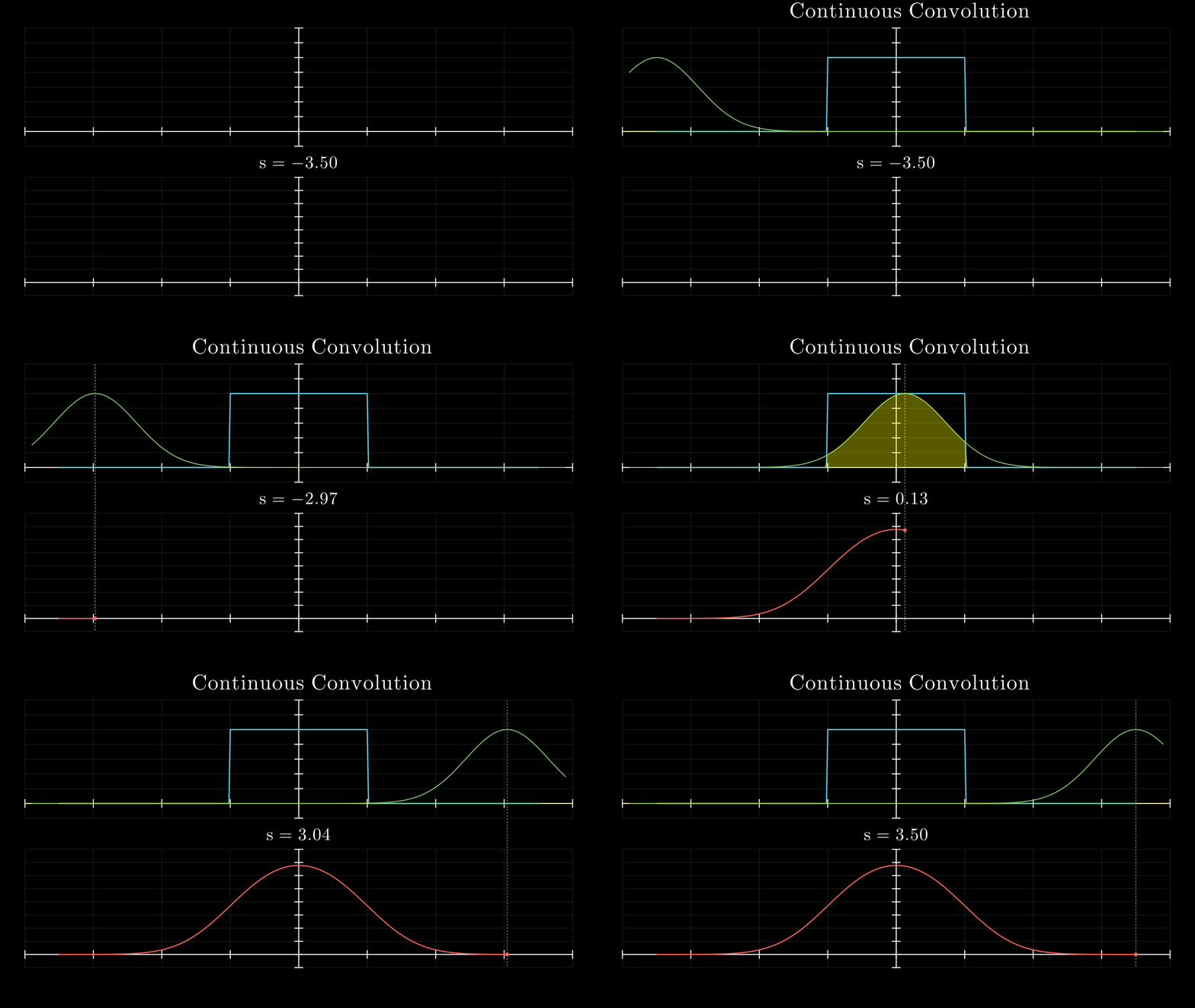
Continuous convolution — a Gaussian kernel slides across a box function, building the convolution result in real time. Generated with ~70 lines of VectorMation code (source).
VectorMation produces compact SVG animations by treating every visual property as a function of time. Instead of rasterising frames, it generates precise vector graphics that can be played back in a browser, exported as SVGs, GIFs, or video.
It provides an alternative to manim, with a pixel coordinate system, explicit timing model, and native SVG export.
Installation
pip install vectormation
System Requirements
Python >=3.10 with the following dependencies (installed automatically):
numpy,svgpathtools,beautifulsoup4,lxml,websockets
Optional dependencies:
| Package | Used for |
|---|---|
cairosvg + Pillow |
PNG / GIF / video export (pip install vectormation[export]) |
ffmpeg (system) |
Video export |
| LaTeX distribution | TexObject / SplitTexObject |
sphinx + furo |
Building documentation |
Quick Start
from vectormation.objects import *

canvas = VectorMathAnim()
canvas.set_background()

point = Dot()
trace = Trace(point.c)
point.c.set(0, 5, lambda t: (t * 80 + 960, 540))
point.c.rotate_around(0, 5, (960, 540), 360 * 4)

canvas.add(trace, point)
canvas.show(end=6)
This opens a browser window showing a spiral being drawn in real time.
Features
- Time-varying attributes -- every property (position, colour, opacity, ...) is a function of time
- Browser-based viewer -- real-time playback with zoom, speed control, sections, and keyboard shortcuts
- Morphing -- smoothly morph any shape into any other, with optional rotation
- LaTeX support -- render LaTeX expressions as animatable SVG objects
- Graph plotting -- axes, function graphs, scatter plots, vector fields, polar plots, and more
- 3D rendering -- 3D axes, surfaces, primitives, and camera rotation with depth-sorted SVG output
- Charts and diagrams -- bar charts, pie charts, flowcharts, tree diagrams, Sankey diagrams, and more
- Physics simulations -- pendulums, springs, cloth, bouncing objects
- Boolean operations -- union, difference, intersection, and exclusion of shapes
- Path animation -- draw objects along paths, animate stroke-dashoffset
- Export -- SVG frames, animated GIFs, PNG, and MP4/WebM video
CLI Arguments
Scripts can use canvas.show() which automatically parses CLI arguments:
from vectormation.objects import *

canvas = VectorMathAnim()
# ... build your animation ...
canvas.show(end=5)
| Flag | Default | Description |
|---|---|---|
-v, --verbose |
off | Enable debug logging |
--port PORT |
8765 | Browser viewer WebSocket port |
--fps FPS |
60 | Frames per second |
-o, --output PATH |
none | Export to file (format from extension: .mp4, .gif, .svg, .png) |
-d, --duration SECS |
none | Animation duration in seconds |
--start SECS |
0 | Start time |
--end SECS |
none | End time |
--hot-reload |
off | Enable hot reload in browser |
Documentation
Full documentation is available at jorisperrenet.github.io/VectorMation.
To build and serve locally:
cd docs && make serve
Examples
The examples/ directory contains 300+ examples organized into:
showcase/-- full demonstrations (spiral, heart, morphing, graphs, physics, 3D, and more)reference/-- concise examples for individual features (shapes, animations, axes, charts, 3D primitives, UI widgets, etc.)advanced/-- complex examples (Fourier circles, double pendulum, Mandelbrot zoom, Galton board, convolutions, etc.)manim/-- recreations of Manim Community examples in VectorMation
Development
To run from a local clone without installing:
git clone https://github.com/jorisperrenet/VectorMation.git
cd VectorMation
pip install -r requirements.txt   # or: pip install numpy svgpathtools beautifulsoup4 lxml websockets
PYTHONPATH=. python examples/showcase/spiral.py
Or install in editable mode:
pip install -e .
python examples/showcase/spiral.py
Architecture
The code to generate the below SVG can be found in examples/showcase/code_explanation.py.
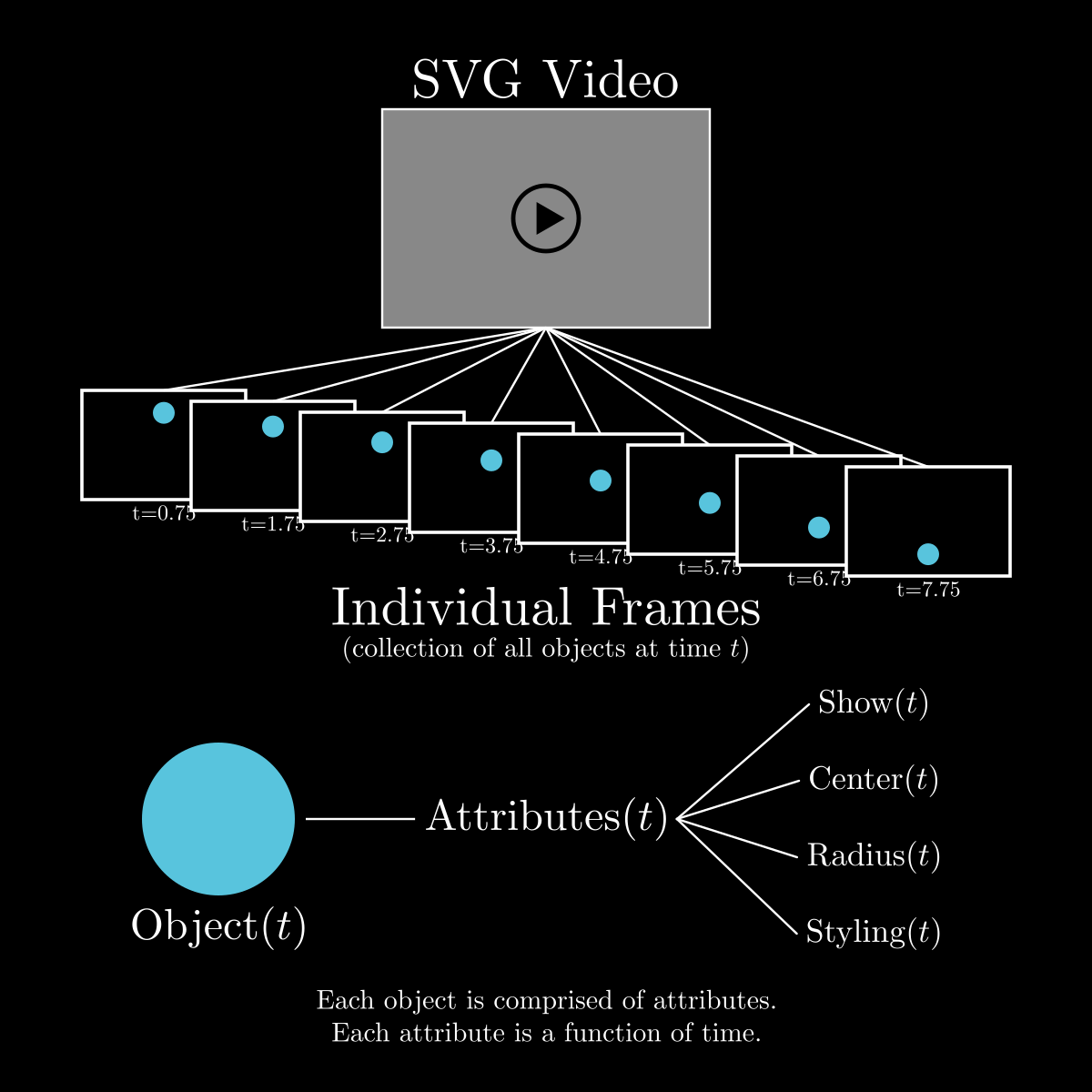
All attributes are functions of time. Evaluating these functions at a certain time gives precise information about every object; combining all objects produces the frame at that time. Repeatedly doing this for different times gives a video, displayed via the browser-based SVG viewer.
Browser Controls
| Key | Action |
|---|---|
| Space / P | Pause / Resume |
| R | Restart |
| , / . | Step backward / forward one frame |
| Left / Right | Previous / next section |
| - / + / Up / Down | Slower / faster (0.25x increments) |
| 0--9 | Jump to 0%--90% |
| Home / End | Jump to start / end |
| F | Reset zoom to fit |
| S | Save current frame as SVG |
| Shift+S | Save current frame as PNG |
| C | Copy SVG to clipboard |
| L | Toggle loop |
| B | Cycle background (dark / white / checker) |
| Ctrl+B | Add / remove bookmark |
| [ / ] | Previous / next bookmark |
| H | Hide / show toolbars |
| G | Toggle grid overlay |
| I | Inspect mode (nearest object) |
| M | Measure tool (click two points) |
| N | Toggle snap-to-point mode |
| D | Debug panel |
| ? | Help overlay |
| Q | Quit |
| Scroll | Zoom at cursor |


Download files
Download the file for your platform. If you're not sure which to choose, learn more about installing packages.
Source Distribution
Built Distribution
Filter files by name, interpreter, ABI, and platform.
If you're not sure about the file name format, learn more about wheel file names.
Copy a direct link to the current filters
File details
Details for the file vectormation-2.2.1.tar.gz.
File metadata
- Download URL: vectormation-2.2.1.tar.gz
- Upload date:
- Size: 374.8 kB
- Tags: Source
- Uploaded using Trusted Publishing? No
- Uploaded via: twine/6.2.0 CPython/3.14.3
File hashes
| Algorithm | Hash digest | |
|---|---|---|
| SHA256 |
404de3723ee20beaa1b81b24f958f476f5419f95139d0225d7349cc70d8b9218
|
|
| MD5 |
fdaff579496f7e618ce830f399498225
|
|
| BLAKE2b-256 |
0154f6b8ad0a6662ee001ea75e37a9dfb5f68690a669d9a0717f24dbdfb1bc5a
|
File details
Details for the file vectormation-2.2.1-py3-none-any.whl.
File metadata
- Download URL: vectormation-2.2.1-py3-none-any.whl
- Upload date:
- Size: 365.2 kB
- Tags: Python 3
- Uploaded using Trusted Publishing? No
- Uploaded via: twine/6.2.0 CPython/3.14.3
File hashes
| Algorithm | Hash digest | |
|---|---|---|
| SHA256 |
063816f5fefcf9d0c3714e850bb7b4e0ba8f969ddd041f9f53d5b649c2cceb0c
|
|
| MD5 |
2a4bae35f52495bdcbaf8b9d3aeda4c6
|
|
| BLAKE2b-256 |
8c664bcd344b4bf9001c65f73f59f2b2f5093167ac1dd2e1f3a15bfd1728ec44
|






