
Detect and fix oversized vector database metadata before upsert.
Verified details
These details have been verified by PyPIProject links
GitHub Statistics
Maintainers

Project description
vectormeta
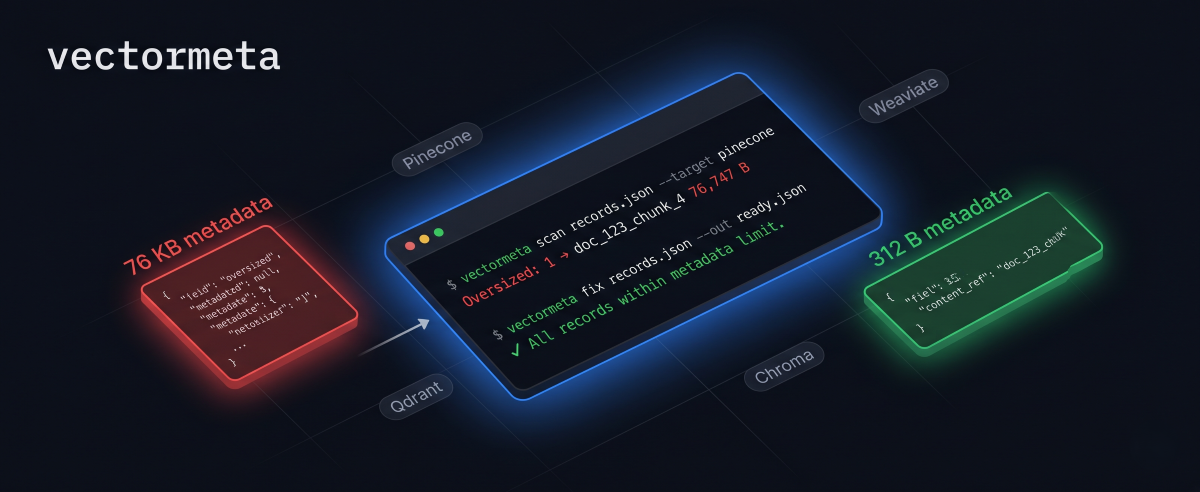
Stop vector DB metadata limit errors before upsert.




Website · Usage · Reduction logic · PyPI
vectormeta is a Python CLI package for detecting, validating, and fixing problematic
metadata in vector database records. It scans JSON or JSONL vector records, reports the
largest metadata fields, validates common upsert-failure cases, and can move heavy
content fields into local JSON sidecar files while leaving clean filterable metadata in
the vector database payload.
The project is designed for developers preparing records for Pinecone, Chroma, Qdrant, Weaviate, or a custom metadata policy. Pinecone is the clearest strict-limit target in the MVP. Other targets use conservative advisory limits that should be adjusted for each deployment.
vectormeta scan records.json --target pinecone
vectormeta validate records.json --target pinecone --dim 1536
vectormeta fix records.json --target pinecone --sidecar ./sidecar --out ready.json
vectormeta hydrate ready.json --sidecar ./sidecar --out hydrated.json
Why This Exists
Vector database metadata should usually stay small and filterable:
sourcepagesectiondoc_idchunk_idtagslanguage
Large payloads such as full chunk text, raw HTML, Markdown, OCR text, summaries, tables,
or full documents can push records over service metadata limits and make upserts fail.
vectormeta catches that problem before upload and can rewrite records into a safer
shape:
vector record metadata -> small filterable fields + content_ref
sidecar JSON file      -> large text, HTML, tables, summaries, payloads
Features
- Scan JSON arrays and newline-delimited JSON records.
- Measure metadata using compact UTF-8 JSON bytes.
- Report oversized records, largest fields, byte counts, KB counts, and suggested moves.
- Exit with code
1when oversized records are found, which makes scans useful in CI. - Validate records for common upsert failures before upload.
- Check Pinecone metadata value shapes, duplicate IDs, missing IDs, vector shape, and vector dimensions.
- Move heavy metadata fields into sidecar JSON files.
- Preserve unknown record fields and original record order.
- Sanitize sidecar filenames derived from record IDs.
- Protect output files and sidecars from accidental overwrite.
- Hydrate records back from sidecar references for debugging and migrations.
- Use
safe_upsert()from Python to validate, fix, persist sidecars, and call an injected vector index client. - Store sidecar payloads in content-addressed local files or SQLite.
- Keep core logic independent from Typer and Rich so it can be tested and reused.
Tech Stack
- Python 3.10+
- Typer for the CLI
- Rich for human-readable terminal reports
- Pydantic for YAML config validation
- PyYAML for config loading
- Pytest for tests
- Ruff for linting and formatting
- Mypy for strict type checks
- Setuptools and
python -m buildfor packaging
Installation
Install from PyPI:
pip install vectormeta
Install with the optional Pinecone SDK:
pip install "vectormeta[pinecone]"
Check the CLI:
vectormeta --help
vectormeta --version
For local development, clone the repository and install the development extras:
git clone https://github.com/Achal13jain/vectormeta.git
cd vectormeta
pip install -e ".[dev]"
Then verify the module entry point as well:
python -m vectormeta --help
Input Format
JSON array:
[
  {
    "id": "doc_1_chunk_1",
    "values": [0.1, 0.2, 0.3],
    "metadata": {
      "source": "paper.pdf",
      "page": 1,
      "chunk_text": "large text..."
    }
  }
]
JSONL:
{"id":"doc_1","values":[0.1],"metadata":{"text":"large text..."}}
{"id":"doc_2","values":[0.2],"metadata":{"text":"large text..."}}
Each record must contain:
idor_idmetadataas a JSON object
Vector fields such as values, vector, or embedding are preserved by scan/fix
workflows. The validate command can check that vectors are finite numeric lists and
that dimensions are consistent.
Quickstart
Scan the included oversized Pinecone example:
vectormeta scan examples/oversized_pinecone_records.json --target pinecone --no-fail
Run a preflight validation pass:
vectormeta validate examples/oversized_pinecone_records.json --target pinecone --no-fail
Fix the records:
vectormeta fix examples/oversized_pinecone_records.json \
  --target pinecone \
  --sidecar examples/sidecar \
  --out examples/pinecone_ready.json \
  --overwrite
Verify the cleaned file now fits the Pinecone-sized policy:
vectormeta scan examples/pinecone_ready.json --target pinecone --no-fail
vectormeta validate examples/pinecone_ready.json --target pinecone --no-fail
Hydrate records for local inspection:
vectormeta hydrate examples/pinecone_ready.json \
  --sidecar examples/sidecar \
  --out examples/hydrated.json \
  --overwrite
Commands
Scan
vectormeta scan chunks.json --target pinecone
Useful options:
--target pinecone|chroma|qdrant|weaviate|custom--limit-kb <number>for custom or overridden limits--top <number>for the largest oversized records to show--format table|json--no-failto exit0even when oversized records are found
Exit codes:
0: all records fit, or--no-failwas passed1: oversized records were found2: expected user-facing input, config, target, or overwrite error
Validate
vectormeta validate chunks.json --target pinecone --dim 1536
validate checks metadata size, ID hygiene, duplicate IDs, vector shape, vector
dimension consistency, and optional dimension matching with --dim.
For Pinecone, it also checks metadata format rules documented by Pinecone: flat metadata
objects, string keys that do not start with $, and values that are strings, finite
numbers, booleans, or lists of strings.
Useful options:
--target pinecone|chroma|qdrant|weaviate|custom--limit-kb <number>for custom or overridden limits--dim <number>for the expected vector dimension--top <number>for validation issues to show--format table|json--no-failto exit0even when error-level issues are found
Exit codes:
0: no error-level validation issues, or--no-failwas passed1: one or more error-level validation issues were found2: expected user-facing input, config, target, or overwrite error
Fix
vectormeta fix chunks.json --target pinecone --sidecar ./sidecar --out pinecone_ready.json
Move explicit fields:
vectormeta fix chunks.json \
  --target pinecone \
  --move-fields chunk_text,raw_html,summary \
  --keep-fields source,page,section,doc_id,chunk_id \
  --content-ref-field content_ref \
  --sidecar ./sidecar \
  --out pinecone_ready.json
Preview without writing:
vectormeta fix chunks.json --target pinecone --sidecar ./sidecar --out ready.json --dry-run
fix does not overwrite files unless --overwrite is passed.
Use content-addressed sidecars from the CLI:
vectormeta fix chunks.json \
  --target pinecone \
  --sidecar-store file \
  --sidecar ./.vectormeta-sidecars \
  --out ready.json
Use a single SQLite sidecar database:
vectormeta fix chunks.json \
  --target pinecone \
  --sidecar-store sqlite \
  --sidecar vectormeta-sidecars.sqlite \
  --out ready.json
If your input metadata already contains content_ref, choose another reference field:
vectormeta fix chunks.json \
  --target pinecone \
  --content-ref-field vectormeta_content_ref \
  --sidecar ./sidecar \
  --out pinecone_ready.json
Hydrate
vectormeta hydrate pinecone_ready.json --sidecar ./sidecar --out hydrated.json
Hydrate from a SQLite sidecar database:
vectormeta hydrate ready.json \
  --sidecar-store sqlite \
  --sidecar vectormeta-sidecars.sqlite \
  --out hydrated.json
Hydrate sidecar content into a separate record field:
vectormeta hydrate pinecone_ready.json \
  --sidecar ./sidecar \
  --mode content_field \
  --content-field payload \
  --out hydrated.json
Limits
vectormeta limits
Current MVP defaults:
| Target | Default | Meaning |
|---|---|---|
pinecone |
40 KB | Primary strict-limit target for this MVP |
chroma |
256 KB | Advisory local/configurable policy |
qdrant |
64 KB | Conservative advisory policy |
weaviate |
64 KB | Conservative advisory policy |
custom |
none | Requires --limit-kb |
Limits and provider behavior can change. Verify official vector database documentation before treating any preset as a production guarantee.
Python API
Use safe_upsert() when you want vectormeta in the ingestion path instead of as a
separate CLI step:
from pathlib import Path

from vectormeta import FileStore, safe_upsert

store = FileStore(Path(".vectormeta-sidecars"))

result = safe_upsert(
    index,
    records,
    target="pinecone",
    sidecar_store=store,
    dim=1536,
    upsert_kwargs={"namespace": "docs"},
)
The result exposes useful ingestion counters:
result.total_records
result.stored_count
result.deduplicated_count
result.warning_count
result.pre_error_count
result.post_error_count
The index object is injected. vectormeta expects an object with a Pinecone-style
method such as:
index.upsert(vectors=cleaned_records, **kwargs)
This keeps vendor SDKs optional and outside the core dependency set.
To hydrate matches returned from your own query path:
from vectormeta import hydrate_results

response = index.query(vector=query_vector, top_k=5)
hydrated = hydrate_results(response["matches"], sidecar_store=store)
For a single-file local backend:
from pathlib import Path

from vectormeta import SQLiteStore

store = SQLiteStore(Path("vectormeta-sidecars.sqlite"))
FileStore and SQLiteStore are content-addressed. Identical moved payloads are stored
once and can be referenced by many records.
Migrate legacy per-record JSON sidecars into a content-addressed store:
from vectormeta import migrate_sidecars_to_store

migration = migrate_sidecars_to_store(
    cleaned_records,
    sidecar_dir=Path("sidecar"),
    input_base_dir=Path("."),
    store=store,
)
How Metadata Reduction Works
vectormeta sizes metadata exactly as compact UTF-8 JSON:
json.dumps(metadata, ensure_ascii=False, separators=(",", ":")).encode("utf-8")
The fixer reduces metadata in this order:
- Move explicit
--move-fields, if provided. - Otherwise move known heavy fields such as
text,chunk_text,raw_html,markdown,summary,tables, andocr_text. - If metadata is still above the limit, move the largest non-keep fields one at a time until the record fits.
- Keep fields such as
source,page,doc_id, andtagsare preserved unless the record cannot fit without moving them. - When fields are moved, metadata receives a
content_ref, and moved fields are written to a sidecar JSON payload.
The logic is covered by tests for Unicode byte sizing, nested metadata sizing, JSON/JSONL input, fixer output, sidecar overwrite protection, hydration, and CLI exit codes. See docs/metadata-reduction.md.
Preflight Validation
vectormeta validate is a linter for vector records before upsert. It reuses the same
compact UTF-8 JSON byte sizing as scan, then adds checks for IDs, duplicate IDs, vector
dimensions, invalid vector values, and Pinecone metadata value types.
For non-Pinecone targets, size presets remain advisory and provider-specific metadata
schema validation is intentionally limited. Use --limit-kb and --dim to match your
deployment policy.
Local Verification
Run the same checks used in CI:
python -m pytest
ruff check .
ruff format --check .
mypy vectormeta
python -m build
Run the acceptance workflow:
vectormeta scan examples/oversized_pinecone_records.json --target pinecone --no-fail
vectormeta validate examples/oversized_pinecone_records.json --target pinecone --no-fail
vectormeta fix examples/oversized_pinecone_records.json --target pinecone --sidecar examples/sidecar --out examples/pinecone_ready.json --overwrite
vectormeta scan examples/pinecone_ready.json --target pinecone --no-fail
vectormeta validate examples/pinecone_ready.json --target pinecone --no-fail
vectormeta hydrate examples/pinecone_ready.json --sidecar examples/sidecar --out examples/hydrated.json --overwrite
Expected result:
- The original example reports one oversized record and one validation error.
- The fixed output reports zero oversized records and zero validation errors.
- Sidecar files are created under
examples/sidecar. - Hydration restores moved fields for inspection.
Documentation
- Project website
- Architecture overview
- Metadata reduction logic
- Usage guide
- Testing checklist
- Vector database notes
Limitations
- The default CLI sidecar mode is local JSON files. Keep cleaned output files and their
sidecar location together unless you opt into
--sidecar-store fileor--sidecar-store sqlite. - Store-backed sidecars deduplicate identical moved payloads, but distributed/cloud stores such as S3 are not included yet.
- Input support is JSON arrays and JSONL records, but files are currently read into memory. Streaming JSONL scan/fix is planned for larger embedding datasets.
- Vector validation covers dense numeric vector lists and dimensions. It does not infer
index configuration unless you provide
--dim. - Provider-specific metadata schema validation is currently strictest for Pinecone.
- Non-Pinecone target limits are conservative advisory defaults, not vendor claims.
- The fixer is policy-based; review cleaned outputs before production ingestion.
Roadmap
Planned ideas include:
- Streaming JSONL scan/fix
- More provider-specific validation rules
- S3 sidecar backend
- LangChain
Documentadapter - LlamaIndex
Nodeadapter - Pinecone upsert wrapper
- GitHub Action for metadata checks
- HTML report output
See ROADMAP.md.
License
MIT. See LICENSE.
Project details
Verified details
These details have been verified by PyPIProject links
GitHub Statistics
Maintainers
Release history Release notifications | RSS feed


Download files
Download the file for your platform. If you're not sure which to choose, learn more about installing packages.
Source Distribution
Built Distribution
Filter files by name, interpreter, ABI, and platform.
If you're not sure about the file name format, learn more about wheel file names.
Copy a direct link to the current filters
File details
Details for the file vectormeta-0.3.0.tar.gz.
File metadata
- Download URL: vectormeta-0.3.0.tar.gz
- Upload date:
- Size: 36.9 kB
- Tags: Source
- Uploaded using Trusted Publishing? Yes
- Uploaded via: twine/6.1.0 CPython/3.13.12
File hashes
| Algorithm | Hash digest | |
|---|---|---|
| SHA256 |
e880f7276caf1fb84631e00009f71114cabf9c51ff592fe332a73e80e8a0db33
|
|
| MD5 |
f615fec0d41fcfafc324845e8c5a0fb6
|
|
| BLAKE2b-256 |
7ce2524176899aabcce52d402a140150f43cf22440ca826aeed2d6bc224ed004
|
Provenance
The following attestation bundles were made for vectormeta-0.3.0.tar.gz:
Publisher:
release.yml on Achal13jain/vectormeta
-
Statement:
-
Statement type:
https://in-toto.io/Statement/v1 -
Predicate type:
https://docs.pypi.org/attestations/publish/v1 -
Subject name:
vectormeta-0.3.0.tar.gz -
Subject digest:
e880f7276caf1fb84631e00009f71114cabf9c51ff592fe332a73e80e8a0db33 - Sigstore transparency entry: 1993126932
- Sigstore integration time:
-
Permalink:
Achal13jain/vectormeta@f8fc54d7cf97aacb8b3cb1e24f1188aa28b0ec8e -
Branch / Tag:
refs/tags/v0.3.0 - Owner: https://github.com/Achal13jain
-
Access:
public
-
Token Issuer:
https://token.actions.githubusercontent.com -
Runner Environment:
github-hosted -
Publication workflow:
release.yml@f8fc54d7cf97aacb8b3cb1e24f1188aa28b0ec8e -
Trigger Event:
push
-
Statement type:
File details
Details for the file vectormeta-0.3.0-py3-none-any.whl.
File metadata
- Download URL: vectormeta-0.3.0-py3-none-any.whl
- Upload date:
- Size: 31.8 kB
- Tags: Python 3
- Uploaded using Trusted Publishing? Yes
- Uploaded via: twine/6.1.0 CPython/3.13.12
File hashes
| Algorithm | Hash digest | |
|---|---|---|
| SHA256 |
884033e0b3258df1ccd19c19703072c784b0182147c1bf5bcb39dd16b9547385
|
|
| MD5 |
a790c48d2f92550edd18543f733fcad6
|
|
| BLAKE2b-256 |
1d4434fe1f35fb52b63b2ccdc57d837e8e907eb3e234224bc91beb3a8e850b2a
|
Provenance
The following attestation bundles were made for vectormeta-0.3.0-py3-none-any.whl:
Publisher:
release.yml on Achal13jain/vectormeta
-
Statement:
-
Statement type:
https://in-toto.io/Statement/v1 -
Predicate type:
https://docs.pypi.org/attestations/publish/v1 -
Subject name:
vectormeta-0.3.0-py3-none-any.whl -
Subject digest:
884033e0b3258df1ccd19c19703072c784b0182147c1bf5bcb39dd16b9547385 - Sigstore transparency entry: 1993127097
- Sigstore integration time:
-
Permalink:
Achal13jain/vectormeta@f8fc54d7cf97aacb8b3cb1e24f1188aa28b0ec8e -
Branch / Tag:
refs/tags/v0.3.0 - Owner: https://github.com/Achal13jain
-
Access:
public
-
Token Issuer:
https://token.actions.githubusercontent.com -
Runner Environment:
github-hosted -
Publication workflow:
release.yml@f8fc54d7cf97aacb8b3cb1e24f1188aa28b0ec8e -
Trigger Event:
push
-
Statement type:






