
Vectra (Python)
Vectra is a production-grade, provider-agnostic Python SDK for building end-to-end Retrieval-Augmented Generation (RAG) systems. It is designed for teams that need correctness, extensibility, async performance, and observability across embeddings, vector databases, retrieval strategies, and LLM providers.



If you find this project useful, consider supporting it:



Table of Contents
- 1. Overview
- 2. Design Goals & Philosophy
- 3. Feature Matrix
- 4. Installation
- 5. Quick Start
- 6. Core Concepts
- 7. Configuration Reference (Usage-Driven)
- 8. Ingestion Pipeline
- 9. Querying & Streaming
- 10. Conversation Memory
- 11. Evaluation & Quality Measurement
- 12. CLI
- 13. Observability & Callbacks
- 14. Telemetry
- 15. Database Schemas & Indexing
- 16. Extending Vectra
- 17. Architecture Overview
- 18. Development & Contribution Guide
- 19. Production Best Practices
1. Overview
Vectra implements a fully modular RAG pipeline:
Load → Chunk → Embed → Store → Retrieve → Rerank → Plan → Ground → Generate → Stream
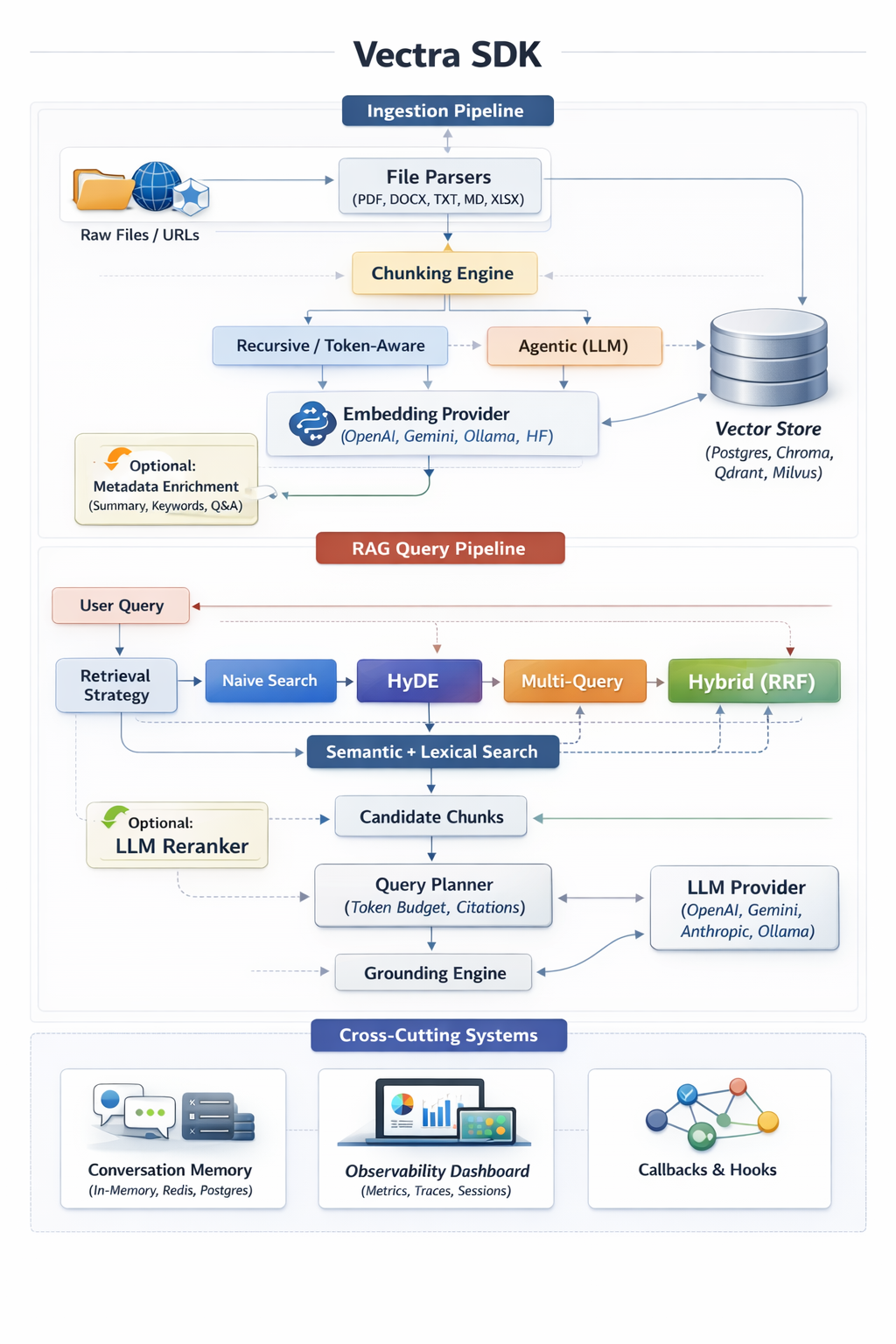
Vectra SDK – End-to-End RAG Architecture
All stages are explicitly configured, async-first, and observable.
Key Characteristics
- Async-first API (
asyncio) - Provider-agnostic embeddings & LLMs
- Multiple vector backends (Postgres, Chroma, Qdrant, Milvus)
- Advanced retrieval (HyDE, Multi-Query, Hybrid RRF, MMR)
- Unified streaming interface
- Built-in evaluation and observability
- CLI + SDK parity
2. Design Goals & Philosophy
Explicitness over Magic
Vectra avoids hidden defaults. Chunking, retrieval, grounding, memory, and generation behavior are always explicit and validated.
Production-First
Index helpers, rate limiting, embedding cache, observability, and evaluation are first-class features.
Provider Neutrality
Switching providers (OpenAI ↔ Gemini ↔ Anthropic ↔ Ollama) requires no application code changes.
Extensibility
All major subsystems are interface-driven and designed to be extended safely.
3. Feature Matrix
Providers
- Embeddings: OpenAI, Gemini, Ollama, HuggingFace
- Generation: OpenAI, Gemini, Anthropic, Ollama, OpenRouter, HuggingFace
- Streaming: Async generators with normalized output
Vector Stores
- PostgreSQL (Prisma + pgvector)
- ChromaDB
- Qdrant
- Milvus
Retrieval Strategies
- Naive cosine similarity
- HyDE (Hypothetical Document Embeddings)
- Multi-Query expansion (RRF)
- Hybrid semantic + lexical (RRF)
- MMR diversification
4. Installation
Library
pip install vectra-py
# or
uv pip install vectra-py
Backends
# Prisma Client Python – https://prisma.brendonovich.dev
pip install prisma-client-py
# ChromaDB – https://docs.trychroma.com
pip install chromadb
# Qdrant Python Client – https://qdrant.tech/documentation
pip install qdrant-client
# Milvus Python SDK – https://milvus.io/docs
pip install pymilvus
CLI
vectra --help
# alternative
python -m vectra.cli --help
Requirements
Vectra depends on:
pydantic, asyncio, prisma-client-py, chromadb, openai, google-generativeai, anthropic, pypdf, mammoth, openpyxl
5. Quick Start
import asyncpg
from vectra import VectraClient, VectraConfig, ProviderType

pool = await asyncpg.create_pool(os.getenv('DATABASE_URL'))

config = VectraConfig(
    embedding={
        'provider': ProviderType.OPENAI,
        'api_key': os.getenv('OPENAI_API_KEY'),
        'model_name': 'text-embedding-3-small'
    },
    llm={
        'provider': ProviderType.GEMINI,
        'api_key': os.getenv('GOOGLE_API_KEY'),
        'model_name': 'gemini-2.5-flash'
    },
    database={
        'type': 'postgres',
        'client_instance': pool,
        'table_name': 'document',
        'column_map': { 'content': 'content', 'metadata': 'metadata', 'vector': 'vector' }
    }
)

client = VectraClient(config)
await client.ingest_documents('./docs')
result = await client.query_rag('What is the vacation policy?')
print(result['answer'])
6. Core Concepts
Providers
Providers implement embeddings, generation, or both. Vectra normalizes responses and streaming across providers.
Vector Stores
Vector stores persist embeddings and metadata. Backends are swappable via configuration.
Chunking
- Recursive: Token-aware, separator-aware splitting
- Agentic: LLM-driven semantic propositions
Retrieval
Configurable strategies to balance recall, precision, and latency.
Reranking
Optional LLM-based reordering of candidate chunks.
Metadata Enrichment
Optional per-chunk summaries, keywords, and hypothetical questions generated during ingestion.
Query Planning & Grounding
Controls context assembly and factual grounding constraints.
Conversation Memory
Persist multi-turn chat history across sessions.
7. Configuration Reference (Usage-Driven)
All configuration is validated using Pydantic at runtime.
Embedding
embedding={
  'provider': ProviderType.OPENAI,
  'api_key': os.getenv('OPENAI_API_KEY'),
  'model_name': 'text-embedding-3-small',
  'dimensions': 1536
}
Use dimensions when using pgvector to avoid runtime mismatches.
LLM
llm={
  'provider': ProviderType.GEMINI,
  'api_key': os.getenv('GOOGLE_API_KEY'),
  'model_name': 'gemini-2.5-flash',
  'temperature': 0.3,
  'max_tokens': 1024
}
Used for generation
Database
Supports Prisma, Chroma, Qdrant, Milvus.
# PostgreSQL (native asyncpg)
database={
  'type': 'postgres',
  'client_instance': pg_pool,  # asyncpg.Pool or Connection
  'table_name': 'document',
  'column_map': { 'content': 'content', 'metadata': 'metadata', 'vector': 'vector' }
}
# Prisma (Postgres via prisma-client-py)
database={
  'type': 'prisma',
  'client_instance': prisma,
  'table_name': 'Document',
  'column_map': { 'content': 'content', 'metadata': 'metadata', 'vector': 'embedding' }
}
# ChromaDB
database={
  'type': 'chroma',
  'client_instance': chroma_client,  # chromadb.Client or PersistentClient
  'table_name': 'rag_collection',
  'column_map': { 'content': 'content', 'metadata': 'metadata', 'vector': 'embedding' }
}
# Qdrant
database={
  'type': 'qdrant',
  'client_instance': qdrant_client,  # qdrant_client.QdrantClient
  'table_name': 'rag_collection',
  'column_map': { 'content': 'content', 'metadata': 'metadata', 'vector': 'embedding' }
}
# Milvus
database={
  'type': 'milvus',
  'client_instance': milvus_client,  # pymilvus client
  'table_name': 'rag_collection',
  'column_map': { 'content': 'content', 'metadata': 'metadata', 'vector': 'embedding' }
}
Chunking
chunking={
  'strategy': ChunkingStrategy.RECURSIVE,
  'chunk_size': 1000,
  'chunk_overlap': 200
}
Agentic:
chunking={
  'strategy': ChunkingStrategy.AGENTIC,
  'agentic_llm': {
    'provider': ProviderType.OPENAI,
    'api_key': os.getenv('OPENAI_API_KEY'),
    'model_name': 'gpt-4o-mini'
  }
}
Retrieval
retrieval={ 'strategy': RetrievalStrategy.HYBRID }
Hybrid is recommended for production workloads.
Reranking
reranking={
  'enabled': True,
  'window_size': 20,
  'top_n': 5
}
Memory
memory={ 'enabled': True, 'type': 'in-memory', 'max_messages': 20 }
Redis and Postgres are supported.
# Redis
memory={
  'enabled': True,
  'type': 'redis',
  'max_messages': 20,
  'redis': {
    'client_instance': redis_client,
    'key_prefix': 'vectra:chat:'
  }
}
# Postgres
memory={
  'enabled': True,
  'type': 'postgres',
  'max_messages': 20,
  'postgres': {
    'client_instance': pg_pool,  # asyncpg.Pool or Connection
    'table_name': 'ChatMessage',
    'column_map': {
      'sessionId': 'sessionId',
      'role': 'role',
      'content': 'content',
      'createdAt': 'createdAt'
    }
  }
}
Observability
observability={
  'enabled': True,
  'sqlite_path': 'vectra-observability.db'
}
8. Ingestion Pipeline
await client.ingest_documents('./documents')
- Files or directories supported
- Recursive traversal
- Embedding cache via SHA256
- Optional rate limiting
Supported formats: PDF, DOCX, XLSX, TXT, Markdown
9. Querying & Streaming
Standard:
res = await client.query_rag('Refund policy?')
Streaming:
stream = await client.query_rag('Draft email', stream=True)
async for chunk in stream:
    print(chunk.get('delta', ''), end='')
10. Conversation Memory
Pass a session_id to preserve multi-turn context.
11. Evaluation & Quality Measurement
await client.evaluate([
  { 'question': 'Capital of France?', 'expected_ground_truth': 'Paris' }
])
Metrics: Faithfulness, Relevance
12. CLI
Ingest & Query
vectra ingest ./docs --config=./config.json
vectra query "What are the payment terms?" --config=./config.json --stream
WebConfig (Config Generator UI)
vectra webconfig
Launches a local web UI to interactively generate and validate vectra.config.json.
Observability Dashboard
vectra dashboard
Launches a local dashboard for metrics, traces, and session analysis.
13. Observability & Callbacks
Tracks metrics, traces, and chat sessions when enabled.
Callbacks allow hooking into ingestion, retrieval, reranking, and generation stages.
14. Telemetry
Vectra collects anonymous usage data to help us improve the SDK, prioritize features, and detect broken versions.
What we track
- Identity: A random UUID (
distinct_id) stored locally in~/.vectra/telemetry.json. No PII, emails, IPs, or hostnames. - Events:
sdk_initialized: Config shape (providers used), OS/Runtime version, session type (api/cli/chat).ingest_started/completed: Source type, chunking strategy, duration bucket, chunk count bucket.query_executed: Retrieval strategy, query mode (rag), result count, latency bucket.feature_used: WebConfig/Dashboard usage.evaluation_run: Dataset size bucket.error_occurred: Error type and stage (no stack traces).cli_command_used: Command name and flags.
Why we track it
- Detect broken versions: Spikes in
error_occurredhelp us find bugs. - Measure adoption: Helps us understand which providers (OpenAI vs Gemini) and vector stores are most popular.
- Drop support safely: We can see if anyone is still using Python 3.8 before dropping it.
How to opt-out
Telemetry is enabled by default. To disable it:
Option 1: Config
client = VectraClient(
    VectraConfig(
        # ...
        telemetry={'enabled': False}
    )
)
Option 2: Environment Variable
Set VECTRA_TELEMETRY_DISABLED=1 or DO_NOT_TRACK=1.
15. Database Schemas & Indexing
model Document {
  id        String   @id @default(uuid())
  content   String
  metadata  Json
  embedding Unsupported("vector")?
  createdAt DateTime @default(now())
}
16. Extending Vectra
Implement custom vector stores by extending VectorStore.
17. Architecture Overview
Vectra follows a modular, provider-agnostic RAG architecture with clear separation of ingestion, retrieval, and generation pipelines.
18. Development & Contribution Guide
- Python 3.8+
- Async-first (
asyncio) - Pydantic-based configuration
19. Production Best Practices
- Match embedding dimensions to pgvector
- Prefer Hybrid retrieval
- Enable observability in staging
- Evaluate before changing chunk sizes
Vectra (Python) scales cleanly from local prototypes to production-grade RAG platforms.
1 maintainer

Metadata
1 maintainer
Release files for vectra-rag-py 1.0.0
For a detailed explanation of source distributions (sdists) and built distributions (wheels), please see the package formats documentation.
Source distribution (sdist)
| File | Size | Uploaded | |
|---|---|---|---|
| vectra_rag_py-1.0.0.tar.gz | 59.8 kB | Details |
Built distribution (wheel)
| File | Interpreter | ABI | Platform | Reset |
|---|---|---|---|---|
| vectra_rag_py-1.0.0-py3-none-any.whl | Python 3 | none | any | Details |
Total release size: 125.0 kB
Release files / vectra_rag_py-1.0.0.tar.gz
| Download URL | vectra_rag_py-1.0.0.tar.gz |
|---|---|
| Size | 59.8 kB |
| Tags | Source |
|
SHA-256 checksum How to use checksums |
2f78e3b0eac73e4c1cae34f3172e994c36ba732d52d270150309f8773f79057a
|
|
BLAKE2b-256 checksum How to use checksums |
41be2da9bae0417cdfd9fde821acbc8a53705d5931122ca305fd27d130761edd
|
| Upload date | |
|
Uploaded using Trusted Publishing? What is trusted publishing? |
Yes |
| Uploaded via |
twine/6.1.0 CPython/3.13.7
|
Provenance
Provenance describes where a file came from. On PyPI, provenance is shared via attestations, which provide a verifiable record of the build or publishing details. View details, limitations and caveats.


PyPI Publish Attestation
PyPI verified that this artifact, at this checksum, originated from the publisher listed below.
Signed by GitHub Actions, verified by PyPI on Apr 1, 2026.
Transparency logRelease files / vectra_rag_py-1.0.0-py3-none-any.whl
| Download URL | vectra_rag_py-1.0.0-py3-none-any.whl |
|---|---|
| Size | 65.2 kB |
| Tags | Python 3 |
|
SHA-256 checksum How to use checksums |
072e845ffd614dddda0ccd0671485f2e46869dc89b4c3f634257ee9ab966f20f
|
|
BLAKE2b-256 checksum How to use checksums |
d1a4087c31fe4ff9dac60f8b46ebd6b363c2f712f0762f1967e52b96b46be7ff
|
| Upload date | |
|
Uploaded using Trusted Publishing? What is trusted publishing? |
Yes |
| Uploaded via |
twine/6.1.0 CPython/3.13.7
|
Provenance
Provenance describes where a file came from. On PyPI, provenance is shared via attestations, which provide a verifiable record of the build or publishing details. View details, limitations and caveats.
PyPI Publish Attestation
PyPI verified that this artifact, at this checksum, originated from the publisher listed below.
Signed by GitHub Actions, verified by PyPI on Apr 1, 2026.
Transparency log













