
VectrixDB
The vector database that works with no network and no accounts.
Embedded ONNX models, GraphRAG, and eight storage backends. Nothing to sign up for, no API key, no service to run.


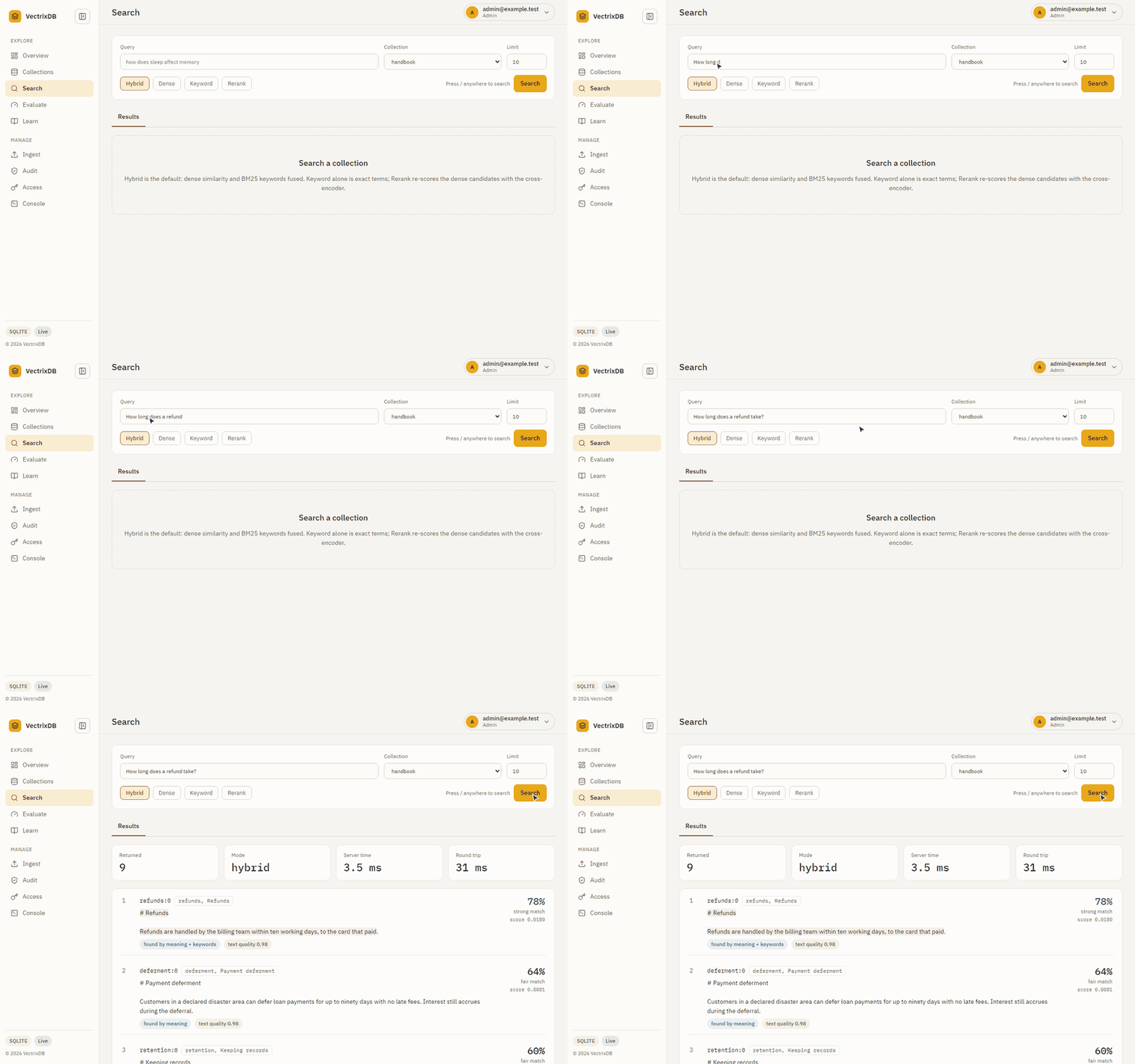
A question goes in, and every result says how well it matched and what found it: meaning, keywords, or both.
Install
pip install vectrixdb
Five dependencies. That is the whole library: vector search, with the embedding model inside the package. No web server, no cloud SDKs, no account.
Quick start
from vectrixdb import Vectrix

db = Vectrix("my_docs")
db.add(["Python is great", "JavaScript powers the web", "Rust is fast"])

results = db.search("programming")
print(results.top.text)
There is no configuration step. The embedding model ships with the package, so the first search works offline on a machine that has never seen an API key.
It persists under ./vectrixdb_data unless told otherwise; give a path to
choose where:
db = Vectrix("my_docs", path="./data")
The default backend is SQLite in WAL mode, so committed writes survive an abrupt shutdown and several threads can read and write at once.
The server and its dashboard
pip install "vectrixdb[api]" and vectrixdb serve give the same collections
a REST API and a dashboard: health and text, search with a relevance on every
result, the evaluation runs that pick a setup, and with vectrixdb[signin]
people who sign in as themselves, roles, masking, and a record of who read
what. Use the dashboard walks every page.
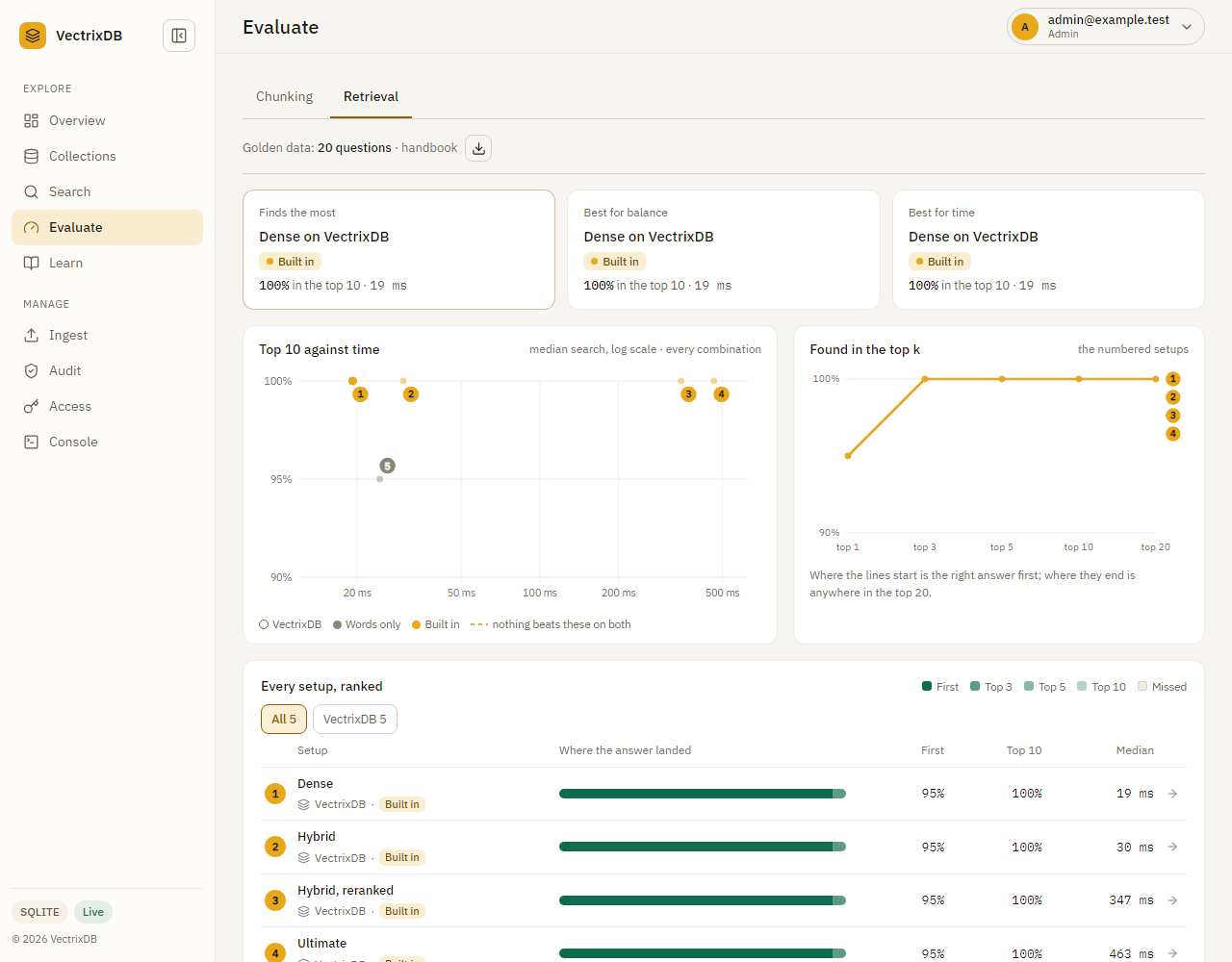
The run in this picture is sample data, drawn to show the page, not a measurement. vectrixdb evaluate on your own questions gives real numbers.
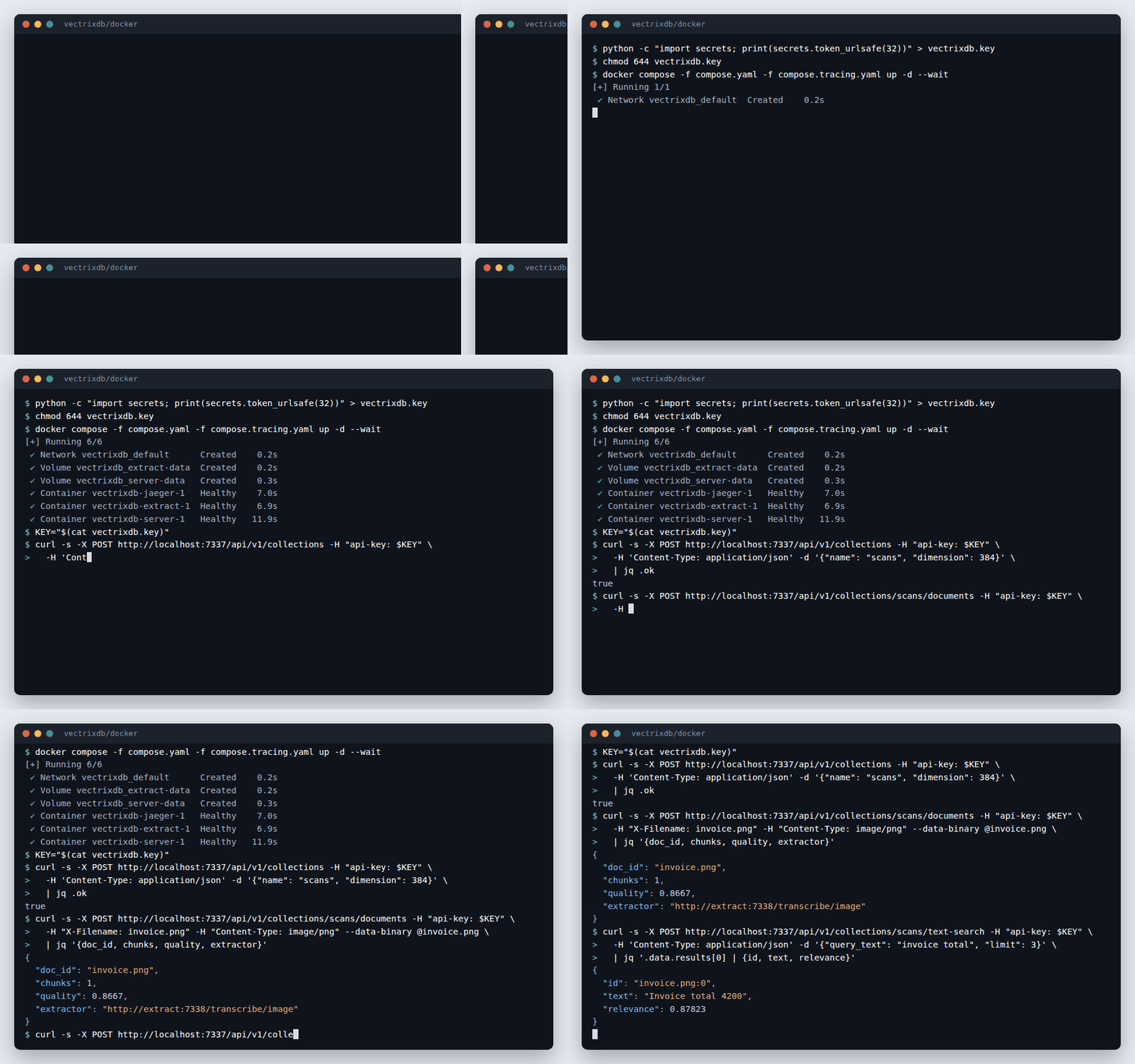
Run it in containers
Each release publishes signed images of the server and the extraction service,
for Intel and ARM. docker/compose.yaml runs the two on one machine, with
Jaeger beside them to see each search and upload as a trace, and
docker/kubernetes runs them on a cluster.
Run it in containers has the steps, and how to
check a signature before anything runs.
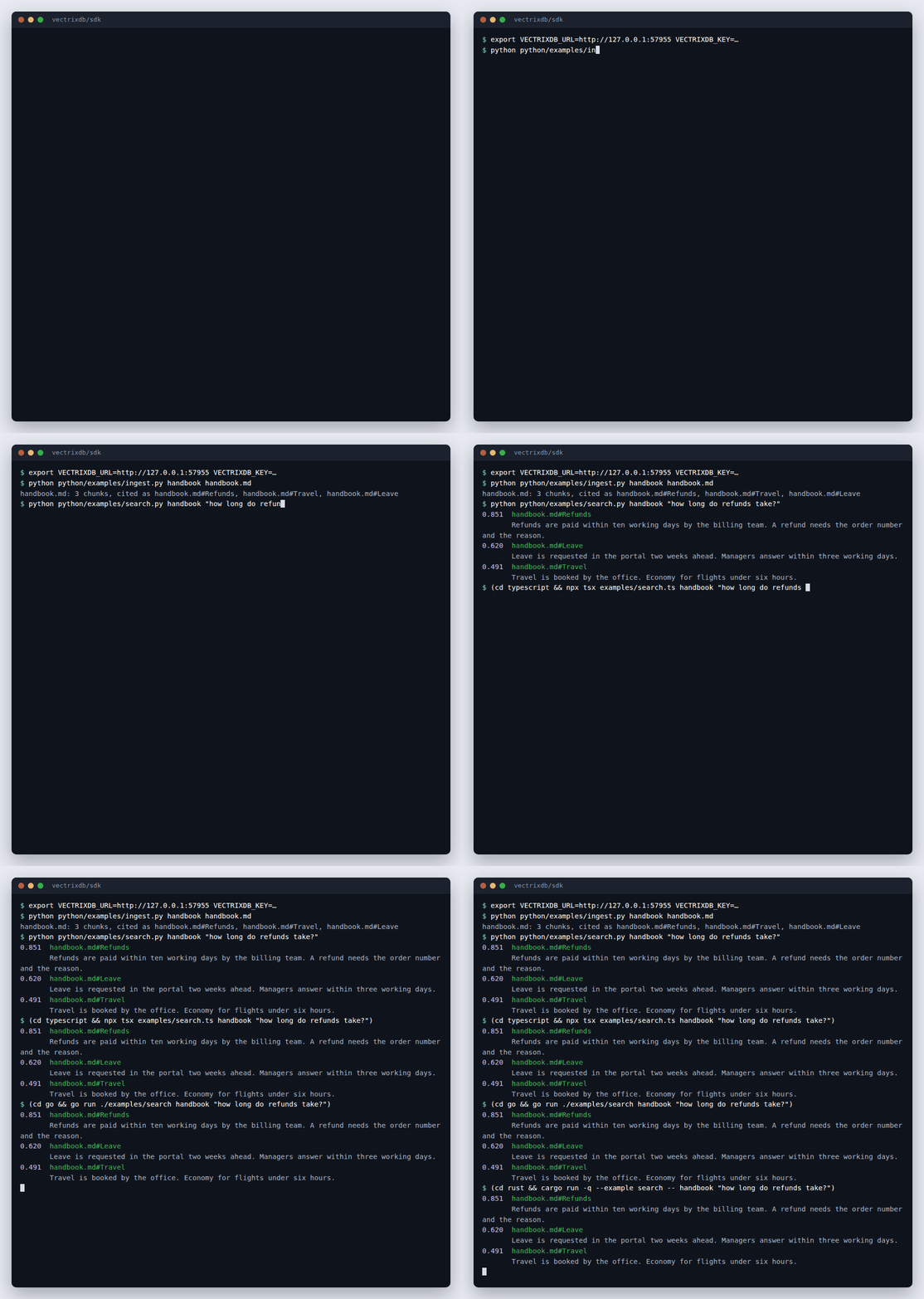
From the command line, four languages, or an assistant
The same server answers the vectrixdb command, clients in Python,
TypeScript, Go and Rust, and an assistant over MCP. Every client keeps the same
safety rules: no key over plain HTTP, no redirects, certificates always checked.
| Install | Guide | |
|---|---|---|
| Command line | pip install "vectrixdb[client]" |
Use the command line on a server |
| Python | pip install "vectrixdb[client]" |
Use it from Python, TypeScript, Go or Rust |
| TypeScript | npm install vectrixdb |
npm |
| Go | go get github.com/knowusuboaky/VectrixDB/sdk/go/v2 |
pkg.go.dev |
| Rust | cargo add vectrixdb |
crates.io |
| MCP | pip install "vectrixdb[mcp]" |
Use your collections from an assistant over MCP |
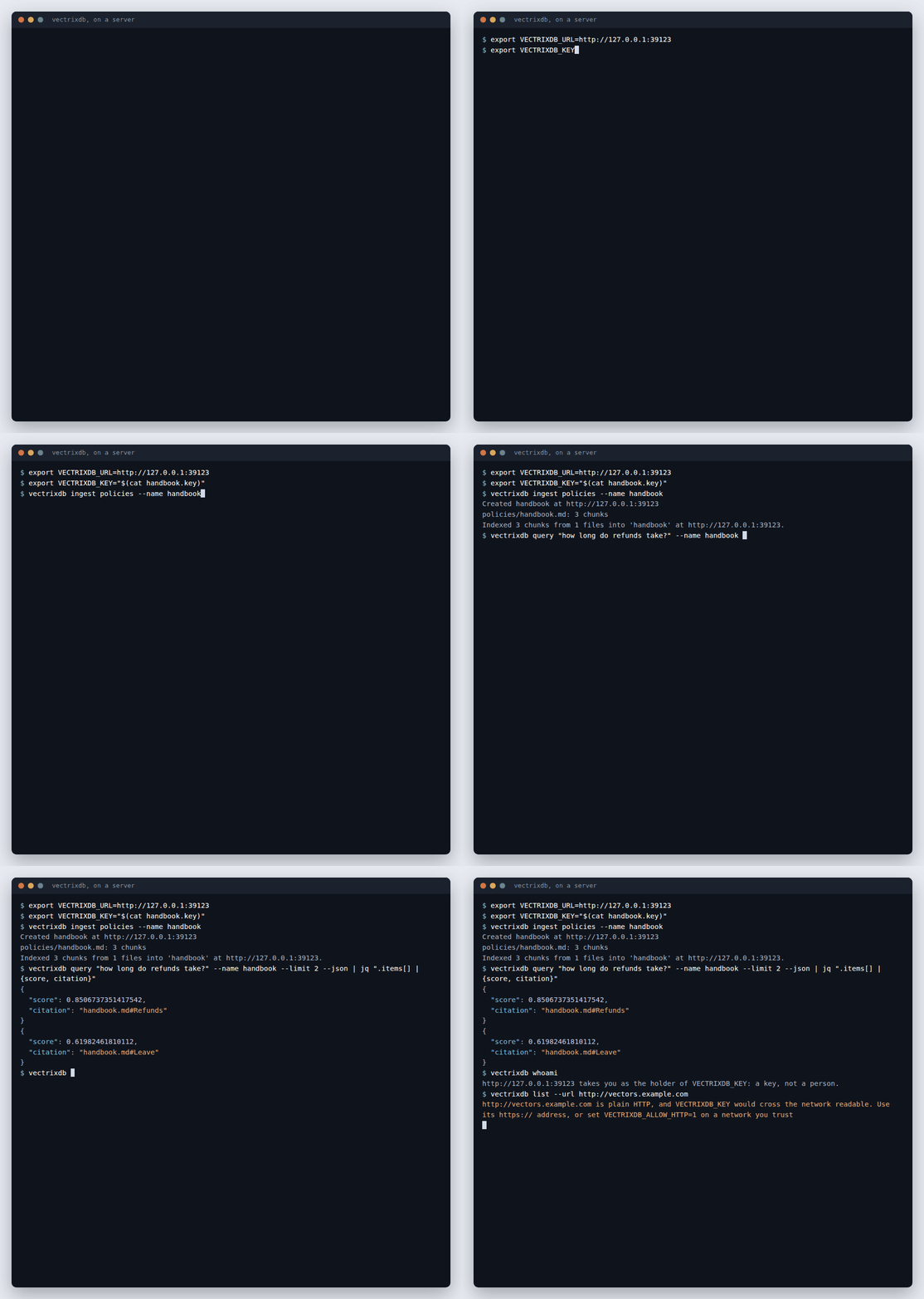
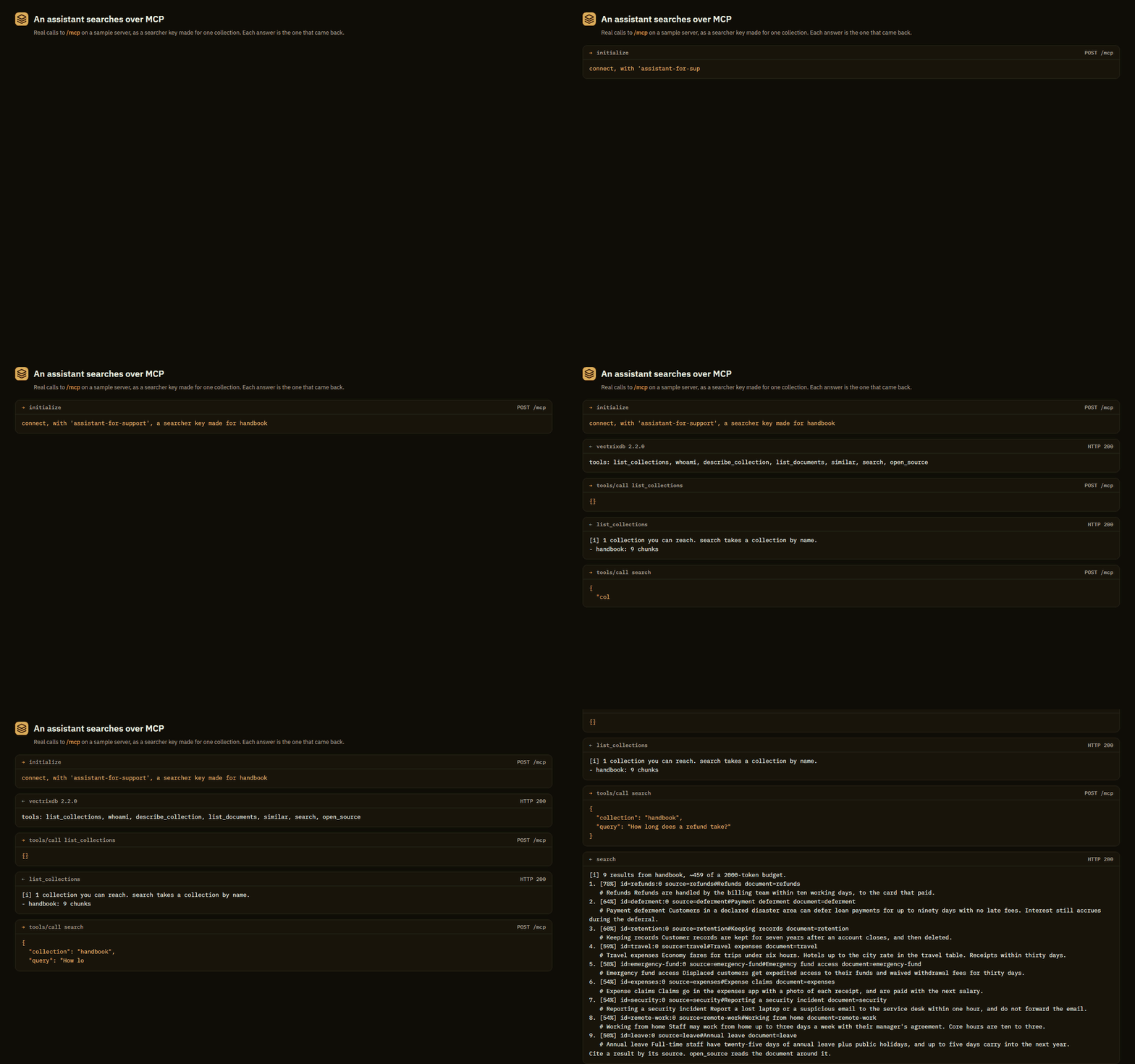
A company can ship its own command or client on these (Ship your own client or command) and serve all of it from its own registry (Run it inside your company's registry).
Documentation
Grouped by what you came for: learning it, doing one thing, looking something up, or understanding why it works that way. They render at knowusuboaky.github.io/VectrixDB. Their examples are executed by the test suite, apart from the few that need an optional package or a cloud account, so the code on them cannot quietly rot.
Tutorial
- Getting started, from an empty directory to a working search in one sitting
- Add it with your coding agent, a prompt to paste into any coding agent, and llms.txt, the docs index agents read
Start
- Install what you need, which extra adds what
- Run without a network
- Tips and tricks, the things that are easy to miss
- Handle errors
Ingest
- Ingest documents
- Chunking, the strategies, parent sections and rechunking
- Extraction quality and blocked pages
- Videos, podcasts and recordings, cited by the second
- Embedding models, which ship in the wheel and which download
- Extract, keep, index
- Ingest when a file lands
- Keep a collection in step with feeds and pages
- Run an extraction service
Search and evaluate
- Search options, every argument and what a result carries
- Trace an answer to its source
- Work with the knowledge graph
- Measure retrieval
- Evaluate every setup
Assistants and agents
- Use it from an assistant over MCP
- Connect your client, VS Code, Cursor, a desktop assistant, a command line
- Company sign-in for MCP
- Keys for a team
- Tools reference, every tool, prompt and resource
- On your own machine, the one-person server
- Keep conversation memory
Secure
- Sign people in
- Keys and roles, scoped and expiring keys
- Collection policies
- Restrict what a search can see
- Masking, names and ids replaced before indexing
- Audit trail
Run in production
- Run the REST API
- Deploy the server
- Run it in containers, signed images for one machine or Kubernetes
- Put it behind a gateway, APIM, API Gateway or any proxy
- Size the server for load
- Scale out
- Check and doctor
- Trace searches and ingestion, opt-in OpenTelemetry spans that never carry query or document text
- Choose a storage backend
- Back up, move and restore
- Put your company's name on it
- Use the dashboard, every page, with pictures
Build on it
- Use it from Python, TypeScript, Go or Rust, the four clients and their one set of calls
- Use the command line on a server, with a key file or your company sign-in
- Ship your own client or command on it, a company's wrapper with its settings filled in, published in its own registry
- Run it inside your company's registry, packages, images and models through JFrog Artifactory, and the company's own tool as the way in
- Use it from async code
- Build an app on it, in any language, on somebody else's server
- LangChain, LlamaIndex, plugins, CLI
Reference
- Easy API, the
Vectrixsurface - Python client,
connect()and the server's calls - Async
- Sources, Ingest, Extract, Chunk models, Extraction quality
- Evaluation, Policy, Masking, Conversation memory, Tracing
- Exceptions, the full hierarchy
- Filters, every operator and what it does to absent fields, nulls and lists
- Command line, every command and option
- Settings, every environment variable the server reads
- REST API, every route and who may call it
- Errors, every refusal a route can send and every exception the library raises, read off the code
- OpenAPI document, the same route table for a gateway to import
Explanation
- Why VectrixDB
- What it does not do, the limits in one place
- Benchmarks
- Search modes
- Score and relevance
- HNSW and its limits
- Threads and processes
- Memory per vector
- Writing past RAM
Errors
Everything VectrixDB raises derives from VectrixError, so one except covers
the library:
from vectrixdb import VectrixError

try:
    results = db.search("programming")
except VectrixError as exc:
    log.warning("search unavailable: %s", exc)
A document that does not exist comes back as an empty result, not an
exception: get() takes one id or many and always returns a list, so a miss
is []. A backend you cannot reach raises. Those stay distinguishable, so an
empty result always means "nothing matched" rather than "something broke".
See Handle errors for the full hierarchy.
The dashboard is optional
What is on it
Nine pages, one server, no build step. Every number on them is read from the running database and the page says so when it cannot read one. Each page is shown with pictures in Use the dashboard.
- Overview. Collections, vectors, size on disk and search latency, and a needs attention list: a collection past 20% deleted vectors, a collection whose model is not on this machine. On a fresh server it is a first-run page with a working demo loader.
- Collections. Cards with a state pill, mode, language, model, tags and the current build id, filterable by state and mode. A collection opens with tabs: Overview, Points, Policy, Builds, Quality and Settings. A collection that carries an entitlement policy shows its rules and fingerprint and nothing that moves with its contents, because this API resolves no principals; each tab says so and shows the Python that does.
- Search. Hybrid by default, then dense, keyword and rerank, with the server time and round trip, per-result score parts where the mode reports them, and a graph tab for collections with entities. The previous page offered Rerank and Late interaction modes that the server ignored, so both ran plain dense search; Rerank is real now and Late interaction is gone until there is a text route for it.
- Evaluate. Golden questions run against every setup, ranked by how often the right answer is in the top ten and how long it took.
- Ingest. Files or pasted text into a collection as chunks, or into the
document index, with metadata on every chunk. A plain splitter, on purpose:
loaders, the four chunkers, parent sections, deduplication, the quality score
and the metadata contract live in
add_document(). - Audit. The decision and ingestion records from a JSONL sink: with
sign-in, to an admin; without it, only with
VECTRIXDB_API_KEY; and never with the principal snapshot, the result ids or the undisclosable count. - Access. For admins: the people and their roles, the keys and when each was last used, sign-ins against refusals.
- Console. A request builder with presets that shows the curl for what it sent.
- Learn. The tutorials and the copy-paste guide.
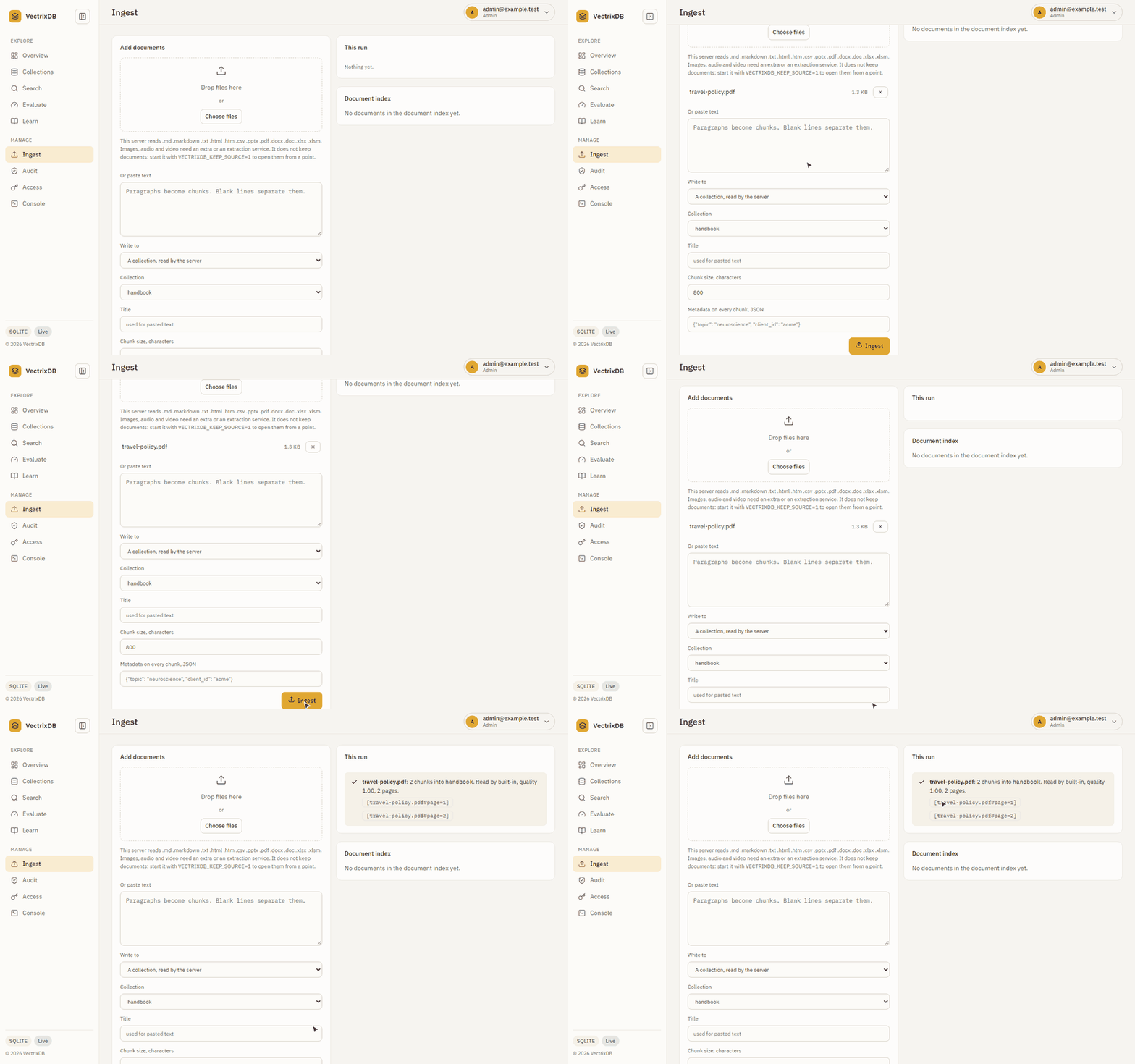
A PDF goes in, the server reads it, and says what it found: two pages, two chunks, and the citation each one carries.
The badge in the sidebar reports what the server reports: Open, no key set on a local server, Read only or Authenticated on one with a key. The previous page said Read Only on every server and refused to load the demo without a key the server did not have.
Install what you need
The core install stays small on purpose. Everything past vector search is an extra, so you never pay for a subsystem you do not use.
pip install vectrixdb              # the library, five dependencies

pip install vectrixdb[api]         # REST API server and dashboard
pip install vectrixdb[aws]         # OpenSearch, Aurora PostgreSQL
pip install vectrixdb[azure]       # Cosmos DB
pip install vectrixdb[databricks]  # Lakebase, Delta Lake
pip install vectrixdb[postgres]    # PostgreSQL
pip install vectrixdb[hf]          # HuggingFace sentence-transformers
pip install vectrixdb[fastembed]   # FastEmbed
pip install vectrixdb[viz]         # UMAP visualisation
pip install vectrixdb[mcp]         # MCP server for agent memory
pip install vectrixdb[nlp]         # spaCy, for better GraphRAG extraction

pip install vectrixdb[all]         # every backend and model extra above,
                                   # mcp included; not nlp, which is separate
From source, or a specific version:
pip install git+https://github.com/knowusuboaky/VectrixDB.git
pip install git+https://github.com/knowusuboaky/VectrixDB.git@v2.2.0
uv works everywhere pip does here, including the
extras: uv add vectrixdb, or uv pip install "vectrixdb[api]". The package
is a standard PEP 517 build with no pip-specific steps, so nothing about the
install path is special.
Benchmarks
Same vectors, same machine, one thread, each library at its defaults. Reproduce with python scripts/benchmark_compare.py --size 10000 --queries 200; the benchmarks page has the chart, the BEIR retrieval-quality numbers and the caveats in full.
| Engine | ingest 10,000 | recall@10 | p50 | p95 | QPS |
|---|---|---|---|---|---|
| VectrixDB | 1.7 s | 0.998 | 0.88 ms | 1.16 ms | 1,091 |
| Chroma | 2.2 s | 1.000 | 1.90 ms | 2.34 ms | 510 |
| LanceDB | 4.0 s | 0.802 | 7.24 ms | 8.83 ms | 135 |
| Qdrant (local mode) | 32.6 s | 1.000 | 16.87 ms | 21.36 ms | 57 |
Measured on 19 September 2026 on an Intel x86-64 CPU with 8 threads, Windows 11, Python 3.13. Milliseconds are the machine's; the order and the gaps are what carry over.
Two things the table hides. Qdrant's local mode is exhaustive search, not the server's HNSW, so its recall is 1.0 by construction; and LanceDB's default index is IVF_PQ, which trades recall for memory and can be tuned up. Embedding dominates real ingest for every engine and is not in this table.
How it compares, honestly
| VectrixDB | Chroma | LanceDB | Qdrant | |
|---|---|---|---|---|
| Embedding model in the package, offline | yes | no, downloads on first use | no | no |
| Hybrid search with BM25 | yes | Chroma Cloud only | yes, its own full-text index | yes, sparse vectors fused by RRF; the BM25 model is a download |
| Cross-encoder reranker bundled | yes | no | no | no |
| Late interaction (ColBERT) | yes, model in the package | no | yes, multivector columns; bring the model | yes, multivectors with MaxSim; bring the model |
| Knowledge graph and GraphRAG | yes | no | no | no |
| Conversation memory with token budgets | yes | no | no | no |
| Metadata filters | yes | yes | yes | yes |
| Columnar storage, Arrow, versioned tables | no | no | yes | no |
| Runs as a server for many clients | one team, one process: sign-in, roles, an access log | yes | cloud | yes |
| Sharding and replication | no | no | cloud | yes |
| GPU embedding | bundled models run on the CPU; via your own model | via your own model | via your own model | via your own model |
| Billions of vectors | no | no | yes, on disk | yes, clustered |
Checked against chromadb 1.5.9, lancedb 0.38.0 and qdrant-client 1.19.0, each embedded in a Python process as the benchmark runs them: Chroma refuses a sparse index outside its cloud, and LanceDB and Qdrant's local mode both search multivectors. VectrixDB is the one to pick when the search has to live inside a Python process and work with nothing else running. It is the wrong pick for a fleet of machines, a GPU embedding pipeline, or a corpus that does not fit one box.
What is in the box
| Search modes | Dense, hybrid, ultimate (reranked), graph (GraphRAG) |
| Storage | Memory, SQLite, Lakebase, Delta Lake, Cosmos DB, Azure AI Search, OpenSearch, Aurora PostgreSQL |
| Models | Bundled ONNX for offline use, or bring your own from HuggingFace |
| Memory | Conversation turns, pinned facts, recency and feedback weighting |
| Extras | Document index with chunking, REST API, dashboard, CLI, MCP server |
| Typing | Ships py.typed, so your type checker sees the annotations |
Search Modes
VectrixDB offers 4 search modes, each building on the previous:
| Mode | Components | Best For |
|---|---|---|
dense |
Vector similarity | Fast semantic search |
hybrid |
Dense + Sparse + Reranker | Keyword + semantic matching |
ultimate |
Hybrid + ColBERT | Maximum accuracy |
graph |
Ultimate + Knowledge Graph | Complex reasoning (GraphRAG) |
# Choose your mode
db = Vectrix("docs", mode="dense")     # Fastest
db = Vectrix("docs", mode="hybrid")    # Balanced
db = Vectrix("docs", mode="ultimate")  # Best quality
db = Vectrix("docs", mode="graph")     # GraphRAG
Model Selection
Customize models for each component. Models load from 3 sources:
1. Bundled Models (Offline, No Downloads)
Pre-packaged ONNX models that work without internet. Three of them, 33 MiB each, plus the BM25 vocabulary: about 100 MiB unpacked. They compress to most of a 68.6 MiB wheel, against PyPI's 100 MiB limit, measured by python scripts/check_wheel_size.py. Sizes here are mebibytes, the same unit PyPI measures that limit in; a file manager counting in megabytes shows the wheel as 72 MB.
db = Vectrix(
    "docs",
    mode="ultimate",
    dense_model="bge-small",           # 384 dim, 33MB, the default
    sparse_model="bm25",               # 1MB
    reranker_model="L12",              # 33MB
    late_interaction_model="colbert",  # 33MB
)
| Component | Alias | Model | Dimension | Size |
|---|---|---|---|---|
| Dense | bge-small (default) |
BAAI/bge-small-en-v1.5 | 384 | 33MB |
| Sparse | bm25 |
BM25 vocabulary | - | 1MB |
| Reranker | L12 |
ms-marco-MiniLM-L-12-v2 | - | 33MB |
| ColBERT | colbert |
answerai-colbert-small-v1 | 128 | 33MB |
e5-small (intfloat/e5-small-v2, the default before 2.2) is not in the wheel.
A collection built with it fetches it once, or moves to bge-small with
reembed(). Other languages need the multilingual models, about 230 MB, from
vectrixdb download-models; English needs nothing from it. See
Run without a network.
2. Larger models, fetched by hand
These are too big to bundle and are published on the releases page. Naming one
does not download it. First use raises ModelNotFoundError, a
FileNotFoundError, with the URL to fetch and the directory to unpack it into,
so nothing reaches the network without you deciding to:
>>> db = Vectrix("docs", dense_model="bge-base")
>>> db.add(["..."])
ModelNotFoundError: Dense model not found: .../models/data/bge_base_en/model.onnx

This model must be downloaded from GitHub releases.
Download: https://github.com/knowusuboaky/VectrixDB/releases/latest
Unpack it into: .../models/data/bge_base_en
| Alias | Model | Dimension | Size |
|---|---|---|---|
bge-base |
BAAI/bge-base-en-v1.5 | 768 | 110MB |
bge-reranker |
BAAI/bge-reranker-base | - | 212MB |
colbert-v2 |
colbert-ir/colbertv2.0 | 128 | 67MB |
splade |
SPLADE++ | - | 508MB |
Unpack into the directory the error names, or point VECTRIXDB_MODELS_DIR at
a directory that already holds them, which is how you would cache them on a
shared volume.
There is one form that does download: a model named github:<release-tag>
fetches that release's archive on first use. It is the only path in the
library that reaches the network on its own.
3. HuggingFace Models
Use any compatible model from HuggingFace (requires pip install vectrixdb[hf]):
db = Vectrix(
    "docs",
    mode="hybrid",
    dense_model="BAAI/bge-large-en-v1.5",
    sparse_model="naver/splade-cocondenser-ensembledistil",
    reranker_model="cross-encoder/ms-marco-MiniLM-L-12-v2",
)
Compatible models:
- Dense:
BAAI/bge-large-en-v1.5,intfloat/e5-large-v2,sentence-transformers/all-mpnet-base-v2 - Sparse:
naver/splade-cocondenser-ensembledistil - Reranker:
cross-encoder/ms-marco-MiniLM-L-12-v2,BAAI/bge-reranker-base - ColBERT:
jinaai/jina-colbert-v2,colbert-ir/colbertv2.0
Storage Backends
VectrixDB has 8 storage backends, plus one deprecated alias:
| Backend | Type | Persistence | Modes | Best For |
|---|---|---|---|---|
memory |
In-Memory | No | All | Testing, small datasets |
sqlite |
File-based | Yes | All | Local development |
lakebase |
PostgreSQL + pgvector | Yes | All | Databricks Lakebase |
delta_lake |
Delta Lake | Yes | All | Databricks Unity Catalog |
cosmosdb |
Azure CosmosDB | Yes | All | Azure cloud |
postgresql |
deprecated alias | Warns and resolves to aurora_postgresql, which speaks pgvector over any PostgreSQL. Removed in 2.3 |
||
opensearch |
AWS OpenSearch | Yes | Dense, Hybrid | AWS managed search |
aurora_postgresql |
AWS Aurora + pgvector | Yes | All | AWS managed PostgreSQL |
azure_search |
Azure AI Search | Yes | Dense, Hybrid | Azure managed search, semantic ranker |
Memory Storage (Default)
from vectrixdb import VectrixDB, StorageConfig, StorageBackend

# In-memory (default, no persistence)
db = VectrixDB()

# Or explicitly
config = StorageConfig(backend=StorageBackend.MEMORY)
db = VectrixDB(storage_config=config)
SQLite Storage (Local Persistence)
from vectrixdb import VectrixDB

# SQLite with file path
db = VectrixDB(path="./my_vectors")

# Creates: ./my_vectors/_vectrixdb.db
Lakebase Storage (Databricks)
from vectrixdb import Vectrix, VectrixDB

# Connect to Lakebase (PostgreSQL + pgvector)
lakebase = VectrixDB.with_lakebase(
    host="your-lakebase-host.cloud.databricks.com",
    database="databricks_postgres",
    user="your-user",
    password="your-oauth-token",  # OAuth JWT from Lakebase Connect
    port=5432,
)

# Use with Vectrix
db = Vectrix(
    "products",
    mode="ultimate",
    storage_backend=lakebase,
)

db.add(texts=["Product A", "Product B"])
results = db.search("query")
Delta Lake Storage (Databricks Unity Catalog)
from vectrixdb import VectrixDB

# Connect to Delta Lake via Databricks SQL
delta = VectrixDB.with_delta_lake(
    workspace_url="https://your-workspace.cloud.databricks.com",
    token="dapi_your_token",
    catalog="main",
    schema="vectrixdb",
    warehouse_id="your_warehouse_id",
)

# Use with Vectrix
db = Vectrix("products", mode="hybrid", storage_backend=delta)
CosmosDB Storage (Azure)
from vectrixdb import VectrixDB, StorageConfig, StorageBackend

config = StorageConfig(
    backend=StorageBackend.COSMOSDB,
    cosmos_endpoint="https://your-account.documents.azure.com:443/",
    cosmos_key="your-primary-key",
    cosmos_database="vectrixdb",
)

db = VectrixDB(storage_config=config)
Azure AI Search Storage (Azure)
Vector, BM25 and hybrid queries served by Azure AI Search, one index per collection, with Azure's semantic ranker as an option.
Note: Azure AI Search supports
denseandhybridmodes. Late interaction and the knowledge graph stay local.
import os
from vectrixdb import Vectrix, VectrixDB

azure = VectrixDB.with_azure_search(
    endpoint="https://my-service.search.windows.net",
    key=os.environ["AZURE_SEARCH_KEY"],   # or key=None for DefaultAzureCredential
    semantic=False,                        # True adds Azure's semantic ranker (needs a tier that has it)
)

db = Vectrix("products", mode="hybrid", storage_backend=azure)
db.add(["Product A", "Product B"])
results = db.search("query")
Install with pip install vectrixdb[azure]. Ids are stored as given and keyed by a URL-safe encoding, so any string id works. Writes become searchable when the service has indexed them, normally within a second or two.
OpenSearch Storage (AWS)
AWS OpenSearch Serverless with native k-NN vector search.
Note: OpenSearch supports
denseandhybridmodes only.
from vectrixdb import VectrixDB

opensearch = VectrixDB.with_opensearch(
    endpoint="https://xxx.us-east-1.aoss.amazonaws.com",
    region="us-east-1",
)
Aurora PostgreSQL Storage (AWS)
AWS Aurora PostgreSQL with pgvector. Supports all modes including ultimate.
from vectrixdb import VectrixDB

aurora = VectrixDB.with_aurora_postgresql(
    host="cluster.xxx.us-east-1.rds.amazonaws.com",
    database="vectrixdb",
    user="admin",
    password="password",
)
Adaptive Schema
Schema adapts based on selected mode:
| Mode | Columns Created |
|---|---|
dense |
id, dense_embedding, metadata, text_content, created_at, updated_at |
hybrid |
+ sparse_embedding |
ultimate |
+ late_interaction_embedding |
graph |
Same as ultimate + graph tables |
Document Index
Hierarchical document storage with automatic chunking:
from vectrixdb import VectrixDB, chunk_text, chunk_with_context

# The document index lives on a database and shares its storage
client = VectrixDB("./data")
doc_index = client.documents

markdown_text = """# Guide

## Install

pip install vectrixdb

## Search

Call search with a query string.
"""

# Chunk text (simple)
chunks = chunk_text(
    "Your long document text here...",
    chunk_size=1000,
    chunk_overlap=200,
)

# Chunk markdown with context (preserves headings)
chunks = chunk_with_context(
    markdown_text,
    chunk_size=1200,
    chunk_overlap=200,
)
# Returns: [{"content": "...", "heading": "Section Title", "level": 2}, ...]

# Build tree from markdown
from vectrixdb import build_tree_from_markdown

tree = build_tree_from_markdown(markdown_text, doc_id="guide")
# build_tree_from_pdf(text, doc_id) does the same for text extracted from a PDF
Document Index with Storage Backend
from vectrixdb import VectrixDB

# Connect to storage
lakebase = VectrixDB.with_lakebase(...)

# The document index keeps its documents and nodes in the same storage
doc_index = lakebase.documents

doc_index.index_text("doc_001", "# My Document\n\nThe text.", title="My Document")

# Query documents
docs = doc_index.list_documents()
nodes = doc_index.get_document_nodes("doc_001")
Metadata & Filtering
from vectrixdb import Vectrix

db = Vectrix("phones")
db.add(
    texts=["iPhone 15", "Galaxy S24", "Pixel 8"],
    metadata=[
        {"brand": "Apple", "price": 999},
        {"brand": "Samsung", "price": 899},
        {"brand": "Google", "price": 699}
    ]
)

# Filter by metadata
results = db.search("smartphone", filter={"brand": "Apple"})

# Complex filters
results = db.search("phone", filter={
    "brand": {"$in": ["Apple", "Samsung"]},
    "price": {"$lt": 1000}
})
Advanced API
For full control, use the VectrixDB class directly:
from vectrixdb import VectrixDB, Collection

# Create database
db = VectrixDB(path="./my_db")

# Create collection with specific dimension
coll = db.create_collection("products", dimension=384)

# Add vectors directly
coll.add(
    ids=["p1", "p2"],
    vectors=[[0.1] * 384, [0.3] * 384],   # your own 384-dim vectors
    metadata=[{"name": "Product A"}, {"name": "Product B"}],
)

# Search with vectors
results = coll.search(query=[0.1] * 384, limit=10)

# List collections
collections = db.list_collections()

# Delete collection
db.delete_collection("products")
Embedded Models API
Use embedding models directly:
from vectrixdb import (
    DenseEmbedder,
    SparseEmbedder,
    RerankerEmbedder,
    LateInteractionEmbedder,
)

# Dense embeddings
dense = DenseEmbedder(model="bge-small")  # in the wheel; e5-small is fetched by download-models
vectors = dense.embed(["Hello world", "How are you?"])

# Sparse embeddings (BM25)
sparse = SparseEmbedder()
sparse_vectors = sparse.embed(["Hello world"])

# Reranker
reranker = RerankerEmbedder(model="L12")
scores = reranker.rerank("query", ["doc1", "doc2", "doc3"])

# Late interaction (ColBERT): one vector per token, scored by MaxSim
colbert = LateInteractionEmbedder(model="colbert")
token_embeddings = colbert.encode_documents(["Hello world"])
scores = colbert.score("greeting", ["Hello world", "Quarterly revenue"])
REST API
Start the server:
export VECTRIXDB_API_KEY="$(python -c 'import secrets; print(secrets.token_urlsafe(32))')"
vectrixdb serve --port 7337
Open the dashboard at http://localhost:7337/dashboard
API Examples
# Create collection
curl -X POST http://localhost:7337/api/v1/collections \
  -H "Content-Type: application/json" \
  -H "api-key: $VECTRIXDB_API_KEY" \
  -d '{"name": "docs", "dimension": 384}'

# Add documents (auto-embedding)
curl -X POST http://localhost:7337/api/v1/collections/docs/text-upsert \
  -H "Content-Type: application/json" \
  -H "api-key: $VECTRIXDB_API_KEY" \
  -d '{"points": [{"id": "1", "text": "Hello world"}]}'

# Search
curl -X POST http://localhost:7337/api/v1/collections/docs/text-search \
  -H "Content-Type: application/json" \
  -H "api-key: $VECTRIXDB_API_KEY" \
  -d '{"query_text": "greeting", "limit": 10}'
Conversation memory
A collection can hold an agent's memory rather than a corpus. Turns go in with a session and a role, come back weighted by recency as well as similarity, and can be graded so that what proved useful outranks what did not.
from vectrixdb import Vectrix

db = Vectrix("memory", path="./memory_data")

db.remember("we decided to ship on Friday", session="u42", role="user")
db.remember("the release owner is Ama", session="u42", role="user")
db.remember("deploys are frozen in December", session="u42", pinned=True)

for hit in db.recall("when do we ship", session="u42", limit=3):
    print(hit.text)

# One block sized to a budget: pinned facts, then recent turns, then
# whatever else is relevant, with nothing silently cut.
block = db.context("what did we decide", session="u42", token_budget=800)
print(block.text)
feedback(id, outcome) grades a memory as useful, dead_end or
corrected, and the grade decays with a half-life so an old verdict stops
outweighing a recent one. consolidate() turns a session's old turns into
dated standalone facts with an LLM of your choosing and drops the turns.
forget() is the one call that loses information on purpose: by ids, by age
within a session, or only the facts a correction has already superseded.
Measured on LoCoMo and LongMemEval: evidence recall under a 1,500-token
budget is 0.623 across ten LoCoMo conversations and 0.721 on the first 150 of
the LongMemEval oracle split, against 0.620 and 0.721 for plain search over
the same turns. scripts/memory_bench.py runs both by one command, and
Conversation memory explains what the
number measures and what it does not.
MCP server
A plain install puts a second command on your path, so an assistant, or any MCP client, can search a collection and keep memory in it:
pip install "vectrixdb[mcp]"
vectrixdb-mcp --name notes --path ./data
Six tools: search, recall, remember, feedback, context and forget.
Every one takes a token_budget, and every answer opens with a line saying
whether anything was cut, because a silently shortened list reads to a model
as a complete one:
[!] TRUNCATED: showing 3 of 9 results (~200-token budget). The answer may be
among the 6 cut. Raise token_budget or narrow the query.
The tool bodies are plain functions, so a host that already holds a Vectrix
can call them without the mcp package. Full details, including how to register
it with a client and the other transports, are in
Use a collection from an assistant over MCP.
GraphRAG
Build knowledge graphs from documents:
import os

from vectrixdb import Vectrix, create_openai_config

# Create with graph mode
db = Vectrix("docs", mode="graph")

# Or with custom LLM config
config = create_openai_config(
    model="gpt-4o-mini",
    llm_api_key=os.environ.get("OPENAI_API_KEY"),
)

db = Vectrix(
    "docs",
    mode="graph",
    graphrag_config=config,
)

# Add documents (extracts entities & relationships)
db.add(["Apple announced the iPhone 15 in September 2023."])

# Search with graph reasoning
results = db.search("What products did Apple release?")
Project Structure
VectrixDB/
├── vectrixdb/
│   ├── core/           # Vector index, storage, search
│   │   ├── storage.py  # All storage backends
│   │   ├── collection.py
│   │   ├── database.py
│   │   ├── document_index.py
│   │   ├── graphrag/   # Knowledge graph
│   │   └── search/     # Search algorithms
│   ├── api/            # FastAPI server
│   ├── models/         # Embedded ONNX models
│   │   └── data/       # Bundled model files
│   ├── dashboard/      # Web UI
│   ├── easy.py         # Vectrix simple API
│   └── cli.py          # Command line
├── tests/
└── pyproject.toml
Requirements
- Python 3.9 through 3.14
- No API keys, and no network, for the bundled models
- The larger models are fetched by hand; naming one does not download it
Project
- Changelog, what changed in each release and why
- Contributing, setup, where tests live, what a good patch looks like
- Roadmap, what is planned, what is deliberately not, and how to argue for a change
- Governance, who decides what merges
- Code of conduct
- Security policy, supported versions and how to report a vulnerability privately
License
Apache 2.0. The models VectrixDB carries or downloads keep their authors' licences, listed in NOTICE. One of them, the knowledge graph's relation extraction model, is for non-commercial use only.
Author
Kwadwo Daddy Nyame Owusu - Boakye
GitHub: @knowusuboaky
1 maintainer

Metadata
1 maintainer
Release files for vectrixdb 2.2.0
For a detailed explanation of source distributions (sdists) and built distributions (wheels), please see the package formats documentation.
Source distribution (sdist)
| File | Size | Uploaded | Provenance | Actions |
|---|---|---|---|---|
| vectrixdb-2.2.0.tar.gz | 77.8 MB | With provenance | Details for vectrixdb-2.2.0.tar.gz |
Built distribution (wheel)
| File | Interpreter | ABI | Platform | Actions Reset |
|---|---|---|---|---|
| vectrixdb-2.2.0-py3-none-any.whl | Python 3 | none | any | Details for vectrixdb-2.2.0-py3-none-any.whl |
Total release size: 150.3 MB
Release files / vectrixdb-2.2.0.tar.gz
| Download URL | vectrixdb-2.2.0.tar.gz |
|---|---|
| Size | 77.8 MB |
| Tags | Source |
|
SHA-256 checksum How to use checksums |
85b4deceb869e2537b04449eb07217fd0cfa75e8be666a93d71fdf73ef95cd7d
|
|
BLAKE2b-256 checksum How to use checksums |
9a0fc7237793dca9f352a4d02698dd6f67de4f9b1ea0cae48e331735865dc6eb
|
| Upload date | |
|
Uploaded using Trusted Publishing? What is trusted publishing? |
Yes |
| Uploaded via |
twine/7.0.0 CPython/3.13.14
|
Provenance
Provenance describes where a file came from. On PyPI, provenance is shared via attestations, which provide a verifiable record of the build or publishing details. View details, limitations and caveats.


PyPI Publish Attestation
PyPI verified that this artifact, at this checksum, originated from the publisher listed below.
Signed by GitHub Actions, verified by PyPI on Oct 9, 2026.
Transparency logRelease files / vectrixdb-2.2.0-py3-none-any.whl
| Download URL | vectrixdb-2.2.0-py3-none-any.whl |
|---|---|
| Size | 72.5 MB |
| Tags | Python 3 |
|
SHA-256 checksum How to use checksums |
cd60cfb0ad5ae74950f1b73eaa9d34eb8438210b099a275bfa5b667a9b689e44
|
|
BLAKE2b-256 checksum How to use checksums |
42c55646f414d25e5c82664e43a661f1e437c82a9db8e61a9dac8ffefc2bd4fc
|
| Upload date | |
|
Uploaded using Trusted Publishing? What is trusted publishing? |
Yes |
| Uploaded via |
twine/7.0.0 CPython/3.13.14
|
Provenance
Provenance describes where a file came from. On PyPI, provenance is shared via attestations, which provide a verifiable record of the build or publishing details. View details, limitations and caveats.
PyPI Publish Attestation
PyPI verified that this artifact, at this checksum, originated from the publisher listed below.
Signed by GitHub Actions, verified by PyPI on Oct 9, 2026.
Transparency logSecurity for vectrixdb 2.2.0
Provenance
Provenance describes where a file came from. On PyPI, provenance is shared via attestations, which provide a verifiable record of the build or publishing details. View details, limitations and caveats.
Full provenance
All 2 files in this release have been uploaded with provenance metadata.
Attestation for vectrixdb-2.2.0.tar.gz
PyPI Publish Attestation
PyPI verified that this artifact, at this checksum, originated from the publisher listed below.
Signed by GitHub Actions, verified by PyPI on Oct 9, 2026.
Transparency logA note on package security
PyPI is a repository for distributing packages, not a service for auditing them. While third-party security researchers and our staff do their best to detect and remove malicious packages, PyPI cannot guarantee the quality, security or suitability of any given package.
To learn more about protecting yourself from malicious actors, visit our package security documentation.














