
VecView
Layered 3D scenes that render to SVG, for scientific schematics: a slab and a beam, a lattice, an optical bench. The schematic is generated from code and stays editable afterwards: elements keep the ids you give them, the same scene renders to byte-identical SVG, and the output opens in Inkscape.
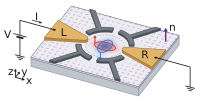
A device sketch: layered solids, Gaussian densities, solid arrows and a circuit, from examples/altermagnetic_dot.py. More in the gallery.
VecView is a small projection layer on top of
svg.py. svg.py builds the elements;
VecView supplies what it has no notion of: a camera, world-space glyph geometry,
and an explicit layer stack. Runtime dependencies are numpy and svg.py.
VecView is alpha: the API may change before 1.0.
Install
Install VecView with pip (Python 3.12 or newer; tested on 3.12–3.14):
python -m pip install vecview
python -m pip install "vecview[occlusion]"  # exact visibility
Quick start
import vecview

cam = vecview.OrthographicCamera(azim_deg=35, elev_deg=24, scale=62)
scene = vecview.Scene(cam, pad=28, background="#ffffff")

slab = vecview.box_faces(center=(0, 0, -0.45), size=(11, 9, 0.9))
scene.faces(10, slab, cull=True, fill="#cfd6e0", stroke="#8b96a6", stroke_width=1.6)

for angle in (0.0, 67.5):
    axis = vecview.in_plane_dir(angle)
    scene.polygon(
        20,
        vecview.double_arrow_shape(
            (0, 0, 0.02), axis, 4.0, (0, 0, 1), shaft_w=0.1, head_w=0.36, head_len=0.34
        ),
        fill="#d62828",
    )

scene.save("slab.svg")
World coordinates are right-handed (x, y, z) with z up, and angles are in
degrees. The first argument of every drawing call is its layer. cull=True
keeps only the walls this camera can see, and the viewBox is fitted to the
content.
Projections
Five, all parallel, so parallel edges stay parallel:
| Camera | Foreshortening |
|---|---|
OrthographicCamera.isometric(scale) |
all three axes equal, 0.8165 |
OrthographicCamera.dimetric(scale, ratio=0.5) |
two equal, third by ratio |
OrthographicCamera(azim_deg, elev_deg, scale) |
trimetric, the general case |
ObliqueCamera.cavalier(scale) |
front face true, depth 1.0 |
ObliqueCamera.cabinet(scale) |
front face true, depth 0.5 |
foreshortening() reports the ratios for any camera, and axonometry() names
the class an orthographic one falls into; both read the projection rather than
how it was built. A scene records objects and holds named cameras, one active,
as a 3D application does. It renders under any camera, byte-identical to building
it from scratch with that camera, and needs none until then:
scene.cameras["cabinet"] = vecview.ObliqueCamera.cabinet(62)
scene.save("cabinet.svg", "cabinet")
scene.camera = "cabinet"  # the active camera, which to_svg_document uses
Camera promises only project, at, depth, and visible. direction,
screen_basis, foreshortening, and plane_matrix live on ParallelCamera,
because each assumes a screen offset independent of position. A future
perspective camera would subclass Camera directly and inherit none of them.
Layers first, depth sorting by request
There is no z-buffer. Draw order is an explicit layer stack: for a beam passing through a translucent slab, the beam above the slab, the attenuated segment inside it, and the emerging beam below are three draw calls at three layers, and no automatic rule orders them correctly against a partially transparent face. Deciding occlusion by hand is worth more than getting it automatically and almost right.
A lattice of hundreds of atoms is the opposite case. scene.sort_by_depth(layer)
opts one layer in to the painter's algorithm: its elements are drawn back to
front, ties keep insertion order, and every other layer is untouched.
sort_by_depth(layer, exact=True) goes further and decides visibility point by
point: each element keeps its native shape, clipped to what shows of it, so
planes can cross and a bond can run into an atom, and lines are dashed exactly
where they pass behind something.
Camera.visible() and faces(..., cull=True) cover the one unambiguous case,
the back faces of a convex solid.
Drawing
World-space calls on Scene:
polygon,polyline,text, andfacesdraw projected geometry;faces(..., id="slab")suffixes the id per face (slab-pz,slab-px, …).arrow(..., normal="camera")turns an arrow about its own axis to show its widest face, resolved by the camera that renders, so every camera sees it. An explicit normal also works.silhouette(layer, solid)fills the projected convex hull of a solid as one polygon. Drawn in the wall colour under the cap, it removes the hairline seams between per-wall polygons.gaussian(layer, center, u, v, a, b, id=..., color=...)draws a soft spot lying in a world plane: one polygon filled by a radial gradient mapped through the plane's affine transform.
Curved solids have exact outlines under any parallel projection, and each is one native element or group:
sphereis a single<circle>(an<ellipse>under an oblique camera).cylinderandconeare two straight sides and two elliptical arcs, plus the end disk that faces the camera;slices=ncuts a long one into separately sorted lengths.arrow3dis a solid shaft and head;tubefollows any curve, such as ahelix.highlight="#fff"shades any of them with a gradient: a fill style, fixed on screen, not a lighting model.
edges(layer, faces, back={...}) draws a convex solid's edges and dashes the
hidden ones, and sphere_curve splits a curve on a sphere where it passes behind.
Labels can be svg.TSpan runs, for subscripts.
Screen-space rect2d and text2d, add_def for <defs>, and add for raw
svg.py elements complete the set. Style keywords pass straight to svg.py
(stroke_width becomes stroke-width).
Geometry functions return plain world-space arrays and know nothing about cameras, styles, or SVG, which keeps them testable as numbers:
| Function | Returns |
|---|---|
box_faces(center, size) |
an axis-aligned box as six named, correctly wound Faces |
prism_faces(footprint, z0, z1) |
a convex footprint extruded along z, culling like a box |
rect_shape, circle_shape, ellipse_shape |
flat outlines in any plane |
arrow_shape, double_arrow_shape |
flat arrows with a shaft and head |
sine_ribbon |
a transverse wave along an axis, for polyline; the amplitude may be an envelope |
arc_shape, helix |
an arc between two directions; a coil or spin spiral |
surface_faces(x, y, z) |
the quads of a sampled surface, such as a band structure |
convex_polyhedron(vertices) |
a Brillouin zone or coordination polyhedron from its corners |
trim_corners(faces, r) |
faces cut back from atoms sitting on their corners |
in_plane_dir(angle_deg, u, v) |
a unit direction at an angle within a plane |
At an azimuth of 35°, neither +x nor +y moves a point horizontally across
the picture. screen_basis() returns the two in-plane world directions that do:
horizontal, down = cam.screen_basis()  # in the z = 0 plane
spots = [-3.0 * horizontal + 1.7 * down, +3.0 * horizontal + 1.7 * down]
Reserving room for other content
Two calls reserve an empty group for content VecView does not draw itself, such as a plot or a TeX label. VecView never parses foreign SVG; a consumer fills the group by id.
Scene.plane reserves a rectangle of a world plane, so flat content lies in
the scene, foreshortened and sheared with the geometry:
scene.plane(15, origin=(-4.2, -2.9, 0.01), u_edge=(0, 8.4, 0), v_edge=(5.8, 0, 0), id="plot-plane")
The embedding is exact: a parallel projection restricted to a plane is affine,
which is what an SVG matrix expresses. (A perspective camera would give a
homography, which matrix cannot represent.)
Scene.slot pins an upright, unforeshortened group to a projected world point,
for content such as a TeX label that should read at the document's font size:
scene.slot(45, (5.5, 4.5, 0), 20, 10, id="label-x", align="west", dx=1.6)
The group records align as data-align, the w by h box grows the fitted
viewBox, and each camera projects the anchor afresh.
Output
Scene.save(path) writes the document; Scene.to_svg_document() returns it as
a string. In Jupyter a scene displays itself inline. That method is the whole embedding contract: any tool that accepts an
object exposing it can place a scene, without VecView knowing about the tool.
The fitted viewBox usually does not start at 0, 0, so a consumer must honour
its origin. See Embedding a scene.
Rasterizing and PDF export are out of scope; they belong to whatever assembles the final page.
Examples
The gallery has the figures everyone draws — a perovskite cell, the fcc Brillouin zone, C60, the Bloch sphere, a Dirac cone, a skyrmion, a solenoid, crossing mirror planes — each from one script:
uv run python examples/gallery                                # all of them

uv run python examples/slab_polarizer.py                      # one projection
uv run python examples/slab_polarizer.py --projection all     # all five
uv run python examples/altermagnetic_dot.py --projection all  # a device sketch, under four cameras
slab_polarizer is a picture of a polarizing slab, rebuilt per
projection because it mixes in screen-space glows. altermagnetic_dot is a
quantum-dot device sketch with arc-shaped gates, Gaussian densities, and a bias
circuit; being world-space throughout, it is built once, holds its projections
as named cameras, and renders each by name.
Development
uv sync --all-extras
uv run ruff format --check .
uv run ruff check .
uv run ty check
uv run pytest
Run both examples with --projection all after touching geometry or projection: mirrored content, or a beam that misses the slab, is the
usual sign of a projection bug.
Related projects
VecView is developed alongside FigWorks, which composes multi-panel figures, and two other producers of editable SVG: VecTeX (TeX equations) and VecWire (circuit schematics). All four share one premise: figures generated from code, with stable ids and byte-identical output, that stay editable in Inkscape.
VecView depends on none of them and contains no code specific to any of them.
Documentation
License
MIT
1 maintainer

Metadata
1 maintainer
Release files for vecview 0.2.0
For a detailed explanation of source distributions (sdists) and built distributions (wheels), please see the package formats documentation.
Source distribution (sdist)
| File | Size | Uploaded | |
|---|---|---|---|
| vecview-0.2.0.tar.gz | 360.7 kB | Details |
Built distribution (wheel)
| File | Interpreter | ABI | Platform | Reset |
|---|---|---|---|---|
| vecview-0.2.0-py3-none-any.whl | Python 3 | none | any | Details |
Total release size: 422.5 kB
Release files / vecview-0.2.0.tar.gz
| Download URL | vecview-0.2.0.tar.gz |
|---|---|
| Size | 360.7 kB |
| Tags | Source |
|
SHA-256 checksum How to use checksums |
8a68fd56d17bc0d99f3bc5011ed0647c0fb02316f4f5475dae7dc9912aa967b5
|
|
BLAKE2b-256 checksum How to use checksums |
e96324fcb76b8bc3898144c92f4be25b266a1aae8e99b01ddb02e2dc5710ebc3
|
| Upload date | |
|
Uploaded using Trusted Publishing? What is trusted publishing? |
Yes |
| Uploaded via |
twine/7.0.0 CPython/3.13.14
|
Provenance
Provenance describes where a file came from. On PyPI, provenance is shared via attestations, which provide a verifiable record of the build or publishing details. View details, limitations and caveats.


PyPI Publish Attestation
PyPI verified that this artifact, at this checksum, originated from the publisher listed below.
Signed by GitHub Actions, verified by PyPI on Oct 6, 2026.
Transparency logRelease files / vecview-0.2.0-py3-none-any.whl
| Download URL | vecview-0.2.0-py3-none-any.whl |
|---|---|
| Size | 61.7 kB |
| Tags | Python 3 |
|
SHA-256 checksum How to use checksums |
5215060a15ba7615aa7b37c3c574fa476cb40e349ac78504ef309163ba256a82
|
|
BLAKE2b-256 checksum How to use checksums |
3b615bc4cf3967d922494461eb4e9c98fe14d2198e36c6cad398e59b26003a31
|
| Upload date | |
|
Uploaded using Trusted Publishing? What is trusted publishing? |
Yes |
| Uploaded via |
twine/7.0.0 CPython/3.13.14
|
Provenance
Provenance describes where a file came from. On PyPI, provenance is shared via attestations, which provide a verifiable record of the build or publishing details. View details, limitations and caveats.
PyPI Publish Attestation
PyPI verified that this artifact, at this checksum, originated from the publisher listed below.
Signed by GitHub Actions, verified by PyPI on Oct 6, 2026.
Transparency log












