
VecWire
VecWire draws electrical circuit schematics as SVG, with circuit-QED figures as the first use case. The schematic is generated from code and stays editable afterwards: each component becomes a named SVG group, the same script writes byte-identical SVG, and the output opens in Inkscape.
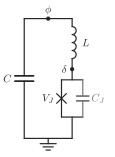
A circuit-QED schematic with labels typeset by VecTeX, from examples/fig1a_cqed.py with --tex.
The symbol set covers wires, capacitors, inductors, Josephson junctions (the bare X, boxed harmonic junctions, and multiharmonic junctions), ground symbols, connection nodes, dashed enclosures, and labels. Components connect named, positioned nodes and draw their own leads.
VecWire is alpha: an early version, with an API that will still change.
Install
VecWire needs Python 3.12 or newer:
python -m pip install vecwire
The only runtime dependency is lxml. For labels typeset by TeX, install the
optional VecTeX extra; VecTeX also needs pdflatex and dvisvgm on PATH:
python -m pip install "vecwire[tex]"
Quick start
A capacitively shunted Josephson junction, grounded at the bottom:
from vecwire import Circuit

circuit = Circuit(70, 96)
circuit.row(14, top_left=18, phi=35, top_right=52, dots={"phi"})
circuit.row(78, bottom_left=18, gnd=35, bottom_right=52)

circuit.wire("top_left", "phi", "top_right")
circuit.wire("bottom_left", "gnd", "bottom_right")
circuit.capacitor("top_left", "bottom_left", id="C")
circuit.junction("top_right", "bottom_right", id="JJ")
circuit.ground("gnd", id="ground")

circuit.label("C", (11, 46), anchor="rc")
circuit.label("φ", "phi", offset=(0, -3), anchor="cb")
circuit.write_svg("transmon.svg")
Coordinates are SVG user units, points by default (Circuit(..., unit="pt");
"px" and "mm" are also accepted). to_svg_document() returns the same
document as a string.
Examples
python examples/fig1a_cqed.py              # writes examples/output/fig1a.svg
python examples/fig1a_cqed.py --tex        # editable TeX labels through Vectex
python examples/harmonic_junctions.py      # the junction symbol legend
fig1a_cqed.py draws a shunt capacitance C across an inductor L in series
with a parallel junction branch of V_J and C_J, marking the node phases φ
and δ. harmonic_junctions.py draws the bare X beside the boxed
m = 1, 2, 3 and sin symbols, and an inductor in series with a sinusoidal
junction next to the multiharmonic junction it acts like. Both previews are
checked in: fig1a.svg and
harmonic_junctions.svg. Without --tex
the examples use plain SVG text and need no TeX installation.
Nodes and wires
A Node is a placed connection point, and wires join nodes into an electrical
net. row() and column() declare several nodes sharing one coordinate;
nodes() takes arbitrary positions. None of them draws anything. Methods
accept node names or the Node values these calls return.
A wire visits its nodes in the order given and may pass through several of
them; a route that doubles back is rejected. Crossing or overlapping in the
drawing does not make a connection. Optional via points shape a route without
adding connections:
circuit.wire("left", "right", via=((18, 30), (52, 30)), corner_radius=2)
Each routed wire is one SVG path, so linejoin="round" softens a bend and
corner_radius curves the centerline; both can be set on the Circuit or per
wire. A route still passes exactly through every named node it visits, even
with a corner radius. Two-terminal symbols are placed horizontally or
vertically.
Labels take plain text or a VecTeX fragment; a fragment's SVG group is embedded as is, so it stays editable through TexText.
The Circuit records drawing geometry only. It does not infer electrical
topology or compute circuit parameters; those belong to the scientific model
that produces the figure.
Plain-text labels accept font_family and size (in the circuit's user units):
circuit.label("Capacitance", (40, 20), size=8, font_family="TeX Gyre Heros")
Omitting font_family preserves inherited SVG typography. For fragment labels,
choose typography when rendering the fragment; these text options do not
rescale or replace its glyphs.
Josephson junctions
junction() draws the bare X, the standard Josephson-junction symbol, which
leaves the current-phase relation unspecified; its leads meet at the centre of
the X, so the wire runs through it. harmonic_junction() draws the boxed
symbol of one tunnelling harmonic: its square holds order crossed diagonals
each way for a cos(mφ) term, in which m Cooper pairs tunnel together, and
kind="sin" adds two dots for the odd sin(mφ) term of a φ0 junction. The
m = 1 box is the bare X inside its square, so the two symbols line up. In
both, color sets the glyph and lead_color keeps the leads in the circuit
ink.
circuit.junction("top", "bottom", id="JJ")  # bare X
circuit.harmonic_junction("top", "bottom", 2, color="#8075c1", lead_color="#262626")
circuit.harmonic_junction("top", "bottom", kind="sin")  # sin φ, m = 1
Both groups carry data-component="josephson-junction"; the boxed one also
records data-harmonic and data-kind, so a stylesheet or selector can tell
them apart.
harmonic_sum() draws a multiharmonic junction: a dashed box holding
⊠ + ⊠⊠ + ⊠⊠⊠ + ⋯ between two terminals. The harmonics of one junction add as
energies, so the terms hang in parallel between two rails, which the branch
leads join at the centre of the box. rails=False ends each term in terminal
dots instead, a shorthand notation. The sum reads left to right on a vertical
branch and top to bottom on a horizontal one. colors and kinds set each
term, and ellipsis=False drops the trailing + ⋯.
box() draws a dashed enclosure around a subcircuit that acts as one element;
it is decoration only and creates no connection. Both return a Box with the
bounds: Box.at("rb") uses the label anchors, and Box.terms holds the
centres of the summed glyphs for per-term labels:
box = circuit.harmonic_sum("top", "bottom", (1, 2, 3), colors=shades)
for order, centre in zip((1, 2, 3), box.terms):
    circuit.label(f"E{order}", (centre[0], box.bottom + 2), anchor="ct")
circuit.box((10, 18), (60, 95), id="effective-junction")
Architecture
| Module | Contents |
|---|---|
vecwire.core |
Circuit: the SVG root and unique ids, nodes, wire routing, labels, box(), to_svg_document(), and the drawing API symbols are built from |
vecwire.elements |
the symbol library: capacitor, inductor, junction, harmonic_junction, harmonic_glyph, harmonic_sum, ground |
vecwire.geometry |
value types and checks shared by both: Point, Box, Branch, positive, offset, … |
vecwire.node |
Node, a named, placed connection point |
A symbol is a plain function whose first argument is the circuit, and it draws
only through the public drawing API: circuit.branch(start, end) resolves the
terminals into a Branch, circuit.group(kind, id, branch=...) opens a
semantic group with data-from/data-to, and line, rect, dot, and
path add strokes in the circuit ink. Symbols are written in branch
coordinates (branch.at(along, across)), so one definition serves every
orientation. A new symbol is a new function, in vecwire.elements or your own
script, with no change to the core:
def resistor(circuit, start, end, *, id=None):
    branch = circuit.branch(start, end)
    group = circuit.group("resistor", id, branch=branch)
    lead, step = branch.length / 4, branch.length / 12
    points = [branch.at(lead + (i + 0.5) * step, 3 * (-1) ** i) for i in range(6)]
    circuit.path(
        group,
        [
            ("M", *branch.start.position),
            ("L", *branch.at(lead)),
            *(("L", *p) for p in points),
            ("L", *branch.at(3 * lead)),
            ("L", *branch.end.position),
        ],
    )


resistor(circuit, "top", "bottom", id="R")
The built-in symbols are also Circuit methods, bound by one class attribute
each (capacitor = elements.capacitor), so circuit.capacitor(a, b) is the
same call as elements.capacitor(circuit, a, b), with the same signature and
docstring. There is no registry or plugin hook. The core imports the library
for these bindings, and the library never imports the core at run time
(tests/test_elements.py checks this), so the dependency points one way.
The core owns number formatting (.12g) and attribute order, so every symbol
serializes coordinates the same way and output is byte-identical from run to
run.
Why not svg.py. svg.py was
evaluated for the symbols and is not used. It writes floats with repr
(0.30000000000000004, 1e-07) and fixes its own attribute order, so adopting
it would change every byte of existing figures, or mean passing preformatted
strings and losing its typed fields. A symbol's size depends on the circuit's
ink, stroke width, and line caps, which svg.py has no notion of, so element
code would get longer, not shorter. The canvas needs lxml anyway, to embed
VecTeX fragments and reorder connection dots. (Its svg.A is also the <a>
element, not an arc.)
Development
python -m pip install -e '.[dev]'
ruff format --check .
ruff check .
ty check
pytest
After touching drawing code, rerun both examples and diff their output against
examples/fig1a.svg and examples/harmonic_junctions.svg; every changed byte
should be one the change intended. Releases are described in
docs/development.md.
Related projects
VecWire is developed alongside FigWorks, which composes multi-panel figures, and two other producers of editable SVG: VecTeX (TeX equations) and VecView (layered 3D schematics). All four share one premise: figures generated from code, with stable ids and byte-identical output, that stay editable in Inkscape.
VecWire does not depend on FigWorks. FigWorks places a Circuit in a panel
through to_svg_document() alone; see its README.
License
MIT
1 maintainer

Metadata
1 maintainer
Release files for vecwire 0.3.0
For a detailed explanation of source distributions (sdists) and built distributions (wheels), please see the package formats documentation.
Source distribution (sdist)
| File | Size | Uploaded | |
|---|---|---|---|
| vecwire-0.3.0.tar.gz | 34.0 kB | Details |
Built distribution (wheel)
| File | Interpreter | ABI | Platform | Reset |
|---|---|---|---|---|
| vecwire-0.3.0-py3-none-any.whl | Python 3 | none | any | Details |
Total release size: 56.0 kB
Release files / vecwire-0.3.0.tar.gz
| Download URL | vecwire-0.3.0.tar.gz |
|---|---|
| Size | 34.0 kB |
| Tags | Source |
|
SHA-256 checksum How to use checksums |
35cfe73b7de440b42dd35ae30363b942cabd73d41004da4f5974538d5d75e390
|
|
BLAKE2b-256 checksum How to use checksums |
b8700a67704d968163a8904c3cb1aa0ffcaefc69843fa268cb37a00ebeddbefe
|
| Upload date | |
|
Uploaded using Trusted Publishing? What is trusted publishing? |
Yes |
| Uploaded via |
twine/7.0.0 CPython/3.13.14
|
Provenance
Provenance describes where a file came from. On PyPI, provenance is shared via attestations, which provide a verifiable record of the build or publishing details. View details, limitations and caveats.


PyPI Publish Attestation
PyPI verified that this artifact, at this checksum, originated from the publisher listed below.
Signed by GitHub Actions, verified by PyPI on Oct 16, 2026.
Transparency logRelease files / vecwire-0.3.0-py3-none-any.whl
| Download URL | vecwire-0.3.0-py3-none-any.whl |
|---|---|
| Size | 22.0 kB |
| Tags | Python 3 |
|
SHA-256 checksum How to use checksums |
319543e6373b51ee63be98fd42ec88a55c7314846fb88a62c21b8cbab6c76327
|
|
BLAKE2b-256 checksum How to use checksums |
4c36be95d21b9aa1a88a3e20002ad4343aff2abd571b7c273dee0cb23a9b3b80
|
| Upload date | |
|
Uploaded using Trusted Publishing? What is trusted publishing? |
Yes |
| Uploaded via |
twine/7.0.0 CPython/3.13.14
|
Provenance
Provenance describes where a file came from. On PyPI, provenance is shared via attestations, which provide a verifiable record of the build or publishing details. View details, limitations and caveats.
PyPI Publish Attestation
PyPI verified that this artifact, at this checksum, originated from the publisher listed below.
Signed by GitHub Actions, verified by PyPI on Oct 16, 2026.
Transparency log














