
Veeva tools library for accelerating Veeva Systems Internal Tools development

Project description

Introduction
This python package is a set of Salesforce.com, Veeva Network, Veeva Vault, and Veeva Nitro libraries, scripts, and functions used to help expedite the development of Veeva Tools.
Installation / Requirements
Ensure you have at least Python version 3.10 installed. To Check your installation version, type the following commands in the terminal (MacOs) / command prompt (Windows):
python --version
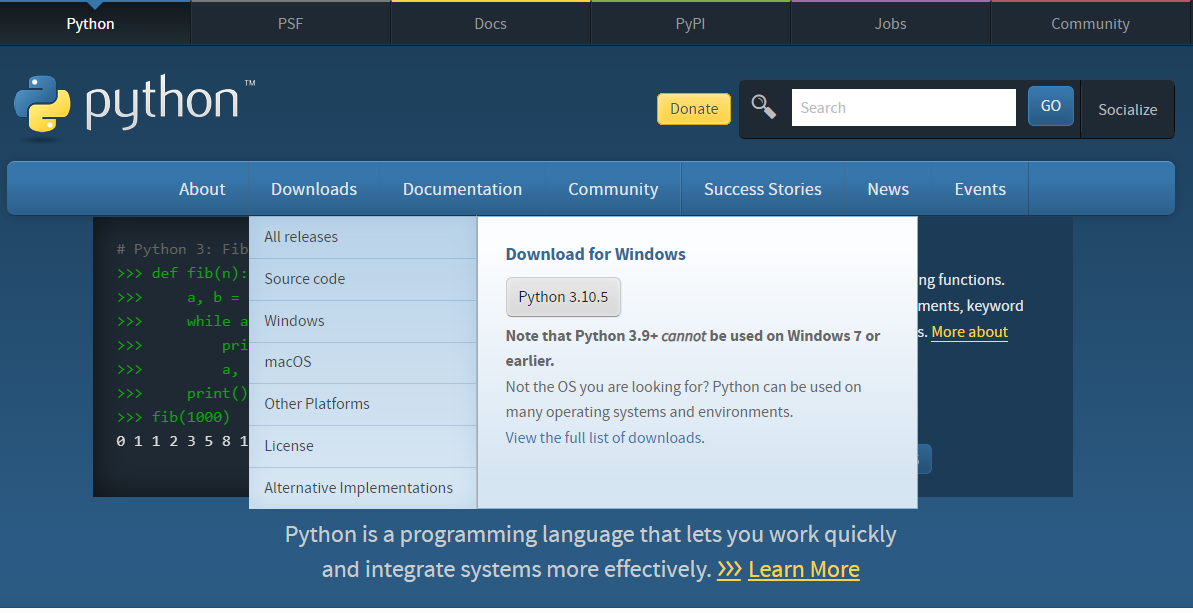
To install python, go to https://www.python.org/ then navigate to the download page of your Operating System.
You will need to have Packager Installer for Python (pip) installed. To install pip, run the following command in the terminal (MacOs) / command prompt (Windows):
curl https://bootstrap.pypa.io/get-pip.py -o get-pip.py
python3 get-pip.py
To install the Veeva Tools library:
pip install veevatools
To upgrade to the latest version of Veeva Tools library:
pip install veevatools --upgrade
Installation Options
Install only the modules you need:
# Install everything
pip install veevatools[all]

# Install individual modules
pip install veevatools[vault]        # Veeva Vault only
pip install veevatools[salesforce]   # Salesforce/CRM only
pip install veevatools[network]      # Veeva Network only
pip install veevatools[nitro]        # Veeva Nitro only

# Development dependencies
pip install veevatools[dev]
Overview
The Veeva Tools package currently contains 4 major components:
Salesforce library
Authentication:
from veevatools.salesforce import Sf
import pandas as pd

sf = Sf()
sf.authenticate(
    sfUsername='yourname@salesforce.com',
    sfPassword='password123',
    sfOrgId='00D2C0000008jIK',
    is_sandbox=False
    )
Sidenote on Pandas DataFrames:
Pandas DataFrame (pd) is used to prepare the data for import (i.e. create, update methods) and additional export methods such as pd.to_excel() in order to save the output into an Excel file.
Additionally, Complex data manipuation (joins, merges, groupbys, filters)and data analytics (describe, statistical analysis) can all be performed using Pandas.
To learn more about Pandas DataFrames, go to the Pandas documentation <br > Or just Google tutorials on Pandas DataFrames. This YouTube playlist by Corey Schafer provides an excellent starting point into the world of Pandas!
Data methods:
The salesforce class (Sf) contains methods that can help you interact with data and metadata components:
Query
account_recordtypes = sf.query("SELECT Id, Name, SobjectType from RecordType WHERE SobjectType = 'Account'")

account_recordtypes
Return -> pd.DataFrame():
| Id | Name | SobjectType | |
|---|---|---|---|
| 0 | 012f4000001ArT3AAK | Professional_vod | Account |
| 1 | 012f4000001ArT4AAK | Institution_vod | Account |
| 2 | 012f4000001ArT5AAK | MCO_vod | Account |
| 3 | 012f4000001ArT6AAK | Organization_vod | Account |
| 4 | 012f4000001ArWzAAK | Hospital_vod | Account |
Sidenote:
You can use any Pandas (pd) methods on the return value of the query output. For exampleaccount_recordtypes.to_excel("Account RecordTypes.xlsx")
Will save the results of the DataFrame into an Excel file.
Create
## Takes a DataFrame of CRM records and creates records in CRM

account_records = pd.DataFrame([{'FirstName': 'Test', 'LastName': 'Account'}, {'FirstName': 'Test2', 'LastName': 'Account2'}])

result = sf.create('Account', account_records)

result
Return -> pd.DataFrame():
| success | created | Id | |
|---|---|---|---|
| 0 | True | True | 0010r00000tF7L1AAK |
| 1 | True | True | 0010r00000tF7L2AAK |
Update
### Takes a dataframe that contains at least the Id column
### and any other column to be updated, for example, FirstName
update_account_name = pd.DataFrame(
    [{'FirstName': 'Updated', 'Id': '0010r00000tF7L1AAK'},
     {'FirstName': 'Name', 'Id': '0010r00000tF7L2AAK'}]
    )

result = sf.update('Account', update_account_name)

result
Return -> pd.DataFrame()
| success | created | Id | |
|---|---|---|---|
| 0 | True | False | 0010r00000tF7L1AAK |
| 1 | True | False | 0010r00000tF7L2AAK |
Upsert
### Takes a dataframe that contains an external ID column
### and any other column to be updated, for example, Name
### if the external ID matches an existing record,
### the account is updated, otherwise, a new record is created

upsert_account = pd.DataFrame(
    [{'NET_External_Id__c': '242977178138969088', 'Name': 'Updated Hospital Name'},
     {'NET_External_Id__c': '555579769212255555', 'Name': 'Create New Hospital'}]
    )

result = sf.upsert(object_api='Account', external_id_field_api='NET_External_Id__c', record_dataframe=upsert_account)

result
Return -> pd.DataFrame()
| success | created | id | |
|---|---|---|---|
| 0 | True | False | 001f400000PKOrwAAH |
| 1 | True | True | 0010r00000tF7stAAC |
Delete
### Takes a dataframe that contains the Id column
### deletes records listed based on their SFID.

delete_account = pd.DataFrame([{'Id': '0010r00000tF7stAAC'}, {'Id': '001f400000PKOrwAAH'}])

result = sf.delete(object_api='Account', record_dataframe=delete_account)

result
Return -> pd.DataFrame()
| success | created | Id | |
|---|---|---|---|
| 0 | True | False | 0010r00000tF7stAAC |
| 1 | True | False | 001f400000PKOrwAAH |
Metadata Methods
Metadata methods (Read, Create, Update, Rename, Delete, List) -- coming soon.
Vault library
Authentication:
from veevavault import VaultClient, DocumentService

client = VaultClient()
client.authenticate(vaultURL='https://myvault.veevavault.com', vaultUserName='user@vault.com', vaultPassword='password123')

# Services take the authenticated client as their argument
docs = DocumentService(client)
all_docs = docs.retrieval.retrieve_all_documents()
Network library
Authentication:
from veevanetwork import NetworkClient

# NetworkClient requires url, username, and password at construction
client = NetworkClient(
    url='https://mynetwork.veevanetwork.com',
    username='user',
    password='pass',
)
client.authenticate()

# Services are accessed as properties on the client
results = client.search.search(q='Smith')
objects = client.metadata.retrieve_object_types()
Nitro library
Authentication:
from veevanitro import Nitro

# Nitro wires the client and all services together
n = Nitro()
n.auth.login(server_url='https://mycompany.veevanitro.com', username='user', password='pass')

# Access services directly
tenant = n.admin.get_tenant()
users = n.admin.get_users()
Release history Release notifications | RSS feed


Download files
Download the file for your platform. If you're not sure which to choose, learn more about installing packages.
Source Distribution
Built Distribution
Filter files by name, interpreter, ABI, and platform.
If you're not sure about the file name format, learn more about wheel file names.
Copy a direct link to the current filters
File details
Details for the file veevatools-1.0.10.tar.gz.
File metadata
- Download URL: veevatools-1.0.10.tar.gz
- Upload date:
- Size: 272.5 kB
- Tags: Source
- Uploaded using Trusted Publishing? No
- Uploaded via: twine/6.2.0 CPython/3.13.1
File hashes
| Algorithm | Hash digest | |
|---|---|---|
| SHA256 |
1521cb552f78e766359c9622515847bf2a9a6d11065439494e7e62624f42f0a0
|
|
| MD5 |
6dbab032fb73b8d22010067634f7a5f7
|
|
| BLAKE2b-256 |
ef5ad2ad59053fec0fc1c3c07f3c3b697d9d9ac45d227e454ada57416f49269a
|
File details
Details for the file veevatools-1.0.10-py3-none-any.whl.
File metadata
- Download URL: veevatools-1.0.10-py3-none-any.whl
- Upload date:
- Size: 362.9 kB
- Tags: Python 3
- Uploaded using Trusted Publishing? No
- Uploaded via: twine/6.2.0 CPython/3.13.1
File hashes
| Algorithm | Hash digest | |
|---|---|---|
| SHA256 |
2268400a0491f65e8eed6a9a87b299a57bb53e01d1342b4e531c8b1b3c311de2
|
|
| MD5 |
97b14005cc79e62edcb0587d62b548a2
|
|
| BLAKE2b-256 |
c96513edb30154db7978deced17841e5b69dd2bc8290d5fa06291975d4857a92
|






