
Vega: a local coding agent that runs on your laptop
Vega is an offline AI coding assistant for the terminal. It runs an open-weight LLM on your
own computer through Ollama, so your code never leaves your machine: no
cloud API, no account, no API key. Vega is a local coding agent written in Python, with a
full-screen TUI and a scriptable CLI. It reads and edits your project, runs your tests in
a sandbox, and repairs what fails. It is built around small open-source models (under 10B
parameters) that fit in 16 GB of RAM. The package is vegacode; the command is vega (or
vegacode).
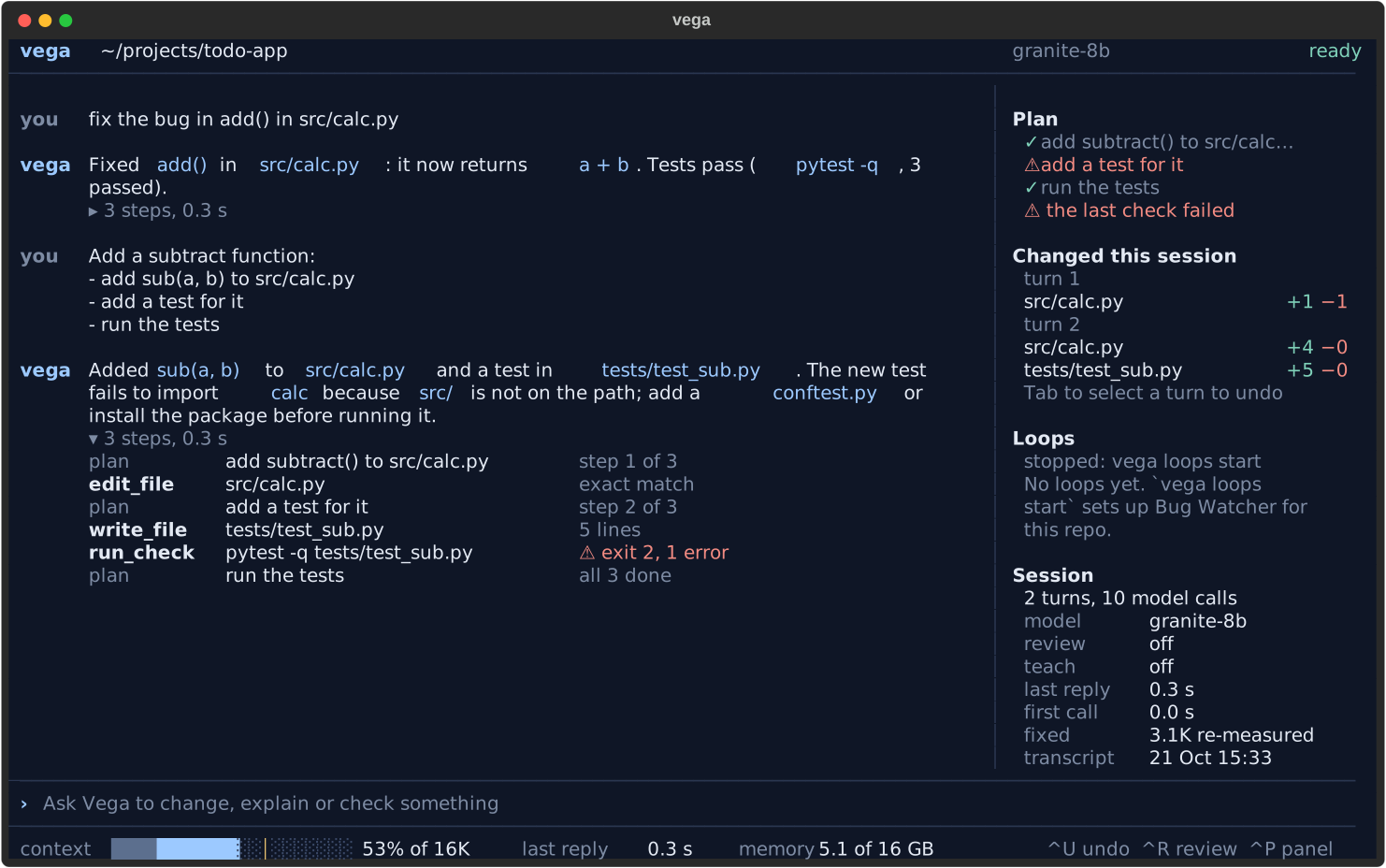
Screens from Vega's UI tests, with scripted model replies.
Why Vega
- Privacy by default. The model runs on your machine. Web research is off until you set up a
self-hosted search backend, and a model profile must point at a server on your machine or
local network unless you opt in with
allow_remote. - Made for small local models. A 7-8B model is unreliable in a free-form tool loop, so Vega does more of the work in code: it routes each task to a fixed pipeline and checks every write.
- Checks before it answers. Vega turns your request into concrete checks (named functions, signatures, the commands you mention, your tests), runs them in a sandbox and sends the failures back to the model before it reports success. When a pipeline could not check anything, its answer says nothing was verified.
Features
- Chat in your terminal: a full-screen app (
vega) or a line-mode chat (vega --plain) in the current project. - One-shot tasks:
vega run "fix the failing test in tests/test_parser.py". - Task routing: each request goes to the path that suits it: a question about the code, a change to one Python file, a multi-file change in a project with tests, a generated file (JSON, Markdown, CSV, a lock file), a single non-Python file with a named check command, a CSS, HTML or JavaScript change, or the general agent loop.
- Write, check, repair: the pipelines write a file, run the checks, send the failures back, and keep the round with the fewest failing checks, not just the last one.
- Multi-file project builds: plan the files, write each one, run the project's tests, repair.
- Bug fixing in existing repositories: Vega points the agent at the files most likely responsible for a reported bug, using the names and messages quoted in the report.
- Safe edits: a write that would not parse, or that adds undefined names, is refused before it
touches the file.
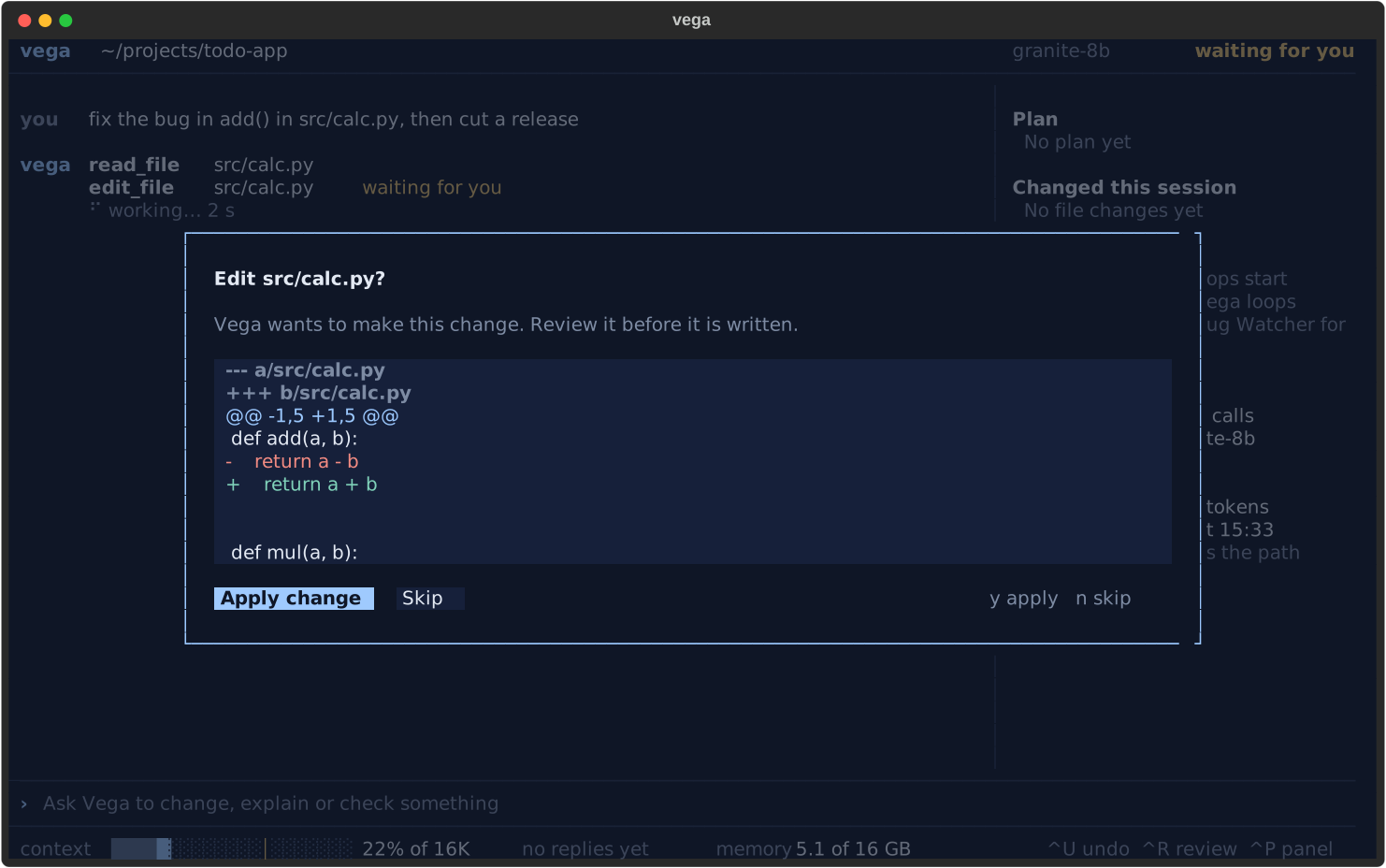
/undorestores files Vega edited, going back up to 20 file-changing turns (changes made by shell commands you approved are not undone). - Edit review:
--reviewshows every edit as a diff and asks before applying it. - Autopilot:
vega auto "goal"works on a new Git branch and commits each round whose check passes. Anything left when it stops is committed as a labelledWIPcommit, so nothing is lost. It never pushes. - Project memory: a
VEGA.mddrafted from your project, short session digests and notes, loaded at the start of each chat (AGENTS.mdandCLAUDE.mdare read too). - Model manager: list, download, switch and remove local models, with a RAM-fit estimate for
your machine. Any Ollama model, or another local OpenAI-compatible server (LM Studio,
llama.cpp's
llama-server,mlx_lm.server). - Secrets stay out of Git: Vega adds one marked block to
.gitignorefor its own files and likely secrets (.env, keys), and warns about tracked files whose names suggest secrets (.env, private keys, credential files).
Opt-in or experimental: web research through a self-hosted SearXNG
(asks once per session; searches send only the query to your own SearXNG instance, and pages Vega
opens are fetched from their sites; see vega web --help), teach mode (--teach: Vega explains
its plan and decisions; not yet measured against a model), and loops (background watchers: tests
and lint run any time; the model step runs only while your Mac's screen is locked and resources
are free).
Requirements
- Python 3.11 or newer.
- Ollama, or another local OpenAI-compatible model server. The model download needs a network connection; after that, Vega works offline.
- Tested on a 16 GB Apple Silicon Mac. The default model is a 5.3 GB download; Vega estimates
it needs about 8.6 GB of RAM with an 8K context (
vega model listshows the fit for your machine). - macOS. Vega is developed and tested on macOS only. Running tests and checks in a sandbox
uses macOS
sandbox-exec.- Linux: not yet tested beyond the automated test suite in CI. Sandboxed checks are not available there, so Vega cannot run your tests or checks, and its answers say nothing was verified.
- Windows: not supported, never run or tested. Vega has never been used on Windows and may not install or work at all. CI runs the test suite there for information only. Reports and fixes are welcome.
Default model
IBM Granite 4.1 8B (granite4.1:8b, Apache-2.0) with an 8K context. Other profiles in
models.toml: Qwen2.5-Coder 7B (including a 16K-context variant) and Qwen3 8B (with thinking off),
plus two reference profiles Vega does not recommend (Qwen2.5-Coder 14B, Qwen3 8B with thinking).
vega model list also offers catalogue models to download, such as Phi-4-mini, Gemma 3 4B and
Llama 3.1 8B. Vega's comparisons use models under 10B parameters.
Install
From PyPI:
pipx install vegacode # or: pip install vegacode, inside a virtual environment
From source:
git clone https://github.com/isaacfrett/vegacode.git
cd vegacode
python3 -m venv .venv
.venv/bin/pip install -e .
source .venv/bin/activate
Then pull the default model and build Vega's copy of it (about 5.3 GB):
vega server build
Quickstart
cd your-project
vega                      # full-screen chat in this project
vega --review             # ask before applying each edit
vega --plain              # line-mode chat (also used when input or output is not a terminal)
vega run "add a --json flag to the export command"   # one task, then exit
vega auto "add input validation to the CLI" --check "python -m pytest -q"
vega, vega run and vega auto start a local Ollama server if none is running.
vega server stop stops only a server that Vega started.
Inside the chat:
| Command | What it does |
|---|---|
/diff, /status |
Tracked changes against HEAD, Git status |
/undo |
Restore the files Vega changed in its last turn (repeat to go further back) |
/review on / off |
Ask before each edit, or stop asking |
/reset |
Clear the conversation |
/help |
Keys and commands |
Other commands:
vega models               # profiles, installed and catalogue models, RAM fit
vega model recommend      # which catalogue model to use for this machine's RAM
vega model pull NAME      # download a catalogue or Ollama model and add its profile
vega model use PROFILE    # make a profile the default (pulls its base model if needed)
vega model rm NAME        # delete a model's downloads
vega model check NAME     # check that a model works through Vega (about a minute)
vega server status        # local server and model state
vega context show         # what a chat loads from VEGA.md, digests and notes
vega config               # active endpoint, model and state directory
vega features             # feature switches and whether each is on
Configuration
models.toml: model profiles: the Ollama base model, context size (num_ctx), sampling and per-model feature settings. In a source checkout it is the file at the repository root; afterpip installVega uses its built-in defaults until the firstvega model addorremovewrites~/.vega/models.toml.default = "granite-8b"picks the shipped default.vega model add NAME --base MODEL [--endpoint URL]adds a profile, andVEGA_MODELS_FILEpoints Vega at another file.VEGA_HOME: where Vega keeps its state (server state, logs, settings, debug logs). Default~/.vega.- Per project:
.vega/holds notes, session digests and project settings.VEGA.mdat the project root is yours to edit. Vega owns only its marked block. On the first chat in a project Vega createsVEGA.mdand.vega/, and in a Git repository adds its marked block to.gitignore(remove the block and it is not added again). - Another server:
VEGA_BASE_URL(defaulthttp://localhost:11434/v1),VEGA_MODEL,VEGA_API_KEYandVEGA_NUM_CTX. Any OpenAI-compatible endpoint with tool calling works.VEGA_BASE_URLis not checked for locality: pointing it at a remote server sends your code there. - Feature switches:
VEGA_FEATURES_OFF=name,...andVEGA_FEATURES_ON=name,...(vega featureslists them).
Safety model
- Project-scoped file access. File tools resolve every path inside the selected project and refuse anything outside it.
- Command approval. Read-only inspection commands (
ls,cat,grep,git status,git diff, ...) run automatically. Every other shell command asks first, and approved commands run on your machine as you. - Sandboxed checks. Tests and checkers (
pytest,ruff,mypy,npm test,go test,cargo test, ...) run in a copy-on-write clone of the project with no network access, and can write only inside that clone (macOS). - Edit review and undo.
--reviewshows each diff before applying it./undorestores Vega's file changes from in-memory copies and never touches Git. - Autopilot boundaries.
vega autorefuses a dirty working tree, works only on its own new branch, does not run commands that need approval, and never pushes or rewrites history. - No telemetry. An optional usage log (
vega usage on) records events only, to a local file, and is never sent anywhere.
Evaluation
Vega is developed against private evaluation suites. Each attempt runs in an isolated temporary
project, and checks are run by the harness, not the agent. Suites include single-function fixes,
multi-file goals, bugs re-introduced into Vega's own source, and imported benchmarks (HumanEval+
and MBPP+ from EvalPlus). Behaviour changes sit behind feature switches (vega features), so each
can be turned off and compared, and a change is judged by a paired A/B comparison on the cases it
targets. Some newer defaults are on while that comparison is pending.
The suites and case data are not published (publishing held-out cases invites training
contamination) and are not in this repository or the PyPI package, so the developer tools that
use them (vega eval, vega lab, vega latency, vega model queue) have nothing to run here. Published results, with denominators, dates and the exact commit, will come in a
later release.
How Vega compares
Aider, OpenHands and Continue are established open-source AI coding tools, and each can use local models. Vega differs in emphasis:
- Local-first by default. It starts and uses a model on your own machine from the first run, and a model profile that points at a remote server needs an explicit opt-in.
- Small-model focus. It is designed, tuned and measured on models under 10B parameters on a 16 GB machine, with deterministic routing, checks and repair loops doing work a larger model would do on its own.
- Measured, not assumed. Behaviour changes sit behind switches and are judged by paired A/B comparisons on the cases they target.
Contributing
See CONTRIBUTING.md.
How Vega is built. Vega is developed with AI assistance (Claude Code); every change is reviewed and tested before release.
Security
To report a vulnerability, see SECURITY.md.
Licence
GNU AGPL-3.0 (version 3 only). See LICENSE and NOTICE. You may use, change and share Vega, including commercially; if you distribute a modified version, or let others use it over a network, you must offer its source under the same licence. If the AGPL does not fit your use, other licensing terms may be available: open an issue to ask.
1 maintainer

Metadata
1 maintainer
Release files for vegacode 0.3.0
For a detailed explanation of source distributions (sdists) and built distributions (wheels), please see the package formats documentation.
Source distribution (sdist)
| File | Size | Uploaded | Provenance | |
|---|---|---|---|---|
| vegacode-0.3.0.tar.gz | 636.4 kB | With provenance | Details |
Built distribution (wheel)
| File | Interpreter | ABI | Platform | Reset |
|---|---|---|---|---|
| vegacode-0.3.0-py3-none-any.whl | Python 3 | none | any | Details |
Total release size: 1.3 MB
Release files / vegacode-0.3.0.tar.gz
| Download URL | vegacode-0.3.0.tar.gz |
|---|---|
| Size | 636.4 kB |
| Tags | Source |
|
SHA-256 checksum How to use checksums |
56944c09769d4f8ea9e8e8ef64125573759a86e0dc3e471d5d30674e22cf863e
|
|
BLAKE2b-256 checksum How to use checksums |
c5511fcb2c029551a2312cfaf8db425b31966467bf614d3454cbf55f1605b70c
|
| Upload date | |
|
Uploaded using Trusted Publishing? What is trusted publishing? |
Yes |
| Uploaded via |
twine/7.0.0 CPython/3.13.14
|
Provenance
Provenance describes where a file came from. On PyPI, provenance is shared via attestations, which provide a verifiable record of the build or publishing details. View details, limitations and caveats.


PyPI Publish Attestation
PyPI verified that this artifact, at this checksum, originated from the publisher listed below.
Signed by GitHub Actions, verified by PyPI on Oct 22, 2026.
Transparency logRelease files / vegacode-0.3.0-py3-none-any.whl
| Download URL | vegacode-0.3.0-py3-none-any.whl |
|---|---|
| Size | 693.6 kB |
| Tags | Python 3 |
|
SHA-256 checksum How to use checksums |
b44bbe5ec4fad9a78879620293a3e82f6d89fa872d0ddde719cea96bae4c9ace
|
|
BLAKE2b-256 checksum How to use checksums |
30c4aa44b4a370fcd2dddba432f51e1a003f3f570ce35e7778ef17c6d887e81c
|
| Upload date | |
|
Uploaded using Trusted Publishing? What is trusted publishing? |
Yes |
| Uploaded via |
twine/7.0.0 CPython/3.13.14
|
Provenance
Provenance describes where a file came from. On PyPI, provenance is shared via attestations, which provide a verifiable record of the build or publishing details. View details, limitations and caveats.
PyPI Publish Attestation
PyPI verified that this artifact, at this checksum, originated from the publisher listed below.
Signed by GitHub Actions, verified by PyPI on Oct 22, 2026.
Transparency logSecurity for vegacode 0.3.0
Provenance
Provenance describes where a file came from. On PyPI, provenance is shared via attestations, which provide a verifiable record of the build or publishing details. View details, limitations and caveats.
Full provenance
All 2 files in this release have been uploaded with provenance metadata.
Attestation for vegacode-0.3.0.tar.gz
PyPI Publish Attestation
PyPI verified that this artifact, at this checksum, originated from the publisher listed below.
Signed by GitHub Actions, verified by PyPI on Oct 22, 2026.
Transparency logA note on package security
PyPI is a repository for distributing packages, not a service for auditing them. While third-party security researchers and our staff do their best to detect and remove malicious packages, PyPI cannot guarantee the quality, security or suitability of any given package.
To learn more about protecting yourself from malicious actors, visit our package security documentation.













