
This release is a pre-release and may not be stable for production use.

Vektori
Memory that remembers the story, not just the facts.








👋 Questions, ideas, bugs → GitHub Issues · Discussions
If Vektori has been useful, a ⭐ goes a long way.
Why Vektori
Building agents that actually remember people is harder than it looks:
- Facts aren't enough. Knowing a user prefers WhatsApp is different from knowing they've asked three times and are getting frustrated. Most systems give you the what, not the why or how it changed.
- Patterns stay invisible. Spotting that someone's tone has been shifting across sessions requires more than point-in-time retrieval — you need to see the trajectory.
- Context overhead explodes. Stuffing raw conversation history into every prompt doesn't scale. You need structure, not just storage.
Vektori solves this with a three-layer sentence graph. Agents don't just recall preferences — they understand how things got there.
FACT LAYER (L0)      <- vector search surface. Short, crisp statements.
        |
EPISODE LAYER (L1)   <- patterns auto-discovered via graph traversal.
        |
SENTENCE LAYER (L2)  <- raw conversation. Sequential NEXT edges. The full story.

Search hits Facts, graph discovers Episodes, traces back to source Sentences. SQLite by default — swap to Postgres, Neo4j, Qdrant, or Milvus when you're ready to scale.
Benchmarks
Tested on long-horizon memory benchmarks — hundreds of turns, real user details buried deep in history.
| System | LoCoMo | LongMemEval-S | DMR | F1 avg (LoCoMo)† | Search p95 | Total p95 |
|---|---|---|---|---|---|---|
| Vektori | 66% | 73% | — | — | — | 1.48s |
| Mem0 | 66.88% | — | — | 41.0 | 0.48s | 2.59s |
| Zep | 75.14%‡ | 71.2% | 94.8% | — | 0.778s | 2.926s |
| Supermemory | — | 81.6% | — | — | — | — |
| Letta | 74.0% | — | — | — | — | — |
†F1 = harmonic mean of precision (how much of the answer was correct) and recall (how much of the correct answer was covered). Only Mem0 publishes token-level F1; 41.0 is the average across single-hop 38.72, multi-hop 28.64, open-domain 47.65, temporal 48.93.
‡Zep self-reported; Mem0's paper measured Zep at 65.99% on the same run. Latency from Mem0's paper. Model choice significantly shifts all scores — we used gemini-2.5-flash-lite for cost.
On LoCoMo and LongMemEval, the retrieved context contains the answer in 95% of questions — the gap to 66% is a synthesis problem, not a retrieval one. Actively working on closing it, exploring RL.
Still improving — PRs and evals welcome. Run your own: /benchmarks
Install
pip install vektori                      # SQLite + Postgres
pip install 'vektori[neo4j]'             # + Neo4j support
pip install 'vektori[qdrant]'            # + Qdrant support
pip install 'vektori[milvus]'            # + Milvus support
pip install 'vektori[neo4j,qdrant,milvus]'  # all backends
No Docker, no external services. SQLite by default.
30-Second Quickstart
import asyncio
from vektori import Vektori

async def main():
    v = Vektori(
        embedding_model="openai:text-embedding-3-small",
        extraction_model="openai:gpt-4o-mini",
    )

    await v.add(
        messages=[
            {"role": "user", "content": "I only use WhatsApp, please don't email me."},
            {"role": "assistant", "content": "Got it, WhatsApp only."},
            {"role": "user", "content": "My outstanding amount is ₹45,000 and I can pay by Friday."},
        ],
        session_id="call-001",
        user_id="user-123",
    )

    results = await v.search(
        query="How does this user prefer to communicate?",
        user_id="user-123",
        depth="l1",  # facts + episodes
    )

    for fact in results["facts"]:
        print(f"[{fact['score']:.2f}] {fact['text']}")
    for episode in results["episodes"]:
        print(f"episode: {episode['text']}")

    await v.close()

asyncio.run(main())
Output:
[0.94] User prefers WhatsApp communication
[0.81] Outstanding balance of ₹45,000, payment expected Friday
episode: User consistently avoids email — route all comms to WhatsApp
Retrieval Depths
Pick how deep you want to go.
| Depth | Returns | ~Tokens | When to use |
|---|---|---|---|
l0 |
Facts only | 50-200 | Fast lookup, agent planning, tool calls |
l1 |
Facts + Episodes + source Sentences | 300-800 | Default. Full answer with context |
l2 |
Facts + Episodes + Sentences + ±N context window | 1000-3000 | Trajectory analysis, full story replay |
# Just the facts
results = await v.search(query, user_id, depth="l0")

# Facts + episodes (recommended)
results = await v.search(query, user_id, depth="l1")

# Everything, with surrounding conversation context
results = await v.search(query, user_id, depth="l2", context_window=3)
Build an Agent with Memory
Three lines to wire memory into any agent loop:
import asyncio
from openai import AsyncOpenAI
from vektori import Vektori

client = AsyncOpenAI()

async def chat(user_id: str):
    v = Vektori(
        embedding_model="openai:text-embedding-3-small",
        extraction_model="openai:gpt-4o-mini",
    )
    session_id = f"session-{user_id}-001"
    history = []

    print("Chat with memory (type 'quit' to exit)\n")
    while True:
        user_input = input("You: ").strip()
        if user_input.lower() == "quit":
            break

        # 1. Pull relevant memory
        mem = await v.search(query=user_input, user_id=user_id, depth="l1")
        facts = "\n".join(f"- {f['text']}" for f in mem.get("facts", []))
        episodes = "\n".join(f"- {ep['text']}" for ep in mem.get("episodes", []))

        # 2. Inject into system prompt
        system = "You are a helpful assistant with memory.\n"
        if facts:    system += f"\nKnown facts:\n{facts}"
        if episodes: system += f"\nBehavioral episodes:\n{episodes}"

        # 3. Get response
        history.append({"role": "user", "content": user_input})
        resp = await client.chat.completions.create(
            model="gpt-4o-mini",
            messages=[{"role": "system", "content": system}, *history],
        )
        reply = resp.choices[0].message.content
        history.append({"role": "assistant", "content": reply})
        print(f"Assistant: {reply}\n")

        # 4. Store exchange
        await v.add(
            messages=[{"role": "user", "content": user_input},
                      {"role": "assistant", "content": reply}],
            session_id=session_id,
            user_id=user_id,
        )

    await v.close()

asyncio.run(chat("demo-user"))
More examples in /examples:
quickstart.py— fully local, zero API keys (Ollama)openai_agent.py— OpenAI native harness loopvektori_agent_demo.py— minimalVektoriAgentdemogemini_agent_integration_demo.py— Gemini extraction + agent chat showcasegemini_agent_ui.py— single-file local web UI that shows chat + live memory traceintegrating_hermes_openclaw.py— Hermes/OpenClaw adapter wiring examplereal_world_support_case.py— realistic support handoff / follow-up smoke test
For a live end-to-end harness check, run scripts/test_agent_e2e.py. It exercises retrieval, profile learning, tool calling, and window persistence against real providers.
Hermes/OpenClaw support in this repo is currently an integration starter path (adapter/plugin wiring), not a widely benchmarked default harness.
Storage Backends
# SQLite (default) — zero config, starts instantly
v = Vektori()

# PostgreSQL + pgvector — production scale
v = Vektori(database_url="postgresql://localhost:5432/vektori")

# Neo4j — native graph traversal for Episode layer
v = Vektori(
    storage_backend="neo4j",
    database_url="bolt://localhost:7687",
    embedding_dimension=1024,   # must match your embedding model
)

# Qdrant — dedicated vector DB, cloud-ready
v = Vektori(
    storage_backend="qdrant",
    database_url="http://localhost:6333",
    embedding_dimension=1024,
)

# Qdrant Cloud
v = Vektori(
    storage_backend="qdrant",
    database_url="https://your-cluster.qdrant.io",
    qdrant_api_key="your-api-key",
    embedding_dimension=1024,
)

# Milvus — high-scale vector store with partition-key isolation
v = Vektori(
    storage_backend="milvus",
    database_url="http://localhost:19530",
    embedding_dimension=1024,
)

# Milvus / Zilliz Cloud
v = Vektori(
    storage_backend="milvus",
    database_url="https://your-cluster-endpoint",
    milvus_token="your-api-key-or-token",
    embedding_dimension=1024,
)

# In-memory — tests / CI
v = Vektori(storage_backend="memory")
All backends via Docker:
git clone https://github.com/vektori-ai/vektori
cd vektori
docker compose up -d                 # starts Postgres, Neo4j, Qdrant, and Milvus

# Postgres
DATABASE_URL=postgresql://vektori:vektori@localhost:5432/vektori python examples/quickstart_postgres.py

# Neo4j
VEKTORI_STORAGE_BACKEND=neo4j VEKTORI_DATABASE_URL=bolt://localhost:7687 vektori add "I prefer dark mode" --user-id u1

# Qdrant
VEKTORI_STORAGE_BACKEND=qdrant VEKTORI_DATABASE_URL=http://localhost:6333 vektori add "I prefer dark mode" --user-id u1

# Milvus
VEKTORI_STORAGE_BACKEND=milvus VEKTORI_DATABASE_URL=http://localhost:19530 vektori add "I prefer dark mode" --user-id u1

# Milvus Cloud
MILVUS_TOKEN=your-api-key VEKTORI_STORAGE_BACKEND=milvus VEKTORI_DATABASE_URL=https://your-cluster-endpoint vektori add "I prefer dark mode" --user-id u1
CLI storage flags:
vektori config --storage-backend qdrant --database-url http://localhost:6333
vektori config --storage-backend milvus --database-url http://localhost:19530
vektori add "my note" --user-id u1
vektori search "preferences" --user-id u1
Model Support
Bring whatever model stack you have. Works with 10 providers out of the box.
# OpenAI
v = Vektori(
    embedding_model="openai:text-embedding-3-small",
    extraction_model="openai:gpt-4o-mini",
)

# Azure OpenAI
# Ensure AZURE_OPENAI_ENDPOINT and AZURE_OPENAI_API_KEY are set
# Note: The string after "azure:" must match your specific Azure deployment names
v = Vektori(
    embedding_model="azure:my-embedding-deployment",
    extraction_model="azure:my-gpt-4o-deployment",
)

# GitHub Models (Copilot)
# Requires GITHUB_TOKEN. You can get one by running `./scripts/get_github_token.sh`
v = Vektori(
    embedding_model="github:text-embedding-3-small",
    extraction_model="github:gpt-4o",
)

# Anthropic
v = Vektori(
    embedding_model="anthropic:voyage-3",
    extraction_model="anthropic:claude-haiku-4-5-20251001",
)

# Fully local, no API keys, no internet
v = Vektori(
    embedding_model="ollama:nomic-embed-text",
    extraction_model="ollama:llama3",
)

# Sentence Transformers (local, no Ollama required)
v = Vektori(embedding_model="sentence-transformers:all-MiniLM-L6-v2")

# BGE-M3 — multilingual, 1024-dim, best local embeddings we've found
v = Vektori(embedding_model="bge:BAAI/bge-m3")

# LiteLLM — 100+ providers through one interface
v = Vektori(extraction_model="litellm:groq/llama3-8b-8192")
NVIDIA NIM - GPU-optimized models via NVIDIA NIM.
# NVIDIA embedding models (Matryoshka: 384-2048 dimensions)
v = Vektori(
    embedding_model="nvidia:llama-nemotron-embed-1b-v2",
    embedding_dimension=1024,  # Optional: 384, 512, 768, 1024, or 2048
)

# NVIDIA LLM models (nvidia/ prefix auto-added)
v = Vektori(extraction_model="nvidia:llama-3.3-nemotron-super-49b-v1")

# Third-party models hosted on NVIDIA NIM (use full path)
v = Vektori(extraction_model="nvidia:z-ai/glm5")
Contributing
Vektori is early and there's a lot of ground to cover. If you're building agents that need memory, your real-world feedback is the most valuable thing you can contribute.
- Found a bug or an edge case? Open an issue
- Have an idea or want to discuss direction? Start a discussion
- Want to contribute code? See CONTRIBUTING.md
git clone https://github.com/vektori-ai/vektori
cd vektori
pip install -e ".[dev]"
pytest tests/unit/
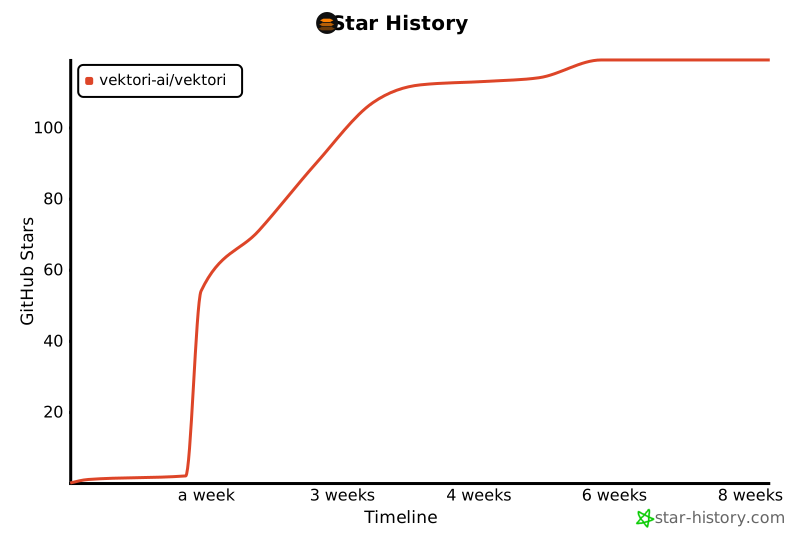
Star History
License
Apache 2.0. See LICENSE.
1 maintainer

Metadata
1 maintainer
Release files for vektori 0.1.2.dev121
For a detailed explanation of source distributions (sdists) and built distributions (wheels), please see the package formats documentation.
Source distribution (sdist)
| File | Size | Uploaded | Provenance | |
|---|---|---|---|---|
| vektori-0.1.2.dev121.tar.gz | 1.0 MB | With provenance | Details |
Built distribution (wheel)
| File | Interpreter | ABI | Platform | Reset |
|---|---|---|---|---|
| vektori-0.1.2.dev121-py3-none-any.whl | Python 3 | none | any | Details |
Total release size: 1.4 MB
Release files / vektori-0.1.2.dev121.tar.gz
| Download URL | vektori-0.1.2.dev121.tar.gz |
|---|---|
| Size | 1.0 MB |
| Tags | Source |
|
SHA-256 checksum How to use checksums |
8c45b2b0b5321d01d29e7b0a62c04b373bce602ba11782bbdf848748f791941f
|
|
BLAKE2b-256 checksum How to use checksums |
5a4ad7397b7f0b329d746395a4619a0b792748b1ee16b7e3adea3a5334ba4bb6
|
| Upload date | |
|
Uploaded using Trusted Publishing? What is trusted publishing? |
Yes |
| Uploaded via |
twine/6.1.0 CPython/3.13.12
|
Provenance
Provenance describes where a file came from. On PyPI, provenance is shared via attestations, which provide a verifiable record of the build or publishing details. View details, limitations and caveats.


PyPI Publish Attestation
PyPI verified that this artifact, at this checksum, originated from the publisher listed below.
Signed by GitHub Actions, verified by PyPI on May 5, 2026.
Transparency logRelease files / vektori-0.1.2.dev121-py3-none-any.whl
| Download URL | vektori-0.1.2.dev121-py3-none-any.whl |
|---|---|
| Size | 370.2 kB |
| Tags | Python 3 |
|
SHA-256 checksum How to use checksums |
771a4fceb55c1ebc77207c078c30afbd3158520bfd9720397540e3cce2063d3f
|
|
BLAKE2b-256 checksum How to use checksums |
19b5fa6625cdca104ad5b3a1ef1576e80e6247228ac1bdc95321d975d66f7e80
|
| Upload date | |
|
Uploaded using Trusted Publishing? What is trusted publishing? |
Yes |
| Uploaded via |
twine/6.1.0 CPython/3.13.12
|
Provenance
Provenance describes where a file came from. On PyPI, provenance is shared via attestations, which provide a verifiable record of the build or publishing details. View details, limitations and caveats.
PyPI Publish Attestation
PyPI verified that this artifact, at this checksum, originated from the publisher listed below.
Signed by GitHub Actions, verified by PyPI on May 5, 2026.
Transparency logSecurity for vektori 0.1.2.dev121
Provenance
Provenance describes where a file came from. On PyPI, provenance is shared via attestations, which provide a verifiable record of the build or publishing details. View details, limitations and caveats.
Full provenance
All 2 files in this release have been uploaded with provenance metadata.
Attestation for vektori-0.1.2.dev121.tar.gz
PyPI Publish Attestation
PyPI verified that this artifact, at this checksum, originated from the publisher listed below.
Signed by GitHub Actions, verified by PyPI on May 5, 2026.
Transparency logA note on package security
PyPI is a repository for distributing packages, not a service for auditing them. While third-party security researchers and our staff do their best to detect and remove malicious packages, PyPI cannot guarantee the quality, security or suitability of any given package.
To learn more about protecting yourself from malicious actors, visit our package security documentation.














