






venice-ai opencode claude-code codex openai-compatible
anthropic-compatible tool-calling llm-proxy venice-api-alternative
coding-agent ollama local-bridge macos python
venice-bridge is a free, open-source local bridge for macOS that lets OpenCode, Claude Code, Codex CLI and other OpenAI- or Anthropic-compatible coding agents use a venice.ai web subscription, with working tool calls.
It has two small Python processes. The bridge (venice_bridge.py, with the tolerant tool-call parser
tolerant_parser.py) runs an OpenAI Chat Completions server on 127.0.0.1:18891 and forwards each request to
the backend of the venice.ai web app, signed in with your own browser login. The optional adapter
(venice_adapters.py, standard library only) runs on 127.0.0.1:18892 and translates Anthropic Messages
(Claude Code) and OpenAI Responses (Codex CLI) into Chat Completions for the bridge. A launcher,
claude-venice, starts Claude Code against the adapter in its own profile. Nothing uses the paid Venice API,
and no API key is needed.
Documentation site: https://nsozturk.github.io/venice-bridge/ · Agent contract: AGENTS.md · Changelog: CHANGELOG.md · Tool routing reference: docs/TOOL_ROUTING.md
Screenshots
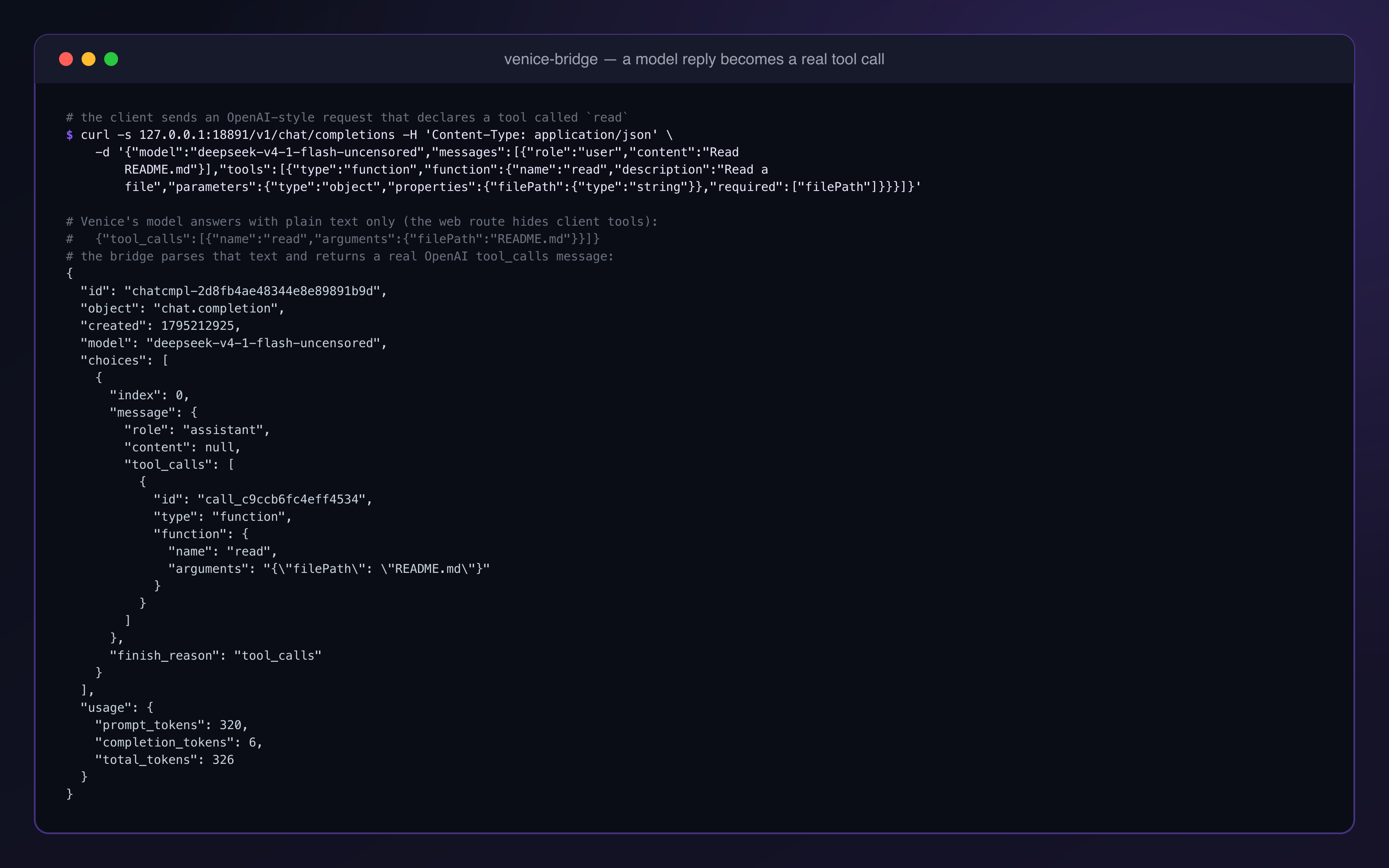 |
A request that declares a read tool. The Venice model answers in plain text; the bridge
parses that text and returns a standard OpenAI tool_calls message, which is what OpenCode runs. |
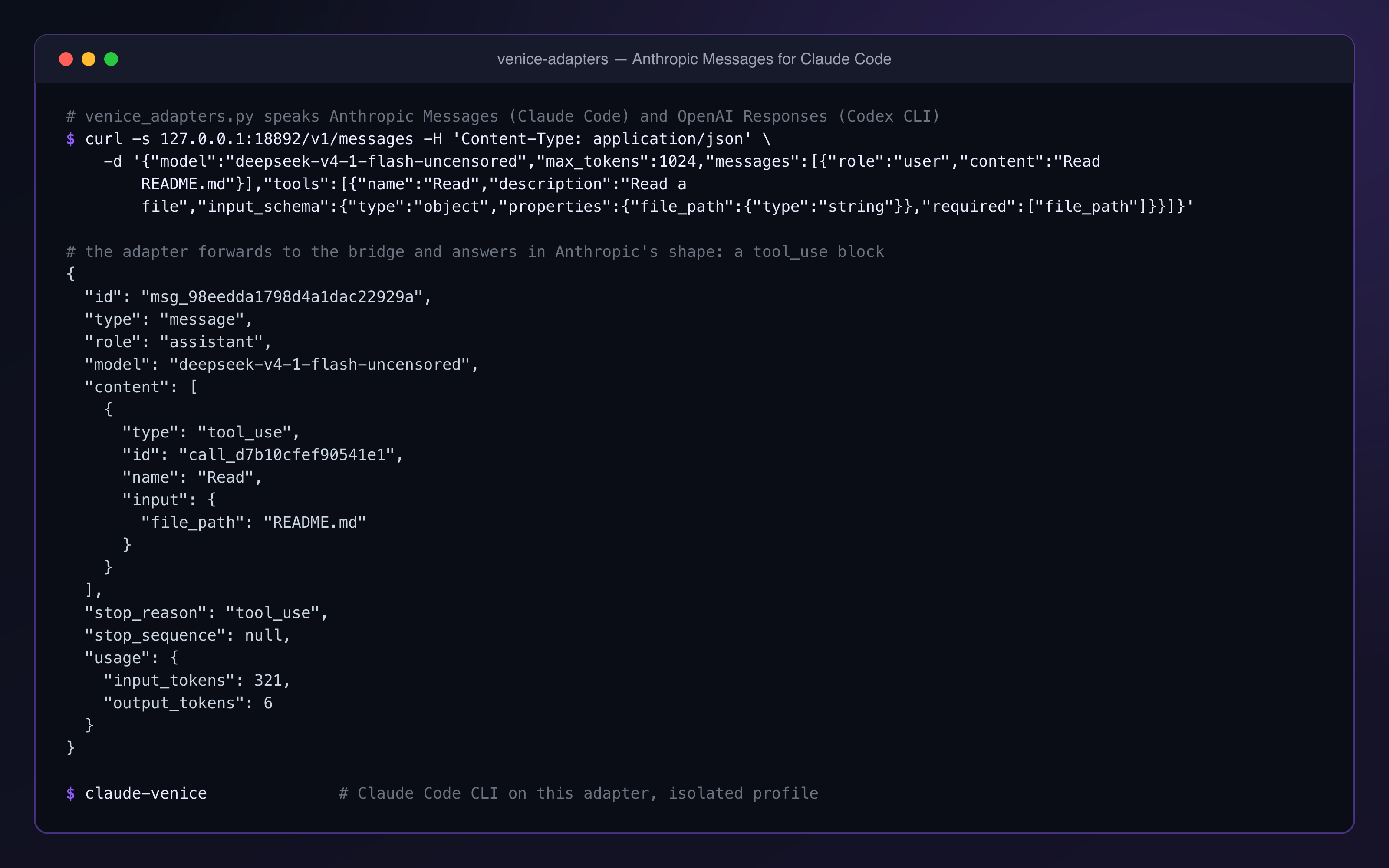 |
The adapter (venice_adapters.py) answers the same kind of request in Anthropic's
shape, a tool_use block. This is what Claude Code talks to when you start it with
claude-venice. |
Requirements
| Item | Notes |
|---|---|
| macOS | The system curl is used for the chat stream because it passes Cloudflare. Linux and Windows are untested. |
| Python 3.10+ | With curl_cffi (pip install curl_cffi, or pip install -r requirements.txt). The adapter needs only the standard library. |
| A venice.ai web account | Logged in on venice.ai in your browser. Tested on a paid plan (Pro). The agent route needs a paid plan (a free account gets 403 creator_access_required); a free account has a very small chat quota. |
| A client | OpenCode or anything else that speaks OpenAI Chat Completions talks to the bridge directly. Claude Code (Anthropic Messages) and Codex CLI (OpenAI Responses) go through the adapter. |
Quick start
This path sets up the bridge and OpenCode. Claude Code and Codex CLI need the same bridge plus the adapter; see Use it with Claude Code and Use it with Codex CLI.
1. Save your venice.ai login cookie
The bridge needs the value of the __client cookie of clerk.venice.ai. This is a long-lived login cookie; from
it the bridge mints a short-lived (about 60 s) session token and a client attestation for every request window.
- Log in on venice.ai in Chrome.
- Open DevTools → Application → Cookies →
https://clerk.venice.ai. - Copy the Value of
__client. - Save it to the cookie file:
mkdir -p ~/.config/venice-bridge && pbpaste > ~/.config/venice-bridge/client-cookie.txt && chmod 600 ~/.config/venice-bridge/client-cookie.txt
The file may hold the bare value or a pasted __client=<paste the cookie value>; string. The cookie is a live
credential for your Venice account: never commit it and never share it.
2. Run the bridge
pip install curl_cffi
python3 venice_bridge.py            # options: --host, --port (default 127.0.0.1:18891)
Or install it from PyPI as commands (venice-bridge,
venice-adapters, claude-venice):
pipx install venice-bridge          # or: pip install venice-bridge
venice-bridge                       # same options; venice-adapters starts the adapter
3. Check it
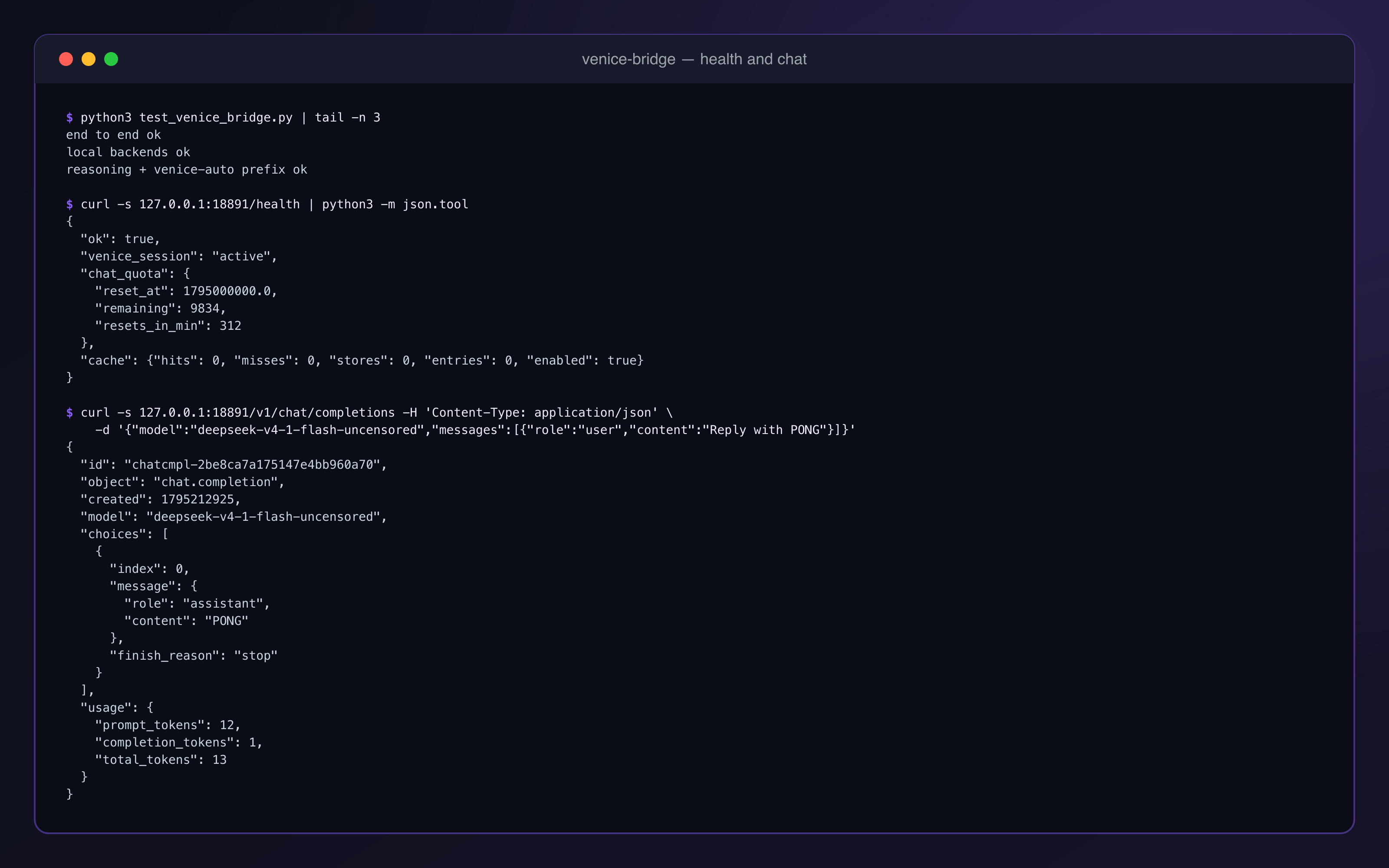
curl -s http://127.0.0.1:18891/health
A working setup answers 200 with "ok": true, "venice_session": "active", the remaining web chat quota
(chat_quota) and the response-cache counters (cache). If the login is missing or rejected it answers 503
with "ok": false and the reason.
4. Add the provider to OpenCode
Copy the provider block from examples/opencode.json into
~/.config/opencode/opencode.json (or a project opencode.json). The example lists nine models; this is the
same block with one of them:
{
  "$schema": "https://opencode.ai/config.json",
  "provider": {
    "venice-bridge": {
      "npm": "@ai-sdk/openai-compatible",
      "name": "Venice Web (local bridge)",
      "options": {
        "baseURL": "http://127.0.0.1:18891/v1",
        "apiKey": "local"
      },
      "models": {
        "deepseek-v4-1-flash-uncensored": {
          "name": "DeepSeek V4.1 Flash Uncensored (Venice Web)",
          "modalities": { "input": ["text"], "output": ["text"] },
          "limit": { "context": 524288, "output": 131072 }
        }
      }
    }
  }
}
apiKey is a placeholder; the bridge does not read it.
5. First run
opencode -m venice-bridge/deepseek-v4-1-flash-uncensored
Models in the example config: deepseek-v4-1-flash-uncensored, deepseek-v4-1-flash, z-ai-glm-5-3-flash,
kimi-k2-5, default (Venice "Auto"), qwen3-coder-480b-a35b-instruct-turbo, qwen3-6-27b, zai-org-glm-5.2,
venice-uncensored-1-2. GET /v1/models lists whatever your account's web catalogue offers without credits,
plus the models of every reachable local backend and the virtual
venice-auto model.
Any other OpenAI-compatible client works the same way: base URL http://127.0.0.1:18891/v1, any API key.
Use it with Claude Code
Claude Code speaks Anthropic Messages, so it goes through the adapter. Start both processes:
python3 venice_bridge.py      # 127.0.0.1:18891
python3 venice_adapters.py    # 127.0.0.1:18892, forwards to the bridge
Then use the claude-venice launcher from this folder:
ln -s "$PWD/claude-venice" ~/.local/bin/claude-venice    # or run ./claude-venice
ln -s "$PWD/claude-venice" ~/.local/bin/cv               # optional short alias (defaults to bypassPermissions)
claude-venice                                             # default model deepseek-v4-1-flash-uncensored
claude-venice --lean                                      # disable MCP servers (--strict-mcp-config)
claude-venice -m <venice-model-id>                        # another Venice model
VENICE_CLAUDE_MODEL=<venice-model-id> claude-venice       # same, from the environment
claude-venice -m deepseek-v4-1-flash-uncensored:web       # with Venice web search (see below)
claude-venice --resume <session-id>                       # resumes in bypassPermissions mode
claude-venice --models                                    # list the model ids the bridge serves
claude-venice --quota                                     # remaining web quota and cache counters
-m and --lean may appear anywhere before --; --models and --quota must be the first argument. Everything else is passed to claude.
What the launcher does:
- Runs the
claudeCLI in an isolated profile,~/.claude-venice(CLAUDE_CONFIG_DIR). Your normalclaudeinstall, its login and its settings are not touched. - Unsets
ANTHROPIC_API_KEY, setsANTHROPIC_BASE_URL=http://127.0.0.1:18892and a fillerANTHROPIC_AUTH_TOKEN, and pointsANTHROPIC_MODELand the opus / sonnet / haiku default-model variables at the chosen Venice id. A model id that the bridge does not list (such asclaude-...) is replaced by the adapter withVENICE_ADAPTER_MODEL; an id with a/(a localbackend/model) is passed through as is. - Checks before it starts: both
/healthendpoints answer and the Venice session is active. It warns when fewer than 500 requests are left in the web quota. - The ports
18891and18892are fixed in the script. If you run either process on another port, edit theBRIDGEandADAPTERlines at the top ofclaude-venice.
Use it with Codex CLI
Codex CLI speaks OpenAI Responses, so it also goes through the adapter (bridge and adapter running as above).
This command configures a provider on the command line and writes nothing to ~/.codex:
VB_KEY=local codex exec --skip-git-repo-check -c 'model_providers.vb={name="vb",base_url="http://127.0.0.1:18892/v1",wire_api="responses",env_key="VB_KEY"}' -c model_provider=vb -m deepseek-v4-1-flash-uncensored "<task>"
Measured with Codex CLI 0.163.0 on one machine: it ran exec_command and answered. Limits: Codex's namespace
tools (MCP servers, multi-agent) and its built-in web_search do not pass through the adapter; function tools and
freeform tools such as apply_patch do.
Local models (Ollama, LM Studio, llama.cpp)
A model id of the form <backend>/<model> is passed straight to that local OpenAI-compatible server, for example
ollama/qwen3:8b or lmstudio/<id>. Such a request needs no Venice login, uses no tool emulation and spends no
Venice quota. A leading venice-bridge/ is stripped first, so venice-bridge/ollama/qwen3:8b works too.
| Backend | Default base URL |
|---|---|
ollama |
http://127.0.0.1:11434/v1 |
lmstudio |
http://127.0.0.1:1234/v1 |
To add llama.cpp, MLX or any other OpenAI-compatible server, write ~/.config/venice-bridge/backends.json
(path override: VENICE_BRIDGE_BACKENDS). A file replaces the defaults, so list every backend you want;
examples/backends.json lists the two defaults plus llama.cpp:
{"backends":[{"name":"llamacpp","base_url":"http://127.0.0.1:8080/v1","api_key":null}]}
api_key is optional; when set it is sent as Authorization: Bearer <key>. An empty list turns local backends
off. The file is read on every request, so edits apply without a restart.
GET /v1/modelslists the Venice models plus the models of every reachable backend as<backend>/<id>. A backend that is down is skipped and never breaks the list; when Venice itself is unreachable, the local models are still listed.- A request to the bridge for a local-prefixed model whose backend is down answers
502(local_backend_error) and never falls through to Venice. - The same holds through the adapter: it passes any id that contains a
/straight to the bridge, so a local model asked from Claude Code or Codex reaches its backend or fails with502; it is never sent to Venice.
Model list and venice-auto
GET /v1/models lists only the Venice models your web subscription covers:
- Models that cost credits (
usesCredits: truein Venice's catalogue) are hidden. - End-to-end-encrypted models (
e2ee-*) are always hidden; they need client-side keys the bridge does not handle. VENICE_EXCLUDE_MODELShides more, as comma-separated glob patterns, for exampleVENICE_EXCLUDE_MODELS='qwen3-vl-*,venice-uncensored-*'.
The filter only changes the list: a hidden model can still be requested by its id.
The list also starts with one virtual id, venice-auto. It resolves to the first Venice id in
VENICE_AUTO_MODELS (comma-separated, default deepseek-v4-1-flash-uncensored,ollama/qwen3:8b). While the
bridge knows the daily web quota is used up, it resolves to the first local <backend>/<model> entry instead,
until the reset time Venice reports. The fallback is local only because the web quota is plan-wide: every Venice
model shares it, so another Venice model would fail the same way.
opencode -m venice-bridge/venice-auto      # add "venice-auto" to the models block of your OpenCode config
claude-venice -m venice-auto               # works through the adapter, because venice-auto is in the model list
Limits, so you know what to expect:
- The bridge learns that the quota is gone from a failed request, so the request that hits the limit still fails
once (
403venice_quota_exhausted); the requests after it go to the local model. - The local backend must be running, or the request answers
502(local_backend_error). Without a local entry inVENICE_AUTO_MODELSthere is no fallback and the quota error stays. - A suffix (
venice-auto:think,venice-auto:web) is kept for the Venice model and dropped for the local one. - The over-quota state lives in memory.
POST /reloadand a restart clear it; when Venice reports no reset time, the bridge asks again after about a minute. - A local model is not a Venice model: expect different quality, speed and context size.
Web search (opt-in)
Venice can run its own web search on the chat route. It is off by default, because Venice runs it on the server side and it can compete with the client's own tools in an agent loop.
- Per request, with a suffix on the model id:
<model>:web(web search and URL scraping),<model>:xsearch(X search), or both,deepseek-v4-1-flash-uncensored:web:xsearch. The suffix is removed before the id reaches Venice. The adapter keeps the suffix when the base id is valid, soclaude-venice -m <id>:webworks. - For the whole process: start the bridge with
VENICE_WEB=1and/orVENICE_X_SEARCH=1.
Measured: a :web request returned a current fact, with ^1^-style citation markers in the text. Search queries
and the pages Venice fetches go through your Venice account.
Reasoning (opt-in)
Venice's reasoning models can return their chain of thought. It is off by default, and a thinking turn is made only on the chat route and only for requests that declare no tools.
- Per request, with a suffix on the model id:
<model>:think(aliases:reason,:reasoning). It combines with the web suffixes, for exampledeepseek-v4-1-flash-uncensored:web:think. - For the whole process: start the bridge with
VENICE_REASONING=1. - From the client:
reasoning_effortmediumorhigh.none,minimal,lowor no effort means off.
The chain of thought comes back as OpenAI reasoning_content: a field on the message (non-stream) and
delta.reasoning_content chunks (stream), sent before the normal content. On a thinking turn the bridge also
lets Venice include its own system prompt, as the official web client does; without it the chat route returns
no reasoning.
With tools in the request, :think and VENICE_REASONING=1 are ignored, because a reasoning turn makes the
model expect its reasoning_content passed back on the next turn, which coding agents do not do (HTTP 400).
OpenCode, Claude Code and Codex always send tools, so :think has no effect in their agent loops; it is for plain
chat and scripts. The same holds for reasoning_effort: with tools in the request it is ignored and nothing
about reasoning is sent to Venice. The adapter does not forward a reasoning effort.
Response cache
A byte-identical repeat request (same model, messages, tools and parameters; stream aside) is answered from an
in-memory cache without a Venice call. Only clean successes (a real answer or a tool call) are stored, and a
stored non-stream result can be replayed as a stream and the reverse. The hit rate is modest by design: it
catches exact retries, and agent turns rarely repeat word for word. Local-backend requests are not cached.
| Variable | Default | Meaning |
|---|---|---|
VENICE_BRIDGE_CACHE |
on | 0 disables the cache. |
VENICE_BRIDGE_CACHE_MAX |
256 |
Entries kept (least recently used is dropped first). |
VENICE_BRIDGE_CACHE_TTL |
3600 |
Seconds an entry stays valid. |
GET /health returns the counters: cache: {hits, misses, stores, entries, enabled}. The cache lives in memory
only and is emptied when the bridge restarts.
What it costs: requests, not tokens
The Venice web plan is limited by a daily request quota, not by tokens. Every model step an agent takes is
one request; in-bridge retries and the early-stop judge can add more. Fewer requests save quota; shorter prompts
do not. GET /health shows chat_quota.remaining and resets_in_min (claude-venice --quota prints both).
To keep working after the quota runs out, use venice-auto with a local fallback.
The usage numbers in responses are an estimate (about 4 characters per token), because Venice returns no token
counts; the adapter reports cached_tokens: 0. Do not read them as billing.
Autostart with launchd
examples/com.example.venice-bridge.plist is a launchd template that
starts the bridge at login and restarts it if it exits.
examples/com.example.venice-adapters.plist does the same for the
adapter.
- Replace every
/PATH/TOwith real absolute paths (yourpython3and this folder). - Copy the file(s) to
~/Library/LaunchAgents/. - Load them:
launchctl bootstrap gui/$(id -u) ~/Library/LaunchAgents/com.example.venice-bridge.plist
launchctl bootstrap gui/$(id -u) ~/Library/LaunchAgents/com.example.venice-adapters.plist
The templates write their logs to venice_bridge.log and venice_adapters.log in this folder. Because they set
KeepAlive, a killed process is started again; unload them with
launchctl bootout gui/$(id -u)/com.example.venice-bridge (and …/com.example.venice-adapters) to stop them.
How it works
 OpenCode / any OpenAI client ──────── POST /v1/chat/completions ────────┐
                                                                         │
 Claude Code ── POST /v1/messages  ──┐                                   │
 Codex CLI ──── POST /v1/responses ──┤                                   │
                                     ▼                                   ▼
            venice-adapters 127.0.0.1:18892  ── chat/completions ──►  venice-bridge 127.0.0.1:18891
            (translation only, optional)                                 │
                                         model "<backend>/<id>" ┌────────┴────────┐ any other model
                                                                ▼                 ▼
                                    local server (Ollama, LM Studio, …)     venice.ai web backend
The adapter only translates messages, tool declarations, tool calls and results, and stream events, then
forwards to the bridge. Nothing about Venice lives in it; its upstream (VENICE_ADAPTER_UPSTREAM) can be any
Chat Completions server. Inside the bridge, a Venice request goes like this:
 venice-bridge  127.0.0.1:18891
        │  1. __client cookie ──► clerk.venice.ai      (session id, ~60 s session JWT)
        │  2. JWT ─────────────► outerface.venice.ai  (client attestation)
        │  3. chat request ────► outerface.venice.ai, route chosen by VENICE_BRIDGE_ROUTE (default auto):
        │       chat route:  /api/inference/chat                    (JSON lines; auto uses it first)
        │       agent route: /api/inference/chat/agents/ad-hoc      (SSE; auto uses it on 400 modelNotFound)
        ▼
 Venice web models  ──►  stream  ──►  bridge (call readers, tool routing)  ──►  OpenAI chunks / tool_calls
Routes
VENICE_BRIDGE_ROUTE chooses the Venice web route that carries the chat:
| Setting | Route | What happens |
|---|---|---|
auto (default) |
chat, agent as fallback | Uses the chat route. If Venice answers 400 modelNotFound for a model (measured for kimi-k2-5), the bridge remembers that model until it restarts and sends it to the agent route. |
chat |
POST outerface.venice.ai/api/inference/chat |
The web app's plain chat route (JSON lines, one object per line with a kind). Venice runs no agent loop there and gives the model no tools of its own, so nothing collides with the client's tools and no call is swallowed. |
agent |
POST outerface.venice.ai/api/inference/chat/agents/ad-hoc |
The agent route (Responses-style SSE). Needs a paid plan (a free account gets 403 creator_access_required). Venice runs its own agent loop here: the model gets Venice's server tools as native tools, a native call to a client tool is swallowed, and turns can end in "Tool not found". |
On the chat route the client's system prompt is folded into the first user message
([SESSION INSTRUCTIONS] … [END OF SESSION INSTRUCTIONS], then [USER REQUEST]), because that route's
413 userPromptTooLong limit (about 150,000 characters) applies to the systemPrompt field only; 460,000
characters inside a user message were accepted (measured). The log line timing open: … route=chat|agent shows
which route a request used.
On the agent route, a swallowed call shows only the tool name in the stream, never its arguments, so it cannot be
forwarded; Venice's own get_attachment / view_media run there with made-up ids.
Settings sent on the chat route
temperatureandtop_pare forwarded when the client sets them; otherwise Venice's own defaults apply.max_tokensis ignored by the route.- Reasoning is off by default. A thinking turn is made only when asked for (
:think,VENICE_REASONING=1orreasoning_effortmedium/high) and only when the request declares no tools; see Reasoning. Reasoning models want theirreasoning_contentpassed back on tool turns, which most clients do not do (HTTP 400), so a request with tools never gets reasoning, whatever it asks for. The adapter does not forwardtemperature,top_por a reasoning effort, so Claude Code and Codex always run with reasoning off. - Always sent: large-context chat on. Venice's own system prompt is off, except on a thinking turn.
- Web search is added only when asked for (see Web search); it applies to the chat route only.
Tool calling
Venice's web routes do not give the model the client's declared tools (measured on the
agent route /agents/ad-hoc and on /agents/venice: a declared bash client tool was invisible to the model; the
chat route offers the model no tools). The bridge therefore emulates tool calling in text. The full mapping
tables (tool-name aliases, argument-name aliases, Venice server-tool names, what is dropped) are in
docs/TOOL_ROUTING.md.
- Tool emulation. The tool list goes into the system prompt: built-in tools and tools already used in the
conversation with a compact full JSON schema, the rest as one-liners, inside a 78,000-character budget. A real
OpenCode request measured 411 tools and about 441,000 characters of system prompt. The model answers
{"tool_calls":[{"name":"...","arguments":{...}}]}; a format reminder with one example is appended as the last user message. - Tolerant parser.
tolerant_parser.py(a port of opencode-venice-web's parser, MIT) reads calls that are bare, fenced, after prose, in several envelopes, or structurally broken (8 of 8 real malformed replies in the fixtures). - Native call reader. Some models write tool calls in their own markup, with arguments, as text. On the chat
route DeepSeek V4.1 Flash writes
<|DSML| invoke name="shell"><|DSML| parameter name="command" string="true">ls</|DSML| parameter></|DSML| invoke>. The bridge reads that form and plain<invoke name=…><parameter name=…>, several calls per reply, takesstring="false"parameters as JSON, and never shows the markup as text. - Tagged call reader.
<tool_calls>{"name":...,"arguments":...}</tool_calls>is read too, including file content with unescaped quotes. - Tool routing. A call to a tool the client did not declare is routed to the client's tool for the same job (examples in the table below), and Venice server-tool names are mapped back to the client's tools. A call to an unknown name with no counterpart is passed to the client when the reply is only that call (under 200 characters of other text), so the client can tell the model; otherwise it is dropped and logged.
- Argument fitting. Arguments the model named differently are renamed, for example
path/file_path/filename→filePath,cmd/script→command,old_str→oldString,new_str→newString,contents/text→content,query/regex→pattern,link→url. This happens only when the tool expects that name, did not get it, and does not know the other name. Leftover arguments the tool's schema does not know are dropped and logged. - Prompt-header hint. The tool block tells the model that Venice's own tools and built-in function calling do not reach this computer, and which client tool does which job (read a file, run a command, search the web, fetch a web page).
- Completion check. A reply counts only after its completion signal:
response.completedon the agent route; on the chat route, which sends no closing event, a clean end of the HTTP response (curl exit code 0). A cut stream never becomes a half-written file. - Server-loop cut (agent route only). On the agent route Venice sometimes takes a model's native tool call for one of its own server tools, or runs one of its own tools, and answers the model "Tool not found" in a loop. The bridge tolerates 3 such steps, then cuts the response and retries with a reminder that names the tools. Cutting at the first step in which Venice runs its own tool was tried and removed: it made DeepSeek V4.1 Flash fail 7 of 8 turns, because the model usually recovers inside the same response.
- Retries. In-bridge retries (budget 2) for a server loop, an unreadable call, an empty reply, or a broken stream.
- Judge. A small model (
qwen3-5-35b-a3bby default) checks short turn endings after a tool result for early stops, such as a reply that only announces the next step. Disable it withVENICE_BRIDGE_JUDGE=0. - Stream gate. With tools, a prose reply longer than 200 characters is streamed while it is written; anything that may still become a tool call is held back. Failures before the status line are returned as HTTP 502, because OpenCode retries a 502 but not an error inside a started stream (measured).
- Error mapping. Quota used up → 403
venice_quota_exhaustedwith the reset time (OpenCode retries a 429 silently); a passing rate limit → 429; request too large (Venice 413) → 400context_length_exceeded; Cloudflare challenge → 502 with a clear message; a model the chat route does not know (Venice 400modelNotFound) → sent to the agent route withauto, or 502 "Venice answered HTTP 400" withchat.
Tool routing examples (foreign name → client tool):
| The model calls | Routed to |
|---|---|
cat, read_file, view |
read |
shell, execute, run_command |
bash (or shell on clients that name it so) |
str_replace, edit_file |
edit |
create_file, write_file |
write |
search, rg |
grep |
find_files |
glob |
web_search |
websearch |
web_scrape, fetch |
webfetch |
ls, list_dir |
list, or a shell ls |
Venice's get_attachment, view_media |
read, only when the id is a file path |
Clerk rotates the __client cookie while it is used. The bridge saves the rotated value to
~/.config/venice-bridge/rotated-client.json (mode 0600) and keeps using it across restarts.
Configuration
Environment variables are read when a process starts. Set them before you start it.
Bridge (venice_bridge.py)
| Variable | Default | Purpose |
|---|---|---|
VENICE_BRIDGE_HOST |
127.0.0.1 |
Bind address. Keep it on loopback (see SECURITY.md). --host overrides it. |
VENICE_BRIDGE_ROUTE |
auto |
Venice web route: auto (chat route; agent route for a model the chat route does not know), chat (chat route only), agent (agent route only; needs a paid plan). See Routes. |
VENICE_BRIDGE_COOKIE_FILE |
~/.config/venice-bridge/client-cookie.txt |
File holding the __client cookie value. |
VENICE_BRIDGE_SESSION_DIR |
empty (off) | Folder with a client.py exposing get_session(domain) that returns {"timestamp": <ms>, "tokens": {"clerk_client": "<value>"}}, for a local session daemon. Used when the cookie file is missing or empty. |
VENICE_BRIDGE_CLIENT_FILE |
~/.config/venice-bridge/rotated-client.json |
Where the rotated cookie is saved (mode 0600). |
VENICE_BRIDGE_BACKENDS |
~/.config/venice-bridge/backends.json |
Local backends file. Without it: ollama and lmstudio defaults. See Local models. |
VENICE_WEB |
off | 1 turns on Venice web search and URL scraping for every request. |
VENICE_X_SEARCH |
off | 1 turns on Venice X search for every request. |
VENICE_REASONING |
off | 1 turns on reasoning for every request that declares no tools. See Reasoning. |
VENICE_EXCLUDE_MODELS |
empty | Comma-separated glob patterns hidden from GET /v1/models (on top of credit models and e2ee-*), for example qwen3-vl-*,venice-uncensored-*. |
VENICE_AUTO_MODELS |
deepseek-v4-1-flash-uncensored,ollama/qwen3:8b |
Candidates for venice-auto: the first Venice id normally, the first local <backend>/<model> while the quota is used up. See venice-auto. |
VENICE_BRIDGE_CACHE |
on | 0 disables the response cache. |
VENICE_BRIDGE_CACHE_MAX |
256 |
Cache entries. |
VENICE_BRIDGE_CACHE_TTL |
3600 |
Cache entry lifetime in seconds. |
VENICE_BRIDGE_FORMAT_RETRIES |
2 |
In-bridge retries for server loops, unreadable calls, empty replies and broken streams. |
VENICE_BRIDGE_JUDGE |
on | 0 turns the early-stop judge off. |
VENICE_BRIDGE_JUDGE_MODEL |
qwen3-5-35b-a3b |
Model used by the judge. |
VENICE_BRIDGE_JUDGE_RETRIES |
1 |
Retries the judge may add per turn. |
VENICE_BRIDGE_LOOP_MAX_CALLS |
40 |
Tool calls per reply before a runaway reply is cut. |
VENICE_BRIDGE_LOOP_MAX_CHARS |
150000 |
Characters per tool-mode reply before it is cut. |
VENICE_BRIDGE_PROACTIVE_REFRESH_S |
30 |
Refresh the session token in the background when fewer seconds than this remain. |
VENICE_BRIDGE_COOKIE_POOL |
empty (off) | Opt-in multi-account pool: a 0600 file, one __client cookie per line (see cookie-pool.example.txt). On a quota 429 the bridge moves to the next account. |
VENICE_BRIDGE_MAX_ATTACHMENT_BYTES |
10485760 |
Per-file limit for image/document attachments (413 above it). |
VENICE_BRIDGE_MAX_TOTAL_ATTACHMENT_BYTES |
20971520 |
Total attachment limit per request. |
VENICE_BRIDGE_MAX_AUDIO_BYTES |
26214400 |
Upload limit for /v1/audio/transcriptions. |
VENICE_BRIDGE_ASR_MODEL |
nvidia/parakeet-tdt-0.6b-v3 |
Venice speech-to-text model. |
Command-line options: --host (default VENICE_BRIDGE_HOST, else 127.0.0.1) and --port (default 18891).
The bridge has no client authentication, so keep the host on loopback.
Adapter (venice_adapters.py)
| Variable | Default | Purpose |
|---|---|---|
VENICE_ADAPTER_HOST |
127.0.0.1 |
Bind address. Keep it on loopback. |
VENICE_ADAPTER_PORT |
18892 |
Port. |
VENICE_ADAPTER_UPSTREAM |
http://127.0.0.1:18891/v1 |
The Chat Completions server it forwards to (the bridge). |
VENICE_ADAPTER_MODEL |
deepseek-v4-1-flash-uncensored |
Used when the client asks for a model the upstream does not list (for example claude-... or gpt-...). |
VENICE_ADAPTER_DUMP |
empty (off) | An existing folder: every request body is saved there as JSON. Debugging only; the bodies contain your prompts and file contents. |
The adapter has no command-line options.
Launcher (claude-venice)
| Variable | Default | Purpose |
|---|---|---|
VENICE_CLAUDE_MODEL |
deepseek-v4-1-flash-uncensored |
Venice model id (-m <id> overrides it). |
VENICE_CLAUDE_SKIP_PERMS |
1 |
0 stops the launcher from adding --dangerously-skip-permissions. |
API
Bridge, 127.0.0.1:18891
| Method and path | Purpose | Status codes |
|---|---|---|
POST /v1/chat/completions |
OpenAI Chat Completions, streaming and non-streaming, with tools / tool_calls. A <backend>/<model> id is passed to that local backend; venice-auto is resolved first. When the model returns reasoning (see Reasoning), it comes as reasoning_content (message field, or delta.reasoning_content when streaming). |
200; 400 invalid JSON or context_length_exceeded; 402 plan or credits; 401/403 Venice refusal; 403 quota used up; 429 passing rate limit; 502 upstream, local backend (local_backend_error) or bridge failure |
GET /v1/models |
venice-auto first, then the Venice models the account's web catalogue offers without credits (minus e2ee-* and VENICE_EXCLUDE_MODELS), plus <backend>/<id> for every reachable local backend. |
200; 502 when nothing can be listed |
GET /health |
Session state, remaining web chat quota (chat_quota), cache counters (cache). |
200; 503 no usable login |
GET /stats |
Live runtime counters (requests, models, TTFT, retries, cache, pool, endpoint counts); ?format=html renders a minimal dark dashboard. |
200 |
POST /v1/audio/transcriptions |
OpenAI Whisper-compatible speech-to-text (multipart/form-data: file, model, response_format json/text/verbose_json), backed by Venice ASR (nvidia/parakeet-tdt-0.6b-v3). Supports mp3/wav/m4a/webm/ogg/flac up to VENICE_BRIDGE_MAX_AUDIO_BYTES (25 MB). |
200; 400 bad format; 413 too large; 502 upstream failure |
POST /v1/images/generations |
OpenAI Image Generation (`{"prompt", "n": 1, "size", "response_format": "b64_json" | "url"}, where urlreturns adata: URI), backed by Venice in-chat image generation (image_chunk`). Uses 1 chat + 1 image quota call. |
POST /reload |
Drops cached auth (cookie, session, token, attestation) and the local quota lock (also the over-quota state of venice-auto). |
200 |
Adapter, 127.0.0.1:18892
| Method and path | Purpose | Status codes |
|---|---|---|
POST /v1/messages |
Anthropic Messages (Claude Code), streaming and non-streaming, with tools. | 200; upstream status passed through; 400 body not JSON; 502 the bridge did not answer |
POST /v1/messages/count_tokens |
An estimate (input_tokens ≈ request size / 4). |
200 |
POST /v1/responses |
OpenAI Responses (Codex CLI), streaming and non-streaming, with function and freeform tools. | as /v1/messages |
GET /v1/models |
The upstream's model list, passed through. | 200; 502 |
GET /health |
{"ok": true, "upstream": "...", "default_model": "..."}. It does not check the bridge. |
200 |
On both processes any other path answers 404.
Measured performance
Measured in November 2026 on one machine with one account. These are observations, not guarantees.
- Bridge overhead per request: about 21 ms with a 441k-character prompt and 401 tools (against a local fake upstream).
- A short model step through the bridge: 1.5–3 s. A warm OpenCode session: 2.8–4.5 s per message.
- On the agent route, swallowed calls cost roughly 20–50 % of bridge time on models that prefer native tool calls; on the chat route none were seen.
Small-project benchmark: the coding client builds a Python todo CLI with tests and a README from one prompt. Wall time includes the client's own startup.
| Model id | Route used | Result | Time |
|---|---|---|---|
deepseek-v4-1-flash |
chat | working project, 3 of 3 runs, 0 retries, 0 swallowed calls | 34–51 s |
deepseek-v4-1-flash (before, agent route) |
agent | 2 of 4 runs produced a project | 63–203 s |
deepseek-v4-1-flash-uncensored |
chat | working project, 3 of 3 runs | 16 s, 56 s, and one 460 s run where the model itself took 86 steps to debug a test |
z-ai-glm-5-3-flash |
chat | working project | 84 s |
qwen3-coder-480b-a35b-instruct-turbo |
chat | working project | 86 s |
kimi-k2-5 |
agent (not on the chat route) | commands work, its own tests left failing | 146 s |
Model quality
Venice's fast models are weak at long agentic chains. In a small test of 5 one-tool runs per model through Claude Code, none of the three fast models produced a clean, correct final answer every time, and one invented a cited weather report. Measured on one machine, one account. Treat venice-bridge as a cheap runner for exploratory work, check what it produces, and do not use it for high-stakes changes.
When to use venice-bridge vs local vs paid
Because the Venice web route has no native tools / tool_choice and no prompt cache (cached_tokens: 0), match the backend to the job. On short synthetic tool benchmarks across four Venice models, the bridge scored 52/52 with 0 runaway cuts; caveat: that score comes from short synthetic tasks — in long real sessions before the runaway cutoff, 15 of 7,167 streams entered repetition loops, so 52/52 is not proof of 95%+ reliability on long sessions.
| Workload | Recommended route | Why |
|---|---|---|
| High-volume / parallel exploration, cheap throwaway runs | venice-bridge (pass claude-venice --lean if the repo has .mcp.json) |
Request-metered web plan, ~4–5 s per step, short synthetic tool benchmarks: 52/52 |
Offline / private / zero-quota work needing native tools |
Local models via Ollama / LM Studio / llama.cpp (direct or <backend>/<model> through the bridge) |
Native tool grammar, no external network or daily request cap |
| Deep multi-step coding, architecture, security review, strict schema / long-context fidelity | Paid native-tools APIs (including the metered api.venice.ai/api/v1) |
Native tools + tool_choice + real prompt caching; web login cookies do not work on api.venice.ai |
Troubleshooting
| Symptom | Cause | Fix |
|---|---|---|
403 with "Venice rejected the request (403): creator_access_required" |
The request went to the agent route on a free account; that route needs a paid plan. | Use an account with a paid Venice web plan (Pro). With VENICE_BRIDGE_ROUTE=agent, try auto. |
403 with error.type venice_quota_exhausted and "Resets in about N min" |
The web chat quota of the account is used up. The bridge answers locally until the reset. | Wait for the reset. GET /health shows the remaining quota and the reset time. To keep working meanwhile, use venice-auto with a local fallback. |
429 with error.type venice_rate_limited |
A passing Venice rate limit while quota is left. | Retry after a short wait; clients usually back off on their own. |
502 with "Cloudflare challenged the request" |
Cloudflare challenged the upstream call. | Open venice.ai in your browser, refresh the cookie file (or sync your session daemon), then retry. |
"No venice.ai login found" (503 on /health, 502 on chat) |
The cookie file is missing or empty and no session daemon is configured. | Save the cookie as in Quick start, or set VENICE_BRIDGE_COOKIE_FILE. |
| "Clerk ... rejected" or "token mint failed" | The saved cookie is no longer valid. | Log in on venice.ai again, save a fresh cookie, then curl -s -X POST http://127.0.0.1:18891/reload. |
400 with context_length_exceeded |
The request is larger than Venice accepts (Venice 413). | Start a new session or compact the conversation; use a model with a larger context. |
402 "Your Venice plan or credits do not cover this model" |
The model needs credits or a higher plan. | Pick a model that GET /v1/models lists. |
| The model says its tools are unavailable, or "Tool not found" (for example "the tool layer is down — shell, execute and read all return Tool not found") | The request went through the agent route (check route= in the log). Venice took the model's native tool call for one of its own server tools. |
Use VENICE_BRIDGE_ROUTE=auto or chat, or pick a model that exists on the chat route. In an existing conversation the model may keep believing its tools are broken: tell it they work now, or start a new session. |
502 with "Venice answered HTTP 400: … modelNotFound" while VENICE_BRIDGE_ROUTE=chat |
That model exists only on the agent route. | Use VENICE_BRIDGE_ROUTE=auto. |
claude-venice: "venice-bridge (…) is down" or "venice-adapters (…) is down" |
The bridge or the adapter is not running on its default port. | Start it (python3 venice_bridge.py, python3 venice_adapters.py), or load the launchd templates. |
claude-venice: "Venice web session is not active" |
The login cookie expired. | Save a fresh cookie as in Quick start, then POST /reload. |
| Claude Code: "Auto mode could not evaluate this action and is blocking it for safety" | Auto mode's safety classifier needs a model that Venice's fast models cannot replace. | Leave the launcher's default (VENICE_CLAUDE_SKIP_PERMS=1), or pass a --permission-mode <mode> other than auto to be asked before tools run. |
502 with local_backend_error "Local backend '…' (…) did not answer" |
The local server for that model prefix is not running, or its URL is wrong. | Start it; check ~/.config/venice-bridge/backends.json. |
| Log line "backends.json is not valid JSON; using the default backends" | A syntax error in the backends file. | Fix the JSON; it is read again on the next request. |
Codex cannot use MCP servers, multi-agent tools or web_search |
Namespace tools and Codex's built-in web_search do not pass through the adapter. |
Use function tools only, or the bridge's opt-in web search. |
The bridge logs to stderr (or to venice_bridge.log under the launchd template). Lines start with
[venice-bridge] and include upstream status codes, per-request timing and cache hits; the timing open: line
ends with route=chat or route=agent. The adapter logs one [venice-adapters] line per request (model, stream,
number of tools and messages, time).
FAQ
Does it need a Venice API key?
No. It uses the venice.ai web app's own backend with your browser login (the __client cookie). It does not
call the paid Venice API. The apiKey value in the OpenCode config is a placeholder.
Does it cost tokens?
No. The Venice web plan is limited by a daily number of requests, not by tokens. The usage numbers in responses
are estimates (about 4 characters per token). Fewer requests save quota; shorter prompts do not. See
What it costs.
Does it work on a free Venice account?
It was not tested on one. Everything was measured on a paid Venice web plan (Pro). The agent route needs a paid
plan; on a free account it answers 403 creator_access_required. A free account also has a very small chat quota
(about 5 messages per ~4 hours when it was observed).
Does it work with Claude Code or Codex?
Yes, through the adapter (venice_adapters.py on 127.0.0.1:18892), which translates Anthropic Messages and
OpenAI Responses into Chat Completions for the bridge. For Claude Code use the claude-venice launcher; for
Codex CLI pass a provider on the command line. See Use it with Claude Code and
Use it with Codex CLI. Venice's fast models are weak at long agentic chains, so expect
to check their work.
Does it run local models?
Yes. A model id <backend>/<model> (for example ollama/qwen3:8b) goes straight to that local
OpenAI-compatible server: Ollama and LM Studio by default, llama.cpp, MLX or others through
~/.config/venice-bridge/backends.json. No Venice login, no tool emulation, no quota. See
Local models.
What happens when my daily Venice quota runs out?
Venice requests answer 403 venice_quota_exhausted with the reset time until the quota resets. The quota is
plan-wide, so switching to another Venice model does not help. To keep working, use the virtual model
venice-auto: it serves a Venice model normally and a local model (default ollama/qwen3:8b) while the quota is
used up. The request that hits the limit still fails once, the local backend must be running, and a local model
may differ in quality, speed and context size. See Model list and venice-auto.
Can I use it from Docker?
Yes. A container reaches a bridge bound to 127.0.0.1 through http://host.docker.internal:18891/v1 (measured
with Docker Desktop on macOS). Binding the bridge to 0.0.0.0 is not needed and not recommended: it has no
client authentication.
Does it work on Linux or Windows?
Untested. It relies on the system curl to pass Cloudflare, and that has only been verified on macOS.
Is this allowed by Venice?
venice-bridge is unofficial and uses undocumented web endpoints. Automating your logged-in web session may be against Venice's terms of service. Use it at your own risk, with your own account only, and do not share cookies or accounts.
Where do my chats go?
From the bridge, Venice requests go only to Venice (clerk.venice.ai for login, outerface.venice.ai for
models, quota and chat), under your own account. With the judge on, a short extra request per checked turn also
goes to Venice. With web search on, Venice runs the searches and fetches the pages under your account. A
local-prefixed model goes only to its local backend. The adapter talks only to its upstream (the bridge by
default).
On disk, the bridge keeps only the rotated login cookie; each upstream call writes its headers and body to a
private temporary folder that is removed when the call ends. The response cache is in memory only. The adapter
writes request bodies to disk only when VENICE_ADAPTER_DUMP is set. The logs record request sizes, timing,
status codes, model names and short fragments of Venice's own tool steps. How Venice stores chats is governed by
Venice, not by this project.
Is it an alternative to opencode-venice-web?
It solves the same problem in Python instead of Node. opencode-venice-web is the most mature Venice web proxy and sends full schemas for every tool; venice-bridge sends full schemas only for built-in and already-used tools and one-liners for the rest, to fit large tool lists. Its tolerant parser is a port of opencode-venice-web's.
Alternatives / compared with
| Project | What it is |
|---|---|
| CanArslanDev/opencode-venice-web | Node. The most mature Venice web proxy; sends full schemas for every tool. |
| aintlikeu/unofficial-venice-proxy | Another Venice web proxy. |
| zalo-alex/venice-opencode | Another Venice web proxy. |
| Official Venice API | Paid, metered credits with an API key; OpenCode has a built-in venice provider for it. |
Tests
Two offline self-checks. They use temporary files and fake servers on localhost, never the real Venice endpoints, and need no running bridge.
python3 test_venice_bridge.py
cookie file ok
session ok
ok
end to end ok
local backends ok
reasoning + venice-auto prefix ok
python3 test_venice_adapters.py
messages ok
pick_model ok
responses ok
Success is these lines and exit status 0. A failure stops with an AssertionError traceback and a non-zero exit
status.
A live check of a running setup (bridge up and logged in):
claude-venice --quota
Venice web quota  remaining=<n>  resets_in_min=<n>
Bridge cache      hits=<n> misses=<n> entries=<n> enabled=True
If the bridge does not answer it prints could not read http://127.0.0.1:18891/health.
Credits
tolerant_parser.py is a Python port of the tolerant tool-call parser of
opencode-venice-web, and the malformed-reply fixtures come
from the same project; several reminder texts and the judge prompt are adapted from it. All are used under the MIT
License. See NOTICE.md and
THIRD_PARTY_LICENSE-opencode-venice-web.txt.
License
MIT © 2026 venice-bridge contributors.
1 maintainer

Metadata
1 maintainer
Release files for venice-bridge 0.2.6
For a detailed explanation of source distributions (sdists) and built distributions (wheels), please see the package formats documentation.
Source distribution (sdist)
| File | Size | Uploaded | Provenance | Actions |
|---|---|---|---|---|
| venice_bridge-0.2.6.tar.gz | 122.3 kB | Without provenance | Details for venice_bridge-0.2.6.tar.gz |
Built distribution (wheel)
| File | Interpreter | ABI | Platform | Actions Reset |
|---|---|---|---|---|
| venice_bridge-0.2.6-py3-none-any.whl | Python 3 | none | any | Details for venice_bridge-0.2.6-py3-none-any.whl |
Total release size: 211.4 kB
Release files / venice_bridge-0.2.6.tar.gz
| Download URL | venice_bridge-0.2.6.tar.gz |
|---|---|
| Size | 122.3 kB |
| Tags | Source |
|
SHA-256 checksum How to use checksums |
b3e5d64994aa852b65b601304db897481776e188428939e55d9d55e09fabcdd1
|
|
BLAKE2b-256 checksum How to use checksums |
5263b6c73ee4a8d5bbccab2d6f133cb2ddb2c42ed4d17eb6220b6c720341843e
|
| Upload date | |
|
Uploaded using Trusted Publishing? What is trusted publishing? |
No |
| Uploaded via |
twine/6.2.0 CPython/3.10.11
|
Release files / venice_bridge-0.2.6-py3-none-any.whl
| Download URL | venice_bridge-0.2.6-py3-none-any.whl |
|---|---|
| Size | 89.1 kB |
| Tags | Python 3 |
|
SHA-256 checksum How to use checksums |
27795e294247c3235984fd4cac09fbbe0d011b60fa9e2b37a0f7ec2cb69f974c
|
|
BLAKE2b-256 checksum How to use checksums |
57ff0efedf6de33acf5b4e41e238c9c65096d2bb1d5ef4708ead3cfd94412c08
|
| Upload date | |
|
Uploaded using Trusted Publishing? What is trusted publishing? |
No |
| Uploaded via |
twine/6.2.0 CPython/3.10.11
|
Security for venice-bridge 0.2.6
Provenance
Provenance describes where a file came from. On PyPI, provenance is shared via attestations, which provide a verifiable record of the build or publishing details. View details, limitations and caveats.
No provenance found
None of the files in this release were uploaded with provenance metadata.
A note on package security
PyPI is a repository for distributing packages, not a service for auditing them. While third-party security researchers and our staff do their best to detect and remove malicious packages, PyPI cannot guarantee the quality, security or suitability of any given package.
To learn more about protecting yourself from malicious actors, visit our package security documentation.














