
Ventriloquist
Turn a Mac app into an MCP server using the accessibility API.
Try it in a minute · Use from Claude, Cursor or Codex · How it works
An agent explores the app once, the interesting actions get compiled into a JSON "pack" of typed tools, and after that each tool call is deterministic replay. No model runs per UI step and none runs on the serving path. The client composing tool calls is still a model, so a multi-step workflow has one model in it, but it's deciding which tools to call, not where to click. No screenshots and no pixel coordinates anywhere in the codebase.
Try it in a minute
Needs macOS and uv (brew install uv).
uv tool install git+https://github.com/ShaanGS/ventriloquist
vent doctor
vent doctor checks the one permission vent needs. If it says
Accessibility is missing, open System Settings > Privacy & Security >
Accessibility, switch on your terminal app, restart the terminal, and run
it again. (pipx install git+https://github.com/ShaanGS/ventriloquist
works too.)
Now drive TextEdit with the pack that ships with vent:
echo "hello" > /tmp/vent-demo.txt && open -a TextEdit /tmp/vent-demo.txt
vent run TextEdit write_document --arg text="typed by a pack"
vent run TextEdit read_document
The document changes with no keystrokes and no screenshot: the pack sets
the text area's value through the accessibility API, then reads it back
to verify. write_document replaces the whole text of the frontmost
TextEdit document, which is why the first line opens a scratch file; don't
run it with a document you care about in front.
Use it from Claude, Cursor, or Codex
vent serve speaks MCP over stdio. GUI apps start MCP servers without
your shell's PATH, so the config needs vent's absolute path, and
vent mcp-config prints the entry with the right path for your machine:
{
  "mcpServers": {
    "ventriloquist": {
      "command": "/Users/you/.local/bin/vent",
      "args": ["serve"]
    }
  }
}
-
Claude Desktop: merge it into
~/Library/Application Support/Claude/claude_desktop_config.json. -
Cursor: merge it into
~/.cursor/mcp.json. -
Claude Code:
claude mcp add --scope user ventriloquist -- ~/.local/bin/vent serve -
Codex CLI: add to
~/.codex/config.toml:[mcp_servers.ventriloquist] command = "/Users/you/.local/bin/vent" args = ["serve"]
The Accessibility permission belongs to whichever app starts
vent serve: Claude Desktop or Cursor themselves, or your terminal for
Claude Code and Codex. Switch it on for that app (use the + button if it
isn't in the list yet) and restart it. If every call fails with "not
trusted for Accessibility", that's the fix.
Tools show up as textedit_write_document, code_show_search,
slack_filter_channels, and so on. Then ask for things in plain words,
like "open the Search view in VS Code and search the workspace for
TODO". Anything marked risk: high in a pack is refused unless the
server was started with VENT_ALLOW_HIGH=1;
docs/SECURITY.md
explains why.
What ships
| App | Tools | Notes |
|---|---|---|
| TextEdit | write_document, read_document |
Acts on the frontmost document; write_document replaces all of its text |
| Notes | create_note, read_open_note |
|
| VS Code | show_explorer, show_search, show_source_control, search_workspace |
Launch VS Code with --force-renderer-accessibility |
| Slack | show_home, filter_channels |
Same flag as VS Code |
Electron apps like VS Code and Slack only publish a working tree when
started with that flag, for example
open -a "Visual Studio Code" --args --force-renderer-accessibility.
Without it the tree can still be read, but actions get silently ignored.
Anchors are recorded per machine and per app version, so the bundled
packs are working examples of the format more than guarantees for your
exact setup. If a tool refuses to resolve, that's the safety design doing
its job (it never guesses between lookalike elements), and re-recording
takes about a minute with vent inspect and vent anchor. See section 5
of docs/ARCHITECTURE.md.
How it works
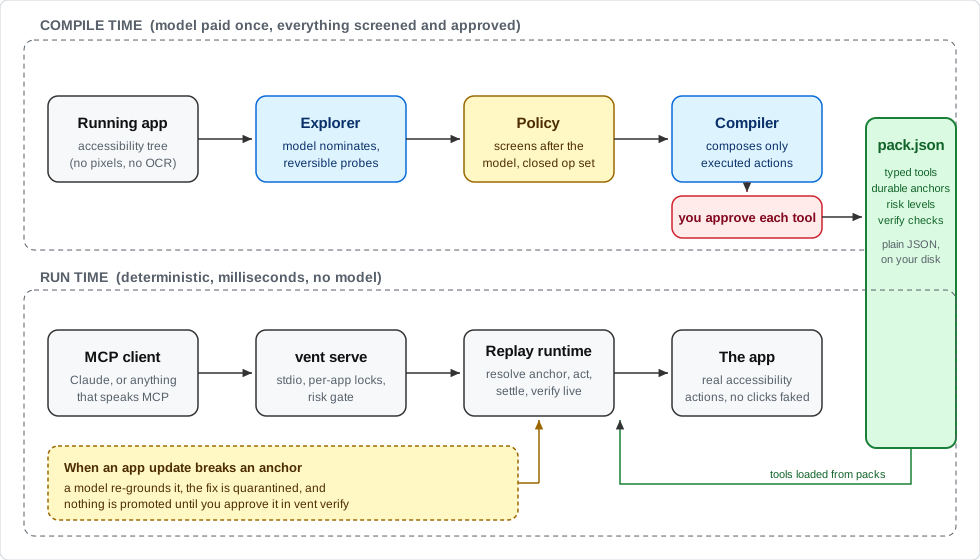
Most computer-use agents are interpreters. A model looks at your screen
and decides every single click, every time, which is slow and expensive
and breaks in weird ways. This is the compiler version of that. You pay
the model cost once during exploration and get back tools like
write_document(text). Calling them later costs no model tokens and takes
well under a second: on the author's Mac a read takes about 85 ms and a
write about 0.9 s, most of it spent waiting for the app to settle. When an
app update breaks a recorded action, a model is brought back in to fix it,
but the fix sits in quarantine until you approve it.
The top half of the diagram runs once per app and is where the model earns its keep, with a policy screening every probe and a human approving every tool. The bottom half is what you actually use day to day, and it has no model in it at all. The pack file in the middle is the whole interface between the two: plain JSON you can read, diff, and check into a repo.
The accessibility layer has been in every Mac app for decades because screen readers depend on it. It turns out it's also a pretty good API for driving apps, if you're careful about how you find elements again later.
How it compares
- Screenshot computer use (the computer-use features in Claude and Codex, and most open-source agents): a model looks at the screen and picks every action. It works on any app, and every step costs a model call.
- Accessibility MCP servers such as Peekaboo and MacOS-MCP: they hand the accessibility tree and its actions to your client's model, which still decides each click on every call. Nothing to record first, and nothing fixed either.
- AppleScript servers: dependable where an app has a scripting dictionary, which most Electron apps don't.
- Ventriloquist: the model works once, while you record. What gets served is a fixed set of tools you approved, replayed with no model. It covers fewer apps than any of the above, by design, and in exchange calls are cheap, fast, and the same every time. The closest idea elsewhere is terminator, which records workflows as deterministic code on Windows.
Make a pack for another app
vent doctor Spotify                 # does this app expose a usable tree?
vent explore Spotify --no-values    # a model probes safely, the policy screens every action
vent compile Spotify                # the model proposes tools; you approve each against its literal steps
vent run Spotify <tool> --arg k=v   # call one tool directly
vent verify Spotify                 # dry-resolve anchors; promote quarantined heals
vent explore, vent compile, and vent run --heal call a model, and so
does vent serve if you start it with VENT_HEAL=1 to let it heal broken
anchors. Nothing else does. The model comes from the Claude Code CLI if
it's installed and signed in, with no API key needed, or from the
Anthropic API: install with
uv tool install --with anthropic git+https://github.com/ShaanGS/ventriloquist
and set ANTHROPIC_API_KEY.
Packs you make live in ~/.ventriloquist/packs/ (set VENT_HOME to move
it), next to the traces vent explore records. A pack there replaces the
bundled pack for the same app, which is also where a healed bundled pack
ends up; delete your copy to go back to the bundled one.
Limitations
This is an early release by one developer. What it doesn't do yet, or does with caveats:
- macOS only. The whole approach rests on the macOS accessibility API.
- The Accessibility grant is broad. macOS gives it to the app that starts vent (your terminal, Claude Desktop, Cursor), and anything that app runs can then drive every app on your Mac. vent's own scoping (named apps, a policy, risk levels) is self-discipline inside that grant, not an OS boundary. SECURITY.md T10 has the details.
- Packs are recorded on one machine. Anchors held up under resizes, full restarts, and a deliberately degraded environment on the author's Mac, but nobody has measured them on a second Mac yet. A bundled pack may refuse on yours and need re-recording.
- The app needs a usable tree. AppKit apps have one. Electron and
Chromium apps need
--force-renderer-accessibility. Anything drawn on a canvas (Figma's design surface, games) exposes its chrome and nothing inside. - The app has to be running, with the window the tool expects. The Notes, VS Code, and Slack tools bring their app to the front while they run and hand focus back afterwards. A locked screen makes every app look empty.
- Calls to one app run one at a time. A GUI is one shared thing, so parallel calls against the same app queue.
- Preconditions are prose. VS Code's
search_workspacesays to open the Search view first, but nothing enforces it, and called cold it fails. Stateful preconditions are planned. - High-risk tools are all or nothing. They're refused unless the
server runs with
VENT_ALLOW_HIGH=1; per-call confirmation isn't built yet. - Exploring acts on your real app. The explorer clicks and types
under a policy, and probes are restored, but an app that syncs every
keystroke may send a probe string before it's undone. Explore against
a scratch document or a test account, and use
--no-valuesto keep field contents away from the model. vent compilereplaces a pack instead of merging into it.- Read tools hand app text to your client's model. vent marks it as untrusted data (SECURITY.md T12); whether the client respects that is up to the client.
- No system dialogs. File pickers and save sheets are out of scope for now.
Anchor durability, measured
vent harness <app> records anchors for an app's elements, messes with
the app (a real window resize, and optionally a full quit and relaunch),
and then tries to resolve every anchor again. Survival only counts when
the element found is provably the one that was recorded. Binding a
lookalike counts as WRONG, which is the number that actually matters.
Numbers from this machine (macOS 26, small anchor sets, early days):
TextEdit: baseline 100%,  resized 100%,   0 wrong
Finder:   baseline 100%,  resized 100%,   0 wrong
VS Code:  baseline  95%,  resized  87.5%, restart 92.5%, 0 wrong  (40 anchors)
Slack:    baseline  95%,  resized  82.5%, restart 82.5%, 0 wrong  (40 anchors)
Slack matters here more than the others. TextEdit and Finder have AppleScript, VS Code has a CLI and an extension API, so the apps that justify this project are the ones with no scripting surface at all, and Slack is the first of those measured. Its tree has no identifiers anywhere, so anchors ride entirely on labels and ancestor chains, and they still come back with zero wrong bindings across resize and a full restart. Every non-survivor is an ambiguity refusal.
Figma desktop is the deliberate worst case and it behaves like one: the app shell (tabs, navigation, buttons) publishes a usable tree, and the design canvas publishes nothing, because it's rendered pixels. That's the honest boundary of the accessibility thesis. Apps whose content is a custom-drawn canvas keep their chrome scriptable and their content opaque.
The VS Code restart round quits and relaunches the app completely, and 37 of 40 anchors still bind to provably the same element afterward. The ones that don't survive are refusals, not mistakes: Chromium trees are full of unlabeled twin groups, and when two candidates score too close together the resolver refuses to pick one. The VS Code pack's own curated anchors went 6 for 6 across view switches, a resize, and an actual app update.
Per-anchor survival flatters what a caller actually experiences, because
a tool touches several anchors plus settling and verification, so there
is a second harness mode that runs whole tools end to end.
vent harness <app> --tools executes every tool in the app's pack
repeatedly, resizing the window every other cycle:
TextEdit: 8/8 calls passed   (4 cycles)
VS Code:  12/16 calls passed (4 cycles, every failure the same tool)
Slack:    6/8 calls passed   (4 cycles, both failures ambiguity refusals)
The Slack pack is thin on purpose (navigation and a parameterized sidebar filter) but it is compiled capability, not just anchor survival. Its two failures happen when the resized window reflows the nav rail and the Home tab gains a lookalike; the resolver refuses to pick between them, which is a safe failure and still a failure. Nothing wrong was pressed in any cycle on any app.
The VS Code failures are all search_workspace called cold. Its
description says to open the Search view first, but that dependency is
prose, not a machine-checked precondition, so a caller who ignores it
fails and so does this harness, on purpose. The anchors were fine in
every failing call. That gap between 87.5% per-anchor and 75% per-tool
is the honest cost of state in a GUI, and stateful preconditions are the
planned fix.
There is also a first portability data point, from a deliberately
degraded environment rather than a second machine: the VS Code pack was
re-verified after collapsing the sidebar, closing every file and folder,
switching theme, disabling extensions, and resizing the window. The
three activity bar anchors resolved exactly, unmoved by the extension
removals that changed their sibling set. The two view-content anchors
whose views no longer existed failed the right way, one by refusing
outright, and one by binding a same-role neighbor, an open editor pane,
which the semantic drift check flagged. That near-miss became a runtime
rule: an element wearing a label its anchor has never been recorded
under is never acted on, so the call that would have typed into the open
editor now refuses and names the element it declined to touch. What this
run does not show is cross-machine portability; it was the same machine,
account, and app install. vent verify <app> --report out.json exists
for the real test: it produces a small JSON resolution table with no
model calls and no app content beyond each element's live label, meant
to be run on someone else's Mac and sent back.
Some field notes that ended up shaping the code: macOS AX trees can be cyclic (a wedged TextEdit once returned the app element as its own child, so every walk carries a cycle guard), apps relaunched from a background process serve junk menubar-only trees until they're genuinely foregrounded, a pending permission dialog silently degrades AX for every app launched after it, and a locked screen makes every app read as empty while the permission check still passes.
Design
Read docs/ARCHITECTURE.md before the code, and docs/SECURITY.md for the threat model. Both went through adversarial review before implementation and got rewritten from the findings, and each phase since has gotten the same treatment. docs/HANDOFF.md is the current state and what's next.
Contributing
Bug reports from Macs other than the author's are the most useful thing
right now, especially vent verify <app> --report out.json output for a
bundled pack. To work on the code:
git clone https://github.com/ShaanGS/ventriloquist && cd ventriloquist
python3 -m venv .venv && .venv/bin/pip install -e . pytest
.venv/bin/python -m pytest tests/
The test suite needs no Mac permissions, no live apps, and no model credentials, and runs in CI on Linux and macOS. CONTRIBUTING.md has the rules that are load-bearing.
License
MIT
1 maintainer

Metadata
1 maintainer
Release files for ventriloquist-mcp 0.2.0
For a detailed explanation of source distributions (sdists) and built distributions (wheels), please see the package formats documentation.
Source distribution (sdist)
| File | Size | Uploaded | Provenance | |
|---|---|---|---|---|
| ventriloquist_mcp-0.2.0.tar.gz | 115.4 kB | With provenance | Details |
Built distribution (wheel)
| File | Interpreter | ABI | Platform | Reset |
|---|---|---|---|---|
| ventriloquist_mcp-0.2.0-py3-none-any.whl | Python 3 | none | any | Details |
Total release size: 191.2 kB
Release files / ventriloquist_mcp-0.2.0.tar.gz
| Download URL | ventriloquist_mcp-0.2.0.tar.gz |
|---|---|
| Size | 115.4 kB |
| Tags | Source |
|
SHA-256 checksum How to use checksums |
534a74373934813df78d0bf09351712a07d4f3b8366ae866238429fbf522f8b9
|
|
BLAKE2b-256 checksum How to use checksums |
8c6cbdc8d56be72da0a29efaa152f3635195d6ee143fb7f3145f3fb4ea0d0e15
|
| Upload date | |
|
Uploaded using Trusted Publishing? What is trusted publishing? |
Yes |
| Uploaded via |
twine/7.0.0 CPython/3.13.16
|
Provenance
Provenance describes where a file came from. On PyPI, provenance is shared via attestations, which provide a verifiable record of the build or publishing details. View details, limitations and caveats.


PyPI Publish Attestation
PyPI verified that this artifact, at this checksum, originated from the publisher listed below.
Signed by GitHub Actions, verified by PyPI on Oct 20, 2026.
Transparency logRelease files / ventriloquist_mcp-0.2.0-py3-none-any.whl
| Download URL | ventriloquist_mcp-0.2.0-py3-none-any.whl |
|---|---|
| Size | 75.8 kB |
| Tags | Python 3 |
|
SHA-256 checksum How to use checksums |
1cdcd447ee81cf15216f66b18c3c0da5505a2da31174f842563ea67dd5d24797
|
|
BLAKE2b-256 checksum How to use checksums |
3112e69a43e0c84d493082ae7d18fcd1eb21f740eda297db84f7bf0f899843b3
|
| Upload date | |
|
Uploaded using Trusted Publishing? What is trusted publishing? |
Yes |
| Uploaded via |
twine/7.0.0 CPython/3.13.16
|
Provenance
Provenance describes where a file came from. On PyPI, provenance is shared via attestations, which provide a verifiable record of the build or publishing details. View details, limitations and caveats.
PyPI Publish Attestation
PyPI verified that this artifact, at this checksum, originated from the publisher listed below.
Signed by GitHub Actions, verified by PyPI on Oct 20, 2026.
Transparency logSecurity for ventriloquist-mcp 0.2.0
Provenance
Provenance describes where a file came from. On PyPI, provenance is shared via attestations, which provide a verifiable record of the build or publishing details. View details, limitations and caveats.
Full provenance
All 2 files in this release have been uploaded with provenance metadata.
Attestation for ventriloquist_mcp-0.2.0.tar.gz
PyPI Publish Attestation
PyPI verified that this artifact, at this checksum, originated from the publisher listed below.
Signed by GitHub Actions, verified by PyPI on Oct 20, 2026.
Transparency logA note on package security
PyPI is a repository for distributing packages, not a service for auditing them. While third-party security researchers and our staff do their best to detect and remove malicious packages, PyPI cannot guarantee the quality, security or suitability of any given package.














