





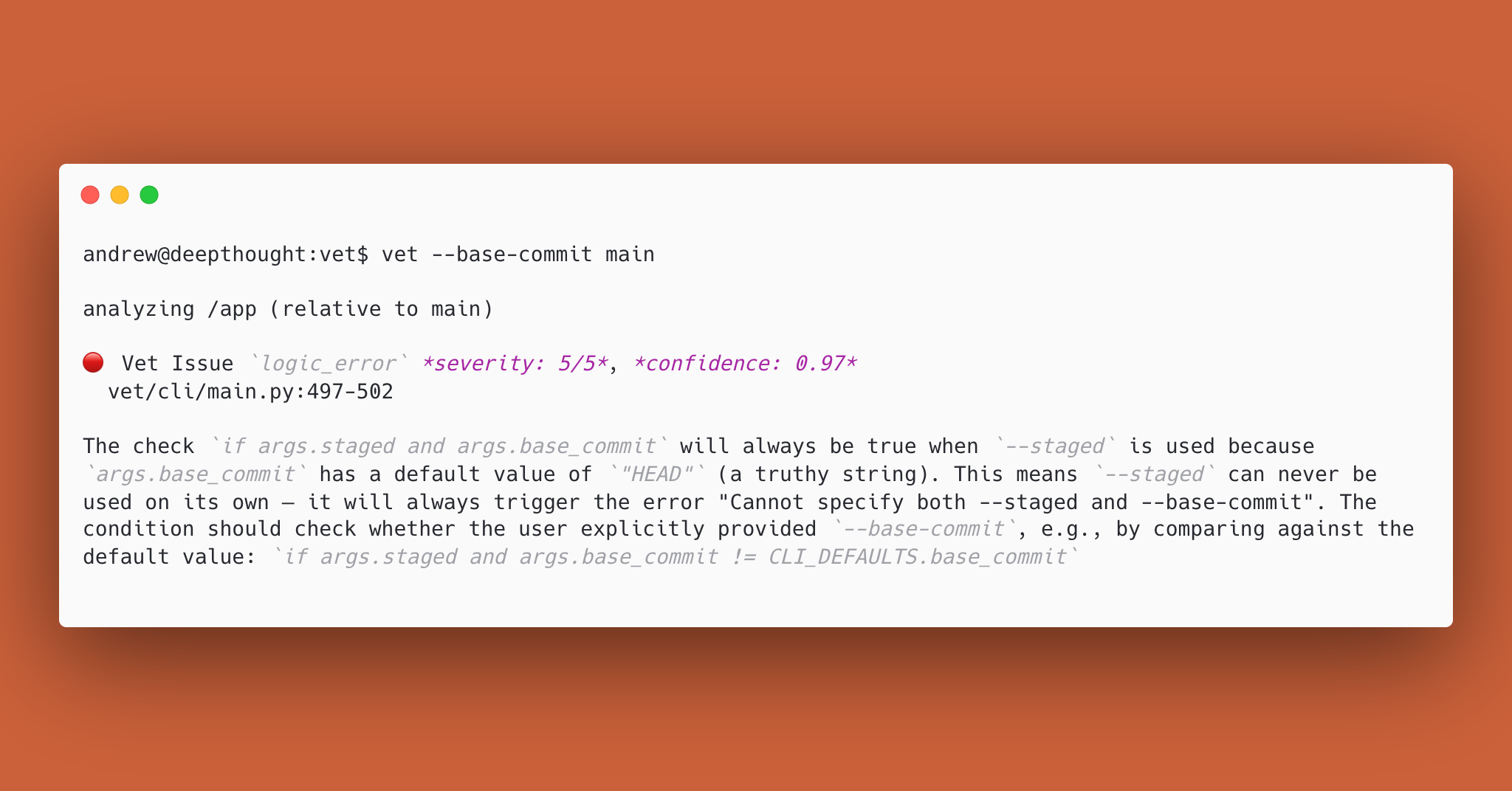
Vet is a standalone verification tool for code changes and coding agent behavior.
Why Vet
- Reviews intent and code: checks agent conversations for goal adherence and code changes for correctness.
- Runs anywhere: from the terminal, as an agent skill, or in CI.
- Bring-your-own-model: works with any provider using your own API keys.
- Works with existing subscriptions: supports Anthropic and OpenAI subscriptions using
--agentic. - Free and open source: no account, fees, or data collection. Requests go directly to your inference provider. Licensed under the AGPL-3.0.
Using Vet with Coding Agents
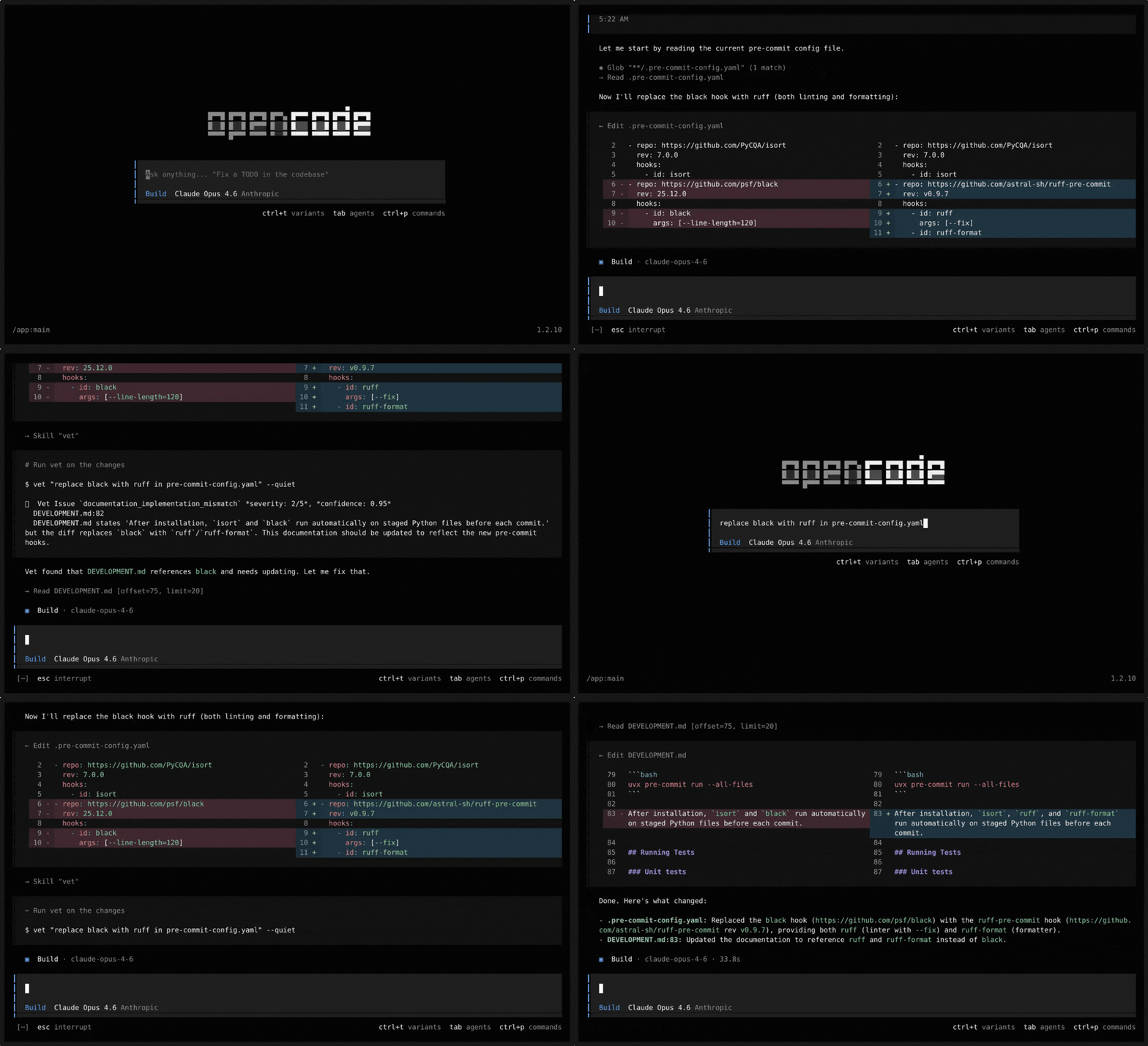
Vet includes an agent skill. When installed, agents will proactively run vet after code changes to find issues with the new code and mismatches between the user's request and the agent's actions.
Install the skill
curl -fsSL https://raw.githubusercontent.com/imbue-ai/vet/main/install-skill.sh | bash
You will be prompted to choose between:
- Project level: installs into
.agents/skills/vet/,.opencode/skills/vet/,.claude/skills/vet/, and.codex/skills/vet/at the repo root (run from your repo directory) - User level: installs into
~/.agents/,~/.opencode/,~/.claude/, and~/.codex/skill directories, discovered globally by all agents
Demo
Manual installation
Project Level
From the root of your git repo:
for dir in .agents .opencode .claude .codex; do
  mkdir -p "$dir/skills/vet/scripts"
  for file in SKILL.md scripts/export_opencode_session.py scripts/export_codex_session.py scripts/export_claude_code_session.py; do
    curl -fsSL "https://raw.githubusercontent.com/imbue-ai/vet/main/skills/vet/$file" \
      -o "$dir/skills/vet/$file"
  done
done
User Level
for dir in ~/.agents ~/.opencode ~/.claude ~/.codex; do
  mkdir -p "$dir/skills/vet/scripts"
  for file in SKILL.md scripts/export_opencode_session.py scripts/export_codex_session.py scripts/export_claude_code_session.py; do
    curl -fsSL "https://raw.githubusercontent.com/imbue-ai/vet/main/skills/vet/$file" \
      -o "$dir/skills/vet/$file"
  done
done
Security note
The --history-loader option executes the specified shell command as the current user to load the conversation history. It is important to review history loader commands and shared config presets before use.
Install the CLI
pip install verify-everything
Or with pipx:
pipx install verify-everything
Or with uv:
uv tool install verify-everything
Usage
Run Vet in the current repo:
vet "Implement X without breaking Y"
Compare against a base ref/commit:
vet "Refactor storage layer" --base-commit main
Use Claude Code, Codex, or OpenCode instead of LLM APIs (--agent-harness: claude, codex, opencode):
vet "Implement X without breaking Y" --agentic --agent-harness claude
GitHub PRs (Actions)
Vet reviews pull requests using a reusable GitHub Action.
Create .github/workflows/vet.yml:
name: Vet

permissions:
  contents: read
  pull-requests: write

on:
  pull_request:
    types: [opened, edited, synchronize, reopened]

jobs:
  vet:
    if: github.event.pull_request.draft == false
    runs-on: ubuntu-latest
    env:
      ANTHROPIC_API_KEY: ${{ secrets.ANTHROPIC_API_KEY }}
    steps:
      - uses: actions/checkout@v4
        with:
          ref: ${{ github.event.pull_request.head.sha }}
          fetch-depth: 0
      - uses: imbue-ai/vet@main
        with:
          agentic: false
The action handles Python setup, vet installation, merge base computation, and posting the review to the PR. ANTHROPIC_API_KEY must be set as a repository secret when using Anthropic models (the default). See action.yml for all available inputs.
How it works
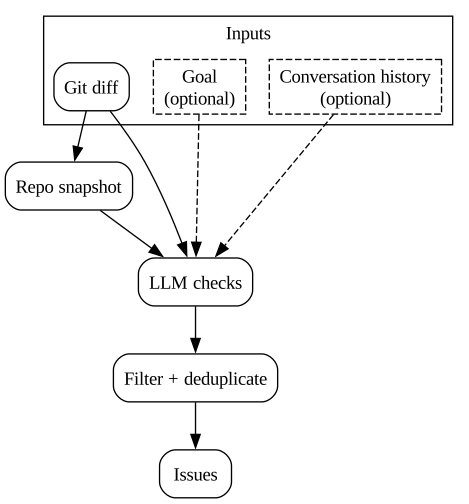
Vet snapshots the repo and diff, optionally adds a goal and agent conversation, runs LLM checks, then filters/deduplicates findings into a final list of issues.
Output & exit codes
- Exit code
0: no issues found - Exit code
1: unexpected runtime error - Exit code
2: invalid usage/configuration error - Exit code
10: issues found
Output formats:
textjsongithub
Configuration
Model configuration
Vet supports custom model definitions using OpenAI-compatible endpoints via JSON config files searched in:
$XDG_CONFIG_HOME/vet/models.json(or~/.config/vet/models.json).vet/models.jsonat your repo root
Example models.json
{
  "providers": {
    "openrouter": {
      "name": "OpenRouter",
      "api_type": "openai_compatible",
      "base_url": "https://openrouter.ai/api/v1",
      "api_key_env": "OPENROUTER_API_KEY",
      "models": {
        "gpt-5.2": {
          "model_id": "openai/gpt-5.2",
          "context_window": 400000,
          "max_output_tokens": 128000,
          "supports_temperature": true
        },
        "kimi-k2": {
          "model_id": "moonshotai/kimi-k2",
          "context_window": 131072,
          "max_output_tokens": 32768,
          "supports_temperature": true
        }
      }
    }
  }
}
Then:
vet "Harden error handling" --model gpt-5.2
Model registry
Vet maintains a remote model registry with community-contributed model definitions. To fetch the latest definitions without upgrading vet:
vet --update-models
This downloads model definitions from the registry and caches them locally at ~/.cache/vet/remote_models.json. Once cached, registry models appear in vet --list-models and can be used with --model like any other model.
Model resolution priority (highest to lowest):
- User config (
.vet/models.jsonor~/.config/vet/models.json) - Builtin models (Anthropic, OpenAI, Gemini)
- Registry models (cached via
--update-models)
See registry/CONTRIBUTING.md for information about contributing model definitions to the registry.
Configuration profiles (TOML)
Vet supports named profiles so teams can standardize CI usage without long CLI invocations.
Profiles set defaults like model choice, enabled issue codes, output format, and thresholds.
See the example in this project.
Custom issue guides
You can customize the guide text for the issue codes via guides.toml. Guide files are loaded from:
$XDG_CONFIG_HOME/vet/guides.toml(or~/.config/vet/guides.toml).vet/guides.tomlat your repo root
Example guides.toml
[logic_error]
suffix = """
- Check for integer overflow in arithmetic operations
"""

[insecure_code]
replace = """
- Check for SQL injection: flag any string concatenation or f-string formatting used to build SQL queries rather than parameterized queries
- Check for XSS: flag user-supplied data rendered into HTML templates without proper escaping or sanitization
- Check for path traversal: flag file operations where user input flows into file paths without validation against directory traversal (e.g. ../)
- Check for insecure cryptography: flag use of deprecated or weak algorithms (e.g. MD5, SHA1 for security purposes, DES, RC4)
- Check for hardcoded credentials: flag passwords, API keys, or tokens embedded directly in source code
"""
Section keys must be valid issue codes (vet --list-issue-codes). Each section supports three optional fields: prefix (prepends to built-in guide), suffix (appends to built-in guide), and replace (fully replaces the built-in guide). prefix and suffix can be used together, but replace is mutually exclusive with the other two. Guide text should be formatted as a list.
Community
New to Vet? Read the launch post for an intro and 2-minute demo.
Join the Imbue Discord for discussion, questions, and support. For bug reports and feature requests, please use GitHub Issues.
License
This project is licensed under the GNU Affero General Public License v3.0 (AGPL-3.0-only).
1 maintainer

Metadata
1 maintainer
Release files for verify-everything 0.2.16
For a detailed explanation of source distributions (sdists) and built distributions (wheels), please see the package formats documentation.
Source distribution (sdist)
| File | Size | Uploaded | |
|---|---|---|---|
| verify_everything-0.2.16.tar.gz | 205.3 kB | Details |
Built distribution (wheel)
| File | Interpreter | ABI | Platform | Reset |
|---|---|---|---|---|
| verify_everything-0.2.16-py3-none-any.whl | Python 3 | none | any | Details |
Total release size: 468.4 kB
Release files / verify_everything-0.2.16.tar.gz
| Download URL | verify_everything-0.2.16.tar.gz |
|---|---|
| Size | 205.3 kB |
| Tags | Source |
|
SHA-256 checksum How to use checksums |
45fbfb6d182df66d389769cb6b551a7be509fdd9b65a1cd315ee49379bebea7c
|
|
BLAKE2b-256 checksum How to use checksums |
823a9a7c7de8d7a3de19ba3ce4fc90c40b77c63fcf35d5a43f955211e8ef0200
|
| Upload date | |
|
Uploaded using Trusted Publishing? What is trusted publishing? |
No |
| Uploaded via |
twine/7.0.0 CPython/3.13.14
|
Release files / verify_everything-0.2.16-py3-none-any.whl
| Download URL | verify_everything-0.2.16-py3-none-any.whl |
|---|---|
| Size | 263.1 kB |
| Tags | Python 3 |
|
SHA-256 checksum How to use checksums |
25434d811d8410ed350311d7edd5f7bc7d8adaba4d2d0f080f5eb79e74bd9cd9
|
|
BLAKE2b-256 checksum How to use checksums |
2786f10c790341ec1a6a36f5e04b0fa5bd2b92f2fef5a91e70a769211ba0ba80
|
| Upload date | |
|
Uploaded using Trusted Publishing? What is trusted publishing? |
No |
| Uploaded via |
twine/7.0.0 CPython/3.13.14
|














