
智能 AI 助手会话结束通知系统

Project description
VibeNotification




English | 中文
Stop waiting when vibe coding — Give a notification when Claude Code or Codex finishes replies —
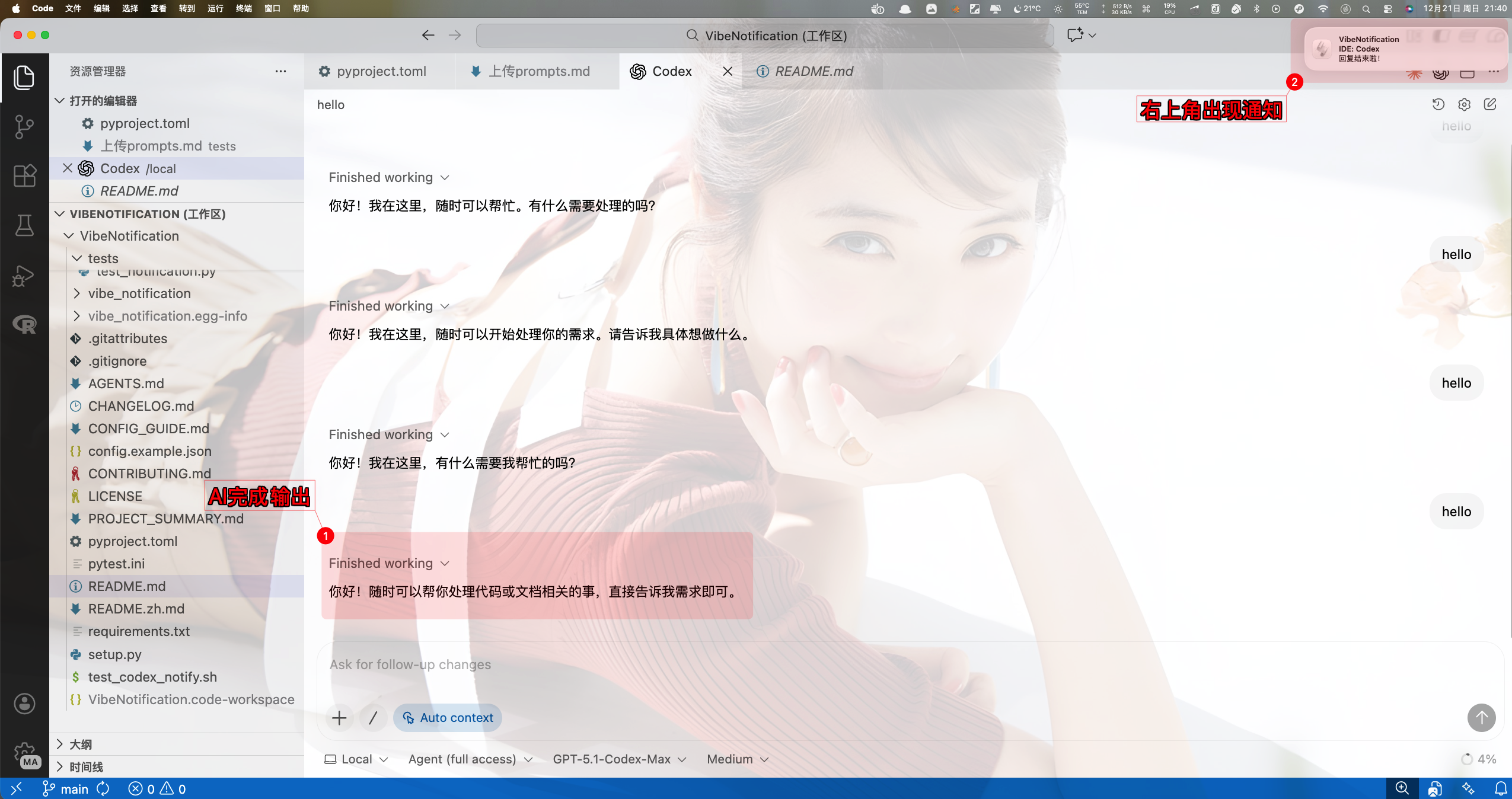
Installation
- Stable (PyPI):
pip install vibe-notification - Dev:
pip install -e . - Optional venv:
python -m venv venv && source venv/bin/activate - Verify:
python -m vibe_notification --test(should toast and chime when enabled) - Interactive setup:
python -m vibe_notification --config- Default config file:
~/.config/vibe-notification/config.json - Make sure both sound and system notifications are enabled
- Default config file:
Quick Start
Claude Code
- Hooks you can use:
Stop(on every reply),SessionEnd(when the session ends),SubagentStop(Task tool completes) - If what you want is "notify me when this reply is done", use
Stop. That is the default and usually the only hook you need. SessionEndis optional and only useful if you explicitly want a notification when the entire Claude Code session exits. Many users do not need it because session exit is user-initiated.- On macOS, VibeNotification now defaults to
senderoff in Claude Code hook contexts and terminal-hosted CLI contexts for more reliable banners. If you explicitly want host-app attribution/icon, setVIBE_NOTIFICATION_SENDER_MODE=auto. - If a notification appears only in Notification Center, check
System Settings > Notificationsfor the effective app (terminal-notifierwhen sender is off, or the host app such as VS Code / Terminal when sender is auto/force). Make sure notifications are allowed, banner/alert style is enabled, and Focus is not suppressing them. - Edit
~/.claude/settings.jsonand add a Stop hook:
{
  "hooks": {
    "Stop": [
      {
        "hooks": [
          {
            "type": "command",
            "command": "env VIBE_NOTIFICATION_SENDER_MODE=off python -m vibe_notification"
          }
        ]
      }
    ]
  }
}
- Example full settings snippet with environment variables:
{
  "$schema": "https://json.schemastore.org/claude-code-settings.json",
  "env": {
    "ANTHROPIC_AUTH_TOKEN": "xxx",
    "ANTHROPIC_BASE_URL": "https://open.bigmodel.cn/api/anthropic",
    "ANTHROPIC_DEFAULT_HAIKU_MODEL": "glm-4.6",
    "ANTHROPIC_DEFAULT_OPUS_MODEL": "glm-4.6",
    "ANTHROPIC_DEFAULT_SONNET_MODEL": "glm-4.6",
    "ANTHROPIC_MODEL": "glm-4.6",
    "CLAUDE_CODE_DISABLE_NONESSENTIAL_TRAFFIC": "1",
    "DISABLE_ERROR_REPORTING": "1",
    "DISABLE_TELEMETRY": "1",
    "MCP_TIMEOUT": "60000"
  },
  "hooks": {
    "Stop": [
      {
        "hooks": [
          {
            "command": "env VIBE_NOTIFICATION_SENDER_MODE=off python -m vibe_notification",
            "type": "command"
          }
        ]
      }
    ]
  },
  "includeCoAuthoredBy": false,
  "outputStyle": "engineer-professional"
}
- Session end only:
{
  "hooks": {
    "SessionEnd": [
      {
        "hooks": [
          {
            "type": "command",
            "command": "env VIBE_NOTIFICATION_SENDER_MODE=off python -m vibe_notification"
          }
        ]
      }
    ]
  }
}
- Combine multiple hooks (Stop + SessionEnd):
{
  "hooks": {
    "Stop": [
      {
        "hooks": [
          {
            "type": "command",
            "command": "env VIBE_NOTIFICATION_SENDER_MODE=off python -m vibe_notification"
          }
        ]
      }
    ],
    "SessionEnd": [
      {
        "hooks": [
          {
            "type": "command",
            "command": "env VIBE_NOTIFICATION_SENDER_MODE=off python -m vibe_notification"
          }
        ]
      }
    ]
  }
}
Codex CLI
Add a notifier command to ~/.codex/config.toml so Codex triggers VibeNotification when the agent actually finishes a turn (agent-turn-complete):
notify = ["python3", "-m", "vibe_notification"]
Note: notify is turn-based, not session-exit-based.
As of April 14, 2026, OpenAI's current Codex docs still describe notify and Stop/hook-style events as turn-scoped rather than whole-process-exit signals.
If you only want one notification after the whole Codex session exits, do not rely on notify. Use the built-in wrapper:
python -m vibe_notification --wrap-codex
You can pass normal Codex arguments through unchanged:
python -m vibe_notification --wrap-codex -- --help
python -m vibe_notification --wrap-codex -- -C /path/to/project
If you want this as your everyday entrypoint, add a shell alias such as:
alias codexn='python3 -m vibe_notification --wrap-codex --'
Then launch codexn; VibeNotification will fire only once, after the Codex process actually exits.
To inspect your local integration and spot config/semantic mismatches quickly:
python -m vibe_notification --doctor
Typical placement in config.toml:
model_provider = "xxx"
model = "gpt-5.1-codex-max"
model_reasoning_effort = "medium"
disable_response_storage = true
notify = ["python3", "-m", "vibe_notification"]

[model_providers.xxx]
name = "xxx"
base_url = "https://xxx/v1"
wire_api = "responses"
requires_openai_auth = true

[tui]
notifications = true
Configuration Recipes
Visual only (no sound)
- Codex
~/.codex/config.toml:
notify = ["python3", "-m", "vibe_notification", "--sound", "0"]
- Claude Code
~/.claude/settings.json:
{
  "hooks": {
    "Stop": [
      {
        "hooks": [
          {
            "type": "command",
            "command": "python -m vibe_notification --sound 0"
          }
        ]
      }
    ]
  }
}
- Quick test:
python -m vibe_notification --sound 0 --test
Sound only (no system toast)
- Codex:
notify = ["python3", "-m", "vibe_notification", "--notification", "0"]
- Claude Code:
{
  "hooks": {
    "Stop": [
      {
        "hooks": [
          {
            "type": "command",
            "command": "python -m vibe_notification --notification 0"
          }
        ]
      }
    ]
  }
}
- Quick test:
python -m vibe_notification --notification 0 --test
Temporary toggles (environment variables)
VIBE_NOTIFICATION_SOUND=0— mute soundVIBE_NOTIFICATION_NOTIFY=0— disable system notificationVIBE_NOTIFICATION_LOG_LEVEL=DEBUG— enable debug logging; raw Codex payloads are also appended to~/.config/vibe-notification/debug/codex-events.jsonlVIBE_NOTIFICATION_SENDER_MODE=off|auto|force— control macOSterminal-notifiersender binding; Claude Code hooks and terminal-hosted CLI contexts default tooff
Codex examples:
# Temporarily mute sound
notify = ["env", "VIBE_NOTIFICATION_SOUND=0", "python3", "-m", "vibe_notification"]

# Disable all notifications (for debugging)
notify = ["env", "VIBE_NOTIFICATION_NOTIFY=0", "VIBE_NOTIFICATION_SOUND=0", "python3", "-m", "vibe_notification"]

# Enable debug logging
notify = ["env", "VIBE_NOTIFICATION_LOG_LEVEL=DEBUG", "python3", "-m", "vibe_notification"]
Claude Code example:
{
  "hooks": {
    "Stop": [
      {
        "hooks": [
          {
            "type": "command",
            "command": "env VIBE_NOTIFICATION_SOUND=0 VIBE_NOTIFICATION_SENDER_MODE=off python -m vibe_notification"
          }
        ]
      }
    ]
  }
}
CLI tests:
VIBE_NOTIFICATION_SOUND=0 python -m vibe_notification --test
VIBE_NOTIFICATION_SOUND=0 VIBE_NOTIFICATION_NOTIFY=0 python -m vibe_notification --test
VIBE_NOTIFICATION_LOG_LEVEL=DEBUG python -m vibe_notification --test
VIBE_NOTIFICATION_SENDER_MODE=off python -m vibe_notification --test
Sound type
Available macOS sound types: Glass (default), Ping, Pop, Tink, Basso.
notify = ["env", "VIBE_NOTIFICATION_SOUND_TYPE=Ping", "python3", "-m", "vibe_notification"]
# Low tone
notify = ["env", "VIBE_NOTIFICATION_SOUND_TYPE=Basso", "python3", "-m", "vibe_notification"]
Claude Code:
{
  "hooks": {
    "Stop": [
      {
        "hooks": [
          {
            "type": "command",
            "command": "env VIBE_NOTIFICATION_SOUND_TYPE=Pop python -m vibe_notification"
          }
        ]
      }
    ]
  }
}
Test different sounds:
VIBE_NOTIFICATION_SOUND_TYPE=Tink python -m vibe_notification --test
VIBE_NOTIFICATION_SOUND_TYPE=Ping python -m vibe_notification --test
Volume control
Volume range is 0.0–1.0.
notify = ["env", "VIBE_NOTIFICATION_SOUND_VOLUME=0.2", "python3", "-m", "vibe_notification"]
notify = ["env", "VIBE_NOTIFICATION_SOUND_VOLUME=0.5", "python3", "-m", "vibe_notification"]
notify = ["env", "VIBE_NOTIFICATION_SOUND_VOLUME=0", "python3", "-m", "vibe_notification"] # mute
Claude Code:
{
  "hooks": {
    "Stop": [
      {
        "hooks": [
          {
            "type": "command",
            "command": "env VIBE_NOTIFICATION_SOUND_VOLUME=0.3 python -m vibe_notification"
          }
        ]
      }
    ]
  }
}
Quick test:
VIBE_NOTIFICATION_SOUND_VOLUME=0.1 python -m vibe_notification --test
VIBE_NOTIFICATION_SOUND_VOLUME=0.8 python -m vibe_notification --test
Notification timeout
Edit ~/.config/vibe-notification/config.json:
{
  "enable_sound": true,
  "enable_notification": true,
  "notification_timeout": 5000,
  "sound_type": "Glass",
  "sound_volume": 0.1,
  "log_level": "INFO"
}
5000= 5s auto-dismiss10000= 10s (default)30000= 30s0= sticky, manual close
Or use the interactive config:
python -m vibe_notification --config
Prebuilt combos
Focus mode (low volume + toast only + short display):
notify = ["env", "VIBE_NOTIFICATION_SOUND_VOLUME=0.1", "VIBE_NOTIFICATION_SOUND_TYPE=Basso", "python3", "-m", "vibe_notification"]
Meeting mode (sound only, louder, specific tone):
notify = ["env", "VIBE_NOTIFICATION_NOTIFY=0", "VIBE_NOTIFICATION_SOUND_VOLUME=0.7", "VIBE_NOTIFICATION_SOUND_TYPE=Ping", "python3", "-m", "vibe_notification"]
Debug mode (all on + debug logs):
notify = ["env", "VIBE_NOTIFICATION_LOG_LEVEL=DEBUG", "python3", "-m", "vibe_notification"]
CLI Reference
Command-line options
| Option | Type | Default | Description |
|---|---|---|---|
event_json |
positional | - | Optional Codex event JSON string |
--test |
flag | - | Send a test notification |
--config |
flag | - | Interactive configuration |
--sound {0,1} |
choice | config value | Enable/disable sound (0=off, 1=on) |
--notification {0,1} |
choice | config value | Enable/disable system notification (0=off, 1=on) |
--log-level {DEBUG,INFO,WARNING,ERROR} |
choice | config value | Set log level |
--version |
flag | - | Show version |
Config file
Location: ~/.config/vibe-notification/config.json
| Key | Type | Default | Description |
|---|---|---|---|
enable_sound |
bool | true |
Enable sound |
enable_notification |
bool | true |
Enable system notification |
notification_timeout |
int | 10000 |
Duration in ms |
sound_type |
string | "default" |
Sound type |
sound_volume |
float | 0.1 |
Sound volume |
log_level |
string | "INFO" |
Log level |
detect_conversation_end |
bool | true |
Detect end of conversation |
macos_sender_mode |
string | "auto" |
Sender mode for macOS: auto, off, or force |
Environment variables
| Env | Description | Example |
|---|---|---|
VIBE_NOTIFICATION_SOUND |
Override sound setting | VIBE_NOTIFICATION_SOUND=0 |
VIBE_NOTIFICATION_NOTIFY |
Override notification setting | VIBE_NOTIFICATION_NOTIFY=0 |
VIBE_NOTIFICATION_LOG_LEVEL |
Override log level | VIBE_NOTIFICATION_LOG_LEVEL=DEBUG |
VIBE_NOTIFICATION_SENDER_MODE |
Override macOS sender binding mode | VIBE_NOTIFICATION_SENDER_MODE=off |
Typical commands
# Test (toast + sound)
python -m vibe_notification --test

# Toast only
python -m vibe_notification --sound 0 --test

# Sound only
python -m vibe_notification --notification 0 --test

# Debug logs
python -m vibe_notification --log-level DEBUG --test
Hook usage examples
Claude Code:
echo '{"toolName": "Bash"}' | python -m vibe_notification
VIBE_NOTIFICATION_SOUND=0 echo '{"toolName": "Task"}' | python -m vibe_notification
VIBE_NOTIFICATION_NOTIFY=0 python -m vibe_notification
Codex:
python -m vibe_notification '{"type":"agent-turn-complete","thread-id":"thread-1","turn-id":"turn-1","cwd":"/tmp/project","input-messages":["fix tests"],"last-assistant-message":"Done"}'
python -m vibe_notification '{"type":"agent-turn-complete","thread-id":"thread-1","turn-id":"turn-1","cwd":"/tmp/project","input-messages":["fix tests"],"last-assistant-message":"Done"}' --notification 1 --sound 0
VIBE_NOTIFICATION_SOUND=1 VIBE_NOTIFICATION_NOTIFY=1 python -m vibe_notification '{"type":"agent-turn-complete","thread-id":"thread-1","turn-id":"turn-1","cwd":"/tmp/project","input-messages":["fix tests"],"last-assistant-message":"Done"}'
Publishing to PyPI
- Bump the version in
pyproject.toml(single source of truth). - Install tooling:
python -m pip install --upgrade build twine. - Build:
python -m build(creates.tar.gzand.whlunderdist/). - Validate:
python -m twine check dist/*. - Upload:
TWINE_USERNAME=__token__ TWINE_PASSWORD=<pypi-token> python -m twine upload dist/*(use--repository testpypito dry run). - Install + verify:
pip install -U vibe-notificationthenpython -m vibe_notification --test.
Release history Release notifications | RSS feed


Download files
Download the file for your platform. If you're not sure which to choose, learn more about installing packages.
Source Distribution
Built Distribution
Filter files by name, interpreter, ABI, and platform.
If you're not sure about the file name format, learn more about wheel file names.
Copy a direct link to the current filters
File details
Details for the file vibe_notification-1.0.18.tar.gz.
File metadata
- Download URL: vibe_notification-1.0.18.tar.gz
- Upload date:
- Size: 49.3 kB
- Tags: Source
- Uploaded using Trusted Publishing? No
- Uploaded via: twine/6.2.0 CPython/3.12.7
File hashes
| Algorithm | Hash digest | |
|---|---|---|
| SHA256 |
01506609c3a97aa334b9582e6bf98c7eec0afbfd0a3b62d9d943263eb8daa2c3
|
|
| MD5 |
283a78968f236f47e691f3193837993a
|
|
| BLAKE2b-256 |
be7166e9b98facf4f96f7aa54b9be050cba1d68c36035546c5815b1ea829f5f2
|
File details
Details for the file vibe_notification-1.0.18-py3-none-any.whl.
File metadata
- Download URL: vibe_notification-1.0.18-py3-none-any.whl
- Upload date:
- Size: 55.3 kB
- Tags: Python 3
- Uploaded using Trusted Publishing? No
- Uploaded via: twine/6.2.0 CPython/3.12.7
File hashes
| Algorithm | Hash digest | |
|---|---|---|
| SHA256 |
17a7200393c0f927ef98bb5bd0564d82dd0612da81e65997323e51cba58553e5
|
|
| MD5 |
388eca426ba109608e24e2cfb06b8209
|
|
| BLAKE2b-256 |
dbe02c79062d7743500af1ec69a0338e02b942075dd3dc0918137dec065e9809
|






