
vibemaxxing
Run several Claude Code accounts from one machine, switch between them in a second, and see all their plan limits in one place.
If you have more than one Claude subscription, you already know the problem: the only way
to change account is /logout, /login, browser, paste. And nothing anywhere tells you
how much weekly headroom you have left across all of them.
vibe switch work
Install
uv tool install vibemaxxing # or: pipx install vibemaxxing
macOS and Linux. Python 3.11+. Two commands, same program: vibe and vibemaxxing.
Start
vibe add                  # store the account you are already logged in to
vibe add side             # log a second one in, in the browser
vibe list                 # see both, and what is left on them
vibe switch side          # Claude Code is now that account
vibe add with no name takes the login already in Claude Code, no browser and no
network. That is the fastest way in: one command and you have your first account stored.
Every day
vibe                          open the dashboard in the terminal
vibe usage web                open it in a browser at http://127.0.0.1:8787
vibe list                     every account, its limits, the pooled total
vibe switch <name>            change the active account
vibe run <name> -- <cmd>      run one command as one account
vibe remove <name>            forget an account
vibe alias <old> <new>        rename one
vibe help                     what each command is for
switch, or run?
vibe switch work changes the account globally, the same as logging out and back in.
Claude Code sessions already running keep the old one until they restart.
vibe run work -- claude pins one command to one account and leaves everything else
alone. Two terminals can hold two different accounts at once:
vibe run work -- claude          # this window is "work"
vibe run side -- claude          # that window is "side"
See what is left
$ vibe list
* work      you@example.com   max 20x
    Session                   34%
    Weekly · all models       61%
    Weekly · Fable            12%

  side      side@example.com  max
    Session                    2%
    Weekly · all models        9%

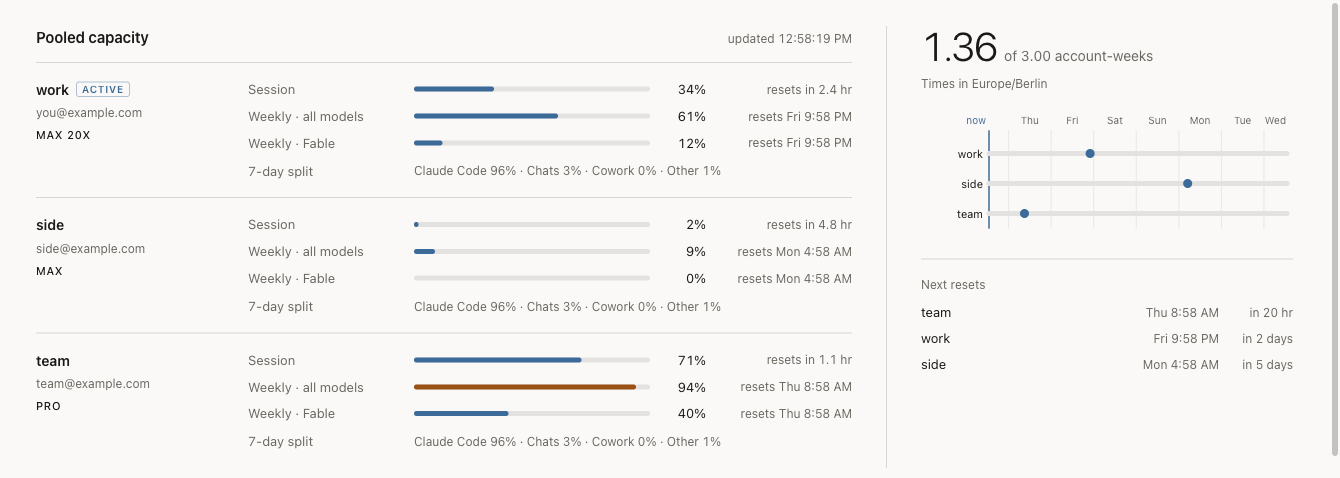
pool  1.36 account-weeks across 2 accounts
account-weeks is the pooled number: one account with a fresh weekly limit is 1.00.
Two accounts each 50% spent is also 1.00. It answers "how much Claude do I have left in
total", which no single account's percentage can.
The web dashboard adds the week ahead: one lane per account, a marker where that account's weekly limit resets, in your own timezone. So you can see whether a reset lands before your work does.
Scripting
--json works on every command and prints one documented envelope, the same bytes the
dashboard serves at /api/usage:
vibe list --json | jq '.pool.remaining_account_weeks'
vibe list --json | jq -r '.resets[] | "\(.alias) \(.at)"'
The schema is frozen in docs/CONTRACT.md §10.
How it works
It swaps credentials, plus the one line of config that names them. One ~/.claude
history and one MCP config, shared by every account, exactly as if you had logged in and
out by hand. On macOS the active credential is Claude Code's own Keychain item; on Linux
it is ~/.claude/.credentials.json.
vibe switch also repoints oauthAccount in ~/.claude.json and clears its
profileFetchedAt, because Claude Code caches that profile for 24 h and would otherwise
run on the new token while still showing the old account's email, org and limits. It
refetches the rest itself on the next start, so a fresh machine needs no setup beyond
vibe add and vibe switch.
Tokens refresh on demand about five minutes before expiry, behind a consume gate: a refresh rotates the refresh token, so the successor is written to disk before the predecessor is treated as spent. A crash mid-refresh leaves a recoverable successor rather than a dead account.
It talks to three hosts and no others — claude.ai, platform.claude.com,
api.anthropic.com — and refuses to contact anything else, redirects included. No
version pings, no analytics, no telemetry. The web dashboard binds 127.0.0.1, and
--host with anything else is a hard error.
Known limitations
Real and deliberate. None of these is a bug report.
Your tokens sit in plaintext JSON at rest. ~/.vibemaxxing/accounts/*.json, mode
0600, directories 0700. Anyone who can read your files can read your tokens — which
is equally true of ~/.claude itself.
The macOS Keychain write puts the credential in argv. vibe switch shells out to
/usr/bin/security add-generic-password -w <blob>, and macOS shows any local user a
process's full argv through ps. For the length of one exec, the credential is
readable cross-uid. The alternatives were measured and are worse: security -i silently
truncates at ~4005 bytes and stores the truncated value, and the Security framework
refuses to read Claude Code's item from a process outside its ACL, which would put an
authorization prompt in front of every switch. Multi-user macOS is out of scope for v1.
vibe run cannot refresh its own token. It sets CLAUDE_CODE_OAUTH_TOKEN for the
child only, which is what lets two shells hold two accounts, but a session outliving that
access token needs a re-run. Every grandchild inherits the variable.
Switching does not reach a running session. vibe switch makes no attempt to signal
a live Claude Code process. Restart it, or use vibe run.
Usage numbers can be a few minutes old. Anthropic's usage endpoint allows roughly 30
requests per account per hour, shared by everything that asks. Every vibe process
reuses one answer per account for about 3 minutes. An account that gets rate limited waits
1 to 8 minutes before its next try, longer if the server asks but never more than an hour,
and shows its last numbers and the time they are from in the meantime. Numbers more than
an hour old are not shown at all.
The active account's token is Claude Code's to refresh. Neither the dashboard nor
vibe run refreshes it, because refreshing one token from two places kills whichever side
goes second. If no Claude Code session has run since the token expired (about 8 hours),
the active account shows its last numbers for up to an hour and then a message saying
so, and vibe run on it asks you to start claude once. vibe switch and vibe alias
refuse while a token refresh or another switch is under way; run them again, or wait
30 seconds if one was killed mid-way.
Windows is unsupported. It says so rather than half-working.
Uninstall
uv tool uninstall vibemaxxing
rm -rf ~/.vibemaxxing
That is everything it creates. Your Claude Code login is untouched; whichever account was active stays active.
Contributing
Issues and pull requests welcome. CONTRIBUTING.md has the setup and
the one command CI runs. docs/CONTRACT.md is the frozen design and
the authority on any question of intent.
MIT licensed. Not affiliated with Anthropic.
1 maintainer

Metadata
1 maintainer
Release files for vibemaxxing 0.2.2
For a detailed explanation of source distributions (sdists) and built distributions (wheels), please see the package formats documentation.
Source distribution (sdist)
| File | Size | Uploaded | |
|---|---|---|---|
| vibemaxxing-0.2.2.tar.gz | 349.9 kB | Details |
Built distribution (wheel)
| File | Interpreter | ABI | Platform | Reset |
|---|---|---|---|---|
| vibemaxxing-0.2.2-py3-none-any.whl | Python 3 | none | any | Details |
Total release size: 411.3 kB
Release files / vibemaxxing-0.2.2.tar.gz
| Download URL | vibemaxxing-0.2.2.tar.gz |
|---|---|
| Size | 349.9 kB |
| Tags | Source |
|
SHA-256 checksum How to use checksums |
17dcef2adedd0672ee951b9d067a1584f67a0c99533b7cfbfd943827157ec641
|
|
BLAKE2b-256 checksum How to use checksums |
c42706066b2eb77d4655b753f7dcc5ab5ba5d88fa9c4472fa6ffd47f3b7d4499
|
| Upload date | |
|
Uploaded using Trusted Publishing? What is trusted publishing? |
Yes |
| Uploaded via |
twine/7.0.0 CPython/3.13.14
|
Provenance
Provenance describes where a file came from. On PyPI, provenance is shared via attestations, which provide a verifiable record of the build or publishing details. View details, limitations and caveats.


PyPI Publish Attestation
PyPI verified that this artifact, at this checksum, originated from the publisher listed below.
Signed by GitHub Actions, verified by PyPI on Sep 17, 2026.
Transparency logRelease files / vibemaxxing-0.2.2-py3-none-any.whl
| Download URL | vibemaxxing-0.2.2-py3-none-any.whl |
|---|---|
| Size | 61.4 kB |
| Tags | Python 3 |
|
SHA-256 checksum How to use checksums |
f6395f3940bc6267d7cc436bd794a8d77c5c397bdea8dcac696eb45f6abd1bb4
|
|
BLAKE2b-256 checksum How to use checksums |
dafffd0fe8d228de3da3c0c341f8d6e8f0feb88d33e36ec13a84f77a93864f91
|
| Upload date | |
|
Uploaded using Trusted Publishing? What is trusted publishing? |
Yes |
| Uploaded via |
twine/7.0.0 CPython/3.13.14
|
Provenance
Provenance describes where a file came from. On PyPI, provenance is shared via attestations, which provide a verifiable record of the build or publishing details. View details, limitations and caveats.
PyPI Publish Attestation
PyPI verified that this artifact, at this checksum, originated from the publisher listed below.
Signed by GitHub Actions, verified by PyPI on Sep 17, 2026.
Transparency log













