
vibepython: AI-Powered Interactive Python Code Generator
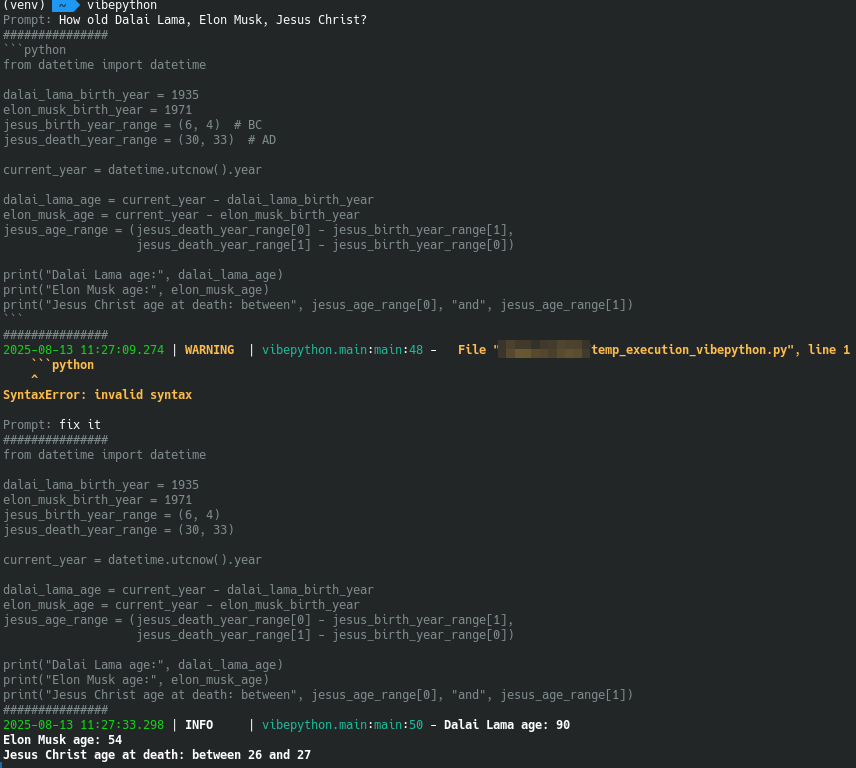
vibepython is an interactive command-line tool that uses AI to generate executable Python code from user prompts. Powered by OpenAI or alternative providers, it allows you to create, run, and capture code outputs while maintaining a contextual history stored in JSON. Ideal for developers, experimenters, and AI enthusiasts looking for a seamless coding experience.
Example of work
Features
- Interactive Prompting: Enter your ideas and receive AI-generated Python code.
- AI Code Generation: Leverages AI models with prompt history for accurate scripts.
- Safe Code Execution: Run generated code and capture stdout/stderr outputs.
- Persistent History: Uses Pydantic models to store interactions in JSON for ongoing context.
- Customization via Environment Variables: Adjust settings for personalized control.
- Docker Support: Easy deployment in containerized environments.
Installation
From PyPI
- Install the package:
pip install vibepython - Run the tool:
vibepython
From Source
- Clone the repository:
git clone https://github.com/OldTyT/vibepython.git - Navigate to the directory:
cd vibepython - Install dependencies:
pip install -r requirements.txt - Launch the application:
python3 main.py
Using Docker
Run the container with this command:
docker run --rm -ti -e HISTORY_PATH=/history/history.json -v my_history:/history ghcr.io/oldtyt/vibepython
- Set your OpenAI API key via the
OPENAI_API_KEYenvironment variable (required for the 'openai' provider).
Usage
Start the tool and follow the prompts:
- Enter a prompt (e.g., "Write a function to calculate factorial").
- The AI generates code based on your input and history.
- All interactions are logged to history for context.
To exit, press Ctrl+C.
Environment Variables
Customize the tool using these environment variables:
| Variable | Default | Description |
|---|---|---|
HISTORY_PATH |
history.json |
Path to the JSON history file. |
HISTORY_SIZE |
7 |
Number of past interactions to include in AI context. |
OPENAI_API_KEY |
None |
Required for the openai provider; your OpenAI API key. |
PROVIDER |
gpt4free |
AI provider to use. Supports gpt4free, ollama and openai. |
MODEL_NAME |
Varies by provider (gpt-4o for gpt4free, gpt-5-mini for openai, llama3 for ollama) |
Model to use with the provider. |
OLLAMA_URL |
http://localhost:11434 |
Ollama URL(only for ollama provider). |
Example configuration:
export PROVIDER=openai
export OPENAI_API_KEY=your-api-key
export MODEL_NAME=gpt-5-mini
export HISTORY_SIZE=10
python3 main.py
1 maintainer

Metadata
1 maintainer
Release files for vibepython 0.0.5
For a detailed explanation of source distributions (sdists) and built distributions (wheels), please see the package formats documentation.
Source distribution (sdist)
| File | Size | Uploaded | |
|---|---|---|---|
| vibepython-0.0.5.tar.gz | 10.4 kB | Details |
Built distribution (wheel)
| File | Interpreter | ABI | Platform | Reset |
|---|---|---|---|---|
| vibepython-0.0.5-py3-none-any.whl | Python 3 | none | any | Details |
Total release size: 23.1 kB
Release files / vibepython-0.0.5.tar.gz
| Download URL | vibepython-0.0.5.tar.gz |
|---|---|
| Size | 10.4 kB |
| Tags | Source |
|
SHA-256 checksum How to use checksums |
d7c15814fcae06e8d7905ad571825d552de6fa69a547bb37ae466094d8f4b352
|
|
BLAKE2b-256 checksum How to use checksums |
a3212e7d5550e4a23cb222904606c66dc0df20206ebce72ec42943c2f132a4aa
|
| Upload date | |
|
Uploaded using Trusted Publishing? What is trusted publishing? |
Yes |
| Uploaded via |
twine/6.1.0 CPython/3.12.9
|
Provenance
Provenance describes where a file came from. On PyPI, provenance is shared via attestations, which provide a verifiable record of the build or publishing details. View details, limitations and caveats.


PyPI Publish Attestation
PyPI verified that this artifact, at this checksum, originated from the publisher listed below.
Signed by GitHub Actions, verified by PyPI on Aug 13, 2025.
Transparency logRelease files / vibepython-0.0.5-py3-none-any.whl
| Download URL | vibepython-0.0.5-py3-none-any.whl |
|---|---|
| Size | 12.7 kB |
| Tags | Python 3 |
|
SHA-256 checksum How to use checksums |
64bbabe5c6f897e04d4ef21a37378431649870b088c4ce7b1e4dc1389033b0d4
|
|
BLAKE2b-256 checksum How to use checksums |
815919c1f8567a2d612638c645b191b708d22f767a75c483df41754e3f0218e3
|
| Upload date | |
|
Uploaded using Trusted Publishing? What is trusted publishing? |
Yes |
| Uploaded via |
twine/6.1.0 CPython/3.12.9
|
Provenance
Provenance describes where a file came from. On PyPI, provenance is shared via attestations, which provide a verifiable record of the build or publishing details. View details, limitations and caveats.
PyPI Publish Attestation
PyPI verified that this artifact, at this checksum, originated from the publisher listed below.
Signed by GitHub Actions, verified by PyPI on Aug 13, 2025.
Transparency log













