
Physical status light for coding agents (Claude Code / Codex) via busylight
Verified details
These details have been verified by PyPIProject links
GitHub Statistics
Maintainers

Project description
VibeSignal
A physical USB status light for AI coding agents (Claude Code, Codex)




Install · Quickstart · How It Works · Three Renderers · Configure Agents · What's Next
[!NOTE] The light is the point. When Claude Code or Codex needs your reply, a USB light on your desk turns amber. When an agent finishes its turn, it turns blue. While an agent is working, green. A light on the desk is harder to miss than one more notification in the corner of a screen you are already ignoring.
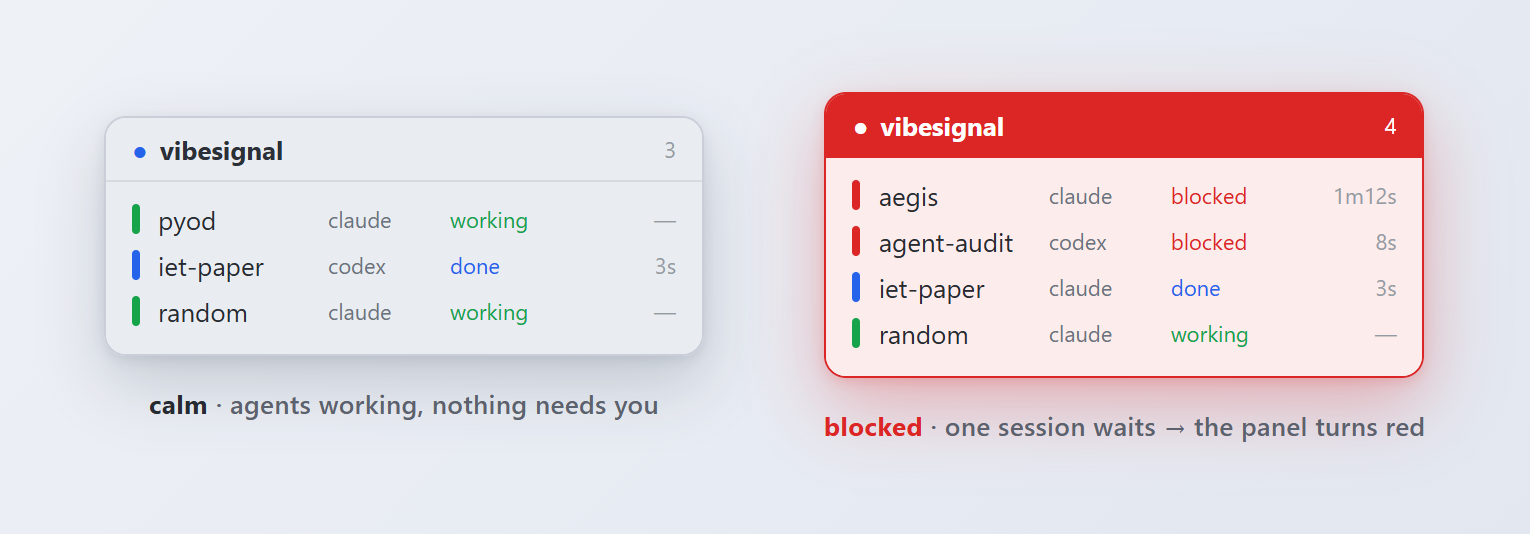
No light on your desk yet? The same signal renders on screen, so you can run VibeSignal today and add the hardware later. The always-on-top widget below stays calm grey while agents work, and turns red the moment a session blocks for your input.
What You Get
- 🟢 Solid colors, daemon-free: the state persists in the hardware after the hook exits; no service to keep alive
- 🪝 Hook-driven:
UserPromptSubmit,PostToolUse,Notification,Stop,SessionEndall wire in via JSON - 🤖 Cross-agent: the same store covers Claude Code and Codex; one light tracks both
- 📺 Three renderers: USB busylight (hardware), terminal watch panel, always-on-top Tk widget
- 🚦 Multi-session aware: runs 4–5 agents in parallel; the widget shows which one is blocked
- 🖱️ One-click on macOS and Windows:
install-launcher+install-autostartwire a native launcher and login autostart (.app+ LaunchAgent on macOS; Start menu, Desktop, and Startup shortcuts on Windows) - 🪟 Cross-platform: Windows, macOS, Linux; per-platform fonts and work-area detection
Install
pip install vibesignal
On macOS, add the macos extra for accurate Dock-aware widget placement:
pip install 'vibesignal[macos]'
Install the latest unreleased build from GitHub
pip install 'vibesignal @ git+https://github.com/yzhao062/vibesignal.git'

# with the macOS extra:
pip install 'vibesignal[macos] @ git+https://github.com/yzhao062/vibesignal.git'
The Quickstart below wires the one-click launcher and login autostart on macOS and Windows. On Linux, add a .desktop entry under ~/.config/autostart/ that runs vibesignal widget, then configure your agents to fire the hooks.
Quickstart
Install, wire the Claude Code hooks once (see Configure Agents), then run the two install commands for your OS.
macOS:
pip install 'vibesignal[macos]'   # macos extra: accurate Dock-aware widget placement
vibesignal install-launcher       # Spotlight-able .app, draggable to the Dock
vibesignal install-autostart      # starts the widget now and at every login
vibesignal status                 # verify: active sessions + resolved color
Windows:
pip install vibesignal
vibesignal install-launcher       # Start menu (type 'VibeSignal') + Desktop shortcut
vibesignal install-autostart      # starts the widget now and at every login
vibesignal status                 # verify: active sessions + resolved color
After install-autostart, a small panel appears in the bottom-left of your screen. When any session blocks for permission, the panel turns red and shows which session.
macOS daily lifecycle (show or quit the widget, autostart controls)
| Action | Command |
|---|---|
| Show widget on demand | Cmd+Space → VibeSignal → Enter (Spotlight); or vibesignal widget & |
| Quit widget window | Right-click or Control-click header → Quit |
| Force-kill a running widget | pkill -f "vibesignal.widget" |
| Start the LaunchAgent right now (no relogin) | launchctl kickstart gui/$UID/io.github.yzhao062.vibesignal |
| Disable autostart, keep launcher | vibesignal uninstall-autostart |
| Re-enable autostart later | vibesignal install-autostart (idempotent) |
Remove the .app launcher |
vibesignal uninstall-launcher |
| Inspect autostart status | launchctl print gui/$UID/io.github.yzhao062.vibesignal |
| Tail autostart logs | tail /tmp/io.github.yzhao062.vibesignal.log /tmp/io.github.yzhao062.vibesignal.err |
| Re-pin paths after switching conda env | vibesignal install-autostart |
| Manually clear stuck sessions | vibesignal clear (all) or vibesignal clear --session <id> |
Windows daily lifecycle (show or quit the widget, autostart controls)
| Action | Command |
|---|---|
| Show widget on demand | Start menu → type VibeSignal; or the Desktop shortcut; or pythonw -m vibesignal widget |
| Quit widget window | Right-click the header → Quit |
| Disable autostart, keep launcher | vibesignal uninstall-autostart |
| Re-enable autostart later | vibesignal install-autostart (idempotent) |
| Remove the launcher shortcuts | vibesignal uninstall-launcher |
| Re-pin paths after switching conda env | vibesignal install-autostart |
| Manually clear stuck sessions | vibesignal clear (all) or vibesignal clear --session <id> |
How It Works
Every hook invocation does the full cycle and exits. Nothing has to stay running.
%%{init: {'theme': 'base', 'themeVariables': {
  'primaryColor': '#dbeafe', 'primaryTextColor': '#1e3a8a',
  'primaryBorderColor': '#3b82f6', 'lineColor': '#475569',
  'fontFamily': 'system-ui', 'fontSize': '13px'
}}}%%
flowchart LR
    H["Claude Code / Codex hook"] --> C["vibesignal event<br/>--agent X --state Y"]
    C --> S[("~/.vibesignal/<br/>sessions/*.json")]
    S --> L["USB busylight"]
    S --> P["Watch panel"]
    S --> W["Floating widget"]
Each hook fires vibesignal event, which writes one JSON file per (agent, session), reads every active file, resolves the aggregate state by priority (blocked > error > done > working > idle), and updates the USB light if the color changed. Sessions that stop emitting events drop off after their per-state TTL.
Concurrent hooks stay honest two ways. The record-resolve-apply cycle holds a short cross-process lock, so two sessions firing at once cannot leave the light on a lower-priority color (a finishing working hook overwriting a fresh blocked event from another session). Every state file is written atomically (tempfile plus os.replace), so a reader never sees a half-written file. The lock is bounded: if it cannot be taken quickly it gives up and proceeds, because never blocking the agent's hook matters more than perfect ordering under rare contention.
State Table
| State | Light | Set by (Claude Code hook) | Meaning |
|---|---|---|---|
blocked |
Amber, solid | Notification (permission_prompt) |
An agent needs you now |
done |
Blue, solid | Stop, StopFailure, Notification (idle_prompt) |
An agent finished its turn; your move |
working |
Green, solid | UserPromptSubmit, PostToolUse |
An agent is busy, do not interrupt |
error |
Red, solid | Manual only | A failure |
idle |
Off | TTL timeout, done-fade | Nothing needs you |
Aggregate priority across active sessions: blocked > error > done > working > idle. If any one agent is waiting on you, the light is amber, so the signal you care about most is never hidden.
Three Renderers
| Renderer | Command | Where It Lives |
|---|---|---|
| 🟢 USB busylight | Driven automatically by every event call |
Physical light on the desk |
| 📋 Watch panel | vibesignal watch |
Live multi-session TUI in a terminal pane |
| 🪟 Floating widget | vibesignal widget |
Always-on-top Tk window |
All three read the same state store, so they stay in sync. The widget shows which session is blocked when several agents run at once. The USB light shows the highest-priority state across all sessions.
Watch Panel
vibesignal watch
Live table, one row per active session, blocked rows first:
  PROJECT          AGENT    STATE      FOR
* aegis            claude   * blocked  1m12s
* agent-audit      codex    * blocked  8s
o iet-paper        claude   o done     3s
. random           claude   . working  --
Foreground viewer (Ctrl-C to stop), not a daemon. vibesignal watch --once renders a single snapshot.
Floating Widget
Cross-platform Tk panel, always-on-top, draggable by the header. Right-click to quit; on macOS, Control-click also opens the Quit menu.
# macOS: open via Spotlight ("VibeSignal") after install-launcher, or:
vibesignal widget &

# Windows (no console window):
pythonw -m vibesignal widget

# Linux:
vibesignal widget &
The widget pins to the bottom-left of the work area on first launch, then becomes draggable. A done row fades after about 90 seconds, a silent working row clears after 10 minutes, and blocked or error rows persist until the state changes or the 8-hour backstop expires.
Configure Agents
Claude Code
Merge hooks/claude-settings.snippet.json into ~/.claude/settings.json under "hooks". The keys (UserPromptSubmit, PostToolUse, Notification, Stop, StopFailure, SessionEnd) do not collide with any default hooks. Notification is split by matcher: permission_prompt sets blocked, idle_prompt sets done. SessionEnd clears the session at once instead of waiting out the TTL.
The vibesignal command reads the session id from the hook's stdin JSON, so one light tracks every concurrent session.
[!TIP]
PostToolUsereturns the light to green after you approve a mid-task permission prompt, at the cost of one quick call per tool use. Drop it if you prefer zero per-tool overhead; the light then stays amber until the turn ends.
Codex
The state store is agent-agnostic: events carry an --agent tag. Codex points at the same command with --agent codex, so one light covers both. See hooks/codex-hooks.md for the mapping (Codex's notify program or 0.130+ hooks system).
Test Without Hardware
The light arrives later than the code does, so the whole pipeline is observable without a device:
vibesignal event --agent claude --state working
vibesignal status        # active sessions and the resolved color
vibesignal off           # clear all sessions
With no light connected, event records state and prints the color it would set, then exits cleanly. Hooks never fail when the light is missing or unplugged.
Hardware
There is no purpose-built "AI agent light" product. The proven path is a commercial presence light plus the open-source busylight-core library, which supports many USB lights across multiple vendors.
| Light | Form | Notes |
|---|---|---|
| Luxafor Flag 2 | Magnet on a monitor edge, USB-C | Eye-level spot, holds its color |
| blink(1) mk2 | Tiny, fully open | Long-standing developer favorite |
Both are on Amazon US and supported by busylight-core. Check the live price before buying.
Why Solid Colors, Not Blinking
Blinking a USB light needs a process that stays alive to drive the blink, which would mean a daemon. Solid colors persist in the light hardware after the process exits, so they fit the daemon-free design. Amber solid is still very visible.
This assumes a light that holds its last state (Luxafor, blink(1), BlinkStick). Kuando-style lights that need a constant connection would require the daemon mode even for solid colors.
Per-State Lifetimes
donefades after ~90 seconds (a transient "your move" pulse)workingclears after 10 minutes of silence (a silent working session is treated as dead)blockedanderrorpersist for up to 8 hours: nothing refreshes them while they wait on you, and a shorter TTL would drop a long-pending prompt exactly when it is most overdue. Cleared sooner when you act on it, when the session ends, or byvibesignal clear.
The 8-hour backstop only self-cleans a hard-crashed session that left no final event.
Launcher and Autostart Internals (macOS + Windows)
The same two subcommands wire up native paths on each OS, with no new package dependency:
vibesignal install-launcher      # macOS .app / Windows Start menu + Desktop shortcut
vibesignal uninstall-launcher
vibesignal install-autostart     # macOS LaunchAgent / Windows Startup shortcut; starts now + every login
vibesignal uninstall-autostart
macOS compiles an AppleScript .app via osacompile into ~/Applications/VibeSignal.app (Spotlight-able, draggable to the Dock), and writes ~/Library/LaunchAgents/io.github.yzhao062.vibesignal.plist with the absolute path of vibesignal baked in (so LaunchAgent's empty PATH is not an issue), loaded via launchctl bootstrap gui/<uid>.
Windows writes VibeSignal.lnk shortcuts through the stock PowerShell WScript.Shell COM object: Start menu plus Desktop for the launcher, and the Startup folder for autostart. The shortcut runs pythonw -m vibesignal widget so there is no console window, and [Environment]::GetFolderPath resolves the Startup / Programs / Desktop folders correctly even when the Desktop is redirected into OneDrive.
On both systems the widget starts immediately on install-autostart and at every future login. Re-run install-autostart after switching env to re-pin the interpreter path.
The work area is detected per platform: SPI_GETWORKAREA on Windows (taskbar excluded); NSScreen.visibleFrame on macOS (menu bar and Dock excluded), with a 28 / 80 px heuristic fallback when pyobjc is absent; full screen on Linux. The fallback assumes a bottom Dock; install the macos extra for accurate placement under any Dock orientation.
Fonts: Segoe UI on Windows, Helvetica Neue on macOS, DejaVu Sans elsewhere.
Project Layout
vibesignal/
|-- README.md
|-- DESIGN.md
|-- LICENSE
|-- pyproject.toml
|-- vibesignal/
|   |-- __init__.py
|   |-- store.py        # per-session state files + TTL + atomic writes + last-color cache
|   |-- resolve.py      # aggregate + per-session resolution -> colors
|   |-- light.py        # busylight wrapper, no-ops without a device
|   |-- lock.py         # bounded cross-process lock for the event critical section
|   |-- panel.py        # live multi-session TUI panel (foreground viewer)
|   |-- widget.py       # always-on-top floating GUI panel (Tkinter, stdlib)
|   |-- installer.py    # macOS .app + LaunchAgent / Windows .lnk launcher + autostart
|   |-- __main__.py     # CLI invoked by hooks
|-- hooks/
|   |-- claude-settings.snippet.json
|   |-- codex-hooks.md
|-- tests/
    |-- test_resolve.py
    |-- test_store.py
    |-- test_lock.py
    |-- test_main.py
    |-- test_panel.py
    |-- test_widget.py
    |-- test_installer.py
    |-- test_hooks.py
What's Next
[!NOTE] Recently shipped: one-click Windows setup (
install-launcher/install-autostart), PyPI packaging (pip install vibesignal), and a GitHub Actions CI matrix (Windows / macOS / Linux, Python 3.11 to 3.13).
- Homebrew tap at
yzhao062/homebrew-tapforbrew install yzhao062/tap/vibesignal - Multi-LED strip support: a BlinkStick Strip with one cell per session (the store already keys by session; needs a
session -> cellmap inresolve.py) - Daemon mode (opt-in) for blinking patterns and auto-off after idle, at the cost of a service to keep alive
License
BSD 2-Clause © 2026 Yue Zhao
Project details
Verified details
These details have been verified by PyPIProject links
GitHub Statistics
Maintainers
Release history Release notifications | RSS feed


Download files
Download the file for your platform. If you're not sure which to choose, learn more about installing packages.
Source Distribution
Built Distribution
Filter files by name, interpreter, ABI, and platform.
If you're not sure about the file name format, learn more about wheel file names.
Copy a direct link to the current filters
File details
Details for the file vibesignal-0.1.1.tar.gz.
File metadata
- Download URL: vibesignal-0.1.1.tar.gz
- Upload date:
- Size: 43.4 kB
- Tags: Source
- Uploaded using Trusted Publishing? Yes
- Uploaded via: twine/6.1.0 CPython/3.13.12
File hashes
| Algorithm | Hash digest | |
|---|---|---|
| SHA256 |
e5291ed5777be0d13252ff82ebd625137d037ff77ee62994e09c4c6776c3907c
|
|
| MD5 |
5f4fb392cdaf6e541d544addbcde3012
|
|
| BLAKE2b-256 |
7ffca5c947f2f73df0167f584de86b729d6cf5cf5952dc5b61bc350a1c2f1414
|
Provenance
The following attestation bundles were made for vibesignal-0.1.1.tar.gz:
Publisher:
publish.yml on yzhao062/vibesignal
-
Statement:
-
Statement type:
https://in-toto.io/Statement/v1 -
Predicate type:
https://docs.pypi.org/attestations/publish/v1 -
Subject name:
vibesignal-0.1.1.tar.gz -
Subject digest:
e5291ed5777be0d13252ff82ebd625137d037ff77ee62994e09c4c6776c3907c - Sigstore transparency entry: 1686729357
- Sigstore integration time:
-
Permalink:
yzhao062/vibesignal@0c981034e256ffe7a21516fbf191323097df6281 -
Branch / Tag:
refs/tags/v0.1.1 - Owner: https://github.com/yzhao062
-
Access:
public
-
Token Issuer:
https://token.actions.githubusercontent.com -
Runner Environment:
github-hosted -
Publication workflow:
publish.yml@0c981034e256ffe7a21516fbf191323097df6281 -
Trigger Event:
push
-
Statement type:
File details
Details for the file vibesignal-0.1.1-py3-none-any.whl.
File metadata
- Download URL: vibesignal-0.1.1-py3-none-any.whl
- Upload date:
- Size: 29.7 kB
- Tags: Python 3
- Uploaded using Trusted Publishing? Yes
- Uploaded via: twine/6.1.0 CPython/3.13.12
File hashes
| Algorithm | Hash digest | |
|---|---|---|
| SHA256 |
7037de03cdb3919fada7d92bd3e65c71c624c3d64d6514db0c5a5037b9bef6a8
|
|
| MD5 |
325a60225732a1eb201b8e0b02513594
|
|
| BLAKE2b-256 |
e7ffc4cb9eb62dc65dc765f54c9bf6bc0f4cda160a1c26e92246603cfd8dcac6
|
Provenance
The following attestation bundles were made for vibesignal-0.1.1-py3-none-any.whl:
Publisher:
publish.yml on yzhao062/vibesignal
-
Statement:
-
Statement type:
https://in-toto.io/Statement/v1 -
Predicate type:
https://docs.pypi.org/attestations/publish/v1 -
Subject name:
vibesignal-0.1.1-py3-none-any.whl -
Subject digest:
7037de03cdb3919fada7d92bd3e65c71c624c3d64d6514db0c5a5037b9bef6a8 - Sigstore transparency entry: 1686729486
- Sigstore integration time:
-
Permalink:
yzhao062/vibesignal@0c981034e256ffe7a21516fbf191323097df6281 -
Branch / Tag:
refs/tags/v0.1.1 - Owner: https://github.com/yzhao062
-
Access:
public
-
Token Issuer:
https://token.actions.githubusercontent.com -
Runner Environment:
github-hosted -
Publication workflow:
publish.yml@0c981034e256ffe7a21516fbf191323097df6281 -
Trigger Event:
push
-
Statement type:






