
vibetrack
Modern experiment tracking.
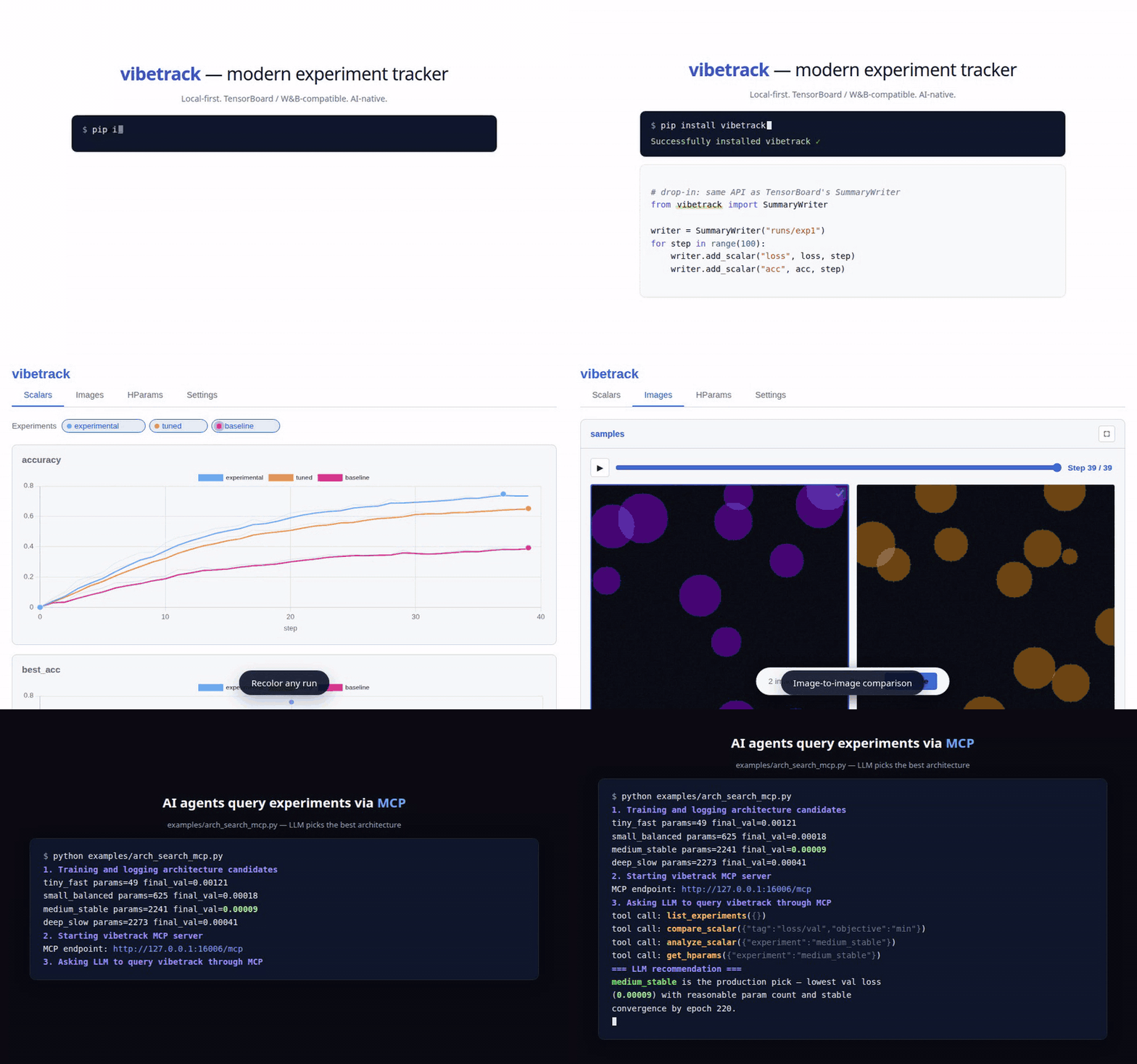
Key features:
- Send experiment results elsewhere: Telegram, Slack, Jupyter, Gradio, and MCP.
- Run locally while receiving experiment data over the network via REST API.
- Use open formats: experiment data is stored in SQLite and local files.
- Compare image-to-image results.
- Use a rich UI to show, hide, delete, and customize runs.
- TensorBoard SummaryWriter compatible drop-in APIs.
- Query results through the MCP server.
- Fast scalar logging; see the benchmark report.
Install
pip install vibetrack          # default with web
pip install vibetrack[all]     # all optional backends+dev; MCP on Python >=3.10
Quick start
TensorBoard-style API
from vibetrack import SummaryWriter

writer = SummaryWriter("runs/exp1", project_folder="my_project")
for step in range(100):
    writer.add_scalar("loss", 1.0 / (step + 1), step)
    writer.add_scalar("acc", step / 100, step)
writer.close()
See API.md for SummaryWriter and module-level logging examples.
Launch the dashboard
vibetrack --listen 0.0.0.0:6116
# -> Web UI on http://you_server:6116
# -> MCP is also mounted when installed with vibetrack[all] on Python 3.10+
Viewers and destinations syntax
writer = SummaryWriter("runs/exp1", project_folder="my_project")
writer.to("console").to("slack", every="15m")
writer.to("remote", url="http://server:8080", token="devtoken")
writer.add_scalar("loss", 0.5, step=0).to("telegram")
See VIEWERS.md for web, console, Slack, Telegram, Gradio, Jupyter, custom viewers, remote forwarding, credentials, and HTTP ingest.
vibetrack Architecture
flowchart TB
  subgraph LOGGING["Experiment logging"]
    direction TB
    SW["SummaryWriter"]
    ADD["add_(scalar|image|*)"]
    SW --> ADD
  end
  subgraph REMOTE["remote HTTP logging"]
    direction TB
    TO_REMOTE[".to(#quot;remote#quot;)"]
  end
  VIBETRACK["vibetrack<br/>scalars • media • text"]
  subgraph PERSIST["Persist"]
    direction TB
    DB_ROWS["scalars + text + metadata"]
    DEFAULT_DB[("default DB<br/>~/.vibetrack/vibetrack.db")]
    PROJECT_DB[("per project DB<br/>project_log_dir/vibetrack.db")]
    MEDIA["media files<br/>project_log_dir/media"]
    DB_ROWS --> DEFAULT_DB
    DB_ROWS -.-> PROJECT_DB
  end
  DISPATCH[".to(viewer)"]
  FANOUT["best-effort fanout"]
  subgraph VIEWERS["live / summary viewers"]
    direction TB
    WEB["web<br/>(default)"]
    CONSOLE["console"]
    SLACK["slack"]
    GRADIO["gradio"]
    TELEGRAM["telegram"]
    JUPYTER["jupyter"]
    MCP["MCP"]
    CUSTOM[".to(#quot;custom#quot;)"]
  end

  ADD --> VIBETRACK
  TO_REMOTE -.-> VIBETRACK
  VIBETRACK --> DB_ROWS
  VIBETRACK --> MEDIA
  ADD --> DISPATCH
  DISPATCH --> FANOUT
  FANOUT --> VIEWERS
  DEFAULT_DB --> VIEWERS
  PROJECT_DB -.-> VIEWERS
  MEDIA --> VIEWERS

  classDef logging fill:#fff4e6,stroke:#f59e0b,stroke-width:2px,color:#172033;
  classDef code fill:#fff7ed,stroke:#f59e0b,stroke-width:1.5px,color:#172033,font-family:monospace;
  classDef liveCode fill:#eef2ff,stroke:#6366f1,stroke-width:1.5px,color:#172033,font-family:monospace;
  classDef event fill:#ffe4ec,stroke:#e11d48,stroke-width:2px,color:#172033;
  classDef live fill:#eef2ff,stroke:#6366f1,stroke-width:2px,color:#172033;
  classDef storage fill:#e7f8ef,stroke:#10b981,stroke-width:2px,color:#172033;
  classDef optional fill:#f8fafc,stroke:#94a3b8,stroke-width:1.5px,stroke-dasharray:5 5,color:#64748b;
  classDef optionalCode fill:#f8fafc,stroke:#94a3b8,stroke-width:1.5px,stroke-dasharray:5 5,color:#64748b,font-family:monospace;
  classDef viewer fill:#f5e8ff,stroke:#a855f7,stroke-width:2px,color:#172033;

  class SW,ADD code;
  class TO_REMOTE optionalCode;
  class VIBETRACK event;
  class DISPATCH liveCode;
  class FANOUT live;
  class DB_ROWS,DEFAULT_DB,MEDIA storage;
  class PROJECT_DB optional;
  class WEB,CONSOLE viewer;
  class SLACK,GRADIO,TELEGRAM,JUPYTER,MCP optional;
  class CUSTOM optionalCode;
FAQ
How do I collect results from another server?
Run a vibetrack ingest server on the machine that should receive results:
vibetrack --listen 0.0.0.0:8080 --token devtoken --project-folder /srv/runs
Then forward events from the training machine:
from vibetrack import SummaryWriter

writer = SummaryWriter("runs/exp1", project_folder="my_project")
writer.to("remote", url="http://server:8080", token="devtoken")
See VIEWERS.md for remote forwarding and direct HTTP ingest.
How do I use separate databases on one machine?
By default, vibetrack writes to ~/.vibetrack/vibetrack.db. Pass
project_folder to keep a separate vibetrack.db inside that project folder.
from vibetrack import SummaryWriter

writer = SummaryWriter("runs/exp1", project_folder="projects/cv")
Open that database in the dashboard with the same folder:
vibetrack --project-folder projects/cv
How does vibetrack work with distributed training?
vibetrack automatically detects RANK / LOCAL_RANK. Only rank 0 logs by
default; other ranks get a silent no-op writer.
from vibetrack import SummaryWriter

writer = SummaryWriter("runs/distributed", project_folder="project/")
writer.add_scalar("loss", loss.item(), step)
writer.close()
To force every rank to log, pass rank="all":
writer = SummaryWriter("runs/distributed", rank="all")
Can vibetrack collect system resources?
Yes. vibetrack can collect CPU, GPU, memory, and project disk metrics in a background thread.
writer = SummaryWriter("runs/exp1", system_metrics_interval=3600) # every hour
Collected metrics include system/cpu_percent, system/mem_used_gb,
system/disk_free_gb, gpu/utilization, gpu/memory_used_gb, and
gpu/temperature. Use system_metrics_interval=0 to disable collection.
How do I run the MCP server for an LLM agent?
Install MCP dependencies, then run the standalone MCP server:
pip install vibetrack[all]
vibetrack --viewer mcp --project-folder my_project/
See MCP.md for MCP endpoints, tools, resources, and agent usage.
What CLI commands are available?
vibetrack                           # default
vibetrack [PROJECT_FOLDER]          # Launch dashboard (web + ingest; MCP with vibetrack[all] on Python 3.10+)
vibetrack --port 8080               # Custom port
vibetrack --token SECRET            # Protect ingest endpoints
vibetrack --listen 0.0.0.0:9009     # Open server on separate port
vibetrack migrate PROJECT_FOLDER    # Merge legacy per-run DBs into project DB
How is vibetrack configured?
Settings are stored in ~/.vibetrack/config.json. The web UI can also write
project-scoped settings through its Settings tab.
{
  "smoothing": "ema",
  "smooth_weight": 0.6,
  "system_metrics_interval": 3600,
  "web": {
    "theme": "light",
    "auto_refresh": 5,
    "image_play_fps": 2,
    "original_values_opacity": 0.17
  }
}
License
Apache 2.0
1 maintainer

Metadata
1 maintainer
Release files for vibetrack 0.1.3
For a detailed explanation of source distributions (sdists) and built distributions (wheels), please see the package formats documentation.
Source distribution (sdist)
| File | Size | Uploaded | |
|---|---|---|---|
| vibetrack-0.1.3.tar.gz | 4.3 MB | Details |
Built distribution (wheel)
| File | Interpreter | ABI | Platform | Reset |
|---|---|---|---|---|
| vibetrack-0.1.3-py3-none-any.whl | Python 3 | none | any | Details |
Total release size: 4.6 MB
Release files / vibetrack-0.1.3.tar.gz
| Download URL | vibetrack-0.1.3.tar.gz |
|---|---|
| Size | 4.3 MB |
| Tags | Source |
|
SHA-256 checksum How to use checksums |
24d15d27fd4e347ed67dd7d5624580eeb7a02532d7b14d014773adc4ebb0cfc9
|
|
BLAKE2b-256 checksum How to use checksums |
7355fddbdc51c48c3c2d5f232e5b4b7146603f1e4c1e1b49c9e5164abed195cf
|
| Upload date | |
|
Uploaded using Trusted Publishing? What is trusted publishing? |
Yes |
| Uploaded via |
twine/7.0.0 CPython/3.13.14
|
Provenance
Provenance describes where a file came from. On PyPI, provenance is shared via attestations, which provide a verifiable record of the build or publishing details. View details, limitations and caveats.


PyPI Publish Attestation
PyPI verified that this artifact, at this checksum, originated from the publisher listed below.
Signed by GitHub Actions, verified by PyPI on Oct 13, 2026.
Transparency logRelease files / vibetrack-0.1.3-py3-none-any.whl
| Download URL | vibetrack-0.1.3-py3-none-any.whl |
|---|---|
| Size | 339.9 kB |
| Tags | Python 3 |
|
SHA-256 checksum How to use checksums |
b2143561262056583118e12c51ac923213a566bf7813b0e893b55b8e1deafc60
|
|
BLAKE2b-256 checksum How to use checksums |
d26ab44a45df13886f8ec565366db177f61a2a042dc3504a8822e59cf1c30423
|
| Upload date | |
|
Uploaded using Trusted Publishing? What is trusted publishing? |
Yes |
| Uploaded via |
twine/7.0.0 CPython/3.13.14
|
Provenance
Provenance describes where a file came from. On PyPI, provenance is shared via attestations, which provide a verifiable record of the build or publishing details. View details, limitations and caveats.
PyPI Publish Attestation
PyPI verified that this artifact, at this checksum, originated from the publisher listed below.
Signed by GitHub Actions, verified by PyPI on Oct 13, 2026.
Transparency log













