






Speech to Phoneme, Bandwidth Extension and Speaker Verification using the Vibravox dataset.
Resources:
- 📝: The Open access paper published in Speech Communication related to this project is available on arXiv and Speech Communication
- 🤗: The dataset used in this project is hosted by Hugging Face. You can access it here.
- 🌐: For more information about the project, visit our project page.
- 🏆: Explore Leaderboards on Papers With Code.
Setup
pip install vibravox
Available sensors
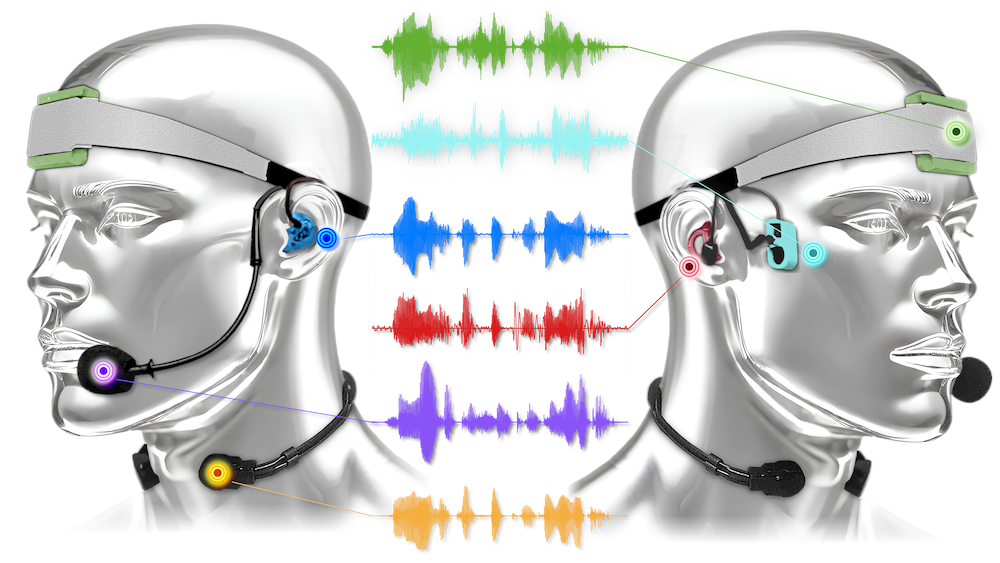
- 🟣:
headset_microphone( Not available for Bandwidth Extension as it is the reference mic ) - 🟡:
throat_microphone - 🟢:
forehead_accelerometer - 🔵:
rigid_in_ear_microphone - 🔴:
soft_in_ear_microphone - 🧊:
temple_vibration_pickup
Run some models
-
EBEN for Bandwidth Extension
- Train and test on
speech_clean, for recordings in a quiet environment:python run.py \ lightning_datamodule=bwe \ lightning_datamodule.sensor=throat_microphone \ lightning_module=eben \ lightning_module.generator.p=2 \ +callbacks=[bwe_checkpoint] \ ++trainer.check_val_every_n_epoch=15 \ ++trainer.max_epochs=500 - Train on
speech_cleanmixed withspeechless_noisyand test onspeech_noisy, for recordings in a noisy environment: (weights initialized from vibravox_EBEN_models )python run.py \ lightning_datamodule=noisybwe \ lightning_datamodule.sensor=throat_microphone \ lightning_module=eben \ lightning_module.description=from_pretrained-throat_microphone \ ++lightning_module.generator=dummy \ ++lightning_module.generator._target_=vibravox.torch_modules.dnn.eben_generator.EBENGenerator.from_pretrained \ ++lightning_module.generator.pretrained_model_name_or_path=Cnam-LMSSC/EBEN_throat_microphone \ ++lightning_module.discriminator=dummy \ ++lightning_module.discriminator._target_=vibravox.torch_modules.dnn.eben_discriminator.DiscriminatorEBENMultiScales.from_pretrained \ ++lightning_module.discriminator.pretrained_model_name_or_path=Cnam-LMSSC/DiscriminatorEBENMultiScales_throat_microphone \ +callbacks=[bwe_checkpoint] \ ++callbacks.checkpoint.monitor=validation/torchmetrics_stoi/synthetic \ ++trainer.check_val_every_n_epoch=15 \ ++trainer.max_epochs=200
- Train and test on
-
wav2vec2 for Speech to Phoneme
- Train and test on
speech_clean, for recordings in a quiet environment: (weights initialized from facebook/wav2vec2-base-fr-voxpopuli )
python run.py \ lightning_datamodule=stp \ lightning_datamodule.sensor=throat_microphone \ lightning_module=wav2vec2_for_stp \ lightning_module.optimizer.lr=1e-5 \ ++trainer.max_epochs=10- Train and test on
speech_noisy, for recordings in a noisy environment: (weights initialized from vibravox_phonemizers )
python run.py \ lightning_datamodule=stp \ lightning_datamodule.sensor=throat_microphone \ lightning_datamodule.subset=speech_noisy \ lightning_datamodule/data_augmentation=aggressive \ lightning_module=wav2vec2_for_stp \ lightning_module.wav2vec2_for_ctc.pretrained_model_name_or_path=Cnam-LMSSC/phonemizer_throat_microphone \ lightning_module.optimizer.lr=1e-6 \ ++trainer.max_epochs=30 - Train and test on
-
ECAPA2 for Speaker Verification:
- Test the model on
speech_clean:
python run.py \ lightning_datamodule=spkv \ lightning_module=ecapa2 \ logging=csv \ ++trainer.limit_train_batches=0 \ ++trainer.limit_val_batches=0- Test on
speech_cleanmixed withspeechless_noisy, representative ofspeech_noisywith the exact same pairs that were used onspeech_clean, allowing direct comparison of results:
python run.py \ lightning_datamodule=spkv \ lightning_datamodule.dataset_name=Cnam-LMSSC/vibravox_mixed_for_spkv \ lightning_datamodule.subset=speech_noisy_mixed \ lightning_module=ecapa2 \ logging=csv \ ++trainer.limit_train_batches=0 \ ++trainer.limit_val_batches=0 - Test the model on
Cite our work
If you use code in this repository or the Vibravox dataset (either curated or non-curated versions) for research, please cite this paper :
@article{hauret2025vibravox,
      title={{Vibravox: A dataset of french speech captured with body-conduction audio sensors}},
      author={{Hauret, Julien and Olivier, Malo and Joubaud, Thomas and Langrenne, Christophe and
        Poir{\'e}e, Sarah and Zimpfer, V{\'e}ronique and Bavu, {\'E}ric},
      journal={Speech Communication},
      pages={103238},
      year={2025},
      publisher={Elsevier}
}
and this HuggingFace repository, which is linked to a DOI :
@misc{cnamlmssc2024vibravoxdataset,
    author={Hauret, Julien and Olivier, Malo and Langrenne, Christophe and
        Poir{\'e}e, Sarah and Bavu, {\'E}ric},
    title        = { {Vibravox} (Revision 7990b7d) },
    year         = 2024,
    url          = { https://huggingface.co/datasets/Cnam-LMSSC/vibravox },
    doi          = { 10.57967/hf/2727 },
    publisher    = { Hugging Face }
}
1 maintainer

Metadata
1 maintainer
Release files for vibravox 0.1.1
For a detailed explanation of source distributions (sdists) and built distributions (wheels), please see the package formats documentation.
Source distribution (sdist)
| File | Size | Uploaded | |
|---|---|---|---|
| vibravox-0.1.1.tar.gz | 38.9 kB | Details |
Built distribution (wheel)
| File | Interpreter | ABI | Platform | Reset |
|---|---|---|---|---|
| vibravox-0.1.1-py3-none-any.whl | Python 3 | none | any | Details |
Total release size: 91.6 kB
Release files / vibravox-0.1.1.tar.gz
| Download URL | vibravox-0.1.1.tar.gz |
|---|---|
| Size | 38.9 kB |
| Tags | Source |
|
SHA-256 checksum How to use checksums |
4d9e694eaed0173c2cafaee1bb5cd487fd15edbf35c0d9a133a6a1db7be49150
|
|
BLAKE2b-256 checksum How to use checksums |
18ac73e019c65dee309172261e3c4b456a2b69139332bb6bee31ec7d04070090
|
| Upload date | |
|
Uploaded using Trusted Publishing? What is trusted publishing? |
No |
| Uploaded via |
twine/6.1.0 CPython/3.12.9
|
Release files / vibravox-0.1.1-py3-none-any.whl
| Download URL | vibravox-0.1.1-py3-none-any.whl |
|---|---|
| Size | 52.6 kB |
| Tags | Python 3 |
|
SHA-256 checksum How to use checksums |
dfad3758f009c410c3665bb6997c49430119f26e456885e031547a544bcc4c8b
|
|
BLAKE2b-256 checksum How to use checksums |
7a7aa2d77b11bfd42fafa9af9784de99f5b35cacf59190c321f7856dcbdec151
|
| Upload date | |
|
Uploaded using Trusted Publishing? What is trusted publishing? |
No |
| Uploaded via |
twine/6.1.0 CPython/3.12.9
|














