
victron-ble2mqtt



Emit MQTT events from Victron Energy Smart Devices via victron-ble
Tested with:
- Solar Charger: SmartSolar MPPT 100/20
- Smart Battery Shunt
- Raspberry Pi Zero 2 W with Raspberry Pi OS Lite
- Mosquitto MQTT Broker
- Home Assistant MQTT integration
Scrrenshot from Home Assistant:
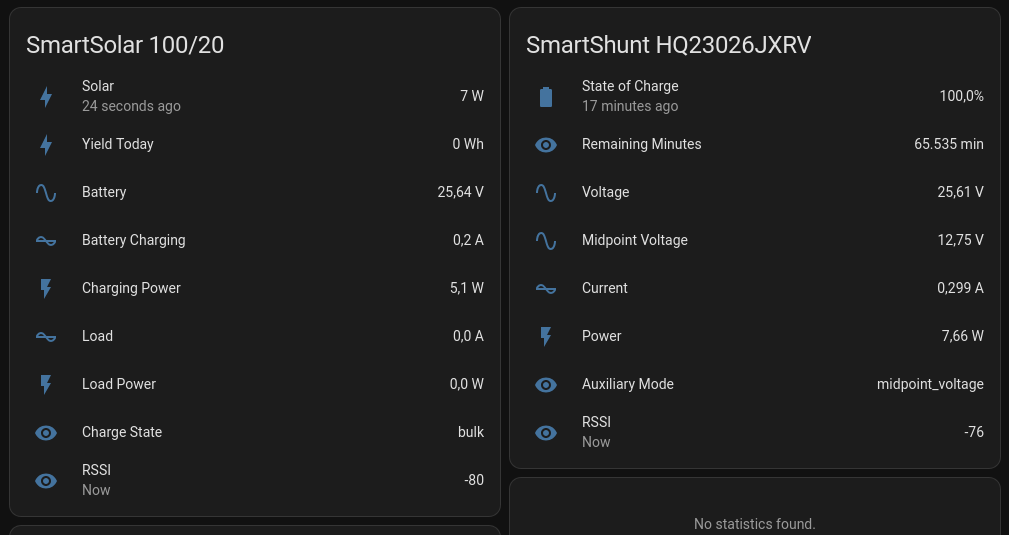
More screenshots here: https://codeberg.org/jedie/jedie.github.io/blob/master/screenshots/victron-ble2mqtt/README.md
Usage
preperation
victron_ble used Bleak and the Linux backend of Bleak communicates with BlueZ over DBus. So you have to install this, e.g.:
~$ sudo apt install bluez
Note: If you using a Raspberry Pi: Check that https://www.piwheels.org/ are in use.
For this, just look into etc/pip.conf it should be looked like this:
~/pysmartmeter$ cat /etc/pip.conf
[global]
extra-index-url=https://www.piwheels.org/simple
Installation
The easiest way is to install "victron-ble2mqtt" via pipx, e.g.:
~$ sudo apt install pipx
~$ pipx install --verbose victron-ble2mqtt
Then just call victron-ble2mqtt CLI, e.g.:
~$ victron-ble2mqtt --help
Setup Device
Detect your device first, e.g.:
~$ victron-ble2mqtt discover
...
{
    'name': 'SmartSolar HQ2248AM79D',
    'address': 'E7:37:97:XX:XX:XX',
    'details': {
        'path': '/org/bluez/hci0/dev_E7_37_97_XX_XX_XX',
        'props': {
            'Address': 'E7:37:97:XX:XX:XX',
            'AddressType': 'random',
            'Name': 'SmartSolar HQ2248AM79D',
            'Alias': 'SmartSolar HQ2248AM79D',
            'Paired': False,
            'Trusted': False,
            'Blocked': False,
            'LegacyPairing': False,
            'RSSI': -89,
            'Connected': False,
            'UUIDs': [],
            'Adapter': '/org/bluez/hci0',
            'ManufacturerData': {737: bytearray(b'...')},
            'ServicesResolved': False
        }
    }
}
...
(Hit Ctrl-C to abort)
Device Keys
You need the device keys of all Victron Energy Smart Devices you want to monitor.
The easiest way to get the keys: Install the official Victron Smartphone App and copy&paste the keys:
- Click on your device
- Go to detail page about the
SmartSolar Bluetooth Interface - Click on
SHOWatInstant readout via Bluetooth/Encryption data - Copy the Connectionkey by click on the key
(I send the key via Signal as "my note" and use the Desktop Signal app to receive the key on my Computer)
See also: https://community.victronenergy.com/questions/187303/victron-bluetooth-advertising-protocol.html
setting
Just call edit-settings command, e.g.:
~$ victron-ble2mqtt edit-settings
At least insert your MQTT settings and all devices keys.
The device keys is a list of strings. It should look like this:
device_keys = [
    "0123456789abcdef0123456789abcdef",
    "0123456789abcdef0123456789abcdef",
]
Just insert the keys of all Victron Energy Smart Devices you want to monitor.
How to get settings defaults back?
There is a trick to get the default value back for one or more settings. Follow these steps:
- Call
edit-settingsand comment out the setting you want to reset by add a#at the beginning of the line - Save and exit the editor
- Call
print-settings: You will see the commented out setting has not the default value - To cleanup: Call
edit-settingsagain: You can now delete the commented lines
To reset the settings completely: Rename or delete your settings file and call edit-settings: The default settings file will be created again.
Test
Start publish MQTT endless look, just call publish-loop command, e.g.:
~$ victron-ble2mqtt publish-loop -vv
setup systemd services
Check systemd setup:
~$ victron-ble2mqtt systemd-debug
Setup services:
~$ victron-ble2mqtt systemd-setup
After this the MQTT publising runs and will be started on boot.
Note:
You may need to run the above command with sudo if you get a permission error!
For the sudo call the full path to the victron-ble2mqtt executable is needed.
You can get it by call which victron-ble2mqtt or just this:
~$ sudo $(which victron-ble2mqtt) systemd-setup
Check the services:
~$ victron-ble2mqtt systemd-status
update
To update, just call:
~$ pipx upgrade --verbose victron-ble2mqtt
see: https://pipx.pypa.io/stable/docs/#pipx-upgrade
app CLI
usage: victron-ble2mqtt [-h] {debug-read,discover,edit-settings,print-settings,publish-loop,shell-completion,systemd-debug,systemd-logs,systemd-remove,systemd-setup,systemd-status,systemd-stop,update-readme-history,version}


╭─ options ──────────────────────────────────────────────────────────────────────────────╮
│ -h, --help        show this help message and exit                                      │
╰────────────────────────────────────────────────────────────────────────────────────────╯
╭─ subcommands ──────────────────────────────────────────────────────────────────────────╮
│ (required)                                                                             │
│   • debug-read    Read data from devices and print them. Device keys are used from     │
│                   config file, if not given.                                           │
│   • discover      Discover Victron devices with Instant Readout                        │
│   • edit-settings                                                                      │
│                   Edit the settings file. On first call: Create the default one.       │
│   • print-settings                                                                     │
│                   Display (anonymized) MQTT server username and password               │
│   • publish-loop  Publish MQTT messages in endless loop (Entrypoint from systemd)      │
│   • shell-completion                                                                   │
│                   Setup shell completion for this CLI (Currently only for bash shell)  │
│   • systemd-debug                                                                      │
│                   Print Systemd service template + context + rendered file content.    │
│   • systemd-logs  Display the systemd logs for this service. (May need sudo)           │
│   • systemd-remove                                                                     │
│                   Remove Systemd service file. (May need sudo)                         │
│   • systemd-setup                                                                      │
│                   Write Systemd service file, enable it and (re-)start the service.    │
│                   (May need sudo)                                                      │
│   • systemd-status                                                                     │
│                   Display status of systemd service. (May need sudo)                   │
│   • systemd-stop  Stops the systemd service. (May need sudo)                           │
│   • update-readme-history                                                              │
│                   Update project history base on git commits/tags in README.md         │
│                                                                                        │
│                   Will be exited with 1 if the README.md was updated otherwise with 0. │
│                                                                                        │
│                   Also, callable via e.g.:                                             │
│                       python -m cli_base update-readme-history -v                      │
│   • version       Print version and exit                                               │
╰────────────────────────────────────────────────────────────────────────────────────────╯
start development
At least uv is needed. Install e.g.: via pipx:
apt-get install pipx
pipx install uv
Clone the project and just start the CLI help commands. A virtual environment will be created/updated automatically.
~$ git clone https://codeberg.org/jedie/victron-ble2mqtt.git
~$ cd victron-ble2mqtt
~$ victron-ble2mqtt --help
~/victron-ble2mqtt$ ./dev-cli.py --help
dev CLI
usage: ./dev-cli.py [-h] {coverage,install,lint,mypy,nox,pip-audit,publish,shell-completion,test,update,update-readme-history,update-test-snapshot-files,version}


╭─ options ──────────────────────────────────────────────────────────────────────────────╮
│ -h, --help     show this help message and exit                                         │
╰────────────────────────────────────────────────────────────────────────────────────────╯
╭─ subcommands ──────────────────────────────────────────────────────────────────────────╮
│ (required)                                                                             │
│   • coverage   Run tests and show coverage report.                                     │
│   • install    Install requirements and 'victron_ble2mqtt' via pip as editable.        │
│   • lint       Check/fix code style by run: "ruff check --fix"                         │
│   • mypy       Run Mypy (configured in pyproject.toml)                                 │
│   • nox        Run nox                                                                 │
│   • pip-audit  Run pip-audit check against current requirements files                  │
│   • publish    Build and upload this project to PyPi                                   │
│   • shell-completion                                                                   │
│                Setup shell completion for this CLI (Currently only for bash shell)     │
│   • test       Run unittests                                                           │
│   • update     Update dependencies (uv.lock) and git pre-commit hooks                  │
│   • update-readme-history                                                              │
│                Update project history base on git commits/tags in README.md            │
│                                                                                        │
│                Will be exited with 1 if the README.md was updated otherwise with 0.    │
│                                                                                        │
│                Also, callable via e.g.:                                                │
│                    python -m cli_base update-readme-history -v                         │
│   • update-test-snapshot-files                                                         │
│                Update all test snapshot files (by remove and recreate all snapshot     │
│                files)                                                                  │
│   • version    Print version and exit                                                  │
╰────────────────────────────────────────────────────────────────────────────────────────╯
Backwards-incompatible changes
0.8.0
Not really a breaking change: The new, preferred way to install "victron-ble2mqtt" is via pipx. You can still use the old git clone way.
To upgrade, just follow the installation instructions above.
Call victron-ble2mqtt edit-settings to update your settings file. It's needed to update the template_path, work_dir and exec_start.
Because they contain the full path to our old git clone installation.
Read above the "How to get settings defaults back?" section to reset the path values to defaults.
Don't forget to call systemd-setup command to update the systemd service file with the new paths!
0.4.0
You must edit your settings:
device_address(The Device MAC address) was removeddevice_keyis replaced bydevice_keysa list of device keys
History
- v0.8.2
- 2026-09-28 - Make "external_device_load" optional.
- 2026-09-28 - Increase min/max battery_charging_current and solar_power values
- 2026-09-28 - Update requirements and set tool.cli_base.force_dev_platform = "codeberg.org"
- v0.8.1
- 2026-09-21 - Update tests + add gitlab CI config
- 2026-09-21 - Give up GitHub -> Codeberg / OpenCommit / GitLab / Redicle
- 2026-04-11 - Update README.md
- v0.8.0
- 2026-04-11 - Expand README
- 2026-04-10 - fix CLI prog name to: "victron-ble2mqtt"
- 2026-04-10 - Enhance documentation how to update to pipx installation
- 2026-04-10 - New install method with pipx
- 2026-04-10 - Apply project updates
- v0.7.7
- 2026-03-14 - Fix #51 API changes in victron-ble v0.9.3
Expand older history entries ...
- v0.7.6
- 2026-03-14 - Don't install dev dependencies by
cli.py
- 2026-03-14 - Don't install dev dependencies by
- v0.7.5
- 2026-03-14 - Apply code style changes
- 2026-03-14 - Update requirements
- v0.7.4
- 2026-02-08 - Apply manageproject updates: Set min. Python to v3.12
- v0.7.3
- 2025-12-09 - update README
- 2025-12-09 - Apply manageprojects update
- 2025-12-09 - Update requirements
- 2025-10-15 - Revert debugging
- 2025-10-15 - Add support for temperature for shunt
- 2025-09-25 - Fix SolarChargerHandler "yield_today" sensor
- 2025-09-25 - Tweak 'Consumed Ah' because "Ah" is not supported in HA.
- v0.7.2
- 2025-09-24 - remove obsolete .flake8 config + add/update PyCharm run configs
- 2025-09-24 - Remaining Minutes: set device_class='duration'
- 2025-09-24 - cleanup
- 2025-09-24 - Apply manageproject updates + update requirements
- 2025-09-24 - Update sensor units to those supported by the device class
- v0.7.1
- 2025-09-13 - fix wrong links in README
- 2025-09-13 - Add PyCharm run config files
- 2025-09-13 - Apply manageprojects updates
- 2025-08-19 - Bugfix "consumed_ah" sensor: "electricity" -> "energy"
- v0.7.0
- 2025-08-19 - NEW: "./cli.py systemd-logs"
- 2025-08-19 - Add new setting:
publish_throttle_secondsfor #31 - 2025-08-19 - Update requirements
- 2025-06-17 - Limit sensor values
- v0.6.0
- 2025-04-08 - Remove own Wifi info stuff
- v0.5.1
- 2025-04-08 - pip-tools -> uv
- v0.5.0
- 2024-09-25 - NEW: Midpoint Shift (absolut + percent) in BatteryMonitor
- v0.4.1
- 2024-09-24 - Bugfix delay data: Never, never use time.sleep() in a async context
- v0.4.0
- 2024-09-24 - Update README.md
- 2024-09-22 - Use device keys and refactor MQTT sensors: Support BatteryMonitor
- 2024-09-22 - Bugfix Pi installation
- 2024-09-22 - Move pip-compile switches into pyproject.toml
- 2024-09-22 - Update requirements
- v0.3.0
- 2024-09-20 - bugfix publish
- 2024-09-20 - Add help pages into README
- 2024-04-16 - Update to new ha-services version and update project setup
- 2024-03-23 - Update README.md
- 2024-03-10 - Disable verbose print as default
- 2024-03-10 - Expose WiFi quality values to MQTT
- v0.1.0
- 2024-03-09 - Remove 3.9 from test matrix
- 2024-03-09 - requires-python = ">=3.10"
- 2024-03-09 - Update README.md
- 2024-03-09 - Add Hostname + sys load to MQTT
- 2024-03-09 - Add info about systemd to README
- 2024-03-09 - Remove deprecation warning about RSSI
- 2024-03-09 - Bugfix systemd "exec_start" value
- 2024-03-09 - Add systemd commands
- 2024-03-09 - Publish value to MQTT
- 2024-03-09 - Add user settings and "debug-read" CLI command
- 2024-03-09 - Add "discover" to app CLI
- 2024-03-08 - More info in README
- 2024-03-08 - Add "victron-ble" and "ha-services"
- 2024-03-08 - Init from https://github.com/jedie/cookiecutter_templates
GitHub suspended me!
Important notice:
GitHub suspended my account sometime in late August 2026 ! There was no warning beforehand, nor any explanation of the reasons afterwards. Since then, I have had no access or control over my data on GitHub.
All my projects and everything about me have completely disappeared. Everything just results in a 404 "Not Found" error page.
A support request still hasn't been answered, even after several weeks (apart from a confirmation that the request was received).
For that reason, I have been looking for a new home for all my OpenSource projects. (Or rather, I am in the process of republishing all my projects elsewhere.)
Now you can find my on these places:
- Codeberg.org/jedie
- OpenCommit.eu/jedie
- GitLab.com/users/jedie
- Radicle: did🔑z6MkfvNUuBCwRtNZwANEAGd4vaTzyuZXMKfiSyjoBALga934 | jedie.radicle.garden
That is why there will probably be a lot of broken links pointing to my GitHub account for quite some time!
#GitHubSuspendedMe #GiveUpGitHub
Project links
1 maintainer

Metadata
1 maintainer
Release files for victron-ble2mqtt 0.8.2
For a detailed explanation of source distributions (sdists) and built distributions (wheels), please see the package formats documentation.
Source distribution (sdist)
| File | Size | Uploaded | |
|---|---|---|---|
| victron_ble2mqtt-0.8.2.tar.gz | 154.7 kB | Details |
Built distribution (wheel)
| File | Interpreter | ABI | Platform | Reset |
|---|---|---|---|---|
| victron_ble2mqtt-0.8.2-py3-none-any.whl | Python 3 | none | any | Details |
Total release size: 195.1 kB
Release files / victron_ble2mqtt-0.8.2.tar.gz
| Download URL | victron_ble2mqtt-0.8.2.tar.gz |
|---|---|
| Size | 154.7 kB |
| Tags | Source |
|
SHA-256 checksum How to use checksums |
b01c445b7194c390fa47a19d4497c41fa69d6eb0506b35a13f0b7a76f0f5174b
|
|
BLAKE2b-256 checksum How to use checksums |
314ce5a41ee391d07dd8fc8bd988eadf68a3d4c89e556f25722c20d1bd16d90d
|
| Upload date | |
|
Uploaded using Trusted Publishing? What is trusted publishing? |
No |
| Uploaded via |
twine/7.0.0 CPython/3.14.4
|
Release files / victron_ble2mqtt-0.8.2-py3-none-any.whl
| Download URL | victron_ble2mqtt-0.8.2-py3-none-any.whl |
|---|---|
| Size | 40.4 kB |
| Tags | Python 3 |
|
SHA-256 checksum How to use checksums |
3cb7108b5bcbe2ef8e03d344651fdde40cd3337f2f3e2f265801411339662177
|
|
BLAKE2b-256 checksum How to use checksums |
d69816b7ecb3d4be50983f43e902f9c1d37751ea40172b68d18160c66ff8f3e6
|
| Upload date | |
|
Uploaded using Trusted Publishing? What is trusted publishing? |
No |
| Uploaded via |
twine/7.0.0 CPython/3.14.4
|














