
A python module to extract audio from a video

Project description

Installation
Before Installation, vid2aud require soundscape_IR as dependency. Thus, install soundscape_IR first in a Python>=3.7.0 environment.
git clone https://github.com/meil-brcas-org/soundscape_IR.git
cd soundscape_IR
pip install -r requirements.txt
Run the following command to install vid2aud from PyPI.
pip install vid2aud
To install the latest version, clone the repository and install the module with dependencies from the top-level folder.
git clone https://github.com/yijensun/vid2aud.git
cd vid2aud
pip install . --use-feature=in-tree-build
Quick start
vid2aud allows importing video from both Google drive and local directory.
In this guide, we import video from Google drive. Assign the folder ID of the Google drive folder that contains video in folder_id and the video format in file_format (The folder ID is a string of text after the last / in your folder's url).
To import the video from local directory, use path to assign the directory instead.
from vid2aud import vid2aud

# loading video from Gdrive
test = vid2aud(folder_id='1r8OF_5Vu7p8tjdZwsf1maOcKHdmZWpuo', file_format='.mp4')

# loading video from local directory
#test = vid2aud(path='data/video/', file_format='.mp4')
Choose the video file desired to convert by file_no and assign file name and file format of the converted audio in audio_name and audio_format respectively.
#converting...
test.convert(file_no = 2, audio_name = 'GH020063', audio_format = '.wav')
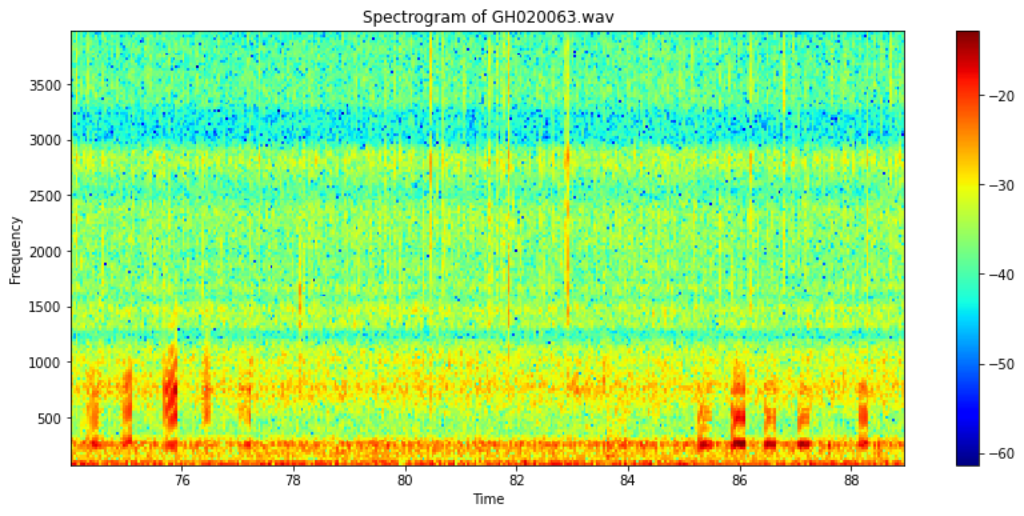
By the function audio_visualization in soundscape_IR, we can plot the spectrogram of the converted audio.
from soundscape_IR.soundscape_viewer import audio_visualization

#Spectrogram of part of the converted audio
camera = audio_visualization('GH020063.wav', offset_read = 74, duration_read=15, FFT_size=2048, window_overlap=0, plot_type='Spectrogram', f_range=[50,4000], prewhiten_percent=0)

Currently ongoing developments
- Batch process videos
Bugs report and suggestions
If you encounter any bug or issue, please contact Yi-Jen Sun via elainesun442@gmail.com. Suggestions are also appreciated!
Release history Release notifications | RSS feed


Download files
Download the file for your platform. If you're not sure which to choose, learn more about installing packages.
Source Distribution
Built Distribution
Filter files by name, interpreter, ABI, and platform.
If you're not sure about the file name format, learn more about wheel file names.
Copy a direct link to the current filters
File details
Details for the file vid2aud-0.1.1.tar.gz.
File metadata
- Download URL: vid2aud-0.1.1.tar.gz
- Upload date:
- Size: 3.9 kB
- Tags: Source
- Uploaded using Trusted Publishing? No
- Uploaded via: twine/4.0.1 CPython/3.7.13
File hashes
| Algorithm | Hash digest | |
|---|---|---|
| SHA256 |
e677bf653cb3f88e8760dd47d89f006e8b5e1be9f3d5d09503292807da555581
|
|
| MD5 |
2380c14eaf06ee64578b4e6b6bf3d6d6
|
|
| BLAKE2b-256 |
8d1da58bd886399929eb7a8e092ec0ecf96bb019e10448a2ed2d4a80b431dbb4
|
File details
Details for the file vid2aud-0.1.1-py3-none-any.whl.
File metadata
- Download URL: vid2aud-0.1.1-py3-none-any.whl
- Upload date:
- Size: 4.4 kB
- Tags: Python 3
- Uploaded using Trusted Publishing? No
- Uploaded via: twine/4.0.1 CPython/3.7.13
File hashes
| Algorithm | Hash digest | |
|---|---|---|
| SHA256 |
a85e45f5bf261d3005f9e12ff58953a983b8f20d10e1985eda310ced6b13675d
|
|
| MD5 |
e1e435e6de3afe3e66e2643fe5f62f06
|
|
| BLAKE2b-256 |
7a255e9a57a786c41ec803dc91836d84a6f97f068edcbf9c1f9f8a485376645b
|






