
VidDup 🎬
A fast, local video duplicate detector — finds re-encoded, re-scaled, and compressed copies that other tools miss.




Demo

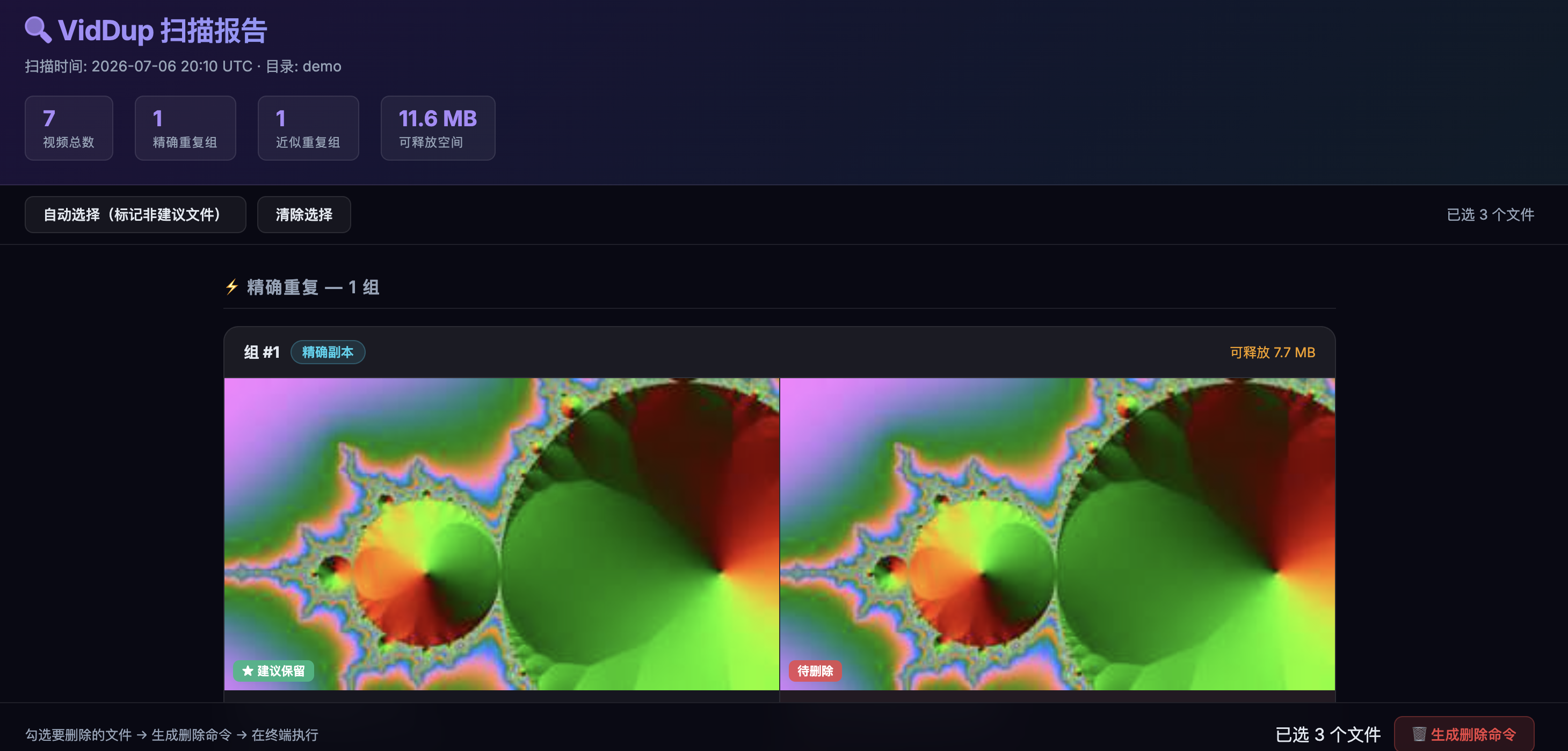
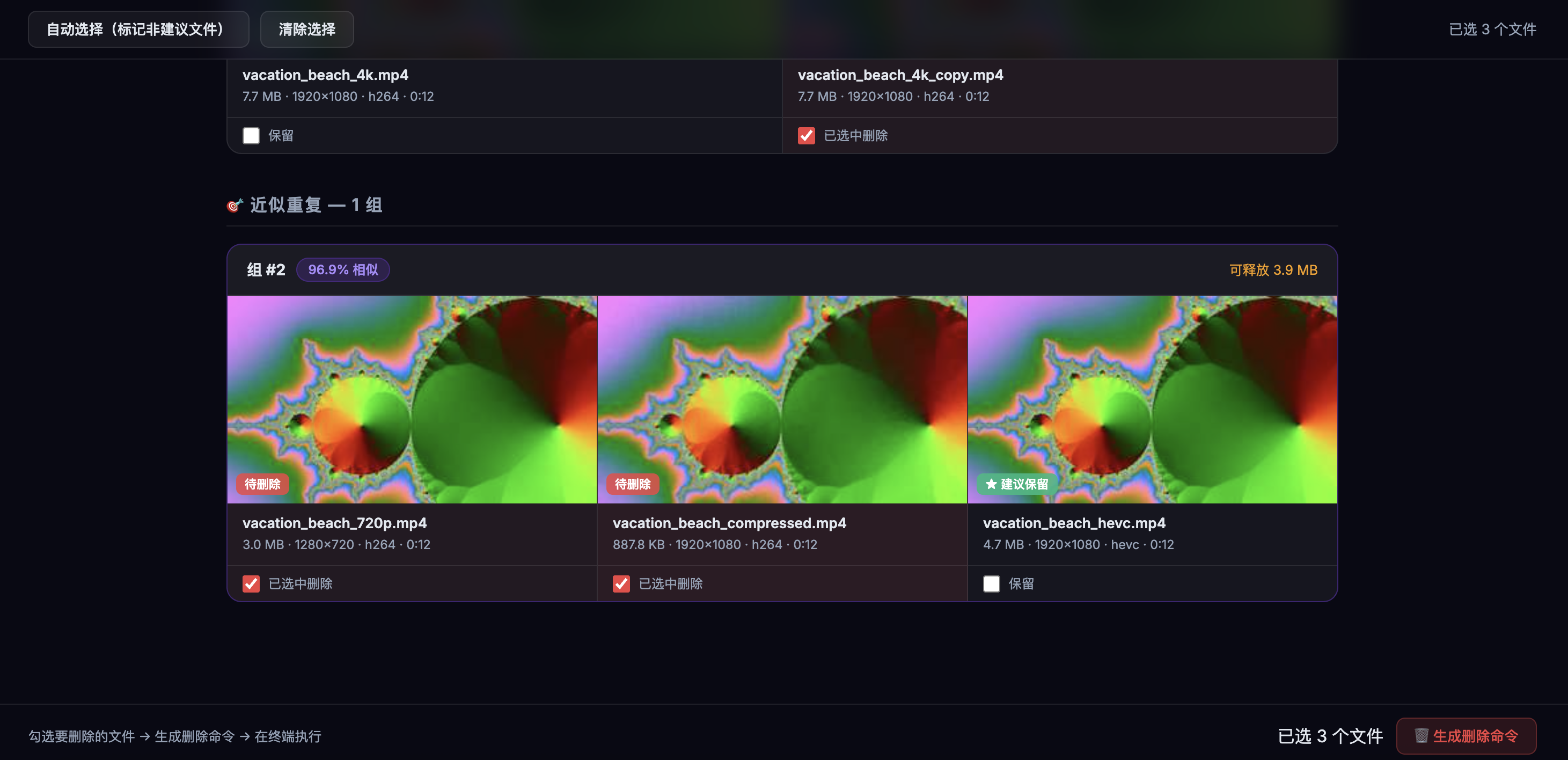
扫描完成后自动生成交互式 HTML 报告 ↓
Why VidDup?
Most duplicate detectors only find byte-for-byte identical files. VidDup goes further:
| Scenario | dupeGuru | Czkawka | VidDup |
|---|---|---|---|
| Exact copy (same file) | ✅ | ✅ | ✅ |
| Re-encoded (H.264 → HEVC) | ❌ | ❌ | ✅ |
| Re-scaled (1080p → 720p) | ❌ | ❌ | ✅ |
| Compressed (high → low bitrate) | ❌ | ❌ | ✅ |
| Incremental cache (skip unchanged files) | ❌ | ❌ | ✅ |
| Interactive HTML report with thumbnails | ❌ | ❌ | ✅ |
VidDup uses perceptual frame hashing (pHash) across multiple sampled frames per video, with a low-variance frame filter to ignore black/fade frames that cause false positives.
Quick Start
# Install VidDup (FFmpeg is bundled automatically — no extra steps!)
pip install viddup

# Scan a directory
viddup scan ~/Movies
That's it. A terminal report is printed and an interactive HTML report (with video thumbnails) is automatically saved to the scanned directory and opened in your browser.
💡 Zero external dependencies — VidDup bundles a static FFmpeg binary via
imageio-ffmpeg. No need tobrew install ffmpegorapt install ffmpeg.
Features
- Three-layer detection
- L1: xxHash3-128 — instant exact-copy detection
- L2: Duration metadata — groups candidates, skips impossible pairs
- L3: 10-frame pHash — perceptual similarity across re-encodes and re-scales
- Robust pHash comparison — uses median Hamming distance (not average), resistant to black frames, fade-outs, and title cards
- Smart frame selection — automatically skips solid-color frames and retries with alternate timestamps
- Ultra-short video handling — graceful degradation for clips under 3 seconds
- Incremental SQLite cache — fingerprints are cached; re-scanning a library of 500 videos takes seconds after the first run
- Multi-directory scan — finds duplicates across multiple folders in one pass
.viddup_ignore— exclude directories and files with glob patterns, like.gitignore- Hardware acceleration — automatically uses VideoToolbox on macOS (Apple Silicon & Intel)
- Interactive HTML report — embedded thumbnails, one-click delete-script generation, copy to clipboard
Installation
Requirements
- Python 3.11+
- FFmpeg — bundled automatically (or use your own system install)
# Recommended: one command, everything included
pip install viddup

# Or run directly without installing (via uvx)
uvx viddup scan ~/Movies

# From source (development)
git clone https://github.com/Pengfei-Kou/viddup.git
cd viddup
python -m venv .venv && source .venv/bin/activate
pip install -e ".[dev]"
🔧 Already have FFmpeg installed? VidDup will automatically prefer your system
ffmpegover the bundled one. No configuration needed.
Supported Video Formats
VidDup scans files with the following extensions:
| Format | Extension |
|---|---|
| MPEG-4 | .mp4, .m4v |
| Matroska | .mkv |
| AVI | .avi |
| QuickTime | .mov |
| WebM | .webm |
| Flash Video | .flv |
| Windows Media | .wmv |
| MPEG Transport Stream | .ts |
| MPEG | .mpeg, .mpg |
| 3GPP | .3gp |
Other formats can be decoded if FFmpeg supports them — contributions to extend the list are welcome!
Usage
viddup scan — find duplicates
# Basic scan
viddup scan ~/Movies

# Scan multiple directories (finds cross-folder duplicates)
viddup scan ~/Movies ~/Downloads/Videos

# Stricter threshold (only report very similar videos)
viddup scan ~/Movies --threshold 0.92

# Looser duration filter (catches clips with trimmed intros)
viddup scan ~/Movies --duration-tol 0.15

# Preview what would be scanned (no DB writes)
viddup scan ~/Movies --dry-run

# Save report to a specific directory
viddup scan ~/Movies --output ~/Desktop

# Don't auto-open the browser
viddup scan ~/Movies --no-open

# Force re-fingerprint everything (ignore cache)
viddup scan ~/Movies --no-cache
Full options:
Options:
  -t, --threshold FLOAT         Similarity threshold (0–1). Default: 0.85
  -f, --frames INTEGER          Frames sampled per video. Default: 10
  --duration-tol FLOAT          Duration tolerance for pre-filter. Default: 0.05 (±5%)
  --db PATH                     Fingerprint database path. Default: ~/.viddup/fingerprints.db
  -w, --workers INTEGER         Parallel worker processes. Default: CPU count
  -o, --output PATH             Report output directory. Default: first scanned directory
  --no-cache                    Ignore cache, recompute all fingerprints
  --recursive / --no-recursive  Recurse into subdirectories. Default: on
  --dry-run                     List files to be processed without writing DB
  --html / --no-html            Generate interactive HTML report. Default: on
  --open / --no-open            Auto-open HTML report in browser. Default: on
  -v, --verbose                 Show per-file progress
viddup status — cache info
viddup status
# Shows: cached video count, orphan records, database size, last scan time
viddup clear — clean up cache
# Remove records whose files no longer exist
viddup clear --orphans-only

# Wipe the entire cache
viddup clear --confirm
.viddup_ignore
Place a .viddup_ignore file in any scan directory to exclude files or subdirectories:
# Lines starting with # are comments

# Exclude directories (trailing slash required)
BRaw/
原始素材/
proxies/

# Exclude by filename glob
temp_*
*.tmp
._*

# Exclude by relative path glob
Backups/**
archive/2020/**
VidDup reports how many files were filtered when an ignore file is active.
How It Works
Each video goes through three layers:

 ┌─────────────────────────────────────────────────┐
 │  L1 — File Hash (xxHash3-128)                    │
 │  Identical bytes → immediate match, skip L2/L3  │
 └──────────────────────────┬──────────────────────┘
                            │ not exact
 ┌──────────────────────────▼──────────────────────┐
 │  L2 — Metadata Pre-filter (ffprobe)              │
 │  Duration difference > 5% → skip pair            │
 │  Reduces O(n²) comparisons to small groups       │
 └──────────────────────────┬──────────────────────┘
                            │ duration match
 ┌──────────────────────────▼──────────────────────┐
 │  L3 — Perceptual Frame Hash (pHash)              │
 │  Sample 10 frames at 5%, 15%, ..., 95%           │
 │  Skip low-variance frames (black/solid color)    │
 │  Compute pHash per frame → compare sequences     │
 │  Median Hamming distance < threshold → duplicate │
 └─────────────────────────────────────────────────┘
"Suggest keep" priority (shown in HTML report):
- Highest resolution (width × height)
- Largest file size (less compression loss)
- Alphabetical path (deterministic tiebreak)
HTML Report
After scanning, VidDup generates a self-contained viddup_report_*.html file saved directly in the scanned directory. No server required — open it with any browser.
The report includes:
- Video thumbnails (extracted from the middle of each file, embedded as base64)
- Grouped duplicate cards sorted by reclaimable space
- "Suggest keep" badge for the recommended file in each group
- Checkboxes to select files for deletion (non-suggested files pre-selected)
- Generate delete script → shell commands you can review and execute in your terminal
- Copy to clipboard button
⚠️ VidDup never deletes files automatically. You always review the generated
rmcommands before executing them.
Performance
Fingerprinting speed is limited by ffmpeg frame extraction (I/O + decode) and scales linearly with video count. The main bottleneck is the first scan of a new library — subsequent scans reuse the SQLite cache and complete in seconds regardless of library size.
Tips for faster scans:
- macOS: VideoToolbox hardware decoding is enabled automatically — no action needed.
- Reduce
--frames(e.g.--frames 6) for a 40% speedup with minimal accuracy loss on long videos. - Increase
--workerson machines with many CPU cores. - Use
--duration-tolconservatively — a tighter window means fewer L3 comparisons.
Configuration Reference
| Setting | Default | Notes |
|---|---|---|
--threshold |
0.85 |
Lower = more matches (more false positives). Try 0.90–0.95 for stricter. |
--frames |
10 |
More frames = slower but more accurate. 6 is usually sufficient for short clips. |
--duration-tol |
0.05 |
Increase to 0.10–0.15 if you expect trimmed intros/outros. |
--workers |
CPU count | Reduce if your system slows down during scanning. |
Limitations
- No semantic understanding: VidDup cannot detect if two videos are "about" the same topic but visually different (e.g., two different recordings of the same lecture).
- Duration pre-filter: Videos differing by more than
--duration-tolwill not be compared at L3, even if they are perceptually similar. Increase the tolerance if needed. - Corrupt files: Videos that
ffprobecannot parse are skipped and reported in the terminal output.
Contributing
Contributions are welcome! See CONTRIBUTING.md for guidelines.
git clone https://github.com/Pengfei-Kou/viddup.git
cd viddup
python -m venv .venv && source .venv/bin/activate
pip install -e ".[dev]"
pytest          # run tests
ruff check .    # lint
Roadmap
- v0.2: Demo GIF and HTML report screenshots in README
- v0.3: BK-tree for large libraries (10,000+ videos), audio fingerprint verification,
.viddup_ignorenegation patterns - v0.4: Standalone binaries via PyInstaller + GitHub Actions (macOS, Windows, Linux)
- v1.0: PyQt desktop GUI option, Windows full testing
License
MIT © VidDup Contributors
1 maintainer

Metadata
1 maintainer
Release files for viddup 0.2.1
For a detailed explanation of source distributions (sdists) and built distributions (wheels), please see the package formats documentation.
Source distribution (sdist)
| File | Size | Uploaded | |
|---|---|---|---|
| viddup-0.2.1.tar.gz | 3.2 MB | Details |
Built distribution (wheel)
| File | Interpreter | ABI | Platform | Reset |
|---|---|---|---|---|
| viddup-0.2.1-py3-none-any.whl | Python 3 | none | any | Details |
Total release size: 3.3 MB
Release files / viddup-0.2.1.tar.gz
| Download URL | viddup-0.2.1.tar.gz |
|---|---|
| Size | 3.2 MB |
| Tags | Source |
|
SHA-256 checksum How to use checksums |
124d00e0a403206f31f53765b231c41d7be05a3bc268cf38dedecdfbaec4b0cb
|
|
BLAKE2b-256 checksum How to use checksums |
ffb5bc32c9abc502ef076889a52c02d038533678dcc1164c4704344d843a6f45
|
| Upload date | |
|
Uploaded using Trusted Publishing? What is trusted publishing? |
No |
| Uploaded via |
twine/6.2.0 CPython/3.14.3
|
Release files / viddup-0.2.1-py3-none-any.whl
| Download URL | viddup-0.2.1-py3-none-any.whl |
|---|---|
| Size | 33.5 kB |
| Tags | Python 3 |
|
SHA-256 checksum How to use checksums |
c3579fdb0f0c56142d840779b41a8298ecf12da88d6efb1da648183ffdc24f06
|
|
BLAKE2b-256 checksum How to use checksums |
f13082306ac5fc8a4af8aed1cde9f6f8345f42c5f60797607173b176211d36ec
|
| Upload date | |
|
Uploaded using Trusted Publishing? What is trusted publishing? |
No |
| Uploaded via |
twine/6.2.0 CPython/3.14.3
|














