
Video Helper




Video Helper belongs to a collection of libraries called AI Helpers developed for building Artificial Intelligence.

Video Helper is a Python library that provides utility functions for processing video files. It includes features like loading, converting, extracting frames as well as working with subtitle formats.
The Promise
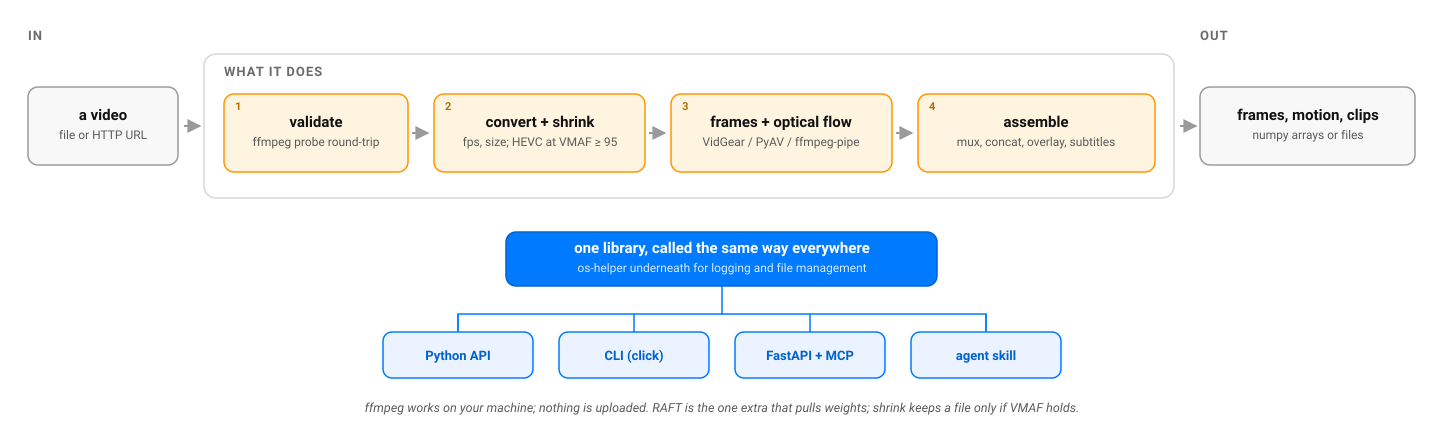
Local-first by design. video-helper runs entirely on your machine. Everything is processed locally with open-source tooling (ffmpeg): your data is never uploaded to a third-party service, no telemetry, no account, no cloud lock-in. You own the whole pipeline. Part of the AI Helpers suite: sovereignty over your data through local-first Open Source.
Battle-tested
video-helper follows the same discipline as the rest of the suite.
Every change runs through continuous integration before it reaches main; CI stays green, never red on main. Each release is tagged with semantic versioning (currently v2.9.2), and that exact tag is what gets published on PyPI — so what you pip install matches what was tested.
It builds on os-helper, the suite's shared foundation for logging and file handling. In the other direction, youtube-helper depends on video-helper directly for every clip it hands off for processing.
This is meant to be built on, not experimented with.
Documentation
Features
-
Video validation:
is_valid_video_file, extension check plus anffmpeg.proberound-trip. -
Conversion:
video_converter, re-encode, resample fps, resize (aspect-preserving), strip audio. -
Frame access:
extract_frames(generator with time/index range, stabilization, sampling) anddump_frames(list → video). -
Optical flow: a per-pixel estimate of motion between two frames (
vx/vy, how far each pixel shifted sideways and vertically).iter_frame_optical_flowwraps any BGR frame iterator with densevx/vy, color orgrayscale=True(DIS/Farneback free, RAFT via the[flow]extra),extract_optical_flowis the video-file convenience wrapper (.mp4visualization or raw.npy), andresize_flowis a wavelet-based, discontinuity-preserving flow resize. -
Temporal crop:
extract_video_chunk,video_duration. -
Pipeline primitives:
black_video,compress_video,image_loop_to_video,concat_videos,overlay_image,extract_audio_track,mux_audio_video,burn_subtitles. -
Subtitles:
srt2vtt(with companion CSS),vtt2srt,extract_unique_colors, and the timed-text layer:Cue,parse(reads WebVTT or SubRip),write/write_vtt/write_srt,format_timestamp,from_centiseconds,split_sentences. That layer imports neither OpenCV nor ffmpeg-python. -
Face-anchored speaker identity (
video_helper.faces, needs the[faces]extra). Audio-only diarization tells you a voice cluster exists, but not which on-screen face it belongs to.This submodule answers that: it detects faces (YuNet), tracks them across frames, then scores which tracked face's lip motion lines up with a given speaker's audio activity. The technique has a name — active-speaker detection (ASD): catching who is actually talking on screen, not just whose voice is on the track.
The pieces:
FaceDetector/FaceRecognizer— YuNet + SFace, OpenCV's own DNN wrappers, no HuggingFace at runtime;track_faces— IoU tracking;get_engine— a zero-weight lip-motion proxy, or the accurate Light-ASD PyTorch model;active_speaker_map— the harness that ties it together: it samples a handful of short clips instead of decoding the whole recording, growing the sample only for speakers it is not yet sure about.
The
facesmodule docstring has the full picture.
How it works
Installation
Prerequisites: Python 3.10–3.13 and git, ffmpeg, cross-platform:
- 🍎 macOS (Homebrew):
brew install python git ffmpeg - 🐧 Ubuntu/Debian:
sudo apt update && sudo apt install -y python3 python3-pip git ffmpeg - 🪟 Windows (PowerShell):
winget install Python.Python.3.12 Git.Git Gyan.FFmpeg
We recommend using Python environments. Check this link if you're unfamiliar with setting one up: 🥸 Tech tips.
From PyPI (recommended)
# Core video utilities (library + CLI)
pip install video-helper

# Optional surfaces and backends
pip install "video-helper[pyav]"      # PyAV frame backend
pip install "video-helper[api]"       # FastAPI HTTP surface
pip install "video-helper[faces]"     # face-anchored speaker identity (YuNet / SFace / Light-ASD)
pip install "video-helper[flow]"      # RAFT optical flow + wavelet flow resize
pip install "video-helper[torch]"     # destination="torch"
pip install "video-helper[pil]"       # destination="pil"
pip install "video-helper[mcp]"       # MCP tools (pulls [api])
From source (no PyPI)
git clone https://github.com/warith-harchaoui/video-helper.git
cd video-helper
pip install -e .

# Optional surfaces and backends
pip install -e ".[pyav]"
pip install -e ".[api]"
Quick start
For the full catalog of recipes, see 📋 EXAMPLES.md.
Here’s an example of how to use Video Helper to load, convert, and extract frames from a video file:
import video_helper as vh

# Check if the video file is valid
video_file = "example.mp4"
valid = vh.is_valid_video_file(video_file)  # True or False

# Get video dimensions and details
details = vh.video_dimensions(video_file)
print(details)
# {'width': 1920, 'height': 1080, 'duration': 10.0, 'frame_rate': 30.0, 'has_sound': True}

# Convert the video file to a different format
output_video = "video_tests/example_converted.mp4"
vh.video_converter(video_file, output_video, frame_rate=30, width=640, without_sound=True)

# The images will never be distorted:
# aspect ratios are kept even for arbitrary width and height thanks to black padding if necessary

# Extract frames from the video

start_instant = 5  # seconds
# it corresponds to start_index = start_instant * frame_rate = 5 * 30 = 150th frame

end_instant = 10  # seconds
# it corresponds to end_index = end_instant * frame_rate = 10 * 30 = 300th frame

frame_step = 5  # take one frame every 5
# which corresponds to 1 frame every 5 / frame_rate = 5 / 30 = 0.17 second

# This means that in the video we take 1 frame every 5 from the 150th to the 300th

# List example
frames = list(
    vh.extract_frames(
        video_file, start_instant=start_instant, end_instant=end_instant, frame_step=frame_step
    )
)

# For loop example
for frame in vh.extract_frames(
    video_file, start_instant=start_instant, end_instant=end_instant, frame_step=frame_step
):
    pass  # Replace with your frame processing logic

# Each frame is a numpy array with shape (height, width, channels)
# with pixel values between 0 and 255.
Another example is about subtitles
Convert SRT subtitles to WebVTT with color preservation:
import video_helper as vh

srt_file = "subtitles.srt"
vtt_file = "subtitles.vtt"
css_file = "subtitles.css"

vh.srt2vtt(srt_file, vtt_file, css_file)
Multi-surface exposure
Every operation is reachable from four surfaces: the eighteen CLI
subcommands and the eighteen HTTP routes mirror each other one-to-one, and the
MCP tools are those routes. The lower-level building blocks stay library-only:
dump_frames, iter_frame_optical_flow, resize_flow,
extract_unique_colors, hw_vcodec, the subtitle Cue layer and
video_helper.faces.
| Surface | Install | Entry point |
|---|---|---|
| Python library | pip install video-helper |
import video_helper as vh |
| CLI | pip install video-helper |
video-helper --help |
| FastAPI HTTP + GUI | pip install 'video-helper[api]' |
uvicorn video_helper.api:app |
| MCP | pip install 'video-helper[mcp]' |
video-helper-mcp (same app + /mcp) |
The FastAPI app also serves a minimal browser GUI ("video bench") at
GET /gui (and GET / redirects there): drop a clip, pick one operation,
run it against the same HTTP endpoints, preview input vs output in an
in-browser <video> / <img> player, and download the result. It is a
single self-contained page (Tailwind via CDN + vanilla JS, no build step)
defined in video_helper/gui.py.
pip install 'video-helper[api]'
uvicorn video_helper.api:app --port 8000
# open http://localhost:8000/gui  (or just http://localhost:8000/)
The Dockerfile at the repo root ships .[api,pyav] by default on
python:3.11-slim with ffmpeg and libass: one docker build && docker run -p 8000:8000 gives you the HTTP + GUI surfaces immediately.
For the exhaustive catalogue of what triggers each operation (natural-language phrasings, commands, functions, file types), see TRIGGERS.md.
The page speaks French and English. GET /gui?lang=fr|en picks one, a flag in the header toggles between them, and a code no catalogue carries falls back to the default rather than failing.
The English is the source, written in the markup itself. The French lives in video_helper/locales/fr/LC_MESSAGES/video_helper.po, a standard gettext catalogue read through os_helper.Catalog — the loader shared across the suite — so a translator works in the format every translation tool already speaks, on real sentences rather than on key names.
A string the French catalogue has not caught up with renders as readable
English instead of as a key. The mirror image is the risk: reword the English
and its French entry is orphaned, so the tests hand every source string to
Catalog.problems, which fails the build rather than letting the page
half-revert. Edit the .po, then recompile with
python -c "import os_helper as osh; osh.compile_catalogs('video_helper/locales')".
The parameter labels stay in one language on purpose: each one names the form field the request actually carries.
See GUI.md for the roadmap toward a richer GUI (Recipe
Canvas, frame-first comparator, batch drop zone: the minimal /gui bench
above is the first step).
Use it as an agent skill
skills/video-helper/ packages video-helper as a Claude Skill and an OpenCode
skill, so an agent can reach for it on your behalf. See
skills/README.md to install it (symlink into
~/.claude/skills/ and ~/.opencode/skills/), and
TRIGGERS.md for the exhaustive trigger catalogue —
scripts/check_triggers.py keeps the skill's description in sync with it, and
the test suite fails if a capability stops being named.
Environment variables
| Variable | Default | Effect |
|---|---|---|
VIDEO_HELPER_HOST / VIDEO_HELPER_PORT |
127.0.0.1 / 8000 |
Where video-helper-mcp binds. |
VIDEO_HELPER_MAX_THREADS |
4 |
ffmpeg's -threads on the heavy encodes, so several conversions at once do not oversubscribe the cores. |
VIDEO_HELPER_FFMPEG_LOCK |
video_helper_ffmpeg_encode.lock in the OS temporary directory (tempfile.gettempdir()) |
File lock that serializes heavy encodes across processes. Every process on the machine must use the same path. |
VIDEO_HELPER_RW_TIMEOUT |
60 (seconds) |
How long an ffmpeg socket read may stall on a URL before giving up; 0 turns the timeout off. |
VIDEO_HELPER_MODEL_DIR |
~/.cache/ai-helpers/models |
Where video_helper.faces caches its weights. |
AI_HELPERS_MODEL_BASE_URL |
the suite's mirror | First source tried for the face weights, before the upstreams. |
NH_ASD_DEVICE |
auto |
Light-ASD device: cpu, cuda, mps or auto (CUDA, then MPS, then CPU). |
NH_FACES_MAX_HEIGHT |
720 |
Frames are downscaled to this height before face detection. |
PYTORCH_ENABLE_MPS_FALLBACK |
set to 1 on import |
Lets the few PyTorch ops without an MPS kernel run on CPU; an explicit 0 still wins. |
API Reference
| Function | Signature | Description |
|---|---|---|
is_valid_video_file |
(video_file: str) -> bool |
True iff the file exists, has a known video extension, and ffmpeg.probe finds a video stream. An HTTP(S) URL returns True without being fetched; a bad URL fails later, in ffmpeg. |
video_dimensions |
(video_file: str, http_headers: dict | None = None) -> dict |
Returns {width, height, duration, frame_rate, has_sound} via ffmpeg.probe. video_file accepts a URL; http_headers forwards to ffprobe for URLs that need them. |
video_duration |
(input_video: str) -> float |
Duration in seconds (thin wrapper over video_dimensions). |
video_converter |
(input_video, output_video=None, frame_rate=None, width=None, height=None, without_sound=False) |
Re-encode with optional fps, resize (aspect-preserving black padding when both width and height are given), and audio stripping. |
extract_frames |
(video_path, start_index=None, end_index=None, start_instant=None, end_instant=None, stabilize=False, frame_step=1, frame_interval=None, frame_indices=None, frame_times=None, backend="auto", hwaccel=None, http_headers=None, output_width=None, output_height=None, pad_color="black", destination="numpy", device="cpu", batch_size=None, layout="image") -> Iterator |
Multi-backend dispatcher (VidGear / PyAV / ffmpeg-pipe). destination: "numpy" (HWC BGR), "torch" (CHW RGB), or "pil" (PIL.Image RGB, size=(W, H)). batch_size+layout yields NHWC/NCHW or THWC/CTHW. frame_indices/frame_times = sparse access via PyAV keyframe-seek. http_headers forwards User-Agent/Referer/Cookie to PyAV / ffmpeg-pipe (needed for yt-dlp-resolved YouTube live, members-only, age-gated). output_width+output_height → exact size with pad_color-padded letterbox/pillarbox; one of them alone → aspect-preserving scale. pad_color="transparent" is not implemented yet: it raises, since it would need 4-channel BGRA/RGBA output, breaking the (H, W, 3) contract on every destination. See SPEED_ANALYSIS.md and EXAMPLES.md. |
dump_frames |
(frames_list, output_movie, fps=30) |
Write a list of BGR frames (OpenCV convention, same as extract_frames yields) to a video file. |
extract_video_chunk |
(input_video, sample_start, sample_end, output_video, *, copy=False) |
Temporal crop from sample_start to sample_end (seconds). copy=True stream-copies instead of re-encoding: fast and lossless, but only frame-accurate when every frame of the input is a keyframe. |
black_video |
(duration, width, height, output_video, frame_rate=30) |
Generate a silent solid-black video. Odd dimensions are rounded down. |
compress_video |
(input_video, output_video=None, *, target_size_mb=97.0, audio_bitrate="128k", vcodec="libx265", min_video_bitrate_kbps=200, overwrite=True) -> str |
Two-pass ffmpeg encode that solves for the video bitrate needed to hit target_size_mb given the source duration, then encodes at that bitrate. Defaults to HEVC (libx265) tagged hvc1 (ffmpeg's default hev1 tag is not recognized by QuickTime/Apple players) with +faststart. Built for "the compressed file that gets embedded in a web video player", not an archival master. Pass vcodec="hevc_videotoolbox" on macOS for a large speed win (single-pass hardware HEVC) at a small quality-per-bit cost, or vcodec="copy" to skip re-encoding and just remux (plus +faststart) when the source is already small enough. |
image_loop_to_video |
(image, duration, output_video, frame_rate=30, width=None, height=None) |
Loop a still image into a silent video; optional letterboxing. |
concat_videos |
(input_videos, output_video, reencode=True, frame_rate=None) |
Concatenate clips end-to-end via the ffmpeg concat demuxer. |
overlay_image |
(input_video, image, output_video, x="0", y="0", scale_width=None) |
Overlay a PNG/JPG (alpha supported); x / y accept ffmpeg expressions for time-varying motion. |
extract_audio_track |
(input_video, output_audio, sample_rate=44100, channels=2, encoding="pcm_s16le") |
Pull the audio stream out of a video file. |
mux_audio_video |
(input_video, input_audio, output_video, audio_codec="aac", audio_bitrate="192k", shortest=False) |
Replace the audio track of a (typically silent) video. |
burn_subtitles |
(input_video, subtitles_file, output_video, force_style=None) |
Burn .srt / .vtt / .ass / .ssa into the video frames (requires ffmpeg built with libass). |
srt2vtt |
(srt_file_path, vtt_file_path=None, css_file_path=None) |
Convert SRT → WebVTT, lifting <font color> tags into a sidecar CSS file. |
extract_unique_colors |
(srt_file_path: str) -> Set[str] |
Set of unique hex colors found in <font color> tags of an SRT. |
hw_vcodec |
(software: str, hardware: str) -> str |
Returns hardware (e.g. "hevc_videotoolbox") on macOS when ffmpeg -encoders lists it, else software. A failed probe falls back to software instead of raising. |
vtt2srt |
(vtt_file_path, srt_file_path=None) -> str |
Convert WebVTT → SubRip; a <v Name> voice tag becomes a Name: prefix. Returns the path written (default: <stem>.srt beside the input). |
Cue |
(start, end, text, speaker=None, identifier=None) |
One timed caption. Newlines in text are kept: they are where a renderer breaks lines. |
parse |
(text: str) -> list[Cue] |
Read a WebVTT or SubRip document into cues, in time order. |
write |
(cues, output_path=None, *, subtitle_format="", voices=True) -> str |
Render cues as WebVTT or SubRip, the output extension picking the format (subtitle_format="vtt"/"srt" when there is no path), and write them when a path is given. |
write_vtt / write_srt |
(cues, *, voices=True) -> str / (cues) -> str |
Render one format to a string. voices=False drops the <v Name> tags, for a translated subtitle track. |
format_timestamp |
(seconds: float, *, srt=False) -> str |
HH:MM:SS.mmm (WebVTT) or HH:MM:SS,mmm (SubRip); negative input clamps to zero. |
from_centiseconds |
(value: int) -> float |
whisper.cpp timestamp (10 ms units) → seconds. |
split_sentences |
(text: str) -> list[str] |
One entry per sentence; decimals, initials, ellipses and the bilingual ABBREVIATIONS set stay whole. |
iter_frame_optical_flow |
(frames: Iterator[np.ndarray], *, method="dis", dis_preset="fast", raft_variant="small", device="cpu", clip_flow=None, grayscale=False, output_width=None, output_height=None, wavelet="db2") -> Iterator[np.ndarray] |
Wraps any (H, W, 3) BGR frame iterator (extract_frames output, or a live source like capture_helper.iter_camera_frames) and re-yields (H, W, 5) float32 arrays (frame + vx/vy dense flow vs. the previous frame), or (H, W, 3) with grayscale=True (intensity + flow). method="dis"/"farneback" need no extra dep; method="raft" and output_width/output_height (wavelet resize via resize_flow) need the [flow] extra. |
extract_optical_flow |
(input_video, output_path=None, *, method="dis", dis_preset="fast", raft_variant="small", device="cpu", clip_flow=None, start_instant=None, end_instant=None, frame_step=1, frame_interval=None, fps=None, output_width=None, output_height=None, wavelet="db2", overwrite=True) -> str |
File-level convenience wrapper: runs extract_frames → iter_frame_optical_flow and writes the result. Output kind inferred from output_path's extension: .npy (raw (T, H, W, 2) float32 flow array) or anything else (default .mp4, an HSV-color-wheel visualization video). |
resize_flow |
(flow: np.ndarray, output_width: int, output_height: int, *, wavelet="db2") -> np.ndarray |
Resizes a (H, W, 2) vx/vy flow field via wavelet decomposition instead of plain bilinear/bicubic, avoiding smearing motion discontinuities across the resize, and correctly rescales flow magnitude by the spatial resize factor. Needs the [flow] extra (PyWavelets). |
By default frames are BGR numpy.ndarray of shape (H, W, 3) with pixel values in [0, 255]. See EXAMPLES.md → Destination for the full shape × colorspace table including torch (CHW/NCHW/CTHW RGB) and PIL (RGB, size=(W, H)).
Author
Acknowledgements
Special thanks to Mohamed Chelali and Bachir Zerroug for fruitful discussions.
License
This project is licensed under the BSD-3-Clause License: see the LICENSE file for details.
1 maintainer

Metadata
1 maintainer
Release files for video-helper 2.9.2
For a detailed explanation of source distributions (sdists) and built distributions (wheels), please see the package formats documentation.
Source distribution (sdist)
| File | Size | Uploaded | Provenance | Actions |
|---|---|---|---|---|
| video_helper-2.9.2.tar.gz | 188.7 kB | Without provenance | Details for video_helper-2.9.2.tar.gz |
Built distribution (wheel)
| File | Interpreter | ABI | Platform | Actions Reset |
|---|---|---|---|---|
| video_helper-2.9.2-py3-none-any.whl | Python 3 | none | any | Details for video_helper-2.9.2-py3-none-any.whl |
Total release size: 326.3 kB
Release files / video_helper-2.9.2.tar.gz
| Download URL | video_helper-2.9.2.tar.gz |
|---|---|
| Size | 188.7 kB |
| Tags | Source |
|
SHA-256 checksum How to use checksums |
4c0594f905e7e307212d50fd9c50e1c9b661aebac665a29fe509da51324629d9
|
|
BLAKE2b-256 checksum How to use checksums |
b69e4bcdddb6ec85fc1eac08ef60997554cd440a1580fb9691a2a086ae0fe5c5
|
| Upload date | |
|
Uploaded using Trusted Publishing? What is trusted publishing? |
No |
| Uploaded via |
twine/7.0.0 CPython/3.13.13
|
Release files / video_helper-2.9.2-py3-none-any.whl
| Download URL | video_helper-2.9.2-py3-none-any.whl |
|---|---|
| Size | 137.7 kB |
| Tags | Python 3 |
|
SHA-256 checksum How to use checksums |
a2ec96f0b449522a8a1ddf2dcb0fb704ce7c68f47edf468f217a6de28422c668
|
|
BLAKE2b-256 checksum How to use checksums |
36a0e36d9356baa928c53c0b5afe66ee1c66c6d58558e316baef7ff1fde434f7
|
| Upload date | |
|
Uploaded using Trusted Publishing? What is trusted publishing? |
No |
| Uploaded via |
twine/7.0.0 CPython/3.13.13
|
Security for video-helper 2.9.2
Provenance
Provenance describes where a file came from. On PyPI, provenance is shared via attestations, which provide a verifiable record of the build or publishing details. View details, limitations and caveats.
No provenance found
None of the files in this release were uploaded with provenance metadata.
A note on package security
PyPI is a repository for distributing packages, not a service for auditing them. While third-party security researchers and our staff do their best to detect and remove malicious packages, PyPI cannot guarantee the quality, security or suitability of any given package.
To learn more about protecting yourself from malicious actors, visit our package security documentation.














