
video_montage
Easily create a video montage (either a sequence or a grid of videos)
Installing
Install:
pip install video_montage
Usage
Before running, you must have a prepare an input video folder with videos the following structure, eg.
<INPUT_VIDEO_FOLDER_PATH>
├── <video1>.mp4
├── <video2>.mp4
└── ...
video_grid_montage: Create a grid of videos (all playing at the same time). If the videos are not all the same length, the video length will default to using the longest video, and filling the other videos with a freeze of the last frame.
video_grid_montage --help

usage: video_grid_montage --input_video_folder_path INPUT_VIDEO_FOLDER_PATH [--output_video_folder_path OUTPUT_VIDEO_FOLDER_PATH]
                          [--output_video_filename OUTPUT_VIDEO_FILENAME] [--max_n_videos MAX_N_VIDEOS] [--montage_duration_seconds MONTAGE_DURATION_SECONDS]
                          [--fps FPS] [--num_per_row NUM_PER_ROW] [--overlay_filename] [--fill_mode {freeze,loop,black}] [-h]

optional arguments:
  --input_video_folder_path INPUT_VIDEO_FOLDER_PATH
                        (Path, required)
  --output_video_folder_path OUTPUT_VIDEO_FOLDER_PATH
                        (Path, default=.)
  --output_video_filename OUTPUT_VIDEO_FILENAME
                        (Union[str, NoneType], default=None)
  --max_n_videos MAX_N_VIDEOS
                        (Union[int, NoneType], default=None)
  --montage_duration_seconds MONTAGE_DURATION_SECONDS
                        (Union[float, NoneType], default=None)
  --fps FPS             (Union[int, NoneType], default=None)
  --num_per_row NUM_PER_ROW
                        (Union[int, NoneType], default=None)
  --overlay_filename    (bool, default=False)
  --fill_mode {freeze,loop,black}
                        (Literal['freeze', 'loop', 'black'], default=freeze)
  -h, --help            show this help message and exit
video_sequence_montage: Create a sequence of videos (playing one at a time sequentially)
video_sequence_montage --help

usage: video_sequence_montage --input_video_folder_path INPUT_VIDEO_FOLDER_PATH
                              [--output_video_folder_path OUTPUT_VIDEO_FOLDER_PATH]
                              [--output_video_filename OUTPUT_VIDEO_FILENAME]
                              [--max_n_videos MAX_N_VIDEOS] [--fps FPS]
                              [--overlay_filename] [-h]

optional arguments:
  --input_video_folder_path INPUT_VIDEO_FOLDER_PATH
                        (Path, required)
  --output_video_folder_path OUTPUT_VIDEO_FOLDER_PATH
                        (Path, default=.)
  --output_video_filename OUTPUT_VIDEO_FILENAME
                        (str, default=2023-10-20_00-17-06_video_sequence_montage.mp4)
  --max_n_videos MAX_N_VIDEOS
                        (Union[int, NoneType], default=None)
  --fps FPS             (Union[int, NoneType], default=None)
  --overlay_filename    (bool, default=False)
  -h, --help            show this help message and exit
Example Usage
(video_montage_env) ➜  video_montage git:(main) ✗ tree openai_rubiks_cube

openai_rubiks_cube
├── 2023-10-07_20-04-36_openai_rubiks_cube.gif
├── 2023-10-07_20-05-13_openai_rubiks_cube.gif
├── 2023-10-07_20-05-48_openai_rubiks_cube.gif
├── 2023-10-07_20-07-27_openai_rubiks_cube.gif
├── 2023-10-07_20-08-02_openai_rubiks_cube.gif
└── 2023-10-07_20-11-18_openai_rubiks_cube.gif

0 directories, 6 files
(video_montage_env) ➜  video_montage git:(main) ✗ video_grid_montage --input_video_folder_path openai_rubiks_cube
Moviepy - Building video 2023-10-07_20-16-08_video_grid_montage.mp4.
Moviepy - Writing video 2023-10-07_20-16-08_video_grid_montage.mp4

Moviepy - Done !
Moviepy - video ready 2023-10-07_20-16-08_video_grid_montage.mp4
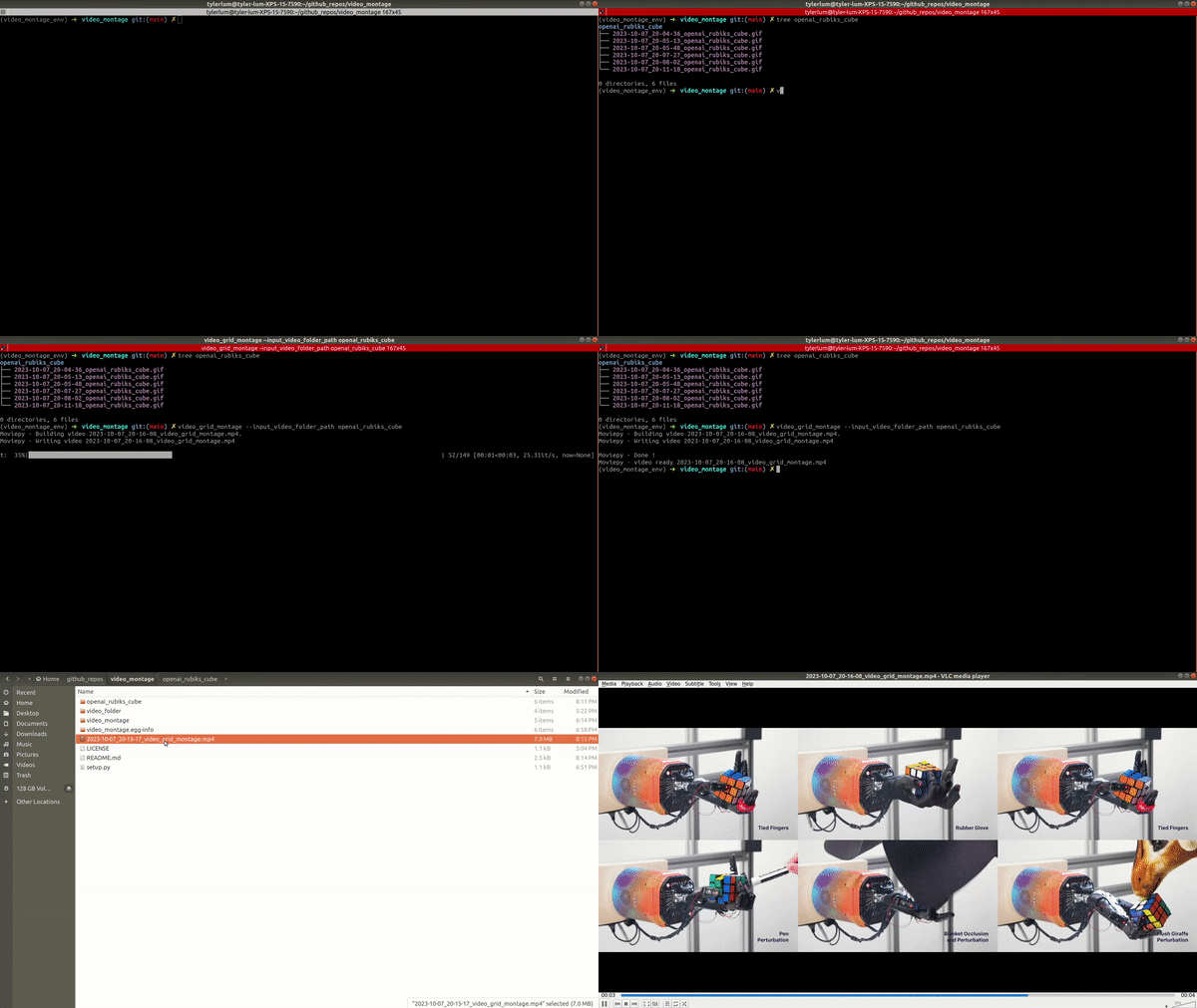
You can also add the --overlay_filename argument to add the clip's filename to each video clip.
If you get an error related to ImageMagick, you can try running the following command to fix it:
sudo apt-get install imagemagick
or
conda install -c conda-forge imagemagick
1 maintainer

Metadata
1 maintainer
Release files for video-montage 0.2.1
For a detailed explanation of source distributions (sdists) and built distributions (wheels), please see the package formats documentation.
Source distribution (sdist)
| File | Size | Uploaded | Provenance | |
|---|---|---|---|---|
| video_montage-0.2.1.tar.gz | 6.2 kB | Without provenance | Details |
Built distribution (wheel)
| File | Interpreter | ABI | Platform | Reset |
|---|---|---|---|---|
| video_montage-0.2.1-py3-none-any.whl | Python 3 | none | any | Details |
Total release size: 13.9 kB
Release files / video_montage-0.2.1.tar.gz
| Download URL | video_montage-0.2.1.tar.gz |
|---|---|
| Size | 6.2 kB |
| Tags | Source |
|
SHA-256 checksum How to use checksums |
7905382c3a876fecaf09cd071343dcdec1ce8c99675f3fe5444998d27fc1980f
|
|
BLAKE2b-256 checksum How to use checksums |
c53762856730105d207192a392af8484ddaa417a2a0d06a115736ea34c29a3c3
|
| Upload date | |
|
Uploaded using Trusted Publishing? What is trusted publishing? |
No |
| Uploaded via |
twine/6.1.0 CPython/3.9.21
|
Release files / video_montage-0.2.1-py3-none-any.whl
| Download URL | video_montage-0.2.1-py3-none-any.whl |
|---|---|
| Size | 7.7 kB |
| Tags | Python 3 |
|
SHA-256 checksum How to use checksums |
4505dd51a773ca8e22f267bbf5156c70860477f7f7233e3b2bc6916c2a676c6c
|
|
BLAKE2b-256 checksum How to use checksums |
75a51f2f4e2fde6db192f6096d07b8bbe0c62ef32677edad9a5029e236fb60d9
|
| Upload date | |
|
Uploaded using Trusted Publishing? What is trusted publishing? |
No |
| Uploaded via |
twine/6.1.0 CPython/3.9.21
|
Security for video-montage 0.2.1
Provenance
Provenance describes where a file came from. On PyPI, provenance is shared via attestations, which provide a verifiable record of the build or publishing details. View details, limitations and caveats.
No provenance found
None of the files in this release were uploaded with provenance metadata.
A note on package security
PyPI is a repository for distributing packages, not a service for auditing them. While third-party security researchers and our staff do their best to detect and remove malicious packages, PyPI cannot guarantee the quality, security or suitability of any given package.
To learn more about protecting yourself from malicious actors, visit our package security documentation.














