
English · 简体中文





你的 Agent 浏览了无数网页
现在该让它看视频了
Video2Agent 让 AI Agent 看懂视频、直接回答。
B 站和本地视频都能问:讲了什么、哪条更好、值不值得看。
实测 · 快速开始 · 它能做什么 · 工作原理 · 文档 · 插件市场
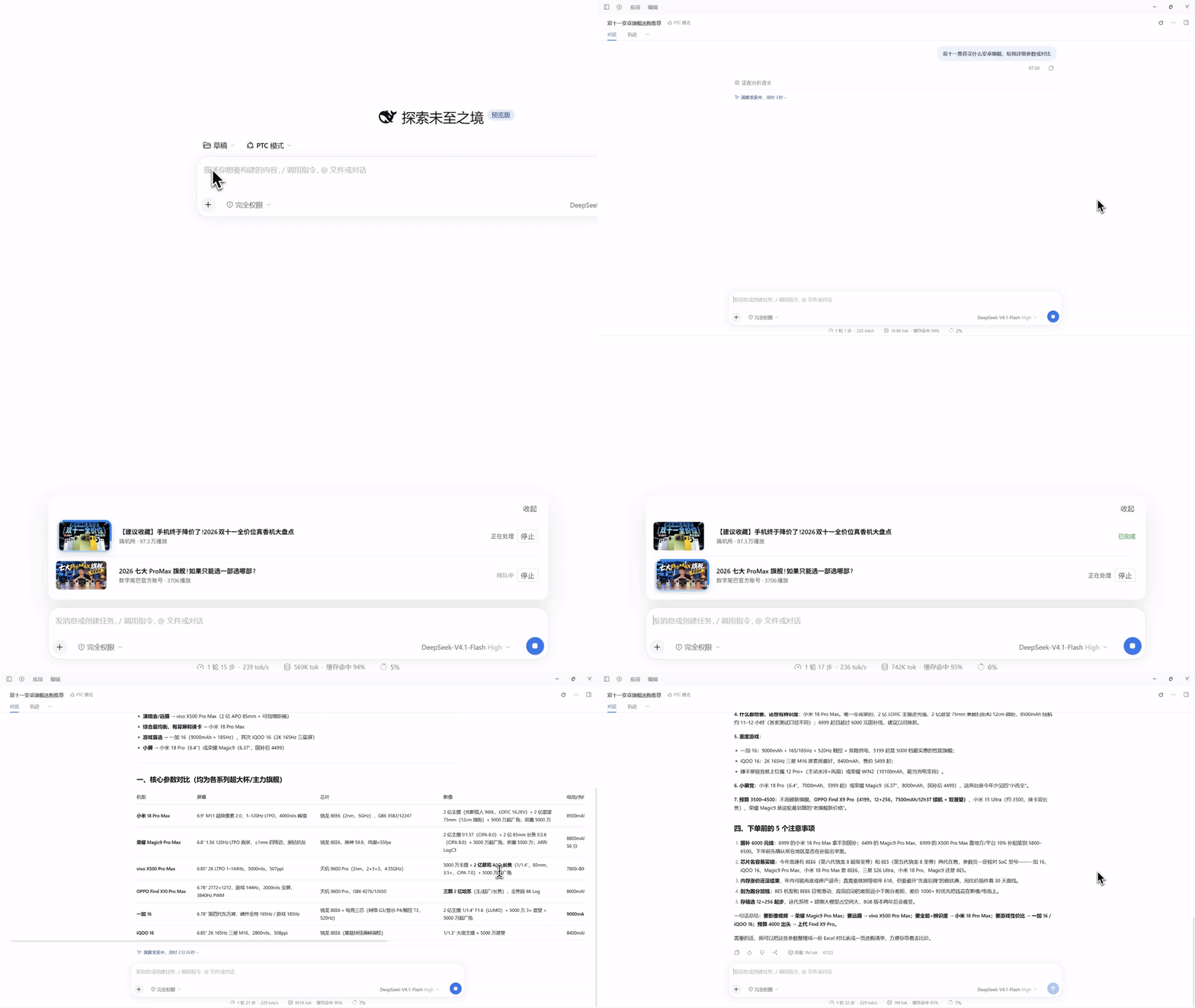
实录;等待部分已压缩。
1 找视频 → 2 处理 → 3 回答
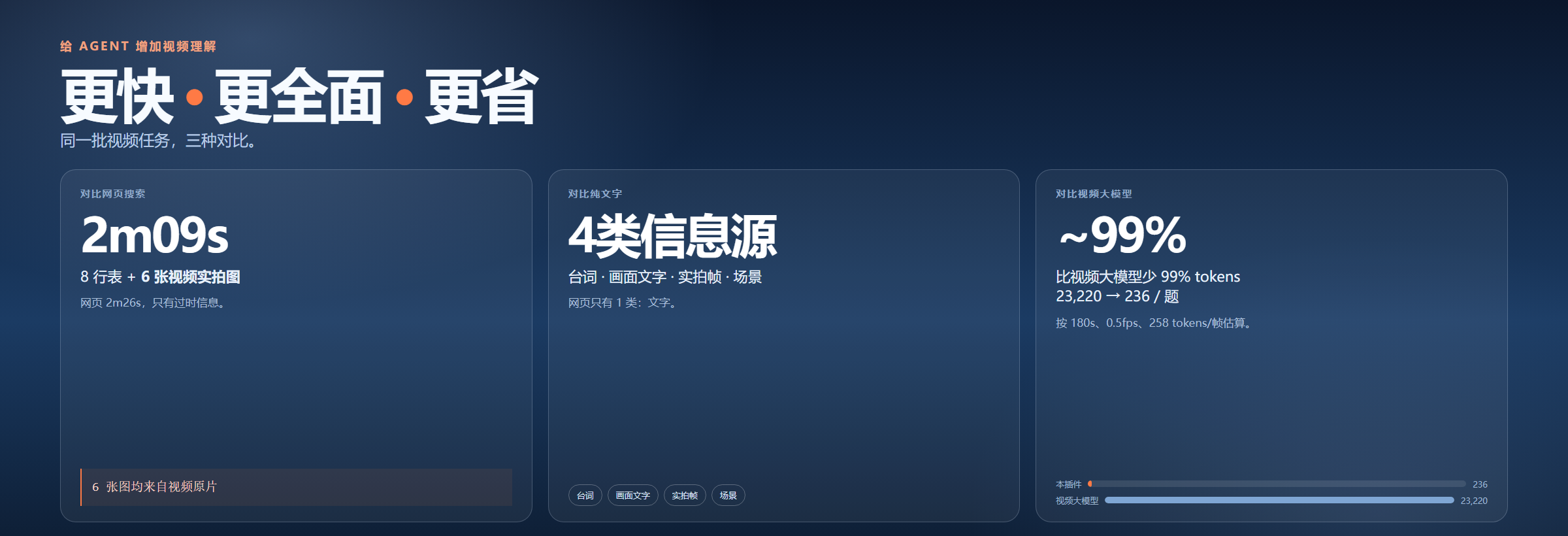
更快、更全面、更省
一条视频:2m09s 做出 8 行速查表 + 6 张原片截图;走网页要 2m26s。信息源 4 类,纯文字只有 1 类;比视频大模型少 ~99% tokens。
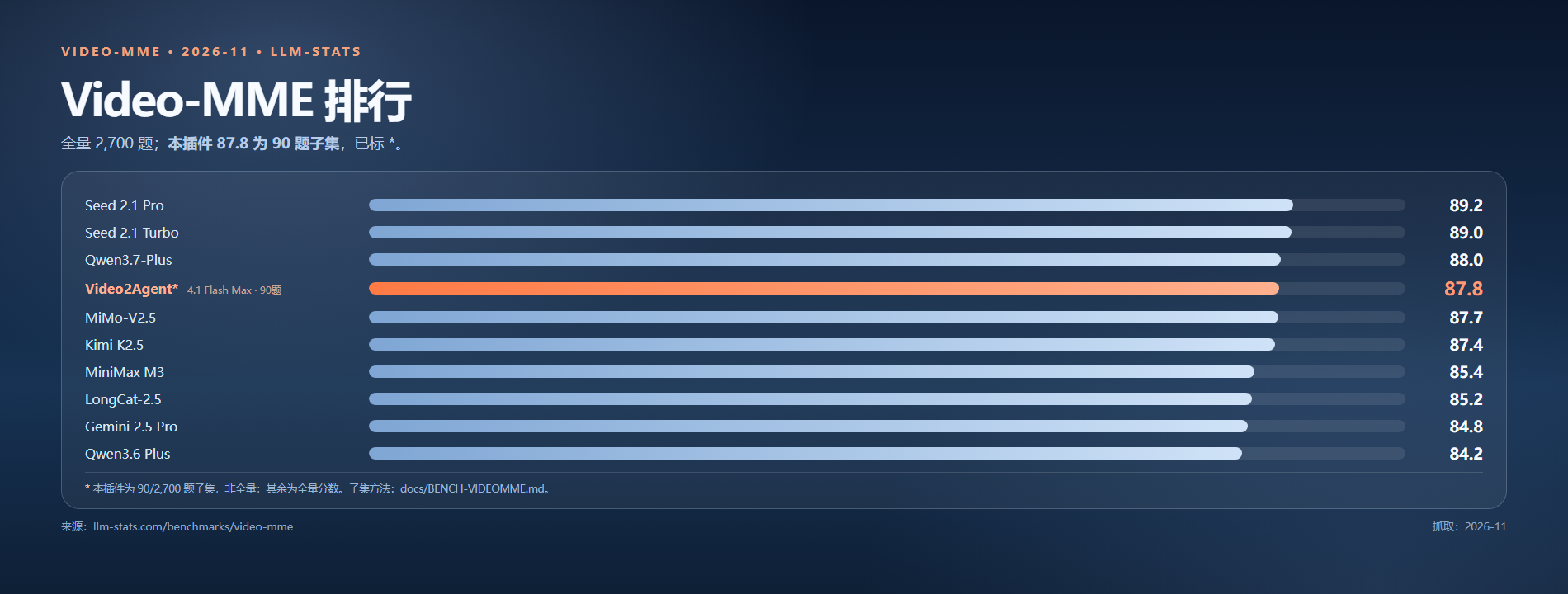
Video-MME 排行
在 llm-stats 2026-11 的 Video-MME 全量榜(2,700 题)上,橙色那行是 Video2Agent* 87.8(4.1 Flash Max),与前沿模型同榜;* 表示 90 题子集。
它能做什么
1. 检索网络视频
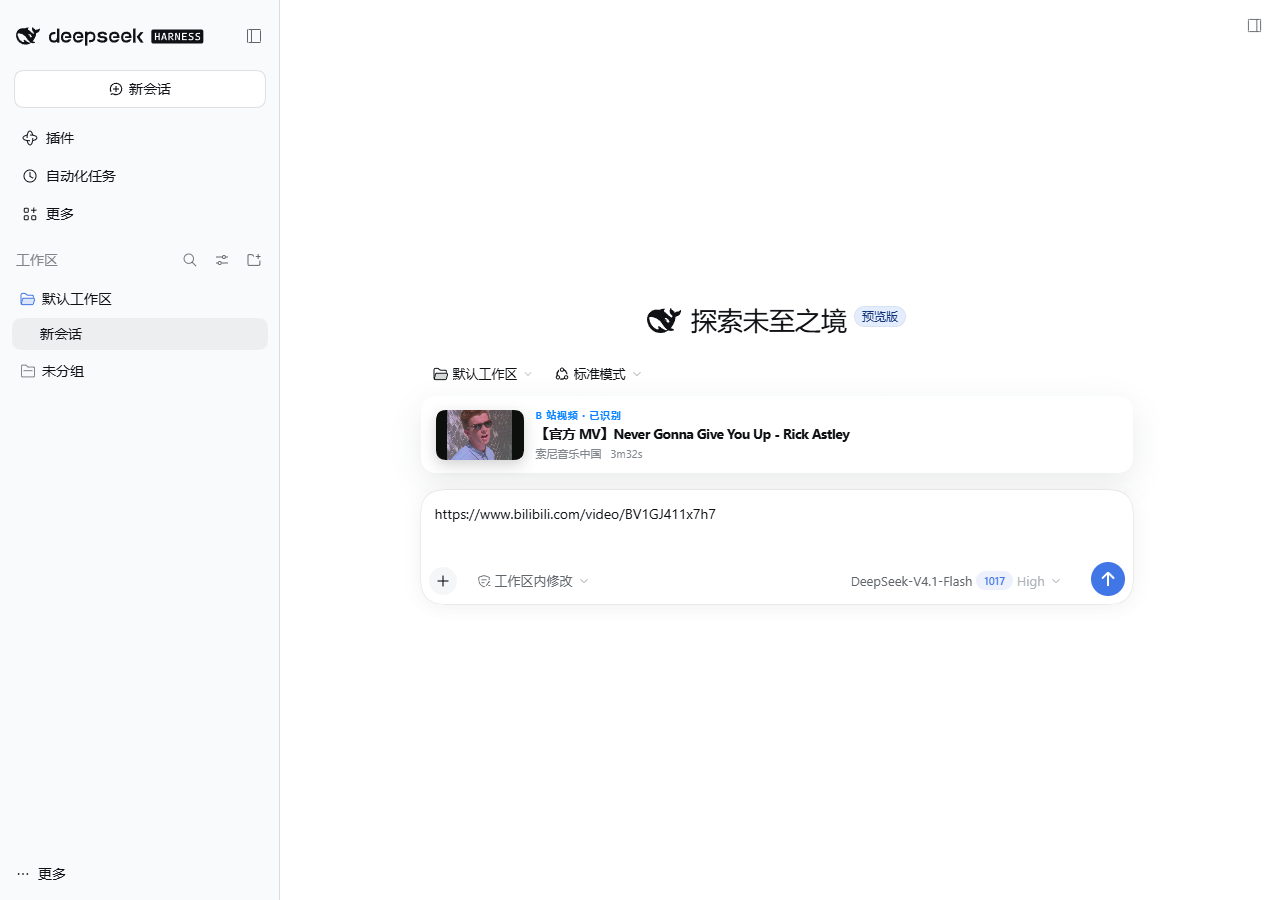
在 B 站按关键词找片,按 UP 主、发布时间筛选;也可以直接贴 BV、av 或 b23 链接,先看标题、封面、时长,再决定要不要处理。
2. 批量处理视频
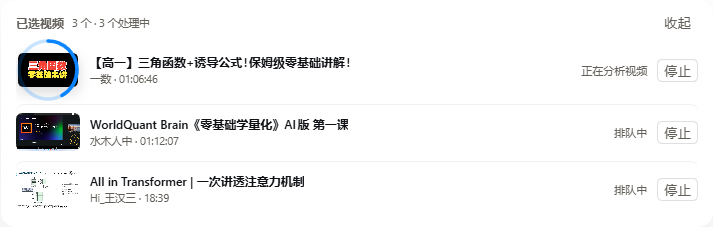
本地文件或链接都能处理:先读视频信息,再走 CC/AI 字幕或 ASR,切镜头、抽取关键画面、做 OCR,最后把转写、画面文字、场景和关键画面存到本地。一次一批 1–10 条;之后问答、对比、整理都直接查这份内容,长视频也不用整段重看。
3. 获得全面视频理解
插件给出的不只是转写,而是转写、画面文字、场景结构、关键画面和运动信息。Agent 可以据此回答视频里的问题、比较多条视频,或者把内容整理成步骤、结论和可用的建议。
- 长电影、长课程:先看结构和关键内容,再决定要不要深入,不用从头看到尾。
- UI 动效、操作录屏:看切镜、运动和界面变化,帮开发定位交互、动效和实现问题。
- 教程、评测、访谈:把步骤、参数、观点和结论抽出来,多条视频放在一起对比。
4. 管理 B 站收藏夹
扫码登录后,能看收藏夹、历史、文件夹,统计时长、UP 主和未看完,按 UP 主生成分类草案。DSH 里的 account 工具只读;真正整理文件夹、批量分类,回 CLI 加 --confirm 才动手,Cookie 只留在本地。
快速开始
环境: Python 3.11+、FFmpeg(在 PATH 中),以及 DSH(用插件界面时需要)。
视频没有字幕时,才需要语音模型(small 约 464 MB)。
git clone https://github.com/Harm0ny-AI/DSH-Video2Agent.git
cd DSH-Video2Agent

python -m venv .venv
# Windows: .venv\Scripts\activate    macOS/Linux: source .venv/bin/activate
pip install -e .

video2agent setup          # 把 Skill 安装到 ~/.dsh/skills
video2agent doctor
video2agent ingest ./your-video.mp4      # 或 B 站链接
video2agent list
video2agent search "what you remember"
从当前仓库安装 DSH 插件:
dsh plugin --profile web add ./packages/dsh-video2agent
然后重启或重新加载 DSH。插件会注册 video2agent 工具和 /video 命令;video2agent setup 装好的 Skill 会告诉模型先调什么、引用怎么写。
工作原理
sequenceDiagram
  autonumber
  participant A as Agent
  participant V as video2agent
  participant D as SQLite + FTS5
  Note over V: 先把视频入库:探测 → 字幕/ASR → 场景 → 采样帧 → OCR → 视觉片段
  A->>V: search / digest / transcript
  V->>D: 查 FTS5 和已入库片段
  D-->>V: 文字结果
  V-->>A: 文字 + 时间码
  opt 需要核对时
    A->>V: evidence / frames
    V->>V: 取同一时刻的画面 + OCR/转写
    V-->>A: 画面 + 文字 + 时间码
  end
  A-->>A: 带引用的回答
设计规则
- 先文字,后画面。 搜索只返回文字;只有需要核对某句话时,
evidence才取图,而且图和文字一定来自同一帧。 - 边界明确,不把未知当零。 时间码超过视频结尾,会直接报错并给出处理建议;OCR 读取失败就是“未知”,不是“没有文字”;没读过的 OCR 保持
pending/partial/failed,绝不写成 0。 - 默认本地处理,但不等于离线。 本地 ASR/OCR 都在这台机器上跑;
evidence取到的画面和文字会交给宿主模型,所以用云端模型时,它们会离开本机。云端 ASR/OCR 可以单独开启,用你自己的服务商密钥;设置页会写清楚哪些内容会发出去。 - 上下文有上限。
digest/transcript都是紧凑格式,图片有预算,读取有缓存,查得再久也不会把上下文塞满。
截图
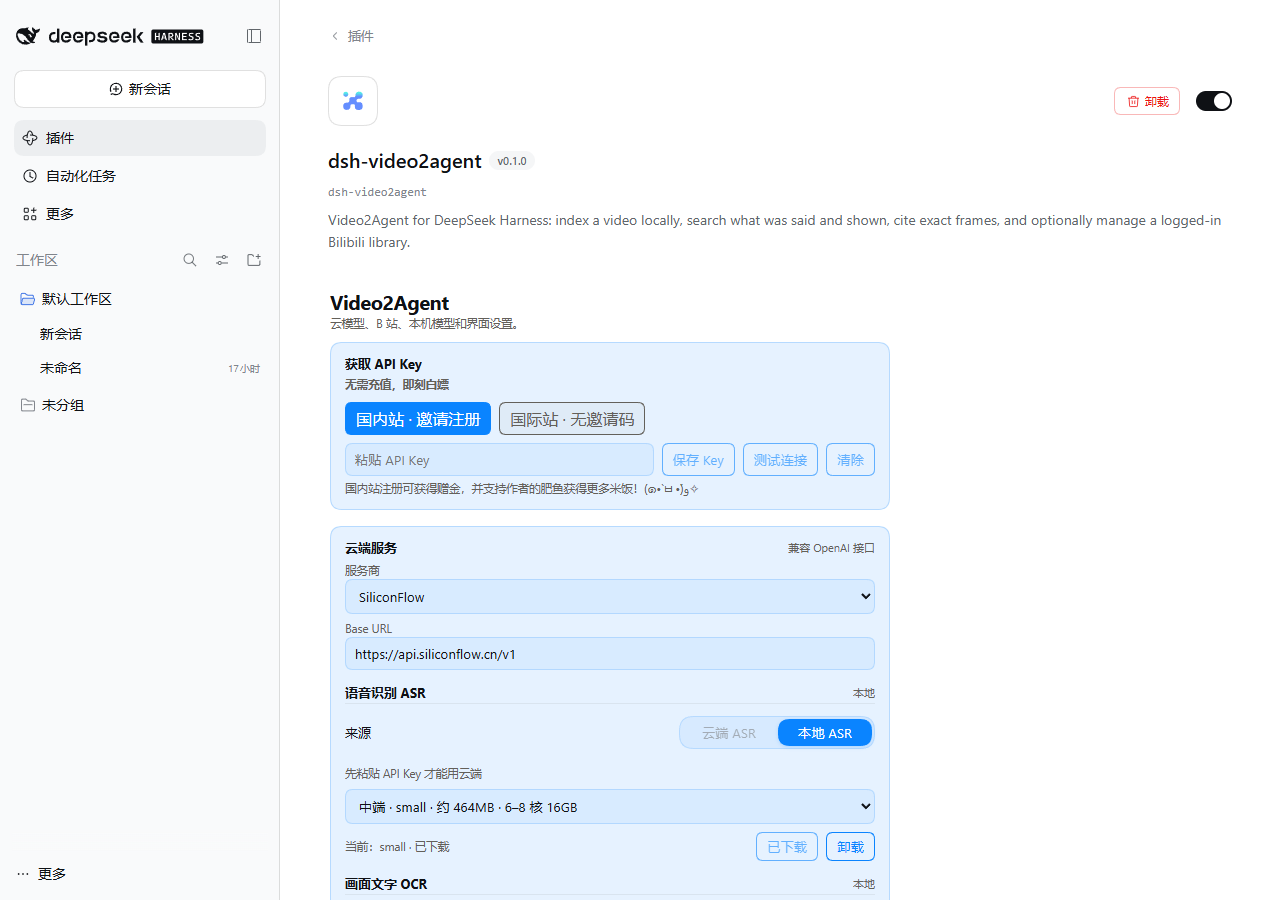
| DSH 插件 | 批量任务 | 设置 |
|---|---|---|
 |
 |
 |
深色社交分享图和插件市场卡片在 docs/assets/。
文档
状态
- 0.1.0 候选版。 CLI 和 Skill 已经稳定;DSH 插件也在隔离环境里验证过。
- 默认在本地跑,不需要 GPU;云端可选。
- PyPI/npm 还没发布;插件市场条目已按 awesome 列表格式准备好。
- 已知限制:单字中文搜索、小字/低对比度文字的 OCR、跨镜头计数。
插件市场
原生 DSH 插件(dsh.bundle → cordis.patch.yml),已经按 awesome-dsh-plugin 的格式准备好条目。
- 分类:
vision - 安装入口:
video2agent工具 +/video命令;CLI 是同一套引擎。
参与贡献
欢迎提交 Issue 和 PR。先看 CONTRIBUTING.md;改代码后请运行:
python -m unittest discover -s tests -q
ruff check src tests --select E,F,I --ignore E501
node tests/test_plugin_card.mjs
node tests/test_plugin_manifest.mjs
node tests/test_plugin_host_settings.mjs
node tests/test_plugin_campaign.mjs
node tests/test_plugin_dock_state.mjs
许可证
Apache-2.0。第三方声明见 THIRD_PARTY_LICENSES.md。
如果它帮你少拖了一次进度条,点个 ⭐ 能让更多 Agent 找到它。
1 maintainer

Metadata
1 maintainer
Release files for video2agent 0.1.0
For a detailed explanation of source distributions (sdists) and built distributions (wheels), please see the package formats documentation.
Source distribution (sdist)
| File | Size | Uploaded | Provenance | Actions |
|---|---|---|---|---|
| video2agent-0.1.0.tar.gz | 332.8 kB | Without provenance | Details for video2agent-0.1.0.tar.gz |
Built distribution (wheel)
| File | Interpreter | ABI | Platform | Actions Reset |
|---|---|---|---|---|
| video2agent-0.1.0-py3-none-any.whl | Python 3 | none | any | Details for video2agent-0.1.0-py3-none-any.whl |
Total release size: 561.3 kB
Release files / video2agent-0.1.0.tar.gz
| Download URL | video2agent-0.1.0.tar.gz |
|---|---|
| Size | 332.8 kB |
| Tags | Source |
|
SHA-256 checksum How to use checksums |
9037361f49736fd322b171da2a0f3ca9f2987a0fe82fac7315629e4ca5ac3fc7
|
|
BLAKE2b-256 checksum How to use checksums |
34d7276bd142f7bde47ed8e13ad0882912afe218f52c5d6b1b4431075b86ec6d
|
| Upload date | |
|
Uploaded using Trusted Publishing? What is trusted publishing? |
No |
| Uploaded via |
twine/7.0.0 CPython/3.12.3
|
Release files / video2agent-0.1.0-py3-none-any.whl
| Download URL | video2agent-0.1.0-py3-none-any.whl |
|---|---|
| Size | 228.6 kB |
| Tags | Python 3 |
|
SHA-256 checksum How to use checksums |
3b89bce09d662eaa096a34295a416ddbfd9d3a6d10723805932a6d7b22bfa97a
|
|
BLAKE2b-256 checksum How to use checksums |
b6e2a0b289bad2b9f279fa968fb1defb86880bb7f99d798ddf258550dd40e619
|
| Upload date | |
|
Uploaded using Trusted Publishing? What is trusted publishing? |
No |
| Uploaded via |
twine/7.0.0 CPython/3.12.3
|
Security for video2agent 0.1.0
Provenance
Provenance describes where a file came from. On PyPI, provenance is shared via attestations, which provide a verifiable record of the build or publishing details. View details, limitations and caveats.
No provenance found
None of the files in this release were uploaded with provenance metadata.
A note on package security
PyPI is a repository for distributing packages, not a service for auditing them. While third-party security researchers and our staff do their best to detect and remove malicious packages, PyPI cannot guarantee the quality, security or suitability of any given package.
To learn more about protecting yourself from malicious actors, visit our package security documentation.














