








About
A library that helps to convert volumetric video data into image frames with adjustable frame capturing rate functionality.
The main reason why I created this library is to ease the video to image frames conversion process. During video annotation we need frames of an video or a subpart of a video and that too custom frame capture rate, so this problems led to this library development.
How to install?
pip install video2images
Requirements
It will be automatically installed
- tqdm, imageio, imageio-ffmpeg, moviepy
Class Object Argument Description
| Argument | Description |
|---|---|
| video_filepath | source path of the video |
| start_time | Default is None i.e 0s will be considered |
| end_time | Default is None i.e till last duration will be considered |
| capture_rate | No. of frames you want to capture per second. For e.g if my capture_rate= 20 then only first 20 frames will captured out of input Frames per second rate |
| save_format | Output frame image extension. By default ".jpg" |
| out_dir | Output directory for saving images. If not specified a folder will be made in current directory and saved |
Note:- The capture_rate if not specified will consider the original video frames per second rate
Frame Capture Rate Explaination
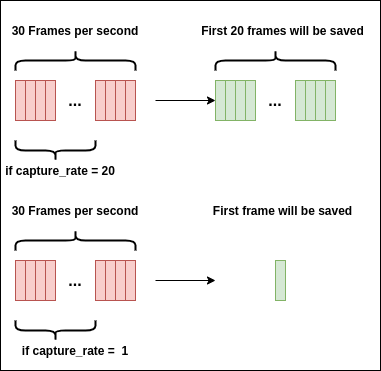
Valid Extensions
For Video
- .mov
- .avi
- .mpg
- .mpeg
- .mp4
- .mkv
- .wmv
For Image
- .jpg, .jpeg
- .png
- .bmp
- .tiff, .tif
- .dicom, .dcm
How to use?
Minimal setting (Basic)
from video2images import Video2Images


Video2Images(video_filepath="--path-to-video-file--",
             out_dir="--path-to-output-directory--")
Want to capture frames in between some interval
from video2images import Video2Images


# Lets take start_time to be 2mins i.e 120s
# & end_time to be 10 mins i,e 600s out of 20mins videos

Video2Images(video_filepath="--path-to-video-file--",
             start_time=120,
             end_time=600,
             out_dir="--path-to-output-directory--")
Want only first 'f' frames out of 30 frames per second
from video2images import Video2Images


# Let say f = 20 i.e capturing only first 20 frames
Video2Images(video_filepath="--path-to-video-file--",
             capture_rate=20,
             out_dir="--path-to-output-directory--")
Want output image to be saved in png or other format
from video2images import Video2Images


Video2Images(video_filepath="--path-to-video-file--",
             save_format=".png",
             out_dir="--path-to-output-directory--")
From command line
We can convert video frames to images by using simple command line as follows
$video2images --video_filepath <input video filepath> \
--start_time <some integer number in seconds> \
--end_time <some integer number in seconds> \
--capture_rate <some integer capture rate> \
--save_format <any one image extension> \
--out_dir <output folder name where all images will be pushed>
Note:- The output will be saved in a folder named frames_folder_{timestamp}
Output Process Screenshot

Author
I will be happy to connect with you guys!!
Citation
@software{abhishek_c_salian_2020_4384148,
  author       = {Abhishek C. Salian},
  title        = {Video2Images: A python library for video frames extraction for video annotation based task},
  month        = dec,
  year         = 2020,
  publisher    = {Zenodo},
  version      = {v1.1},
  doi          = {10.5281/zenodo.4384147},
  url          = {http://doi.org/10.5281/zenodo.4384147}
}
Any suggestions are most welcome.
1 maintainer

Metadata
1 maintainer
Release files for video2images 1.3
For a detailed explanation of source distributions (sdists) and built distributions (wheels), please see the package formats documentation.
Source distribution (sdist)
| File | Size | Uploaded | |
|---|---|---|---|
| video2images-1.3.tar.gz | 7.2 kB | Details |
Built distribution (wheel)
| File | Interpreter | ABI | Platform | Reset |
|---|---|---|---|---|
| video2images-1.3-py3-none-any.whl | Python 3 | none | any | Details |
Total release size: 14.5 kB
Release files / video2images-1.3.tar.gz
| Download URL | video2images-1.3.tar.gz |
|---|---|
| Size | 7.2 kB |
| Tags | Source |
|
SHA-256 checksum How to use checksums |
6daa574926473e154cb366b75c1be96129cf67c7f9a29a855dde43aead50c03a
|
|
BLAKE2b-256 checksum How to use checksums |
9c90318a8a7b90e652774d1d80fc3d860701cdb595a036775afa047c96963c85
|
| Upload date | |
|
Uploaded using Trusted Publishing? What is trusted publishing? |
No |
| Uploaded via |
twine/3.2.0 pkginfo/1.5.0.1 requests/2.23.0 setuptools/56.0.0 requests-toolbelt/0.9.1 tqdm/4.48.2 CPython/3.7.7
|
Release files / video2images-1.3-py3-none-any.whl
| Download URL | video2images-1.3-py3-none-any.whl |
|---|---|
| Size | 7.4 kB |
| Tags | Python 3 |
|
SHA-256 checksum How to use checksums |
748f3cf90c0536a4d19157acbd3a5ea59ee7f2793f88cf6c5872772cd28619bc
|
|
BLAKE2b-256 checksum How to use checksums |
1d2e4b5c1777e23b6a6c1d6c70f59b59f55d5fce88aa31d01c8e0514d7789846
|
| Upload date | |
|
Uploaded using Trusted Publishing? What is trusted publishing? |
No |
| Uploaded via |
twine/3.2.0 pkginfo/1.5.0.1 requests/2.23.0 setuptools/56.0.0 requests-toolbelt/0.9.1 tqdm/4.48.2 CPython/3.7.7
|














