

Video Gestalt






One-Glance Overview of Any Video
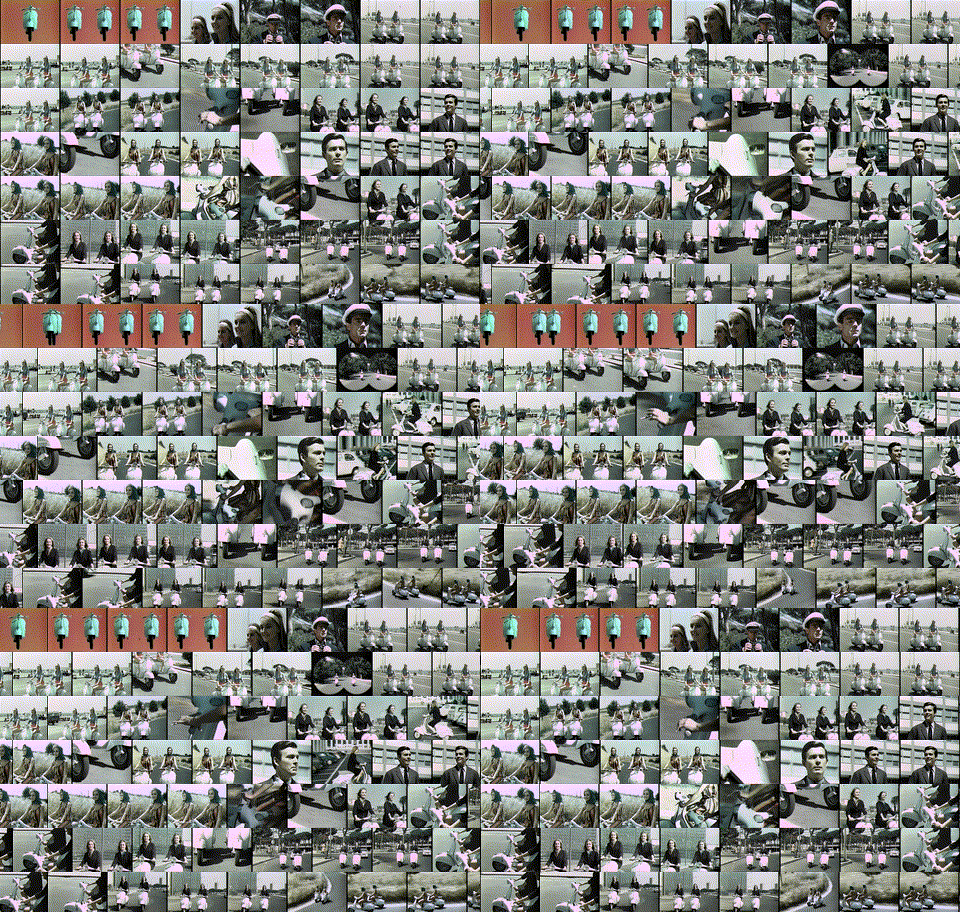
Video Gestalt displays a video in a summary form that shows the entire video at once as an array of moving video thumbnails.
Description
Video Gestalt presents a condensed video array, showing the entire video at once as moving video thumbnails.
The above is an example of the Video Gestalt for a 50-second commercial for Vesta scooters. (Click the Video Gestalt to see the original video.)
As you can see, it is a looping video with moving thumbnails of the original video. In one second, you can see every frame of the original video at a glance, without any discontinuities as it loops. This is done by arranging that each thumbnail slides over exactly its width in one loop so that the next thumbnail takes over seamlessly.
Hence, the video gestalts can be read in two ways: 1- an overall quick glance shows all the scenes of the entire video, 2- by focusing on one animated thumbnail, we can watch the entire video, by starting in the upper left corner, and following to the right, then descending one block lower and moving from right to left, then descending one block and moving left to right again, etc.
A longer explanation is available in this blog post.
Installation
So far this has been tested on Linux, Chrome OS and Windows, but it will likely work on MacOS too.
To install, simply use pip:
pip install --upgrade videogestalt
This will also install MoviePy, which will automatically install FFmpeg if necessary.
If they are not already installed, you will need to install python3 and the corresponding Python package manager pip beforehand.
On Linux and friends you might be able to do this like so:
sudo apt-get install python3 python3-pip
If you get an error, please ensure you are using the latest pip version, as older versions may not support PEP517 Python packages:
pip install --upgrade pip
Usage
An executable binary videogestalt is automatically installed in the local environment.
To generate a video file:
videogestalt -i countdown.mp4 -o countdown-gestalt --video
To generate an animated GIF (warning, output can be large):
videogestalt -i countdown.mp4 -o countdown-gestalt --gif
The application can also be used as a Python module:
>>> from videogestalt import videogestalt as vg
>>> vg.main('-i countdown.mp4 -o countdown-gestalt --gif')
Note: if the repository is cloned, there is an example countdown.mp4 video in tests/examples.
Building
The module can be built with PEP517 standard tools, such as pypa/build:
python -sBm build .
It can also be installed in development/editable mode after cloning this git repository:
pip install --upgrade -e .
Known issues
There are a few known issues, due to the fact that moviepy, the library that we use to process videos, is currently not actively maintained as of August 2023 since at least December 2022. Here is a list of downstream issues:
- PILLOW 10.0.0 introduced a breaking change with moviepy, and although a fix was merged upstream into moviepy, there is no pypi release. Two solutions: cap PILLOW below 10, or install moviepy from github. Since the future of moviepy is uncertain, we chose to cap PILLOW, to ensure this tool continues to work in venvs.
- On Windows, after saving the output, the following exception may arise:
Exception ignored in: <function FFMPEG_VideoReader.__del__ at 0x00000253011BF920>
Traceback (most recent call last):
  File "C:\Users\33632\miniconda3\Lib\site-packages\moviepy\video\io\ffmpeg_reader.py", line 199, in __del__
    self.close()
  File "C:\Users\33632\miniconda3\Lib\site-packages\moviepy\video\io\ffmpeg_reader.py", line 190, in close
    self.proc.terminate()
  File "C:\Users\33632\miniconda3\Lib\subprocess.py", line 1671, in terminate
    _winapi.TerminateProcess(self._handle, 1)
OSError: [WinError 6] Descripteur non valide
Again this was fixed on github but not in the latest pypi release of MoviePy. This remain unfixed, it does not prevent usage of the tool, it is just inelegant.
License
Created by Eamonn O'Brien-Strain.
Licensed under the Mozilla Public License 2.0
1 maintainer

Metadata
1 maintainer
Release files for videogestalt 0.2.10
For a detailed explanation of source distributions (sdists) and built distributions (wheels), please see the package formats documentation.
Source distribution (sdist)
| File | Size | Uploaded | Provenance | Actions |
|---|---|---|---|---|
| videogestalt-0.2.10.tar.gz | 16.2 kB | Without provenance | Details for videogestalt-0.2.10.tar.gz |
Built distribution (wheel)
| File | Interpreter | ABI | Platform | Actions Reset |
|---|---|---|---|---|
| videogestalt-0.2.10-py3-none-any.whl | Python 3 | none | any | Details for videogestalt-0.2.10-py3-none-any.whl |
Total release size: 28.7 kB
Release files / videogestalt-0.2.10.tar.gz
| Download URL | videogestalt-0.2.10.tar.gz |
|---|---|
| Size | 16.2 kB |
| Tags | Source |
|
SHA-256 checksum How to use checksums |
892fcde57e18809d5542b46d0a574ce7b22a4e018afc9deda4a614cf0ec20075
|
|
BLAKE2b-256 checksum How to use checksums |
ad0fd5cb2e85a150c30f36a168770aa1ac26e8d927339feb3a9f786a62a26179
|
| Upload date | |
|
Uploaded using Trusted Publishing? What is trusted publishing? |
No |
| Uploaded via |
twine/4.0.2 CPython/3.11.4
|
Release files / videogestalt-0.2.10-py3-none-any.whl
| Download URL | videogestalt-0.2.10-py3-none-any.whl |
|---|---|
| Size | 12.4 kB |
| Tags | Python 3 |
|
SHA-256 checksum How to use checksums |
5cf30af7a9b96f9911cdd981f18de0ae10d2960310e1a6952a43eaf713d14054
|
|
BLAKE2b-256 checksum How to use checksums |
37af96f9c47a1e8a5500c88a0ac701011c8d987a7f77d495bd47230667b99ecc
|
| Upload date | |
|
Uploaded using Trusted Publishing? What is trusted publishing? |
No |
| Uploaded via |
twine/4.0.2 CPython/3.11.4
|
Security for videogestalt 0.2.10
Provenance
Provenance describes where a file came from. On PyPI, provenance is shared via attestations, which provide a verifiable record of the build or publishing details. View details, limitations and caveats.
No provenance found
None of the files in this release were uploaded with provenance metadata.
A note on package security
PyPI is a repository for distributing packages, not a service for auditing them. While third-party security researchers and our staff do their best to detect and remove malicious packages, PyPI cannot guarantee the quality, security or suitability of any given package.
To learn more about protecting yourself from malicious actors, visit our package security documentation.














