
vidfilter_scripter
An mpv front-end which creates a mencoder script with video adjustments. The script reencodes your video with the correct adjustments using ffmpeg.
Installation
You must have libmpv-dev and ffmpeg installed on your computer. On a debian based system using apt, run the following:
$ sudo apt install libmpv-dev ffmpeg
Install vidfilter_scripter using pip:
pip install vidfilter_scripter
Usage
Preview the video you wish to reencode, adjusting brightness, contrast, hue, saturation, and gamma:
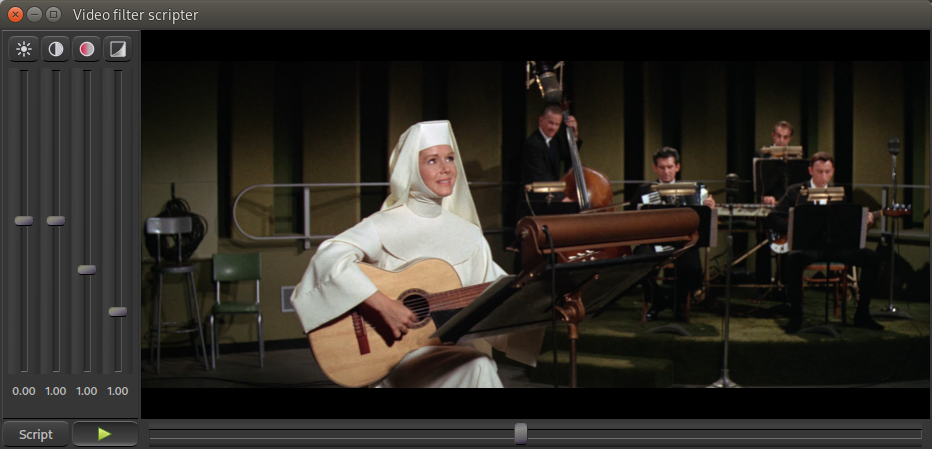
When you are satisfied, click the "Create script" button. The created menocoder script will be shown with a "Save as" function available to save it to disk.
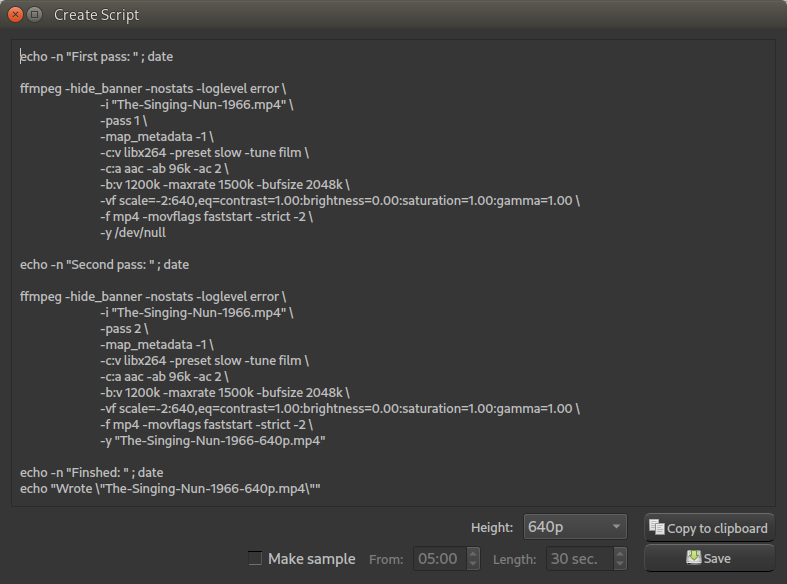
Save the script and run it. You can run a script in the background using "at":
$ realpath reencode.sh | at now
...or...
$ realpath reencode.sh | batch
Or if you have more than one computer, you run it on the one in the closet at night!
$ realpath reencode.sh | at midnight
Custom script
You can always change the script before running it.
I chose some decent encoding options for one of several common video heights. You can replace those lines with your own preferece, if you want.
The purpose of this "program" is not to be a complete reeencoder. It is to be able to preview the video filter settings as you modify them, and then generate a correct video filter option to pass to ffmpeg for reencoding.
1 maintainer

Metadata
1 maintainer
Release files for vidfilter-scripter 1.6.0
For a detailed explanation of source distributions (sdists) and built distributions (wheels), please see the package formats documentation.
Source distribution (sdist)
| File | Size | Uploaded | Provenance | |
|---|---|---|---|---|
| vidfilter_scripter-1.6.0.tar.gz | 24.1 kB | Without provenance | Details |
Built distribution (wheel)
| File | Interpreter | ABI | Platform | Reset |
|---|---|---|---|---|
| vidfilter_scripter-1.6.0-py2.py3-none-any.whl | Python 3, Python 2 | none | any | Details |
Total release size: 51.6 kB
Release files / vidfilter_scripter-1.6.0.tar.gz
| Download URL | vidfilter_scripter-1.6.0.tar.gz |
|---|---|
| Size | 24.1 kB |
| Tags | Source |
|
SHA-256 checksum How to use checksums |
e7cd3f21e71654722e9df1e9d66779a9a710f4f336145ce7dd154a4cd9d90e12
|
|
BLAKE2b-256 checksum How to use checksums |
841223f01f2f0b17c49f5ee0d5a7b3c3b7356afbb8c456fb2714298a1be4b941
|
| Upload date | |
|
Uploaded using Trusted Publishing? What is trusted publishing? |
No |
| Uploaded via |
twine/6.2.0 CPython/3.14.4
|
Release files / vidfilter_scripter-1.6.0-py2.py3-none-any.whl
| Download URL | vidfilter_scripter-1.6.0-py2.py3-none-any.whl |
|---|---|
| Size | 27.5 kB |
| Tags | Python 2 Python 3 |
|
SHA-256 checksum How to use checksums |
171972b4c92054b2f96ffb827bcd5537ce0b4efb02bf26cf1553d1c49dcbd36c
|
|
BLAKE2b-256 checksum How to use checksums |
75e84c39ef768cbad591c0a2b893b755d024219b09f5fb562f6466ad4beac9c9
|
| Upload date | |
|
Uploaded using Trusted Publishing? What is trusted publishing? |
No |
| Uploaded via |
twine/6.2.0 CPython/3.14.4
|
Security for vidfilter-scripter 1.6.0
Provenance
Provenance describes where a file came from. On PyPI, provenance is shared via attestations, which provide a verifiable record of the build or publishing details. View details, limitations and caveats.
No provenance found
None of the files in this release were uploaded with provenance metadata.
A note on package security
PyPI is a repository for distributing packages, not a service for auditing them. While third-party security researchers and our staff do their best to detect and remove malicious packages, PyPI cannot guarantee the quality, security or suitability of any given package.
To learn more about protecting yourself from malicious actors, visit our package security documentation.














