
vidmag
See what's too small to see: a pulse in a face, a sleeping child's breathing, a guitar string's vibration. Eulerian Video Magnification (MIT, SIGGRAPH 2012) in hand-written CUDA — plus five more backends, so it runs on whatever hardware you have.







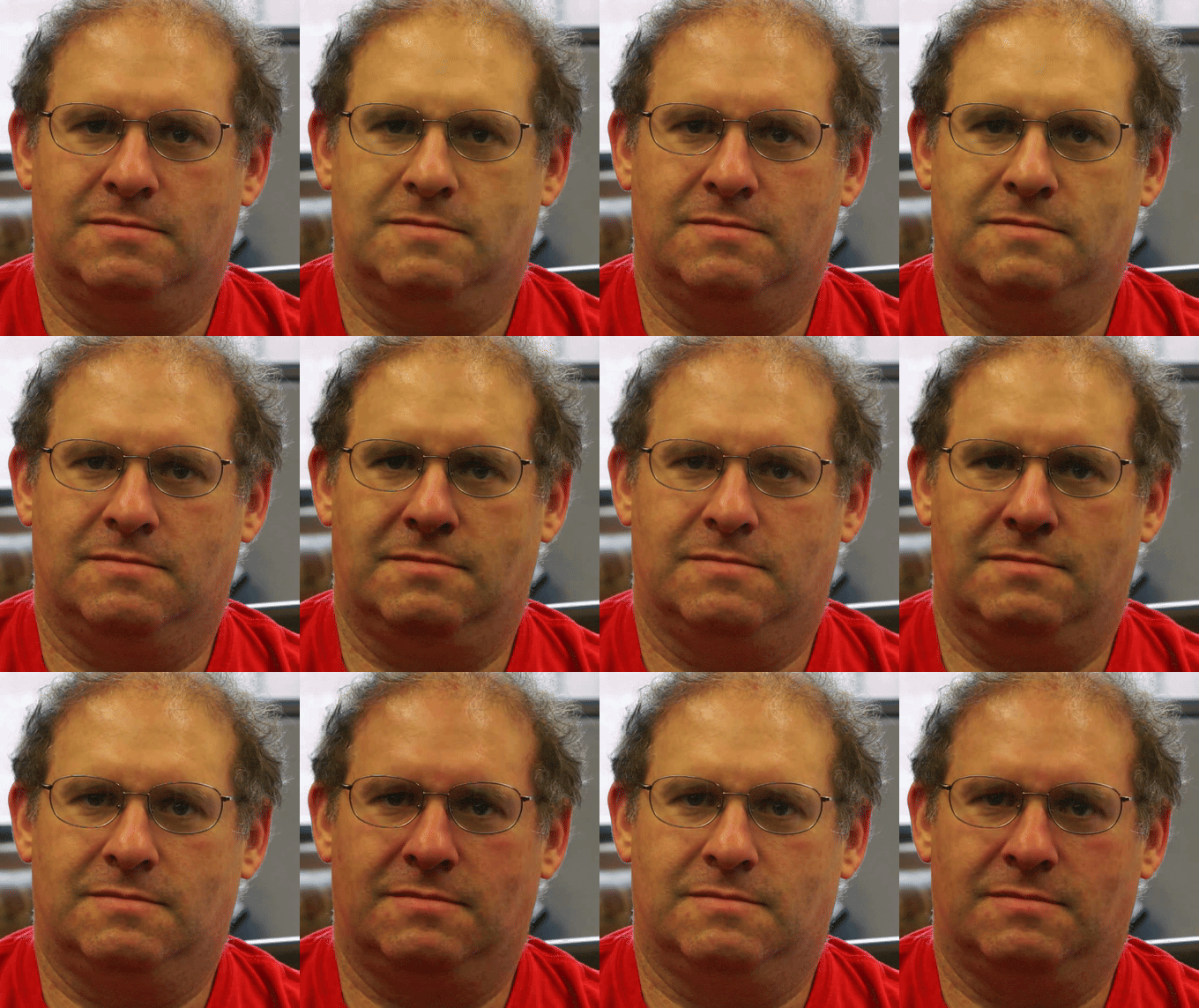

Left of each pair: the original. Right: amplified. Blood flow with each heartbeat, and sub-millimetre chest movement from breathing.
Highlights
- Fast. Hand-written CUDA runs a 291-frame motion clip in 26.8 ms on an RTX 3090 (half precision, kernel time) — up to ~1,650x the NumPy reference. See Performance for what that ratio does and does not mean.
- Runs anywhere. Six backends — NVIDIA CUDA, Apple Metal, Vulkan, OpenCL,
PyTorch, and a NumPy baseline — computing the same four pipelines.
pip install vidmagneeds no GPU and no compiler. - Checked, not just written. The NumPy baseline is validated against the original authors' published MIT output; every other backend is tested against that baseline, operation by operation. The NVIDIA path is measured on five cards across four architectures (Ampere, Hopper, Pascal, Turing).
- No heavy framework. Raw CUDA C++ compiled with
nvcc— no PyTorch, CuPy, or Numba in the NVIDIA path. - Composable and live. Use the whole pipeline, or its building blocks on any backend; magnify a running camera frame by frame.
Install
pip install vidmag
Nothing needs to be compiled and no GPU is required. If nvcc is present the
NVIDIA kernels are built for your card; if not, you get the same library running
on Metal, Vulkan, OpenCL or the processor.
Use it
import vidmag

# A file in, a file out. The backend is chosen for you and printed.
vidmag.magnify("face.mp4", preset="pulse", out="pulse.mp4")
import numpy as np, vidmag

# Or arrays: (T, H, W, 3) uint8 in, the same shape out.
frames = np.stack([...])                       # your own decode
out = vidmag.magnify(frames, preset="motion", fps=30)

# Force a backend, or trade precision for speed.
out = vidmag.magnify(frames, preset="motion", fps=30,
                     backend="cuda", precision="fp16")

# Override any preset parameter by name.
out = vidmag.magnify(frames, preset="pulse", fps=30, alpha=100)
From the terminal:
vidmag magnify face.mp4 pulse.mp4 --preset pulse
And on a live camera, one frame at a time:
from vidmag.stream import MotionStream

stream = MotionStream(height=480, width=640, alpha=10, lambda_c=16)
for frame in camera:                 # any (H, W, 3) uint8 source
    display(stream.push(frame))
The streamed output is identical to feeding the same frames to the batch pipeline, not merely similar — the test suite asserts the equality.
Presets
preset= picks a parameter set; any single parameter can still be overridden by
keyword.
| Preset | What it reveals | Needs |
|---|---|---|
pulse |
Colour change from blood flow, banded to 50–60 bpm. Faces, wrists, babies. | ordinary video |
motion |
Sub-pixel motion at everyday speeds — breathing, a swaying structure. Sampling-rate free, so it assumes no fps. | ordinary video |
motion_phase |
The same motion, amplified by phase rather than by scaling detail. Slower, but holds together at amplifications where motion tears into ripples at edges. |
ordinary video |
vibration |
Mechanical vibration in a narrow band (guitar low-E, 72–92 Hz). | a high-speed clip (~184+ fps) |
Worked walkthroughs for each: pulse · motion · vibration · streaming.
Backends
One library, six implementations of the same four pipelines. backend="auto"
takes the first that is actually present, in this order, and says which it chose:
| Backend | Runs on | |
|---|---|---|
| 1 | cuda |
NVIDIA — hand-written CUDA C++, the fast path this project exists for |
| 2 | metal |
Apple silicon |
| 3 | vulkan |
Any vendor with a Vulkan driver |
| 4 | opencl |
Apple, AMD, Intel |
| 5 | torch |
Wherever PyTorch runs (optional extra) |
| 6 | cpu |
Anywhere — the NumPy baseline |
The NumPy baseline is the correctness oracle: every other backend is tested against it, and it is tested against the original authors' published output. To see what is available on your machine:
from vidmag.backend import list_backends
for b in list_backends():
    print(b.name, b.unavailable_reason or "available")
A missing backend always reports why — no driver, no device, missing extra. Details in Backends.
Performance
RTX 3090 against the NumPy baseline, 291 frames, at three inclusion levels because they answer different questions:
| Pipeline | Python CPU | ① Compute only | ② + H2D (inference) | ③ + H2D + D2H (full) |
|---|---|---|---|---|
Colour FP32 (face.mp4) |
11,194 ms | 9.8 ms (~1,140x) | 29.7 ms (~377x) | 77.1 ms (~145x) |
Colour FP16 (face.mp4) |
11,194 ms | 7.6 ms (~1,470x) | 27.9 ms (~400x) | 79.6 ms (~141x) |
Motion FP32 (baby.mp4) |
44,190 ms | 40.3 ms (~1,100x) | 74.7 ms (~592x) | 154.1 ms (~287x) |
Motion FP16 (baby.mp4) |
44,190 ms | 26.8 ms (~1,650x) | 61.2 ms (~722x) | 140.0 ms (~316x) |
- ① Compute only — kernel time with the clip already on the card, e.g. as one stage of a larger GPU computation.
- ② + H2D — the realistic inference cost: input uploaded, result kept on the card, for heart-rate estimation, motion features, or a downstream network.
- ③ + H2D + D2H — the full decode, magnify, encode path, result back on the host.
Two caveats before quoting a ratio. The Python CPU column is this project's
original reference measurement, taken on a different machine and — for colour —
on the larger baby.mp4 clip, so it flatters the ratios; a same-clip,
same-session comparison divides by 5,585 ms and 31,981 ms instead. And ③ is a sum
of stage timings, not wall-clock: motion FP16 is 140 ms of stages but 232 ms
through vidmag.magnify() end to end, the difference being input preparation and
output allocation.
Half precision costs almost nothing in accuracy — RMSE 0.0014 against FP32 for motion, 0.0007 for colour.
These numbers come from a device-resident pipeline: the whole clip is uploaded to the card once and runs through every stage — colour conversion, pyramids, temporal filter, amplify, reconstruct — with no per-frame host round-trip. Batching collapses the roughly 1,773 per-frame kernel launches a naive port makes into a few dozen.
Throughput and Full-HD streams
The same two tiers on the RTX 3090 at half precision, read as pixel rate and as how many 1080p-at-30 streams that many pixels per second covers. The stream count is a pixel-count estimate, not a measured multi-stream run.
| Pipeline | ① Compute only | ② Inference (+ upload) |
|---|---|---|
Colour (face.mp4) |
~12 Gpx/s · ~190 streams | ~3.3 Gpx/s · ~52 streams |
Motion (baby.mp4) |
~5.7 Gpx/s · ~90 streams | ~2.5 Gpx/s · ~40 streams |
Faster than PyTorch on the same card
Same RTX 3090, same clip, array in and array out: hand-written CUDA 238 ms (1,223 frames/s) against PyTorch 596 ms (488 frames/s) — 2.5x. That gap is why the project keeps a hand-written path instead of a tensor framework.
Across five NVIDIA GPUs
The motion pipeline, kernel time, on five cards spanning four architectures (fastest first):
| GPU | Architecture | Motion FP32 | Motion FP16 |
|---|---|---|---|
| H100 80GB | Hopper | 17.0 ms | 13.8 ms |
| RTX 3090 | Ampere | 40.3 ms | 26.8 ms |
| A100 80GB † | Ampere | 54.4 ms | 48.2 ms |
| P100 16GB | Pascal | does not fit | 82.8 ms |
| T4 16GB | Turing | does not fit | 137.2 ms |
† The A100 row was measured before the three motion-path speedups and not re-run, so it is on older code and pessimistic, and it records no date or commit. Single precision needs 16.3 GB, so the 16 GB P100 and T4 skip it. The T4 and P100 are single runs on shared cloud hardware.
Without an NVIDIA card
Apple M2 Max, magnification only, against the same machine's processor. One machine, measured 2026-08-11, not re-verified since:
| Backend | Colour (face.mp4) |
Motion (baby.mp4) |
vs processor |
|---|---|---|---|
| OpenCL | 217 ms | 1,020 ms | 32x / 23x |
| Vulkan | 255 ms | 1,462 ms | 28x / 16x |
| Metal | 362 ms | 1,698 ms | 19x / 14x |
| PyTorch | 653 ms | 2,320 ms | 11x / 10x |
| Processor (NumPy) | 7,014 ms | 23,634 ms | — |
Every raw JSON is in benches/. Full numbers, per-GPU tables, and the honesty
notes behind each figure:
Performance.
How the motion path got 2.3x faster, including the two decisions a later round
reversed:
how it was made fast.
Documentation
iamkucuk.github.io/eulerian-video-magnification-cuda
Install · Your first result · How EVM works · Backends · Performance · Building blocks · API stability
Output looks identical to the input? The first-result page covers the usual causes.
Development
git clone https://github.com/iamkucuk/eulerian-video-magnification-cuda
cd eulerian-video-magnification-cuda
python3 -m venv .venv && source .venv/bin/activate
make install-dev     # editable install + dev/build tooling
make download        # fetch the MIT sample clips into data/
make test            # 402 tests; the 98 NVIDIA ones skip without a card
make help            # every target
make build recompiles the CUDA kernels after editing src/vidmag/cuda/.
No single machine runs every backend, so always read the skip count next to the
pass count. Layout, conventions and gotchas are in
CLAUDE.md; the kernel-by-kernel map is in
src/vidmag/cuda/DESIGN.md.
Citation
@misc{kucuk2026evm,
  title     = {Eulerian Video Magnification, on processors and any graphics hardware},
  author    = {Kucuk, Furkan},
  year      = {2026},
  url       = {https://github.com/iamkucuk/eulerian-video-magnification-cuda},
}
Built on the original EVM work:
Wu, Rubinstein, Freeman, Durand, Guttag. "Eulerian Video Magnification for Revealing Subtle Changes in the World." SIGGRAPH 2012. http://people.csail.mit.edu/mrub/vidmag/
License
BSD 3-Clause (Non-Commercial Research Use). Free for research (including inside a company), teaching, personal and evaluation use, and inside open-source software distributed at no charge under a licence permitting those same uses. Selling it, or building it into something sold or run for commercial advantage, needs written permission. Any publication using it must cite it.
1 maintainer

Metadata
1 maintainer
Release files for vidmag 0.2.0
For a detailed explanation of source distributions (sdists) and built distributions (wheels), please see the package formats documentation.
Source distribution (sdist)
| File | Size | Uploaded | Provenance | Actions |
|---|---|---|---|---|
| vidmag-0.2.0.tar.gz | 17.6 MB | With provenance | Details for vidmag-0.2.0.tar.gz |
Release files / vidmag-0.2.0.tar.gz
| Download URL | vidmag-0.2.0.tar.gz |
|---|---|
| Size | 17.6 MB |
| Tags | Source |
|
SHA-256 checksum How to use checksums |
859e5dc6a93cec84318beba584ce60fd4e96d4636655252e67d234b2245e9bfb
|
|
BLAKE2b-256 checksum How to use checksums |
ef42438f3c2fbc48e9dd0d82a594fb9af2a6681aa3bbb18150e0ab923a0b9f7d
|
| Upload date | |
|
Uploaded using Trusted Publishing? What is trusted publishing? |
Yes |
| Uploaded via |
twine/7.0.0 CPython/3.13.14
|
Provenance
Provenance describes where a file came from. On PyPI, provenance is shared via attestations, which provide a verifiable record of the build or publishing details. View details, limitations and caveats.


PyPI Publish Attestation
PyPI verified that this artifact, at this checksum, originated from the publisher listed below.
Signed by GitHub Actions, verified by PyPI on Aug 27, 2026.
Transparency logSecurity for vidmag 0.2.0
Provenance
Provenance describes where a file came from. On PyPI, provenance is shared via attestations, which provide a verifiable record of the build or publishing details. View details, limitations and caveats.
Full provenance
1 file in this release has been uploaded with provenance metadata.
Attestation for vidmag-0.2.0.tar.gz
PyPI Publish Attestation
PyPI verified that this artifact, at this checksum, originated from the publisher listed below.
Signed by GitHub Actions, verified by PyPI on Aug 27, 2026.
Transparency logA note on package security
PyPI is a repository for distributing packages, not a service for auditing them. While third-party security researchers and our staff do their best to detect and remove malicious packages, PyPI cannot guarantee the quality, security or suitability of any given package.
To learn more about protecting yourself from malicious actors, visit our package security documentation.













