
ViDownloader






[!WARNING] Heads up: This is currently in Beta phase. It works, but there might be rough edges and unexpected behavior. Your feedback will help shape the stable release.
What This Is
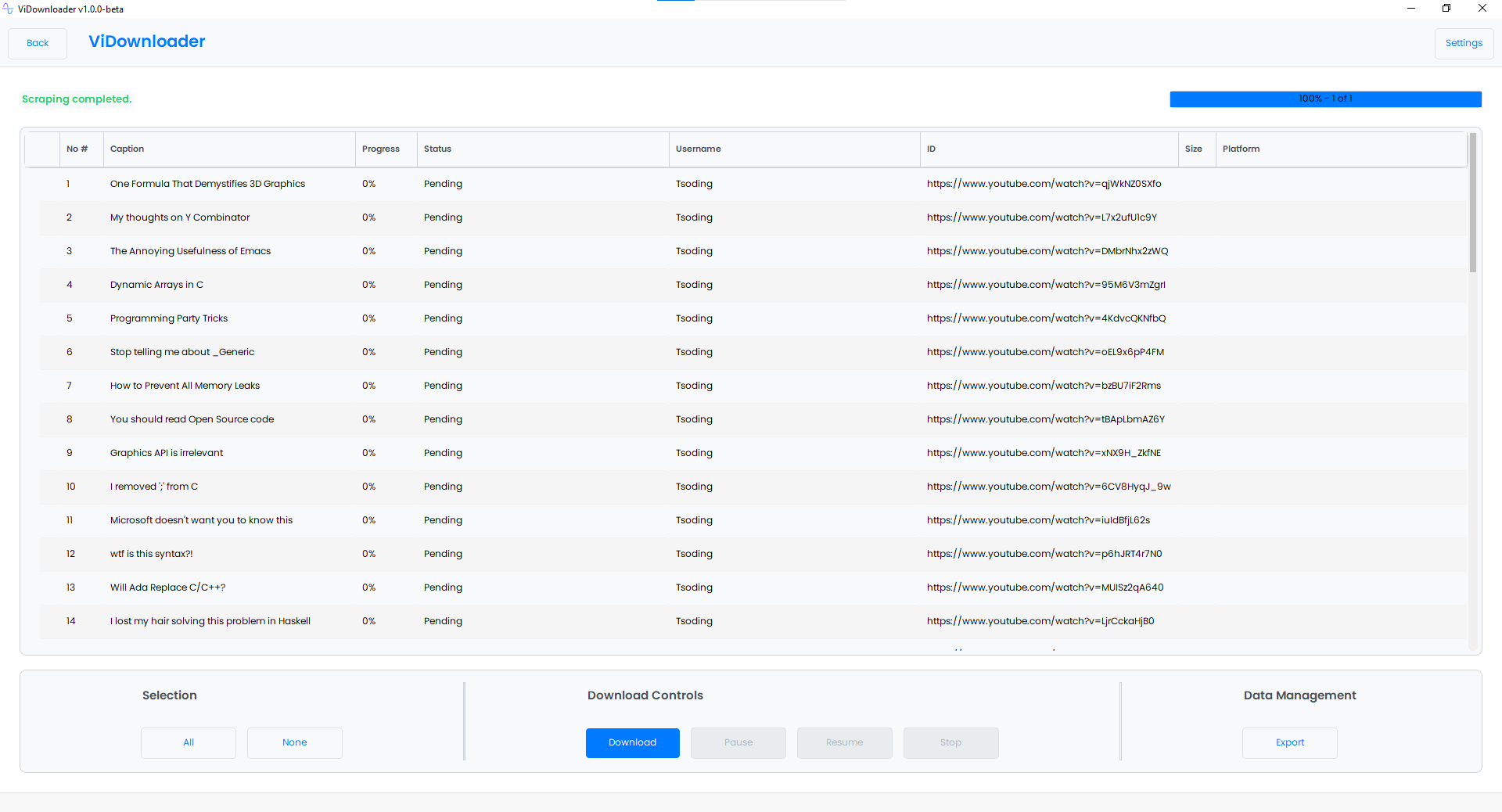
ViDownloader is a desktop application built with PySide6 that simplifies downloading YouTube videos in bulk. While it uses yt-dlp under the hood for the actual downloading, the scraping and interface are completely custom-built.
This happens to be my first substantial open-source project, so please bear with me. it might do some dumb things, but I'm learning as I go. If something breaks or doesn't make sense, let me know and I'll do my best to fix it.
Quick Start
Install via pip (PyPI)
pip install vidownloader
Or from source
git clone https://github.com/farhaanaliii/vidownloader.git
cd vidownloader
pip install -e .
Launch the App
After installation, run:
vidownloader
Or, if you prefer:
python -m vidownloader
What You Can Download
Paste almost any YouTube URL and ViDownloader will figure out the rest:
- Channel videos –
https://youtube.com/@channel/videos - Channel shorts –
https://youtube.com/@channel/shorts - Playlist videos –
https://youtube.com/playlist?list=PLAYLIST_ID - Single videos –
https://youtube.com/watch?v=VIDEO_ID - Single shorts –
https://youtube.com/shorts/VIDEO_ID
Just paste one or more links (one per line) and let the app handle the scraping and downloading.
How It Works
- Paste Links – Add YouTube URLs into the text area
- Scrape Metadata – Click Start to fetch video details using custom scraping logic
- Select Videos – Choose which videos you want from the list
- Download – Hit Download and let yt-dlp do its magic in the background
The interface sits on top of yt-dlp for reliable downloads, but all the scraping, queuing, and progress tracking happens within ViDownloader itself.
Features
- Bulk downloads – Scrape entire channels, playlists, or mixed link lists
- Multi-threaded – Run 1–10 simultaneous downloads
- Pause & Resume – Pause active downloads and resume them at any time
- Real-time progress – Per-video progress bars, status indicators, file size display, and duration
- Export & Import – Save your video list as a
.viiofile and reload it later without re-scraping - Flexible file naming – Name files by video title, video ID, or a random string
- Flexible organization – Organize downloads by playlist name, uploader, or into a dedicated singles folder
Configuration
Open Settings (top-right corner) to adjust:
| Setting | What It Does |
|---|---|
| Download Location | Where your videos are saved |
| Export Location | Where .viio list files are stored |
| File Naming | Name files by title, video ID, or random string |
| Download Threads | Simultaneous downloads (1–10 threads) |
| Playlist Organization | Group by playlist name or by uploader |
| Single Video Organization | Group in a singles folder or by uploader |
Export & Resume
Working with a large channel? Export your video list as a .viio file, close the app, and import it later to resume right where you left off. No need to re-scrape everything.
System Requirements
- Python 3.10 or newer
- PySide6 (≥ 6.5.0)
- yt-dlp (latest recommended)
- curl_cffi
- FFmpeg – Required by yt-dlp for video/audio processing (download)
- JavaScript Runtime – yt-dlp needs a JS engine to handle some videos. Install one of:
Python dependencies install automatically via pip. You'll need to install FFmpeg and a JS runtime separately.
[!TIP] One-click installer coming soon! A standalone installer that bundles all dependencies is in development.
Cross-Platform Support
ViDownloader is cross-platform and has been tested on:
- Windows (10, 11)
- Linux (Ubuntu 22.04, Ubuntu 24.04)
The application is built with Python and PySide6, making it portable across different operating systems. Both the source installation and pre-built executables work seamlessly on supported platforms.
[!NOTE] macOS is not officially supported at this time. It may work from source, but no pre-built executables are provided.
Building Executables
Want to build a standalone executable? Use the provided Makefile:
make build
This works on both Windows and Linux and will:
- Build a single-file executable using PyInstaller
- Bundle fonts and icons into the binary
Other useful Makefile targets:
make format   # Auto-format code with black & isort
make lint     # Run flake8, black, and isort checks
make test     # Run the test suite with pytest
make clean    # Remove build artifacts and caches
Pre-built executables are also available for download:
- Windows (x64)
.exe - Linux (x64) standalone binary
Each release includes a SHA256SUMS file for checksum verification. Check the Releases page for downloads.
Development & Contribution
This is my first major open-source project, so I'm sure there are plenty of areas to improve. If you find bugs, have feature ideas, or want to contribute code:
- Fork the repository
- Create a feature branch
- Submit a pull request
See CONTRIBUTING.md for more details. All contributions are welcome. just try to match the existing code style (black + isort).
Dev Setup
git clone https://github.com/farhaanaliii/vidownloader.git
cd vidownloader
pip install -e ".[dev]"
This installs all development dependencies including pytest, black, isort, flake8, and pyinstaller.
Running Tests
The project has a growing pytest suite (137+ tests):
make test
# or
pytest
License
Released under the MIT License. Use it, modify it, share it.
Coming Soon
- Format & quality selection – Pick 720p, 1080p, 4K, etc.
- Advanced filtering – Search and filter video lists
- Download history – Track your past downloads
- Improved error handling – Making the app more resilient
TODO: If you're good with design, we could really use a better logo. The current one is... functional, but not pretty. Any takers?
Acknowledgment
While ViDownloader implements its own scraping logic, it relies on the excellent yt-dlp project for actual video downloading. Big thanks to the yt-dlp maintainers for their incredible work.
Author
Built by Farhan Ali, my first serious dive into open-source desktop apps. Be gentle.
1 maintainer

Metadata
1 maintainer
Release files for vidownloader 0.5.0
For a detailed explanation of source distributions (sdists) and built distributions (wheels), please see the package formats documentation.
Source distribution (sdist)
| File | Size | Uploaded | |
|---|---|---|---|
| vidownloader-0.5.0.tar.gz | 297.8 kB | Details |
Built distribution (wheel)
| File | Interpreter | ABI | Platform | Reset |
|---|---|---|---|---|
| vidownloader-0.5.0-py3-none-any.whl | Python 3 | none | any | Details |
Total release size: 600.5 kB
Release files / vidownloader-0.5.0.tar.gz
| Download URL | vidownloader-0.5.0.tar.gz |
|---|---|
| Size | 297.8 kB |
| Tags | Source |
|
SHA-256 checksum How to use checksums |
08e7bda870d92ba06bc9bce1be23fa351fd2cce585c6dddf0d131556300fc4db
|
|
BLAKE2b-256 checksum How to use checksums |
cafa85ac2a1d69ef13900d9c77a847891561b58cdf8c8e175567c8164b1b8088
|
| Upload date | |
|
Uploaded using Trusted Publishing? What is trusted publishing? |
Yes |
| Uploaded via |
twine/6.1.0 CPython/3.13.14
|
Provenance
Provenance describes where a file came from. On PyPI, provenance is shared via attestations, which provide a verifiable record of the build or publishing details. View details, limitations and caveats.


PyPI Publish Attestation
PyPI verified that this artifact, at this checksum, originated from the publisher listed below.
Signed by GitHub Actions, verified by PyPI on Jul 24, 2026.
Transparency logRelease files / vidownloader-0.5.0-py3-none-any.whl
| Download URL | vidownloader-0.5.0-py3-none-any.whl |
|---|---|
| Size | 302.7 kB |
| Tags | Python 3 |
|
SHA-256 checksum How to use checksums |
08d4c8758a9f19469aa337c6b4f2c7535f8578cf4305f6b81a0d4c0735b9d024
|
|
BLAKE2b-256 checksum How to use checksums |
6caafd2ace5aaffad4bcf8780728ac2188525feea0d947944c5ee492ee7a318a
|
| Upload date | |
|
Uploaded using Trusted Publishing? What is trusted publishing? |
Yes |
| Uploaded via |
twine/6.1.0 CPython/3.13.14
|
Provenance
Provenance describes where a file came from. On PyPI, provenance is shared via attestations, which provide a verifiable record of the build or publishing details. View details, limitations and caveats.
PyPI Publish Attestation
PyPI verified that this artifact, at this checksum, originated from the publisher listed below.
Signed by GitHub Actions, verified by PyPI on Jul 24, 2026.
Transparency log













