
vidpy: Video Editing in Python


Install name:
vidpy-ray· command:vidpy· import:import vidpy
vidpy is an open-source video editor that you install with pip and run on your own computer. It gives you a browser-based studio on localhost, a Python API and a CLI, all powered by FFmpeg. Cut and arrange clips on a timeline, grade them with cinematic looks, add titles, transitions, green screen and music that auto-ducks under dialogue, then export to MP4, WebM, ProRes, GIF or audio. The core has no Python dependencies beyond the standard library.
pip install vidpy-ray
vidpy studio      # opens vidpy Studio at http://localhost:8765
vidpy demo        # opens with generated sample media and a ready-made edit
Created by Muhammad Rafay Shaikh, from Pakistan.
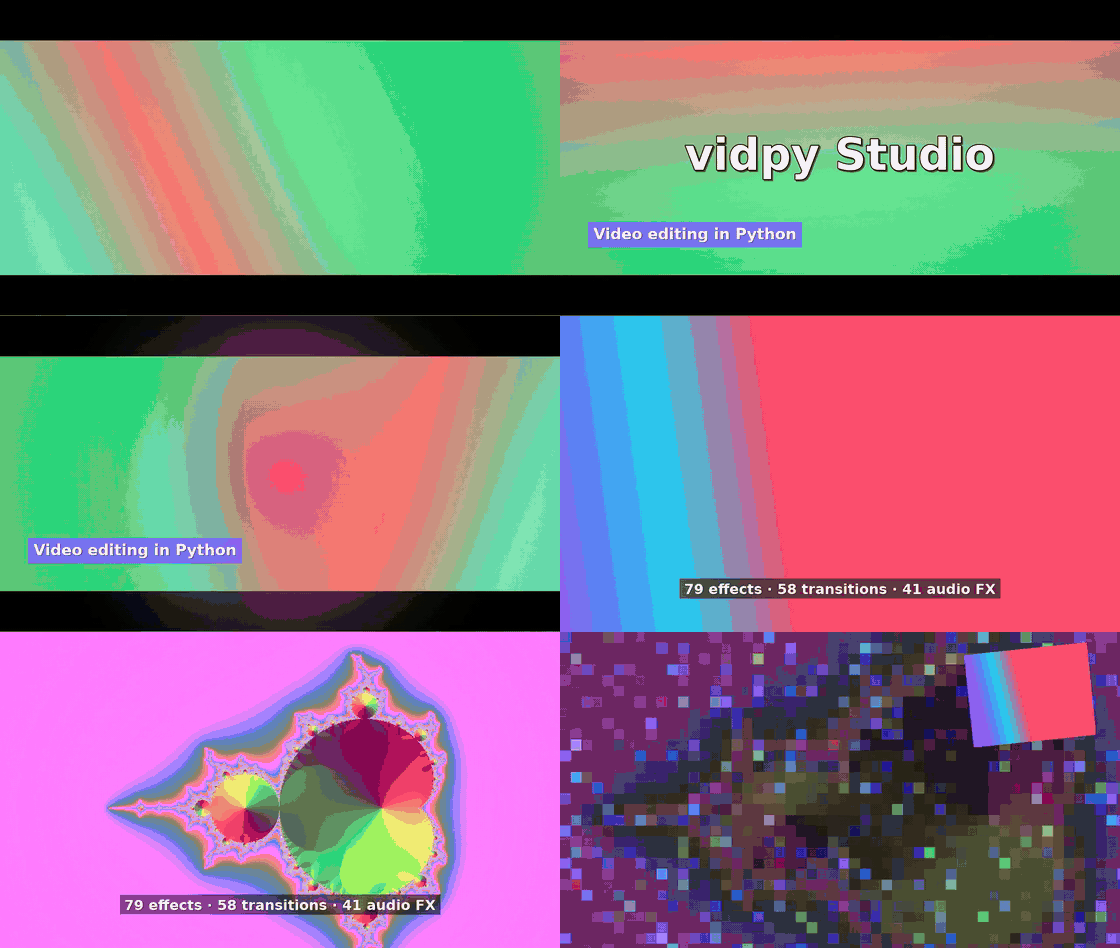
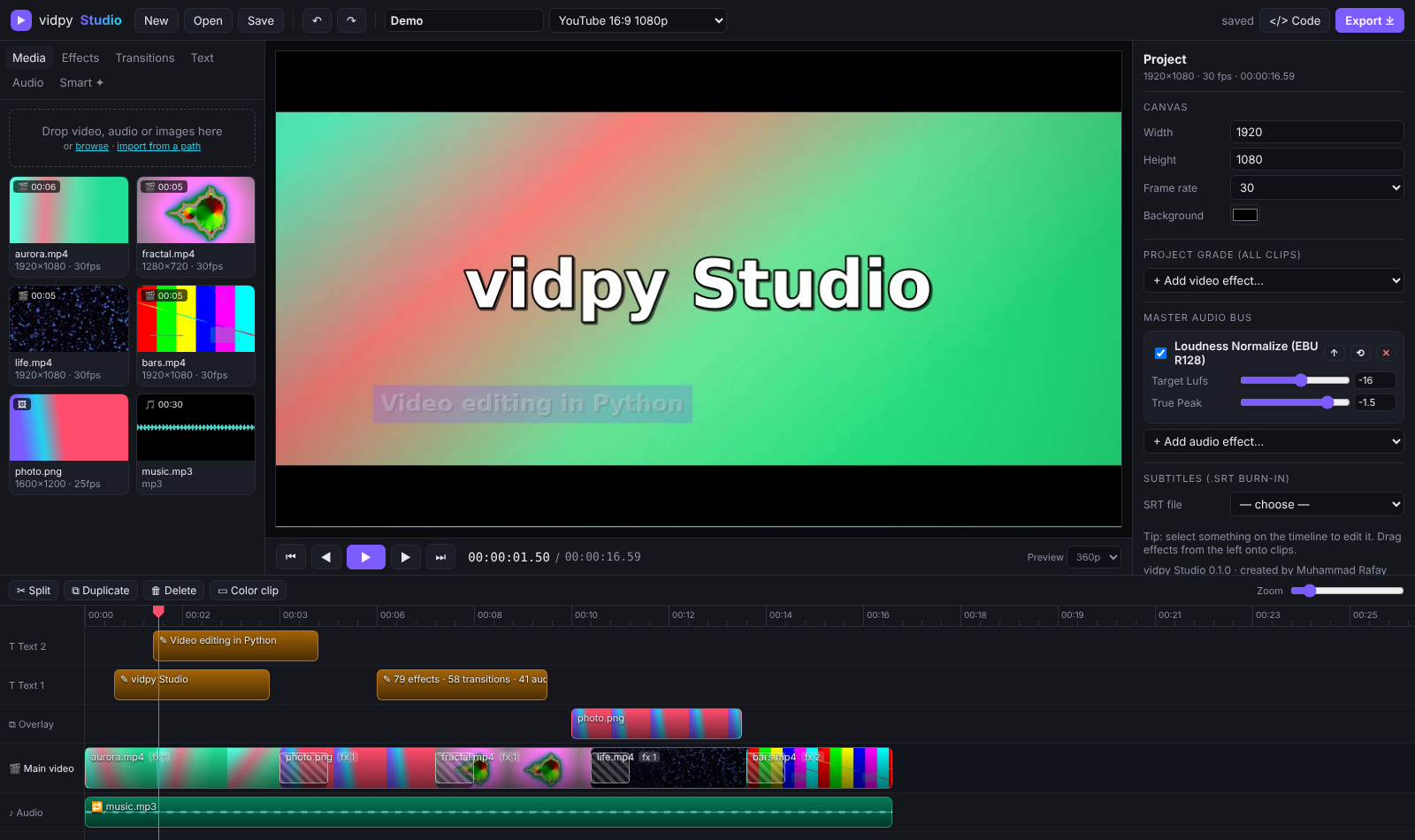
More screenshots
| Effects & inspector | Your edit as Python / FFmpeg code |
|---|---|
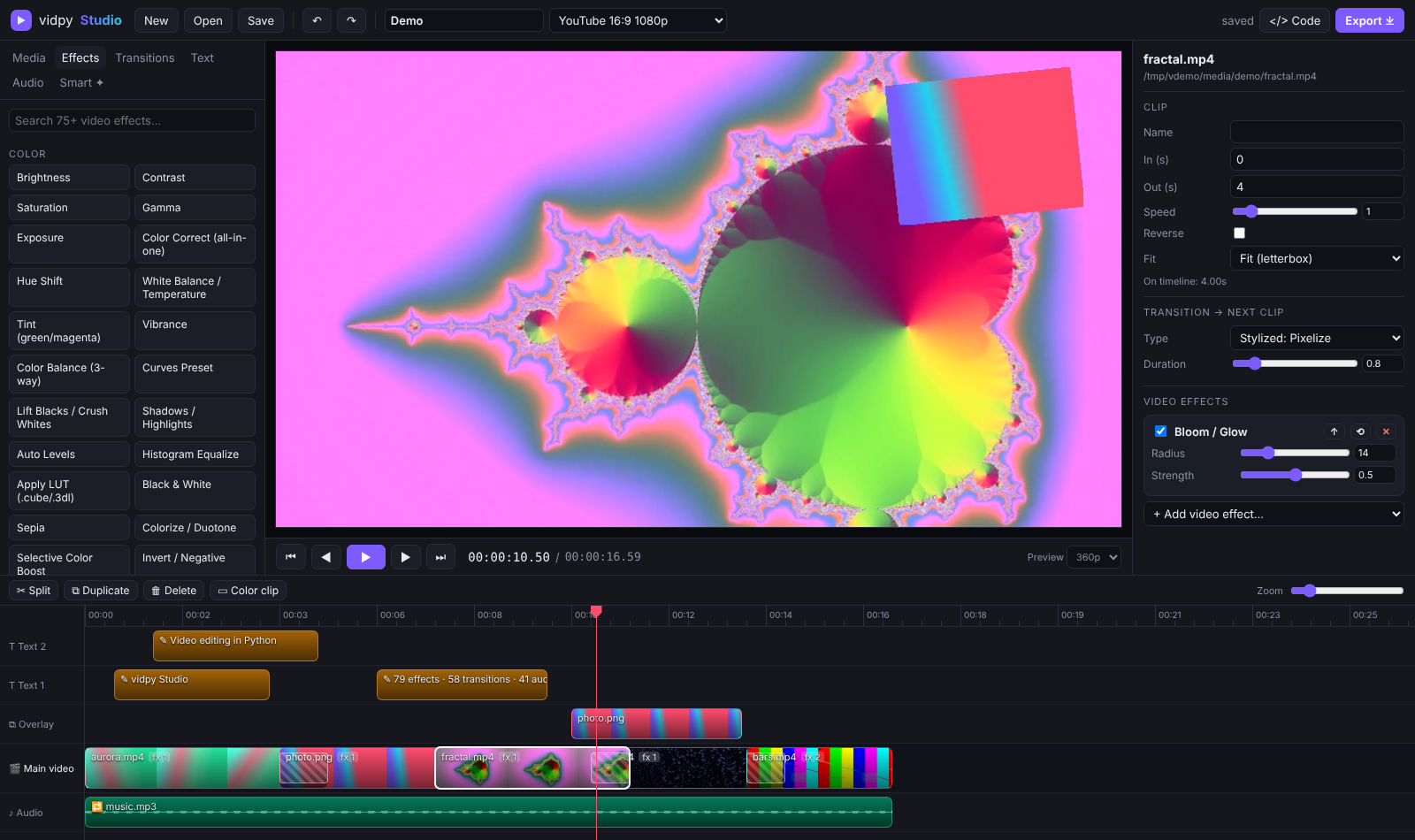 |
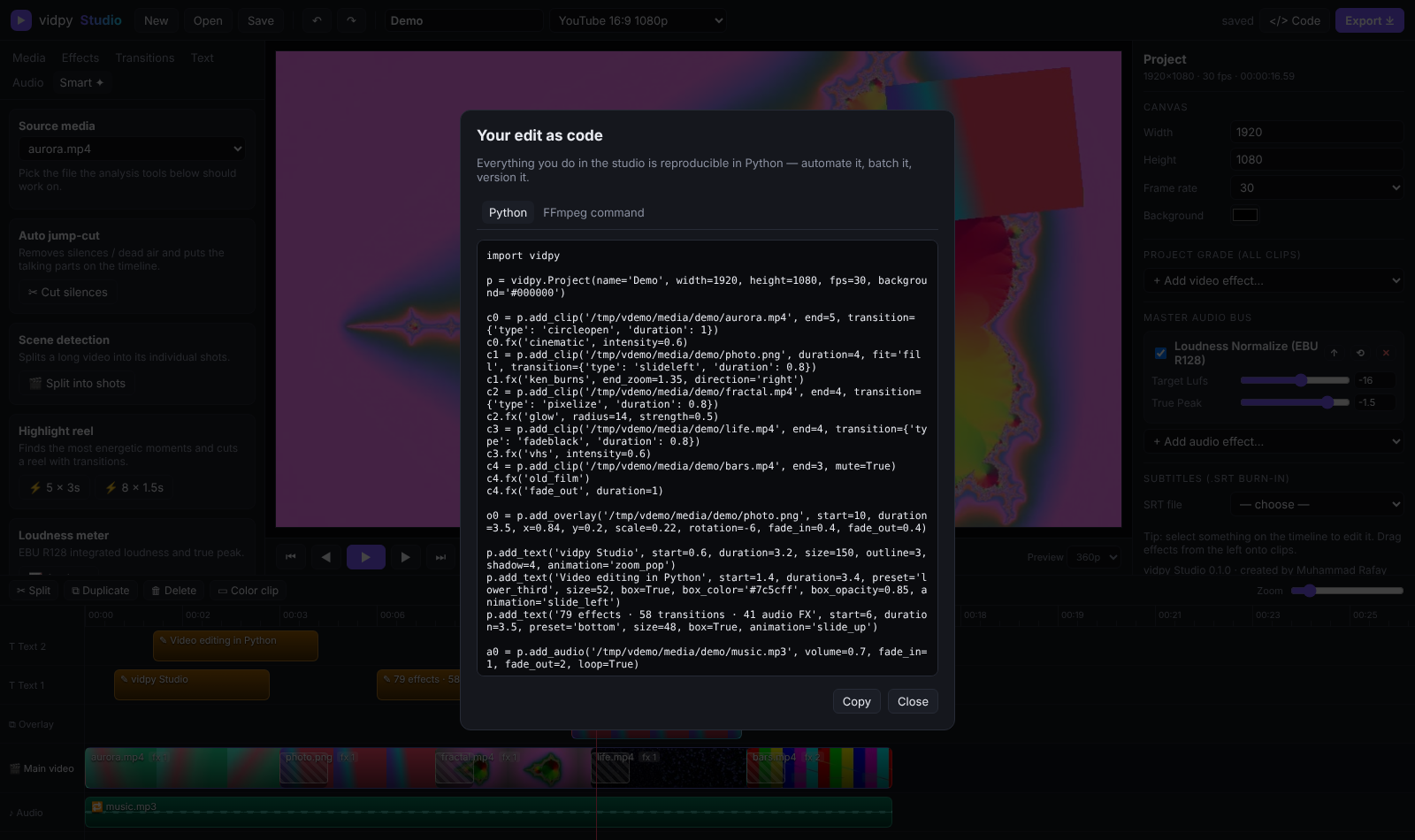 |
Features
| 🎬 Timeline editor | Magnetic main track, unlimited overlay / text / audio lanes, trim, split, ripple-reorder, snapping, undo/redo |
| 🎨 79 video effects | Color (3-way balance, curves, LUTs, white balance, vibrance, selective color…), cinematic looks (teal & orange, VHS, noir, cyberpunk, film grain, bloom…), blur/sharpen/denoise, stylize, transform (Ken Burns, stabilize, lens correction, shake…), time (optical-flow slow-mo, strobe…), overlays, and a raw-FFmpeg Custom node |
| 🔊 41 audio effects | Loudness normalize (EBU R128), voice enhance, noise reduction, de-ess, compressor, limiter, 10-band EQ, pitch shift, robot/chipmunk/deep voice, reverb, echo, 8D audio, stereo widener… |
| 🔀 58 transitions | Every FFmpeg xfade transition with audio crossfades: dissolves, wipes, slides, shapes, slices, pixelize, zoom… (how many you get depends on your FFmpeg version) |
| ✍️ Animated titles | Fade, slide-up, slide-left, zoom-pop, typewriter; boxes, outlines, shadows, any font; burn-in .srt subtitles |
| 🟩 Compositing | Picture-in-picture, logos, green-screen chroma key, opacity, rotation, fades, layers |
| 🦆 Smart audio mixing | Music auto-ducks under dialogue (sidechain), loop to fit, fades, per-track FX, master bus |
| ✦ Smart tools | Auto jump-cut (remove silences), scene detection, highlight reel, auto-enhance, reframe to 9:16 / 1:1, loudness meter, two-pass stabilization, compress-to-size |
| ⤓ 12 export formats | MP4 (H.264/H.265/AV1), WebM (VP9), MKV, ProRes MOV, GIF (palette-optimised), PNG sequence, MP3, WAV, AAC, FLAC; draft → lossless; 360p → 8K; optional GPU encoders |
| 🧑💻 Edit as code | Every studio edit can be exported as a runnable Python script and the exact FFmpeg command |
| 🔌 Plugins | Register your own effect with one decorator and it shows up in the studio UI automatically |
Requirements
- Python 3.10+ (Windows, macOS or Linux)
- FFmpeg on your
PATH:winget install ffmpeg·brew install ffmpeg·sudo apt install ffmpeg. On macOS, Homebrew's defaultffmpeghas no text support, so titles won't render. Use the full build instead:brew tap homebrew-ffmpeg/ffmpeg && brew install homebrew-ffmpeg/ffmpeg/ffmpeg. If you can't install it system-wide, usepip install "vidpy-ray[ffmpeg]", which bundles a static build. You can also point to a binary withVIDPY_FFMPEG=/path/to/ffmpeg.
The studio (localhost)
vidpy studio --port 8765 --workspace ~/my-edits
- Media: drag files into the window, or import from a path to use files in place without copying them.
- Timeline: double-click media to append it. Drag clips to reorder, and drag their edges to trim. S splits at the playhead.
- Effects / Transitions / Audio: drag onto a clip, or click to apply to the selection. With nothing selected, they apply to the whole project.
- Viewer: scrubbing renders exact frames. Space renders a fast preview and plays it.
- Export ⤓: pick a format, quality and resolution. Progress shows live, and the file lands in
workspace/exports. - </> Code: shows your edit as Python and as an FFmpeg command.
Shortcuts: Space play · S split · Del delete · Ctrl+D duplicate · Ctrl+Z / Ctrl+Shift+Z undo/redo ·
Ctrl+S save · ←/→ frame step (Shift = 1 s) · +/- zoom · Esc deselect.
The server binds to
127.0.0.1by default.--host 0.0.0.0exposes it on your network; only do that on a network you trust.
Python API
import vidpy

p = vidpy.Project(width=1920, height=1080, fps=30)          # or p.canvas("shorts_reels_tiktok")

p.add_clip("intro.mp4", start=2, end=8).fx("cinematic").transition_to("circleopen", 1)
p.add_clip("beach.jpg", duration=4).fx("ken_burns", end_zoom=1.4, direction="left")
p.add_clip("talk.mp4").set(speed=1.25).afx("voice_enhance").afx("denoise", reduction_db=15)

p.add_overlay("logo.png", x=0.92, y=0.08, scale=0.1, opacity=0.85, fade_in=0.5)
p.add_overlay("greenscreen.mp4", start=3, x=0.75, y=0.65, scale=0.4).green_screen("#00ff00")
p.add_text("SUMMER 2026", start=0.5, duration=3, size=120, animation="zoom_pop", outline=3)
p.add_audio("music.mp3", volume=0.5, loop=True, duck=True, fade_out=3)

p.fx("film_grain", amount=8)          # whole-project grade
p.afx("normalize", target_lufs=-14)   # master bus

p.render("final.mp4", quality="high")                     # H.264
p.render("final.webm", quality="web", resolution="720p")  # VP9
p.render("teaser.gif", start=0, end=4)                    # any range
p.save("my_edit.vidpy.json")                              # open it in the studio later
Progress callbacks: p.render("x.mp4", on_progress=lambda f, stats: print(f"{f:.0%}"))
Smart tools
from vidpy import smart

smart.cut_silences("podcast.mp4").render("tight.mp4")              # auto jump-cut
smart.highlight_reel("match.mp4", clips=6, clip_length=2).render("reel.mp4")
smart.split_scenes("film.mp4")                                     # one clip per shot
smart.slideshow(["a.jpg", "b.jpg"], music="song.mp3").render("show.mp4")
smart.auto_reframe(vidpy.Project.load("edit.vidpy.json"), "9:16").render("vertical.mp4")
smart.stabilize("shaky.mp4", "steady.mp4")
smart.compress_to_size("big.mov", "email.mp4", target_mb=20)
smart.loudness("mix.wav")   # {'integrated_lufs': -15.1, 'true_peak_db': -1.2, ...}
Write your own effect (it appears in the studio automatically)
import vidpy

@vidpy.effect("neon_edges", "Neon Edges", category="My FX",
              params=[vidpy.Param("glow", "float", 6, 0, 30)])
def neon_edges(p, ctx):
    return f"edgedetect=mode=colormix,gblur=sigma={p['glow']},eq=saturation=2"

vidpy.studio()   # launch the studio with your plugin loaded
CLI
vidpy studio                                  # browser editor
vidpy demo                                    # studio + sample media + demo edit
vidpy version                                 # vidpy and FFmpeg versions
vidpy render edit.vidpy.json out.mp4 -q ultra -r 4k
vidpy convert input.mov output.webm -q web
vidpy jumpcut lecture.mp4 lecture_tight.mp4
vidpy highlights game.mp4 reel.mp4 --clips 6 --length 2
vidpy scenes movie.mp4
vidpy loudness song.wav
vidpy stabilize shaky.mp4 steady.mp4
vidpy compress big.mp4 small.mp4 --mb 25
vidpy effects video | audio | transitions | formats
vidpy info clip.mp4
How it works
A project is plain JSON: clips, overlays, texts, audio and effect stacks. Python, the CLI and the studio all
share that format. At render time, vidpy.render compiles the whole timeline into one FFmpeg
filter_complex graph. That covers trims, speed ramps, effects, xfade transitions, overlays, drawtext
titles, sidechain ducking and the master bus. Media is decoded once and encoded once, with no
intermediate files or generation loss. Scrubbing renders only the frames under the playhead, so it
stays fast even on long timelines.
Contributing
Contributions are very welcome, from bug reports and new effects (usually 3–10 lines) to timeline features and translations. Read CONTRIBUTING.md to get set up in five minutes, then pick a good first issue. Questions and showcases go in Discussions.
Maintainers: the release process is in docs/PUBLISHING.md.
License
MIT © Muhammad Rafay Shaikh
1 maintainer

Metadata
1 maintainer
Release files for vidpy-ray 0.1.1
For a detailed explanation of source distributions (sdists) and built distributions (wheels), please see the package formats documentation.
Source distribution (sdist)
| File | Size | Uploaded | Provenance | Actions |
|---|---|---|---|---|
| vidpy_ray-0.1.1.tar.gz | 83.3 kB | With provenance | Details for vidpy_ray-0.1.1.tar.gz |
Built distribution (wheel)
| File | Interpreter | ABI | Platform | Actions Reset |
|---|---|---|---|---|
| vidpy_ray-0.1.1-py3-none-any.whl | Python 3 | none | any | Details for vidpy_ray-0.1.1-py3-none-any.whl |
Total release size: 164.7 kB
Release files / vidpy_ray-0.1.1.tar.gz
| Download URL | vidpy_ray-0.1.1.tar.gz |
|---|---|
| Size | 83.3 kB |
| Tags | Source |
|
SHA-256 checksum How to use checksums |
2c0eda1df0a067378b53f38f084261f7af3c2d96c03b9882b9d6b42fca6439c3
|
|
BLAKE2b-256 checksum How to use checksums |
f93a4bd9809401c5f1c8c17f5706f04bdb992862f9abae298e947ea22ec35c0d
|
| Upload date | |
|
Uploaded using Trusted Publishing? What is trusted publishing? |
Yes |
| Uploaded via |
twine/7.0.0 CPython/3.13.16
|
Provenance
Provenance describes where a file came from. On PyPI, provenance is shared via attestations, which provide a verifiable record of the build or publishing details. View details, limitations and caveats.


PyPI Publish Attestation
PyPI verified that this artifact, at this checksum, originated from the publisher listed below.
Signed by GitHub Actions, verified by PyPI on Nov 12, 2026.
Transparency logRelease files / vidpy_ray-0.1.1-py3-none-any.whl
| Download URL | vidpy_ray-0.1.1-py3-none-any.whl |
|---|---|
| Size | 81.4 kB |
| Tags | Python 3 |
|
SHA-256 checksum How to use checksums |
1aab9f871de256635248c1586ed12f1c255e65ff9a930cd5d1ac21351308e7af
|
|
BLAKE2b-256 checksum How to use checksums |
34cefa931558dd35cd8909f807c949bcb86008853d44f143769155f1c890b5f3
|
| Upload date | |
|
Uploaded using Trusted Publishing? What is trusted publishing? |
Yes |
| Uploaded via |
twine/7.0.0 CPython/3.13.16
|
Provenance
Provenance describes where a file came from. On PyPI, provenance is shared via attestations, which provide a verifiable record of the build or publishing details. View details, limitations and caveats.
PyPI Publish Attestation
PyPI verified that this artifact, at this checksum, originated from the publisher listed below.
Signed by GitHub Actions, verified by PyPI on Nov 12, 2026.
Transparency logSecurity for vidpy-ray 0.1.1
Provenance
Provenance describes where a file came from. On PyPI, provenance is shared via attestations, which provide a verifiable record of the build or publishing details. View details, limitations and caveats.
Full provenance
Both files in this release have been uploaded with provenance metadata.
Attestation for vidpy_ray-0.1.1.tar.gz
PyPI Publish Attestation
PyPI verified that this artifact, at this checksum, originated from the publisher listed below.
Signed by GitHub Actions, verified by PyPI on Nov 12, 2026.
Transparency logA note on package security
PyPI is a repository for distributing packages, not a service for auditing them. While third-party security researchers and our staff do their best to detect and remove malicious packages, PyPI cannot guarantee the quality, security or suitability of any given package.
To learn more about protecting yourself from malicious actors, visit our package security documentation.














