
vidsum
Summarize any video locally. No API cost, no upload.
Give vidsum a video file or a link (YouTube, Bilibili, Douyin, Xiaohongshu, TikTok, Instagram, X, Weibo, Vimeo and other sites yt-dlp supports, or a whole pasted share message). It turns the video into a timestamped transcript, SRT/VTT subtitles, notes on what the key frames show, the text that appears on screen, and a short summary. Key points cite a timecode ([audio 01:23], [screen 00:40], [OCR 00:12]), and the quotes section is copied from the transcript by code. Links are downloaded first. On an Apple Silicon Mac the models (Whisper and Qwen) then run through MLX, so the video is never uploaded anywhere. Without a Mac there is a cloud profile for OpenAI-compatible APIs; it has only been tested against a mock server, and outside macOS there is no OCR.
Use it from the terminal, as an MCP server, or as an Agent Skill. The MCP server is tested in Claude Code; the Claude Desktop, Cursor and Codex configs below are untested.
Quick start
You need uv and FFmpeg (brew install ffmpeg). Run setup once to download the models (7.6 GB); after that, give it a video file or a link and it prints the summary. Put links in quotes, because zsh treats ? and & in a bare URL as special characters.
uvx vidsum-local setup
uvx vidsum-local talk.mp4
uvx vidsum-local "https://www.youtube.com/watch?v=jNQXAC9IVRw"
Subtitles only:
uvx vidsum-local transcribe talk.mp4 --format srt > talk.srt
Everything else (frames, contact sheet, OCR, transcript files) lands in ./vidsum-output/.
Links and share text
Links are downloaded with yt-dlp, which is installed with vidsum. You can paste a whole share message, such as a Douyin or Xiaohongshu share text with Chinese around the link; vidsum finds the link and follows short links (v.douyin.com, xhslink.com, b23.tv). We downloaded one public video from each of these sites on 2026-11-24, from a US connection (download times are in docs/benchmarks.md):
| Site | Result | Notes |
|---|---|---|
| YouTube, Bilibili, TikTok, X, Weibo | worked without cookies | some TikTok posts are blocked by region |
| a public reel worked without cookies | other posts may need cookies; not tested | |
| Xiaohongshu | worked without cookies | share links carry an xsec_token; a bare note link without it failed and needs cookies |
| Douyin | share text and short links worked | needs the browser extra (below); yt-dlp alone cannot sign Douyin's requests |
| Vimeo | worked | pages that ask for a login are retried through the public player; DRM-protected videos cannot be downloaded |
| Wikimedia Commons | worked | an example of the many other sites yt-dlp supports; we did not test the rest |
| Kuaishou | not supported | yt-dlp has no Kuaishou extractor; use --fetch-command with your own downloader |
Douyin opens the public video page in a headless browser and reads the page's own video details: no login, nothing stored. It needs the browser extra and Google Chrome (or Playwright's Chromium):
uvx --from "vidsum-local[browser]" vidsum-local "https://v.douyin.com/xxxxxxx/"
Without Chrome, install Playwright's Chromium once with uvx --from "vidsum-local[browser]" playwright install chromium (uv notes that playwright comes from a dependency; that is expected, and it keeps the browser matched to the Playwright version vidsum uses). For the MCP server, start it the same way: uvx --from "vidsum-local[browser]" vidsum-local mcp.
Sites that need a login (private videos, age checks, some Instagram posts) work with your own browser session. vidsum passes these options on to yt-dlp (a cookies file as a temporary copy):
uvx vidsum-local "https://www.instagram.com/reel/xxxxxxx/" --cookies-from-browser chrome
uvx vidsum-local "https://www.instagram.com/reel/xxxxxxx/" --cookies cookies.txt
--cookies-from-browser also takes firefox, safari, edge, brave and a profile ("chrome:Profile 1", quoted because of the space). On macOS, reading Chrome's cookies may make the system ask for permission. Use one of the two options, not both. vidsum hands yt-dlp a temporary copy of your cookies file, so the file itself is never rewritten. For the MCP server, set one of VIDSUM_COOKIES_FROM_BROWSER or VIDSUM_COOKIES (a full path) in its environment.
Use it responsibly. Only process videos you have the right to use, and follow each site's terms of service. vidsum downloads one video per link for your own analysis: a playlist or channel link gives its first video, and live streams are skipped. It does not get around DRM, and cookies are only read when you ask for it.
Add it to your AI agent
Claude Code plugin (skill and MCP server in one step). Type these two lines inside Claude Code, not in a terminal:
/plugin marketplace add allenwu-blip/vidsum
/plugin install vidsum@vidsum
Recent versions of Claude Code also take it as one line: /plugin install vidsum --marketplace allenwu-blip/vidsum.
MCP server, for any client. Run uvx vidsum-local setup in a terminal first: it downloads the models and lets uvx build its environment, so the server starts quickly and no tool call waits on a download.
Claude Code (tested):
claude mcp add vidsum -- uvx vidsum-local mcp
For Douyin links, add the browser extra instead: claude mcp add vidsum -- uvx --from "vidsum-local[browser]" vidsum-local mcp.
Claude Desktop, Cursor and other JSON configs (untested; if the app cannot find uvx, put the full path from which uvx in command):
{
  "mcpServers": {
    "vidsum": {
      "command": "uvx",
      "args": ["vidsum-local", "mcp"]
    }
  }
}
Codex (~/.codex/config.toml, untested). Codex stops a tool call after 60 s by default, and a summary takes minutes, so raise the timeouts:
[mcp_servers.vidsum]
command = "uvx"
args = ["vidsum-local", "mcp"]
startup_timeout_sec = 120
tool_timeout_sec = 1800
The server has two tools:
| Tool | Arguments | Returns |
|---|---|---|
summarize_video |
path (a file, a link or share text), language (default auto), focus (a question to answer), describe_frames |
the Markdown summary and the folder with the evidence |
transcribe_video |
path (a file, a link or share text), language hint, format (md, srt, vtt, txt, json) |
the transcript |
Things to ask once it is installed:
- "Summarize ~/Movies/keynote.mp4 and list the key quotes with timecodes."
- "Transcribe https://www.youtube.com/watch?v=jNQXAC9IVRw and give me an SRT file."
- "Summarize https://commons.wikimedia.org/wiki/File:ScienceCasts-_The_Zero_Gravity_Coffee_Cup.webm. Which points come from what is said, and which from what is shown?"
- "Here is a Douyin share text: … Break down its first three seconds for a creator."
If the models are not downloaded yet, the tools return the one command to run instead of hanging on a 7.6 GB download. While a summary runs the server sends no progress updates, so a client with a short tool timeout will give up before it finishes.
Agent Skill: skills/vidsum/SKILL.md follows the open Agent Skills format. Copy the folder into your agent's skills directory, or run npx skills add allenwu-blip/vidsum.
What you get
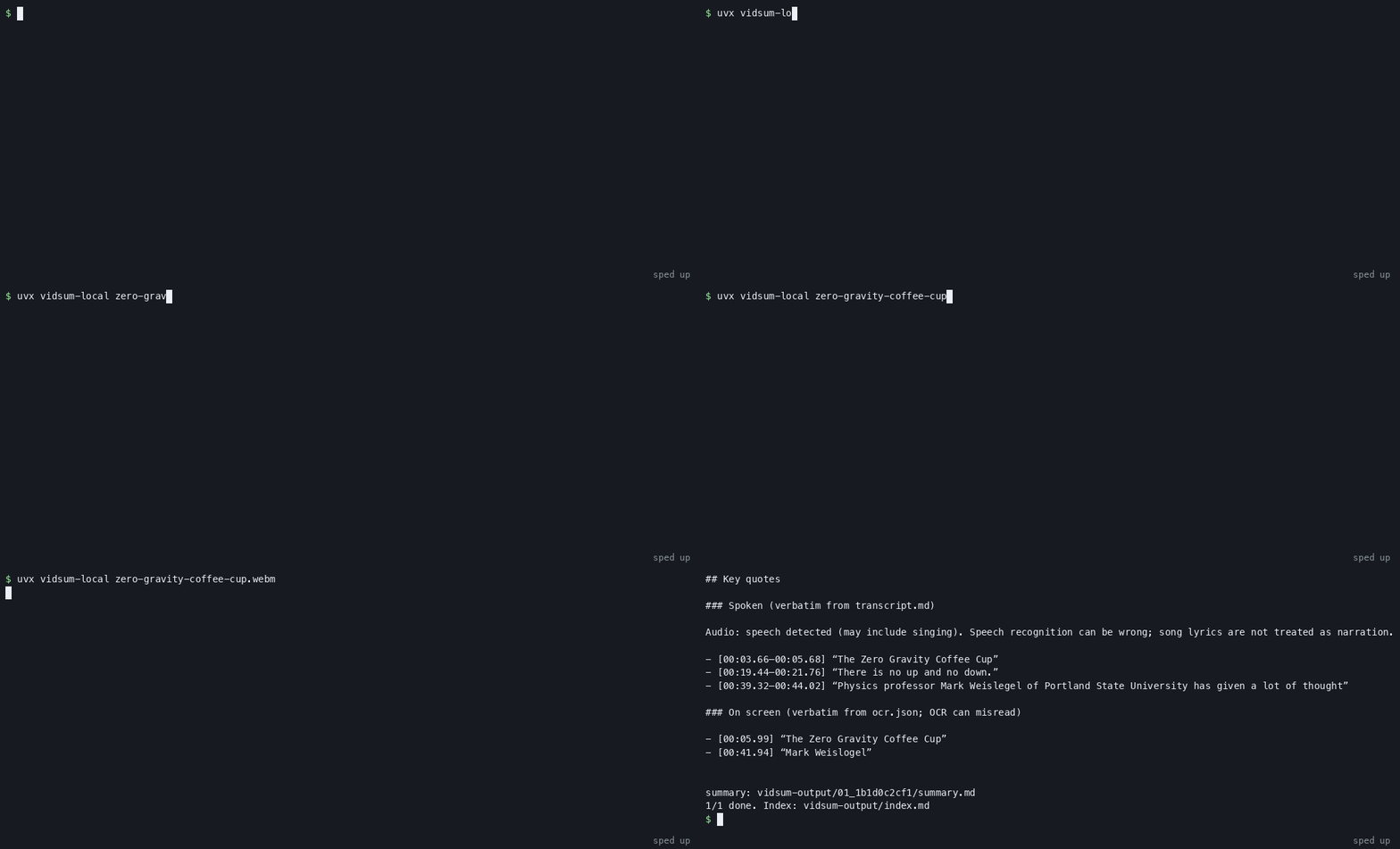
From the first 45 seconds of a public-domain NASA clip ("ScienceCasts: The Zero Gravity Coffee Cup"), default small profile, the same run as the GIF above. Lines are copied from that output unchanged; each … marks lines that were left out.
# zero-gravity-coffee-cup.webm
…

## TL;DR
This is a short educational video from Science@NASA about the unique physics of coffee in zero gravity. It explains that standard Earth rules like "up and down" do not apply in space, where dropped objects float rather than fall. The video introduces Professor Mark Weislegel and his work on a specialized cup designed to keep coffee contained in microgravity.

## Key points
*   The video explains that familiar Earth rules, such as gravity causing things to fall or hot air to rise, do not apply in the microgravity environment of space stations. [audio 00:13.30–00:25.40]
…
*   Physics professor Mark Weislegel of Portland State University is identified as someone who has studied coffee in this environment. [audio 00:39.32–00:44.98]
…

## Timeline
…

## On screen

*   A glowing, fiery celestial body resembling a star or sun against a black background. [screen 00:00]
*   Title card text reading "SCIENCE@NASA" and "The Zero Gravity Coffee Cup". [screen 00:05.99]
…
*   An astronaut floating inside a cluttered space station module, holding a plastic bag. [screen 00:23.97]
*   Text "HATCH" visible on a panel behind the astronaut. [OCR 00:23.97]
…
*   Text "science @ NASA" and "Mark Weislogel" visible in the top right corner during later frames. [OCR 00:41.94]
…

## Key quotes

### Spoken (verbatim from transcript.md)

Audio: speech detected (may include singing). Speech recognition can be wrong; song lyrics are not treated as narration.

- [00:03.66–00:05.68] “The Zero Gravity Coffee Cup”
- [00:19.44–00:21.76] “There is no up and no down.”
- [00:39.32–00:44.02] “Physics professor Mark Weislegel of Portland State University has given a lot of thought”

### On screen (verbatim from ocr.json; OCR can misread)

- [00:05.99] “The Zero Gravity Coffee Cup”
- [00:41.94] “Mark Weislogel”
Whisper heard the professor's name as "Weislegel"; the on-screen caption spells it "Weislogel". Both are kept with their timecodes, so you can tell which one to trust. Each run also leaves the full transcript (.md, .srt, .vtt, .txt), the frame notes, the OCR and a contact sheet of the sampled frames in vidsum-output/.
Models and memory
| Profile | Models | Download | Measured peak | 45 s clip, Apple M6 32 GB |
|---|---|---|---|---|
small (default) |
Whisper large-v3-turbo, Qwen3.5 9B 4-bit for frames and text | 7.6 GB | 7.2 GB | about 2 min (3 runs on 0.4.0: median 116 s, range 111–121 s); --no-visual 43 s; transcript only 3.5 s |
large |
Whisper large-v3-turbo, Qwen3.6 35B-A3B 4-bit | 22 GB | 22 GB (frame stage) | not timed on this clip; frames took 5.25 s each on average over 12 earlier videos (benchmarks) |
cloud |
any OpenAI-compatible API | none | — | depends on the API |
Peaks are MLX's own high-water mark on a 32 GB Apple M6, one model loaded at a time. Times are wall-clock on 2026-11-24 with the models already downloaded and no other GPU job running (1-minute load average 3.3 to 4.4); on a quieter machine the day before, 0.3.0 took a median of 96 s on the same clip. A run with a training job sharing the GPU took 315 s, so a busy machine can be three times slower. Longer videos take longer. Details: benchmarks. With a measured peak of 7.2 GB, 16 GB Macs should work but are untested; if you run it on one, please open an issue with the numbers. Weights go to the Hugging Face cache (~/.cache/huggingface/hub, move it with HF_HOME) and revisions are pinned.
Local or cloud
| vidsum, local profiles | Cloud transcription and LLM APIs | |
|---|---|---|
| Where the video goes | stays on your Mac | uploaded to the provider |
| Network | the one-time model download, and downloading the links you give it; after setup, weights load from the local cache by path (set HF_HUB_OFFLINE=1 to be sure) |
every run |
| Cost per video | nothing after the download | billed by the provider per minute or per token |
| Hardware | Apple Silicon; measured peak 7.2 GB, 16 GB Macs untested | anything |
What vidsum runs, sends and fetches:
uvxinstalls vidsum and its Python packages from PyPI.vidsum setupdownloads the model weights from Hugging Face once.- A link is downloaded from the site it points to, by yt-dlp in a child process; for Douyin, a headless Chrome or Chromium loads the public video page. Cookies are read only with
--cookiesor--cookies-from-browser. yt-dlp's metadata comes back on standard output, so no file with signed media addresses or request headers is left on disk. - With the local profiles, nothing else leaves the Mac: the video, frames, transcript and summary are written to the output folder you choose. There is no telemetry and no vidsum server.
- With the cloud profile, audio, frames and text are sent to the OpenAI-compatible endpoint you set in
VIDSUM_API_BASE.
The cloud profile is for machines without Apple Silicon. It is experimental: it has only been tested against a mock server, not a paid provider, and outside macOS there is no OCR and no music detection (both use Apple frameworks).
It reads four environment variables. Put your key in place of ...:
VIDSUM_API_KEY: your API key. If it is not set,OPENAI_API_KEYis used.VIDSUM_API_BASE: any OpenAI-compatible endpoint.VIDSUM_CLOUD_MODEL: a chat model that accepts images.gpt-6-lunais the default and has not been checked against a live API.VIDSUM_CLOUD_ASR_MODEL: a speech model that returns segment timestamps.whisper-1is the default.
export VIDSUM_API_KEY=...
export VIDSUM_API_BASE=https://api.openai.com/v1
export VIDSUM_CLOUD_MODEL=gpt-6-luna
export VIDSUM_CLOUD_ASR_MODEL=whisper-1
uvx vidsum-local --profile cloud talk.mp4
In cloud mode the audio and the sampled frames are sent to that API.
Options
The examples use uvx vidsum-local. Run uv tool install vidsum-local if you want the shorter vidsum command on your PATH; uvx alone does not add it.
Options can go before or after the file name, for example:
uvx vidsum-local talk.mp4 --language zh --focus "what about pricing?"
--language auto|en|zh|ja|...: language of the summary.autofollows the speech.--focus "what about pricing?": make the summary answer one question.--no-visual: skip the frames. Faster; transcript and OCR only.--profile small|large|cloud: which models to use (see the table above).--template general|creator:creatorcovers the hook, structure, shots and takeaways, for short-video makers.--visual-frames 8-12: how many key frames the vision model looks at.--manifest batch.json: many videos at once, as[{"id": "a1", "input": "a.mp4", "label": "...", "focus": "..."}]. Aninputcan be a file or a link.--cookies-from-browser BROWSER[:PROFILE],--cookies FILE: for links that need a signed-in session (see Links and share text).--fetch-command CMD: your own downloader instead of the built-in one. vidsum runsCMD <input> <item_dir>; it must leavemeta.jsonandvideo.mp4there.
How it works
- A link is downloaded first: yt-dlp for most sites, a headless browser for Douyin. FFmpeg finds scene changes and samples up to 24 frames, keeping the first and last; it also builds a contact sheet.
- macOS Vision reads on-screen text (OCR). Apple's sound classifier flags music and singing so lyrics are not mistaken for narration. Both are macOS only.
- Whisper large-v3-turbo transcribes the speech with timestamps.
- A vision model describes 8 to 12 of the frames, each compared with the one before, and then the contact sheet.
- A text model writes the summary from that evidence. The quotes section is copied from the transcript and OCR by code, so the model cannot rewrite what was said.
Only one model is in memory at a time, and each runs in its own process.
Limits
- Frames are samples. Camera moves, editing pace and "this looks AI-generated" are guesses, and the summary says so.
- Whisper can hear words in music. vidsum flags music-only and singing tracks, but check quotes that matter.
- The vision model can misread small text or misdescribe a frame. The frames and OCR are kept next to the summary so you can check.
- Long videos still get 8 to 12 frames. For a one-hour talk the transcript carries most of the summary.
- A link download stops at 4 GB. A live stream is skipped when the site marks it live or the server sends audio or video without a size. An ordinary file sent without a size is refused the same way; download it first (for example with
curl -L -o clip.mp4 '<url>') and pass the path. - The MCP server runs one job at a time. Cancelling a call in your client does not stop a summary that is already running; the next call waits for it.
Development
git clone https://github.com/allenwu-blip/vidsum && cd vidsum
uv venv && uv pip install -e .
.venv/bin/python -m unittest discover -s tests
MIT licensed. Third-party licenses: THIRD_PARTY.md.
中文说明
在本机总结任何视频:不花 API 的钱,视频不上传。
给它一个视频文件,或者一个视频链接(YouTube、B 站、抖音、小红书、TikTok、Instagram、X、微博、Vimeo,以及 yt-dlp 支持的其他网站),整段分享文字直接粘进去也行。它出带时间码的转写、SRT/VTT 字幕、关键帧在拍什么、画面上的字,再写一份摘要。要点后面标时间码出处([声音 01:23]、[画面 00:40]、[字幕/OCR 00:12]),原话那节由代码从转写里逐字摘。链接先下载到本机,再在 Apple Silicon 的 Mac 上用 MLX 跑开源模型(Whisper 和千问),视频不上传到任何地方。没有 Mac 可以用 cloud 档接 OpenAI 兼容接口,不过它只对模拟服务器测过,离开 macOS 也没有 OCR。
能在终端里用,也能当 MCP server 或 Agent Skill 给 AI 用。MCP 只在 Claude Code 里测过,Claude Desktop、Cursor、Codex 的配置写了但没测。
下面四条命令:第一条只在第一次跑,下 7.6 GB 模型;第二条出中文摘要;第三条总结一个 B 站链接(换成你的);第四条只出字幕。链接要加引号,zsh 会把网址里的 ? 和 & 当成特殊字符。
uvx vidsum-local setup
uvx vidsum-local 视频.mp4 --language zh
uvx vidsum-local "https://www.bilibili.com/video/BV1xxxxxxxxx" --language zh
uvx vidsum-local transcribe 视频.mp4 --format srt
抖音要加 browser 扩展:它用无头 Chrome 打开公开的视频页,读页面自己拿到的视频信息,不登录,也不存任何东西。整段分享文字可以直接粘:
uvx --from "vidsum-local[browser]" vidsum-local "7.94 复制打开抖音,看看【某某的作品】… https://v.douyin.com/xxxxxxx/ 复制此链接…" --language zh
- Claude Code 里装插件:
/plugin marketplace add allenwu-blip/vidsum,再/plugin install vidsum@vidsum。插件自带 browser 扩展,抖音也能下。单独加 MCP server 要下抖音的话,用claude mcp add vidsum -- uvx --from "vidsum-local[browser]" vidsum-local mcp。 --language不写就跟着视频里说的话走,中文视频出中文摘要。--template creator是给做短视频的人拆片子用的:开头三秒、结构、拍法剪法、能学的点。- 默认的 small 档(9B 模型)实测峰值 7.2 GB,16 GB 的 Mac 还没试过。45 秒的片子在 M6 32 GB 上、没有别的 GPU 活时,整条约 2 分钟,只出字幕约 3.5 秒。32 GB 以上可以
--profile large(35B),看图更细。 - 11-24 每个平台实测下载了一条公开视频(美国网络):YouTube、B 站、TikTok、X、微博不用 cookies;小红书 App 分享出来的链接带 xsec_token,不用 cookies,去掉 token 的链接要 cookies;抖音分享文字和短链都能下,要 browser 扩展;Vimeo 要登录的页面会改走公开播放器,有 DRM 的下不了。快手不支持,yt-dlp 没有快手的解析器。
- 要登录才能看的视频,用自己浏览器里的登录状态:
--cookies-from-browser chrome(也可以是 firefox、safari、edge),或者--cookies cookies.txt,两个只选一个。cookies 文件交给 yt-dlp 的是临时副本,原文件不会被改。MCP server 在环境变量里设VIDSUM_COOKIES_FROM_BROWSER或VIDSUM_COOKIES(写完整路径),也是只设一个。 - 请负责任地使用:只处理你有权使用的视频,遵守各平台的用户协议。vidsum 一条链接只下一个视频,给你自己分析用:播放列表和频道链接只取第一个,直播不下;不绕过 DRM;不加 cookies 选项,就不读浏览器的 cookies。
- 单个下载最多 4 GB。网站标成直播的、服务器不报大小的音视频流都不下;不报大小的普通文件也会被拒,先自己下到本地再传路径。在 Claude 这类客户端里取消一次调用,正在跑的那条不会停,下一次调用要等它跑完。
- 会连网的地方:uvx 从 PyPI 装包;
setup从 Hugging Face 下模型;链接从它所在的网站下(抖音用无头浏览器打开公开页面);cloud 档把音频、画面和文字发到你设的接口。别的都留在本机,没有统计上报。 - 模型选型和实测记录(英文):docs/benchmarks.md。
1 maintainer

Metadata
1 maintainer
Release files for vidsum-local 0.4.0
For a detailed explanation of source distributions (sdists) and built distributions (wheels), please see the package formats documentation.
Source distribution (sdist)
| File | Size | Uploaded | Provenance | Actions |
|---|---|---|---|---|
| vidsum_local-0.4.0.tar.gz | 86.0 kB | Without provenance | Details for vidsum_local-0.4.0.tar.gz |
Built distribution (wheel)
| File | Interpreter | ABI | Platform | Actions Reset |
|---|---|---|---|---|
| vidsum_local-0.4.0-py3-none-any.whl | Python 3 | none | any | Details for vidsum_local-0.4.0-py3-none-any.whl |
Total release size: 150.1 kB
Release files / vidsum_local-0.4.0.tar.gz
| Download URL | vidsum_local-0.4.0.tar.gz |
|---|---|
| Size | 86.0 kB |
| Tags | Source |
|
SHA-256 checksum How to use checksums |
2bf37d26d7ca100603d6662f2c82dd2d198dc802d681aa2294d19721b7cf387a
|
|
BLAKE2b-256 checksum How to use checksums |
5fabbc24261ccffc4b101ece55576cf3ad130b2f228e93fa1c23197718790913
|
| Upload date | |
|
Uploaded using Trusted Publishing? What is trusted publishing? |
No |
| Uploaded via |
twine/7.0.0 CPython/3.13.18
|
Release files / vidsum_local-0.4.0-py3-none-any.whl
| Download URL | vidsum_local-0.4.0-py3-none-any.whl |
|---|---|
| Size | 64.1 kB |
| Tags | Python 3 |
|
SHA-256 checksum How to use checksums |
5a2a21919d215caa58165c4927e1487ad1ce301956cdc984bd2a2e2ddff36f00
|
|
BLAKE2b-256 checksum How to use checksums |
eac27bc4678019333ee0a1a59fc1c883ede234ef7c47b06ac2c1fa60fbecbfa9
|
| Upload date | |
|
Uploaded using Trusted Publishing? What is trusted publishing? |
No |
| Uploaded via |
twine/7.0.0 CPython/3.13.18
|
Security for vidsum-local 0.4.0
Provenance
Provenance describes where a file came from. On PyPI, provenance is shared via attestations, which provide a verifiable record of the build or publishing details. View details, limitations and caveats.
No provenance found
None of the files in this release were uploaded with provenance metadata.
A note on package security
PyPI is a repository for distributing packages, not a service for auditing them. While third-party security researchers and our staff do their best to detect and remove malicious packages, PyPI cannot guarantee the quality, security or suitability of any given package.
To learn more about protecting yourself from malicious actors, visit our package security documentation.













