




Turn any video into a markdown guide your LLM can actually use.
Transcript, key frames, and every line of code, command, and error shown on screen, copied out verbatim.
Quick start · Claude Code plugin · What gets captured · How it works
Videos are the biggest blind spot for AI. A 5-minute Loom bug report, a 30-minute coding tutorial, a recorded meeting where someone walked through their code: your LLM can't see any of it. You either rewatch it yourself or the knowledge is lost.
Transcripts alone don't fix this. The most useful part of a technical video is usually what's on screen, not what's said. "So I changed this line here" means nothing without the line.
vidwise runs one command and produces a self-contained folder: a timestamped transcript, the frames where something changed, and a guide that pairs them. When code, a terminal, a stack trace, a diagram, or a slide appears on screen, the guide contains the actual text, not a description of it.
pip install vidwise
vidwise https://loom.com/share/abc123
Described vs. captured
Most video-to-text tools tell you about the screen. vidwise copies it.
What a typical frame description gives you:
The presenter shows a Python file with a function that retries failed requests, then runs the tests in the terminal, and one fails.
What vidwise puts in guide.md:
## Captured Code and Commands

*At 2:14 (`frame_2m14s.png`)*
```python
# src/client/retry.py
def fetch_with_retry(url: str, attempts: int = 3) -> Response:
    for i in range(attempts):
        resp = session.get(url, timeout=5)
        if resp.status_code < 500:
            return resp
        time.sleep(2 ** i)
    raise RetryExhausted(url)
```

*At 2:40 (`frame_2m40s.png`)*
```bash
$ pytest tests/test_retry.py -q
F.
FAILED tests/test_retry.py::test_gives_up_after_three - AssertionError: expected 3 calls, got 4
1 failed, 1 passed in 0.12s
```
(Illustrative example of the output format.)
The first version lets an LLM talk about the video. The second lets it fix the bug.
What you can do with it
| Scenario | What you get |
|---|---|
| Debug a Loom bug report | The UI state, the exact error message, and the stack trace, ready to paste into Claude |
| Absorb a coding tutorial | Every command and code snippet in order, so you can follow along without rewatching |
| Pick up a recorded meeting | The code someone shared on screen, with its file path, plus how it changed during the discussion |
| Learn from a talk | Full slide text and diagram labels, searchable and quotable |
| Onboard faster | Training videos become docs a new hire (or their AI assistant) can search |
Tutorials
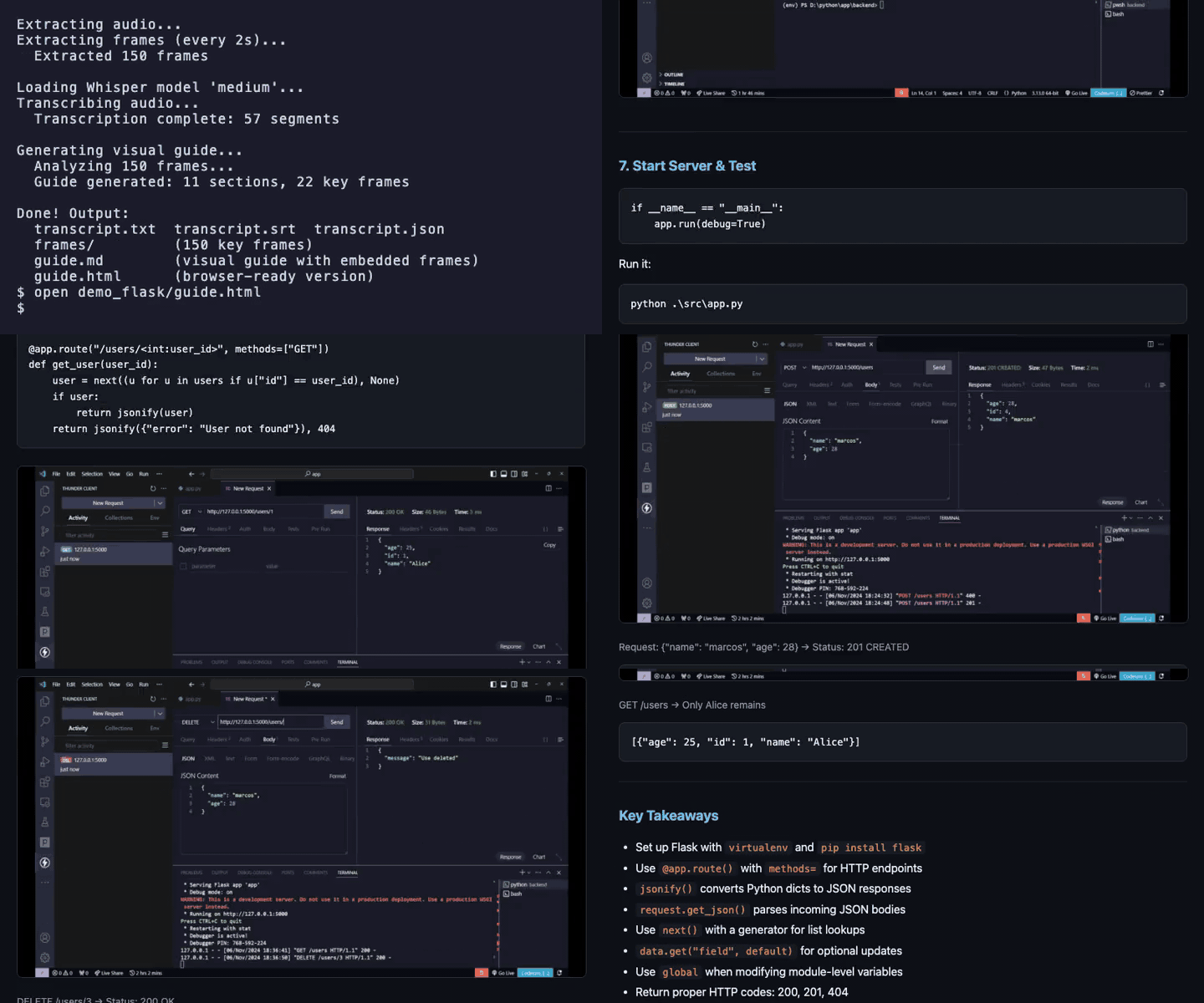
A 5-minute Flask CRUD tutorial becomes a step-by-step guide with every code snippet and API response as a copyable code block.
Fast-paced technical videos
Fireship's "JavaScript in 100 Seconds" becomes a browsable guide that keeps up with the rapid-fire diagrams and code.

Meetings
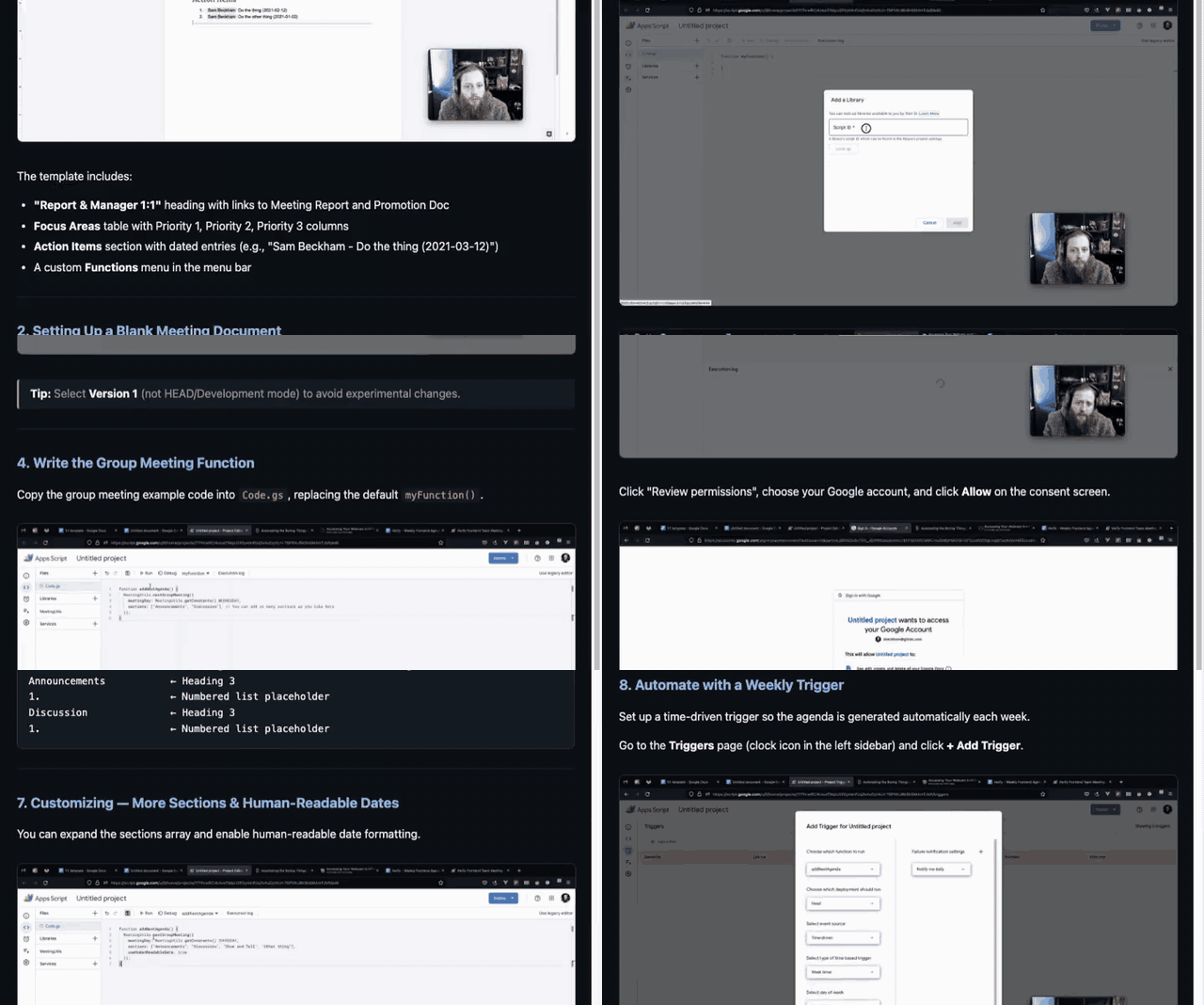
A screen-shared meeting becomes a reference document with the code from the editor, the config values, and the discussion points.
What gets captured
The frame analysis follows explicit rules for each kind of screen, so the output is consistent from video to video.
| On screen | What ends up in the guide |
|---|---|
| Code editor / IDE | The whole visible file, verbatim, with the file path from the tab as a first-line comment. Unsaved-change markers, the selection being discussed, and both sides of a diff view. If the file is edited during the video, each version. |
| Terminal | Commands and their output verbatim, including the prompt line and exit status |
| Errors, stack traces, logs | Verbatim and never shortened |
| Diagrams and whiteboards | The structure, every node and edge label, and the direction of each arrow |
| Browser / web app | The URL, visible state, table values, and form field contents |
| Slides and documents | The full visible text |
| Chat panels | Each sender and message |
Two rules keep the guide readable:
- A screen that stays the same for a minute is captured once, with the time range it was visible.
- Text that can't be read clearly is marked
[unreadable]instead of guessed. A wrong line of code is worse than a missing one.
Every code block is also collected into a Captured Code and Commands section at the top of the guide, in the order it appeared. That section is often all an LLM needs.
Why vidwise?
| Captures what was shown, not just said | Audio-only tools miss the screen, and the screen is where the code, errors, and UI state live. |
| Copies text instead of describing it | Code, commands, and errors come out as fenced code blocks you can copy and run. |
| Process once, use forever | The output is a plain folder. Feed it to any LLM, any number of times, with no re-uploading and no per-query video cost. |
| Works with any LLM | Markdown and PNGs. Claude, GPT, Gemini, Llama, whatever you use. |
| Your video stays local | Whisper and ffmpeg run on your machine. Nothing leaves it unless you turn on AI guide generation. |
| Keeps only frames that matter | Pixel-difference filtering drops near-duplicate frames, so a 10-minute screen recording yields dozens of frames, not hundreds. |
| Readable by people too | guide.md renders in GitHub, VS Code, and Obsidian; guide.html opens in any browser. |
Quick start
# Install
pip install vidwise

# A local file
vidwise recording.mp4

# A URL (YouTube, Loom, and anything else yt-dlp supports)
vidwise https://youtube.com/watch?v=abc

# Generate the AI guide with your own API key
export ANTHROPIC_API_KEY=sk-...   # or OPENAI_API_KEY
vidwise recording.mp4 --provider claude
No API key? Use the Claude Code plugin, which generates the guide with Claude Code itself.
Prerequisites
- Python 3.10+
- ffmpeg:
brew install ffmpeg(macOS) orapt install ffmpeg(Linux)
Lighter install:
pip install "vidwise[fast]"uses faster-whisper (~200MB) instead of openai-whisper (~2GB). Transcription is 3-4x faster, but without Apple Metal GPU support. vidwise detects which one is installed.
Claude Code plugin
If you use Claude Code, the plugin is the best way to run vidwise. No API key needed: Claude Code's own vision does the frame analysis.
# Add the marketplace and install the plugin
/plugin marketplace add jpdjere/vidwise
/plugin install vidwise@vidwise

# Use it
/vidwise:vidwise recording.mp4
/vidwise:vidwise https://loom.com/share/abc123
The plugin runs vidwise --no-guide to get the transcript and frames, then splits the video into 30-second segments and runs a dedicated frame-analyzer agent on each one in parallel. Each agent follows the capture rules above, and the results are assembled into guide.md.
To load it from a local clone instead:
claude --plugin-dir /path/to/vidwise/plugin
Usage
vidwise <source> [options]
| Option | Default | Description |
|---|---|---|
--model, -m |
medium |
Whisper model: tiny, base, small, medium, large |
--output-dir, -o |
auto | Output directory path |
--no-guide |
off | Skip AI guide generation |
--provider, -p |
auto |
AI provider: auto, claude, openai |
--frame-interval |
2 |
Seconds between frame captures |
--frame-threshold |
0.05 |
Pixel difference needed to keep a frame |
Examples
# Quick transcript of a short clip, no guide
vidwise demo.mp4 --model tiny --no-guide

# YouTube tutorial with a Claude-generated guide
vidwise https://youtube.com/watch?v=abc --model small --provider claude

# Loom bug report with default settings
vidwise https://loom.com/share/abc123def

# Fast-moving code video: sample every second
vidwise talk.mp4 --frame-interval 1
Output
One self-contained folder:
vidwise-abc123-2026-02-26/
├── video.mp4              # Source video
├── audio.wav              # Extracted audio (16kHz mono)
├── transcript.txt         # Plain text transcript
├── transcript.srt         # Timestamped subtitles
├── transcript.json        # Full Whisper output with segments
├── frames/                # One frame every 2 seconds, named by timestamp
│   ├── frame_0m00s.png
│   ├── frame_0m02s.png
│   └── ...
├── guide.md               # The guide: overview, captured code, step-by-step sections
└── guide.html             # The same guide as a dark-themed web page
guide.md uses relative image paths, so the frames render inline in any markdown viewer. To give an LLM the whole video, give it guide.md.
How it works
┌──────────────┐
│  Video URL   │──→ yt-dlp download
│  or file     │
└──────┬───────┘
       │
       ▼
┌──────────────┐     ┌──────────────────┐
│   ffmpeg     │────→│  audio.wav       │──→ Whisper ──→ transcript.*
│  (parallel)  │     │  (16kHz mono)    │
│              │────→│  frames/         │──→ Key frame selection
│              │     │  (every 2 sec)   │    (pixel difference filter)
└──────────────┘     └──────────────────┘
                              │
                              ▼
                     ┌──────────────────┐
                     │  Frame analysis  │  Per-segment, in parallel:
                     │  (optional)      │  describe the screen and copy
                     │                  │  its text verbatim
                     └────────┬─────────┘
                              │  Claude API, OpenAI API,
                              │  or Claude Code (no key)
                              ▼
                     ┌──────────────────┐
                     │  guide.md        │  Overview, captured code,
                     │  guide.html      │  step-by-step with frames
                     └──────────────────┘
Key frame selection. vidwise compares consecutive frames and keeps only the ones where the picture actually changed. A 10-minute video has 300 raw frames but usually only about 40 that matter.
Segment analysis. Key frames are grouped with the transcript lines spoken at the same time. A vision model looks at each group, describes what changed, and copies out any readable text according to the capture rules.
Guide assembly. The segments are stitched into one document. All captured code is gathered at the top, and the step-by-step sections follow, each with its frames, narration, and the code shown during that step.
Whisper model sizes
Measured on an Apple Silicon Mac, CPU only:
| Model | 1 hour of audio takes | Quality |
|---|---|---|
tiny |
~4 min | Rough. Mangles product names and jargon. Fine for a quick look. |
base |
~6-10 min (estimated) | Between tiny and small |
small |
~27 min | Decent. Still trips over acronyms. |
medium |
~90 min | Recommended. Handles technical jargon and overlapping speakers. |
large |
~2-3 hours (estimated) | Best accuracy |
For long videos, small is a good trade: the LLM reading the guide can usually work out a garbled acronym from context. The first run with each model downloads its weights once.
Contributing
Contributions are welcome. Please open an issue first to discuss what you'd like to change.
git clone https://github.com/jpdjere/vidwise
cd vidwise
python -m venv .venv
source .venv/bin/activate
pip install -e ".[dev]"

pytest
ruff check src/
If vidwise saved you from rewatching a video, a star helps other people find it.
License
1 maintainer

Metadata
1 maintainer
Release files for vidwise 0.3.0
For a detailed explanation of source distributions (sdists) and built distributions (wheels), please see the package formats documentation.
Source distribution (sdist)
| File | Size | Uploaded | |
|---|---|---|---|
| vidwise-0.3.0.tar.gz | 9.5 MB | Details |
Built distribution (wheel)
| File | Interpreter | ABI | Platform | Reset |
|---|---|---|---|---|
| vidwise-0.3.0-py3-none-any.whl | Python 3 | none | any | Details |
Total release size: 9.6 MB
Release files / vidwise-0.3.0.tar.gz
| Download URL | vidwise-0.3.0.tar.gz |
|---|---|
| Size | 9.5 MB |
| Tags | Source |
|
SHA-256 checksum How to use checksums |
f7c9948860c522535a25709f5cd46c4b3959ba62ca5151c97ef9358538097192
|
|
BLAKE2b-256 checksum How to use checksums |
c3150387c94a18ace571987362b6ac36bdb751bdf424cc6e1d7e161345589362
|
| Upload date | |
|
Uploaded using Trusted Publishing? What is trusted publishing? |
Yes |
| Uploaded via |
twine/7.0.0 CPython/3.13.14
|
Provenance
Provenance describes where a file came from. On PyPI, provenance is shared via attestations, which provide a verifiable record of the build or publishing details. View details, limitations and caveats.


PyPI Publish Attestation
PyPI verified that this artifact, at this checksum, originated from the publisher listed below.
Signed by GitHub Actions, verified by PyPI on Oct 2, 2026.
Transparency logRelease files / vidwise-0.3.0-py3-none-any.whl
| Download URL | vidwise-0.3.0-py3-none-any.whl |
|---|---|
| Size | 25.8 kB |
| Tags | Python 3 |
|
SHA-256 checksum How to use checksums |
d9e0bcf679a7ce77e0c9cd51f40e45a94fb6925f25ca5023e9b5cfe1180242a3
|
|
BLAKE2b-256 checksum How to use checksums |
ca89d6ab6c5ccf45d39a9fc93339fdbaf0316259574767db3f70d47510750d1e
|
| Upload date | |
|
Uploaded using Trusted Publishing? What is trusted publishing? |
Yes |
| Uploaded via |
twine/7.0.0 CPython/3.13.14
|
Provenance
Provenance describes where a file came from. On PyPI, provenance is shared via attestations, which provide a verifiable record of the build or publishing details. View details, limitations and caveats.
PyPI Publish Attestation
PyPI verified that this artifact, at this checksum, originated from the publisher listed below.
Signed by GitHub Actions, verified by PyPI on Oct 2, 2026.
Transparency log













