
vignore
Never been so easy to visualize ignore rules
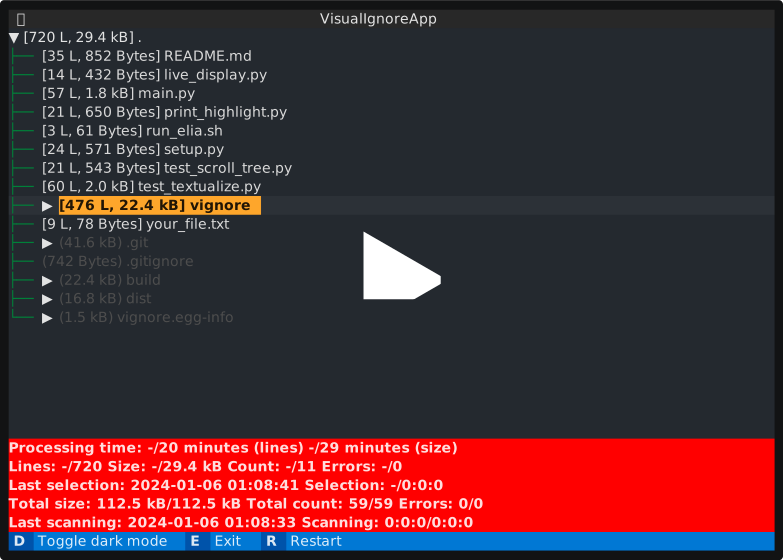





It has been a while since I've found writing ignore files, like .gitignore, .dockerignore, or .fdignore, being a hassle.
I've struggled with including the correct files and excluding unwanted ones.
But now, there's no need to guess blindly! Experience the power of visualizing ignored (selected) files and receive instant feedback through intuitive representations.
Highlights
- Asynchronous output, so you can scroll smoothly while processing
- Extremely fast for large repositories
- Human friendly number representations
- Supports
gitandfdignore files - Supports custom ignore files and custom
fdarguments (coming soon)
Install
pip3 install vignore
Usage
The diffpath shall be absolute.
vignore [-h] -d DIFFPATH

optional arguments:
  -h, --help            show this help message and exit
  -d DIFFPATH, --diffpath DIFFPATH
                        Path to visualize ignored files
Requirements
You need to install fd, a fast find alternative.
You need to run this under a Unix-like OS.
1 maintainer

Metadata
1 maintainer
Release files for vignore 1.0.9
For a detailed explanation of source distributions (sdists) and built distributions (wheels), please see the package formats documentation.
Source distribution (sdist)
| File | Size | Uploaded | Provenance | |
|---|---|---|---|---|
| vignore-1.0.9.tar.gz | 11.4 kB | Without provenance | Details |
Built distribution (wheel)
| File | Interpreter | ABI | Platform | Reset |
|---|---|---|---|---|
| vignore-1.0.9-py2.py3-none-any.whl | Python 3, Python 2 | none | any | Details |
Total release size: 22.2 kB
Release files / vignore-1.0.9.tar.gz
| Download URL | vignore-1.0.9.tar.gz |
|---|---|
| Size | 11.4 kB |
| Tags | Source |
|
SHA-256 checksum How to use checksums |
6e0779244ad6bb1d16824f26524afb1e61b0faa9aa211aabd66a2fc9868c02db
|
|
BLAKE2b-256 checksum How to use checksums |
4eb75bd5d289ea380af3b7bcea7bc92495801f0938d9bb5cc49361a09e3cd328
|
| Upload date | |
|
Uploaded using Trusted Publishing? What is trusted publishing? |
No |
| Uploaded via |
twine/6.1.0 CPython/3.9.19
|
Release files / vignore-1.0.9-py2.py3-none-any.whl
| Download URL | vignore-1.0.9-py2.py3-none-any.whl |
|---|---|
| Size | 10.8 kB |
| Tags | Python 2 Python 3 |
|
SHA-256 checksum How to use checksums |
b25069433de262d62762abf82fe4c7246ae47961a51ca57bfebdf2926c334f4c
|
|
BLAKE2b-256 checksum How to use checksums |
a488f91104796b1cf493b1dd96b719661c41652796fb83438063f1a192b2f59f
|
| Upload date | |
|
Uploaded using Trusted Publishing? What is trusted publishing? |
No |
| Uploaded via |
twine/6.1.0 CPython/3.9.19
|
Security for vignore 1.0.9
Provenance
Provenance describes where a file came from. On PyPI, provenance is shared via attestations, which provide a verifiable record of the build or publishing details. View details, limitations and caveats.
No provenance found
None of the files in this release were uploaded with provenance metadata.
A note on package security
PyPI is a repository for distributing packages, not a service for auditing them. While third-party security researchers and our staff do their best to detect and remove malicious packages, PyPI cannot guarantee the quality, security or suitability of any given package.
To learn more about protecting yourself from malicious actors, visit our package security documentation.














