
vim-goban



A terminal-based Go (Baduk) game controlled by Vim motions.
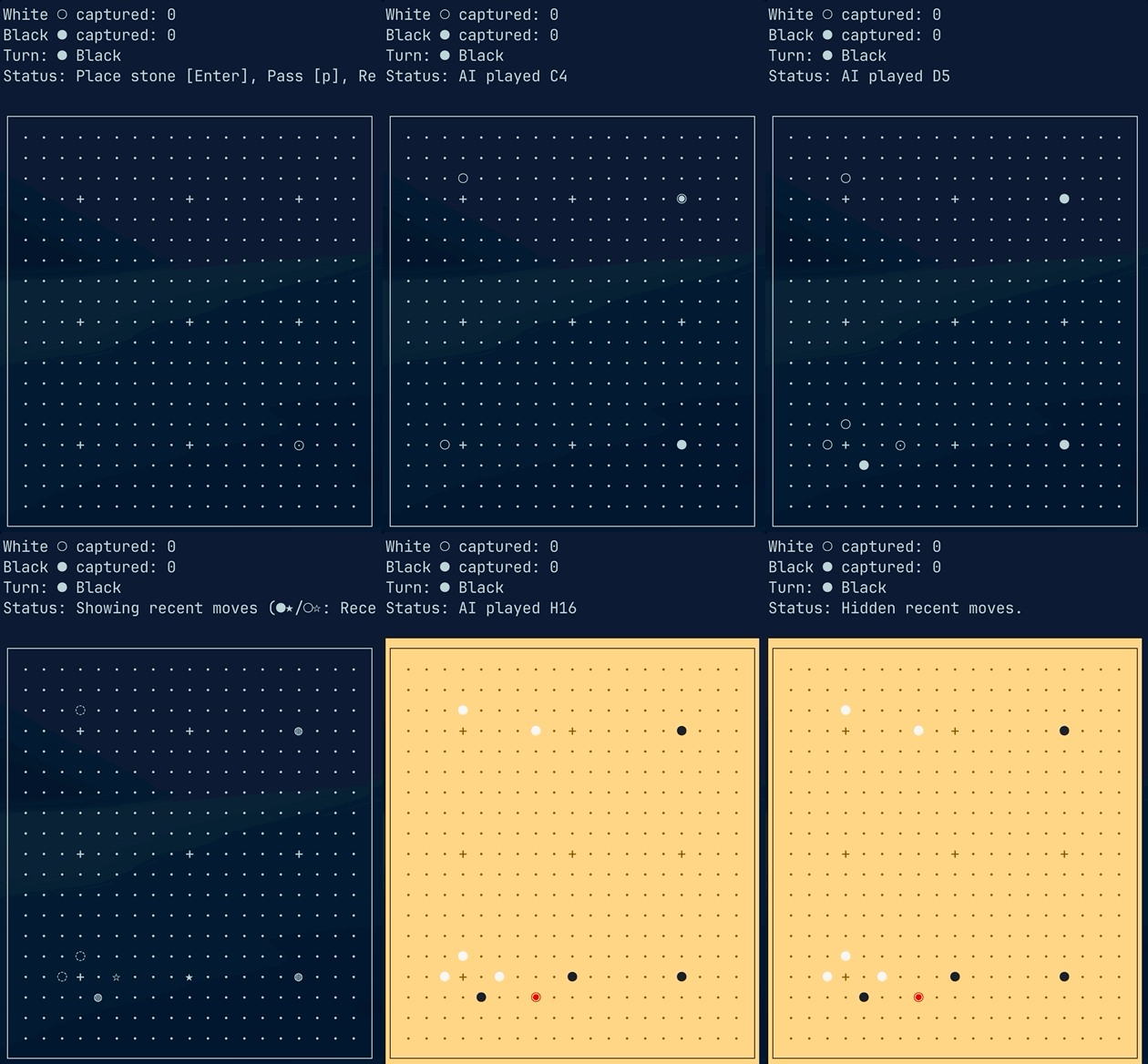
vim-goban lets you play Go directly in your terminal with familiar Vim keybindings.
Built with Python and powered by GNU Go AI.
Features
- 🏁 Terminal UI based Go board
- 🎮 Vim-style keyboard navigation (
h,j,k,l) or arrow keys - ⏩ Jump and position movement inspired by Vim motions
- 🤖 GNU Go AI integration for opponent gameplay
- ⚫⚪ Go rule based stone placement and capture system
- 🔄 Undo and recent move tracking support
- ⏸️ Pass system with automatic scoring after consecutive passes
- 🎨 Terminal color board rendering
- ⌨️ Keyboard-focused lightweight gameplay experience
Screenshot
Installation
Requirements
- Python 3.10+
- GNU Go
Install GNU Go
macOS
brew install gnugo
Ubuntu / Debian
sudo apt install gnugo
Check installation:
gnugo --version
Install vim-goban
Using pipx (Recommended)
vim-goban is a terminal application, so installing with pipx is recommended.
If you don't have pipx installed:
macOS
brew install pipx
pipx ensurepath
Linux
python3 -m pip install --user pipx
pipx ensurepath
Install vim-goban:
pipx install vim-goban
Run
goban
Controls
Movement
vim-goban uses Vim style movement.
| Key | Action |
|---|---|
h, ← |
Move left |
j, ↓ |
Move down |
k, ↑ |
Move up |
l, → |
Move right |
Jump Movement
| Key | Action |
|---|---|
Ctrl+h, b |
Jump left |
Ctrl+j, ] |
Jump down |
Ctrl+k, [ |
Jump up |
Ctrl+l, w |
Jump right |
Position Movement
| Key | Action |
|---|---|
Shift + I |
Move to far left |
Shift + A |
Move to far right |
Shift + H |
Move to top of column |
Shift + M |
Move to middle of column |
Shift + L |
Move to bottom of column |
Note: Some Ctrl key bindings may conflict with terminal shortcuts depending on your terminal emulator.
Game Controls
| Key | Action |
|---|---|
Enter |
Place stone |
p |
Pass |
| Two consecutive passes end the game (Score) | |
r |
Show recent move positions |
c |
Toggle Color Theme |
n |
Start a new game |
u |
Undo last move |
? |
Toggle help |
q |
Quit game |
Gameplay
Capturing Stones
When a group of stones has no remaining liberties, the stones are removed from the board.
Example:
Before:
. ○ .
○ ● ○
. ○ .
After:
. . .
. . .
. . .
AI
After placing a stone, GNU Go responds automatically.
GNU Go provides the computer opponent while vim-goban handles:
- Board rendering
- User input
- Game state
- Go rules
Rules
Pass + Pass : Both players pass consecutively → Game ends Score : GNU Go calculates territory and winner
Project Structure
vim-goban/
│
├── goban/
│   ├── main.py        # Game loop
│   ├── board.py       # Go rules and board state
│   ├── renderer.py    # Terminal renderer
│   ├── input.py       # Vim motion input
│   └── engine.py      # GNU Go communication
│
├── tests/             # Unit tests
│
├── README.md
├── LICENSE
└── pyproject.toml
Development
Create virtual environment:
python -m venv .venv

source .venv/bin/activate
Install package locally:
pip install -e .
Run:
goban
License
MIT License
See LICENSE.
Author
1 maintainer

Download files
Download the file for your platform. If you're not sure which to choose, learn more about installing packages.
Source Distribution
Built Distribution
Filter files by name, interpreter, ABI, and platform.
If you're not sure about the file name format, learn more about wheel file names.
Copy a direct link to the current filters
File details
Details for the file vim_goban-0.3.3.tar.gz.
File metadata
- Download URL: vim_goban-0.3.3.tar.gz
- Upload date:
- Size: 20.3 kB
- Tags: Source
- Uploaded using Trusted Publishing? No
- Uploaded via:
twine/7.0.0 CPython/3.14.6
File hashes
| Algorithm | Hash digest | |
|---|---|---|
| SHA256 |
e3ebfdfa3d9c6c23f70d5b6dd1611e4ef7d2102263a40bfadc72758563ac29ef
|
|
| MD5 |
aacef81964f9b5d6431b9baff92e7d19
|
|
| BLAKE2b-256 |
5d3fefaa4a69a67da04cf5dd265265621a816f63ed7b3ab836a90838d388f511
|
File details
Details for the file vim_goban-0.3.3-py3-none-any.whl.
File metadata
- Download URL: vim_goban-0.3.3-py3-none-any.whl
- Upload date:
- Size: 16.5 kB
- Tags: Python 3
- Uploaded using Trusted Publishing? No
- Uploaded via:
twine/7.0.0 CPython/3.14.6
File hashes
| Algorithm | Hash digest | |
|---|---|---|
| SHA256 |
ea0edd4ee65540251c434bfc63ebb1b8bd0d678e994de32520eedef2adc2b9d9
|
|
| MD5 |
3457dd8ca1beb657c40e54e12a39f477
|
|
| BLAKE2b-256 |
fb5e039d095316ec05d2811612d1fb67ffcc0f29f26facb1ba89c992d719b2a2
|







