
A gym environment for VimGolf challenges

Project description
vimgolf-gym
OpenAI gym like, customizable environment and benchmark for Vimgolf.




Demo
A simple script for solving the "vimgolf-test" challenge
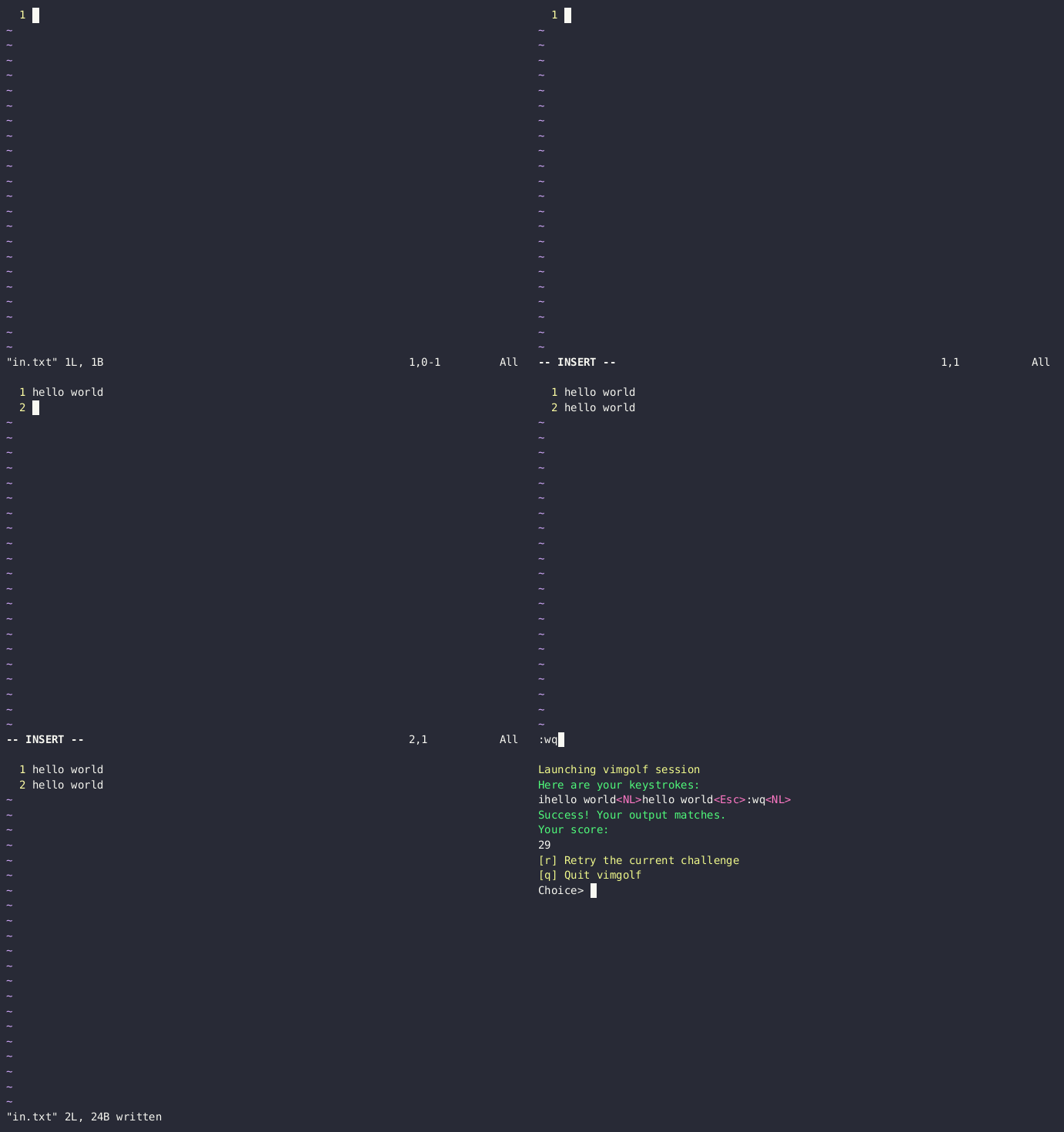
Console output:
Success: True
Results:
[VimGolfEnvResult(correct=True, keys='ihello world<NL>hello world<Esc>:wq<NL>', score=29)]
Reproduction code
import vimgolf_gym
import time
import PIL.Image

def test_demo():
    """
    Run a demo of vimgolf-gym, interacting with the environment by
    typing "hello world" into the buffer and then saving and quitting vim.
    Takes screenshots of the process and saves them to a .gif file.
    """
    env = vimgolf_gym.make("vimgolf-test")
    images: list[PIL.Image.Image] = []
    images.append(env.screenshot())
    env.act("i")
    images.append(env.screenshot())
    env.act("hello world\n")
    images.append(env.screenshot())
    env.act("hello world")
    images.append(env.screenshot())
    env.act("\x1b:wq")
    images.append(env.screenshot())
    env.act("\n")
    images.append(env.screenshot())
    time.sleep(1)
    images.append(env.screenshot())
    print("Success:", env.success)
    print("Results:")
    try:
         import rich
         rich.print(env.results)
    except ImportError:
         print(env.results)
    env.close()
    write_images_to_gif(images=images, output_gif_path="vimgolf-test-success.gif")


def write_images_to_gif(
    images: list[PIL.Image.Image], output_gif_path: str, interval=1000
):
    durations = [interval] * len(images)

    images[0].save(
        output_gif_path,
        save_all=True,
        append_images=images[1:],
        duration=durations,
        loop=1,
    )

if __name__ == "__main__":
    test_demo()
A trial on the "vimgolf-local-4d1a1c36567bac34a9000002" challenge
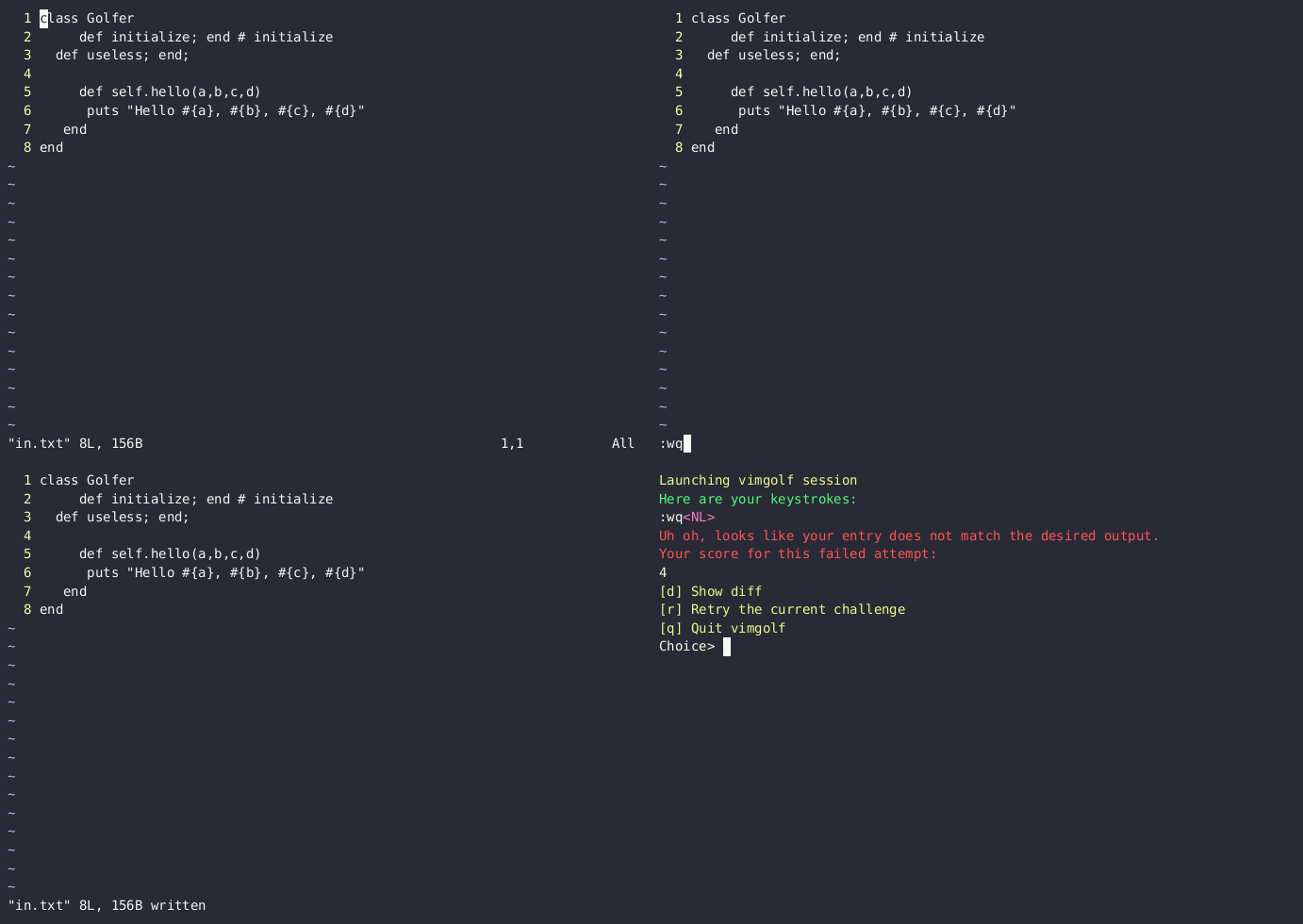
Console output:
Success: False
Results:
[VimGolfEnvResult(correct=False, keys=':wq<NL>', score=4)]
Reproduction code
import vimgolf_gym
import time
import PIL.Image

def write_images_to_gif(
    images: list[PIL.Image.Image], output_gif_path: str, interval=1000
):
    durations = [interval] * len(images)

    images[0].save(
        output_gif_path,
        save_all=True,
        append_images=images[1:],
        duration=durations,
        loop=1,
    )

def test_local():
    """
    Test a local challenge with the given challenge id.

    It checks the data of the challenge in the local dataset, and then runs the
    challenge in the local environment and takes screenshots of the process.
    """
    challenge_id = "4d1a1c36567bac34a9000002"
    assert challenge_id in vimgolf_gym.list_local_challenge_ids()
    assert (
        vimgolf_gym.get_local_challenge_definition(challenge_id).client_version
        == "0.5.0"
    )
    assert (
        vimgolf_gym.get_local_challenge_metadata(challenge_id).challenge_hash
        == challenge_id
    )
    assert vimgolf_gym.get_local_challenge_worst_solution(challenge_id).rank == "74"
    assert (
        vimgolf_gym.get_local_challenge_worst_solution_header(challenge_id).score
        == "206"
    )
    env = vimgolf_gym.make("vimgolf-local-%s" % challenge_id)
    images: list[PIL.Image.Image] = []
    images.append(env.screenshot())
    env.act(":wq")
    images.append(env.screenshot())
    env.act("\n")
    images.append(env.screenshot())
    time.sleep(1)
    images.append(env.screenshot())
    print("Success:", env.success)
    print("Results:")
    try:
         import rich
         rich.print(env.results)
    except ImportError:
         print(env.results)
    env.close()
    write_images_to_gif(
        images=images, output_gif_path="vimgolf-local-%s-fail.gif" % challenge_id
    )

if __name__ == "__main__":
   test_local()
Installation
# install from pypi
pip install vimgolf-gym

# or install the latest version from github
pip install git+https://github.com/james4ever0/vimgolf-gym.git
If you do not have Vim installed locally, or want an extra layer of isolation, you can use this docker image:
# build the image
bash build_docker_image.sh
docker tag cybergod_vimgolf_gym agile4im/cybergod_vimgolf_gym

# or pull the image
docker pull agile4im/cybergod_vimgolf_gym
Usage
Basic interactions:
import vimgolf_gym
import vimgolf_gym.dataclasses

# a basic "hello world" challenge
env_name = "vimgolf-test"

# a local challenge, format is "vimgolf-local-<challenge_id>"
env_name = "vimgolf-local-4d1a1c36567bac34a9000002"

# an online challenge, format is "vimgolf-online-<challenge_id>"
env_name = "vimgolf-online-4d1a1c36567bac34a9000002"

# if you have vim installed locally
env = vimgolf_gym.make(env_name)

# or run the executor with docker
env = vimgolf_gym.make(env_name, use_docker=True)

# if you want to customize the challenge
env = vimgolf_gym.make("vimgolf-custom", custom_challenge = vimgolf_gym.dataclasses.VimGolfCustomChallenge(input="", output="hello world\n"))

# if you want to read the buffer of the editor (and avoid cheating)
env = vimgolf_gym.make(env_name, log_buffer=True)

# retrieve the editor buffer to track progress
buffer = env.buffer

# take an action
env.act("hello world\n")

# take a screenshot and output a PIL image
img = env.screenshot()

# preview screenshot
env.render()

# reset the environment
env.reset()

# check if the environment has at least one success result
if env.success:
   # VimGolfEnvResult: (correct: bool, keys: str, score: int)
   result: vimgolf_gym.dataclasses.VimGolfEnvResult = env.get_last_success_result()
The local challenges are stored in ~/.cache/cybergod-vimgolf-challenges/.
If you want to learn more about the local challenges, use the following code:
import vimgolf_gym
import vimgolf_gym.dataclasses

challenge_id = "4d1a1c36567bac34a9000002"

# list all local challenge ids
local_challenge_ids: list[str] = vimgolf_gym.list_local_challenge_ids()

# get the challenge definition
# VimGolfChallengeDefinition: (input: InputOutputModel, output: InputOutputModel, client_version: str)
# InputOutputModel: (data: str, type: str)
challenge: vimgolf_gym.dataclasses.VimGolfChallengeDefinition = get_local_challenge_definition(challenge_id)

# get the challenge metadata
# VimGolfChallengeMetadata: (href: str, title: str, detail: str, challenge_hash: str)
metadata: vimgolf_gym.dataclasses.VimGolfChallengeMetadata = vimgolf_gym.get_local_challenge_metadata(challenge_id)

# get the worst solution
# VimGolfPublicSolution: (rank: str, solution: str, header: str)
solution: vimgolf_gym.dataclasses.VimGolfPublicSolution = vimgolf_gym.get_local_challenge_worst_solution(challenge_id)

# get the worst solution header
# VimGolfParsedPublicSolutionHeader: (rank: str, score: str, user_name: str, user_id: str, data: datetime)
header: vimgolf_gym.dataclasses.VimGolfParsedPublicSolutionHeader = vimgolf_gym.get_local_challenge_worst_solution_header(challenge_id)
If you want to obtain online challenge ids, you have a few options:
- Visit the Vimgolf website and look for the challenge ids.
- Use
vimgolfcommand- Install:
pip3 install vimgolf - Run:
vimgolf list
- Install:
License
The Unlicense
Release history Release notifications | RSS feed


Download files
Download the file for your platform. If you're not sure which to choose, learn more about installing packages.
Source Distribution
Built Distribution
Filter files by name, interpreter, ABI, and platform.
If you're not sure about the file name format, learn more about wheel file names.
Copy a direct link to the current filters
File details
Details for the file vimgolf_gym-0.0.5.tar.gz.
File metadata
- Download URL: vimgolf_gym-0.0.5.tar.gz
- Upload date:
- Size: 23.6 kB
- Tags: Source
- Uploaded using Trusted Publishing? No
- Uploaded via: twine/6.1.0 CPython/3.9.19
File hashes
| Algorithm | Hash digest | |
|---|---|---|
| SHA256 |
974f4f3d5bbf8afcd2d263b6087bbef84581cccf5c57615c49cd11f16287bed2
|
|
| MD5 |
ceb0abab1e4ee674f4153709455a452e
|
|
| BLAKE2b-256 |
423a699aaaa298da09560d4a8185e3933a0ad21a0b09c5e50c06db5b6841a6c1
|
File details
Details for the file vimgolf_gym-0.0.5-py2.py3-none-any.whl.
File metadata
- Download URL: vimgolf_gym-0.0.5-py2.py3-none-any.whl
- Upload date:
- Size: 23.0 kB
- Tags: Python 2, Python 3
- Uploaded using Trusted Publishing? No
- Uploaded via: twine/6.1.0 CPython/3.9.19
File hashes
| Algorithm | Hash digest | |
|---|---|---|
| SHA256 |
68cd2c142afa76bb7cd07532e428dba02bc44f3665b81eb91abaf45bd0bb3612
|
|
| MD5 |
b5d00ea5dc7610c5ba450d066031bd01
|
|
| BLAKE2b-256 |
34f0fa092ca4e2844fc1aa65494cad4754660f96b62efe9af85ce61ade452e0d
|






