

vinoWhisper





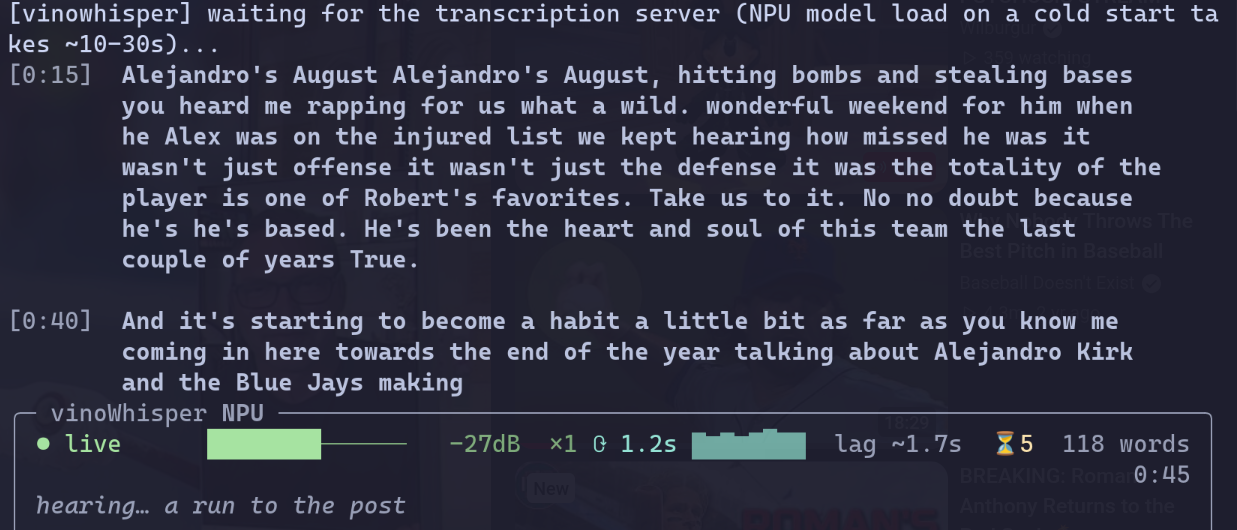
Live captions for anything playing on your Linux laptop, running on the NPU that came with it. No cloud, no API key, no account, no audio leaving the machine. Point it at whatever is playing and it captions in your terminal, or in a floating box above everything else on screen. There is nothing to interact with: start it and it goes.
pip install vinowhisper && vinowhisper-setup && vinowhisper-caption
Why this exists
To be upfront about the bias: I did not build this because local speech-to-text is hard to find. I built it because my laptop has an Intel NPU rated at 16 TOPS that was doing absolutely nothing, and captioning a video turns out to be the rare workload that suits it: continuous, latency-sensitive, and small enough to fit. 16 TOPS is a coprocessor, not a GPU, and whisper-small.en is one of the genuinely useful models that fits in it.
So the pitch is not "another Whisper wrapper." It is: the transcription runs on
a chip that is otherwise idle, so it costs you no CPU, no GPU, no fan, and no
network. openvino-genai's WhisperPipeline with device="NPU" does the
work, the same idea as vinoAuthFace,
different feature.
Measured on this laptop (Wildcat Lake, stepping A0), whisper-small.en:
Per 30s window, generate() |
1.19s |
| First streamed token | 0.204s |
| First readable sentence | 0.32s |
| Idle cost after you stop | zero, the server exits itself |
What makes it different from a shell script around Whisper
Words are never rewritten once printed. The stitcher runs LocalAgreement-2:
a word is committed only when two overlapping windows independently agree on
it. That is why the transcript can live in your terminal's own scrollback,
where it survives quitting and where your terminal's selection and search still
work on it. The hearing… line is the words heard once and still waiting on a
second opinion, so the two-cycle commit delay is visible rather than felt as
a freeze.
It scales to zero, the systemd way. The NPU model load costs 10-30s, so something has to hold it. A socket unit owns the port at boot with no process running, systemd spawns the server on the first connection, and the server exits itself after 30 minutes idle. Serverless, on your laptop, with no framework.
The model download is verified. The export is hashed against pins in
vinowhisper/model_digests.json before anything loads it, and the check tells
a toolchain upgrade apart from bytes changing under a toolchain that did not.
Details in SECURITY.md.
A missing NPU degrades instead of bricking. Selection walks NPU, then GPU,
then CPU, and a fallback is never silent: it shows up in the server journal, in
/health, in vinowhisper-doctor, and on the status bar as a red border.
It tells you how to fix it. Nearly every error path here prints the command that resolves it, in your distro's package names, for eight distro families.
The overlay is optional, and native. vinowhisper-gui is a 5.6MB Rust
binary that floats a caption box above every window, fullscreen video
included, with a tray icon and a global shortcut. It links nothing but libc
and adds nothing to the Python install. It draws the same event stream as the
terminal UI rather than reimplementing any of it.
docs/gui.md
Install
curl -fsSL https://raw.githubusercontent.com/karanshukla/vinoWhisper/main/scripts/install.sh | bash
That installs uv, clones the repo, builds the
environment, and hands over to vinowhisper-setup, which is where every
machine-specific decision happens: your capture tool, your NPU driver, the
model export your device needs, and systemd units generated against paths that
actually exist. It prints every command before running it and asks first.
The caption overlay is one more command once that is done:
vinowhisper-setup --gui, which downloads it from the GitHub release and
checks it against a digest pinned in the Python package.
From a checkout, or to see what it would do without doing it:
git clone https://github.com/karanshukla/vinoWhisper && cd vinoWhisper
uv sync --extra export               # --extra export: the one-time model export
uv run vinowhisper-setup --dry-run   # the whole plan, nothing changed
uv run vinowhisper-setup             # for real, one prompt per step
Or from PyPI, if you would rather wire up the machine yourself:
pip install vinowhisper   # needs Python 3.11-3.13
vinowhisper-setup         # still worth running: NPU driver, model export, units
pip install gets you the five commands and the Python dependencies. It cannot
get you an NPU driver, a model export or systemd units, which is what
vinowhisper-setup is for either way. See
docs/install.md
for the OpenVINO version floor and why this could not be a pip install until
2026-08-31.
What you need
| OS | Linux. Developed on Fedora 45 / KDE Plasma 6 / Wayland |
| Audio | PipeWire (pw-record) or PulseAudio (parec), picked automatically |
| Accelerator | Intel NPU for the numbers above. GPU and CPU run, slower |
| Python | 3.11 to 3.13. 3.14 cannot export the model |
| Disk | ~1.5GB for the model export |
The NPU needs a userspace driver half that no distro packages completely, and
vinowhisper-doctor will tell you exactly which half is missing.
docs/hardware.md
covers every way it fails to appear.
Commands
vinowhisper-caption                       # caption system audio
vinowhisper-caption --source mic          # caption yourself
vinowhisper-caption --list-targets        # capture one app instead of the whole sink
vinowhisper-caption --debug               # per-cycle timings, levels, raw transcript
vinowhisper-caption --record ~/sess       # save the session for replay
vinowhisper-caption --plain > out.txt     # no status bar (implied when piping)
vinowhisper-caption --json                # one event per line, what the overlay reads

vinowhisper-gui                           # the floating overlay and tray icon
vinowhisper-gui toggle                    # show/hide it; Meta+Alt+C does the same
vinowhisper-gui --install --autostart     # launcher entry, and the tray at login

vinowhisper-setup                         # guided install; re-runnable, idempotent
vinowhisper-setup --dry-run               # print the plan, change nothing
vinowhisper-setup --print-units           # the systemd units it would generate
vinowhisper-setup --gui                   # just the optional caption overlay

vinowhisper-doctor                        # devices, model, digests, audio, live levels
vinowhisper-doctor --json                 # the same, for a bug report
vinowhisper-doctor --no-probe             # skip the 2s-per-target level capture

vinowhisper-replay ~/sess --restitch      # re-run the merge logic offline
vinowhisper-replay ~/sess --sweep 8,12,20 # measure what --window actually costs
Docs
| Installing | What the installer does, the OpenVINO version floor and why, digest pinning, pinning the window on top |
| Terminal captions | Scrollback, paragraphs, the level meter, and plain output |
| Caption overlay | The floating box, tray icon and shortcut: installing, which desktops it works on, and why it is Rust |
| Hardware | Device selection, the two model exports, and every way the NPU fails to appear |
| Audio capture | PipeWire vs PulseAudio, distro coverage, and what actually silences a capture (it is not the mute button) |
| Latency | Why captions trail the audio, the one knob that changes it, and why the wording drifts |
| Debugging | --record, offline replay, and what vinowhisper-doctor measures |
| Architecture | Socket activation and scale-to-zero, and how to stop it |
Honest limits
Worth saying before you install it, because the numbers above are all from one machine:
- Every benchmark here is n=1, on one laptop, with early-silicon NPU drivers. The GPU and CPU fallbacks have never run on hardware at all.
- Captions trail the audio by roughly twice the cycle time. That is inherent to a two-cycle commit policy, not a bug to be tuned away. docs/latency.md explains the one knob that moves it.
- Wording drifts between cycles, because each window is re-decoded with more right-context than the last. The stitcher hides most of it and not all.
- The overlay needs wlr-layer-shell. Tested on KDE Plasma 6.7 only. GNOME does not offer the protocol, so there the overlay refuses to start and the terminal UI is the way in. Sway, Hyprland, niri and COSMIC should work and are untested.
- Package names for seven of the eight distro families are unverified. If one is wrong for yours, that is expected, and it is the fastest thing in this repo to fix.
- Export the model with
transformers<5.4. Bisected on hardware 2026-09-04: 5.4.0 and up produce a graph that compiles and then fails atgenerate()withPort for tensor name cache_position was not found, and a fresh install resolves to 5.5.4. The digest check catches it and says so rather than letting it fail at the first transcription, but it is not fixed upstream. docs/install.md has the bisect table.
More
- CONTRIBUTING.md, where the useful contributions are distro corrections and reports from hardware that isn't this laptop
- SECURITY.md, what stays on the machine and what the loopback server's trust boundary actually is
- CHANGELOG.md
If you run this on hardware that isn't a Wildcat Lake laptop, I want the
report, working or not. That is the one thing I cannot test myself, and an
issue with
vinowhisper-doctor --json pasted into it is worth more than any benchmark I
can run here.
MIT licensed.
1 maintainer

Release files for vinowhisper 0.5.0
For a detailed explanation of source distributions (sdists) and built distributions (wheels), please see the package formats documentation.
Source distribution (sdist)
| File | Size | Uploaded | |
|---|---|---|---|
| vinowhisper-0.5.0.tar.gz | 93.0 kB | Details |
Built distribution (wheel)
| File | Interpreter | ABI | Platform | Reset |
|---|---|---|---|---|
| vinowhisper-0.5.0-py3-none-any.whl | Python 3 | none | any | Details |
Total release size:151.5 kB
Release files / vinowhisper-0.5.0.tar.gz
| Download URL | vinowhisper-0.5.0.tar.gz |
|---|---|
| Size | 93.0 kB |
| Tags | Source |
|
SHA-256 checksum How to use checksums |
d510ee8d6972b4b9041e79c20080392a6e3ee7138c252379ed0d351d4bb56325
|
|
BLAKE2b-256 checksum How to use checksums |
00a61b7218947bdc51b8425da4c6d6bd6bba703255a47d562acd9b5ac6b5ec06
|
| Upload date | |
|
Uploaded using Trusted Publishing? What is trusted publishing? |
Yes |
| Uploaded via |
uv/0.12.13 {"installer":{"name":"uv","version":"0.12.13","subcommand":["publish"]},"python":null,"implementation":{"name":null,"version":null},"distro":{"name":"Ubuntu","version":"24.04","id":"noble","libc":null},"system":{"name":null,"release":null},"cpu":null,"openssl_version":null,"setuptools_version":null,"rustc_version":null,"ci":true}
|
Release files / vinowhisper-0.5.0-py3-none-any.whl
| Download URL | vinowhisper-0.5.0-py3-none-any.whl |
|---|---|
| Size | 58.6 kB |
| Tags | Python 3 |
|
SHA-256 checksum How to use checksums |
77f988f210a2785aea6dbb243d1d61a21e9dd1aa8cc788a476ab826ecf7bc855
|
|
BLAKE2b-256 checksum How to use checksums |
9d8bfb5f049f333008b8d887319a06d257f8f0c9b11ec4fdcc117e7e73a596ef
|
| Upload date | |
|
Uploaded using Trusted Publishing? What is trusted publishing? |
Yes |
| Uploaded via |
uv/0.12.13 {"installer":{"name":"uv","version":"0.12.13","subcommand":["publish"]},"python":null,"implementation":{"name":null,"version":null},"distro":{"name":"Ubuntu","version":"24.04","id":"noble","libc":null},"system":{"name":null,"release":null},"cpu":null,"openssl_version":null,"setuptools_version":null,"rustc_version":null,"ci":true}
|














