
ViOTUcluster: A High-Speed, All-in-One Pipeline for Viromic Analysis from Metagenomic Data

ViOTUcluster is a high-speed, All-in-One solution that streamlines the entire viromics analysis workflow—from raw reads to the generation of viral operational taxonomic units (vOTUs) tables, which include abundance, taxonomy, and quality information, as well as assembled viral genomes, AMG prediction, and host prediction. ViOTUcluster supports the simultaneous processing of multiple samples, efficiently clustering viral sequences across datasets to generate vOTU-related files.

Sihang Liu
Dec 2024
liusihang@tongji.edu.cn
College of Environmental Science and Engineering
Tongji University
Full Text & Citation
See more details in the manuscript on iMetaOmics:
Liu, S., Ye, Y., Guo, B., Hu, Y., Jiang, K., Liang, C., Xia, S. and Wang, H. (2025), ViOTUcluster: A high-speed, All-in-one pipeline for viromic analysis of metagenomic data. iMetaOmics e70023. https://doi.org/10.1002/imo2.70023
Instruction
Demo for using ViOTUcluster
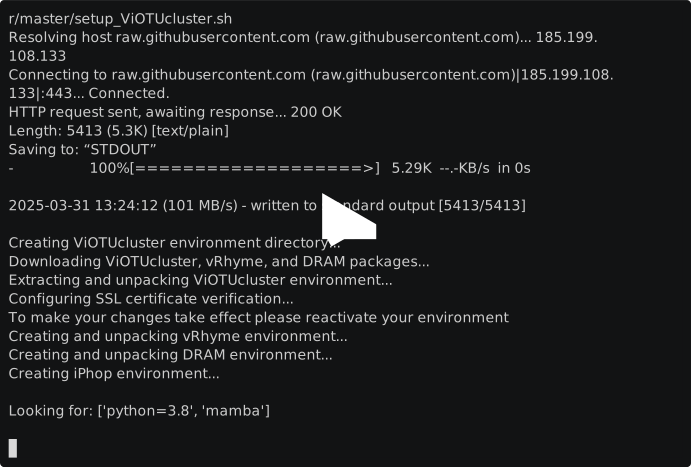
Recorded with asciinema
Important updates
- Version 0.7.1: Made the Bioconda single-environment installation the recommended core-workflow setup and aligned vRhyme and CheckM runtime checks with that layout.
- Version 0.5.7.2: Added the
--save-sambamba-intermediateflag (also available inViOTUcluster_AllinOne) so you can keep Sambamba view BAMs when troubleshooting heavy IO pressure. - Version 0.5.5: Added three concurrency controls options,
--max-prediction-tasks (-P),--tpm-tasks (-T),--assemble-jobs (-A), which could help to limit the over memory usage.
Prerequisites
Before installing ViOTUcluster, ensure an environment manager is available on your system:
Installation
ViOTUcluster has been tested on Ubuntu and CentOS and should be compatible with all Linux distributions.
Choose an Installation Method
| Method | Best for | Behavior |
|---|---|---|
| Bioconda with mamba | Most users and the core pipeline | Installs ViOTUcluster and its core runtime tools into one environment. |
| YAML-based source installation | DRAM and iPhop, development, auditing | Solves five versioned environment files and installs the checked-out ViOTUcluster source. |
| Pre-packed installation | Existing prepared-environment deployments | Downloads and unpacks prepared environments from Zenodo or China SciDB. |
The Bioconda package provides the single-environment core workflow: preprocessing, viral prediction, vRhyme binning, dereplication, abundance calculation, and summary generation. The YAML method adds nested vRhyme, viralverify, DRAM, and iPhop environments for the complete source-managed layout. Database installation remains a separate step for every method.
Bioconda Installation (Recommended)
Create a fresh environment with strict channel ordering:
mamba create -n ViOTUcluster --strict-channel-priority -c conda-forge -c bioconda viotucluster
conda activate ViOTUcluster
ViOTUcluster_Check
The checkm-genome package may install its reference data during environment creation. To reuse a complete CheckM data directory that already contains genome_tree/genome_tree.derep.txt, pass it to the install process:
CHECKM_DATA_DIR=/path/to/checkm_data \
  mamba create -n ViOTUcluster --strict-channel-priority -c conda-forge -c bioconda viotucluster
The Bioconda dependency uses the packaged virsorter2-pyhmmeracc=2.2.4.2 implementation, matching the PyHMMER-based VirSorter behavior pinned by the YAML installation.
On the Linux validation host, a clean GPU-enabled Bioconda installation downloaded about 3 GB of packages and produced an 8.3 GiB environment prefix. Exact sizes vary as dependency builds change; biological databases remain separate.
Use the YAML-based installation below when you also need the separately managed DRAM and iPhop environments. Their database setup remains independent from the Bioconda core package.
YAML-Based Installation
Clone the repository so the installer, YAML files, pipeline source, and bundled mini-test reads all come from the same revision:
git clone https://github.com/liusihang/ViOTUcluster.git
cd ViOTUcluster

# Optional: solve all five environments without creating them.
bash setup_ViOTUcluster_yaml.sh --dry-run

# Install to <conda-root>/envs/ViOTUcluster.
bash setup_ViOTUcluster_yaml.sh
CPU-only installation is an explicit user option; it is not the default. Use it when GPU acceleration is not needed and you want to avoid installing CUDA runtime libraries:
# Optional: verify the CPU-only dependency solution first.
bash setup_ViOTUcluster_yaml.sh --cpu --dry-run

# Create the CPU-only environments.
bash setup_ViOTUcluster_yaml.sh --cpu
The --cpu option requires mamba. The installer selects CPU-specific main and iPhop YAML files and sets CONDA_OVERRIDE_CUDA="" internally, so users do not need to export that variable themselves. The verified specifications pin TensorFlow 2.11.1 for geNomad and TensorFlow 2.7.0 for iPhop to exact Linux/Python 3.8 CPU builds. iPhop 1.3.3 packages TensorFlow 2.7.0 files, so matching that version avoids mixing files from different TensorFlow releases. The normal command without --cpu continues to use the default YAML files.
Disk space: software environments and biological databases are separate. On the Linux validation host, a clean CPU-only software prefix measured 9.19 GiB, compared with 15.72 GiB for the previously validated default prefix (about 6.54 GiB, or 42%, smaller). CPU-only mode avoids the duplicated CUDA, cuDNN, and NCCL runtime packages; database downloads still require their own storage as described below. Exact size varies with platform and resolved package builds.
To install into a custom clean prefix:
bash setup_ViOTUcluster_yaml.sh --prefix /PATH/YOU/WANT/ViOTUcluster
conda activate /PATH/YOU/WANT/ViOTUcluster
If a complete extracted CheckM data directory already exists, reuse it and avoid the CheckM post-link download:
bash setup_ViOTUcluster_yaml.sh \
  --checkm-data-dir /path/to/checkm_data
The directory must contain genome_tree/genome_tree.derep.txt. Without this option, the checkm-genome Conda package downloads and verifies its standard reference data during environment creation.
The YAML installer:
- uses
conda-forgeandbiocondawith strict channel priority without rewriting the user's global Conda configuration; - supports optional
--cpuinstallation through verified CPU-specific TensorFlow YAML files and mamba; - creates
envs/vRhyme,envs/viralverify,envs/DRAM, andenvs/iPhopunder the main prefix; - pins the ViOTUcluster VirSorter fork to a specific Git commit;
- installs the current repository checkout with
pip --no-depsafter Conda resolves runtime dependencies; - stages the bundled mini FASTQ files under
$CONDA_PREFIX/ViTest/Raw/CleanReadsforViOTUcluster_Test; - can reuse an existing read-only CheckM data directory through
--checkm-data-dir; - refuses to overwrite an existing target prefix.
Run bash setup_ViOTUcluster_yaml.sh --help for the full option list.
Pre-Packed Installation (Fastest)
ViOTUcluster also provides an all-in-one setup script that downloads and unpacks prepared environments.
| Option | What it does |
|---|---|
--china |
Switch download source from Zenodo to China SciDB mirrors (faster in mainland CN). |
-p PATH |
Install the whole stack outside your base Conda directory (default is <conda-root>/envs/ViOTUcluster). |
-h, --help |
Show full option list. |
-
Download and Setup ViOTUcluster
ViOTUcluster simplifies the installation of itself and its core dependencies (like vRhyme, DRAM, and iPhop) by providing a setup script that downloads pre-packaged Conda environments.
The setup script can be run directly using
wgetandbash.Default Installation (Recommended for most users, downloads from Zenodo): This command will download the setup script and execute it, which will then download the environment packages from Zenodo.
wget -qO- https://raw.githubusercontent.com/liusihang/ViOTUcluster/master/setup_ViOTUcluster.sh | bash
Alternative for Users in Mainland China (Downloads from China SciDB): If you are in mainland China or experience slow downloads from Zenodo, you can instruct the script to use download mirrors hosted on China SciDB.
wget -qO- https://raw.githubusercontent.com/liusihang/ViOTUcluster/master/setup_ViOTUcluster.sh | bash -s -- --china
For users who lack write access to the Conda base directory or who prefer to install to a custom location:
wget -qO- https://raw.githubusercontent.com/liusihang/ViOTUcluster/master/setup_ViOTUcluster.sh | bash -s -- -p /PATH/YOU/WANT
You can combine flags, for example:
wget -qO- https://raw.githubusercontent.com/liusihang/ViOTUcluster/master/setup_ViOTUcluster.sh | bash -s -- --china -p /PATH/YOU/WANT
Note: When you install to a custom prefix, activate the environment with the full path, e.g.
conda activate /YOUR/CUSTOM/PATH/ViOTUcluster
Verify Installation of All Dependencies
To confirm that all required dependencies are correctly installed, run:
conda activate ViOTUcluster
ViOTUcluster_Check
The YAML installer already installs the checked-out source revision. For a pre-packed installation, run pip install --upgrade ViOTUcluster only when you intentionally want to switch the pipeline scripts to the currently published PyPI release.
A successful check will produce output similar to this:
Checking dependencies...
[✅] fastp is installed.
[✅] megahit is installed.
[✅] spades.py is installed.
[✅] virsorter is installed.
[✅] viralverify is installed.
[✅] genomad is installed.
[✅] checkv is installed.
[✅] vRhyme is installed.
[✅] dRep is installed.
[✅] checkm is installed.
[✅] bwa is installed.
[✅] sambamba is installed.
[✅] parallel is installed.
[✅] makeblastdb is installed.
[✅] blastn is installed.
All dependencies are installed.
Note: ViOTUcluster_Check validates the commands used by the core pipeline. It resolves vRhyme and viralverify from the active Bioconda environment, YAML-managed nested environments, or the sibling environments used by pre-packed installations.
Set Up Databases
ViOTUcluster_download-database "/path/to/db" "num"
If the specified directory (/path/to/db) does not already contain the required databases, the script will download and install them automatically. Replace /path/to/db with your preferred database directory and num with the number of threads to use during installation.
Note: The setup process involves downloading approximately 30 GB of database files, so the installation time depends heavily on your network speed. A stable, high-speed internet connection is recommended to prevent installation failures.
Set Up DRAM and iPhop Databases (Optional for Advanced Analysis)
Install DRAM Database
To install the DRAM database, first activate the ViOTUcluster environment and then run the setup command:
conda activate ViOTUcluster
DRAM-setup.py download "/path/to/db/DRAM"
If you have an existing DRAM environment and want to migrate its settings, follow these steps:
-
Export Configuration from the Old Environment:
conda activate old_DRAM_env
DRAM-setup.py export_config > my_old_config.txt
-
Import the Configuration into the New Environment:
conda activate ViOTUcluster
DRAM-setup.py import_config my_old_config.txt
Install iPhop Database
To install the iPhop database, activate the ViOTUcluster environment and run the database download command:
conda activate ViOTUcluster
iPhop-setup.py "/path/to/db"
Important Notes
- Database Storage: Ensure that the databases for both DRAM and iPhop are stored in the directory specified during the
ViOTUcluster_download-databasestep. - Expected Database Structure: For details on the expected database structure, refer to the File Structure Example section.
- Official Documentation: For additional instructions on downloading and configuring these databases, refer to the official documentation for:
-
Test the Complete ViOTUcluster Workflow with Mini-Samples
To verify ViOTUcluster full workflow are functioning correctly, you can run a test using the
ViOTUcluster_Testcommand with a set of mini FASTQ samples.conda activate ViOTUcluster ViOTUcluster_Test -d /path/to/db
This command will automatically utilize all available threads to execute the entire ViOTUcluster workflow on the provided mini FASTQ samples. Be sure to replace /path/to/db with the path to your database directory.
If you want a lighter smoke test while debugging orchestration or environment issues, you can also run the All-in-One entrypoint with reduced concurrency and disabled binning:
conda activate ViOTUcluster
ViOTUcluster_AllinOne \
  -r /path/to/MiniTest \
  -o /path/to/smoke_output \
  -d /path/to/db \
  -a megahit \
  --con \
  --disable-binning \
  -n 4 -P 1 -T 1 -A 1 \
  --module-timeout-hours 1
Updating ViOTUcluster from an Older Version
To update a Bioconda installation, use the same channel order as the initial installation:
mamba update -n ViOTUcluster --strict-channel-priority -c conda-forge -c bioconda viotucluster
For a YAML source installation, pull the intended tagged source revision and create a new clean prefix with setup_ViOTUcluster_yaml.sh.
Additional Notes
If you run into any difficulties while setting up these environments, feel free to report them by opening an issue on the respective GitHub or Bitbucket repositories for DRAM or iPhop.
How to Use
To run the pipeline, use the following command structure:
-
Run from assembled contigs plus raw reads
ViOTUcluster -i <input_path_to_contigs> -r <input_path_raw_seqs> -o <output_path> -d <database_path> -n <threads> -m <min-sequence length> --non-con/--con [--reassemble] [--disable-binning] [--save-sambamba-intermediate] [--max-prediction-tasks <N>] [--tpm-tasks <N>] [--assemble-jobs <N>] [--module-timeout-hours <H>]
-
Start directly from raw FASTQ files
ViOTUcluster_AllinOne -r <input_path_raw_seqs> -o <output_path> -d <database_path> -a <assembly_software> -n <threads> -m <min-sequence length> --non-con/--con [--reassemble] [--disable-binning] [--save-sambamba-intermediate] [--max-prediction-tasks <N>] [--tpm-tasks <N>] [--assemble-jobs <N>] [--module-timeout-hours <H>]
A mini test file is available for download at MiniTest.zip. You can use this file in All-in-One mode to verify that the pipeline is successfully installed and functioning.
Parameters
-
-i <input_path_to_contigs>: Specifies the directory containing the assembled contig files in FASTA format (e.g.,example1.fasta). Each contig file should have corresponding raw sequencing FASTQ files in the raw sequence directory, sharing the same prefix. -
-r <input_path_raw_seqs>: Specifies the directory with raw sequencing data in FASTQ format. The FASTQ files must have the same prefix as the corresponding contigs file. For example, if the contigs file isexample1.fasta, the FASTQ files should be namedexample1_R1.fqandexample1_R2.fq. The paired-end metagenomic reads should end with.fq,.fq.gz,.fastq, or.fastq.gz. -
-o <output_path>: Defines the output directory for storing the processed results. This will include filtered sequences, prediction outcomes, binning results, and the final dereplicated viral contigs. -
-d <database_path>: Points to the required database for performing viral prediction, binning, and dereplication steps. -
-m, --min-length <length>: Specify the minimum length (bp) for sequences (default: 2500). The same value is applied during initial contig filtering and again before dRep clustering to keep downstream analyses in sync with the user input. -
-n, --threads <N>: Sets the per-task thread budget passed to heavy external tools. Combine this with-P,-T, and-Ato control total host utilization. -
--non-con/--con: Specifies the viral prediction criteria based on the sample preparation method. Use--non-confor samples that were not enriched using viral-particle concentration methods, typically containing a low viral proportion. Use--confor samples subjected to concentration methods, which are expected to have a medium to high viral proportion. -
--reassemble: (Optional) Enables reassembly of bins after the initial binning process to enhance the accuracy and quality of the final contigs. This feature is still in beta and can significantly increase runtime. -
--disable-binning: Skip the vRhyme binning stage entirely. When enabled, the pipeline stages the post-cross-validation per-sample viral contigs into the unbinned dereplication and summary flow, which is useful when bins cannot be recovered for some samples. -
--module-timeout-hours <hours>: Abort a top-level pipeline stage if it runs longer than the configured number of hours. Use0to disable the timeout entirely. -
--save-sambamba-intermediate: Keep Sambamba view BAMs before sorting. This reduces open-file pressure during heavy runs and keeps intermediate BAMs on disk for debugging at the cost of additional storage. -
-a <assembly_software>: (ForViOTUcluster_AllinOneonly) Specifies the assembly software used during the raw sequence processing. Accepted values are-a megahitor-a metaspades. -
--max-prediction-tasks, -P <N>: Cap total concurrent prediction jobs (e.g., viralverify/virsorter2/genomad), default 30. -
--tpm-tasks, -T <N>: Cap concurrent BAM/TPM processing samples, default 15. -
--assemble-jobs, -A <N>: Cap concurrent assembly samples, default 10. -
ViOTUcluster_Check: Use this before long runs to confirm the command-line tools that the pipeline expects are visible from your current shell.
File Structure Example
Below is a tree list of how the file structure should be organized, assuming the prefix for the example files is example1:
<project_directory>/
│
├── input_contigs/
│   ├── example1.fasta
│   ├── example2.fasta
│   └── ...
│
├── input_fastq/
│   ├── example1_R1.fq
│   ├── example1_R2.fq
│   ├── example2_R1.fq
│   ├── example2_R2.fq
│   └── ...
│
├── output_path/
│   ├── Summary/
│   │   ├── SeperateRes
│   │   │   ├── example1_viralseqs.fasta
│   │   │   ├── example2_viralseqs.fasta
│   │   │   └── ...
│   │   ├── vOTU
│   │   │    ├── vOTU.fasta
│   │   │    ├── vOTU.Abundance.csv
│   │   │    ├── vOTU.Taxonomy.csv
│   │   │    └── CheckVRes
│   │   ├── DRAMRes(Optional)
│   │   │    ├── DRAM_annotations.tsv
│   │   │    └── DRAM_Gene.Abundance.csv
│   │   └── iPhopRes(Optional)
│   └── (IntermediateFile....)
│
└── databases/
    ├── db/                # VirSorter2 database
    ├── viralVerify/       # ViralVerify database
    ├── checkv-db-v1.5/    # CheckV database (version 1.5)
    ├── genomad_db/        # Genomad database
    └── Aug_2023_pub_rw/   # iPhop database
input_contigs/contains the assembled contigs (e.g.,example1.fasta).input_fastq/contains the corresponding FASTQ files (e.g.,example1_R1.fqandexample1_R2.fq).output_results/is the directory where all output files will be stored.databases/contains the required databases for the analysis, including:db/: The VirSorter2 database.ViralVerify/: The ViralVerify database.checkv-db-v1.5/: The CheckV database (version 1.5).genomad_db/: The Genomad database.
Final Output
The processed data is organized under the specified output_path/, with the following structure:
-
output_path/Summary: Contains the final results and summaries for all processed samples, organized into the following subdirectories:SeperateRes: Holds individual directories for each sample (e.g.,example1,example2):<sample>_viralseqs.fasta: The list of predicted viral contigs for the respective sample.
vOTU/: Contains the final processed viral OTU (vOTU) results across all samples:vOTU.fasta: The final dereplicated viral contigs after clustering from all samples.vOTU.Abundance.csv: Abundance data of the vOTUs across samples.vOTU.Taxonomy.csv: Taxonomic assignments for the vOTUs, if available.CheckVRes: Summarized CheckV quality assessments for final vOTUs file.
DRAMRes (Optional): Optional functional annotations from DRAM if the advanced analysis stage is executed.DRAM_annotations.tsv: Aggregated DRAM annotations for all predicted genes.DRAM_Gene.Abundance.csv: TPM-based abundance estimates for each DRAM-predicted gene across samples.
iPhopRes (Optional): Optional results from iPhop annotation if included in the workflow.
-
output_path/IntermediateFile: This directory holds intermediate files generated during the processing pipeline, such as filtered sequences and any temporary data. -
databases/: Stores the necessary databases used for various stages of the analysis:db/: The VirSorter2 database.ViralVerify/: The ViralVerify database, used for viral prediction.checkv-db-v1.5/: The CheckV database (version 1.5) for quality control of viral sequences.genomad_db/: The Genomad database for viral identification and dereplication.
Acknowledgement
ViOTUcluster integrates state-of-the-art viromics analysis tools. The main tools within ViOTUcluster are listed below.
Shifu Chen. 2023. Ultrafast one-pass FASTQ data preprocessing, quality control, and deduplication using fastp. iMeta 2: e107.
MEGAHIT: An ultra-fast single-node solution for large and complex metagenomics assembly via succinct de Bruijn graph. Bioinformatics
Prjibelski, A., Antipov, D., Meleshko, D., Lapidus, A., & Korobeynikov, A. (2020). Using SPAdes de novo assembler. Current Protocols in Bioinformatics, 70, e102.
Camargo, Antonio Pedro, Simon Roux, Frederik Schulz, Michal Babinski, Yan Xu, Bin Hu, Patrick SG Chain, Stephen Nayfach, and Nikos C. Kyrpides. "Identification of mobile genetic elements with geNomad." Nature Biotechnology (2023): 1-10.
viralVerify: Online Publication
Dmitry Antipov, Mikhail Raiko, Alla Lapidus, Pavel A Pevzner, MetaviralSPAdes: assembly of viruses from metagenomic data, Bioinformatics, Volume 36, Issue 14, July 2020, Pages 4126–4129
VirSorter2: Online Publication
Guo, Jiarong, Ben Bolduc, Ahmed A. Zayed, Arvind Varsani, Guillermo Dominguez-Huerta, Tom O. Delmont, Akbar Adjie Pratama et al. "VirSorter2: a multi-classifier, expert-guided approach to detect diverse DNA and RNA viruses." Microbiome 9 (2021): 1-13.
Martin Larralde, Georg Zeller, PyHMMER: a Python library binding to HMMER for efficient sequence analysis, Bioinformatics, Volume 39, Issue 5, May 2023, btad214
Nayfach, S., Camargo, A.P., Schulz, F. et al. CheckV assesses the quality and completeness of metagenome-assembled viral genomes. Nat Biotechnol 39, 578–585 (2021)
Kieft, Kristopher, Alyssa Adams, Rauf Salamzade, Lindsay Kalan, and Karthik Anantharaman. "vRhyme enables binning of viral genomes from metagenomes." Nucleic Acids Research 50, no. 14 (2022): e83-e83.
Olm, M., Brown, C., Brooks, B. et al. dRep: a tool for fast and accurate genomic comparisons that enables improved genome recovery from metagenomes through de-replication. ISME J 11, 2864–2868 (2017)
Parks DH, Imelfort M, Skennerton CT, Hugenholtz P, Tyson GW. CheckM: assessing the quality of microbial genomes recovered from isolates, single cells, and metagenomes. Genome Res. 2015 Jul;25(7):1043-55
Aligning sequence reads, clone sequences and assembly contigs with BWA-MEM.
Artem Tarasov, Albert J. Vilella, Edwin Cuppen, Isaac J. Nijman, Pjotr Prins, Sambamba: fast processing of NGS alignment formats, Bioinformatics, Volume 31, Issue 12, June 2015, Pages 2032–2034
Michael Shaffer, Mikayla A Borton, Bridget B McGivern, Ahmed A Zayed, Sabina Leanti La Rosa, Lindsey M Solden, Pengfei Liu, Adrienne B Narrowe, Josué Rodríguez-Ramos, Benjamin Bolduc, M Consuelo Gazitúa, Rebecca A Daly, Garrett J Smith, Dean R Vik, Phil B Pope, Matthew B Sullivan, Simon Roux, Kelly C Wrighton, DRAM for distilling microbial metabolism to automate the curation of microbiome function, Nucleic Acids Research, Volume 48, Issue 16, 18 September 2020, Pages 8883–8900
Roux, Simon, Antonio Pedro Camargo, Felipe Hernandes Coutinho, Shareef M. Dabdoub, Bas E. Dutilh, Stephen Nayfach, and Andrew Tritt. "iPHoP: an integrated machine-learning framework to maximize host prediction for metagenome-assembled virus genomes." bioRxiv (2022): 2022-07.
Contact
Feel free to contact Sihang Liu (liusihang@tongji.edu.cn or GitHub Issues) with any questions or comments!
####################################################################################################
██╗   ██╗██╗ ██████╗ ████████╗██╗   ██╗ ██████╗██╗     ██╗   ██╗███████╗████████╗███████╗██████╗
██║   ██║██║██╔═══██╗╚══██╔══╝██║   ██║██╔════╝██║     ██║   ██║██╔════╝╚══██╔══╝██╔════╝██╔══██╗
██║   ██║██║██║   ██║   ██║   ██║   ██║██║     ██║     ██║   ██║███████╗   ██║   █████╗  ██████╔╝
╚██╗ ██╔╝██║██║   ██║   ██║   ██║   ██║██║     ██║     ██║   ██║╚════██║   ██║   ██╔══╝  ██╔══██╗
 ╚████╔╝ ██║╚██████╔╝   ██║   ╚██████╔╝╚██████╗███████╗╚██████╔╝███████║   ██║   ███████╗██║  ██║
  ╚═══╝  ╚═╝ ╚═════╝    ╚═╝    ╚═════╝  ╚═════╝╚══════╝ ╚═════╝ ╚══════╝   ╚═╝   ╚══════╝╚═╝  ╚═╝
####################################################################################################
Copyright
ViOTUcluster Copyright (C) 2025
This program is free software: you can redistribute it and/or modify it under the terms of the GNU General Public License, version 2, as published by the Free Software Foundation.
This program is distributed in the hope that it will be useful, but WITHOUT ANY WARRANTY; without even the implied warranty of MERCHANTABILITY or FITNESS FOR A PARTICULAR PURPOSE. See the GNU General Public License for more details.
You should have received a copy of the GNU General Public License along with this program. If not, see https://www.gnu.org/licenses/old-licenses/gpl-2.0.en.html.
1 maintainer

Release files for viotucluster 0.7.1
For a detailed explanation of source distributions (sdists) and built distributions (wheels), please see the package formats documentation.
Source distribution (sdist)
| File | Size | Uploaded | |
|---|---|---|---|
| viotucluster-0.7.1.tar.gz | 44.5 MB | Details |
Built distribution (wheel)
| File | Interpreter | ABI | Platform | Reset |
|---|---|---|---|---|
| viotucluster-0.7.1-py3-none-any.whl | Python 3 | none | any | Details |
Total release size: 89.0 MB
Release files / viotucluster-0.7.1.tar.gz
| Download URL | viotucluster-0.7.1.tar.gz |
|---|---|
| Size | 44.5 MB |
| Tags | Source |
|
SHA-256 checksum How to use checksums |
4a5ec69a0cf9478054a92de3d720609e3b33316121712d22537352368f66c550
|
|
BLAKE2b-256 checksum How to use checksums |
1e9c30294bdf947676b34401d2767fb39e8e13d01e12f996c006d3e3dcee07ff
|
| Upload date | |
|
Uploaded using Trusted Publishing? What is trusted publishing? |
Yes |
| Uploaded via |
twine/7.0.0 CPython/3.13.14
|
Provenance
Provenance describes where a file came from. On PyPI, provenance is shared via attestations, which provide a verifiable record of the build or publishing details. View details, limitations and caveats.


PyPI Publish Attestation
PyPI verified that this artifact, at this checksum, originated from the publisher listed below.
Signed by GitHub Actions, verified by PyPI on Aug 27, 2026.
Transparency logRelease files / viotucluster-0.7.1-py3-none-any.whl
| Download URL | viotucluster-0.7.1-py3-none-any.whl |
|---|---|
| Size | 44.5 MB |
| Tags | Python 3 |
|
SHA-256 checksum How to use checksums |
fae64420014b37c793358b1a1d1c5882599487d2ccd9e3753f719fddbe472a31
|
|
BLAKE2b-256 checksum How to use checksums |
734262d1b65b35d58bdb99c5d62ca8419684541ccd4e7a30cf8ab67715a69061
|
| Upload date | |
|
Uploaded using Trusted Publishing? What is trusted publishing? |
Yes |
| Uploaded via |
twine/7.0.0 CPython/3.13.14
|
Provenance
Provenance describes where a file came from. On PyPI, provenance is shared via attestations, which provide a verifiable record of the build or publishing details. View details, limitations and caveats.
PyPI Publish Attestation
PyPI verified that this artifact, at this checksum, originated from the publisher listed below.
Signed by GitHub Actions, verified by PyPI on Aug 27, 2026.
Transparency log













