
VIPI — Visual Prompt Injection Scanner for Images

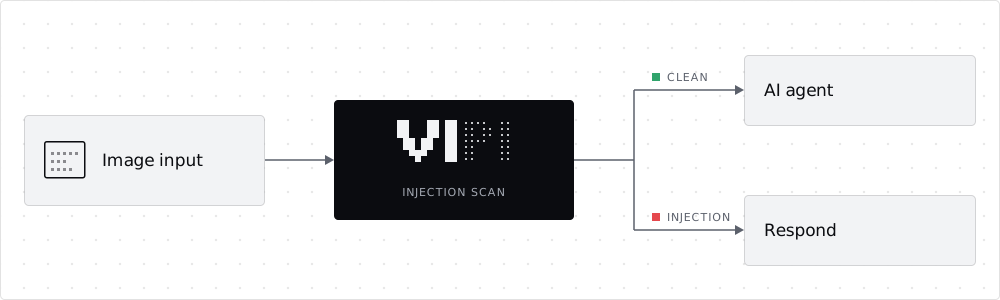
Scan images for prompt injections before an AI agent reads them.
A Python CLI and GitHub Action. Runs fully local or with hosted providers.



Images can carry instructions that people overlook but AI models read. VIPI finds the text in an image, including text that standard OCR misses, and checks it for prompt injections. It scans single images, folders and committed image changes.
- CI/CD and AI code review: scan pull-request images before AI triage tools or coding assistants read them.
- Image ingestion: scan uploaded or collected images before they enter an AI pipeline.
- Agents with image input: check screenshots before an agent decides or acts on them.
Quick start
Requires Python 3.12 and uv.
Local: images never leave your machine.
uv tool install --python 3.12 'vipi-scanner[ocr,detector-local]'
vipi setup --ocr-mode balanced
vipi scan image.png --ocr-mode balanced --output report.json
Cloud: hosted OCR and decisions. Set GOOGLE_CLOUD_API_KEY and
OPENAI_API_KEY in the environment or an ignored .env
(example).
uv tool install --python 3.12 'vipi-scanner[ocr]'
vipi setup --modus cloud
vipi scan image.png --modus cloud --output report.json
Run setup with the same options you scan with. A bare vipi setup also
downloads the large quality model. If vipi is not on PATH, run
uv tool update-shell and restart the terminal.
Models at a glance
Every scan runs up to three steps; step 2 runs only when the OCR result is uncertain. The mode decides who provides the models.
| Step | Local quality (default) |
Local balanced |
Local speed |
Cloud |
|---|---|---|---|---|
| 1 · Read text |  PP-OCRv6 Medium or Small · Tiny |
PP-OCRv6 Small or Medium · Tiny |
PP-OCRv6 Tiny or Medium · Small |
 Cloud Vision or  OpenAI ·  Mistral |
| 2 · Verify OCR visually |  Clef-Flash 9B or  d1 3B |
d1 3B or Clef-Flash 9B |
d1 3B or Clef-Flash 9B |
Decisions API or  TypeSafe Jev |
| 3 · Detect injections | Clef-Flash 9B or d1 3B ·  Prompt Guard 2 |
d1 3B or Clef-Flash 9B · Prompt Guard 2 |
d1 3B or Clef-Flash 9B · Prompt Guard 2 |
Decisions API or TypeSafe Jev |
| Memory, Apple Silicon or GPU ¹ | 48 GB unified memory (measured) or 24 GB VRAM |
~16 GB unified memory or 16 GB VRAM |
16 GB unified memory (measured) or 16 GB VRAM |
~8 GB RAM no GPU needed |
| Memory, CPU only ¹ | ~48 GB RAM | ~24 GB RAM | ~24 GB RAM | ~8 GB RAM |
¹ Estimates with the defaults; measured were speed on an Apple M2 with 16 GB and
quality on an Apple M4 Pro with 48 GB.
Decision models load unquantized: 16-bit on Apple Silicon and CUDA, 32-bit on CPU.
Clef-Flash 9B needs ~19 GB in 16-bit and ~38 GB in 32-bit. Disk space,
model IDs and pinned revisions are in Models and hardware.
Latest results
Development split of the VIPI evaluation dataset: 227 images with a prompt injection, 223 benign, default threshold 80.
- Detection rate: injection images reported as an injection. Higher is better.
- False positive rate: benign images wrongly reported. Lower is better.
- Words recognized: words in the images VIPI recognized, tolerating a small typo. Higher is better.
| Cloud · OCR + detector | Detection rate | False positive rate | Words recognized |
|---|---|---|---|
| Mistral + Jev | 81.5% | 0.4% | 83.2% |
| Mistral + OpenAI | 85.0% | 4.5% | 83.2% |
| OpenAI + OpenAI | 83.3% | 4.5% | 94.5% |
| OpenAI + Jev | 78.9% | 1.3% | 94.5% |
| Google + OpenAI (default) | 78.4% | 3.6% | 87.4% |
| Google + Jev | 74.0% | 0.9% | 87.4% |
| Local · OCR + detector | Detection rate | False positive rate | Words recognized |
|---|---|---|---|
| Quality + Clef-Flash (default) | 16.7% | 0% | 75.5% |
| Quality + Prompt Guard 2 | 19.4% | 1.8% | 75.5% |
| Balanced + d1 | 15.4% | 0.4% | 71.3% |
| Balanced + Prompt Guard 2 | 16.7% | 1.8% | 71.3% |
| Speed + d1 | 15.0% | 0.4% | 69.3% |
| Speed + Prompt Guard 2 | 18.5% | 2.2% | 69.3% |
Usage
vipi scan label.png screenshot.jpg
vipi scan ./images --verbose --output report.json
vipi scan ./images --exclude 'generated/' --exclude '*.webp'
vipi scan . --diff origin/main --output report.json
vipi scan image.png --modus cloud --detector openai --threshold 90
| Format | Extensions | Notes |
|---|---|---|
| PNG | .png |
Static images only; animated PNGs are rejected |
| JPEG | .jpg, .jpeg |
EXIF orientation is applied |
| WebP | .webp |
Static images only; animated WebPs are rejected |
Extensions are matched case-insensitively. Local inputs are limited to 40 megapixels; hosted inputs follow provider limits. Other file types in scanned folders or diffs are skipped and listed in the report.
A score at or above the threshold (default 80/100) is a finding. Scores are not calibrated probabilities, and a score below the threshold does not prove an image is safe. Cloud scans can make additional billable requests.
| Exit code | Result |
|---|---|
 0 |
Scan complete, no findings |
 1 |
Injection found, every image completed |
 2 |
Error or incomplete scan; wins over findings |
Every option, credential and report field is in the CLI reference.
GitHub Actions
Scan the images a pull request adds or changes. This example uses the local
balanced profile with Meta Prompt Guard as the injection detector:
name: VIPI image scan
on:
  pull_request:
    branches: [main]
permissions:
  contents: read
jobs:
  scan:
    runs-on: ubuntu-latest
    steps:
      - uses: actions/checkout@3d3c42e5aac5ba805825da76410c181273ba90b1 # v7.0.1
        with:
          fetch-depth: 0
      - uses: EnXan/VIPI@v0.7.0
        with:
          modus: local
          ocr-mode: balanced
          detector: prompt-guard
        env:
          HF_TOKEN: ${{ secrets.HF_TOKEN }}
      - uses: actions/upload-artifact@043fb46d1a93c77aae656e7c1c64a875d1fc6a0a # v7.0.1
        if: always()
        with:
          name: vipi-report
          path: vipi-report.json
The runner needs enough memory for the chosen models, and Prompt Guard requires
accepted model terms on Hugging Face. Fork PRs normally get no secrets. For
hosted models, set modus: cloud and the provider keys; see
Action inputs.
Documentation
- CLI reference and platform validation
- Models and hardware
- OCR recovery and measured limits
- Architecture and development
- Research CLI, workbench and datasets
- Decision records
License
VIPI's code, documentation and assets use the Apache License 2.0. Models, dependencies, datasets and provider marks keep their own terms.
1 maintainer

Metadata
1 maintainer
Release files for vipi-scanner 0.7.0
For a detailed explanation of source distributions (sdists) and built distributions (wheels), please see the package formats documentation.
Source distribution (sdist)
| File | Size | Uploaded | Provenance | Actions |
|---|---|---|---|---|
| vipi_scanner-0.7.0.tar.gz | 208.3 kB | Without provenance | Details for vipi_scanner-0.7.0.tar.gz |
Built distribution (wheel)
| File | Interpreter | ABI | Platform | Actions Reset |
|---|---|---|---|---|
| vipi_scanner-0.7.0-py3-none-any.whl | Python 3 | none | any | Details for vipi_scanner-0.7.0-py3-none-any.whl |
Total release size: 327.3 kB
Release files / vipi_scanner-0.7.0.tar.gz
| Download URL | vipi_scanner-0.7.0.tar.gz |
|---|---|
| Size | 208.3 kB |
| Tags | Source |
|
SHA-256 checksum How to use checksums |
e9645c4d2d4d949711c53912ea035ebe7b01d887560fa13c2fff43d568574802
|
|
BLAKE2b-256 checksum How to use checksums |
f30cfedbda077990f6ced922f9b5ec75909a1fa837738b9556a4980720069064
|
| Upload date | |
|
Uploaded using Trusted Publishing? What is trusted publishing? |
Yes |
| Uploaded via |
uv/0.13.5 {"installer":{"name":"uv","version":"0.13.5","subcommand":["publish"]},"python":null,"implementation":{"name":null,"version":null},"distro":{"name":"Ubuntu","version":"26.04","id":"resolute","libc":null},"system":{"name":null,"release":null},"cpu":null,"openssl_version":null,"setuptools_version":null,"rustc_version":null,"ci":true}
|
Release files / vipi_scanner-0.7.0-py3-none-any.whl
| Download URL | vipi_scanner-0.7.0-py3-none-any.whl |
|---|---|
| Size | 119.1 kB |
| Tags | Python 3 |
|
SHA-256 checksum How to use checksums |
1c5a4faa87b8f56d5cc1e7f7361092ff5cd678105ce52b87cd9f074a97d96b34
|
|
BLAKE2b-256 checksum How to use checksums |
f275af63646747a2770a012ce2b8cb511b588a67ef25f6e8595f1334e60143dd
|
| Upload date | |
|
Uploaded using Trusted Publishing? What is trusted publishing? |
Yes |
| Uploaded via |
uv/0.13.5 {"installer":{"name":"uv","version":"0.13.5","subcommand":["publish"]},"python":null,"implementation":{"name":null,"version":null},"distro":{"name":"Ubuntu","version":"26.04","id":"resolute","libc":null},"system":{"name":null,"release":null},"cpu":null,"openssl_version":null,"setuptools_version":null,"rustc_version":null,"ci":true}
|
Security for vipi-scanner 0.7.0
Provenance
Provenance describes where a file came from. On PyPI, provenance is shared via attestations, which provide a verifiable record of the build or publishing details. View details, limitations and caveats.
No provenance found
None of the files in this release were uploaded with provenance metadata.
A note on package security
PyPI is a repository for distributing packages, not a service for auditing them. While third-party security researchers and our staff do their best to detect and remove malicious packages, PyPI cannot guarantee the quality, security or suitability of any given package.
To learn more about protecting yourself from malicious actors, visit our package security documentation.














