
Virtual Lab




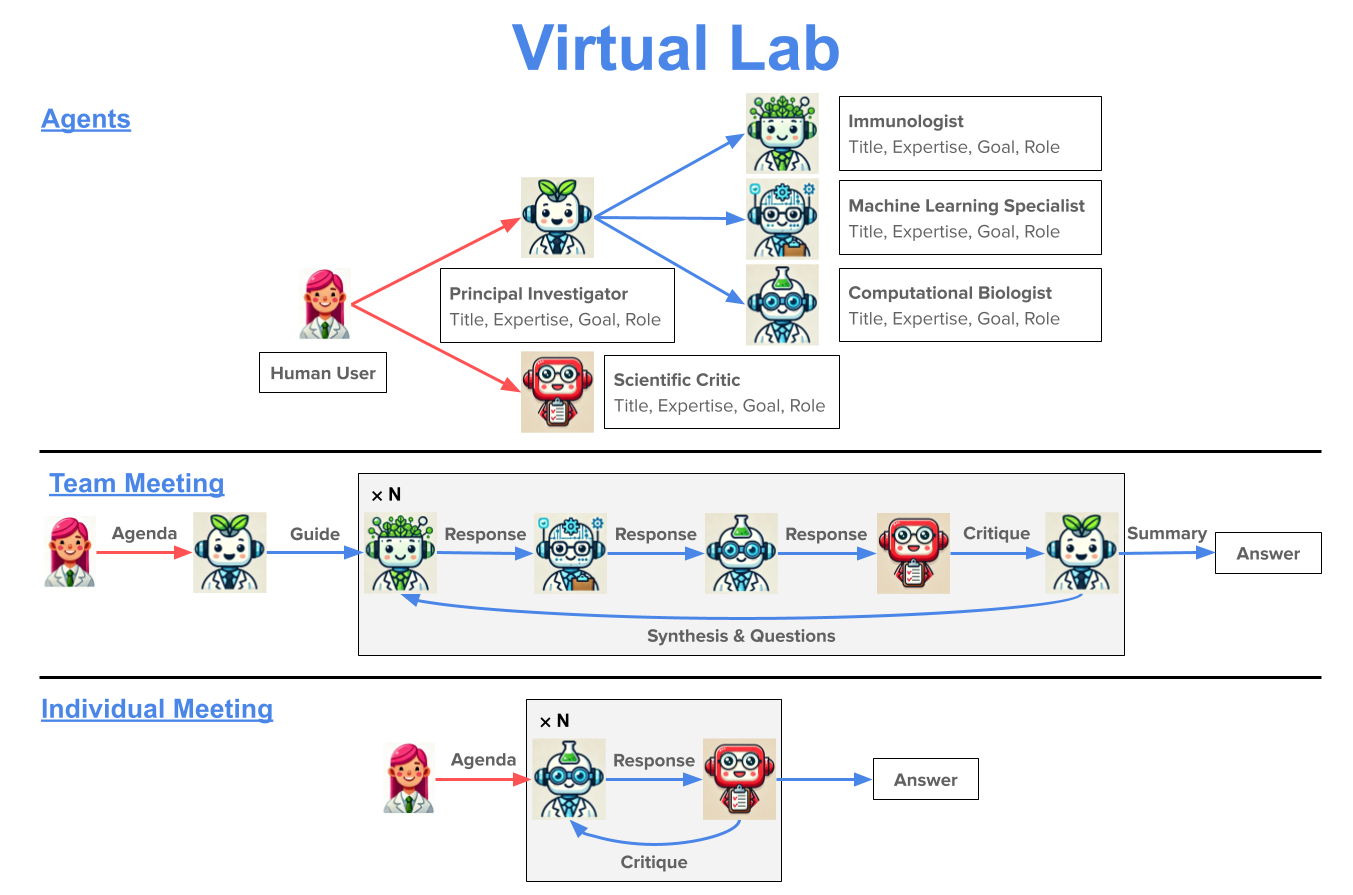
The Virtual Lab is an AI-human collaboration for science research. In the Virtual Lab, a human researcher works with a team of large language model (LLM) agents to perform scientific research. Interaction between the human researcher and the LLM agents occurs via a series of team meetings, where all the LLM agents discuss a scientific agenda posed by the human researcher, and individual meetings, where the human researcher interacts with a single LLM agent to solve a particular scientific task.
Please see our paper The Virtual Lab of AI agents designs new SARS-CoV-2 nanobodies for more details on the Virtual Lab and an application to nanobody design for SARS-CoV-2.
If you use the Virtual Lab, please cite our work as follows:
Swanson, K., Wu, W., Bulaong, N.L. et al. The Virtual Lab of AI agents designs new SARS-CoV-2 nanobodies. Nature (2025). https://doi.org/10.1038/s41586-025-09442-9
Virtual Lab for nanobody design
As a real-world demonstration, we applied the Virtual Lab to design nanobodies for one of the latest variants of SARS-CoV-2 (see nanobody_design). The Virtual Lab built a computational pipeline consisting of ESM, AlphaFold-Multimer, and Rosetta and used it to design 92 nanobodies that were experimentally validated.
Please see the notebook nanobody_design/run_nanobody_design.ipynb for an example of how to use the Virtual Lab to create agents and run team and individual meetings.
Installation
The Virtual Lab can be installed using pip or by cloning the repo and installing the required packages. Installation should only take a couple of minutes.
Optionally, first create a conda environment.
conda create -y -n virtual_lab python=3.14
conda activate virtual_lab
The Virtual Lab can be installed via pip.
pip install virtual-lab
To install the latest version of the Virtual Lab locally, clone the repo and then install the package.
git clone https://github.com/zou-group/virtual_lab.git
cd virtual_lab
pip install -e .
OpenAI API Key
The Virtual Lab currently uses GPT-5.2 from OpenAI by default. Save your OpenAI API key as the environment variable OPENAI_API_KEY. For example, add export OPENAI_API_KEY=<your_key> to your .bashrc or .bash_profile.
1 maintainer

Metadata
1 maintainer
Release files for virtual-lab 1.2.0
For a detailed explanation of source distributions (sdists) and built distributions (wheels), please see the package formats documentation.
Source distribution (sdist)
| File | Size | Uploaded | Provenance | |
|---|---|---|---|---|
| virtual_lab-1.2.0.tar.gz | 12.1 MB | Without provenance | Details |
Built distribution (wheel)
| File | Interpreter | ABI | Platform | Reset |
|---|---|---|---|---|
| virtual_lab-1.2.0-py3-none-any.whl | Python 3 | none | any | Details |
Total release size: 12.2 MB
Release files / virtual_lab-1.2.0.tar.gz
| Download URL | virtual_lab-1.2.0.tar.gz |
|---|---|
| Size | 12.1 MB |
| Tags | Source |
|
SHA-256 checksum How to use checksums |
df622d9a9e62116934e98121fe8534169863e8015451ff4a08cb3f83ae0c460a
|
|
BLAKE2b-256 checksum How to use checksums |
0aabd029c749c099ba29c2c28bbfcf78c66fedfb36086714ef7e7eb586e168a5
|
| Upload date | |
|
Uploaded using Trusted Publishing? What is trusted publishing? |
No |
| Uploaded via |
twine/6.1.0 CPython/3.12.8
|
Release files / virtual_lab-1.2.0-py3-none-any.whl
| Download URL | virtual_lab-1.2.0-py3-none-any.whl |
|---|---|
| Size | 16.8 kB |
| Tags | Python 3 |
|
SHA-256 checksum How to use checksums |
29bdf6e007d00472351d4e9436880ea4db9ce52431c2a6dee9c16017c308d7bf
|
|
BLAKE2b-256 checksum How to use checksums |
a596291768dbba0261b66eb6ffdf9c19075b5921c33d2c6fe0e368a19f93c86b
|
| Upload date | |
|
Uploaded using Trusted Publishing? What is trusted publishing? |
No |
| Uploaded via |
twine/6.1.0 CPython/3.12.8
|
Security for virtual-lab 1.2.0
Provenance
Provenance describes where a file came from. On PyPI, provenance is shared via attestations, which provide a verifiable record of the build or publishing details. View details, limitations and caveats.
No provenance found
None of the files in this release were uploaded with provenance metadata.
A note on package security
PyPI is a repository for distributing packages, not a service for auditing them. While third-party security researchers and our staff do their best to detect and remove malicious packages, PyPI cannot guarantee the quality, security or suitability of any given package.














