

Disposable Linux VMs for your code and your AI agents.





English · 简体中文 · 繁體中文 · 日本語 · 한국어
virtx lets you run tasks in disposable Linux VMs from your own code.
It's useful for jobs with heavy dependencies that you'd rather not install on your own machine, and for code you'd rather not run on it at all, such as the commands an AI agent decides to run. Whatever a VM installs or changes is gone when you remove it, unless it wrote it to a volume you kept.
Quickstart
Each example builds an image with jq in it, boots a sandbox from it, runs a command, and prints its output.
Local
Client.spawn() starts a local server for you.
Python
pip install virtx
import asyncio

from virtx import Client, Recipe


async def main() -> None:
    async with Client.spawn() as client:
        recipe = Recipe("alpine:latest").run("apk add --no-cache jq")
        await client.build_image(recipe, "jq:latest").complete(print=True)

        sandbox = await client.create_sandbox("jq:latest")
        try:
            cmd = ["sh", "-c", """echo '{"hello": "virtx"}' | jq -r .hello"""]
            code = await sandbox.exec(cmd).complete(print=True)
            print("exited", code)
        finally:
            await sandbox.remove()


asyncio.run(main())
Node
npm install @brekkylab/virtx
const { Client, Recipe } = require('@brekkylab/virtx')

async function main() {
  const client = Client.spawn()
  try {
    const recipe = new Recipe('alpine:latest').run('apk add --no-cache jq')
    await client.buildImage(recipe, 'jq:latest').complete({ print: true })

    const sandbox = await client.createSandbox('jq:latest')
    try {
      const cmd = ['sh', '-c', `echo '{"hello": "virtx"}' | jq -r .hello`]
      const code = await sandbox.exec(cmd).complete({ print: true })
      console.log('exited', code)
    } finally {
      await sandbox.remove()
    }
  } finally {
    await client.close()
  }
}

main()
Rust
cargo add virtx
cargo add tokio --features macros,rt-multi-thread
use virtx::{Client, Recipe, SandboxCreateArgs, SandboxExecArgs};

#[tokio::main]
async fn main() -> Result<(), Box<dyn std::error::Error>> {
    let client = Client::spawn_virtx([] as [&str; 0]).await?;

    let recipe = Recipe::new("alpine:latest").step("apk add --no-cache jq");
    client.build_image(recipe, "jq:latest").complete(true).await?;

    let sandbox = client
        .create_sandbox(&SandboxCreateArgs::new("jq:latest"))
        .await?;
    let cmd = ["sh", "-c", r#"echo '{"hello": "virtx"}' | jq -r .hello"#];
    let code = sandbox.exec(&SandboxExecArgs::new(cmd)).complete(true).await?;
    println!("exited {code}");
    sandbox.remove().await?;
    Ok(())
}
Remote
Set up virtx-server-tcp on a machine of yours, as Running your own server shows.
Sign in to it once with the virtx command, which uvx or npx runs without installing, and connect with the token it prints in place of Client.spawn().
The rest is the same as the local example.
uvx virtx login https://virtx.example                 # pipx run virtx, without uv

# or

npx -y @brekkylab/virtx login https://virtx.example
To install virtx instead, see CLI.
Python
from virtx import Client, CommandAuth

client = Client.connect(
    "https://virtx.example",
    CommandAuth("uvx", ("virtx", "token", "--json")),
)
Node
const client = Client.connect(
  'https://virtx.example',
  { type: 'command', program: 'npx', args: ['-y', '@brekkylab/virtx', 'token', '--json'] }
)
Rust
use virtx::Auth;

let client = Client::connect(
    "https://virtx.example",
    Auth::Command { program: "uvx".into(), args: vec!["virtx".into(), "token".into(), "--json".into()] },
    None,
    [] as [(&str, &str); 0],
)?;
Features
- Keep untrusted code off your machine: every sandbox is a microVM with its own kernel, walled off by the hypervisor, not just by namespaces, and its network can be cut entirely.
- Run it wherever you work: any client works with any server on any host, and moving from a local server to a remote one or the cloud changes one line.
- Clients:
- Servers: 💻 local (stdio) · 🖥️ remote (tcp) · ☁️ cloud
- Hosts:
Linux ·
macOS ·
Windows
- Clients:
- Minimal setup: install the package and you are ready to run, with no Docker and no daemon to set up.
- Start from any image you already use: pull from Docker Hub or any OCI registry, or build from a recipe or a Dockerfile, then push it back or copy it to another server.
- Move files in and out without a shell: read, write, copy and remove a sandbox's files straight from your code.
- Reach anything running inside: a web server, SSH, a VNC desktop or a database in the sandbox, at an address on your machine.
- Pick up where you left off: keep what a sandbox wrote in a volume for the next one, share a volume among sandboxes, and mount Notion, Google Drive or OneDrive as plain files.
- Bring the GPU along: run deep learning and other Vulkan work on the host's GPU from inside the sandbox.
Requirements
Client
Pick the one for the language you use.
- Python: 3.11 or later.
- Node: 22 or later.
- Rust: 1.89 or later.
Server
These apply to the machine that runs the virtx server. Guests are always Linux.
Hypervisor
-
Linux: a kernel with KVM support,
/dev/kvmaccessible to your user, and hardware virtualization enabled in the firmware. KVM is built into most modern kernels, so nothing usually needs installing. -
macOS: Apple silicon only. The VM runs on
Hypervisor.framework, which is built in, so nothing needs installing or turning on. -
Windows: Windows 11 or later, x86_64 only. The VM runs on the Windows Hypervisor Platform. If it is off, run this in an administrator PowerShell and restart:
Enable-WindowsOptionalFeature -Online -FeatureName HypervisorPlatform
(Optional) GPU
Only for sandboxes that use the GPU: a Vulkan loader on the host. The guest's half of Vulkan comes with every sandbox, so the image needs none. See Using GPUs.
How it works
Client-server model
virtx follows a client-server model. Your code, the client, tells a virtx server what to run, and the server runs it in a VM and sends the results back.
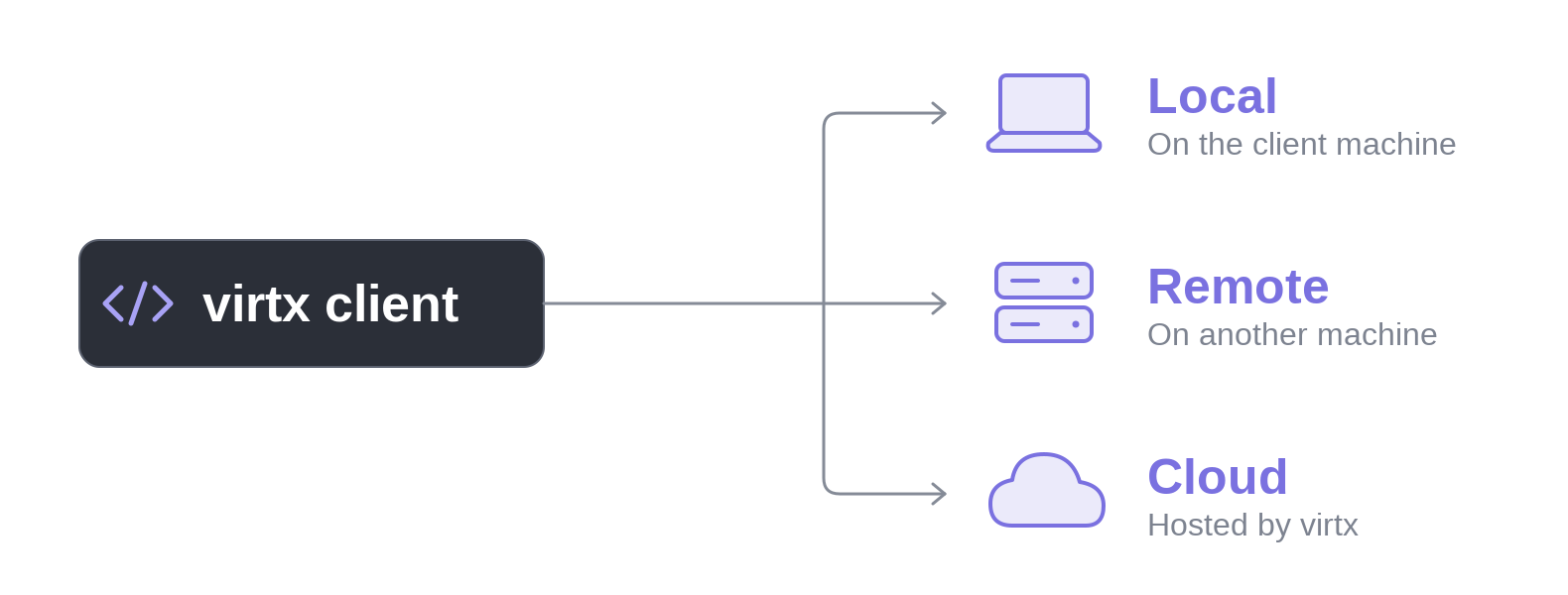
The server can be one you run yourself, on the same machine as your code or on another one, or virtx cloud, hosted for you. Either way, client and server speak the same plain HTTP protocol; only the transport differs.
| Local | Remote | Cloud | |
|---|---|---|---|
| Server | virtx-stdio |
virtx-server-tcp |
virtx cloud |
| Where it runs | Child process of client process | Daemon on another machine, separate from the client | virtx's own machines, hosted for you |
| Transport | HTTP over stdio | HTTP over TCP | HTTPS |
| Setup | None: nothing to install or keep running | Run the server, and give each user a token | Sign in and create an API key |
| Use it for | Running VMs on the machine you work on | A bigger machine, or one host shared by a team | Running VMs without hardware of your own |
Each VM is a libkrun-based microVM: a Linux guest with its own kernel, on the host's hardware virtualization (KVM on Linux, Hypervisor.framework on macOS, the Windows Hypervisor Platform on Windows). Code in it is separated from your machine by a hypervisor, not just by namespaces as in a container, and a microVM boots in a fraction of the time a full VM takes, since there is no firmware or emulated hardware to bring up.
Core concepts
The main resource is the sandbox: a VM you run commands in.
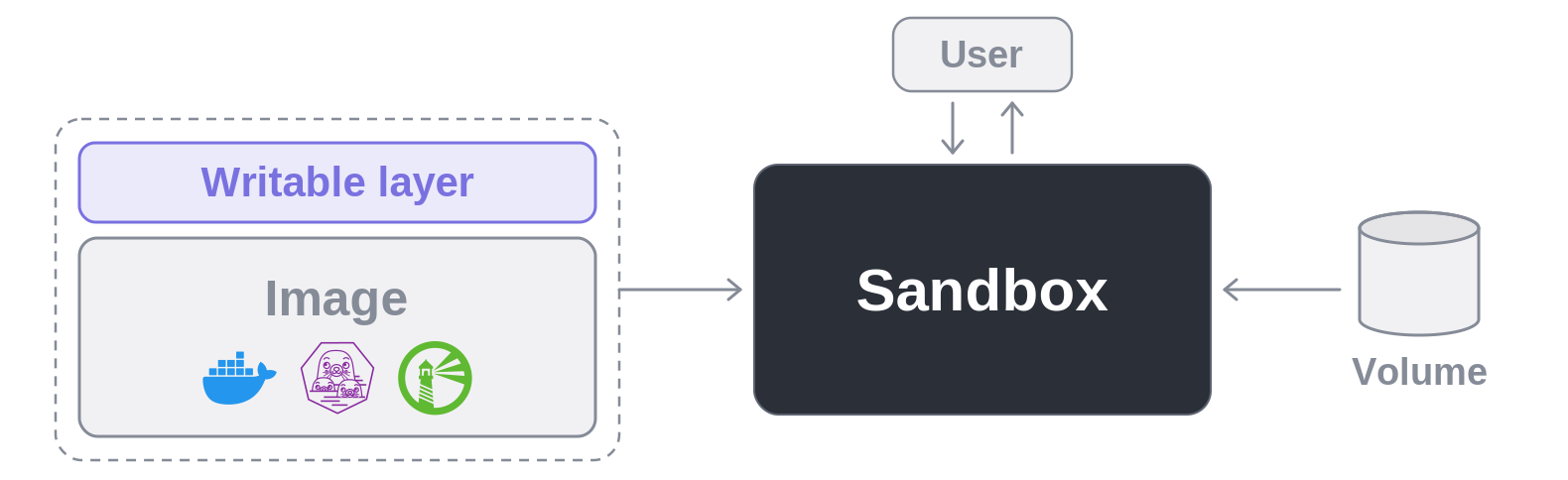
A sandbox's root filesystem is an overlay of two layers: an image below, read-only, and a writable layer above, where its writes go.
The image is what every sandbox on it starts from.
Images are OCI images, the format Docker uses, so alpine:latest or any image from a registry works.
The writable layer is where a sandbox's changes pile up. Each sandbox has its own, which starts empty and goes when the sandbox is removed.
When a sandbox needs storage apart from its root filesystem, use a volume. Unlike the writable layer, a volume is mounted at a path, read-write or read-only, and can be mounted into several sandboxes at once. It stays when they are removed, and its files can be read and written from your code without a sandbox at all. Remote stores such as Notion, Google Drive and OneDrive can be mounted inside a volume too, read-only, so a sandbox sees them as files.
Documentation
See the documentation for guides and the API reference. Rust's API is on docs.rs too.
Building from source
See Building from source in AGENTS.md.
Contributing
Bug reports, ideas and pull requests are welcome. CONTRIBUTING.md covers how to open a PR. For a suspected vulnerability, please follow SECURITY.md instead of opening a public issue. Questions and show-and-tell go on Discord.
License
Apache-2.0. See LICENSE.
1 maintainer

Metadata
1 maintainer
Release files for virtx 0.2.1
For a detailed explanation of source distributions (sdists) and built distributions (wheels), please see the package formats documentation.
Built distributions (wheels)
| File | Actions Reset | |||
|---|---|---|---|---|
| virtx-0.2.1-py3-none-win_amd64.whl | Python 3 | none | Windows x86-64 | Details for virtx-0.2.1-py3-none-win_amd64.whl |
| virtx-0.2.1-py3-none-manylinux_2_28_x86_64.whl | Python 3 | none | Linux glibc 2.28+ x86-64 | Details for virtx-0.2.1-py3-none-manylinux_2_28_x86_64.whl |
| virtx-0.2.1-py3-none-manylinux_2_28_aarch64.whl | Python 3 | none | Linux glibc 2.28+ ARM64 | Details for virtx-0.2.1-py3-none-manylinux_2_28_aarch64.whl |
| virtx-0.2.1-py3-none-macosx_11_0_arm64.whl | Python 3 | none | macOS 11.0+ ARM64 | Details for virtx-0.2.1-py3-none-macosx_11_0_arm64.whl |
Total release size: 19.4 MB
Release files / virtx-0.2.1-py3-none-win_amd64.whl
| Download URL | virtx-0.2.1-py3-none-win_amd64.whl |
|---|---|
| Size | 4.5 MB |
| Tags | Python 3 Windows x86-64 |
|
SHA-256 checksum How to use checksums |
e54d605cf106b5677d978b6d403d458f5e49aab036b7fd6b0001176b9bcecf13
|
|
BLAKE2b-256 checksum How to use checksums |
21f8317593820d7616bd69e31ae917d2426794956d888120d5c8c8a88ac9d355
|
| Upload date | |
|
Uploaded using Trusted Publishing? What is trusted publishing? |
No |
| Uploaded via |
twine/7.0.0 CPython/3.12.3
|
Release files / virtx-0.2.1-py3-none-manylinux_2_28_x86_64.whl
| Download URL | virtx-0.2.1-py3-none-manylinux_2_28_x86_64.whl |
|---|---|
| Size | 5.1 MB |
| Tags | Linux glibc 2.28+ x86-64 Python 3 |
|
SHA-256 checksum How to use checksums |
462968fa6d283a3c84f53483822a3c1a81e4e53380b759953942f80d0cdd739a
|
|
BLAKE2b-256 checksum How to use checksums |
19bdfa7a24a398a01ae16b118e2f2be1ccb6037a99e9672bdddefdb63405cb82
|
| Upload date | |
|
Uploaded using Trusted Publishing? What is trusted publishing? |
No |
| Uploaded via |
twine/7.0.0 CPython/3.12.3
|
Release files / virtx-0.2.1-py3-none-manylinux_2_28_aarch64.whl
| Download URL | virtx-0.2.1-py3-none-manylinux_2_28_aarch64.whl |
|---|---|
| Size | 5.2 MB |
| Tags | Linux glibc 2.28+ ARM64 Python 3 |
|
SHA-256 checksum How to use checksums |
3c5182dce0adcf07ab0cb4baab7c5543f204cbf5487aa15481a4365e4ef22877
|
|
BLAKE2b-256 checksum How to use checksums |
66e85dfba0355954643946efdab42149b320a63d67b50ea7d56c1ca34f1e9175
|
| Upload date | |
|
Uploaded using Trusted Publishing? What is trusted publishing? |
No |
| Uploaded via |
twine/7.0.0 CPython/3.12.3
|
Release files / virtx-0.2.1-py3-none-macosx_11_0_arm64.whl
| Download URL | virtx-0.2.1-py3-none-macosx_11_0_arm64.whl |
|---|---|
| Size | 4.6 MB |
| Tags | Python 3 macOS 11.0+ ARM64 |
|
SHA-256 checksum How to use checksums |
f6a04a28fd44e0fb4f6bee1f5e3f0e0b7a2b00d2ed9791d80fa98a3e4c809948
|
|
BLAKE2b-256 checksum How to use checksums |
a60cd6528d653ff3b86e9b34d1514626adf94b2839af0fadcf5618f785e3a9dd
|
| Upload date | |
|
Uploaded using Trusted Publishing? What is trusted publishing? |
No |
| Uploaded via |
twine/7.0.0 CPython/3.12.3
|
Security for virtx 0.2.1
Provenance
Provenance describes where a file came from. On PyPI, provenance is shared via attestations, which provide a verifiable record of the build or publishing details. View details, limitations and caveats.
No provenance found
None of the files in this release were uploaded with provenance metadata.
A note on package security
PyPI is a repository for distributing packages, not a service for auditing them. While third-party security researchers and our staff do their best to detect and remove malicious packages, PyPI cannot guarantee the quality, security or suitability of any given package.
To learn more about protecting yourself from malicious actors, visit our package security documentation.














