
Visage-Image
Model card and weights · Architecture · Prompting · Data
Introduction
A 256px text-to-image model for face generation: a 237M-parameter single-stream diffusion transformer over the latents of a 128M-parameter f16 autoencoder (16×16×96 latents), conditioned on layer 8 of Qwen3-0.6B.
This model started as an experiment in training a DiT on data from a limited domain. With so many models available for face detection and for tasks like age and gaze estimation, preparing a custom dataset was fairly simple, time-consuming, but simple. I first tried the FLUX.2 VAE, but it turned out that the plastic look is an inherent vice of that model, it turns anything it touches into plastic. It is optimized for learnability, its latent channels have a lot of redundancy, and it fakes details with GAN-style generation, which makes them look plausible rather than faithful. So I trained my own autoencoder using the latest ideas and recipes, and it turned out quite well. Qwen3-0.6B makes the model robust to variations in prompt wording, and unlike most small general-purpose DiTs, it generates quite good faces. In fact, to train a very specific DiT you don't need a big dataset: a set of similar images that differ only in details is enough, because a DiT interpolates between them very well. The first version of this model was like that. I found a "good region" densely populated with similar images. Samples from it were very realistic, and outside it they were a mess.
The model card has the highlights, samples and evaluation. ARCHITECTURE.md covers each design choice and what was tried instead.
Repository layout
| path | what |
|---|---|
visage/dit.py |
DiT: 18 single-stream blocks, width 768, adaLN timestep conditioning, Qwen3-0.6B captions with learned bucket pads and 16 registers, spiral 2D RoPE |
visage/vae.py |
VAE: Haar-wavelet conv encoder with self-attention at f8 and f16 → 96ch f16 latent; two-stage ViT decoder (f16 → f8) + 8×8 patch head + two residual conv refiners |
visage/sampling.py |
Qwen3 text encoder (first 8 layers), rectified-flow sampler (Euler / SDE churn, CFG) |
visage/loading.py |
load_dit / load_vae / load_text_encoder from a model directory or hub repo id |
visage/training.py |
manifest dataset, config loading, Muon + AdamW, LR schedule |
visage/adversarial.py |
latent critic for adversarial post-training: trainable heads on a frozen copy of the DiT |
scripts/generate.py |
text-to-image CLI |
scripts/make_showcase.py |
rebuilds assets/showcase.png; holds each tile's prompt and seed |
PROMPTING.md |
long-caption format, vocabulary and example prompts |
DATA.md |
how the images were curated and captioned, and which model labels each slot |
scripts/crop_faces.py |
square head crops from a photo folder, plus a train.jsonl manifest |
scripts/train_dit.py, scripts/train_vae.py |
training loops; configs in configs/ (dit_adversarial.yaml is the release's last stage) |
Quick Start
pip install -e .            # add [train] for training: pip install -e ".[train]"
python scripts/generate.py "a young woman with long red hair and freckles, soft window light" --n 4
The weights download from the Hugging Face repo on first use. --model also takes a local copy:
huggingface-cli download Sherstnev/Visage-Image --local-dir weights, then --model weights. The loaders read one folder per
component: transformer/ and vae/ hold config.json + model.safetensors, and text_encoder/config.json names
the frozen Qwen3 encoder. The root config.json records the sampler settings tuned for the weights.
To use the model from Python without the repo scripts, install the package from PyPI:
pip install visage-image
from visage import load_dit, load_sampling, load_text_encoder, load_vae, sample

text_encoder, dit, vae = load_text_encoder(), load_dit(), load_vae()
text, mask = text_encoder(["a young woman with long red hair and freckles, soft window light"])
latents = sample(dit, text, mask, latent_size=dit.config.image_size, seed=0, **load_sampling())
images = vae.decode(latents)  # (N, 3, 256, 256) in [-1, 1]
Recommended sampler settings, which the scripts read from that file: --solver sde --churn 0.3 --cfg 3 --steps 50 --shift 3.3.
- Euler: crisper but less realistic.
- churn: applied every step, so raising
--stepswithout lowering churn washes the image out. - shift: depends on the token count. Retune it if you change resolution.
- cfg: depends on the caption-dropout rate.
Detailed structured captions follow best, but short and casual prompts were trained from step 0 and work. Bare prompts default to sharp; no sharpness word is needed. PROMPTING.md lists the long-caption slots in order, with common values and examples. 256px only: the VAE loses 3.2 dB on eye crops at 512.
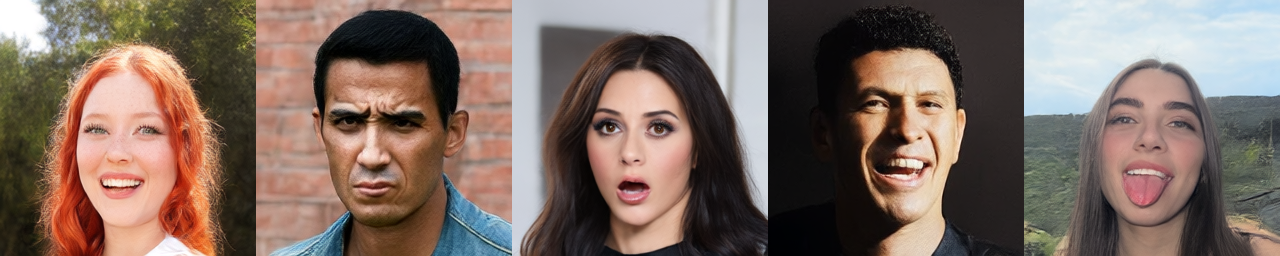
The strip at the top is python scripts/make_showcase.py: default sampler settings, with the
prompts and seeds listed in the script, one image per seed. Any tile is also
python scripts/generate.py "<prompt>" --n 1 --seed <seed>.
Train
The data is a JSONL manifest with one {"image": "path.jpg", "caption": "..."} per line.
Relative paths are resolved against the manifest's directory. The VAE ignores captions.
scripts/crop_faces.py builds one from a folder of photos with the same detector and head
margins as the release data (YOLO face weights, AGPL-3.0; the download line is in the script's
--help). Captions come out empty and have to be filled in before DiT training.
pip install -e ".[data]"
python scripts/crop_faces.py photos/ -o data/          # -> data/images/..., data/train.jsonl
python scripts/train_vae.py configs/vae.yaml   # -> runs/vae/vae/ (+ latent stats)
python scripts/train_dit.py configs/dit.yaml   # uses the VAE in `vae:` -> runs/dit/transformer/ (EMA)
VAE
- Loss: Charbonnier + 3·LPIPS(VGG) + 0.4·DINOv2 alignment. The alignment is mcos + mdms on a middle-layer feature, with margins that loosen over 200k steps to 0.2 of their full slack, then hold.
- From step 80k, a phase-template term removes the decoder's fixed 8px sub-pixel pattern.
- No KL and no GAN. Horizontal flips. 400k steps at batch 8.
- Optimizer: Muon on the decoder's hidden matrices, AdamW for the rest. Cosine LR schedule.
DiT
- Rectified flow with velocity target and logit-normal timesteps, shifted by √(tokens/64).
- 20% caption dropout to a zero embedding. The release drew dropout from sharp images only and omitted the sharpness word on sharp captions, so an unspecified prompt defaults to sharp; this loop drops uniformly.
- Muon + AdamW, EMA 0.999 every 10 steps, batch 64×2.
- The release then ran
configs/dit_adversarial.yaml: 1000 updates of latent adversarial post-training on the anneal checkpoint (see ARCHITECTURE.md).
Checkpoint names (200k, 220k, 222k) count batches of 64, as the training repo did. scripts/train_dit.py
counts optimizer updates of 64×2, so 222k there is step 111,000.
The DiT loop encodes images and captions on the fly, which keeps the code minimal. For a long run, cache the latents and text states once instead.
Compute. The release was trained on one NVIDIA RTX 5090 (32 GB):
| model | steps | throughput | wall-clock |
|---|---|---|---|
| VAE | 400k at batch 8 | ~10.7 it/s | ~10.5 h |
| DiT, base run | 200k batches of 64 | ~5.1 batches/s (~330 images/s) | ~11 h |
| DiT, sharp anneal | 20k batches of 64 | ~5.1 batches/s | ~1.1 h |
| DiT, adversarial | 2k batches of 64 | ~2 batches/s | ~0.3 h |
| total | ~23 GPU-hours |
The DiT figures are with latents and text states cached in advance.
Lint and format with ruff check . && ruff format . (config in pyproject.toml).
License
The code and the weights are Apache-2.0.
References
DiT
- Rectified flow: Liu et al., Flow Straight and Fast — arXiv:2209.03003; Lipman et al., Flow Matching — arXiv:2210.02747
- Logit-normal timesteps, resolution-dependent shift: Esser et al., Scaling Rectified Flow Transformers (SD3) — arXiv:2403.03206
- DiT, adaLN-Zero: Peebles & Xie — arXiv:2212.09748
- Text and image tokens in one sequence: Bao et al., All are Worth Words (U-ViT) — arXiv:2209.12152; joint text–image attention: SD3 (above); single-stream blocks at scale: FLUX.1 — github.com/black-forest-labs/flux
- Spiral RoPE: Liu et al., Rotate Your Rotary Positional Embeddings in the 2D Plane — arXiv:2602.03227
- RoPE: Su et al., RoFormer — arXiv:2104.09864
- Register tokens: Darcet et al., Vision Transformers Need Registers — arXiv:2309.16588
- QK-norm: Dehghani et al., Scaling Vision Transformers to 22B — arXiv:2302.05442
- SwiGLU: Shazeer, GLU Variants Improve Transformer — arXiv:2002.05202
- Text encoder: Qwen3 Technical Report — arXiv:2505.09388
- Classifier-free guidance: Ho & Salimans — arXiv:2207.12598
- SDE churn sampler: Karras et al., EDM — arXiv:2206.00364
VAE
- Losses (no KL/GAN, DINOv2 mcos + mdms alignment), global skip: Qwen-Image-VAE-2.0 — arXiv:2605.13565
- Wavelet encoder: Sadat et al., LiteVAE — arXiv:2405.14477
- Space-to-channel residual downsampling: Chen et al., DC-AE — arXiv:2410.10733
- Alignment target: Oquab et al., DINOv2 — arXiv:2304.07193
- Perceptual loss: Zhang et al., LPIPS — arXiv:1801.03924
- LayerScale: Touvron et al., CaiT — arXiv:2103.17239
- iFID: arXiv:2603.05630
Optimizer
- Muon: Jordan et al. — kellerjordan.github.io/posts/muon; RMS-matched LR: Liu et al., Muon is Scalable — arXiv:2502.16982
1 maintainer

Metadata
1 maintainer
Release files for visage-image 1.0.0
For a detailed explanation of source distributions (sdists) and built distributions (wheels), please see the package formats documentation.
Source distribution (sdist)
| File | Size | Uploaded | Provenance | Actions |
|---|---|---|---|---|
| visage_image-1.0.0.tar.gz | 28.6 kB | Without provenance | Details for visage_image-1.0.0.tar.gz |
Built distribution (wheel)
| File | Interpreter | ABI | Platform | Actions Reset |
|---|---|---|---|---|
| visage_image-1.0.0-py3-none-any.whl | Python 3 | none | any | Details for visage_image-1.0.0-py3-none-any.whl |
Total release size: 54.8 kB
Release files / visage_image-1.0.0.tar.gz
| Download URL | visage_image-1.0.0.tar.gz |
|---|---|
| Size | 28.6 kB |
| Tags | Source |
|
SHA-256 checksum How to use checksums |
e16770751352ad8fddb0155ebf117df8ca62ecd9a9166e8e64c7afaf2e569ae9
|
|
BLAKE2b-256 checksum How to use checksums |
f6b85d0b20b26ae3724b0f40b4cee5c4633c982c4b69a79152f52eb9c3ff359b
|
| Upload date | |
|
Uploaded using Trusted Publishing? What is trusted publishing? |
No |
| Uploaded via |
uv/0.12.7 {"installer":{"name":"uv","version":"0.12.7","subcommand":["publish"]},"python":null,"implementation":{"name":null,"version":null},"distro":{"name":"Arch Linux","version":null,"id":null,"libc":null},"system":{"name":null,"release":null},"cpu":null,"openssl_version":null,"setuptools_version":null,"rustc_version":null,"ci":null}
|
Release files / visage_image-1.0.0-py3-none-any.whl
| Download URL | visage_image-1.0.0-py3-none-any.whl |
|---|---|
| Size | 26.3 kB |
| Tags | Python 3 |
|
SHA-256 checksum How to use checksums |
f45c5d98b1491d9196b581de34a63b59e48fcba73118aa2dd8fe318db6f9fe2b
|
|
BLAKE2b-256 checksum How to use checksums |
6ab68a6d91359e900c275097537062a4c32683f7888ef4ecba71294816f6b493
|
| Upload date | |
|
Uploaded using Trusted Publishing? What is trusted publishing? |
No |
| Uploaded via |
uv/0.12.7 {"installer":{"name":"uv","version":"0.12.7","subcommand":["publish"]},"python":null,"implementation":{"name":null,"version":null},"distro":{"name":"Arch Linux","version":null,"id":null,"libc":null},"system":{"name":null,"release":null},"cpu":null,"openssl_version":null,"setuptools_version":null,"rustc_version":null,"ci":null}
|
Security for visage-image 1.0.0
Provenance
Provenance describes where a file came from. On PyPI, provenance is shared via attestations, which provide a verifiable record of the build or publishing details. View details, limitations and caveats.
No provenance found
None of the files in this release were uploaded with provenance metadata.
A note on package security
PyPI is a repository for distributing packages, not a service for auditing them. While third-party security researchers and our staff do their best to detect and remove malicious packages, PyPI cannot guarantee the quality, security or suitability of any given package.
To learn more about protecting yourself from malicious actors, visit our package security documentation.














