
Output matrix or table in beautiful form

Project description
Visual Matrix
About:
Visual Matrix - module for python, allowing you to display matrices or tables in a beautiful form.
Functional:
- Create and view tables and matrix;
Screenshots:
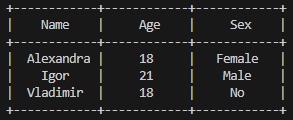
Table visual
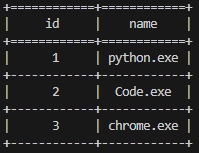
Table visual (with border)
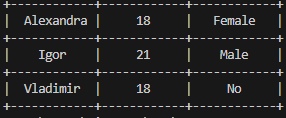
Matrix visual
How to use:
from vismatrix import VisualMatrix

header = ["Name", "Age", "Sex"]

m = [["Alexandra", "18", "Female"],
     ["Igor", "21", "Male"],
     ["Vladimir", "18", "No"]]

matrix = VisualMatrix() # initialization

matrix.setMatrix(m, header, True) # method in which you can immediately initialize a matrix with header
                                   # and without borders
matrix.myMatrix()

matrix.setMatrix(m) # method in which you can immediately initialize a matrix without header
matrix.myMatrix()
First way
from vismatrix import VisualMatrix

matrix = VisualMatrix() # initialization

# second way (in this way you cant change no_border parameter)
matrix.addHeader(["Name", "Age", "Sex"])
matrix.addRow(["Alexandra", "18", "Female"])
matrix.addRow(["Igor", "21", "Male"])
matrix.addRow(["Vladimir", "18", "No"])
matrix.myMatrix()

matrix.addRow(["Alexandra", "18", "Female"])
matrix.addRow(["Igor", "21", "Male"])
matrix.addRow(["Vladimir", "18", "No"])
matrix.myMatrix()
Second way
-The output from both methods will be the same. You can immediately assign lists to methods (as in the first method with header)
addHeader(header)
Adds a table header.
| Parameter | Type | Description |
|---|---|---|
header |
list |
Is the header for the table |
addRow(row)
Adds a row table/matrix.
| Parameter | Type | Description |
|---|---|---|
row |
list |
Matrix or table row |
setMatrix(user_matrix, header, no_border)
Creates a matrix or table (Depending on whether a header is specified or not).
| Parameter | Type | Description |
|---|---|---|
user_matrix |
list |
Matrix or table`s data |
header |
list |
Table`s header |
no_border |
bool |
Use borders (True - No, False - Yes) |
myMatrix()
Output table or matrix. Must be written at the end of creating a matrix or table
Install:
pip install vismatrix


Download files
Download the file for your platform. If you're not sure which to choose, learn more about installing packages.
Source Distribution
Built Distribution
Filter files by name, interpreter, ABI, and platform.
If you're not sure about the file name format, learn more about wheel file names.
Copy a direct link to the current filters
File details
Details for the file vismatrix-0.5.tar.gz.
File metadata
- Download URL: vismatrix-0.5.tar.gz
- Upload date:
- Size: 3.5 kB
- Tags: Source
- Uploaded using Trusted Publishing? No
- Uploaded via: twine/4.0.2 CPython/3.11.6
File hashes
| Algorithm | Hash digest | |
|---|---|---|
| SHA256 |
a172d3ba4b4c7fd4d117f104c2aea38c3c8bcec2ba24000602c2402425203af8
|
|
| MD5 |
7f210731f4f3bb37f288f6924e12253f
|
|
| BLAKE2b-256 |
c92dcc69e88c9fc4bd8ded8884027cc3410dde3442478a2fca87d2436df67a64
|
File details
Details for the file vismatrix-0.5-py3-none-any.whl.
File metadata
- Download URL: vismatrix-0.5-py3-none-any.whl
- Upload date:
- Size: 3.5 kB
- Tags: Python 3
- Uploaded using Trusted Publishing? No
- Uploaded via: twine/6.0.1 CPython/3.12.4
File hashes
| Algorithm | Hash digest | |
|---|---|---|
| SHA256 |
862cff9dfcaac5e2b9ef67354c4bf25ef51a6659d60163fe02883e49b072b5cb
|
|
| MD5 |
1dd4171cba3feeca44f8d98f254223b3
|
|
| BLAKE2b-256 |
9288f3bc5bce47d1100bdc98c4626b19b50b238b5a137bf3b267d2eea064332e
|






