
visnetmap


visnetmap is a Python library for creating interactive network and map visualizations as standalone HTML files.
It provides two main visualization tools:
visnet()— interactive network graph visualization using vis-networknetMap()— interactive geographical network map using Leaflet
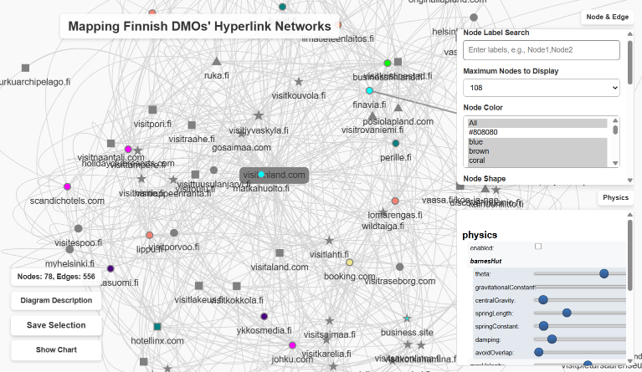
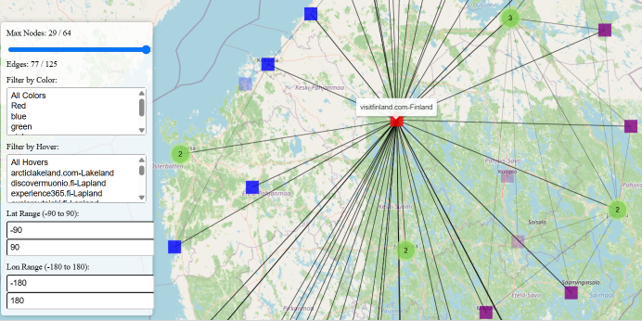
The package is designed for researchers, students, and analysts who want to quickly generate shareable HTML visualizations from Python data structures, NetworkX graphs, or location-based network data.
Live demo
A presentation/demo page is available here:
https://atsaniik.github.io/Finland_DMOs_Vienna/
This page demonstrates the type of interactive network and map visualizations that can be produced with visnetmap.
Main features
- Generate standalone interactive HTML files
- Visualize NetworkX-like graphs
- Visualize geographical networks on maps
- Support node and edge hover information
- Support weighted edges
- Support directed graphs
- Support custom node size, color, shape, and labels
- Support map markers and curved/arced connections
- Export generated visualizations as HTML
- Optionally open output directly in a browser
- No JavaScript coding required for normal use
Installation
Install from PyPI:
pip install visnetmap
If you want to use NetworkX examples:
pip install "visnetmap[networkx]"
If the package is not yet published on PyPI, install directly from GitHub:
pip install git+https://github.com/Atsaniik/visnetmap.git
For local development:
git clone https://github.com/Atsaniik/visnetmap.git
cd visnetmap
pip install -e ".[dev]"
Quick start: network visualization
import networkx as nx
from visnetmap import visnet

G = nx.DiGraph()

G.add_weighted_edges_from([
    ("B", "A", 5),
    ("C", "A", 2),
    ("D", "A", 1),
    ("B", "C", 2),
    ("E", "F", 4),
    ("E", "G", 3),
    ("E", "H", 2),
])

visnet(
    G,
    network_title="Knowledge Sharing Network",
    writeHTML="knowledge_network.html",
    browserView=True,
)
This creates an HTML file such as:
netOutPut/knowledge_network.html
and opens it in your browser if browserView=True.
Quick start: map visualization
from visnetmap import netMap

cities = [
    {
        "node": "New York",
        "lat": 40.7128,
        "lon": -74.0060,
        "size": 15,
        "color": "red",
        "shape": "circle",
        "node_hover": "The Big Apple, USA",
    },
    {
        "node": "London",
        "lat": 51.5074,
        "lon": -0.1278,
        "size": 12,
        "color": "blue",
        "shape": "star",
        "node_hover": "Capital of the UK",
    },
    {
        "node": "Tokyo",
        "lat": 35.6762,
        "lon": 139.6503,
        "size": 10,
        "color": "green",
        "shape": "square",
        "node_hover": "Capital of Japan",
    },
]

connections = [
    {
        "node1": "New York",
        "node2": "London",
        "color": "black",
        "width": 2,
        "style": "solid",
        "arrow": True,
        "curve": False,
        "edge_hover": "Flight from New York to London",
    },
    {
        "node1": "London",
        "node2": "Tokyo",
        "color": "blue",
        "width": 3,
        "style": "solid",
        "arrow": True,
        "curve": True,
        "edge_hover": "Connection from London to Tokyo",
    },
]

netMap(
    cities,
    connections,
    title="Global City Network",
    writeHTML="city_network_map.html",
    browserView=True,
)
This creates an HTML file such as:
mapOutPut/city_network_map.html
Import options
The main functions can be imported directly:
from visnetmap import visnet, netMap
Additional helper functions:
from visnetmap import nx2vis, latLong, base64_from_url, base64_from_loc
visnet() overview
visnet() creates an interactive network graph.
Basic usage:
visnet(
    G=None,
    nodes=None,
    edges=None,
    network_title="Network",
    writeHTML="network.html",
    browserView=False,
    maximum_display=100,
)
Input option 1: NetworkX graph
import networkx as nx
from visnetmap import visnet

G = nx.DiGraph()
G.add_weighted_edges_from([
    ("A", "B", 3),
    ("B", "C", 2),
    ("C", "A", 1),
])

visnet(G, network_title="Directed Network", browserView=True)
Input option 2: node and edge dictionaries
from visnetmap import visnet

nodes = [
    {
        "id": 1,
        "label": "Start",
        "size": 20,
        "color": "red",
        "shape": "dot",
        "title": "Starting node",
    },
    {
        "id": 2,
        "label": "Process",
        "size": 30,
        "color": "blue",
        "shape": "box",
        "title": "Processing node",
    },
]

edges = [
    {
        "from": 1,
        "to": 2,
        "width": 3,
        "color": {"color": "gray"},
        "arrows": "to",
        "title": "Connection from Start to Process",
    },
]

visnet(
    nodes=nodes,
    edges=edges,
    network_title="Simple Network",
    browserView=True,
)
Node format for visnet()
Each node is a dictionary.
Required key:
| Key | Description |
|---|---|
id |
Unique node identifier |
Common optional keys:
| Key | Description |
|---|---|
label |
Text label shown near the node |
size |
Node size |
color |
Node color, for example "red" or {"background": "red", "border": "black"} |
shape |
Node shape, for example "dot", "box", "triangle", "star", "image", "icon" |
title |
Hover tooltip |
image |
Image URL or Base64 image string for image nodes |
icon |
Font Awesome icon settings |
pos |
Optional position such as (x, y) |
Example:
{
    "id": "A",
    "label": "Node A",
    "size": 25,
    "color": "orange",
    "shape": "dot",
    "title": "This is Node A",
}
Edge format for visnet()
Each edge is a dictionary.
Required keys:
| Key | Description |
|---|---|
from |
Source node ID |
to |
Target node ID |
Common optional keys:
| Key | Description |
|---|---|
width |
Edge width |
weight |
Alternative edge weight, especially from NetworkX |
color |
Edge color, for example {"color": "gray"} |
arrows |
Arrow direction, for example "to" |
label |
Edge label |
title |
Hover tooltip |
dashes |
Dashed edge style |
smooth |
vis-network smooth edge settings |
Example:
{
    "from": "A",
    "to": "B",
    "width": 4,
    "color": {"color": "black"},
    "arrows": "to",
    "title": "A shares knowledge with B",
}
netMap() overview
netMap() creates an interactive geographical network map.
Basic usage:
netMap(
    cities_data,
    connections_data,
    title="Network Map",
    maximum_nodes=100,
    writeHTML="network_map.html",
    browserView=False,
)
City/node format for netMap()
Each city or map node is a dictionary.
Required key:
| Key | Description |
|---|---|
node |
Node name or identifier |
Recommended optional keys:
| Key | Description |
|---|---|
lat |
Latitude |
lon |
Longitude |
size |
Marker size |
color |
Marker color |
shape |
Marker shape: "circle", "square", "triangle", or "star" |
node_hover |
Tooltip text shown when hovering over the node |
Example:
{
    "node": "Helsinki",
    "lat": 60.1699,
    "lon": 24.9384,
    "size": 12,
    "color": "blue",
    "shape": "circle",
    "node_hover": "Helsinki, Finland",
}
If latitude and longitude are missing, netMap() may attempt to geocode the location name using geopy and Nominatim, depending on the installed version and function settings.
Connection format for netMap()
Each connection is a dictionary.
Required keys:
| Key | Description |
|---|---|
node1 |
Source node name |
node2 |
Target node name |
Common optional keys:
| Key | Description |
|---|---|
color |
Line color |
width |
Line width |
style |
"solid", "dashed", or "dotted" |
arrow |
True or False |
curve |
True or False |
edge_hover |
Tooltip text shown when hovering over the edge |
Example:
{
    "node1": "Helsinki",
    "node2": "Joensuu",
    "color": "darkblue",
    "width": 3,
    "style": "solid",
    "arrow": True,
    "curve": True,
    "edge_hover": "Connection from Helsinki to Joensuu",
}
Example: Finnish destination network map
from visnetmap import netMap

cities = [
    {
        "node": "Helsinki",
        "lat": 60.1699,
        "lon": 24.9384,
        "size": 15,
        "color": "blue",
        "shape": "circle",
        "node_hover": "Helsinki",
    },
    {
        "node": "Joensuu",
        "lat": 62.6010,
        "lon": 29.7636,
        "size": 10,
        "color": "green",
        "shape": "star",
        "node_hover": "Joensuu",
    },
    {
        "node": "Kuopio",
        "lat": 62.8924,
        "lon": 27.6770,
        "size": 10,
        "color": "orange",
        "shape": "square",
        "node_hover": "Kuopio",
    },
]

connections = [
    {
        "node1": "Helsinki",
        "node2": "Joensuu",
        "color": "blue",
        "width": 3,
        "arrow": True,
        "curve": True,
        "edge_hover": "Helsinki to Joensuu",
    },
    {
        "node1": "Helsinki",
        "node2": "Kuopio",
        "color": "orange",
        "width": 2,
        "arrow": True,
        "curve": True,
        "edge_hover": "Helsinki to Kuopio",
    },
]

netMap(
    cities,
    connections,
    title="Finnish Destination Network",
    writeHTML="finland_destination_network.html",
    browserView=True,
)
Output files
By default, visnet() writes network HTML files to:
netOutPut/
and netMap() writes map HTML files to:
mapOutPut/
Example:
visnet(G, writeHTML="my_network.html")
creates:
netOutPut/my_network.html
Example:
netMap(cities, connections, writeHTML="my_map.html")
creates:
mapOutPut/my_map.html
Tile provider note for maps
netMap() uses web map tiles through Leaflet. Depending on your configuration, map tiles may come from providers such as CARTO, OpenStreetMap, Esri, or other services.
For public or high-traffic use, avoid relying directly on OpenStreetMap volunteer tile servers. Use a proper tile provider or your own tile server if needed.
Example with CARTO tiles:
netMap(
cities,
connections,
title="Map with CARTO tiles",
tile_url="https://{s}.basemaps.cartocdn.com/light_all/{z}/{x}/{y}{r}.png",
tile_attribution='© <a href="https://www.openstreetmap.org/copyright">OpenStreetMap</a> contributors © <a href="https://carto.com/attributions">CARTO</a>',
browserView=True,
)
Geocoding note
If you use latLong() or provide map nodes without latitude and longitude, geocoding may be performed through Nominatim using geopy.
Please respect Nominatim usage policies and avoid sending large volumes of requests.
For larger datasets, it is recommended to prepare latitude and longitude values in advance.
Example:
from visnetmap import latLong

lat, lon, address = latLong("Joensuu, Finland")

print(lat, lon, address)
Helper: convert images to Base64
For image nodes in visnet(), local images can be converted to Base64 strings.
from visnetmap import base64_from_loc, visnet

image_data = base64_from_loc("logo.png")

nodes = [
    {
        "id": "logo",
        "label": "Logo node",
        "shape": "image",
        "image": image_data,
        "size": 30,
    }
]

visnet(nodes=nodes, edges=[], network_title="Image Node Demo", browserView=True)
Common problems
NetworkX edge weight error
If an edge weight is written as a string:
("B", "C", "2")
change it to a number:
("B", "C", 2)
Edge widths and weights should be numeric.
Map tiles show 403 Access blocked
This usually means the selected map tile provider blocked the request.
Possible solutions:
- use a different tile provider,
- avoid heavy automated tile loading,
- use a valid tile service for public applications,
- use CARTO or another provider instead of direct OpenStreetMap volunteer tiles.
Generated HTML does not show correctly offline
The generated HTML may load JavaScript and CSS from external CDNs, such as:
- vis-network
- Leaflet
- Leaflet.markercluster
- map tile providers
An internet connection may be required when opening the HTML file.
Development
Clone the repository:
git clone https://github.com/Atsaniik/visnetmap.git
cd visnetmap
Create and activate a virtual environment:
python -m venv .venv
Windows PowerShell:
.venv\Scripts\Activate.ps1
macOS/Linux:
source .venv/bin/activate
Install in editable mode:
pip install -e ".[dev]"
Run tests:
pytest
Build the package:
python -m build
Check the distribution:
twine check dist/*
Citation
If you use visnetmap in academic work, teaching, presentations, or research demos, please cite or acknowledge the package and the related project page:
visnetmap: Interactive network and map visualization tools in Python.
Available at: https://github.com/Atsaniik/visnetmap
Demo: https://atsaniik.github.io/Finland_DMOs_Vienna/
License
This project is released under the MIT License.
See the LICENSE file for details.
Author
Developed by Atsaniik.
GitHub: https://github.com/Atsaniik
1 maintainer

Metadata
1 maintainer
Release files for visnetmap 0.1.3.4
For a detailed explanation of source distributions (sdists) and built distributions (wheels), please see the package formats documentation.
Source distribution (sdist)
| File | Size | Uploaded | Provenance | Actions |
|---|---|---|---|---|
| visnetmap-0.1.3.4.tar.gz | 34.5 kB | With provenance | Details for visnetmap-0.1.3.4.tar.gz |
Built distribution (wheel)
| File | Interpreter | ABI | Platform | Actions Reset |
|---|---|---|---|---|
| visnetmap-0.1.3.4-py3-none-any.whl | Python 3 | none | any | Details for visnetmap-0.1.3.4-py3-none-any.whl |
Total release size: 65.3 kB
Release files / visnetmap-0.1.3.4.tar.gz
| Download URL | visnetmap-0.1.3.4.tar.gz |
|---|---|
| Size | 34.5 kB |
| Tags | Source |
|
SHA-256 checksum How to use checksums |
be0306bab838aa1bf5e92bc1340c0eb8348bb8616a6403bf1087a9da9f8edaed
|
|
BLAKE2b-256 checksum How to use checksums |
31593e70d14422c56c7f30770e50e5cf5fa93e4b0965a8f67821eb7c812cd9f4
|
| Upload date | |
|
Uploaded using Trusted Publishing? What is trusted publishing? |
Yes |
| Uploaded via |
twine/7.0.0 CPython/3.13.14
|
Provenance
Provenance describes where a file came from. On PyPI, provenance is shared via attestations, which provide a verifiable record of the build or publishing details. View details, limitations and caveats.


PyPI Publish Attestation
PyPI verified that this artifact, at this checksum, originated from the publisher listed below.
Signed by GitHub Actions, verified by PyPI on Sep 27, 2026.
Transparency logRelease files / visnetmap-0.1.3.4-py3-none-any.whl
| Download URL | visnetmap-0.1.3.4-py3-none-any.whl |
|---|---|
| Size | 30.8 kB |
| Tags | Python 3 |
|
SHA-256 checksum How to use checksums |
b04a3d413ddd9644bfd6c035917fe5de135205a8e1604bb3c4c44d788d76d5ae
|
|
BLAKE2b-256 checksum How to use checksums |
d78fd96ae16201b915ef7919aacdc77fe95000be179ceee1a8606fb7ae674125
|
| Upload date | |
|
Uploaded using Trusted Publishing? What is trusted publishing? |
Yes |
| Uploaded via |
twine/7.0.0 CPython/3.13.14
|
Provenance
Provenance describes where a file came from. On PyPI, provenance is shared via attestations, which provide a verifiable record of the build or publishing details. View details, limitations and caveats.
PyPI Publish Attestation
PyPI verified that this artifact, at this checksum, originated from the publisher listed below.
Signed by GitHub Actions, verified by PyPI on Sep 27, 2026.
Transparency logSecurity for visnetmap 0.1.3.4
Provenance
Provenance describes where a file came from. On PyPI, provenance is shared via attestations, which provide a verifiable record of the build or publishing details. View details, limitations and caveats.
Full provenance
All 2 files in this release have been uploaded with provenance metadata.
Attestation for visnetmap-0.1.3.4.tar.gz
PyPI Publish Attestation
PyPI verified that this artifact, at this checksum, originated from the publisher listed below.
Signed by GitHub Actions, verified by PyPI on Sep 27, 2026.
Transparency logA note on package security
PyPI is a repository for distributing packages, not a service for auditing them. While third-party security researchers and our staff do their best to detect and remove malicious packages, PyPI cannot guarantee the quality, security or suitability of any given package.
To learn more about protecting yourself from malicious actors, visit our package security documentation.














