
A simple module for creating ASCII tables

Project description
README | API | CLI | SPEC | CHANGELOG
vistab
vistab is a lightweight Python module for creating beautiful text-based ASCII/Unicode tables. It comes out-of-the-box with support for fluid terminal formatting (ANSI escape sequences), coordinate-based discrete cell styling, and guarantees consistent string lengths across languages and scripts (RTL and LTR) and color variations.
Key Features
- Lightweight Native Core: Operates primarily off the Python standard library with
wcwidthenabling accurate string geometry calculations. - Color-Aware Word Wrapping: measures and wraps table widths over embedded, invisible ANSI formatting sequences without breaking table geometry.
- Coordinate-Based Styling API: Colorize rows, columns, headers, or specific cells declaratively (e.g.
set_header_style(bg="red", bold=True)). - Hierarchical TOML Configurations: Persist your favorite table paddings and layout themes cross-project using a localized
.vistab.toml. - Advanced Data Parsing: Injects automatic text wrapping, infers scientific datatypes, and parses CSV files.
Detailed Documentation
Looking for an exhaustive configuration breakdown or command-line parser bindings?
- Vistab Python API Reference (Covers all objects, data formatting algorithms, and properties)
- Command-Line (CLI) Manual (Covers mapping raw CSV structures and terminal limits)
Installation
You can install vistab directly via pip:
pip install vistab
Note: For complex Asian/CJK full-width character wrapping support, install the optional component using
pip install vistab[cjk].
Quick Start
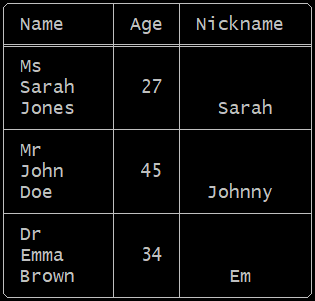
Getting started with vistab is simple. Initialize a Vistab instance, set up column alignments and paddings, and append your rows.
from vistab import Vistab

table = Vistab(style="round-header", padding=1)
# Left, Right, Center alignment
table.set_cols_align(["l", "r", "c"])
# Top, Middle, Bottom vertical alignment
table.set_cols_valign(["t", "m", "b"])

table.add_rows([
    ["Name", "Age", "Nickname"],
    ["Ms\nSarah\nJones", 27, "Sarah"],
    ["Mr\nJohn\nDoe", 45, "Johnny"],
    ["Dr\nEmma\nBrown", 34, "Em"]
])

print(table.draw())
Output:
Note on Web Rendering: We display the raw output below as an image because some package registries (like PyPI) enforce code-block font stacks (e.g.,
Source Code Pro) that lack glyphs for Unicode Extended Box Drawing characters. When falling back to secondary system fonts for characters like╭or╪, the physical grid mathematically misaligns. On your local terminal—and on full-featured renderers like GitHub or BitBucket—the actual text output mathematically aligns perfectly!
Built-in Styles
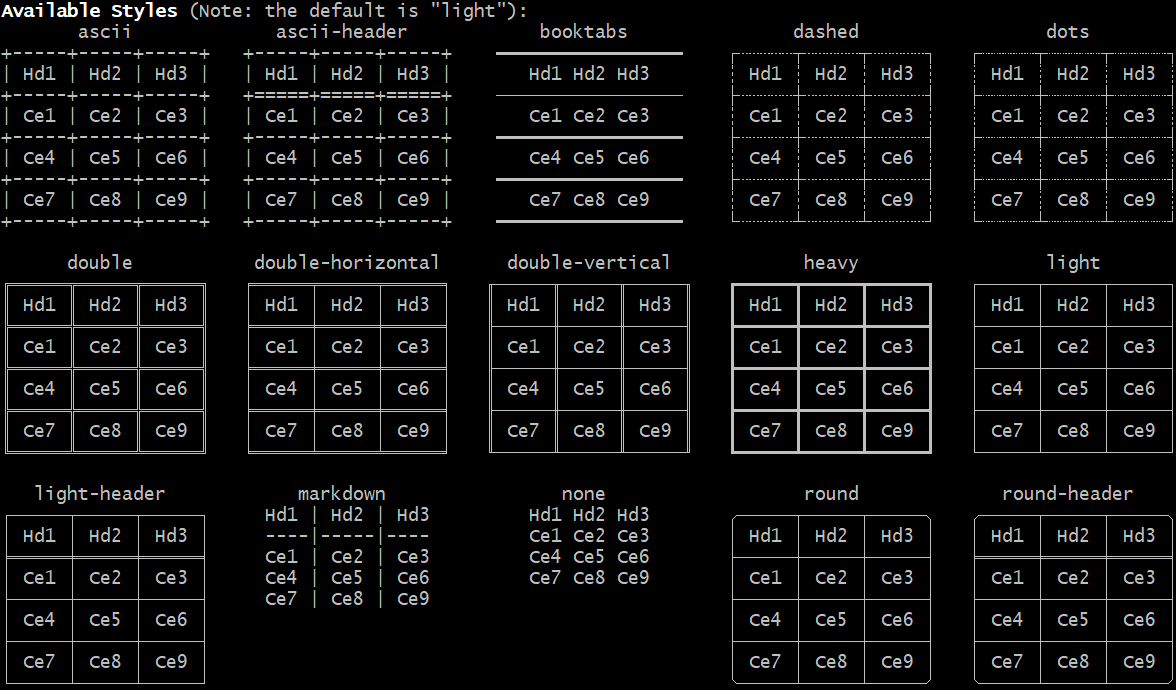
To view available styles, run:
vistab --demo styles
Cookbook Examples
While Vistab excels at rendering arrays, it's also a data-aware formatting engine. Because the API uses a fluent architecture, you can chain multiple logic mutations without intermediate variables.
1. Data Modification & Sorting
You can completely replace data sets or sequentially sort physical rows tracking exact coordinate values without needing pandas overhead:
table = Vistab(style="round", padding=1)

# Sort the array tracking the second column (col_idx=1) descending...
table.set_rows(my_messy_csv_data, header=True).sort_by(1, reverse=True)
2. Output Formatting & Safe Dimensional Windows
Sometimes querying SQL leaves us with extensive data dimensions. We can protect logging interfaces elegantly:
# Force-limit outputs protecting CLI limits!
table.set_max_rows(10).set_max_cols(5)
3. Data Formatting & Precision
You can apply data overrides directly to lock precision across specific columns:
# Force all floats to evaluate to precisely two digits
table.set_precision(2)

# Pass formatting arrays coercing columns sequentially
# a=auto, t=text, i=int, f=float, e=sci
table.set_cols_dtype(["a", "t", "f", "i"])

# Bypass the global precision using inline modifiers
# Here, col 2 maps `f4` (float + precision 4 digits)
table.set_cols_dtype("a,t,f4,i")
When evaluated, the a (automatic) datatype parses columns by inferring numeric types (scientific -> float -> integer), creating uniform alignment.
4. Shorthand Styling & Native Formatting
You don't need to pass massive syntax strings to evaluate layout injections:
# Conditionally highlight physical elements:
for i, condition in enumerate(my_events):
    table.color_row(i, bg="red" if condition == 'CRITICAL' else None)

# Make the header globally bold instantly:
table.bold_header()
Coordinate-Based Cell Styling
vistab supports a fluent, declarative API to inject background colors, foreground colors, and text styles (like bolding and underlining) targeting specific grids—ranging from individual cells, whole rows, columns, headers, or borders.

Coordinate-Based Word Wrapping (Nested Tables)
If you need absolute structural control over spatial layouts—for example, if you are embedding pre-rendered ASCII tables inside the cells of another Vistab—you can bypass the internal word-wrapping engine entirely using coordinate mapping.
By setting wrap=False on specific axes, Vistab guarantees it will preserve your structural spacing verbatim without snapping or aggressively pruning layouts:
# Globally bypass word-wrapping for the entire table
table.set_table_wrap(False)

# Or target specific structural coordinates
table.set_row_wrap(0, False)
table.set_col_wrap(2, False)
table.set_cell_wrap(0, 1, False)
If a cell bypassed with wrap=False exceeds table.max_width, Vistab uses a constraint router (table.on_wrap_conflict = "warn") that drops trailing characters while reconstructing your internal ANSI styling sequences to prevent terminal boundary collapse.
Streaming & Caveat Emptor Pipeline Constraints
For extremely large or infinitely generating files, you can stream data iteratively using the --stream flag to bypass native memory buffering constraints:
$ cat large_dataset.csv | vistab --stream
[!WARNING] Caveat Emptor System Limitations: When executing highly constrained pipeline commands requiring complete structured arrays logically (i.e.
--sort-by), Vistab relies on the host OS executing standard mapping limits naturally. Pipelining infinite streams containing no terminated newlines (likecat /dev/zero) will unconditionally lock system buffers, triggering OS native Out-Of-Memory (OOM) failures similarly to standard POSIXsortbehaviors. No artificial memory caps are injected structurally.
Hierarchical Configuration System
Stop re-typing your constructor arguments! vistab actively scans your execution environment for two distinct configuration architectures:
1. Default Fallbacks (vistab.toml / config.toml)
It evaluates paths sequentially, merging configurations: [./vistab.toml, ./.vistab.toml, ./.config/vistab.toml, ~/.config/vistab/config.toml, ~/.config/vistab.toml, ~/.vistab.toml].
You can generate a default configuration file into the global user profile directly using the CLI:
vistab --create-config
2. Custom Aesthetic Themes (themes.json)
You can lock in CLI layout arguments by saving custom styles into ~/.config/vistab/themes.json using the --save-theme directive. Once saved, these aesthetics become addressable on your machine using --theme.
# Safely capture a global background wash + custom last row colors
vistab data.csv --table-bg-color bright_black --last-row-color magenta --save-theme my_custom_theme

# Execute the saved layout on another dataset modularly universally!
vistab another_data.csv --theme my_custom_theme
Built-in Themes
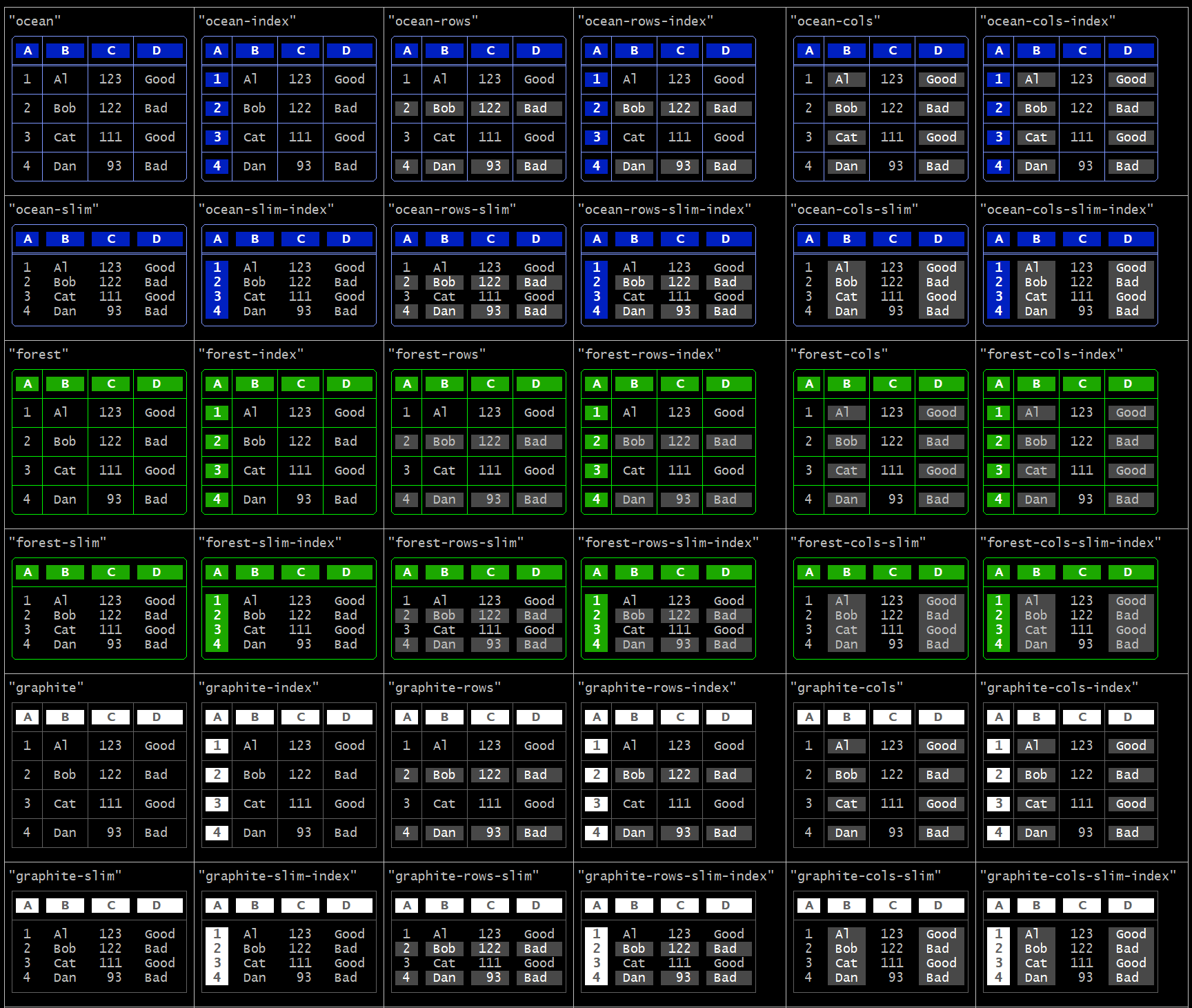
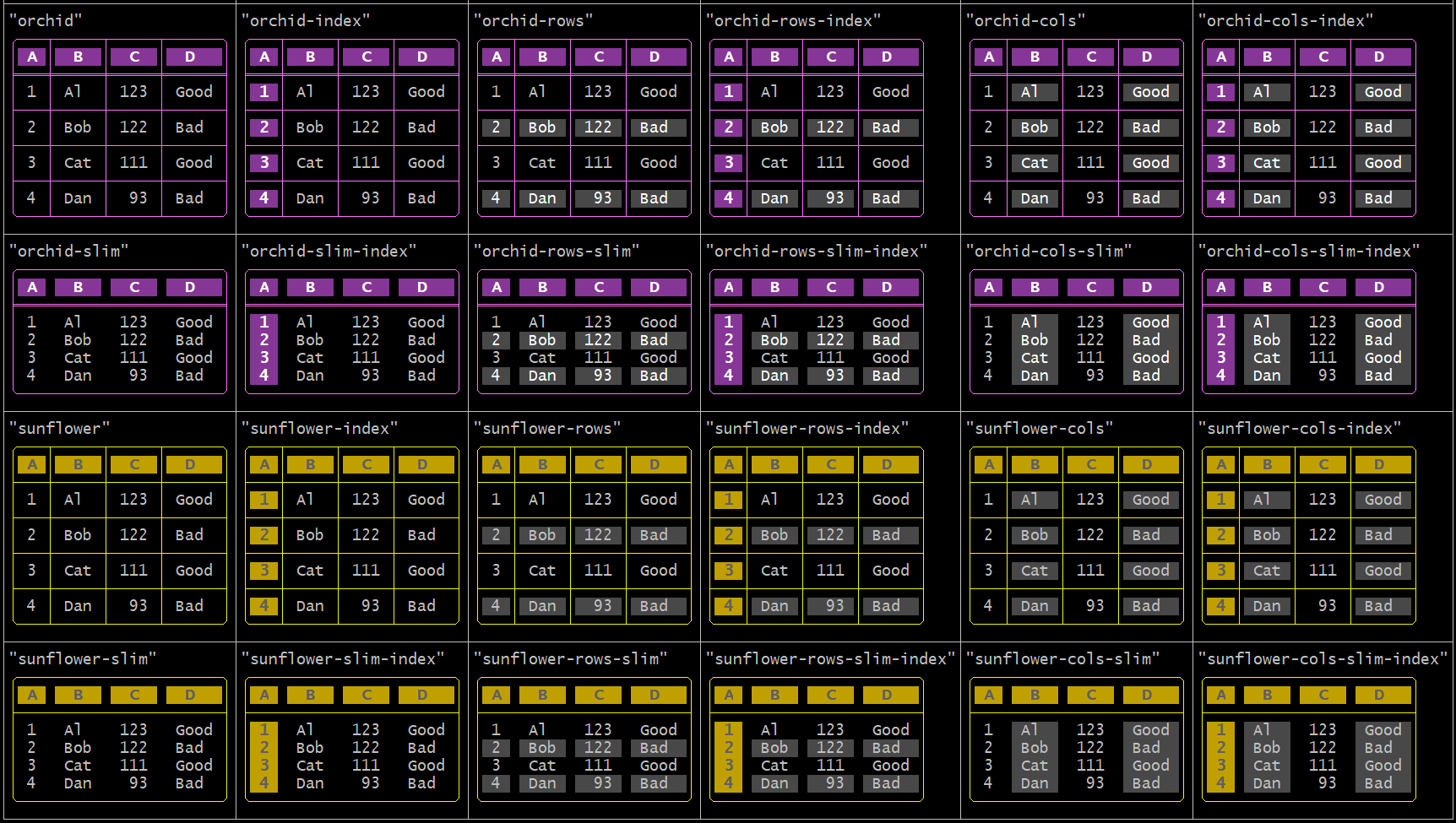
vistab comes with predefined themes including ocean, forest, graphite, orchid, and sunflower.
You can view the built-in themes (which you can alter and save as new themes) by running:
vistab --demo themes
Custom Themes
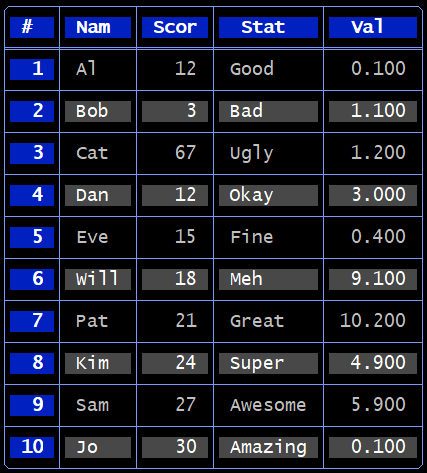
Let's create a test table:
cat > ~/test.csv << EOF
# ,Nam,Scor,Stat,Val
1,Al,12,Good,0.1
2,Bob,3,Bad,1.1
3,Cat,67,Ugly,1.2
4,Dan,12,Okay,3.0
5,Eve,15,Fine,0.4
6,Will,18,Meh,9.1
7,Pat,21,Great,10.2
8,Kim,24,Super,4.9
9,Sam,27,Awesome,5.9
10,Jo,30,Amazing,0.1
EOF
Running:
vistab ~/test.csv --theme ocean-rows-index
produces:
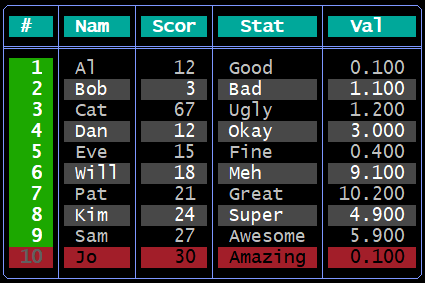
You may then change that theme by running:
vistab ~/test.csv --theme ocean-rows-index --no-hlines \
    --header-bg-color cyan --last-row-bg-color red --last-row-color black \
    --col0-bg-color green
Which results in:
To see how to generate that specific output using code, you can run:
vistab ~/test.csv --theme ocean-rows-index --no-hlines \
    --header-bg-color cyan --last-row-bg-color red --last-row-color black \
    --col0-bg-color green --show-code
Which will output the code you need to generate that table look and feel:
import vistab

custom_theme = {
    "style": "round-header",
    "decorations": 11,
    "header": {
        "fg": "bright_white",
        "bg": "cyan",
        "bold": true
    },
    "border": {
        "fg": "bright_blue"
    },
    "col_0": {
        "fg": "bright_white",
        "bg": "green",
        "bold": true
    },
    "row_-1": {
        "fg": "black",
        "bg": "red"
    },
    "alt_rows": [
        {
            "fg": "white",
            "bg": "black"
        },
        {
            "fg": "bright_white",
            "bg": "bright_black"
        }
    ]
}

table = vistab.Vistab().apply_theme(custom_theme)

# ... map inputs and execute drawing
print(table.draw())
OR you can save it for later use using the --save-theme flag:
vistab ~/test.csv --theme ocean-rows-index --no-hlines \
    --header-bg-color cyan --last-row-bg-color red --last-row-color black \
    --col0-bg-color green --save-theme my_custom_theme
You should see something like:
[SUCCESS] Saved layout globally as 'my_custom_theme' in /home/USER/.config/vistab/themes.json
You can now use it on the command line like this:
vistab ~/test.csv --theme my_custom_theme
Or in code like this:
import vistab

table = vistab.Vistab().apply_theme("my_custom_theme")

# ... map inputs and execute drawing
print(table.draw())
Discovering Output Colors (CLI)
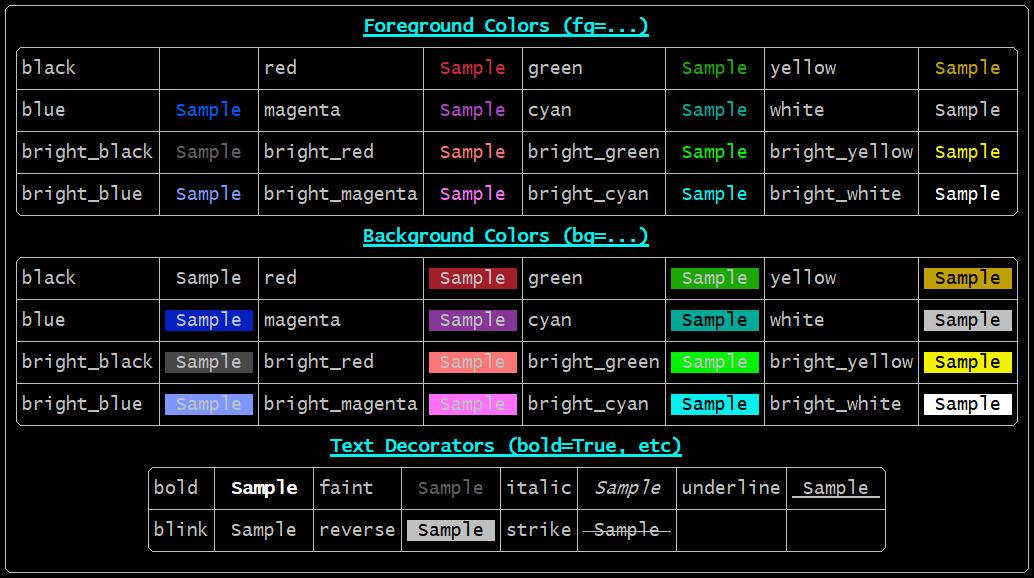
Because terminal color renderings vary across different user host profiles and color palettes, vistab comes packaged with a native matrix test exposing every foreground, background, and styling text option you can safely deploy.
You can view the palette directly on the console by executing:
vistab --demo colors
ANSI Color Layout Support
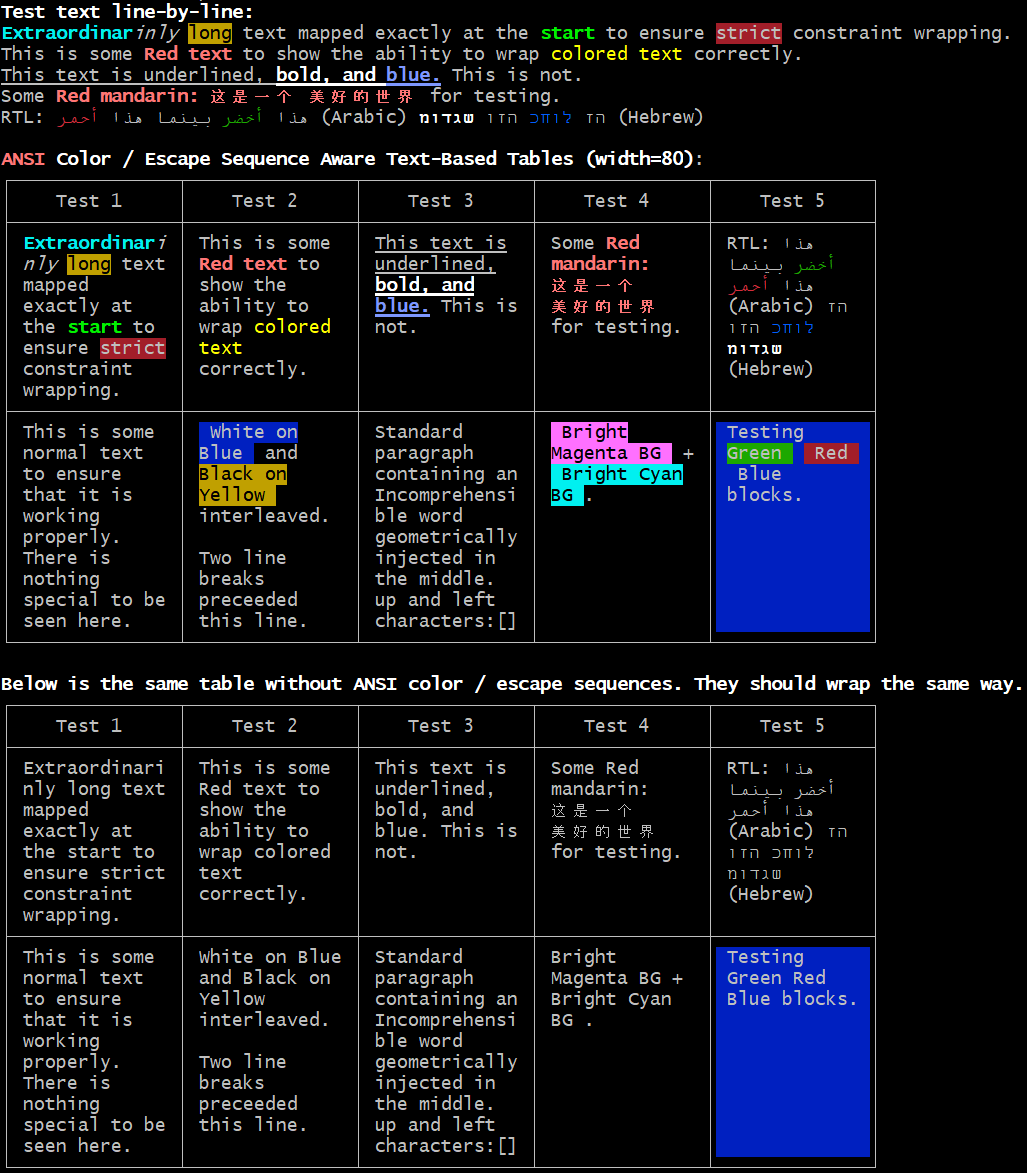
A major benchmark advantage of vistab is native, invisible terminal styling support. Common ASCII libraries frequently break their visual wrapper alignments when raw terminal colors are embedded because they incorrectly count invisible geometry bytes.
You can view a comprehensive color-wrapping conformance test demonstrating dynamic alignment across complex CJK blocks by executing:
vistab --demo capabilities
Advanced Formatting (Datatypes)
vistab can infer and parse formatting rules by passing data types, controlling precision for scientific floats and integers.
from vistab import Vistab

table = Vistab(style="ascii")
table.set_cols_dtype(['t', 'f', 'e', 'i', 'a'])
table.set_cols_align(["l", "r", "r", "r", "l"])

table.add_rows([
    ["text", "float", "exp", "int", "auto"],
    ["alpha", "23.45", 543, 100, 45.67],
    ["beta", 3.1415, 1.23, 78, 56789012345.12],
    ["gamma", 2.718, 2e-3, 56.8, .0000000000128]
])
Limitations & Known Gaps
- Sorting vs. Streaming: Vistab's
--streamcapability processes inputs infinitely, rendering data row-by-row on the fly. However, attempting to sort the stream (--sort-by) requires the engine to cache the entire dataset in physical memory. Streaming extremely large files combined with--sort-bywill trigger anOut of Memoryevent. - Terminal Boundaries: The
max_widthstring constraint wraps data accurately according to integer text lengths. If structural tables are placed into boundaries too thin to support physical text cells (e.g., width=2), the engine will throw aValueErrorrather than attempting to print physically broken graphics.
Detailed API Reference
For the complete list of endpoints, configuration schemas, parameters, and wrapping constraints available in vistab:
Please refer to the absolute granular Vistab Core API Documentation
License
This project is licensed under the BSD 3-Clause License. See LICENSE for details.


Download files
Download the file for your platform. If you're not sure which to choose, learn more about installing packages.
Source Distribution
Built Distribution
Filter files by name, interpreter, ABI, and platform.
If you're not sure about the file name format, learn more about wheel file names.
Copy a direct link to the current filters
File details
Details for the file vistab-1.1.1.tar.gz.
File metadata
- Download URL: vistab-1.1.1.tar.gz
- Upload date:
- Size: 56.2 kB
- Tags: Source
- Uploaded using Trusted Publishing? No
- Uploaded via: twine/6.2.0 CPython/3.14.3
File hashes
| Algorithm | Hash digest | |
|---|---|---|
| SHA256 |
cc726617e10c03f0c10636026a6767b6b88ea3201d1dbfcd41cf2f7ed8746b07
|
|
| MD5 |
2d3353a45b432e83abd5f1739ab5859e
|
|
| BLAKE2b-256 |
a539fca07005224f3f610398fff985855ddb32c340c653c26404afd9b150fc85
|
File details
Details for the file vistab-1.1.1-py3-none-any.whl.
File metadata
- Download URL: vistab-1.1.1-py3-none-any.whl
- Upload date:
- Size: 45.4 kB
- Tags: Python 3
- Uploaded using Trusted Publishing? No
- Uploaded via: twine/6.2.0 CPython/3.14.3
File hashes
| Algorithm | Hash digest | |
|---|---|---|
| SHA256 |
43c8d4057135fecc5f4f2a0a3e5bd8fb71a55a5d5a75d023e33014377235173a
|
|
| MD5 |
428cdeed7052c6d936464bee3a79a522
|
|
| BLAKE2b-256 |
7a0aa2d23323f4f1b8dda6a0b803268d71677e6a0d7256e4c417b183db1889b3
|






