
VISTAL: A visualization tool for temporal action localization
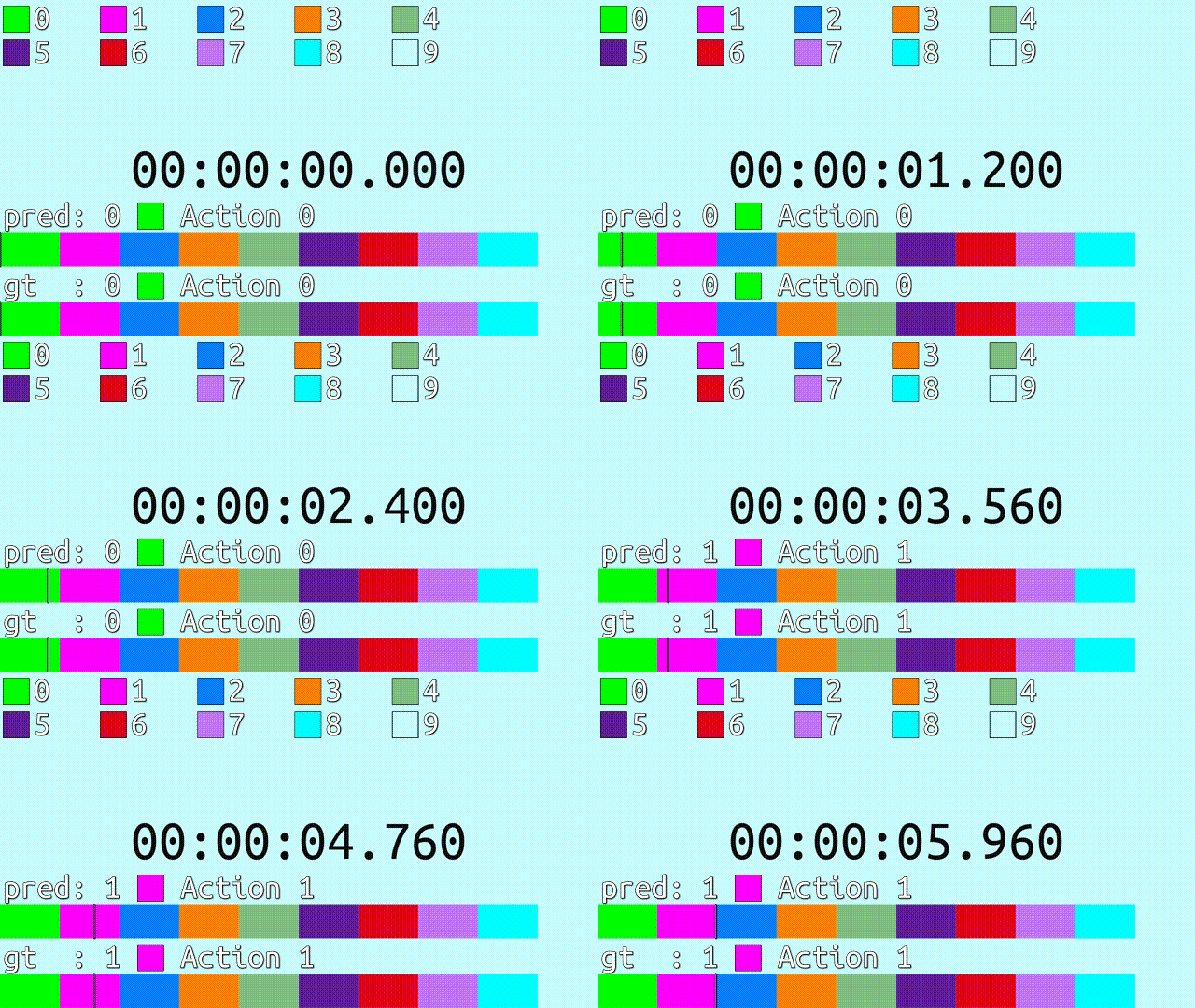
A lightweight tool for visualizing temporal action localization results. It generates .ass subtitle files containing timelines for videos.
Installation
pip install vistal
Tutorial
Import the library
from vistal import vistal, ColourScheme, Colour
Pack the temporal labels into a list of tuple(start, end, label_id), for example:
prediction = [
    # start, end, label_id
    ( 0,     2,     0),
    ( 2,     3,     1),
    ( 3,     5,     2),
    ( 5,     6,     3),
]
start and end are integers or floats in seconds, and label_id are integer IDs for each action. It is best that the whole video duration is covered by (start, end) sections.
And the actual temporal label, for example, is
ground_truth = [
    ( 0,     1,     0),
    ( 1,     1.8,   3),
    ( 1.8,   5,     1),
    ( 4,     6,     2),
]
And another dict maps from label IDs to their names:
label_names = {
    0: 'foo',
    1: 'bar',
    2: 'baz',
    3: 'background',
}
Now we create a colour scheme to determine what colour to represent each action:
colour_scheme = ColourScheme(
    colours=[
        Colour(b=255, g=0,   r=0),
        Colour(b=0,   g=255, r=0),
        Colour(b=0,   g=0,   r=255),
        Colour(alpha=255),
    ]
)
Or, we can generate some random colours. The last action is background, therefore it should be transparent.
colour_scheme = ColourScheme(n_colours=4, transparent_id=3)
Suppose the video resolution is 1280x720, and it lasts for 6 seconds. By default, the display area of the subtitles is the same as the video frame area. Scale up the display resolution by 2 times, because a few thousand is normally enough:
display_width = 1280 * 2
display_height = 720 * 2
video_duration = 6
The main function vistal creates a subtitle object:
sub = vistal(
    temporal_list_dict={
        'gt  ': ground_truth,
        'pred': prediction
    },
    label_names=label_names,
    colour_scheme=colour_scheme,
    video_duration=video_duration,
    display_width=display_width,
    display_height=display_height,
    timeline_height=72,
    font_size=72,
    font_name='Ubuntu Mono',
    show_legend=True,
)
Save to an .ass file:
sub.save('tutorial.ass')
Finally, play the video and load the subtitle to the player. Make sure your video player supports .ass subtitle, for example PotPlayer. Here is how it looks like on a blank video:
For another complete example, see example.py.
FAQ
What video player supports the generated subtitles?
As far as I am aware of, VLC media player and PotPlayer on Windows works fine. Comparison of video player software: Subtitle ability - Wikipidia
Why the VLC media player sometimes fails to show some elements?
Try restart the video, without unloading the subtitles. For example, click "next media" while in "loop one" mode.
The moving cursor jumps rather than moves in PotPlayer.
Try right click video -> subtitles -> Enable ASS/SSA subtitle animations.
Why are everything looks like stretched?
display_width and display_height do not match the video aspect ratio.
How to burn the subtitles into the video?
FFmpeg is capable of doing this. For example: ffmpeg -i {input_video_path} -vf scale={width}x{height},subtitles={subtitle_path} {output_path}. FFmpeg wiki: How To Burn Subtitles Into Video
How to put the subtitles outside the video?
The solution is for PotPlayer. Aspect ratio of the display area (not video) leaving enough room for the subtitles needs to be determined beforehand, applied in right click -> Window Size -> Set Custom Window Size. Then display_width and display_height should match it too. Before playing the video, uncheck "Display text subs inside the video" in Preferences -> Subtitles.
There are small gaps between two rectangles in the timelines, while these two actions are exactly consecutive.
It is strongly recommended to set display_width and display_height to integer multiples of the display area dimensions. Normally the display area for subtitles is just the video frame area (except for the scenario in the section above: "How to put the subtitles outside the video"). Following these advices, one should be able to avoid this problem (that seems to be related to implementation of .ass subtitles).
1 maintainer

Metadata
1 maintainer
Release files for vistal 0.1.3
For a detailed explanation of source distributions (sdists) and built distributions (wheels), please see the package formats documentation.
Source distribution (sdist)
| File | Size | Uploaded | |
|---|---|---|---|
| vistal-0.1.3.tar.gz | 13.3 kB | Details |
Built distribution (wheel)
| File | Interpreter | ABI | Platform | Reset |
|---|---|---|---|---|
| vistal-0.1.3-py3-none-any.whl | Python 3 | none | any | Details |
Total release size: 25.7 kB
Release files / vistal-0.1.3.tar.gz
| Download URL | vistal-0.1.3.tar.gz |
|---|---|
| Size | 13.3 kB |
| Tags | Source |
|
SHA-256 checksum How to use checksums |
622228bfd36978ad09c2b5aef7af1fbe5f88c7f9e0593ca108e6feaa32563171
|
|
BLAKE2b-256 checksum How to use checksums |
b41fe8312e7596a76169322bb22341fb2e49643664109d7d34138a5e096d1f80
|
| Upload date | |
|
Uploaded using Trusted Publishing? What is trusted publishing? |
No |
| Uploaded via |
twine/4.0.1 CPython/3.9.12
|
Release files / vistal-0.1.3-py3-none-any.whl
| Download URL | vistal-0.1.3-py3-none-any.whl |
|---|---|
| Size | 12.4 kB |
| Tags | Python 3 |
|
SHA-256 checksum How to use checksums |
0001505dd45413c14a36043b5d700509d86c139b7668b33c3c0cabbec9ecb603
|
|
BLAKE2b-256 checksum How to use checksums |
a17b214abc322a334bf83df487194d96d798b1e95810584d51ca565005e0f070
|
| Upload date | |
|
Uploaded using Trusted Publishing? What is trusted publishing? |
No |
| Uploaded via |
twine/4.0.1 CPython/3.9.12
|














