
Visual Automata is a Python 3 library built as a wrapper for the Automata library to add more visualization features.

Project description
Visual Automata



Copyright 2021 Lewi Lie Uberg
Released under the MIT license
Visual Automata is a Python 3 library built as a wrapper for the Automata library to add more visualization features.
Contents
- Visual Automata
Prerequisites
pip install automata-lib
pip install pandas
pip install graphviz
pip install colormath
pip install jupyterlab
Installing
Finite Automaton (FA)
VisualDFA
Importing
Import needed classes.
from automata.fa.dfa import DFA

from visual_automata.fa.dfa import VisualDFA
Instantiating DFAs
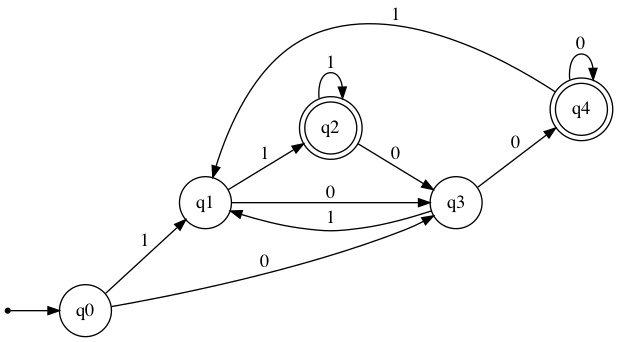
Define an visual_automata DFA that can accept any string ending with 00 or 11.
dfa = VisualDFA(
    states={"q0", "q1", "q2", "q3", "q4"},
    input_symbols={"0", "1"},
    transitions={
        "q0": {"0": "q3", "1": "q1"},
        "q1": {"0": "q3", "1": "q2"},
        "q2": {"0": "q3", "1": "q2"},
        "q3": {"0": "q4", "1": "q1"},
        "q4": {"0": "q4", "1": "q1"},
    },
    initial_state="q0",
    final_states={"q2", "q4"},
)
Converting
An automata-lib DFA can be converted to a VisualDFA.
Define an automata-lib DFA that can accept any string ending with 00 or 11.
dfa = DFA(
    states={"q0", "q1", "q2", "q3", "q4"},
    input_symbols={"0", "1"},
    transitions={
        "q0": {"0": "q3", "1": "q1"},
        "q1": {"0": "q3", "1": "q2"},
        "q2": {"0": "q3", "1": "q2"},
        "q3": {"0": "q4", "1": "q1"},
        "q4": {"0": "q4", "1": "q1"},
    },
    initial_state="q0",
    final_states={"q2", "q4"},
)
Convert automata-lib DFA to VisualDFA.
dfa = VisualDFA(dfa)
Transition Table
Outputs the transition table for the given DFA.
dfa.table
       0    1
→q0   q3   q1
q1    q3  *q2
*q2   q3  *q2
q3   *q4   q1
*q4  *q4   q1
Minimal-DFA
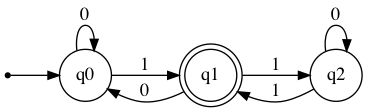
Creates a minimal DFA which accepts the same inputs as the old one. Unreachable states are removed and equivalent states are merged. States are renamed by default.
new_dfa = VisualDFA(
    states={'q0', 'q1', 'q2'},
    input_symbols={'0', '1'},
    transitions={
        'q0': {'0': 'q0', '1': 'q1'},
        'q1': {'0': 'q0', '1': 'q2'},
        'q2': {'0': 'q2', '1': 'q1'}
    },
    initial_state='q0',
    final_states={'q1'}
)
new_dfa.table
      0    1
→q0  q0  *q1
*q1  q0   q2
q2   q2  *q1
new_dfa.show_diagram()
minimal_dfa = VisualDFA.minify(new_dfa)
minimal_dfa.show_diagram()
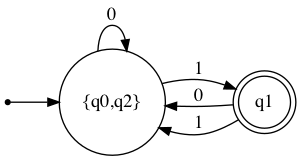
minimal_dfa.table
                0        1
→{q0,q2}  {q0,q2}      *q1
*q1       {q0,q2}  {q0,q2}
Check input strings
1001 does not end with 00 or 11, and is therefore Rejected
dfa.input_check("1001")
          [Rejected]
Step: Current state: Input symbol: New state:
1                →q0             1         q1
2                 q1             0         q3
3                 q3             0        *q4
4                *q4             1         q1
10011 does end with 11, and is therefore Accepted
dfa.input_check("10011")
          [Accepted]
Step: Current state: Input symbol: New state:
1                →q0             1         q1
2                 q1             0         q3
3                 q3             0        *q4
4                *q4             1         q1
5                 q1             1        *q2
Show Diagram
For IPython dfa.show_diagram() may be used.
For a python script dfa.show_diagram(view=True) may be used to automatically view the graph as a PDF file.
dfa.show_diagram()
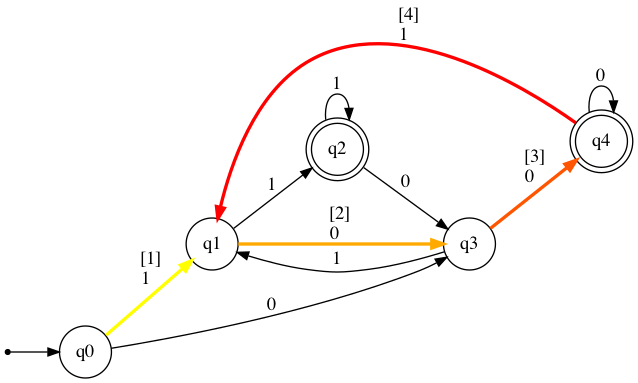
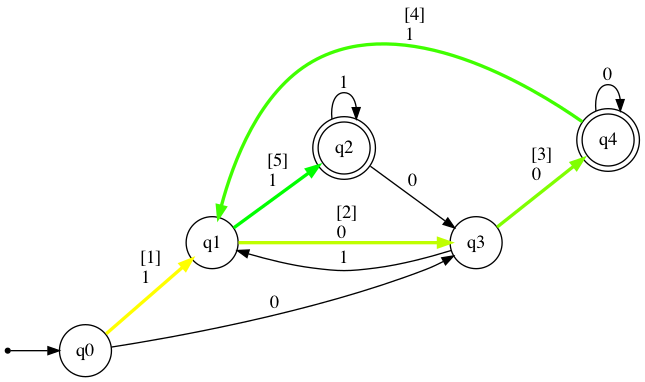
The show_diagram method also accepts input strings, and will return a graph with gradient red arrows for Rejected results, and gradient green arrows for Accepted results. It will also display a table with transitions states stepwise. The steps in this table will correspond with the [number] over each traversed arrow.
Please note that for visual purposes additional arrows are added if a transition is traversed more than once.
dfa.show_diagram("1001")
          [Rejected]
Step: Current state: Input symbol: New state:
1                →q0             1         q1
2                 q1             0         q3
3                 q3             0        *q4
4                *q4             1         q1
dfa.show_diagram("10011")
          [Accepted]
Step: Current state: Input symbol: New state:
1                →q0             1         q1
2                 q1             0         q3
3                 q3             0        *q4
4                *q4             1         q1
5                 q1             1        *q2
VisualNFA
Importing
Import needed classes.
from automata.fa.nfa import NFA

from visual_automata.fa.nfa import VisualNFA
Instantiating NFAs
Define an visual_automata NFA that can accept any string with the pattern 10, 1010, 101010.
nfa = VisualNFA(
    states={"q0", "q1", "q2"},
    input_symbols={"0", "1"},
    transitions={
        "q0": {"": {"q2"}, "1": {"q1"}},
        "q1": {"1": {"q2"}, "0": {"q0", "q2"}},
        "q2": {},
    },
    initial_state="q0",
    final_states={"q0"},
)
Converting
An automata-lib NFA can be converted to a VisualNFA.
Define an automata-lib NFA that can accept any string with the pattern 10, 1010, 101010.
nfa = NFA(
    states={"q0", "q1", "q2"},
    input_symbols={"0", "1"},
    transitions={
        "q0": {"": {"q2"}, "1": {"q1"}},
        "q1": {"1": {"q2"}, "0": {"q0", "q2"}},
        "q2": {},
    },
    initial_state="q0",
    final_states={"q0"},
)
Convert automata-lib NFA to VisualNFA.
nfa = VisualNFA(nfa)
Transition Table
Outputs the transition table for the given DFA.
nfa.table
             0   1   λ
→*q0         ∅  q1  q2
q1    {*q0,q2}  q2   ∅
q2           ∅   ∅   ∅
Eliminate lambda/epsilon
Creates a NFA with lambda transitions removed.
nfa_eliminated = VisualNFA.eliminate_lambda(nfa)
nfa_eliminated.table
             0   1
→*q0         ∅  q1
q1    {*q0,q2}  q2
q2           ∅   ∅
nfa_eliminated.show_diagram()

Check input strings
101 does not correspond with the pattern 10, 1010, 101010, and is therefore Rejected
nfa.input_check("101")
          [Rejected]
Step: Current state: Input symbol: New state:
1               →*q0             1         q1
2                 q1             0         q2
3                 q2             1          ∅
1010 does correspond with the pattern 10, 1010, 101010, and is therefore Accepted
nfa.input_check("1010")
          [Accepted]
Step: Current state: Input symbol: New state:
1               →*q0             1         q1
2                 q1             0       →*q0
3               →*q0             1         q1
4                 q1             0       →*q0
Show Diagram
For IPython nfa.show_diagram() may be used.
For a python script nfa.show_diagram(view=True) may be used to automatically view the graph as a PDF file.
nfa.show_diagram()
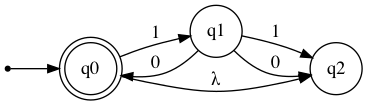
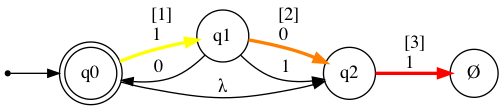
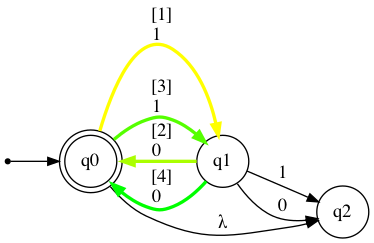
The show_diagram method also accepts input strings, and will return a graph with gradient red arrows for Rejected results, and gradient green arrows for Accepted results. It will also display a table with transitions states stepwise. The steps in this table will correspond with the [number] over each traversed arrow.
Please note that for visual purposes additional arrows are added if a transition is traversed more than once.
nfa.show_diagram("101")
          [Rejected]
Step: Current state: Input symbol: New state:
1               →*q0             1         q1
2                 q1             0         q2
3                 q2             1          ∅
nfa.show_diagram("1010")
          [Accepted]
Step: Current state: Input symbol: New state:
1               →*q0             1         q1
2                 q1             0       →*q0
3               →*q0             1         q1
4                 q1             0       →*q0
Please note that for long input strings, the path calculations may take some time.
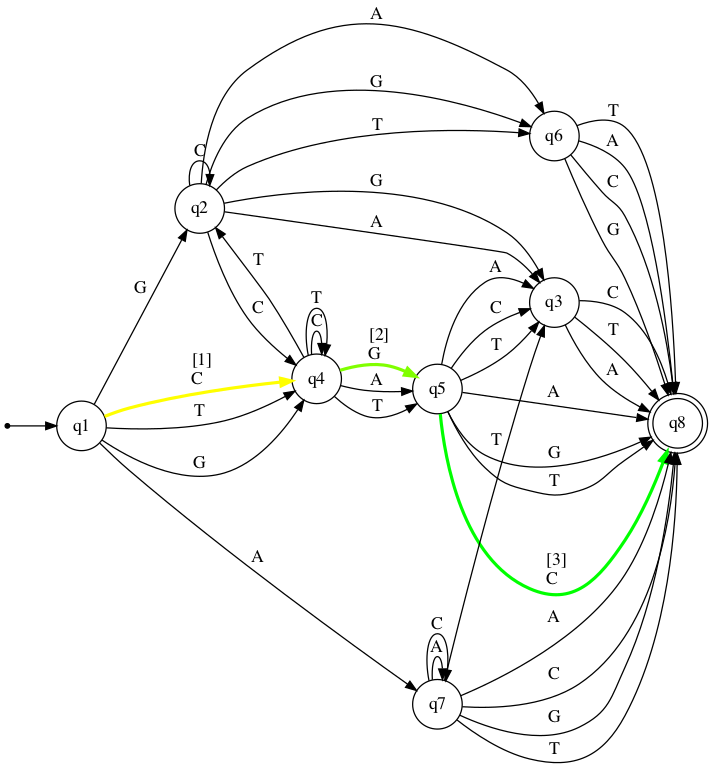
big_nfa = VisualNFA(
    states={"q1", "q2", "q3", "q4", "q5", "q6", "q7", "q8"},
    input_symbols={"A", "C", "G", "T"},
    transitions={
        "q1": {"A": {"q7"}, "C": {"q4"}, "G": {"q4", "q2"}, "T": {"q4"}},
        "q2": {"A": {"q3", "q6"}, "C": {"q2", "q4"}, "G": {"q3", "q6"}, "T": {"q6"}},
        "q3": {"A": {"q8"}, "C": {"q8"}, "T": {"q8"}},
        "q4": {"A": {"q5"}, "C": {"q4"}, "G": {"q5"}, "T": {"q2", "q4", "q5"}},
        "q5": {"A": {"q3", "q8"}, "C": {"q3", "q8"}, "G": {"q8"}, "T": {"q3", "q8"}},
        "q6": {"A": {"q8"}, "C": {"q8"}, "G": {"q8"}, "T": {"q8"}},
        "q7": {"A": {"q7", "q8"}, "C": {"q7", "q8"}, "G": {"q8"}, "T": {"q3", "q8"}},
        "q8": {},
    },
    initial_state="q1",
    final_states={"q8"},
)
big_nfa.table
big_nfa.show_diagram("CGC")
          [Accepted]
Step: Current state: Input symbol: New state:
1                →q1             C         q4
2                 q4             G         q5
3                 q5             C        *q8
Authors
License
This project is licensed under the MIT License - see the LICENSE.md file for details
Acknowledgments
- Caleb Evans for his work on automata-lib.
- Geir Arne Hjelle, Michal Porteš, and Bart Willems for their general counsel.
- Dr. Seifedine Kadry. My Further Discrete Mathematics professor at Noroff University College, for teaching me Automata.
- JFLAP for their work on a GUI based Automata application.


Download files
Download the file for your platform. If you're not sure which to choose, learn more about installing packages.
Source Distribution
Built Distribution
Filter files by name, interpreter, ABI, and platform.
If you're not sure about the file name format, learn more about wheel file names.
Copy a direct link to the current filters
File details
Details for the file visual-automata-1.1.0.tar.gz.
File metadata
- Download URL: visual-automata-1.1.0.tar.gz
- Upload date:
- Size: 15.4 kB
- Tags: Source
- Uploaded using Trusted Publishing? No
- Uploaded via: twine/3.4.1 importlib_metadata/3.7.3 pkginfo/1.7.0 requests/2.25.1 requests-toolbelt/0.9.1 tqdm/4.59.0 CPython/3.7.1
File hashes
| Algorithm | Hash digest | |
|---|---|---|
| SHA256 |
43075b33fd2053b0c408d53f27967555a9f864bacab8c3a52b1d62560a491902
|
|
| MD5 |
3799dbb5133e8650637ad0f4a7dcf697
|
|
| BLAKE2b-256 |
03edf5a762a8185de728a5c60bb02b6607fa12c75fdaf7f5c8fdd6493ced4e5a
|
File details
Details for the file visual_automata-1.1.0-py3-none-any.whl.
File metadata
- Download URL: visual_automata-1.1.0-py3-none-any.whl
- Upload date:
- Size: 15.8 kB
- Tags: Python 3
- Uploaded using Trusted Publishing? No
- Uploaded via: twine/3.4.1 importlib_metadata/3.7.3 pkginfo/1.7.0 requests/2.25.1 requests-toolbelt/0.9.1 tqdm/4.59.0 CPython/3.7.1
File hashes
| Algorithm | Hash digest | |
|---|---|---|
| SHA256 |
a4b6bee503dc77ac84fa834a8a94571e2fe211f1a8af82daf063dcda66b6b572
|
|
| MD5 |
087fe15e568267ebbc69822c2031a0f2
|
|
| BLAKE2b-256 |
514996a6fd5f9cf6e4894046b301e472ecfb23567eba6cf9d6f24850b1dd533d
|






