

VisualAgents
A live map of which agent in your multi-agent AI system is doing what — built from its chain of thought.





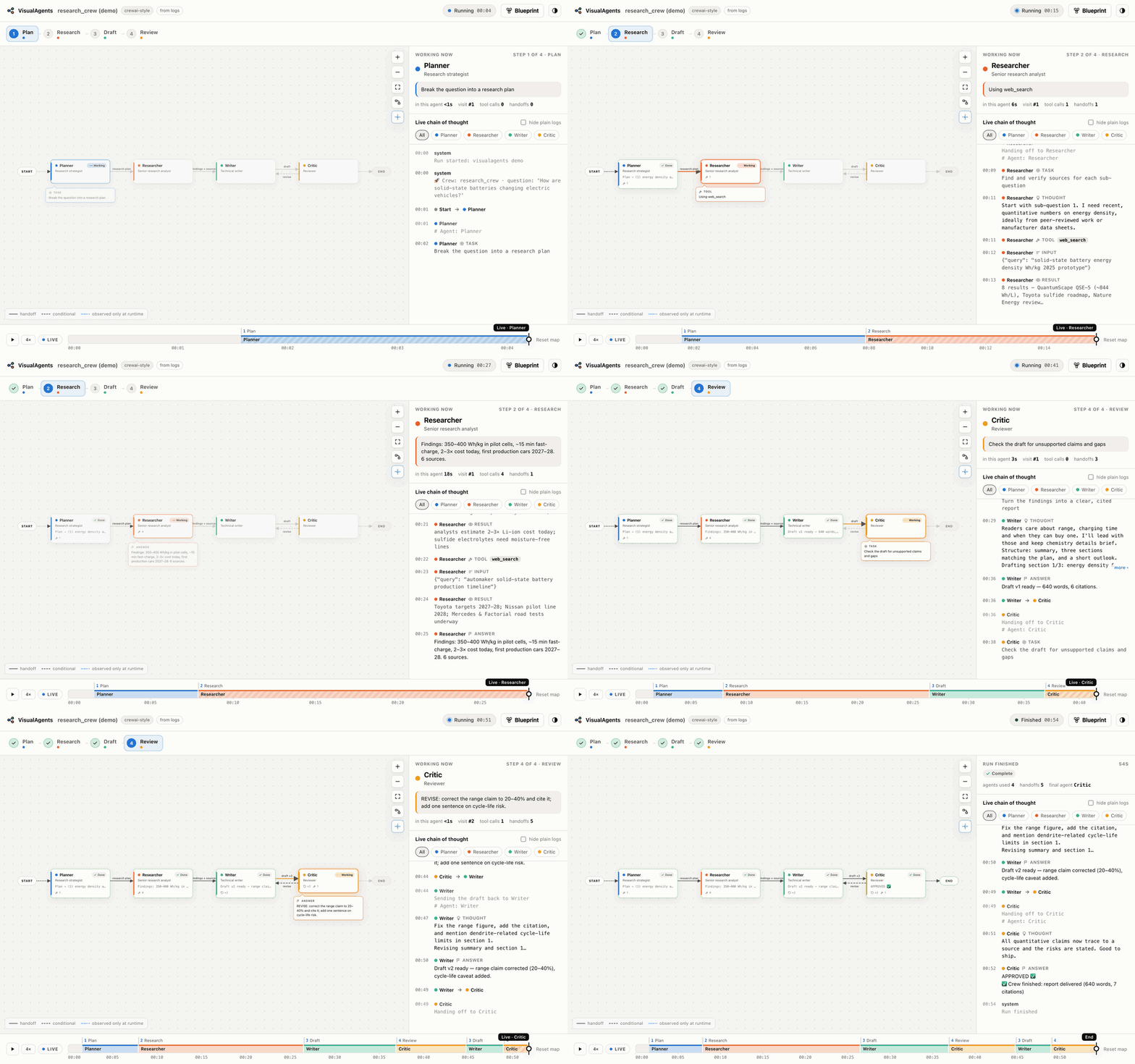
Multi-agent apps usually show you one long stream of thoughts and tool calls. You can't tell which specialist is working, where the request is in the workflow, or why it just looped back. VisualAgents reads your agent project, draws its agents and handoffs as a map, and lights that map up live while the agent works — from the terminal, on your own machine, with no changes to your code.
Contents · Highlights · Quick start · Watching an agent live · The dashboard · How it works · Supported frameworks · Choosing the LLM · Instrument anything · Examples · CLI reference · Privacy · Troubleshooting
Highlights
- Maps any agent repo. Static analysis understands LangGraph, CrewAI, AutoGen, the OpenAI Agents SDK, Swarm, Google ADK, smolagents, LlamaIndex and raw OpenAI-SDK apps; an optional LLM pass (Claude, GPT, Gemini or a local model) adds roles, tools, handoffs and the step-by-step workflow.
- Live map. The working agent glows with a thought bubble, handoffs animate along the arrows (with ×N counts for loops), workflow steps tick off, and the chain of thought streams beside it — colour-coded per agent.
- Rewind and replay. A time ruler shows every agent's turn. Drag back to any second and the whole dashboard rewinds; press play to replay at up to 16×. Every run is recorded and can be replayed later.
- No setup per project. Run
visualagentsand answer three questions. It finds how the project starts, uses the project's own virtualenv, and remembers your choices. Orhooka folder once and keep running your agent however you like. - Precise where it can be, smart where it can't. Auto-instrumentation gives exact agent boundaries for LangChain/LangGraph, the OpenAI Agents SDK and direct OpenAI-SDK calls; everything else is attributed from the console output, with optional LLM narration.
- Interactive. Drag blocks around (arrows follow), hover a line of thought to make its agent bounce, click an agent for its own history, switch light/dark, share a link to an exact moment.
- Private by default. Everything runs on
127.0.0.1. Your code only goes to an LLM if you pick one, with secrets redacted first.
Quick start
1. Install
Requires Python 3.10+.
uv tool install "visualagents[all] @ git+https://github.com/kaih06-hub/VisualAgents.git"
or with pipx: pipx install "visualagents[all] @ git+https://github.com/kaih06-hub/VisualAgents.git".
Claude support is built in; [all] adds Gemini and OpenAI / OpenAI-compatible servers (Ollama, LM Studio, vLLM).
From a local clone: uv tool install --editable ./VisualAgents --with google-genai --with openai.
2. See it work (no API key)
visualagents demo
A simulated four-agent research crew — planner → researcher → writer ⇄ critic — runs in your terminal while the dashboard maps it.
3. Point it at your own agent
visualagents
Three questions, then your agents' map pops up:
  VisualAgents  · a live map of your agents
  Three questions, then your agents' map pops up. Ctrl+C to quit.

1/3 Which project should VisualAgents map?
  ✔ ~/VisualAgents/examples/langgraph_supervisor

2/3 Which LLM should read the code and draw the map?
  ✔ Google Gemini
  Model
  ✔ gemini-2.5-flash

3/3 Google Gemini API key
  Paste it below - it stays hidden · get one at https://aistudio.google.com/apikey · empty = skip
  API key:
  ✔ Key works · 34 models available
  ✔ Saved to ~/.visualagents/keys.json

  ✔ Found 4 agent(s): Supervisor, Researcher, Coder, Reviewer  (langgraph)
  ✔ Map is open at http://127.0.0.1:7420

▶ Watch it live?
  ❯ Start it now  python app.py
    Start it with a different command…
    Hook it - I'll start it myself  IDE, scripts, notebooks: it shows up whenever it runs
    Just show the map
- Project — a recent one, the current folder, any path (Tab completes), or a GitHub URL, which it clones.
- LLM — Gemini, Claude, OpenAI, a local / OpenAI-compatible server, or offline; then a model (best / cheaper / cheapest, or any id).
- API key — pasted hidden, checked with a free model-list call, and (if you agree) saved to
~/.visualagents/keys.json, readable only by you. Next time you just press Enter through the defaults.
Menus work with the arrow keys (or j/k and numbers).
Watching an agent live
The map moves only while the agent is actually working. VisualAgents watches; it doesn't do the work. So:
- Start the agent — choose Start it now in the terminal, or press ▶ Start on the map. VisualAgents runs the project's start command in your terminal.
- Give it a task, the way that agent takes input:
- agents that ask questions in the terminal (e.g. TradingAgents asks for a ticker) → answer them there;
- web-app agents (e.g. LAMBDA) → open the agent's own page and type your request;
- agents that take the task as an argument → put
{task}in the start command (visualagents run . -- python main.py "{task}") and a What should it do? box appears on the dashboard.
- Watch the map light up. When the run ends, ▶ Run again starts the next one.
There are three ways to connect VisualAgents to an agent — pick whichever fits how you work:
| Command | Best for | |
|---|---|---|
| Guided | visualagents |
Getting started: project → LLM → key → map → start. |
| Run through it | visualagents run <folder> |
Repeating runs. Finds how the project starts (README commands, start.sh, FastAPI / Gradio / Streamlit / Chainlit apps, __main__ scripts, pyproject, package.json, Makefile), asks once, remembers it in .visualagents/config.json, and uses the project's virtualenv (or uv run / poetry run). |
| Hook once | visualagents hook <folder> |
Running the agent your usual way — IDE, scripts, notebooks, cron. Installs a one-line startup file into the project's virtualenv; every Python process from it appears on a background dashboard (http://127.0.0.1:7400) as soon as it calls an LLM. pip, pytest and editor tools stay invisible. |
visualagents run ~/projects/my-agent --pick                 # choose the start command again
visualagents run ~/projects/my-agent -- python main.py "q"  # or give an exact command
visualagents hook ~/projects/my-agent                       # then: ./start.sh, your IDE, …
visualagents status | open <folder> | unhook <folder> | up | down
Start scripts that push the app into the background or send its output to a log file still work: events reach
the dashboard over HTTP, and *.log files the app writes are followed. You can also feed it output you already
have: python main.py 2>&1 | visualagents pipe ., or visualagents watch . --log run.log.
The dashboard
Live map
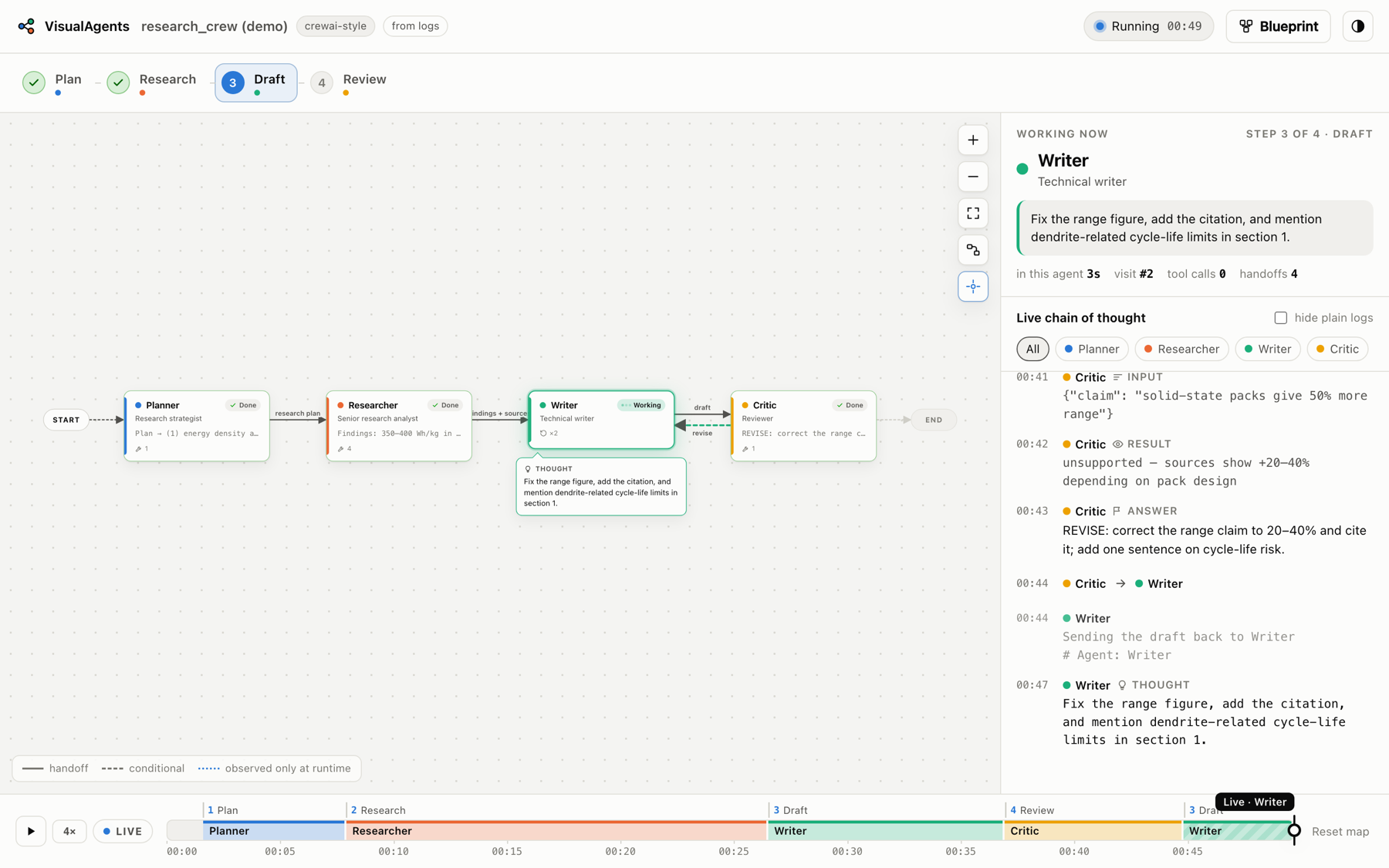
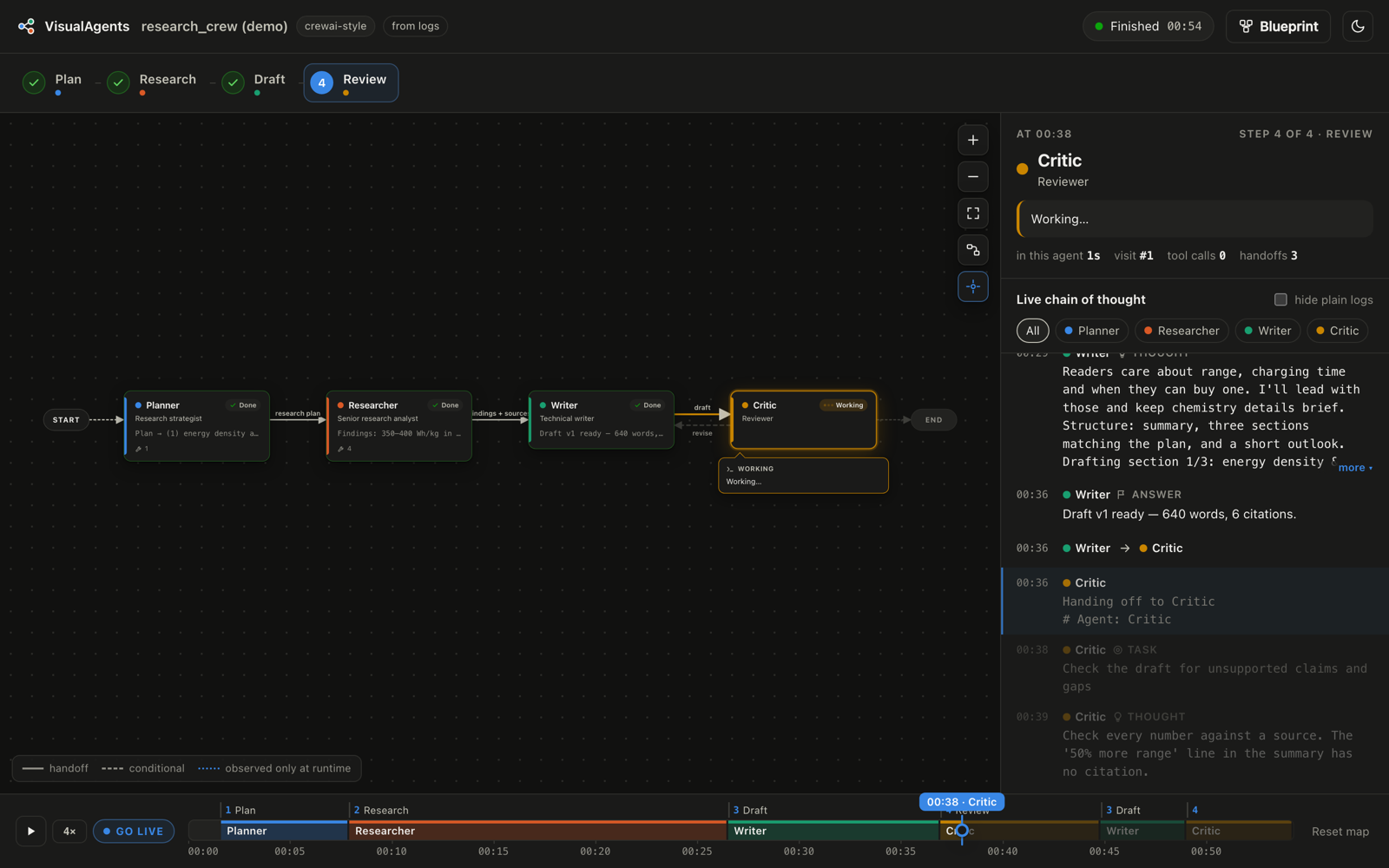
- Graph — agents laid out in workflow order (left→right, or top→bottom on narrow screens). The working agent glows with a bubble showing what it's thinking; finished agents get a ✓; arrows show who hands work to whom, with traversal counts. Two-way handoffs are drawn as parallel arrows; handoffs that weren't in the blueprint appear dotted, and agents it missed appear dashed.
- Steps — the blueprint's phases across the top, checked off as the run moves through them.
- Working now — the active agent, its current activity, time in this turn, tool calls and handoffs.
- Live chain of thought — every thought, tool call, result and answer, colour-coded per agent; filter by agent or hide plain logs. Hover any line and its agent lights up and bounces on the map.
- Drag any block to rearrange the map — arrows follow, positions are remembered per project, and the layout button restores the automatic layout. Click a block for that agent's details and its own chain of thought.
Blueprint
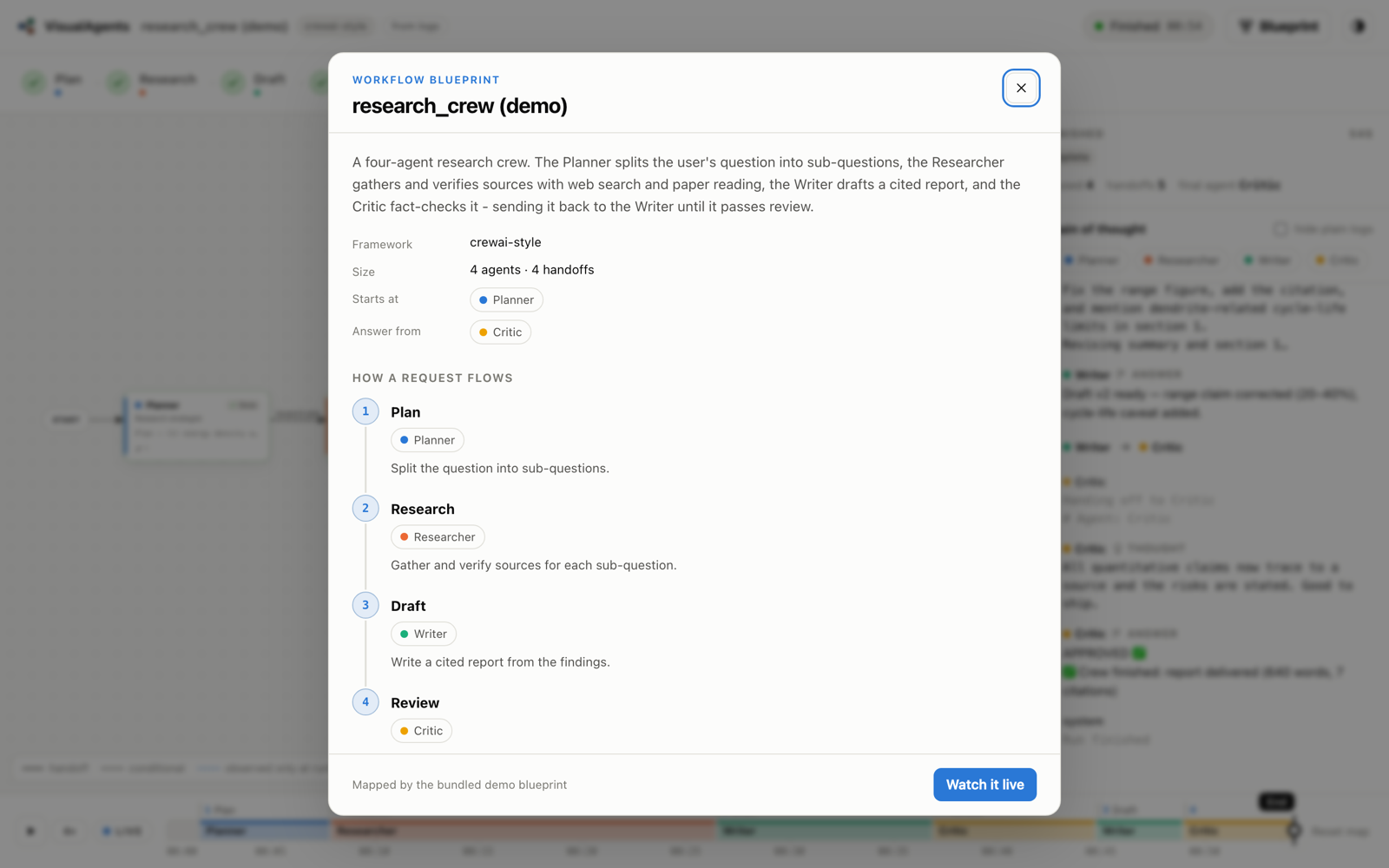
The first time you open a project the blueprint pops up (press B any time): a summary, where requests enter and which agent answers, the step-by-step flow, every agent with its role, tools and source location, and every handoff. It scrolls in one column, top to bottom.
Time ruler — rewind and replay
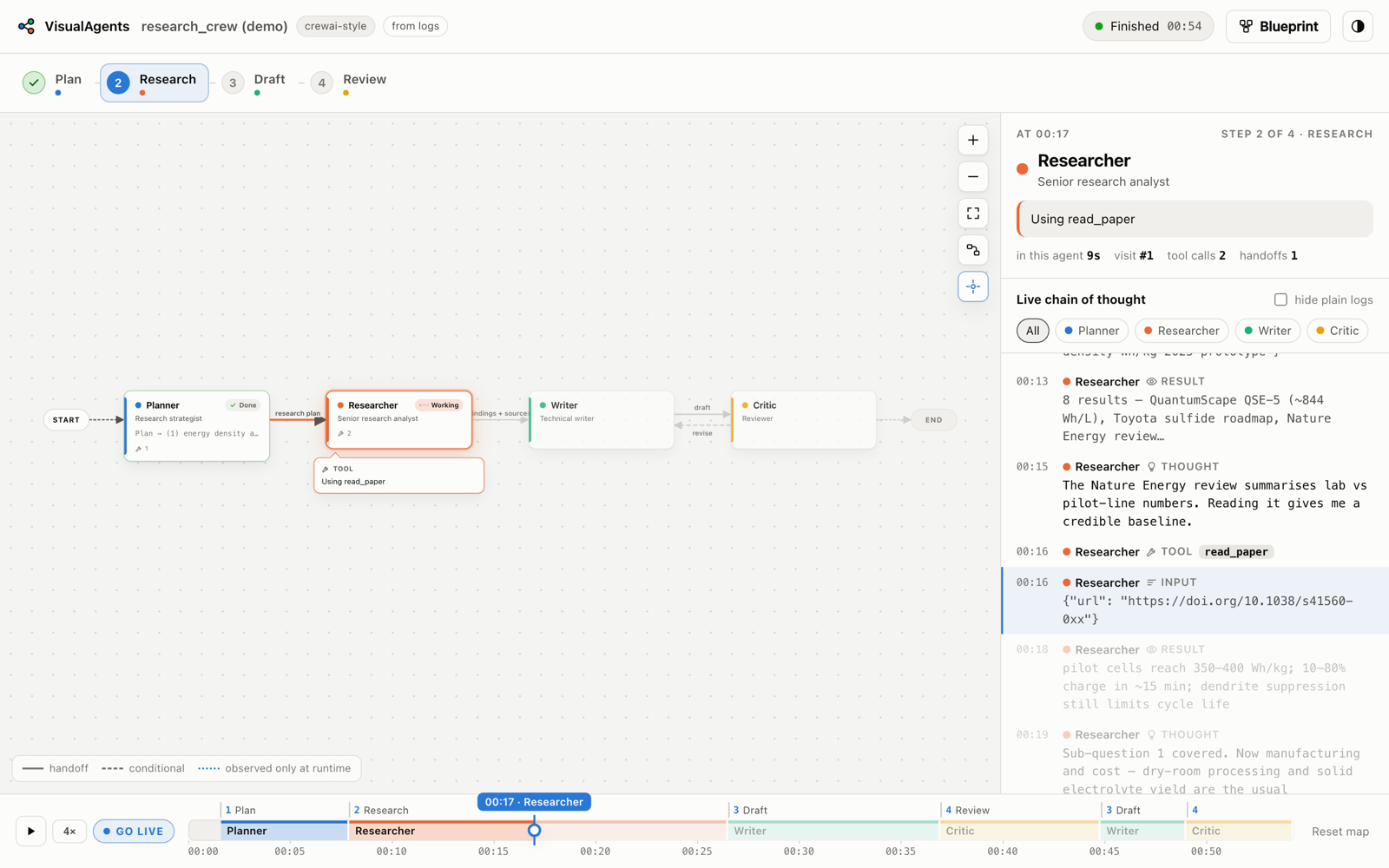
Each agent's turn is a segment on the ruler, with the workflow steps above it. Drag the playhead back and the whole dashboard rewinds — who was working, which step, what it was thinking, and the chain of thought up to that second (later lines dim). ▶ / Space replays at 1–16×; Live / L jumps back to now.
Dark mode and small screens
 |
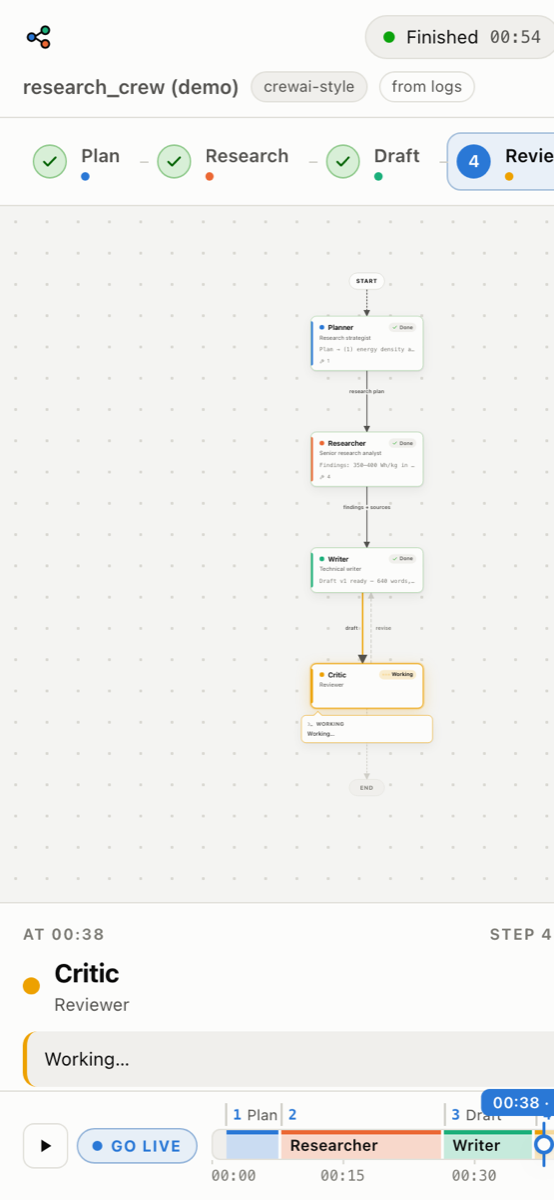 |
Light, dark or follow the system (button in the top right). On narrow screens the map flows top-to-bottom.
Shortcuts and links
| Key | Action | Link option | Effect | |
|---|---|---|---|---|
B |
blueprint popup | ?t=42 |
open rewound to 0:42 of the run | |
F |
fit the map | ?theme=dark / light |
force a theme | |
Space |
play / pause the replay | ?popup=0 / 1 |
hide / show the blueprint popup | |
L |
back to live | ?live=0 |
a still snapshot (no streaming) | |
← → |
step 1 s on the ruler (Shift: 10 s) | ?project=<id> |
pick a project on the background dashboard | |
Esc |
close popups |
How it works
flowchart LR
  repo["Your agent project"] -->|static analysis + optional LLM| bp["Blueprint<br/>.visualagents/blueprint.json"]
  repo -->|run · hook · pipe · watch| proc["Agent process"]
  proc -->|framework hooks, OpenAI SDK hook,<br/>console output, log files| engine["Attribution engine"]
  bp --> engine
  engine -->|Server-Sent Events| ui["Dashboard on 127.0.0.1"]
  engine -->|every input| rec[".visualagents/runs/*.jsonl<br/>(replayable)"]
-
Blueprint.
visualagents scan(run for you on first use) reads the most agent-relevant files. Static analysis finds agents, tools and handoffs for the frameworks below; the optional LLM pass returns each agent's role, description, tools, source location, log aliases and keywords, the handoff graph, entry/exit agents and the general workflow, as schema-checked JSON. You can commit or hand-edit the result. -
Attribution. While the agent runs, three sources say which agent is doing what, from most to least precise:
Source When What you get Auto-instrumentation Python apps using LangChain / LangGraph, the OpenAI Agents SDK, or the OpenAI SDK directly (any OpenAI-compatible endpoint; sync, async, streaming) Exact agent boundaries, LLM replies as thoughts, every tool call and result — no code changes. Direct SDK calls are credited to the class or function that made them (e.g. Programmer,Inspector). Turn off with--no-instrument.Console patterns Always CrewAI ( # Agent: …, rich panels), AutoGen (coder (to critic):), LangGraph stream output, ReAct (Thought:/Action:/Observation:/Final Answer:), handoff phrases (Handing off to Writer,transfer_to_billing),[Agent] …prefixes, and tools owned by one agent.LLM narration ( run --smart)Optional Every few seconds an LLM reads the latest output and names the working agent with a one-line summary. -
Dashboard. A small local web server streams the state to the browser; the map, steps, feed and ruler are rebuilt from the event log, which is what makes rewinding possible.
Supported frameworks
| Framework | Mapped from the code | Followed live |
|---|---|---|
| LangGraph | add_node, add_edge, add_conditional_edges, Command(goto=…), create_react_agent, supervisors |
callbacks: exact node turns, LLM replies, tool calls |
| LangChain | agents and their tools | callbacks: thoughts, actions, results |
| CrewAI | Agent / Task / Crew, config/agents.yaml + tasks.yaml, hierarchical crews |
console format |
| AutoGen 0.2 / 0.4 | agents, GroupChat, RoundRobinGroupChat, SelectorGroupChat, Swarm, initiate_chat |
console format |
| OpenAI Agents SDK | Agent(handoffs=…), as_tool |
tracing: agent spans, handoffs, tools |
| OpenAI SDK, used directly | classes that create or call an LLM client | each call credited to its class/function, with tool calls and results |
| Swarm, Google ADK, smolagents, LlamaIndex | transfer_to_*, sub_agents, managed_agents, AgentWorkflow |
console patterns, --smart |
| LangGraph.js, JS/TS agents | addNode / addEdge, new Agent({ name }) |
console patterns |
| Anything else | the LLM pass | console patterns, --smart, or the SDK below |
Choosing the LLM that draws the map
| Provider | Key | Default map model | Default --smart model |
|---|---|---|---|
anthropic |
ANTHROPIC_API_KEY or ant auth login |
claude-opus-5-5 |
claude-opus-5-5 |
openai |
OPENAI_API_KEY (+ OPENAI_BASE_URL for Ollama, LM Studio, vLLM…) |
gpt-5 |
gpt-5 |
google |
GEMINI_API_KEY / GOOGLE_API_KEY (or Vertex AI) |
gemini-pro-latest |
gemini-flash-lite-latest |
visualagents models                                   # which providers have keys, and their defaults
visualagents models --provider google                 # every model your account can use
visualagents scan . --provider google --model gemini-2.5-flash
visualagents scan . --static                          # offline only
Keys and choices are read from, in order: your shell environment, the project's .env, then what the guided
start saved. You can also set VISUALAGENTS_PROVIDER, VISUALAGENTS_MODEL and VISUALAGENTS_NARRATE_MODEL.
Gemini requests retry automatically when the model is busy.
Instrument anything yourself
From any language, print a line:
@@visualagents {"type": "agent_start", "agent": "researcher", "text": "find sources"}
From Python:
from visualagents import agent, emit, handoff, track

with agent("researcher", task="find sources"):
    emit("thought", "researcher", "Start with peer-reviewed numbers")
    emit("tool_start", "researcher", "solid-state battery Wh/kg", tool="web_search")
handoff("researcher", "writer", "findings ready")

@track("critic")                      # the whole function is the critic's turn
def review(draft): ...
Event types: agent_start, agent_end, thought, tool_start, tool_end, handoff, output, log, error.
Under visualagents run the dependency-free runtime is importable even if VisualAgents isn't installed in your
app's environment (from visualagents_runtime import agent, emit), and marker lines are hidden from your terminal.
Without run: LangChain → callbacks=[visualagents.langchain_handler()]; OpenAI Agents SDK →
agents.add_trace_processor(visualagents.openai_agents_processor()).
Examples
| Example | Try it |
|---|---|
| Simulated research crew (built in) | visualagents demo |
| LangGraph supervisor team — runs offline | pip install langgraph then visualagents run examples/langgraph_supervisor |
| CrewAI template — YAML agents and tasks | visualagents scan examples/crewai_project |
Hand-rolled agents with emit |
visualagents run examples/manual_sdk |
LAMBDA (a data-science agent). LAMBDA is a FastAPI backend plus a React
UI that calls the OpenAI SDK directly, and its start.sh runs both in the background:
git clone https://github.com/AMA-CMFAI/LAMBDA.git ~/LAMBDA
cp ~/LAMBDA/backend/.env.example ~/LAMBDA/backend/.env    # add its model key
visualagents run ~/LAMBDA                                  # pick ./start.sh the first time
Ask LAMBDA something at http://localhost:3000 and watch it at http://127.0.0.1:7420. The paper's
Programmer ⇄ Inspector design is on its legacy-open-source branch, where the map shows the two agents handing
work back and forth.
CLI reference
visualagents                 guided start (same as `visualagents setup`)
visualagents demo            [--speed N]
visualagents run             [FOLDER] [--pick] [--smart] [--cwd DIR] [--no-instrument] [--no-follow-logs] [-- COMMAND…]
visualagents hook            [FOLDER] [--python PY]…
visualagents unhook | open   [FOLDER]
visualagents up              [--port 7400] [--foreground]
visualagents down | status
visualagents scan            [FOLDER] [--static | --llm] [--provider auto|anthropic|openai|google] [--model M] [--json] [-o FILE]
visualagents models          [FOLDER] [--provider anthropic|openai|google]
visualagents show | blueprint [FOLDER]
visualagents pipe            [FOLDER] [--quiet]
visualagents watch           [FOLDER] --log FILE [--from-start] [--echo]
visualagents replay          RECORDING [--project DIR] [--speed N] [--instant]

dashboard options:  --port 7420  --host 127.0.0.1  --no-browser  --blueprint FILE  --exit  --rescan
vagents is a short alias. visualagents <command> --help explains every option.
Files it creates
| Where | What |
|---|---|
<project>/.visualagents/blueprint.json |
the map — commit it or hand-edit it |
<project>/.visualagents/config.json |
the remembered start command |
<project>/.visualagents/runs/*.jsonl |
recorded runs for replay (git-ignored) |
~/.visualagents/settings.json, keys.json |
guided-start choices and saved keys (keys.json is readable only by you) |
~/.visualagents/registry.json, daemon.json |
hooked projects and the background dashboard |
<venv>/site-packages/visualagents_hook.pth |
the hook (visualagents unhook removes it) |
Privacy and security
- The dashboard binds to
127.0.0.1only; events from your agent need a per-session token. - Nothing leaves your machine unless you choose an LLM provider. Before code is sent,
.env, key and credential files are skipped and strings that look like API keys are redacted. - Saved keys live in
~/.visualagents/keys.jsonwith owner-only permissions. No telemetry. - Instrumentation never changes your agent's behaviour or output, and stays silent in processes that never call an LLM.
Troubleshooting
| Problem | Fix |
|---|---|
visualagents: command not found |
Install it (see Quick start); make sure ~/.local/bin is on your PATH. |
| The map doesn't move | The agent isn't working on anything yet — press ▶ Start and give it a task (details). |
| "No virtualenv found" | Create one in the project (python3 -m venv .venv && .venv/bin/pip install -r requirements.txt), or hook --python /path/to/python. |
| The agent fails with import errors | Its own dependencies aren't installed in the environment it runs with — install them, then ▶ Run again. |
| The LLM scan failed | VisualAgents falls back to the offline map. Retry, or pick another model (visualagents models --provider …). |
| An agent is missing or misnamed | visualagents scan <folder> --llm for a richer map, or edit .visualagents/blueprint.json. Agents seen only at runtime still appear (dashed). |
| Wrong start command | visualagents run <folder> --pick. |
Development
git clone https://github.com/kaih06-hub/VisualAgents.git && cd VisualAgents
python -m venv .venv && . .venv/bin/activate
pip install -e ".[dev,all]"
pytest
The dashboard is plain HTML/CSS/JS in visualagents/web/ (no build step). New console formats go in
visualagents/patterns.py, new static detectors in visualagents/static_scan.py, start-command detection in
visualagents/detect.py, and runtime hooks in visualagents/_autoinstrument/visualagents_runtime.py.
License
MIT
1 maintainer

Metadata
1 maintainer
Release files for visualagents 0.1.0
For a detailed explanation of source distributions (sdists) and built distributions (wheels), please see the package formats documentation.
Source distribution (sdist)
| File | Size | Uploaded | Provenance | |
|---|---|---|---|---|
| visualagents-0.1.0.tar.gz | 129.4 kB | With provenance | Details |
Built distribution (wheel)
| File | Interpreter | ABI | Platform | Reset |
|---|---|---|---|---|
| visualagents-0.1.0-py3-none-any.whl | Python 3 | none | any | Details |
Total release size: 257.4 kB
Release files / visualagents-0.1.0.tar.gz
| Download URL | visualagents-0.1.0.tar.gz |
|---|---|
| Size | 129.4 kB |
| Tags | Source |
|
SHA-256 checksum How to use checksums |
66a189d585f2597aa2a4c7dcc14326a0f393665b55bf6017f506c8002efd6b56
|
|
BLAKE2b-256 checksum How to use checksums |
e17b5d5b07812d4a7f81fc61265d9faa71303c28ff7bd05cca42aa77d5f8f180
|
| Upload date | |
|
Uploaded using Trusted Publishing? What is trusted publishing? |
Yes |
| Uploaded via |
twine/7.0.0 CPython/3.13.14
|
Provenance
Provenance describes where a file came from. On PyPI, provenance is shared via attestations, which provide a verifiable record of the build or publishing details. View details, limitations and caveats.


PyPI Publish Attestation
PyPI verified that this artifact, at this checksum, originated from the publisher listed below.
Signed by GitHub Actions, verified by PyPI on Oct 19, 2026.
Transparency logRelease files / visualagents-0.1.0-py3-none-any.whl
| Download URL | visualagents-0.1.0-py3-none-any.whl |
|---|---|
| Size | 128.0 kB |
| Tags | Python 3 |
|
SHA-256 checksum How to use checksums |
9327134167d31b84917b7cea5d561f34ac4c4c0377fc75e8c5884a78e89eb960
|
|
BLAKE2b-256 checksum How to use checksums |
8200abd5e8866d2a3b43ed280f10e4494db25e66004aee613325e257be7bdc70
|
| Upload date | |
|
Uploaded using Trusted Publishing? What is trusted publishing? |
Yes |
| Uploaded via |
twine/7.0.0 CPython/3.13.14
|
Provenance
Provenance describes where a file came from. On PyPI, provenance is shared via attestations, which provide a verifiable record of the build or publishing details. View details, limitations and caveats.
PyPI Publish Attestation
PyPI verified that this artifact, at this checksum, originated from the publisher listed below.
Signed by GitHub Actions, verified by PyPI on Oct 19, 2026.
Transparency logSecurity for visualagents 0.1.0
Provenance
Provenance describes where a file came from. On PyPI, provenance is shared via attestations, which provide a verifiable record of the build or publishing details. View details, limitations and caveats.
Full provenance
All 2 files in this release have been uploaded with provenance metadata.
Attestation for visualagents-0.1.0.tar.gz
PyPI Publish Attestation
PyPI verified that this artifact, at this checksum, originated from the publisher listed below.
Signed by GitHub Actions, verified by PyPI on Oct 19, 2026.
Transparency logA note on package security
PyPI is a repository for distributing packages, not a service for auditing them. While third-party security researchers and our staff do their best to detect and remove malicious packages, PyPI cannot guarantee the quality, security or suitability of any given package.














