
🩻 vit-xray
Look inside any vision transformer backbone in one command





vit-xray photo.jpg
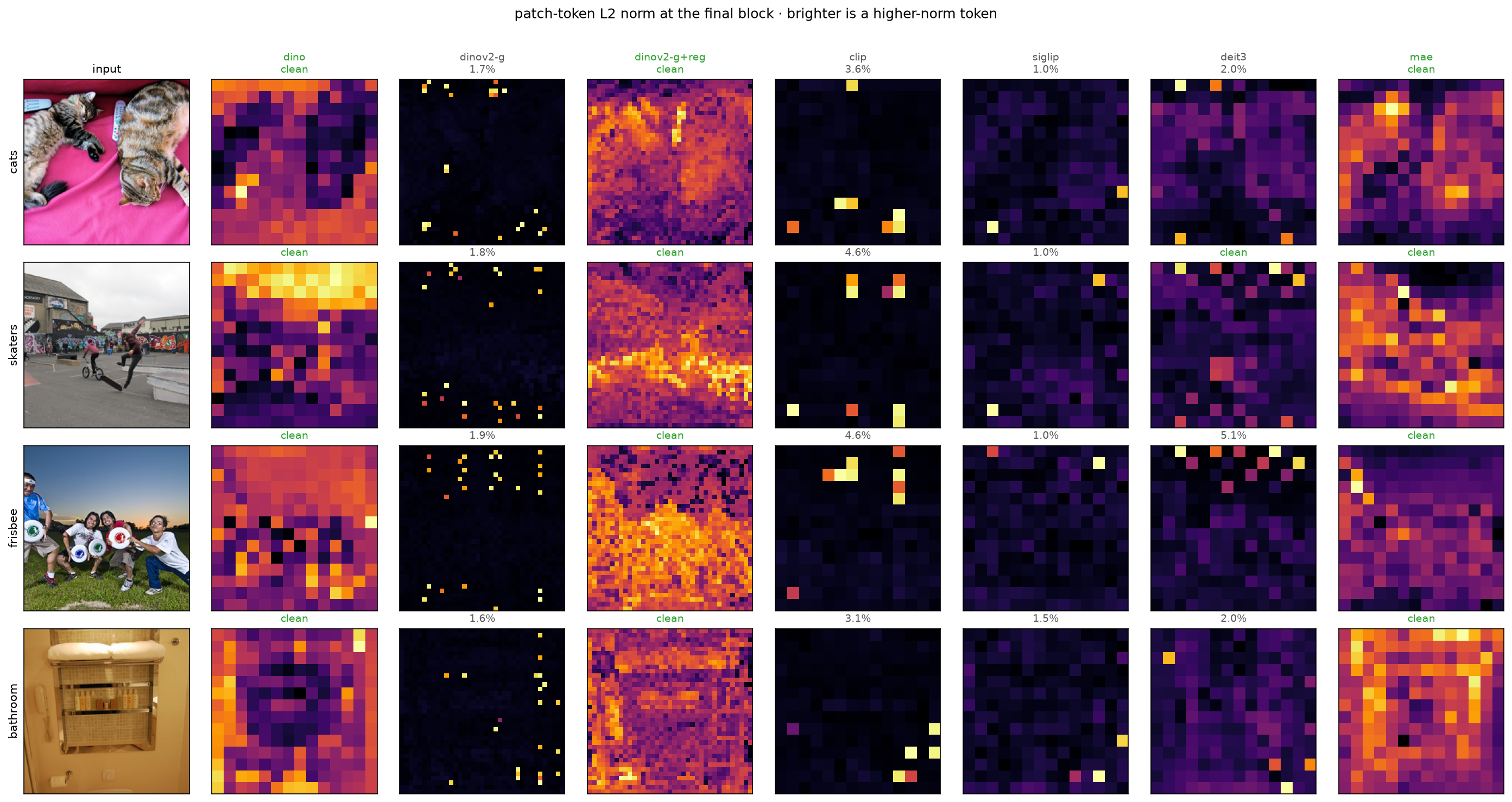
Patch-token norms at the final block, seven pretrained backbones. Most of them quietly repurpose a couple of percent
of their patch tokens as scratch space; the bright dots, sitting in sky, walls and flat ground.
DINO, MAE, and DINOv2-with-registers do not.
https://github.com/user-attachments/assets/f02d2808-1d5e-46ac-88f1-36eb0c5487a2
⚡ Quickstart
conda create -n vitxray python=3.11
conda activate vitxray
pip install vit-xray

vit-xray photo.jpg
For the clearest picture, use the model the figures above lead with:
vit-xray photo.jpg --model vit_giant_patch14_dinov2.lvd142m --all-panels
That's DINOv2 ViT-g/14, a 37×37 grid instead of 14×14, and roughly twenty outlier tokens instead of seven. It costs a 4.3 GB download and ~10 GB of RAM on CPU, which is exactly why it isn't the default.
🔍 What am I looking at
Vision transformers cut an image into patches and give each patch a token. You'd expect every token to describe its own patch. Mostly they do, but in a trained ViT, a handful of tokens in boring regions get quietly repurposed.
The model notices that a patch of empty sky looks exactly like its neighbours, decides it has nothing worth storing, and reuses its token as scratch space for global information about the whole image. Those tokens end up with an L2 norm about ten times larger than everything around them, and they no longer describe the patch they came from.
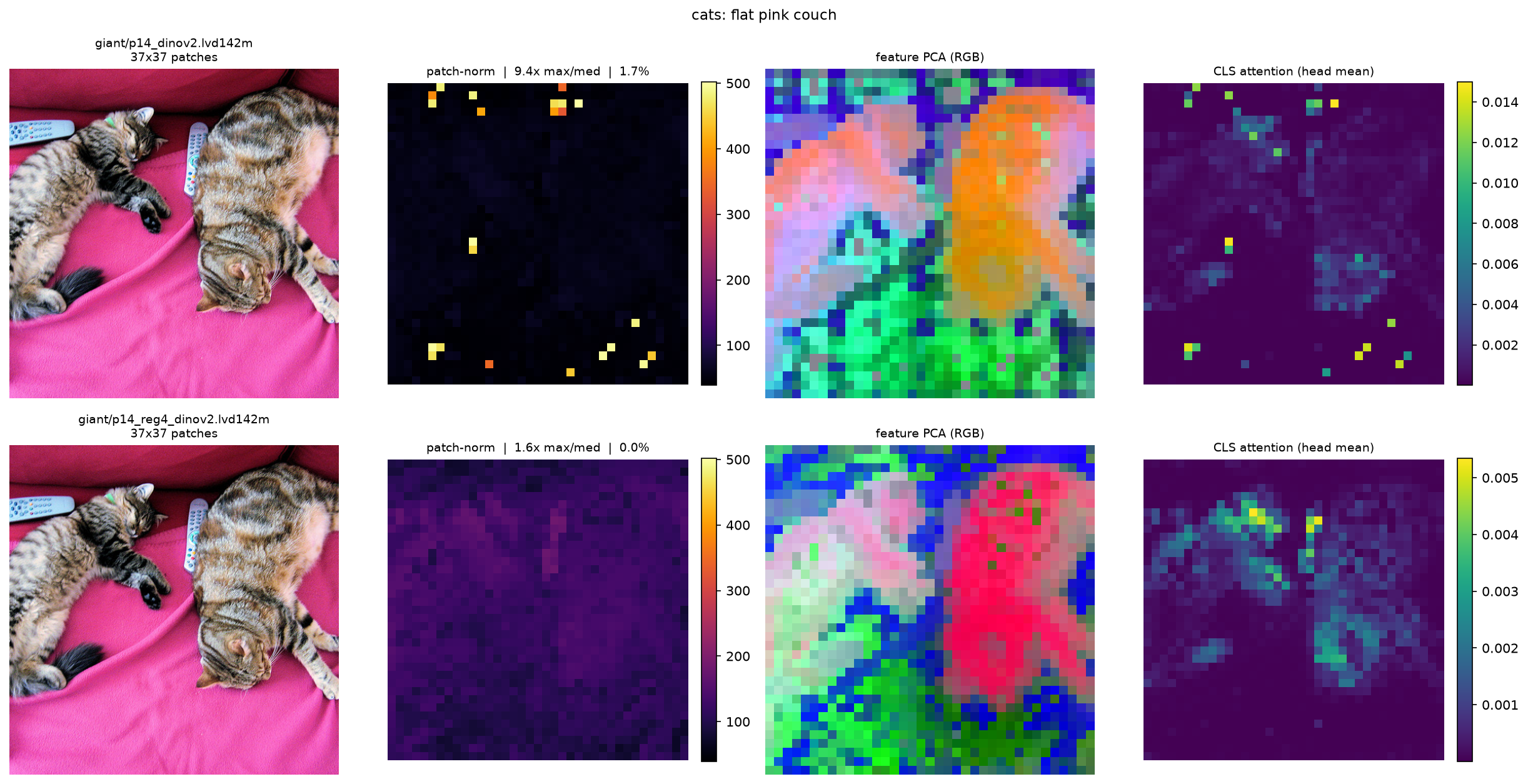
That's the phenomenon Darcet et al. named and measured in Vision Transformers Need Registers (ICLR 2024): roughly 2% of tokens, only in large enough models trained long enough, and fixable by giving the model dedicated scratch tokens registers so it stops stealing patch tokens for the job.
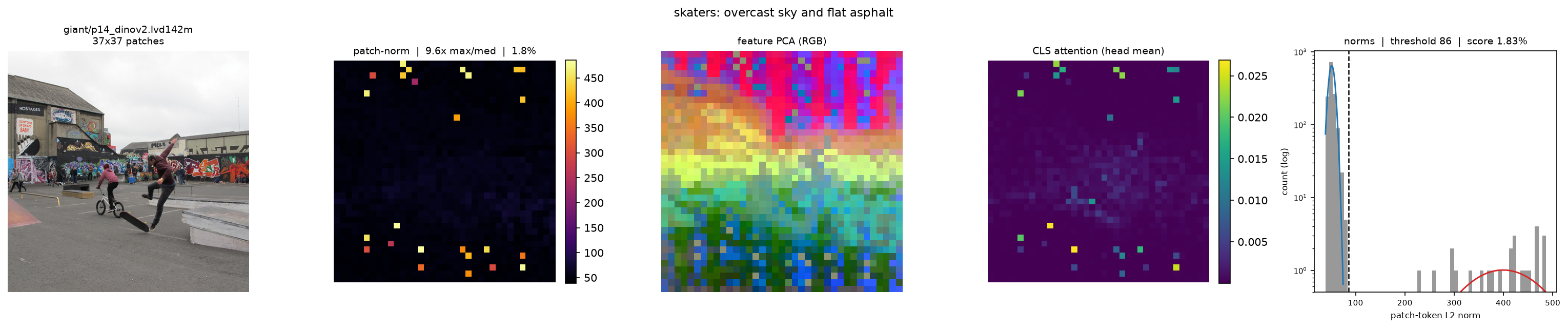
vit-xray gives you three views of it, plus a score:
|
📊 Patch-norm map L2 norm of every patch token. Artifacts are isolated bright dots. |
🎨 Feature PCA Patch tokens projected to 3 components as RGB, the pseudo-segmentation view. |
👁 CLS attention What the class token attends to. Artifacts show up as spikes. |
🩻 Artifact score Fraction of tokens in the high-norm population. |
The score fits a two-component Gaussian mixture to the norms and thresholds at the crossover. There is no hardcoded cutoff: the paper's own was hand-picked for one model, and it says outright that it varies. If the norms aren't meaningfully bimodal, the score is zero and the backbone is reported clean.
🎯 Registers fix it
Same architecture, same width, same training data, one shared colour scale. Registers are the only difference:
📈 The norm distribution
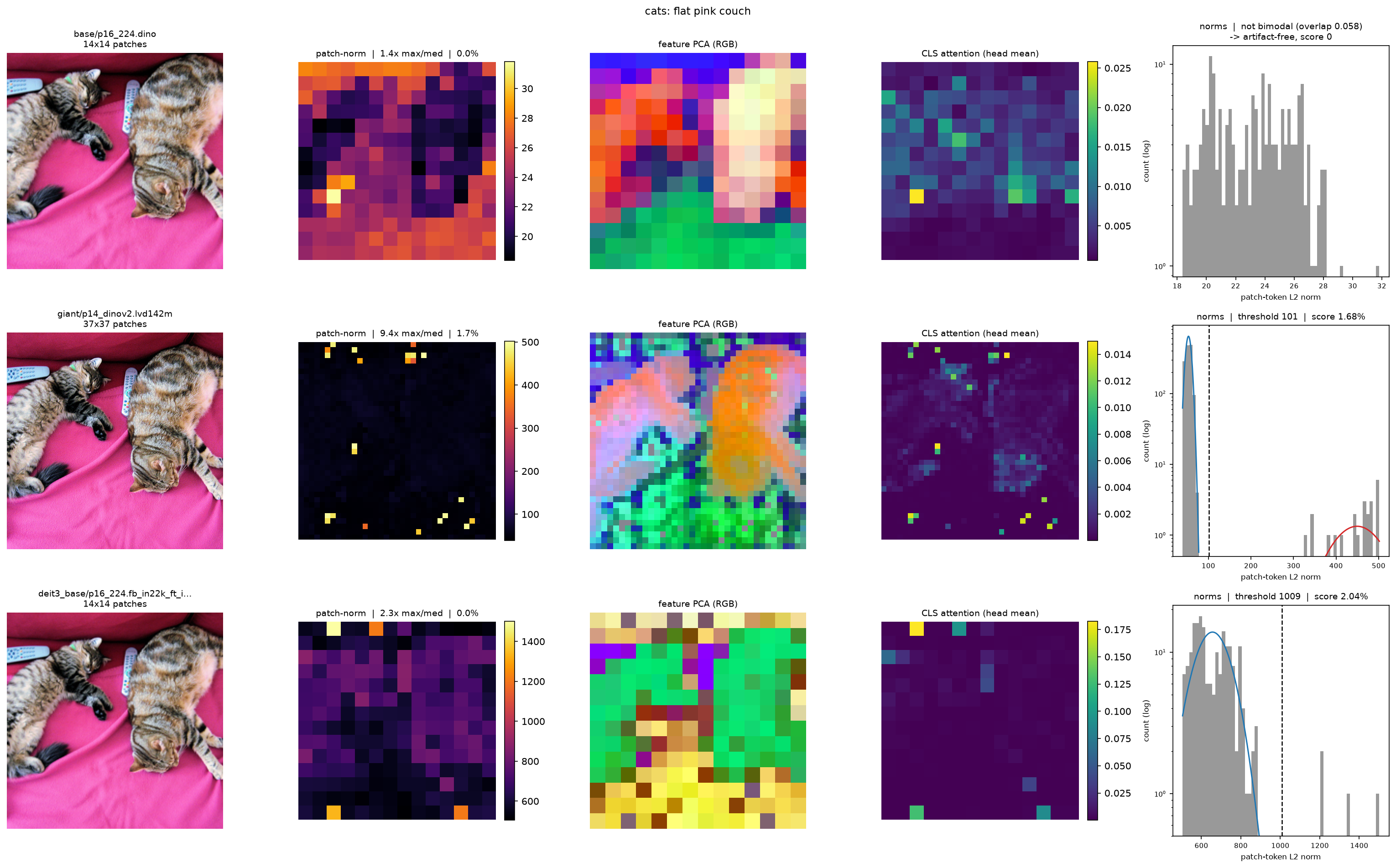
A backbone with artifacts has a visibly bimodal norm distribution, a bulk, a gap, and a small high-norm cluster. That gap is where the fitted threshold lands. DINO has no gap.
💡 Why you should care
If you're freezing a backbone and reading its patch tokens, semantic segmentation, monocular depth, feature fields, open-vocabulary detection, robotic semantic mapping, then artifact tokens are corrupted inputs to your dense head. They carry global information, not local, so whatever sits under them is described wrongly.
Darcet et al. show this measurably hurts dense prediction and breaks unsupervised object discovery: DINOv2 was worse than supervised baselines with LOST until registers were added.
It costs one command to find out which kind of backbone you have. If yours scores clean, ignore all of this. If it doesn't, pick a register-trained variant, or look at the training-free mitigation in Vision Transformers Don't Need Trained Registers.
🧠 Model support
Measured by vit-xray --gallery configs/gallery.yaml, which prints this table as it runs.
Percentages are the artifact score on each of the four gallery images.
| model | size | grid | cats | skaters | frisbee | bathroom | attn |
|---|---|---|---|---|---|---|---|
vit_base_patch16_224.dino |
328 MB | 14×14 | 🟢 clean | 🟢 clean | 🟢 clean | 🟢 clean | ✅ |
vit_giant_patch14_dinov2.lvd142m |
4.3 GB | 37×37 | 🟡 1.7% | 🟡 1.8% | 🟡 1.9% | 🟡 1.6% | ✅ |
vit_giant_patch14_reg4_dinov2.lvd142m |
4.3 GB | 37×37 | 🟢 clean | 🟢 clean | 🟢 clean | 🟢 clean | ✅ |
vit_base_patch16_clip_224.laion2b |
329 MB | 14×14 | 🟡 3.6% | 🟡 4.6% | 🟡 4.6% | 🟡 3.1% | ✅ |
vit_base_patch16_siglip_224.webli |
355 MB | 14×14 | 🟡 1.0% | 🟡 1.0% | 🟡 1.0% | 🟡 1.5% | — |
deit3_base_patch16_224.fb_in22k_ft_in1k |
331 MB | 14×14 | 🟡 2.0% | 🟢 clean | 🟡 5.1% | 🟡 2.0% | ✅ |
vit_base_patch16_224.mae |
328 MB | 14×14 | 🟢 clean | 🟢 clean | 🟢 clean | 🟢 clean | ✅ |
Any timm ViT works, not just these. The patch grid and prefix-token count are read from the model, never hardcoded, so DINOv2-with-registers (5 prefix tokens) and plain ViTs (1) both come out right.
Two honest caveats in that table
SigLIP has no CLS token. It pools instead, so there's nothing to compute CLS attention from. The other panels render and the attention panel says so rather than failing.
DeiT3 reads clean on one image and 5.1% on another. Its artifacts are real and stable, the
same four border tokens sit at ~1500 from block 3 onward, but its bulk norms inflate over the
last few blocks until they nearly reach the outliers, so separability at the final block depends
on the image. --layer 6 shows it unambiguously.
🐍 Library
from vit_xray import inspect

res = inspect("photo.jpg", model="vit_base_patch16_clip_224.laion2b")

res.norm_map        # (H, W)
res.pca_rgb         # (H, W, 3)
res.attention       # (H, W), or None if the model has no CLS token
res.artifact_score  # float
res.plot()          # matplotlib Figure
🎛 Useful flags
| command | what it does |
|---|---|
vit-xray photo.jpg --all-panels |
add the norm histogram |
vit-xray photo.jpg -m modelA -m modelB |
compare backbones, one row each |
vit-xray photo.jpg -m a -m b --norm-scale shared |
shared colour scale (same-width models only) |
vit-xray photo.jpg --layer 6 |
read a mid-network block |
vit-xray photo.jpg --pca-foreground |
mask the PCA background |
vit-xray --gallery configs/gallery.yaml |
rebuild every figure in this README |
What one run actually puts on screen
🔗 Complementary tools
vit-xray answers one question: are this backbone's patch features clean? For other kinds of
looking-inside, use these instead, complementary, and deliberately not reimplemented here:
| tool | what it's for |
|---|---|
| vit-explain | Attention rollout and gradient rollout, aggregating attention across all layers rather than reading one. |
| pytorch-grad-cam | Grad-CAM and the wider family of 2D class-activation methods, why this prediction, rather than are these features clean. |
🔁 Reproducing the figures
The gallery config lives in the repo, so this one needs a checkout:
git clone https://github.com/MikeDegany/vit-xray && cd vit-xray
pip install -e ".[dev]"
vit-xray --gallery configs/gallery.yaml
Downloads the four COCO val2017 images into assets/ (gitignored), runs the zoo, and rewrites
everything in docs/. Images are chosen for large low-information regions, sky, walls, flat
ground, because that's where artifacts concentrate. Output is deterministic: same figures,
pixel for pixel, every run.
Citation
@inproceedings{darcet2024vision,
  title     = {Vision Transformers Need Registers},
  author    = {Darcet, Timoth\'ee and Oquab, Maxime and Mairal, Julien and Bojanowski, Piotr},
  booktitle = {International Conference on Learning Representations (ICLR)},
  year      = {2024}
}
1 maintainer

Release files for vit-xray 0.1.0
For a detailed explanation of source distributions (sdists) and built distributions (wheels), please see the package formats documentation.
Source distribution (sdist)
| File | Size | Uploaded | |
|---|---|---|---|
| vit_xray-0.1.0.tar.gz | 31.6 kB | Details |
Built distribution (wheel)
| File | Interpreter | ABI | Platform | Reset |
|---|---|---|---|---|
| vit_xray-0.1.0-py3-none-any.whl | Python 3 | none | any | Details |
Total release size: 56.4 kB
Release files / vit_xray-0.1.0.tar.gz
| Download URL | vit_xray-0.1.0.tar.gz |
|---|---|
| Size | 31.6 kB |
| Tags | Source |
|
SHA-256 checksum How to use checksums |
c824a7a2ddabc1584b96b7fcf5dd27127757d80e22a6218dfa75dcb717fc1c60
|
|
BLAKE2b-256 checksum How to use checksums |
8fd620bded6ba03341bd83e663be3330220873b132d37046c02dc92652d8cd0f
|
| Upload date | |
|
Uploaded using Trusted Publishing? What is trusted publishing? |
Yes |
| Uploaded via |
twine/7.0.0 CPython/3.13.14
|
Provenance
Provenance describes where a file came from. On PyPI, provenance is shared via attestations, which provide a verifiable record of the build or publishing details. View details, limitations and caveats.


PyPI Publish Attestation
PyPI verified that this artifact, at this checksum, originated from the publisher listed below.
Signed by GitHub Actions, verified by PyPI on Sep 25, 2026.
Transparency logRelease files / vit_xray-0.1.0-py3-none-any.whl
| Download URL | vit_xray-0.1.0-py3-none-any.whl |
|---|---|
| Size | 24.8 kB |
| Tags | Python 3 |
|
SHA-256 checksum How to use checksums |
79fb1289f3f9eb9bff8b8e522f5bd31612fd2e6c316833a6ee1c600dd50f5d73
|
|
BLAKE2b-256 checksum How to use checksums |
bfe602c20cdb12f3ba2625e7eab14cc31d4bf6c39e31e508ed6b6dbc4c34af09
|
| Upload date | |
|
Uploaded using Trusted Publishing? What is trusted publishing? |
Yes |
| Uploaded via |
twine/7.0.0 CPython/3.13.14
|
Provenance
Provenance describes where a file came from. On PyPI, provenance is shared via attestations, which provide a verifiable record of the build or publishing details. View details, limitations and caveats.
PyPI Publish Attestation
PyPI verified that this artifact, at this checksum, originated from the publisher listed below.
Signed by GitHub Actions, verified by PyPI on Sep 25, 2026.
Transparency log












