
Vita-Tree — LaTeX CV Editor and AI Application Workspace
Edit your LaTeX CV, compare tailored versions, and manage job applications in a local browser workspace.
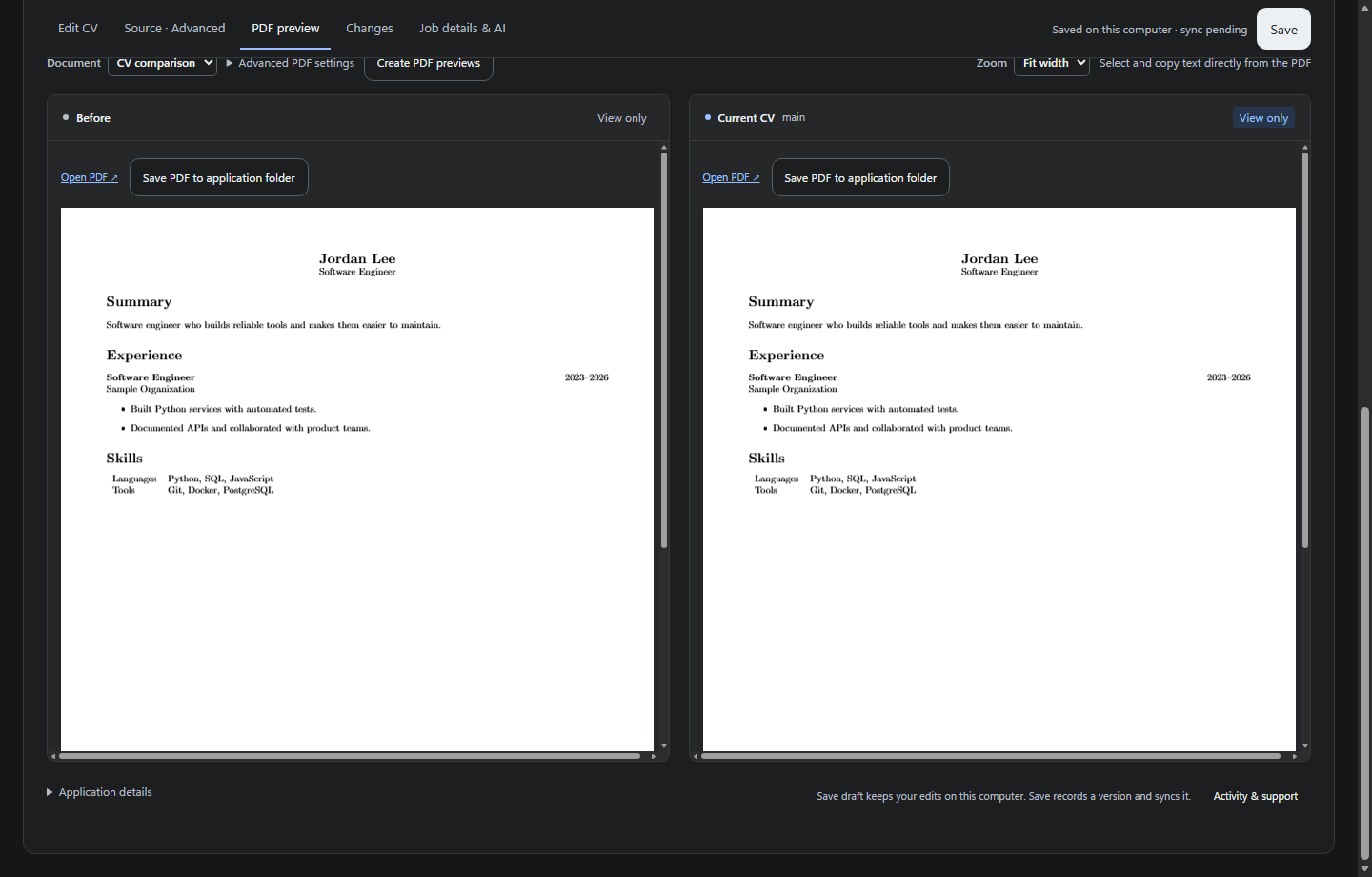
Vita-Tree brings CV editing, Git version history, and PDF previews into one visual interface. Keep a separate CV version and job description for each application, review changes side by side, and check the compiled PDF before sending it.
With optional Vita-CV integration, you can analyze job descriptions, tailor your CV, review AI-generated changes, and generate cover letters using your configured AI provider.
- Edit LaTeX CVs: work with your existing LaTeX source and preview compiled PDFs.
- Compare versions: inspect changes between your starting CV and an application-specific version.
- Organize applications: keep CV variants and job descriptions together, backed by Git.
- Run AI workflows: prepare application materials and review the results before saving.
- Try the demo: explore a sample CV with
vt demo, without an AI account or an existing CV repository.
Vita-Tree and Vita-CV: what’s the difference?
Vita-Tree is the visual workspace. Use it to edit CVs, compare versions, preview PDFs, and run application workflows from your browser.
Vita-CV is the command-line tool. It manages CVs as code and provides the AI workflows that Vita-Tree integrates.
Choose Vita-Tree for a visual interface or Vita-CV for a terminal-based workflow. Vita-Tree supports editing, comparisons, and PDF previews without the optional AI integration. Install vita-tree[ai] to add Vita-CV-powered AI workflows.
Quick start
Try the sample CV
With Python 3.10+, Git, and pipx or uv installed, use either path:
pipx install vita-tree
vt demo
uv tool install vita-tree
vt demo
The sample includes an editable CV and a fictional job description. After installation, the demo opens offline without TeX, a provider account, or an existing CV repository. To compile a PDF, install a local TeX distribution, then choose Check CV files in the workspace. Use vt demo --no-browser to print the local URL without opening a browser.
Guided setup
Choose a published Vita Tree release that includes the setup scripts. Replace VERSION below with its version number, such as 1.2.3. The scripts install that version in a per-user Python environment and ask what you want to open. They check for Python and Git and give installation guidance when a system tool is missing.
Windows · PowerShell or CMD
set VT_VERSION=VERSION
curl.exe --fail --location "https://raw.githubusercontent.com/ABDELLAH-Hallou/vita-tree/v%VT_VERSION%/scripts/setup.ps1" --output setup.ps1 && powershell -NoProfile -ExecutionPolicy RemoteSigned -File .\setup.ps1 %VT_VERSION%
Run the Windows block in CMD. In PowerShell, run cmd.exe first, or use the following:
$version = 'VERSION'
Invoke-WebRequest -UseBasicParsing -Uri "https://raw.githubusercontent.com/ABDELLAH-Hallou/vita-tree/v$version/scripts/setup.ps1" -OutFile setup.ps1
& .\setup.ps1 $version
Linux and macOS · Bash
version=VERSION
curl --fail --location "https://raw.githubusercontent.com/ABDELLAH-Hallou/vita-tree/v$version/scripts/setup.sh" --output setup.sh &&
  bash setup.sh "$version"
Open your own CV
vt run "/path/to/your/cv-repository"
Use a Git repository with UTF-8 LaTeX source. AI preparation expects main.tex at the repository root. For viewing and PDF previews with a different entry file, pass --file other.tex. If you have a PDF or DOCX, use vt demo to explore the app first.
Install MiKTeX on Windows or TeX Live on Linux and macOS for PDF compilation. The project’s fonts and packages must be available locally. Check CV files shows which part of your setup needs attention. Compile only templates you trust and keep the app on localhost. Security policy
AI preparation
Install vita-tree[ai] or choose optional AI support in guided setup. In Job details & AI, select a provider and connect your account. Use the Vita CV setup guide if you need to initialize your CV configuration.
See the workspace guide for applications, editing, reports, approvals, and Jobenu imports. See the changelog for release notes.
Vita Tree is MIT licensed. Bundled components retain their original licenses. Third-party notices
1 maintainer

Metadata
1 maintainer
Release files for vita-tree 1.20.1
For a detailed explanation of source distributions (sdists) and built distributions (wheels), please see the package formats documentation.
Source distribution (sdist)
| File | Size | Uploaded | Provenance | Actions |
|---|---|---|---|---|
| vita_tree-1.20.1.tar.gz | 3.5 MB | Without provenance | Details for vita_tree-1.20.1.tar.gz |
Built distribution (wheel)
| File | Interpreter | ABI | Platform | Actions Reset |
|---|---|---|---|---|
| vita_tree-1.20.1-py3-none-any.whl | Python 3 | none | any | Details for vita_tree-1.20.1-py3-none-any.whl |
Total release size: 6.8 MB
Release files / vita_tree-1.20.1.tar.gz
| Download URL | vita_tree-1.20.1.tar.gz |
|---|---|
| Size | 3.5 MB |
| Tags | Source |
|
SHA-256 checksum How to use checksums |
ef417872a4b0b62cbc8bdf89a85b4308336b17d0db3b560b45a7d9d15fd23c04
|
|
BLAKE2b-256 checksum How to use checksums |
501416fe4bcbc24747ab8a1d369119319454e9d04e542f944761e6807af01f39
|
| Upload date | |
|
Uploaded using Trusted Publishing? What is trusted publishing? |
No |
| Uploaded via |
twine/7.0.0 CPython/3.13.14
|
Release files / vita_tree-1.20.1-py3-none-any.whl
| Download URL | vita_tree-1.20.1-py3-none-any.whl |
|---|---|
| Size | 3.3 MB |
| Tags | Python 3 |
|
SHA-256 checksum How to use checksums |
412a716c189491a89ab00e6a8095be5b626f730576caf6073a3fa63260969ad7
|
|
BLAKE2b-256 checksum How to use checksums |
d1639060876c941cf3f069f7eecb7c57109274f9a63c34fc9330861e0886ac32
|
| Upload date | |
|
Uploaded using Trusted Publishing? What is trusted publishing? |
No |
| Uploaded via |
twine/7.0.0 CPython/3.13.14
|
Security for vita-tree 1.20.1
Provenance
Provenance describes where a file came from. On PyPI, provenance is shared via attestations, which provide a verifiable record of the build or publishing details. View details, limitations and caveats.
No provenance found
None of the files in this release were uploaded with provenance metadata.
A note on package security
PyPI is a repository for distributing packages, not a service for auditing them. While third-party security researchers and our staff do their best to detect and remove malicious packages, PyPI cannot guarantee the quality, security or suitability of any given package.
To learn more about protecting yourself from malicious actors, visit our package security documentation.














